


 ממיר וידאו אולטימטיבי
 מקליט מסך
 תיקון וידאו
למד כיצד לערוך מטא נתונים של OGG בקלות עם שלבים מפורטים
עם תגים בקבצי OGG שלך, המכשיר שבו אתה משתמש כעת יכול להבין מה יש בקובץ. לאחר חיבור המטא נתונים, זה יכול לעזור לך לסדר אותם כראוי על ידי קביעת התגים כדי למצוא אותם במהירות. לכן, אם לקבצי OGG שלך אין מטא נתונים, חובה להוסיף אחד. למרות שהחיפוש אחר עורך תגים עבור OGG הוא קל, אנחנו לא בטוחים אם הם בטוחים לחלוטין לשימוש. במקום לנסות אותם ולהיכשל, אנו נעשה עבורך את פתרון הבעיות לכל כלי. אז, המשך לקרוא את הפוסט הזה כדי לדעת כיצד לערוך מטא נתונים של OGG באופן ידני עם הבטחת הצלחה 100%.

חלק 1. ערוך מטא נתונים של OGG מבלי להוריד תוכנית חיצונית ב-Windows
ב-Windows, אפשר לערוך בקלות מטא־נתונים של OGG בלי להוריד כלי נוסף, באמצעות Properties. עם זאת, זה לא יעיל כמו הכלי הייעודי להלן, אבל בעזרתו ניתן לבצע את המשימה. אז אם ברצונך לדעת איך להשתמש בעורך המטא־נתונים הזה, אפשר לעקוב אחרי השלבים הבאים.
יתרונות השימוש במאפיינים ב-Windows:
◆ הורדת זה אינה חיונית כדי להשתמש בו בכל עת, ואפילו אין לך גישה לאינטרנט.
◆ קל לשימוש ויכול לשמש כל משתמש שמעוניין לערוך מטא נתונים.
◆ הוא תומך במגוון רחב של OGG, MP3, WAV, WMA ועוד פורמטים רבים נוספים.
כיצד לערוך תגיות OGG בקלות עם מאפיינים ב-Windows:
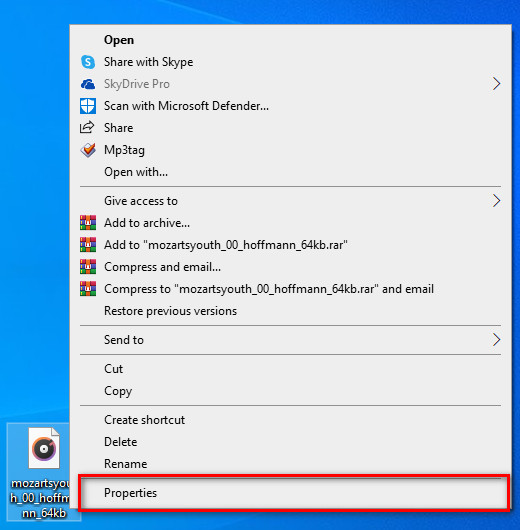
שלב 1. מצא את קובץ ה-OGG על שולחן העבודה, לחץ עליו באמצעות לחצן העכבר הימני, ומתחת לכך בחר ב-Properties.
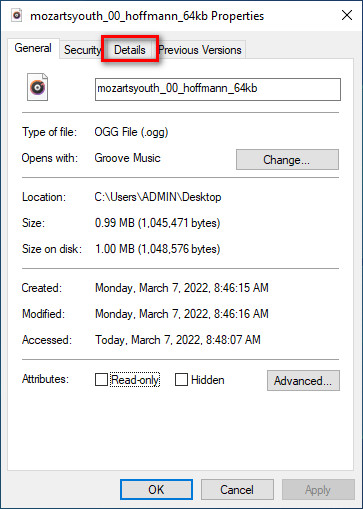
שלב 2. לאחר שלחצת על Properties, תופיע על המסך שלך חלונית. עבור אל Details, לחץ על כל תג ומלא אותו.
שלב 3. לחץ על OK כדי לשמור את השינויים שביצעת ב-Properties.
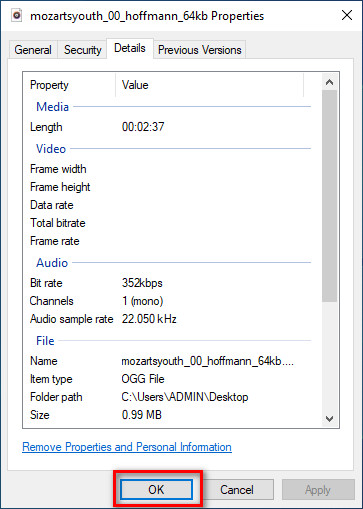
טיפ: פונקציה זו לפעמים לא שומרת את המטא נתונים שהוספת בקובץ OGG. לכן, אם זה קורה, תצטרך לעשות זאת שוב ולהתחיל מההתחלה.
חלק 2. עורך תגיות OGG המומלץ ביותר לעריכת מטא נתונים של OGG ב-Windows ו-Mac [באופן מקצועי]
הדרך הטובה ביותר לערוך OGG היא להשתמש בעורך תגיות חזק אך פשוט גם ב-Windows וגם ב-Mac, בשם FVC Video Converter Ultimate. בעזרת כלי זה תוכל לעדכן ידנית את המטא־נתונים של OGG בכמה קליקים בלבד. שלא כמו Properties, לא תיתקל בשום בעיה בעריכה או בתיקון התגיות של קובץ המדיה שלך. עם זאת, יהיה עליך להוריד ולרכוש את הכלי כדי ליהנות במלואן מהיכולות המרשימות שלו, שאין בשום כלי אחר.
בנוסף ליכולת העריכה שלו במטא נתונים, כלי זה מאפשר לך להמיר את קובץ OGG שלך לפורמט אודיו חדש תוך שמירה על האודיו האיכותי המאוחסן בקובץ OGG שלך. אתה יכול גם לבצע עריכה בסיסית בווידאו ובשמע שלך אם תרצה, כמו חיתוך, חיתוך, מיזוג, חיתוך ועוד רבים אחרים, אבל זה יכול גם לבצע עריכה מתקדמת; אתה יכול לבדוק את העריכה המתקדמת בארגז הכלים. אולי אתה חושב מה הדבר האולטימטיבי בכלי הזה; ובכן, זה עומד בציפיות של כולם, והשם אולטימטיבי הוא לא רק שם, אלא הוא גם היכולות של הכלי. אז אם אתה רוצה להשתמש בכלי כדי לערוך מטא נתונים של OGG, אתה יכול להעתיק את השלבים למטה כדי להצליח על קצה האצבע.
היתרון של שימוש ב-FVC Video Converter Ultimate [מומלץ]:
◆ זהו עורך תגים מקצועי שיכול לתפעל בקלות את המטא נתונים של קובץ האודיו שלך אפילו שאתה לא מקצוען.
◆ הוא תומך במגוון רחב של פורמטים להעלאה כמו OGG, MP3, WAV, WMA, AIFF ועוד 1000 פורמטים נוספים, כולל פורמטי וידאו.
◆ זוהי הבחירה הטובה ביותר בתור התחלה בעריכת המטא נתונים, רזולוציה, איכות, חיתוך וכו'.
◆ מסוגל להוריד את התוכנה גם במערכות Windows וגם ב-Mac אם תרצה.
◆ פונקציות ותכונות נוספות זמינות בארגז הכלים כדי לעזור לך במשימות שונות הקשורות לווידאו ואודיו.
כיצד לערוך תגיות OGG כמו מקצוען עם FVC Video Converter Ultimate:
שלב 1. לחץ על כפתור ההורדה שלמטה, ובחר את מערכת ההפעלה הנכונה שבה אתה משתמש. לאחר שסיום ההורדה, לחץ על קובץ התוכנה שהורדת כדי להתקין אותו בכונן שלך. הגדר אותו בהתאם להעדפותיך; לבסוף, לחץ על Start Now כדי להפעיל את הכלי.
הורדה חינמיתל-Windows 7 ומעלההורדה מאובטחת
הורדה חינמיתל-MacOS 10.7 ומעלההורדה מאובטחת
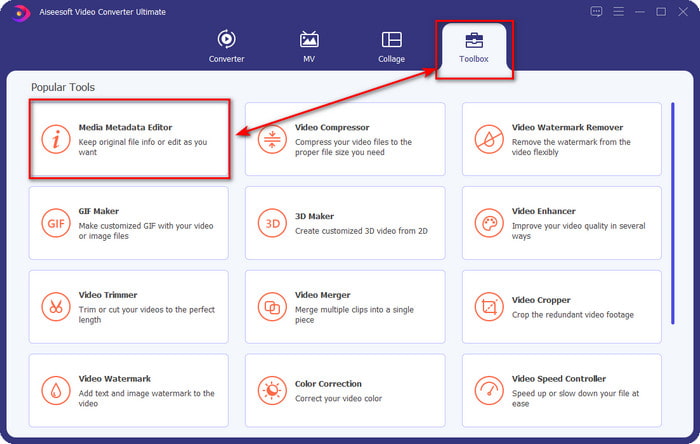
שלב 2. לאחר שפתחת את התוכנה על שולחן העבודה, עבור אל החלק Toolbox ומצא את Media Metadata Editor; לחץ על הפונקציה כדי להמשיך.
שלב 3. לחץ על הסמל + כדי לאתר את קובץ ה-OGG השמור בכונן שולחן העבודה שלך. בחר את קובץ ה-.ogg ולחץ על Open כדי להעלות את הקובץ לכלי.
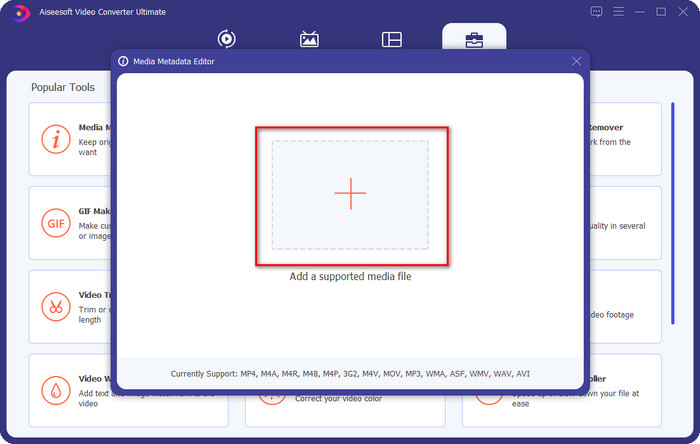
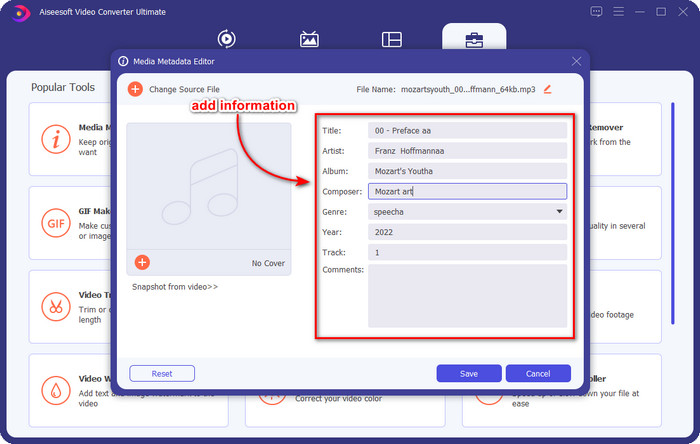
שלב 4. ערוך או הסר את המטא־נתונים בחלון הקטן שיופיע על המסך שלך, לחץ על כל textbox והוסף את המידע שברצונך להחיל על קובץ ה-OGG. באפשרותך גם להוסיף תמונה לקובץ השמע OGG אם תרצה, אבל ודא שהתמונה שמורה על שולחן העבודה שלך.
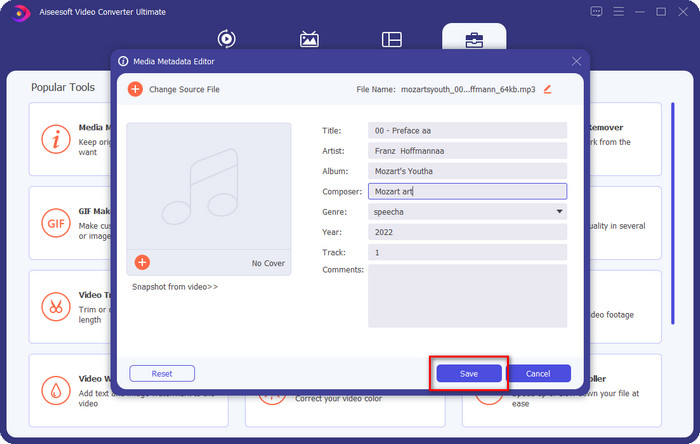
שלב 5. אם סיימת להוסיף את המידע הנדרש לקובץ ה-OGG שלך, באפשרותך ללחוץ על Save כדי להמשיך ולשמור את הקובץ עם המטא־נתונים. כעת הוספת בהצלחה את מטא־נתוני ה-OGG הערוכים לשולחן העבודה שלך בעזרת עורך המטא־נתונים הטוב ביותר ל-OGG, שניתן להשתמש בו בבטחה ובמהירות בשתי מערכות ההפעלה.
חלק 3. שאלות נפוצות על עריכת מטא נתונים של OGG
האם אוכל להשתמש בקובץ OGG ב-Mac?
קובצי OGG אינם נתמכים במכשירי Apple, אך תוכל להשתמש באפליקציית צד שלישי כדי לנגן את קובץ ה-OGG שאינו ניתן לניגון ב-Mac. רוצה לדעת איך? אם כן, לחץ על קישור זה, שבו ריכזנו את העובדות על OGG ועל איך לנגן קובצי OGG ב-Mac בקלות.
האם OGG פופולרי יותר מ-MP3?
מבחינת פופולריות, MP3 נתמך הרבה יותר מאשר OGG מכיוון שהוא הרבה יותר גמיש אם נשווה ביניהם. שניהם מיכלי אודיו טובים, ויש להם עוצמות אודיו שונות. אבל מבחינת איכות, OGG הרבה יותר טוב מ-MP3 אבל הוא פחות נתמך.
האם אני יכול להקליט OGG באיכות גבוהה?
בהחלט כן, אפשר להקליט OGG. אבל איזה כלי תומך בפורמט OGG? ואם יש כזה, האם זהו מקליט ה-OGG הטוב ביותר שאוכל להשתמש בו? ובכן, לכל השאלות האלה יש תשובה אם תלחץ על קישור זה ותמשיך לקרוא.
סיכום
מדהים, נכון? כך זה, עם מה שניתן לעשות כדי לערוך מטא־נתונים של OGG באמצעות הפתרונות שהוזכרו למעלה. אם אתה זקוק לפתרון, אלה הן הדרכים המוכרות לפתור את בעיות התגיות בקובץ ה-OGG שלך. אם אינך מאמין למידע שכתבנו כאן, עליך לנסות את שניהם, ואנו יכולים להבטיח לך הצלחה בעריכת התגיות בקובץ ה-OGG. אבל אם אתה רוצה כלי מקצועי לעריכת תגיות בקובץ ה-OGG שלך, עליך להשתמש בכלי האולטימטיבי כדי לסיים את המשימה. FVC Video Converter Ultimate הוא ללא ספק הבחירה הטובה ביותר לעריכת תגיות מכל סוג על כל סוג מדיה שיש לך. אם אתה חושב שזה הכלי המתאים לך, אנו ממליצים לעיין בשלבים שסיפקנו למעלה כדי לערוך את התגיות בקלות.
-
 7 עורכי תגי מוזיקה פופולריים ב-Windows, Mac ומכשירים ניידים
 תגי מוזיקה פופולריים לשימוש עבור סידור המוזיקה בספרייה שלך לפי הנתונים שבפנים. מה אם אתה רוצה לשנות את זה? קרא את הפרטים למטה כדי לדעת יותר.
-
 4 עורכי מטא נתונים של ספרי אודיו מוצעים בשנת 2022
 אם אין לך מושג לגבי עורך תגיות אודיו, מאמר זה יעזור לך. דע את זה טוב יותר על ידי קריאת כל פרט למטה והכלים לשימוש.
-
 5 עורכי תגי MP3 בחינם הזמינים באופן מקוון ומקוון
 האם אתה רוצה לדעת איך לערוך תגי MP3? במקרה כזה, המשך לקרוא. להיום, אנו נותנים לך 5 מעורכי תגי MP3 הטובים ביותר שתוכל להשתמש בהם.
