


 ממיר וידאו אולטימטיבי
 מקליט מסך
 תיקון וידאו
סקירה על החשיבות של עורך תגיות ID3 ב-2022
שירים שהורדת מאתרי מוזיקה אכן מכילים נתוני מטא, הידועים גם כתגיות ID3. בדרך כלל כל המידע שאתה צריך על השיר נמצא במידע התגית. לעיתים קורה שהקובץ המוזיקלי אינו מגיע עם תגיות או שהמידע בהן שגוי. במצב כזה תצטרך להשתמש בתוכנה שיכולה לעזור לך לטפל במשימה בקלות. במקרה זה אנו מציגים לך בשמחה את עורך תגיות ה‑ID3 הטוב ביותר שתוכל להוריד ל‑Windows, Mac, iOS ו‑Android כדי לערוך את התגיות של השירים שלך.

חלק 1. מהו תג ID3
תגיות ID3 חיוניות לכל משתמש שרוצה לדעת יותר על השיר בפרטי‑פרטים. דוגמה טובה לתגיות שניתן לראות גם בלי להיכנס ישירות לשדה התגיות היא שם האמן וכותרת השיר. אף שלא הוספנו אותם ידנית לקובץ האודיו, הם עדיין משובצים בו כדי לעזור לנו לזהות אם אנחנו משמיעים את המוזיקה הנכונה.
עם זאת, אם אין לך תגית על השירים או הפודקאסט שלך, אז יש סיכוי שהקבצים יהיו מקושקשים בכל הספרייה או התיקיה במקום שבו הם מאוחסנים. הוספת התגים לקובץ שלך יכולה לעזור לך לקבוע את הקובץ ולסדר אותו כך שייראה מאורגן. אם לקובץ שלך אין כזה, עליך להוסיף נתונים. המשך לגלגל את הכדור כדי לעזור לך לחפש את עורך התגים של ID3 שאתה צריך להשתמש שיתאים לצרכים שלך.
אבל לפני שנתחיל, נא להכין את המטא נתונים שברצונך להוסיף לקובץ האודיו שלך; אלה כוללים כותרת, מחבר, פרק, דפים, הערות, מילים וכדומה. לאחר שתקראו את זה, תופתעו מהסקירה שלנו על עורכי התגים המובילים שבהם תוכלו להשתמש בכל המכשירים.
חלק 2. עורך תגיות ID3 הטוב ביותר ב-Windows/Mac לשינוי מטא נתונים בקלות
FVC Video Converter Ultimate - עורך תגיות ID3 הטוב ביותר
אחד הדברים הבסיסיים שכדאי לדעת כשבוחרים עורך תגיות ID3 ב‑Mac או Windows הוא שהוא צריך להיות מדויק, ידידותי למשתמש ונגיש; כל אלה קיימים ב‑FVC Video Converter Ultimate. הוא ידוע כעורך מטא־דאטה מהשורה הראשונה שקל מאוד להשתמש בו, גם אם המשתמשים אינם יודעים כיצד לכוונן את השדות כראוי. בשונה מעורכי תגיות אחרים, לא תצטרך לבצע פעולות מורכבות כדי להוסיף או לתקן את תגיות האודיו או הווידאו שלך. לכן, אם אתה חדש בתחום עריכת או תיקון תגיות ID3, אין ספק שזו התוכנה האחת שמרכזת עבורך את כל הצרכים.
יתר על כן, לא קראנו לזה עורך חד פעמי ללא סיבה; אולי אתה חושב למה. אם נחקור יותר על הכלי, תראה שאתה יכול לבצע עריכת וידאו מתקדמת ובסיסית כאן כדי לגרום לסרטון שלך להיראות יוצא מן הכלל על ידי הוספת אפקטים ומסננים. עדיין יש יותר מדי תכונות שלא הוזכרו שתוכלו לחשוף אם תורידו את הכלי. אבל היום, נתמקד בשימוש בתוכנת עריכת תגי ID3 כדי לעזור לך לערוך ולתקן במהירות את התגים של השירים שלך.
שלב 1. ראשית, הורד את התוכנה למערכת ההפעלה שבחרת; יש שתי אפשרויות זמינות: Windows ו‑Mac. לאחר מכן התקן אותה כראוי, עקוב אחר תהליך ההתקנה ולאחר שתסיים את כל השלבים, פתח את הכלי.
הורדה חינמיתל-Windows 7 ומעלההורדה מאובטחת
הורדה חינמיתל-MacOS 10.7 ומעלההורדה מאובטחת
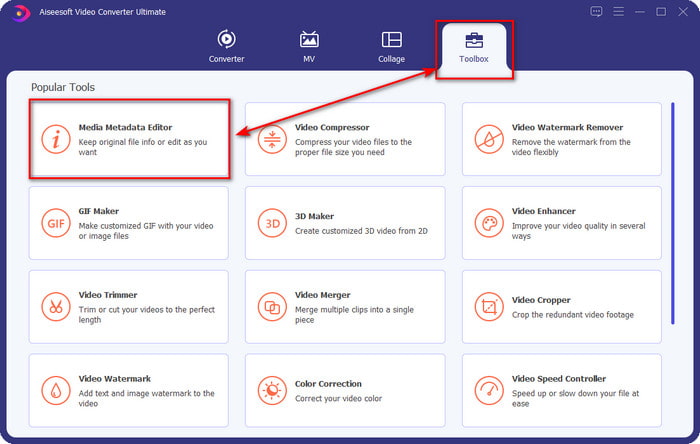
שלב 2. לאחר שפתחת את הכלי, עבור אל החלק שנקרא Toolbox ופתח את Media Metadata Editor על‑ידי לחיצה עליו.
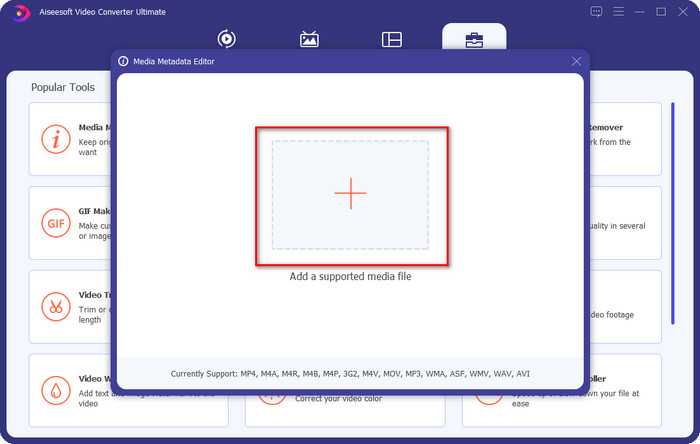
שלב 3. לחץ על סמל ה‑+ בחלון החדש שיופיע על המסך שלך, בחר את קובץ האודיו שבו אתה רוצה לשנות את תגיות ה‑ID3 ולחץ על Open כדי להעלות אותו.
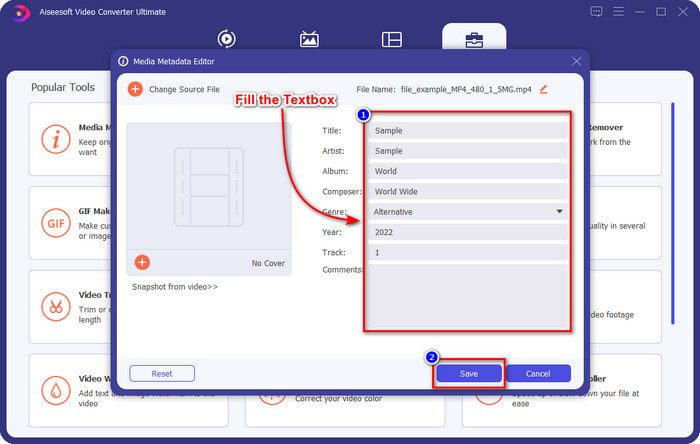
שלב 4. כעת תוכל להקליד את המידע שברצונך להוסיף לקובץ האודיו וללחוץ על Save כשתסיים למלא כל textbox. בפשטות כזו, הוספת כעת תגיות לקובץ האודיו בעזרת התוכנה הזו.
יתרונות
- הוא תומך בשינוי MP3, WMA, WAV ו-1000+ מטא נתונים ללא מאמץ.
- המרה מהירה במיוחד והאצת חומרה נתמכת לתהליך במהירות הבזק.
- תכונות עריכת וידאו ראשיות עד מתקדמות זמינות בארגז הכלים.
- זוהי הבחירה הראשונה של מיליוני משתמשים ברחבי העולם לקחת את המשימה הזו.
חסרונות
- רכישת הכלי נחוצה כדי לקבל את כל תכונות העריכה המפוארות.
- לא זמין באנדרואיד וב-iOS.
נגן מדיה VLC
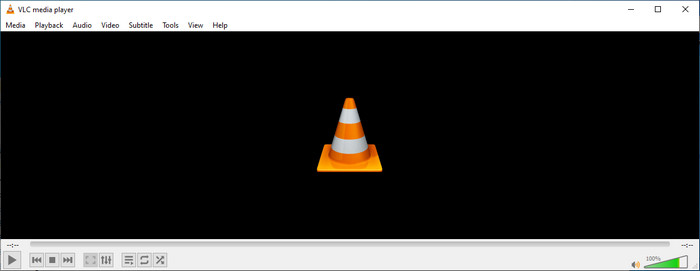
VLC Media Player הוא נגן מדיה מהשורה הראשונה שניתן להוריד ל‑Windows ול‑Mac. הכלי הזה יכול לעזור לך להפעיל וידאו בלי להוריד שום מקודדים (codecs) למערכת שלך, אך ניתן להשתמש בו גם כדי לערוך את תגיות ה‑ID3 של קובץ האודיו. אף שהכלי אינו עורך מטא־דאטה ייעודי, הוא עדיין יכול לתקן תגיות שגויות. לכן, אם יש לך את הכלי הזה, תוכל לכוונן בקלות את המטא־דאטה של השיר שלך, אך אל תצפה ממנו ליותר מדי, משום שהוא אינו טוב כמו עורך תגיות ID3 מהשורה הראשונה למחשב שולחני.
יתרונות
- נגן מדיה ועורך מטא נתונים שתוכלו להשתמש בהם בכל מכשיר.
- זה תומך בפורמט מדיה ממוצע לשינוי התגים.
- GUI פשוט ופשוט.
חסרונות
- זה לא עורך מטא נתונים מקצועי.
- תומך בפונקציות מוגבלות לגבי עריכת התגים.
חלק 3. Top 3 ID3 Tag Editor במכשירי iOS/Android ניידים
עורך תגיות Star Music
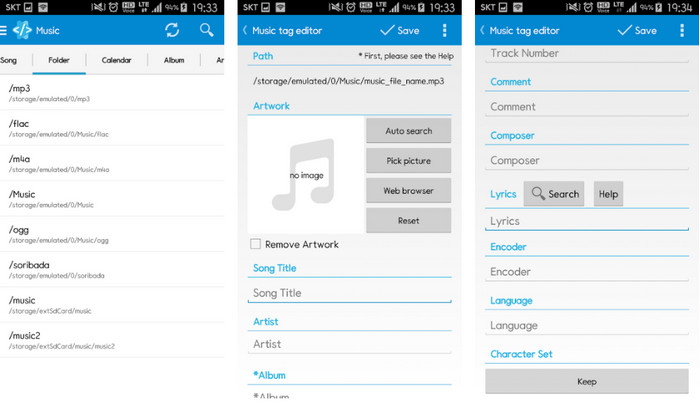
Star Music Tag Editor הוא אחד מעורכי תגיות ID3 הנפוצים ביותר ב‑Android. האפליקציה הזו יכולה להציג בפניך מידע שונה על קובצי המוזיקה שלך, ותוכל לשנות אותו במידת הצורך. ממשק המשתמש שלה (GUI) פשוט מאוד, ולכן אפשר ללמוד בקלות כיצד להשתמש בה גם אם אינך רגיל לעבוד עם כלי לעריכת תגיות. למרות שהאפליקציה מצוינת, עדיין יש לה כמה חסרונות בהוספת מטא־דאטה, במיוחד בנוגע לעטיפת האלבום. אף שבעיות עלולות להתעורר, היא עדיין עורך תגיות אמין שניתן להוריד לטלפון ה‑Android שלך.
יתרונות
- עורך מטא נתונים בחינם להורדה באנדרואיד.
- GUI פשוט וקל להבנה.
- הוסף את התגים לקובץ השמע בקלות.
חסרונות
- יש לו בעיה בהוספת כיסוי תמונה בקובץ האודיו.
- לפעמים באגים עדיין קורים.
נגן מוזיקה עננים עבור עננים
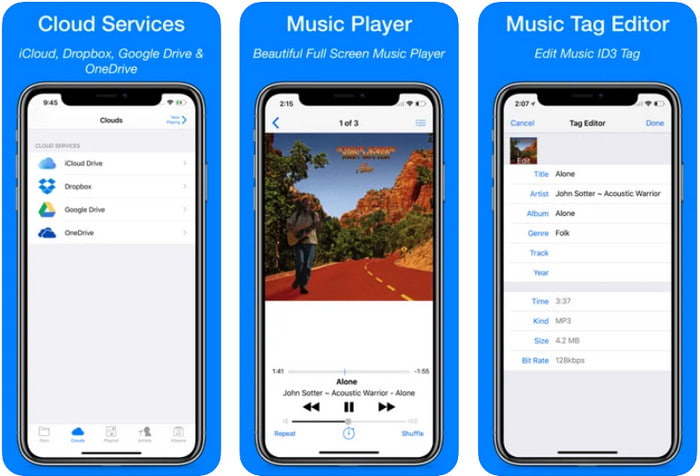
Clouds Music Player for Clouds היא אפליקציה רב‑תכליתית שניתן להוריד למכשירי iOS. היא יכולה לערוך תגיות ID3 ב‑iPhone, להשמיע מוזיקה וליצור רינגטון מהמוזיקה. לצד הפונקציות האלה, ממשק המשתמש שלה פשוט ונקי, ותוכל לגשת לשירותי הענן שלך דרך האפליקציה. גם עם הממשק הידידותי למשתמש, חלק מהמידע שניתן להוסיף כמטא־דאטה לקובץ האודיו מוגבל, כלומר רק תגיות בסיסיות זמינות לעריכה. למרות זאת, היא בחירה מצוינת להורדה אם אתה משתמש iOS.
יתרונות
- זמין להורדה בכל מכשיר iOS.
- עורך מוזיקה רב תכליתי ועורך תגים.
- עורך מטא נתונים אינטואיטיבי ב-iOS.
חסרונות
- זה לא תומך בהוספת מטא נתונים נוספים.
- שינויים באגים ובעיות במטא נתונים מתרחשים אך לא לעתים קרובות.
Dash- אפליקציית אינפורמציה
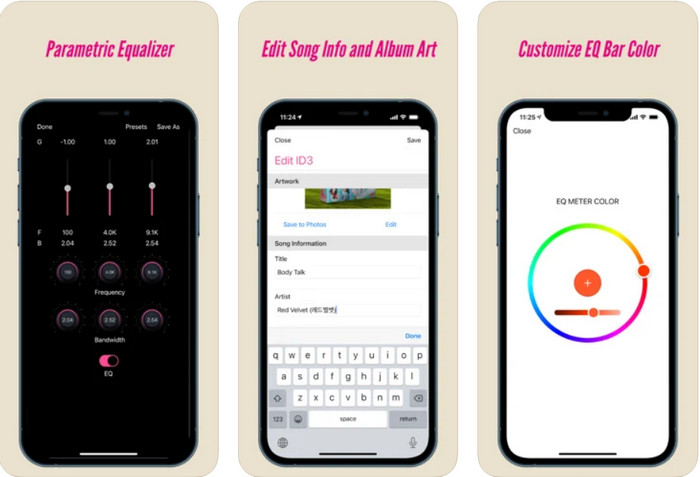
Dash- Infotainment App הוא כלי נוסף שתוכל להוריד ולערוך בו תגיות ID3 ב‑iPhone בעת הצורך. לא נדרש זמן לימוד רב לפני השימוש באפליקציה הודות לממשק הפשוט והזורם שלה. אפשר להשתמש בכלי הזה כדי לשנות בקלות את הפרמטרים של קובצי FLAC ו‑ALAC באמצעות האקולייזר הידידותי. בנוסף, אפשר לראות כאן את המהירות והמצפן (קצב/טמפו וכיוון) של השיר שאתה מעלה. כמו בעורך התגיות הראשון ל‑iPhone, גם כאן ניתן להוסיף רק כותרת, אמן ועיצוב עטיפת אלבום, אך חשוב לזכור שהפורמט חייב להיות FLAC או ALAC בלבד; אם הקובץ אינו באחד מהפורמטים האלה, לא ניתן יהיה להעלות אותו.
יתרונות
- עקומת הלמידה לא כל כך נוקשה.
- אקולייזר שמע רב זמין.
- GUI הוא לא הרבה, והוא לא פחות.
חסרונות
- זה תומך רק בפורמט FLAC ו-ALAC.
- אין הרבה מה להציע בכל הנוגע לעריכת מטא נתונים.
חלק 4. שאלות נפוצות לגבי ID3 Tag Editor
מהו עורך תגיות ID3 הטוב ביותר בשורת הפקודה שאני יכול להשתמש בו?
אם אתה מחפש עורך תגיות ID3 מבוסס שורת פקודה, עליך לדעת ש‑FFmpeg הוא עורך מבוסס שורת פקודה. בעזרת הכלי הזה ניתן להמיר, לסובב, לחתוך, לקצר ולערוך את תגיות המטא־דאטה. אם ברצונך ללמוד עוד על FFmpeg, ייתכן שתרצה לקרוא כיצד להשתמש בו על‑ידי לחיצה על הקישור ל‑עריכת מטא־דאטה ב‑FFmpeg בקלות.
מהם הסוגים האחרים של מטא נתונים?
ישנם שישה סוגי מטא־דאטה: תיאורי, מנהלי, ייחוסי או הסברי, סטטיסטי, משפטי ומבני. אם ברצונך לדעת עוד על סוגים אלה ועל המידע שהם כוללים, תוכל ללחוץ על קישור זה ולקרוא עליהם בהרחבה.
האם ניתן לצפות בתגים ללא אפליקציה?
כן, במקום להוריד תוכנה, אתה יכול להשתמש בכלי מקוון כדי לצפות בתגיות של הקובץ שלך. לחץ על קישור זה כדי לצפות במטא־דאטה בשולחן העבודה שלך באופן מקוון, ואנו גם נציג כמה כלים נוספים שתיהנה להוריד.
סיכום
עם המידע שפורטו למעלה, ניתן היה לערוך את תגיות ה-ID3 באמצעות העורכים שהצגנו למעלה, לא משנה באיזה מכשיר אתה משתמש כעת. יתרה מכך, האפליקציה והתוכנה מושלמות עבור משתמשים שצריכים לערוך את המטא נתונים שלהם. למרות שהכלים פותחים הזדמנות מצוינת למשתמשים לערוך את המטא נתונים, עדיין אין ספק שהכלי האולטימטיבי מציג דרך יעילה לעריכת תגיות ID3 בכל קובץ מוזיקה. אם אתה רוצה לקבל את עורך תגיות ID3 הטוב ביותר ב-Windows וב-Mac, אתה יכול להוריד אותו נקודתית על ידי לחיצה על כפתור ההורדה המוצג למעלה, ואז ליהנות מגדולתו.
-
 2 הדרכים הטובות ביותר לערוך מטא נתונים של OGG שכדאי לנסות בחינם
 צריך לערוך מטא נתונים של OGG? ובכן, אתה יכול בקלות להתמודד עם עריכת התגים באמצעות התוכנה הנכונה. אם אין לך אחד לקרוא את המאמר הזה הוא חובה.
-
 סקירה מוחלטת על עורך המטא נתונים של פנטהו [עודכן 2022]
 לא מוצא מאמר אמין על Pentaho Metadata Editor? למרבה המזל, סקרנו את הכלי בעצמנו כדי לספק את העובדות שתדעו על הכלי.
-
 טיפים וטריקים על עורך מטא נתונים של VLC שאתה חייב להכיר בשנת 2022
 האם אתה רוצה להשתמש ב-VLC כעורך מטא נתונים? במקרה זה, אתה יכול לקרוא מאמר זה מכיוון שאנו מספקים סקירה בלתי משוחדת של עורך המטא נתונים של VLC.
