


 ממיר וידאו אולטימטיבי
 מקליט מסך
 תיקון וידאו
למד להשתמש ב-Premiere Pro כדי להאיץ סרטון עם 2 חלופות Premiere
Adobe Premiere Pro הוא אחד מהתוכנות המובילות מבית Adobe לעריכת וידאו מקצועית. בנוסף, ביצועי הכלי הזה זכו לשבחים ממשתמשים רבים שכבר עובדים איתו. למעשה, נלמד אותך כיצד להאיץ את הווידאו שלך בעזרת הכלי הזה, כדי שלא תצטרך לעבור המון הגדרות או כל דבר אחר לפני שתתחיל. ועכשיו, בוא נלמד אותך איך להאיץ וידאו ב‑Premiere Pro ומהן האלטרנטיבות לכך.

חלק 1. כיצד להאיץ סרטון ב-Premiere Pro
עורך הווידאו המוביל שתרצה לקנות ולהשתמש בו הוא Adobe Premiere Pro. זהו כלי שהוא חבילה מלאה שכל מקצוען ישמח להשתמש בה. הסיבה לכך היא שהתוכנה הזו יכולה להתמודד עם עבודת עריכה כבדה, בדיוק מה שתרצה לעשות אם אתה עורך מקצועי. בנוסף, אם אתה רוצה תוצאה מרשימה, עליך ללמוד איך להשתמש בכלי הזה. אבל ללמוד לעבוד עם Premiere Pro בהחלט ייקח הרבה מזמנך, כך שאם אתה אדם עסוק זה כנראה צריך להיות המפלט האחרון שלך. עם זאת, אם יש לך מוטיבציה ללמוד והרבה זמן פנוי, כדאי לך בהחלט לנסות.
בנוסף, אם אתה רוצה להשתמש בכלי זה, אתה חייב להוציא כמות גדולה של כסף כי זה ממש יקר בהשוואה לכלי עריכת הווידאו האחרים. אז עכשיו, אם אתה רוצה ללמוד כיצד להשתמש בגרסת Adobe Premiere Pro cc 2018 ומעלה כדי להאיץ את הווידאו, עקוב אחר השלבים הפשוטים שלהלן.
שלבים כיצד להאיץ וידאו ב‑Adobe Premiere Pro:
שלב 1. קנה והורד את Adobe Premiere Pro מהאתר הרשמי שלו. לאחר מכן הפעל את התוכנה כדי להתחיל בתהליך ההאצה.
שלב 2. לחץ על File, לאחר מכן עבור אל New ואז Project. המתן לחלון שדומה לזה שיופיע ולחץ על OK כדי להמשיך. פתח את התיקייה ואתר את הווידאו, גרור ושחרר את הקובץ אל Media Browser כדי להציב אותו לצד הTimeline.
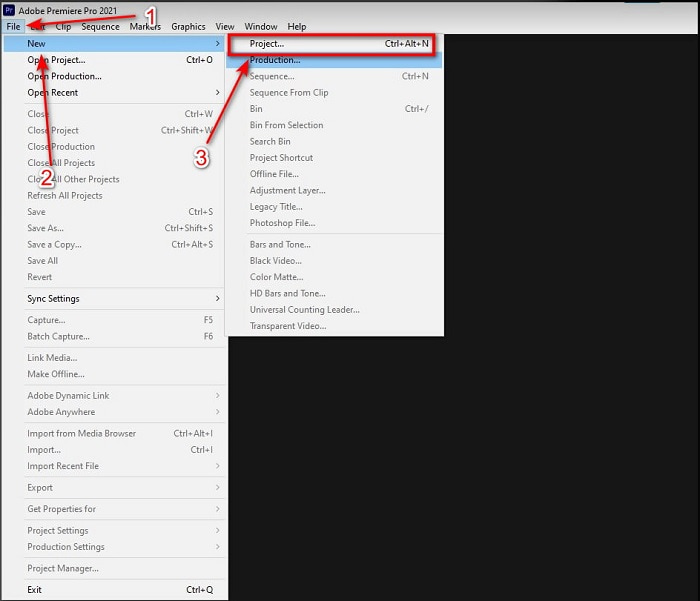
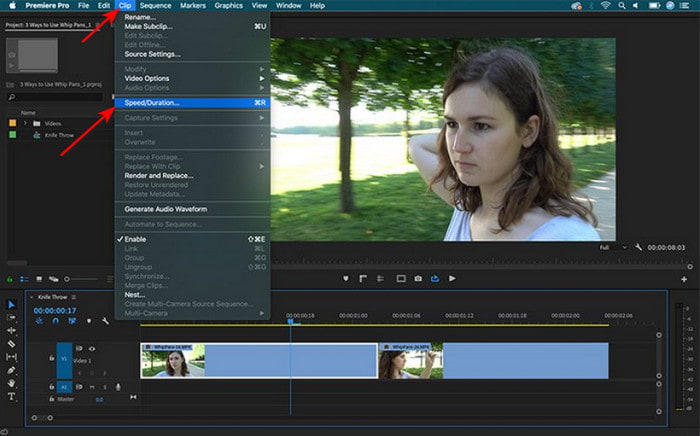
שלב 3. לחץ על הווידאו שהכנסת אל ה‑Timeline ולחץ על Clip בחלק העליון. מתחתיו בחר Speed/Duration ולחץ עליו. שנה את אחוז המהירות לפי רצונך ולחץ על OK כדי לשמור את ההאצה, ולשמירת הקובץ לחץ על כפתור Export.
חלק 2. 2 מהחלופות הטובות ביותר של Premiere Pro להאצת סרטונים
1. Video Converter Ultimate
אם האצה היא הבעיה שלך, אז זו כנראה יכולה להיות הפתרון: קבל את Video Converter Ultimate. בניגוד לעורכי וידאו אחרים, הכלי המדהים הזה הוא הטוב ביותר לכל סוגי העריכה, המרה, יצירת GIF, הגברה, הרצה לאחור, האצה ועוד. כמו כן, משתמשים רבים כבר אוהבים את התוכנה הזו שכן היא מספקת פונקציות מתקדמות כמו Adobe Premiere Pro, אך בגרסה מפושטת. מעבר לכך, כמעט שלא תמצא כלי אחר שמציע פיצ'רים מתקדמים שקל כל כך להשתמש בהם. למעשה אין עוד כלי כמו Video Converter Ultimate. למרות שהתוכנה בתשלום, היא שווה כל שקל שתוציא והיא גם זולה. אז אם אתה רוצה לדעת על אלטרנטיבה לאיך להאיץ וידאו ב‑Premiere Pro, עקוב במדויק אחר השלבים הבאים.
שלבים כיצד להאיץ וידאו בעזרת Video Converter Ultimate:
שלב 1. הורד את התוכנה לכונן המחשב שלך, לאחר מכן התקן אותה כדי להמשיך.
הורדה חינמיתל-Windows 7 ומעלההורדה מאובטחת
הורדה חינמיתל-MacOS 10.7 ומעלההורדה מאובטחת
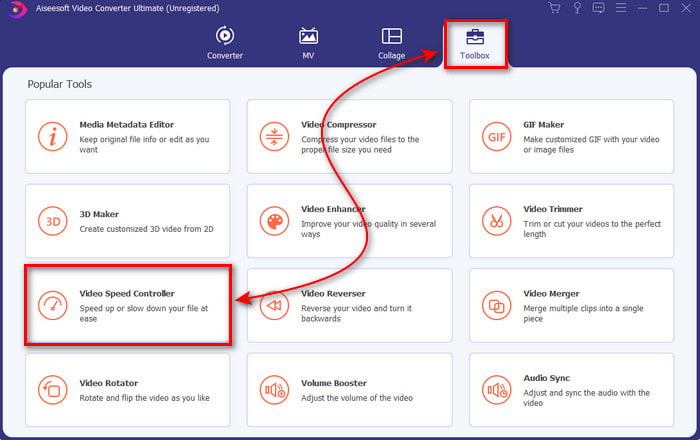
שלב 2. הפעל את הכלי ואז לחץ על Toolbox ומצא את Video Speed Controller.
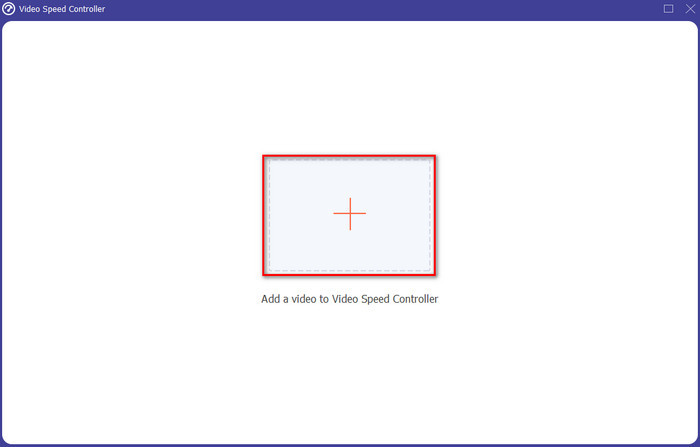
שלב 3. כדי להוסיף את הווידאו שברצונך להאיץ, לחץ על כפתור ה‑+. לאחר מכן אתר את הקובץ בתיקייה ולחץ על Open כדי להכניס את קובץ הווידאו.
שלב 4. בחר את המהירות שאתה רוצה להחיל על הווידאו שלך על‑ידי לחיצה על אפשרויות הbox. אם אתה מרוצה מהמהירות של הווידאו שלך, לחץ על Export כדי לשמור אותו ישירות במחשב שלך.
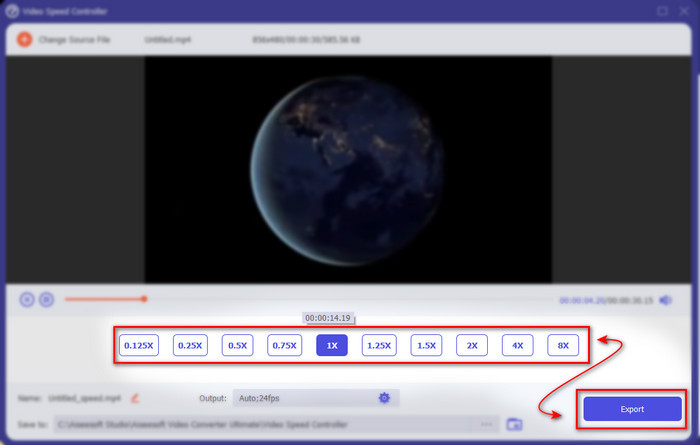
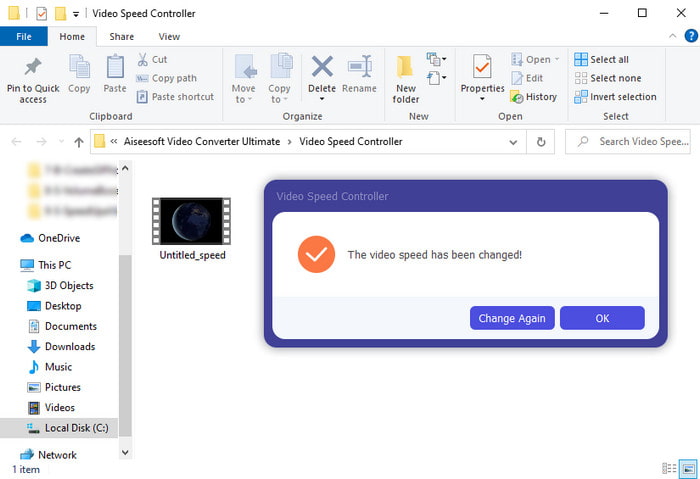
שלב 5. תיקייה תקפוץ למסך כאשר תהליך הייצוא יסתיים. לחץ על הקובץ שהאצת קודם והתרשם מכך שההאצה לא פגעה באיכות הווידאו.
2. iMovie
אם יש לך Mac אז חובה להשתמש בכלי הזה מפני שהוא כבר מותקן עליו מראש. iMovie הוא אחד מעורכי הווידאו הפופולריים שתאהב להשתמש בהם בגלל הפיצ'רים החינמיים שהוא מספק. אם אתה משתמש Windows, אל תצפה שתוכל להשתמש בכלי הזה כי הוא אינו זמין למחשב שלך. אף שהתוכנה חינמית, עדיין יש לה מגבלות, כמו פיצ'רים חשובים לעריכה שאולי תרצה להשתמש בהם ואינם זמינים בה. עם זאת, אם התקציב שלך מוגבל, זה יכול להיות הפתרון המועדף על משתמשי Mac. ואם ברצונך להשיג תוצאה דומה לPremiere Pro האצת וידאו, עקוב אחרי השלבים שלמטה.
איך להאיץ וידאו ב‑iMovie:
שלב 1. פתח את iMovie ב‑Mac שלך ולחץ על File ואז Import Media, ובחר את הקובץ כדי להמשיך.
שלב 2. גרור את הווידאו שהכנסת קודם אל הTimeline. לאחר מכן לחץ על קובץ הווידאו ב‑Timeline כדי שתוכל להתאים את המהירות. בצד הימני לחץ על Speed ובחר מהרשימה הנפתחת את המהירות שברצונך להחיל.
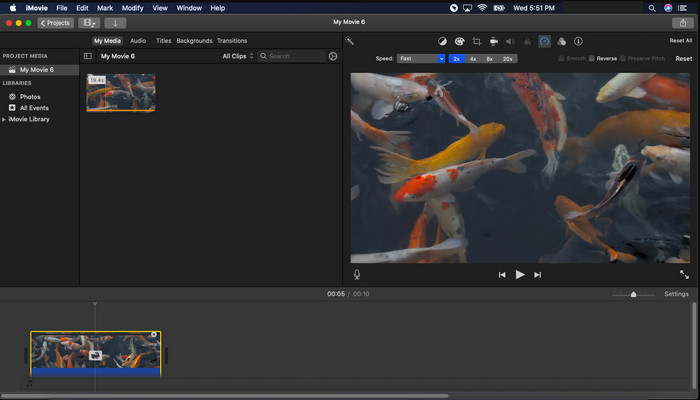
שלב 3. לאחר החלת ההאצה לחץ על Export ואז Export File כדי לשמור את גרסת הווידאו המואץ.
חלק 3. שאלות נפוצות על Premiere Pro Speed Up
האם אוכל להאט סרטון ב-Premiere Pro?
בהחלט כן, פשוט עקוב אחרי אותו תהליך שתיארנו למעלה, אבל עכשיו שנה את האחוז לפחות ממאה כדי להאט במקום להאיץ. או שתוכל ללחוץ כאן כדי ללמוד איך להאט וידאו בפירוט.
כמה מהר אני יכול להגדיר את הסרטון ב-Premiere Pro?
האחוז המקסימלי שאתה יכול להגדיר על מהירות הסרטון הוא 10,000% אחוז. אז אם אתה רוצה לדעת אם זה אמיתי אז בדוק את זה בעצמך והגדר את המהירות ל-10,000%.
האם ל-Adobe Premiere Pro יש דרישת מערכת?
למעשה כן, ישנן דרישות מינימליות שתוכנת Adobe צריכה להיות מסוגלת להשתמש בכלי כראוי. כמו, ברשימה זו למטה: GPU: Intel® i5-4590 / AMD FX 8350 שווה ערך או אחרון; זיכרון RAM: 8GB של זיכרון RAM או אפילו יותר; מערכת הפעלה: Microsoft Windows או macOS; התצוגה צריכה להיות 1920 x 1080 ומעלה.
סיכום
ככל שאנו מגיעים לסוף, כעת ברור לנו יותר שאפילו האצה פשוטה יכולה להיעשות עם הפרמייר פרו. עם זאת, ה-Premiere Pro הוא סופר יקר ולכן אנו מפרטים כמה תוכנות זולות שתשמח להשתמש כדי להאיץ. כמו Video Converter Ultimate מכיוון שהתוכנה הזו מספקת תכונות עריכה מתקדמות גם אם המחשב שלך נמוך. אז אם אתה רוצה לדעת איך להאיץ סרטון ב-Premiere Pro בקלות אז הורד את Video Converter Ultimate כדי לחוות את אותה תכונה אבל בגרסה קלה.
-
 [4 דרכים] כיצד להאיץ בקלות את הסרטונים שלך באינטרנט
 האם אתה רוצה להאיץ סרטון באינטרנט? קרא מאמר זה כדי לדעת יותר על זירוז סרטון בדרכים שונות אפשריות.
-
 דרכים קלות יותר להאיץ סרטונים בפורמט MP4 [לא מקוון ומקוון]
 האם אתה רוצה להאיץ את הווידאו שלך, אבל הוא בפורמט MP4? מאמר זה עשוי לעזור לך לדעת את ההבדלים כיצד להאיץ את הסרטון שלך באינטרנט או לא מקוון.
-
 4 נגני הווידאו המובילים עם בקר מהירות בשנת 2021
 האם לא שמת לב למהירות ההשמעה של כל נגן מדיה בכל פעם שאתה מנגן סרטון? מאמר זה מתאים לך ללמוד הכל על נגני וידאו עם בקרת מהירות.
