


 ממיר וידאו אולטימטיבי
 מקליט מסך
 תיקון וידאו
 הורדה מאובטחת
הסר את סימן המים של Bandicam עם 3 מסירי סימני המים המובילים לשימוש
Bandicam is a tool everyone loves to use especially filming action per action that happens while you are gaming, in a meeting, watching, and such. Unlike other screen recorder competitors, this screen recorder can help you film a 480 FPS video with DirectX/OpenGL/UWP/Vulkan hooking and other advanced acceleration technology. Even though you didn't avail of its premium version, you can still use this and record a video with 60 or 120 FPS, preferably high, but with a watermark. The way you can do to save a video on Bandicam with no watermark is by purchasing its full version.
למרבה המזל הכלים שאנו כוללים במאמר זה יכולים להסיר את סימן המים שה-Bandicam מוסיפה לסרטון המיוצא. רוצה לדעת מה אלה? אז אתה חייב להמשיך לקרוא את המאמר הזה כדי להבין את הרעיון!

חלק 1. כיצד להסיר סימן מים של Bandicam באמצעות 3 מסיר סימני המים היעיל ביותר
ממיר וידיאו אולטימטיבי
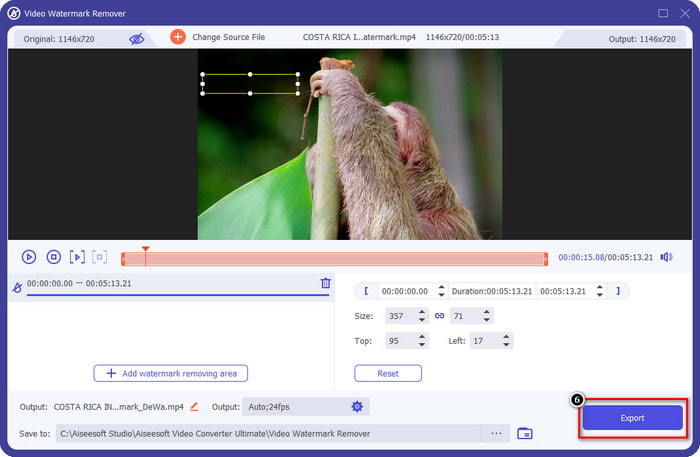
The most effective way to remove the Bandicam watermark is by using a tool that could help, like the FVC Video Converter Ultimate. This tool can detect the watermark on your video by placing the selection box on the watermark, then poof; it will be gone. It works like magic; there will be no watermark traces on the video once you export the file. You can now finally enjoy watching the recording you did on Bandicam without the hindrance of the logo.
התכונות הסבירות ביותר של כלי זה הן הממירים, המשפרים, העורכים בארגז הכלים ועוד. אתה יכול לקבל את כל התכונות והפונקציות האלה אם אתה משתמש בכלי זה ומוריד אותו על שולחן העבודה שלך עכשיו. כדי ללמד אותך כיצד להסיר את סימן המים של Bandicam עם התוכנה האולטימטיבית הזו, אתה יכול לעקוב אחר המדריך הכתוב המלא שאנו מוסיפים להלן.
Step 1. First and foremost, you must download the official software on your desktop by clicking the download button we add here. There is no need to worry because the download link is safe for Windows and Mac users. After downloading the file, click it to install, follow the WinRaR set-up process and click Start Now to launch the tool.
הורדה חינמיתל-Windows 7 ומעלההורדה מאובטחת
הורדה חינמיתל-MacOS 10.7 ומעלההורדה מאובטחת
Step 2. On the tool's main interface, you must go to the Toolbox, and under it, you will see the Video Watermark Remover; click it to open this feature.
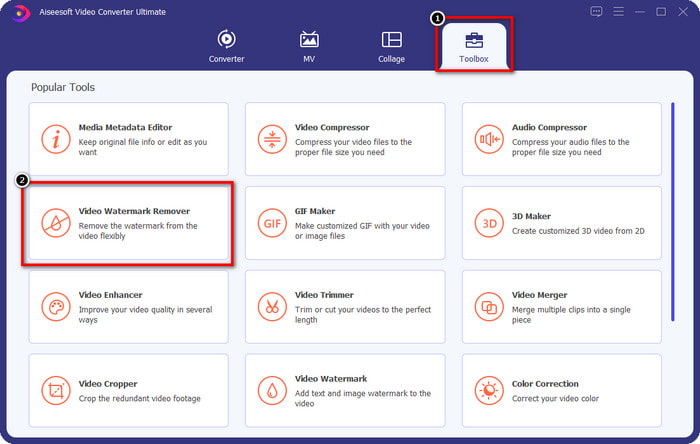
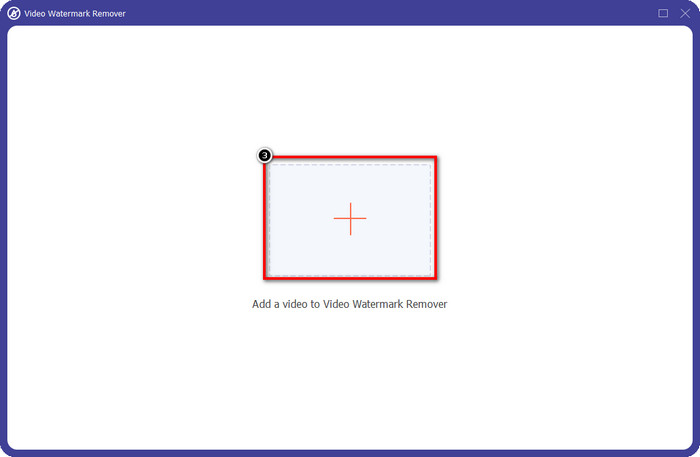
Step 3. A new window will show on your screen; click the + icon to upload the video file that has a watermark. Find the video file on your local drive, then click Open.
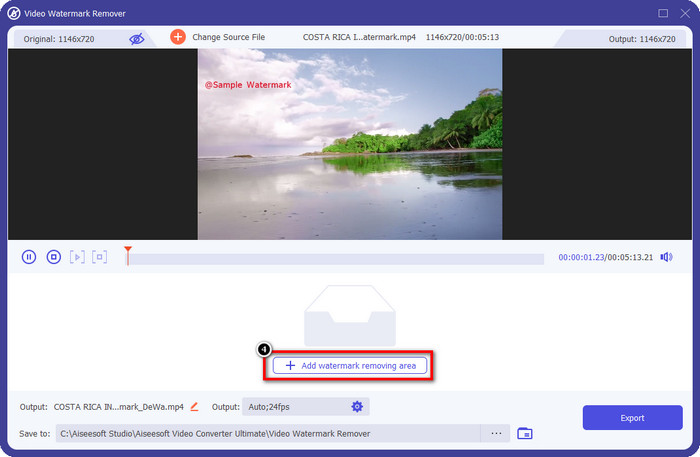
Step 4. After all of that, click Add Watermark Removing Area to start using it so that you can have the videos on Bandicam free no watermark.
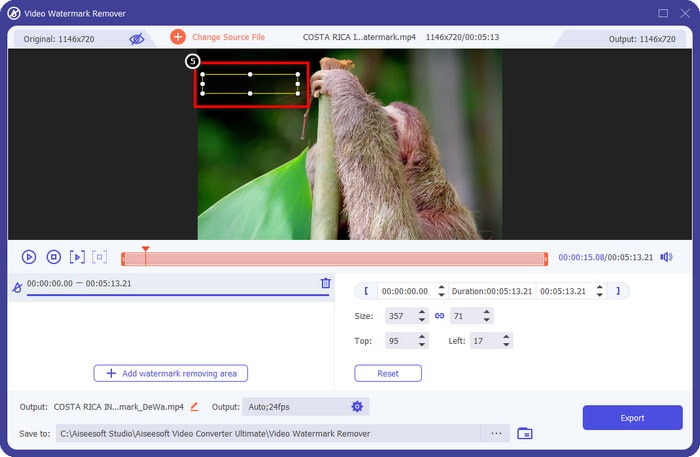
Step 5. On the preview, place the selection box to the watermark; you can change its size to make the image fit the watermark.
Step 6. After placing the selection box to the watermark, click Export to download the video without the watermark that Bandicam adds to it.
הסר את הלוגו עכשיו!
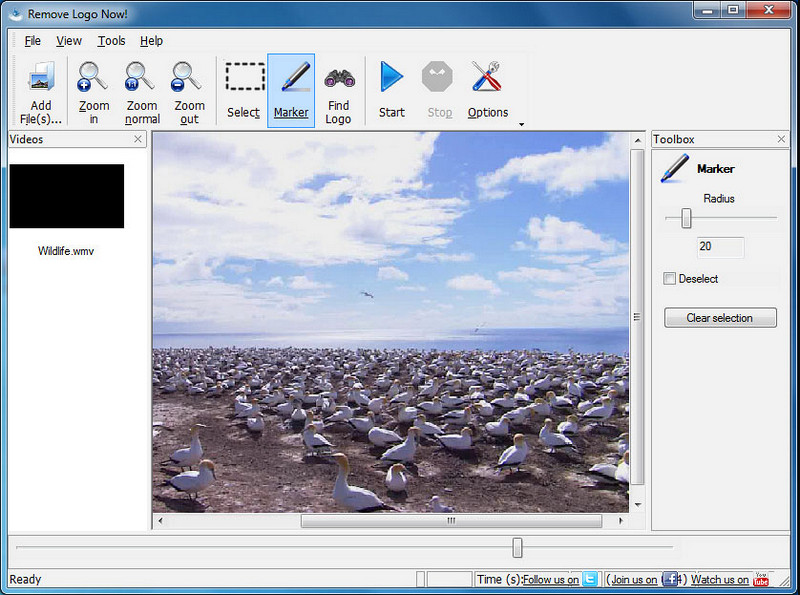
Remove Logo Now! is a complete watermark remover you can use to eliminate the logos that are fixed on your videos. This tool can detect the watermark automatically with the help of algorithms. Still, you can also perform tracing the watermark manually. You can use this tool to remove whatever type of watermark it is without breaking a sweat. However, the software is limited to Windows users, and the interface is a bit outdated. But if you want to try this on your Windows PC, we will show you how to remove the Bandicam watermark for free.
Step 1. You can visit its website to download the Remove Logo Now! Kindly check the website's security to see if it's the official website of the said tool.
Step 2. Open the software you install, then click File to upload the Bandicam video with a watermark.
Step 3. Now that the video is uploaded, click the Find Logo option to detect the watermark on your video automatically.
Optional: If Find Logo didn't detect the watermark algorithm on your video. It would help if you used Marker to manually highlight the watermark, then click Clear Selection to remove it.
Step 4. Click the Start option to export the video and have the version of your recording without the Bandicams watermark.
מסיר סימני מים מקוון של Apowersoft
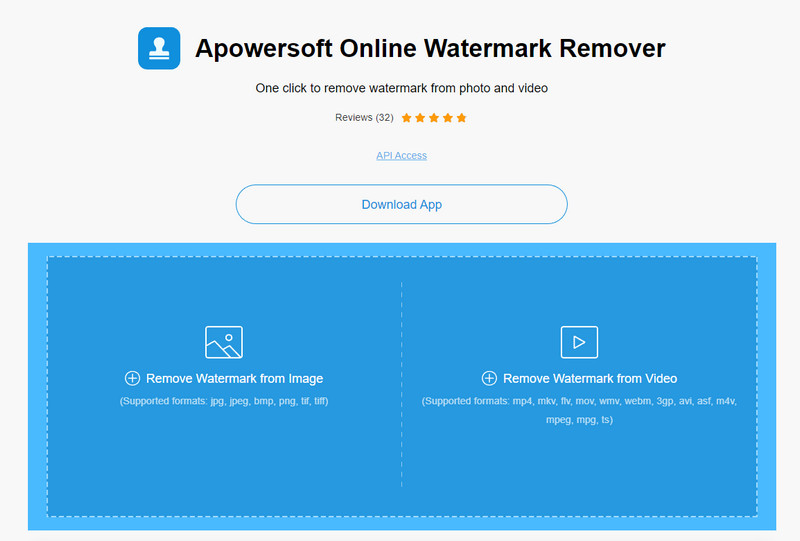
Apowersoft Online Watermark Remover is a dependable and download-free tool you can use to get rid of the watermark on images and videos effectively. The tool is well-known for its watermark removing features because it does the job without leaving a residue on the exported video. Even though it is a web tool, you wouldn't experience lowering the video quality once it is exported. Instead of purchasing Bandicam's full version free from the watermark, you can jump to the steps below to perform removing it.
Step 1. You can go to your favorite web browser and search the name of this watermark remover online.
Step 2. There will be two options available here: click Remove Watermark from Video. Choose the video file that has a logo of Bandicam on your drive, then press Open. Wait for the uploading process; it will take time, especially if the video length is long.
Step 3. Draw a selection box on the video and ensure the watermark is inside the rectangular shape.
Step 4. Click Erase to download the video file, but now the watermark is rid.
קשור:
כיצד להסיר את סימן המים מסרטונים שיוצאו מ‑Renderforest
כיצד להסיר את סימן המים של Viva Video מסרטונים
חלק 2. שאלות נפוצות על איך להסיר סימן מים Bandicam
האם לבנדיקאם יש סימן מים?
עבור המשתמשים שמשתמשים בגרסת הניסיון החינמית, יהיה סימן מים לאחר ייצוא זה. כדי למנוע בעיה זו, אתה יכול לרכוש את הכלי באתר הרשמי של Bandicam.
האם יש מגבלות על השימוש בגרסה החינמית של Bandicam?
ישנן מגבלות רבות אם אתה משתמש בגרסה החינמית של Bandicam, הקלטה של 10 דקות, הוספת סימן מים, תמיכה של 60 עד 120 FPS, פורמטים של קבצים ומהירות העיבוד. למרות שזו יכולה להיות בעיה עבור רובם, זה עדיין נחשב לאחד ממקליטי המסך הטובים ביותר שאתה יכול להשתמש ב- Windows שלך.
כיצד להסיר את סימן המים ב- Bandicam?
אין דרך אחרת להסיר את סימן המים ב- Bandicam, וזהו על ידי רכישת גרסת המקצוענים שלו. פתח את האתר הרשמי של Bandicam, לחץ על קבל גרסה מלאה, בחר את הרישיון הרצוי ולחץ על קנה עכשיו.
סיכום
ואכן, Bandicam הוא מקליט מסך מהשורה הראשונה שתוכל להשתמש בו בחינם. אבל דבר אחד בטוח; שימוש בגרסה החינמית יוסיף סימן מים על הסרטון המיוצא. עם הדרכים שאנו מוסיפים במאמר זה, תוכל להסיר בהצלחה את סימן המים עם מסיר סימני המים האידיאלי שיכול להיות הבחירה שלך. מה אם אתה לא רוצה להשתמש בכלי כדי להסיר את סימן המים? לאחר מכן אנו מציעים לך לרכוש Bandicam כדי להסיר את סימן המים על הסרטונים. זה יעלה לך, אבל שווה להשתמש בגרסת המקצוענים. אנו מקווים שמאמר זה מספק את המידע שתצטרך כדי להסיר את סימן המים ב- Bandicam.
-
 סקירה מלאה של מסירי סימני מים יעילים של PlaceIt [2022]
 מסיר סימני המים של PlaceIt שאנו סוקרים כאן הם כלים יעילים שבהם תוכל להשתמש כדי להסיר את סימן המים בסרטון שאתה מייצא ב-PlaceIt.
-
 5 דרכים כיצד להסיר סימן מים B612 באמצעות הכלים הטובים ביותר
 רוצה לדעת כיצד להסיר סימני מים B612 מהתמונות שלך? אתה יכול להסיר ללא מאמץ את סימן המים B612 מהתמונות שלך באמצעות הכלים המדהימים האלה.
-
 שלבים פשוטים כיצד להסיר את סימן המים של Slider WOW [נפתר]
 WOW Slider היא אפליקציה ליצירת מצגת פנטסטית. עם זאת, הוא מטמיע סימני מים על הפלט שלו. קרא להלן כדי ללמוד כיצד להסיר את סימן המים של WOW Slider.
