


 ממיר וידאו אולטימטיבי
 מקליט מסך
 תיקון וידאו
 הורדה מאובטחת
כיצד להסיר סימן מים לנשיכה מהסרטונים שלך ללא מאמץ
אם אתה מחפש דרכים נהדרות ופשוטות להסרת סימני מים של Biteable מהסרטונים שלך, אינך צריך לטרוח יותר. למען האמת, צפייה בסרטון עם סימני מים היא מעצבנת ומתסכלת. אינך יכול ליהנות באמת מהסרטון שאתה צופה בו. בנוסף לכך, סימני המים מפריעים לצופים. מובן שסימני מים נועדו לאבטחת בעל הסרטון, אבל הצבת סימן מים גדול מדי איננה טובה. היא רק יוצרת רושם שלילי אצל אנשים שאוהבים לצפות בסרטונים האהובים עליהם. דוגמה לכך היא סימני המים של Biteable. סימני מים אלה מגיעים מיישום Biteable, שבו סימן מים מצורף אוטומטית לאחר יצירת הסרטון או שמירתו. למרבה המזל, באפשרותך להשתמש ביישומים כדי להסיר סימני מים אלה מהסרטונים שלך. תוכל לצפות בסרטונים האהובים עליך בלי להרגיש עצבני ומתוסכל. אם ברצונך להכיר את היישומים הטובים והאמינים ביותר שבהם כדאי להשתמש להסרת סימני המים, המשך לקרוא מאמר זה.

חלק 1: הדרך הטובה ביותר להסיר סימן מים שניתן לנשוך מסרטונים
Video Converter Ultimate הוא היישום המרשים ביותר שבו תוכל להשתמש להסרת סימני מים של Biteable מהסרטונים שלך. בנוסף, תוכנה מצוינת זו מסוגלת להסיר גם אובייקטים אחרים שאינם רלוונטיים ומפריעים, כמו לוגואים, טקסטים, חתימות ועוד. כמו כן, תהליך ההסרה והשמירה מהיר מאוד, כך שאין צורך לבזבז זמן רב. מעבר לכך, Video Converter Ultimate מציע שתי שיטות קלות להסרת סימני מים מהסרטונים שלך: חיתוך וידאו (Video Cropper) ומסיר סימני מים מווידאו (Video Watermark Remover). יש בו גם עוד כלי עריכה שתוכל ליהנות מהם, כגון בקר מהירות וידאו, ממיר וידאו, מכווץ וידאו, תיקון צבע, יוצר קולאז', יוצר GIF, חותך וידאו, ממיר תמונות ועוד. היתרון הגדול ביותר של הכלי הוא שקל מאוד להשתמש בו, משום שיש לו ממשק פשוט המתאים במיוחד למתחילים. הוא גם תומך במגוון רחב של פורמטים, כמו MP4, MOV, FLV, MKV, OGV, DIVX ועוד. לבסוף, Video Converter Ultimate זמין גם ב-Windows וגם ב-Mac, מה שנוח מאוד למשתמשים. אם ברצונך להסיר סימן מים מסרטון, עקוב אחר השלבים הפשוטים והקלים שלהלן.
שימוש בכלי מסיר סימני מים של וידאו
שלב 1: עבור לאתר של Video Converter Ultimate והורד את היישום. לאחר מכן המשך בהליך ההתקנה. לאחר ההתקנה, הפעל את היישום.
הורדה חינמיתל-Windows 7 ומעלההורדה מאובטחת
הורדה חינמיתל-MacOS 10.7 ומעלההורדה מאובטחת
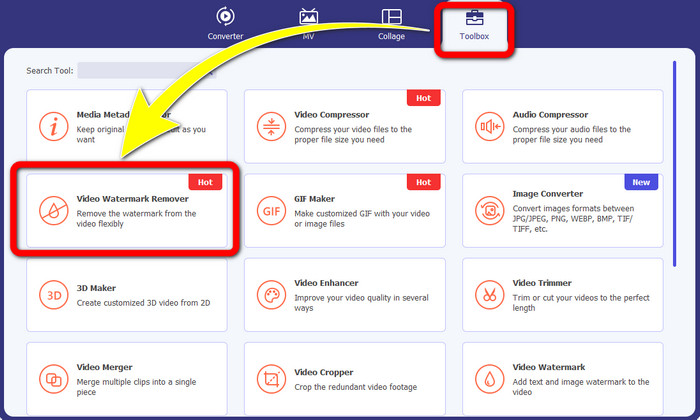
שלב 2: לאחר פתיחת Video Converter Ultimate, לחץ על הכפתור Toolbox > Video Watermark Remover. לאחר מכן ממשק נוסף יופיע על המסך.
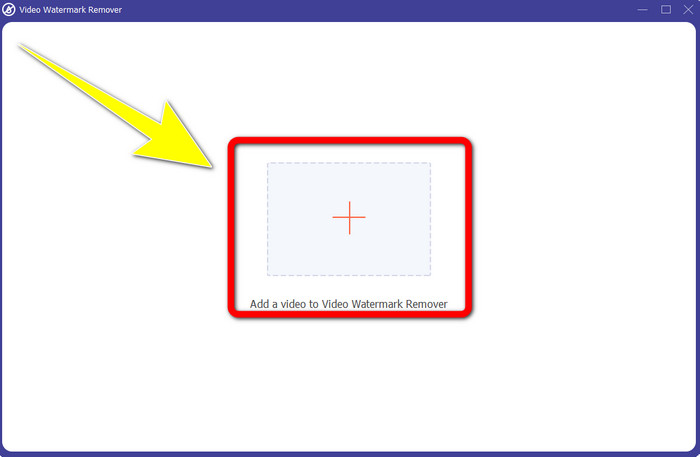
שלב 3: כאשר הממשק החדש כבר הופיע על המסך, לחץ על כפתור הסימן Plus כדי להוסיף את הסרטון שלך עם סימן המים של Biteable.
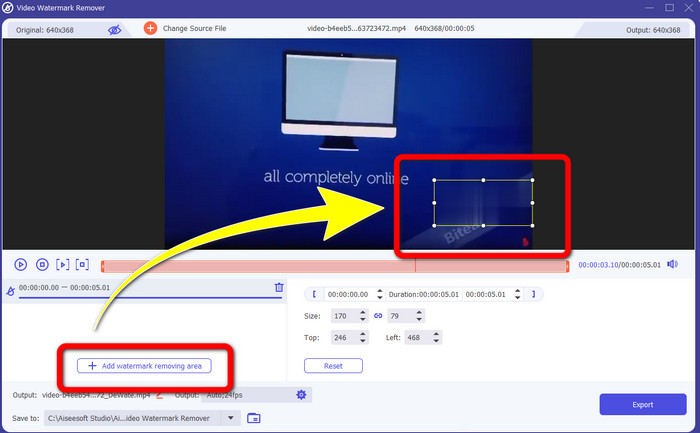
שלב 4: לאחר שהוספת את הסרטון שלך, לחץ על Add Watermark Removing Area. אז תופיע תיבה קטנה על גבי הסרטון שלך. גרור את התיבה כדי לכסות את סימני המים.
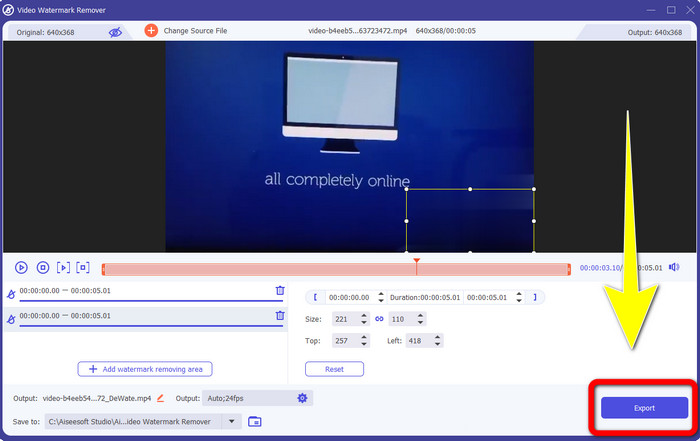
שלב 5: אם הסרת את סימן המים של Biteable מהסרטון שלך, לחץ על כפתור Export כדי לשמור את הפלט הסופי שלך.
שימוש בכלי Video Cropper
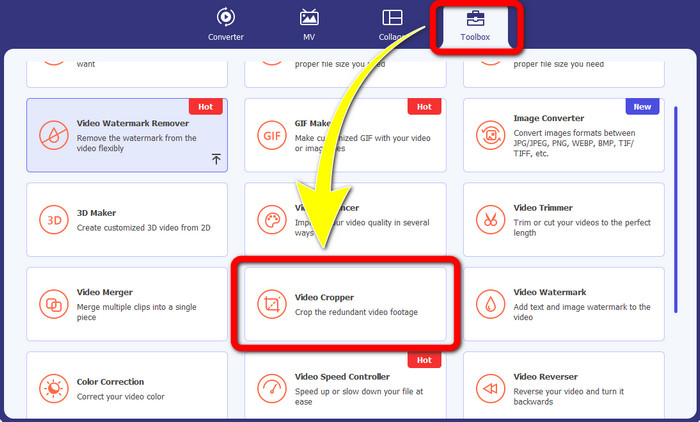
שלב 1: הפעל את Video Converter Ultimate. לחץ על הכפתור Toolbox > Video Cropper.
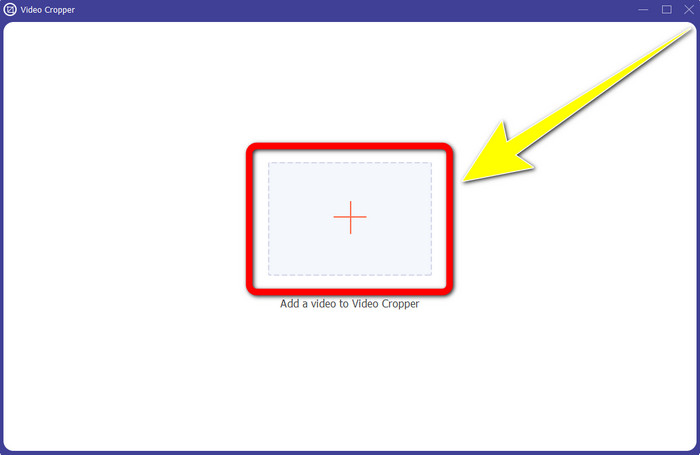
שלב 2: לאחר הלחיצה על Video Cropper, יופיע ממשק חדש על המסך. לחץ על סמל ה-Plus והוסף את הסרטון שלך עם סימן המים של Biteable.
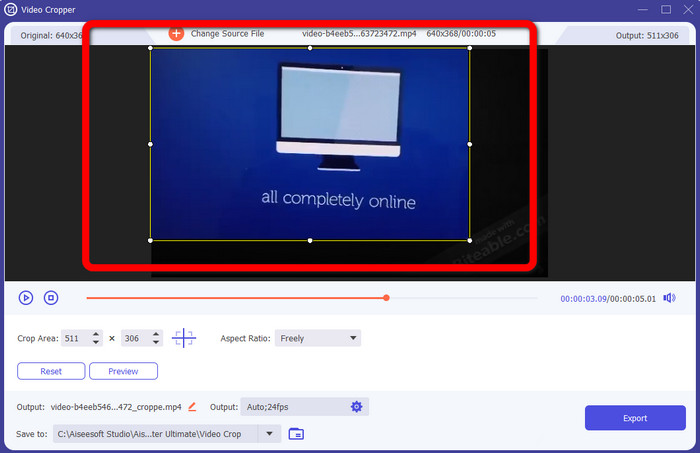
שלב 3: לאחר שהוספת את הסרטון, באפשרותך כעת לבצע Crop (חיתוך) כדי להסיר את סימני המים.
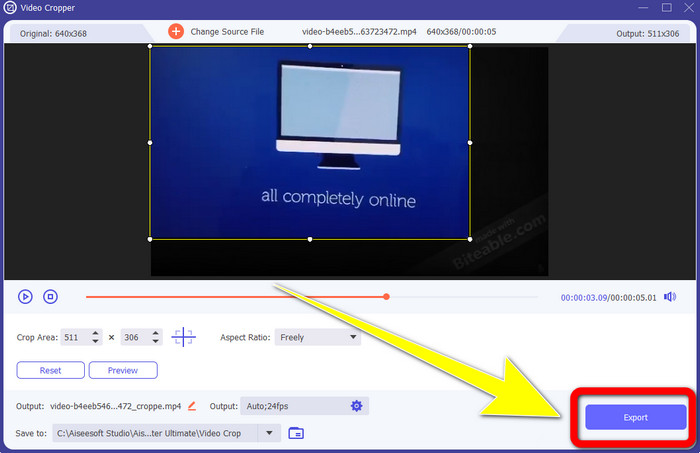
שלב 4: לאחר שסיימת לחתוך את הסרטון, לחץ על כפתור Export ושמור את הסרטון שלך ללא סימן המים של Biteable.
חלק 2: כיצד להסיר סימן מים שניתן לנשוך מסרטונים מקוונים
1. שימוש ב-BeeCut
אם אתה רוצה להסיר את סימן המים הניתן לנשיכה בחינם באינטרנט, BeeCut הוא היישום המקוון הטוב ביותר שאתה יכול להשתמש בו. זה מסוגל להסיר סימני מים מהסרטונים שלך. זהו כלי מקוון פשוט שבו אתה יכול להשתמש, שהוא מושלם למתחילים. אתה יכול להסיר סימני מים לנשיכה מארבעה סרטונים בכמה שלבים.
יתר על כן, ל-BeeCut יש כלי עריכה רבים, כמו חיתוך, חיתוך, פיצול ושילוב סרטונים. בנוסף, אם אתה רוצה לעשות סרטון, אתה יכול להוסיף כתוביות לסרטון שלך למטה, וזה נוח לצופים. עם זאת, הוא איטי בהעלאת קבצים ובתהליכי שמירת השימוש בכלי זה. כמו כן, אינך יכול להשתמש בכלי זה אם אין לך חיבור לאינטרנט. אם ברצונך להסיר סימני מים ניתנים לנשיכה מהסרטון שלך באמצעות כלי מקוון זה, בצע את השלבים הקטנים שלהלן.
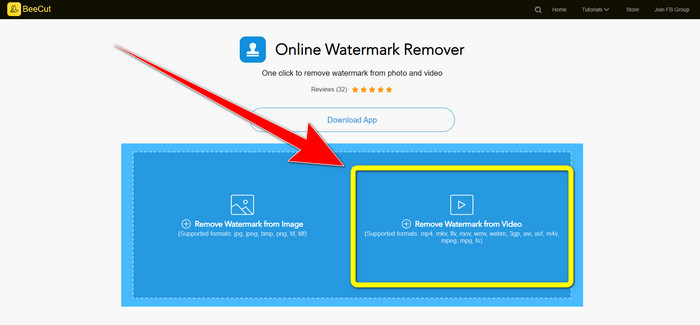
שלב 1: בקר באתר של BeeCut. לאחר מכן לחץ על הכפתור Remove Watermark from Video והוסף את הסרטון שלך עם סימן המים של Biteable.
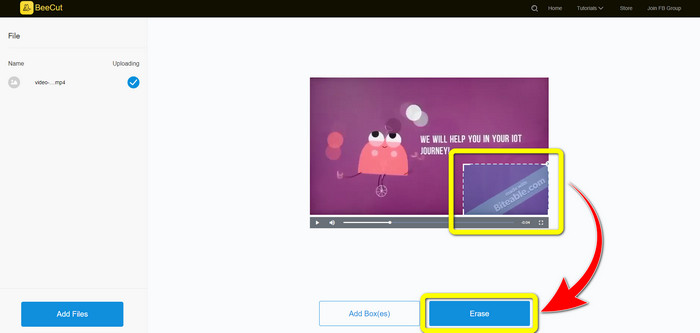
שלב 2: לאחר שהוספת את הקובץ, תופיע תיבה קטנה על גבי הסרטון שלך. גרור אותה וכסה את סימן המים של Biteable. לאחר שסיימת לכסות את סימני המים, לחץ על כפתור Erase.
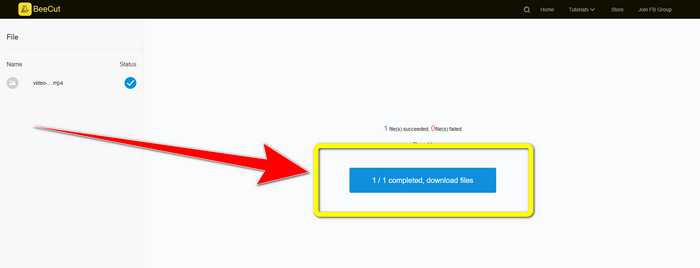
שלב 3: לאחר שלחצת על כפתור Erase, המתן לסיום תהליך ההסרה. לאחר מכן תוכל להוריד את הקובץ וליהנות מצפייה ללא סימן המים של Biteable על הסרטון שלך.
2. שימוש בוידאו לטשטש באינטרנט
אם אתה עדיין מחפש אפליקציה אחרת שבה תוכל להשתמש כדי להסיר את סימן המים הניתן לנשיכה מהסרטון שלך באינטרנט, Blur Video Online הוא כלי נהדר עבורך. ו-Blur Video Online זמין כמעט לכל המכשירים והדפדפנים, כמו Google Chrome, Opera, IE, Mozilla Firefox ועוד. עם זאת, יישום זה תלוי אינטרנט איטי מדי בייבוא קבצי וידאו, ותהליך הסרת סימני מים הוא זמן רב. זהו גם כלי תלוי אינטרנט, מה שאומר שהוא פועל רק אם יש לך חיבור לאינטרנט. בצע את השלבים הפשוטים שלהלן כדי להסיר/לטשטש סימן מים שניתן לנשוך מהסרטון שלך.
שלב 1: עבור לאתר של Blur Video Online. לאחר מכן לחץ על הכפתור Click to Add File והוסף את הסרטון שלך עם סימן המים.

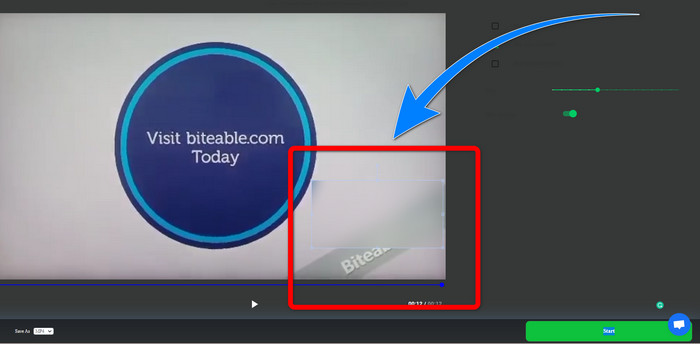
שלב 2: אם כבר הוספת את הסרטון שלך, תופיע תיבה על גבי הסרטון. גרור אותה כדי לכסות את סימני המים ו-שמור את הפלט הסופי שלך.
קשור אל:
הדרך הטובה ביותר להסרת סימן מים מ-Camtasia 9 במחשב ה-Windows שלך
כיצד להסיר במהירות את הבאנר של סימן המים מ-AVS Video Editor
חלק 3: שאלות נפוצות לגבי הסרת סימני מים ניתנים לנשיכה מסרטונים
האם אוכל להסיר חותמת תאריך באמצעות Video Converter Ultimate?
כן אתה יכול! Video Converter Ultimate יכול לסייע לך בביטול אובייקטים מטרידים מהסרטונים שלך, כמו חותמות תאריך, סימני מים, טקסט וכו'.
האם זה גוזל זמן להסיר סימני מים מהסרטונים שלי?
זה תלוי ביישומים שבהם אתה משתמש. יישומים מסוימים יכולים להסיר באופן מיידי את סימני המים מהסרטונים שלך, ולחלק מהיישומים לוקח זמן להסיר את סימני המים.
האם יש מסיר סימן מים שאני יכול להשתמש בו מבלי לאבד את איכות הסרטונים שלי?
כן, יש! תוכל להשתמש ב-Video Converter Ultimate. הוא לא רק מצטיין בהסרת סימני מים ועריכת וידאו. יישום זה מאפשר לך להסיר סימני מים מהסרטונים שלך מבלי לאבד מאיכותם.
סיכום
הסרת סימן המים מהסרטונים שלך היא נהדרת, במיוחד אם אתה רוצה לצפות בסרטונים האהובים עליך ללא אובייקטים מיותרים. מאמר זה סיפק לך יישומים מעשיים שבהם תוכל להשתמש להסרת סימני מים של Biteable מהסרטונים שלך. לבסוף, השימוש ב-Video Converter Ultimate הוא האפשרות הטובה ביותר אם אתה מחפש את היישום המצוין והמופלא ביותר להסרת סימני מים מהסרטונים שלך.
-
 כיצד להסיר את סימן המים של Powtoon באמצעות 4 שיטות יעילות
 קרא מאמר זה כדי ללמוד כיצד להסיר את סימן המים של Powtoon באמצעות הכלים הטובים ביותר שכללנו כאן ומדריך הדרכה.
-
 סקירת מסיר סימני מים של Apowersoft - תכונות, יתרונות וחסרונות ומחירים
 Apowersoft Watermark Remover הוא אחד מסימני המים הטובים ביותר שתומכים באינטרנט ובאופן לא מקוון, לחץ על זה כדי לדעת יותר!
-
 3 ממסירי סימני המים האחרונים של Shutterstock שאי פעם תזדקק להם
 לא אוהב את סימן המים של Shutterstock המצורף לווידאו המיוצא? אתה יכול להשתמש במסיר סימני מים של Shutterstock כדי למחוק אותו ביעילות.
