


 ממיר וידאו אולטימטיבי
 מקליט מסך
 תיקון וידאו
כיצד להסיר מטא נתונים מקבצים דרך Windows, Mac, Online וטלפונים
בכל קובץ מדיה יש מטא־דאטה המחובר לקובץ, בין אם זה וידאו, תמונה, אודיו וכו'. נניח שאתה מעלה קובץ מדיה לרשת; דרך הפוסט הזה מישהו יכול לקבל מידע על קואורדינטות של המיקום שלך, שעה, תאריך, יצרן, דגם המכשיר ועוד רבים אחרים, הידועים בשם נתוני EXIF. האם זה לא מפחיד לחשוב שמישהו יכול לקבל מידע דרך הפוסט שלך באמצעות המטא־דאטה? למרבה המזל, במאמר זה תלמד כיצד להסיר מטא־דאטה מכל קובץ מדיה ב‑Windows, ב‑Mac, אונליין ואפילו מהטלפון שלך לפני שתפרסם אותו ברשת.

חלק 1. הדרכים הטובות ביותר להסיר מטא נתונים על כל קבצים ב-Windows
הדרכים בהן נציג במאמר זה הן מסיר הנתונים המובנה שתוכל להשתמש בו ב-Windows והכלי של צד שלישי שבו תוכל להשתמש כדי למחוק את המטא נתונים בקלות. לכן, כדי לקבל רעיונות נוספים כיצד למחוק את המטא נתונים בקובץ שלך, אתה יכול לקרוא את הפרטים למטה ולבצע את השלבים כדי לעשות זאת בהצלחה.
השתמש במאפיינים ב-Windows
ב-Windows, אתה יכול להסיר בקלות מטא נתונים מסרטונים אם תרצה בכך. על ידי ביצוע השלבים שלהלן, תוכל להסיר את המידע על הקובץ שלך לפני שתפרסם אותם באינטרנט.
שלב 1. אתר את הקובץ בשולחן העבודה ולחץ עליו באמצעות לחצן ימין בעכבר; בתפריט שיופיע תראה את מאפיינים, לאחר מכן לחץ עליו.
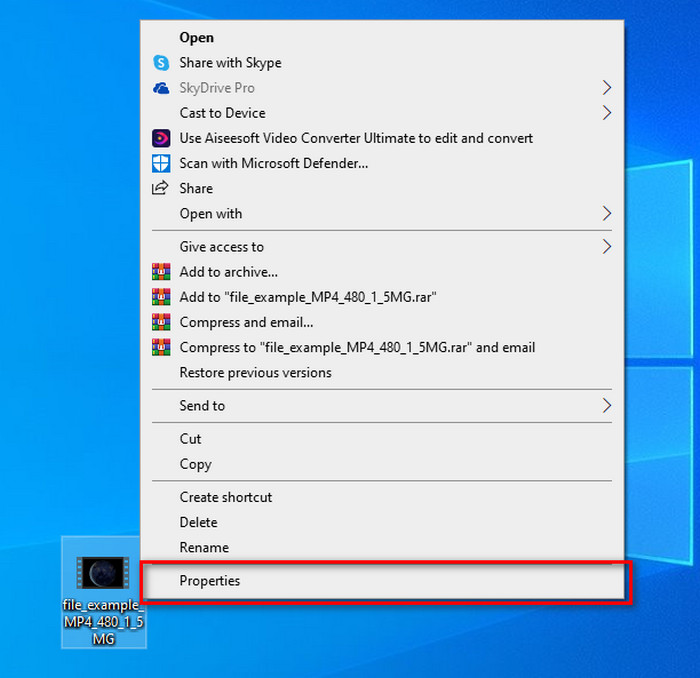
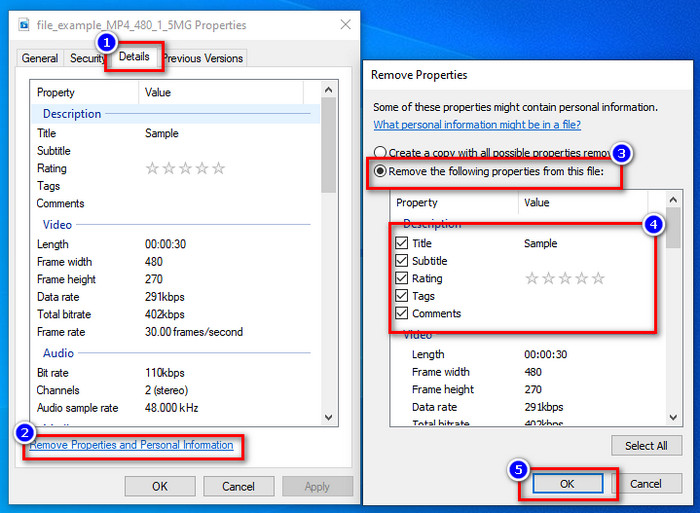
שלב 2. עבור אל פרטים, ומתחת לכך לחץ על הסר מאפיינים ומידע אישי.
שלב 3. סמן את תיבת המטא־דאטה שאינך רוצה לכלול בקובץ המדיה לפני פרסומו. לאחר שסיימת, לחץ על אישור; תיווצר עותק של הקובץ ללא המטא־דאטה שלו.
השתמש בכלי הטוב ביותר להסרת מטא נתונים ב-Windows ו-macOS
נניח שאתה מחפש את כלי ההסרה הטוב ביותר למטא־דאטה – FVC Video Converter Ultimate הוא הכלי שאתה צריך. זהו הכלי המומלץ על ידי מומחים להסרת מטא־דאטה מקובצי המדיה לפני שהמשתמשים מפרסמים אותם ברשת. למרות שזה כלי ברמת מומחה, כל אחד יכול להשתמש בו בקלות מבלי להשקיע מאמץ רב כדי להסיר את הנתונים מהקובץ. בנוסף, זהו פתרון צד שלישי עבורך אם השיטות שלימדנו אינן מצליחות להסיר לחלוטין את המטא־דאטה מהקובץ שלך. השלבים הבאים יעזרו לך למחוק את הנתונים שברצונך להסיר מהקובץ – עקוב אחריהם בהתאם.
שלב 1. לפני הסרת המטא־דאטה עליך קודם להוריד את הכלי על‑ידי לחיצה על כפתור ההורדה שלמטה. לחץ על מערכת ההפעלה המתאימה שבה אתה משתמש, Windows או Mac, ואז התקן אותה מיד. לאחר מכן פתח את הכלי בלחיצה על Start Now.
הורדה חינמיתל-Windows 7 ומעלההורדה מאובטחת
הורדה חינמיתל-MacOS 10.7 ומעלההורדה מאובטחת
לתהליך חלק, עליך להכיר את ממשק המשתמש של הכלים לפני שתמשיך לשלב הבא.
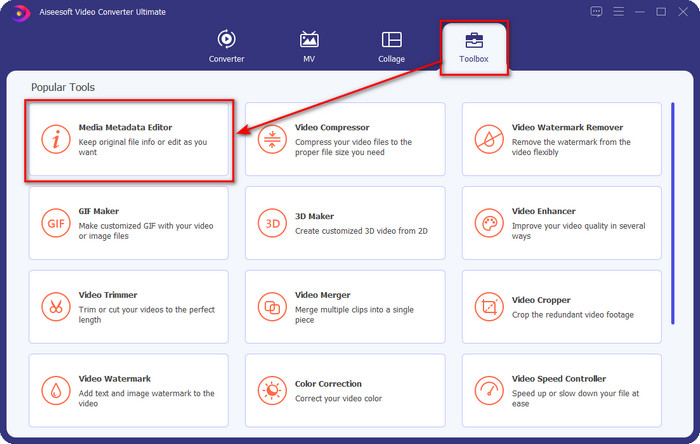
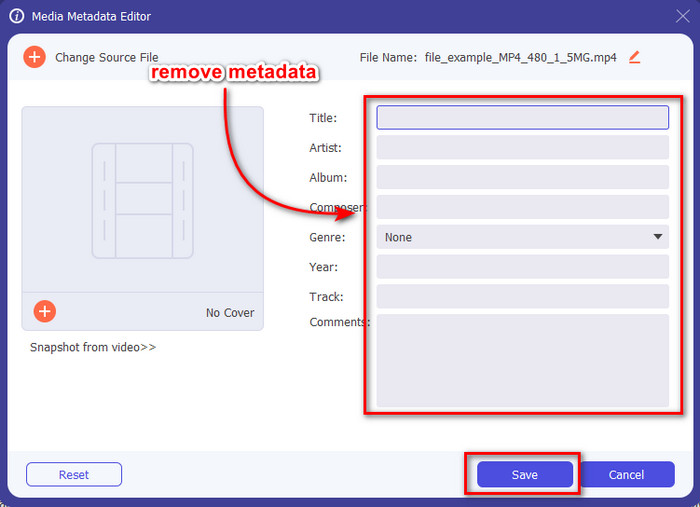
שלב 2. כעת, לאחר שפתחת את חלק הארגז כלים (Toolbox), לחץ על עורך מטא־דאטה של מדיה (Media Metadata Editor) שבו.
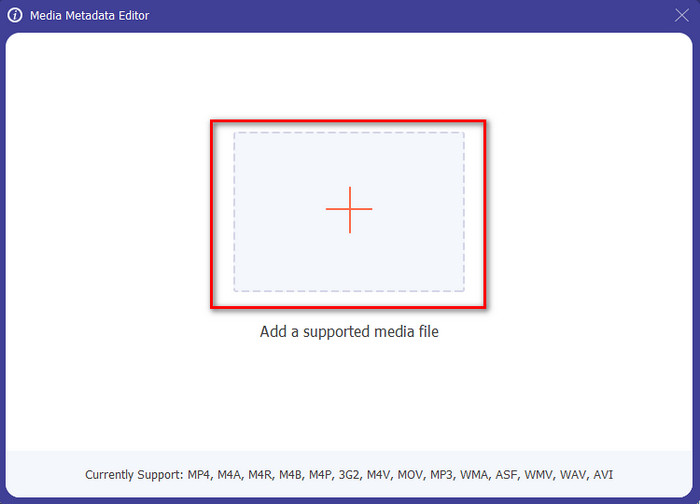
שלב 3. חלון חדש יופיע על המסך שלך; על‑ידי הקשה על כפתור ה+ תוכל להוסיף את קובץ המדיה שממנו אתה רוצה להסיר את המטא־דאטה, ואז להקיש על Open כדי להעלות אותו.
שלב 4. לחץ על תיבת הטקסט של כל פריט מטא־דאטה שברצונך להסיר, ואז לחץ על Delete במקלדת. כדי לשמור את הקובץ, באפשרותך ללחוץ על Save, והוא לא ייצור עותק נוסף – הקובץ הקיים יישמר ללא מטא־דאטה. קל, נכון? זה גם חוסך מקום בשולחן העבודה משום שלא נוצר עותק נוסף של הקובץ שמחקת ממנו מטא־דאטה.
חלק 2. הדרך הטובה ביותר למחוק מטא נתונים מקבצים ב-Mac
ב-Mac, אתה יכול להסיר בקלות את המידע על התמונה שלך; עם זאת, אתה יכול להסיר רק את נתוני המיקום. לכן, אם אתה רוצה ללמוד להסיר מטא נתונים מקובץ ב-Mac יותר מאשר מיקום, עליך להשתמש בכלי שאנו מציגים למעלה.
שלב 1. עבור אל Preview ופתח את הקובץ.
שלב 2. לחץ על Tools, לאחר מכן על Show Inspector ולחץ על הסמל i כדי לראות את נתוני המיקום.
שלב 3. בכרטיסיית GPS לחץ על Remove Location info, והמידע על המיקום יוסר אוטומטית מקובץ המדיה.
חלק 3. כיצד להסיר מטא נתונים במכשירי אנדרואיד ו-iOS
השתמש ב-Exiftool - הצג, ערוך מטא נתונים של תמונה ווידאו (אנדרואיד)
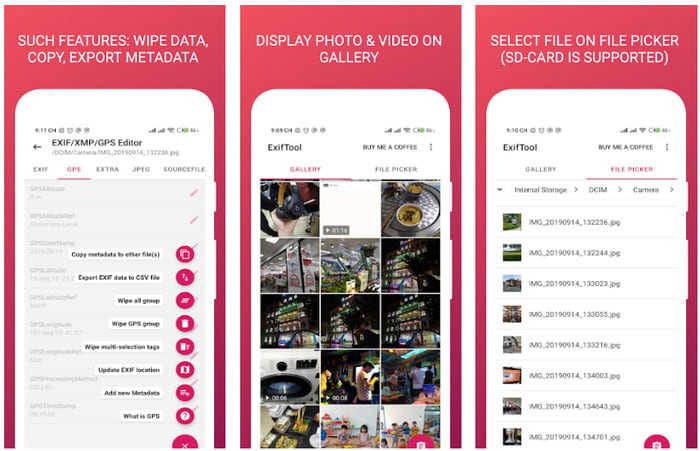
Exiftool – צפייה ועריכת מטא־דאטה של תמונה ווידאו יכול לעזור לך להסיר מטא־דאטה של וידאו באנדרואיד באמצעות הורדת הכלי. בעזרת כלי זה תוכל להוסיף, להסיר ולעדכן את נתוני ה‑EXIF של וידאו ותמונות בחינם. אם ברצונך להשתמש באפליקציה, עקוב אחר השלבים שלהלן.
שלב 1. הורד את האפליקציה מ‑Play Store ולחץ על Install.
שלב 2. פתח את האפליקציה ובחר את הקובץ שממנו אתה רוצה להסיר את המטא־דאטה.
שלב 3. לחץ על option ואז על Wipe Quicktime Group כדי להסיר את המטא־דאטה באופן אוטומטי.
השתמש במסיר מטא נתונים של תמונות ווידאו (iOS)
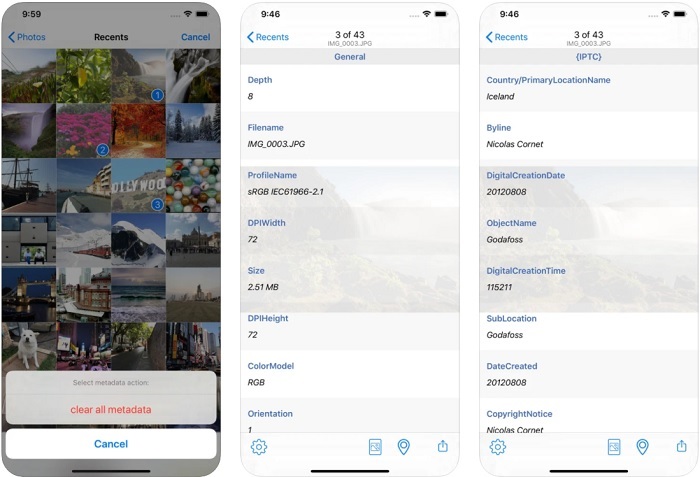
אם אתה משתמש iOS, אתה יכול להשתמש במסיר מטא נתונים של תמונות ווידאו וללמוד כיצד לנקות מטא נתונים במכשירי iOS שלך. אפליקציה זו תומכת בכל פורמטי המדיה המקוריים במכשירי אפל, והיא בדיוק עושה את העבודה שלה כמסיר מטא נתונים. אם יש לך מכשיר iOS, תוכל להעתיק את השלבים הבאים.
שלב 1. כדי להוריד את האפליקציה עליך להיכנס ל‑App Store, לחפש אותה ואז להתקין.
שלב 2. פתח את הכלי ואפשר לאפליקציה לגשת ל‑Photos שלך, בחר את הווידאו או התמונה שממנה אתה רוצה להסיר את המטא־דאטה.
שלב 3. הקש על סמל הגלגל השיניים, ואז לחץ על clear all metadata, והוא ייצור עותק של הקובץ ללא מטא־דאטה.
חלק 4. כיצד להסיר מטא נתונים באמצעות כלי אינטרנט בחינם
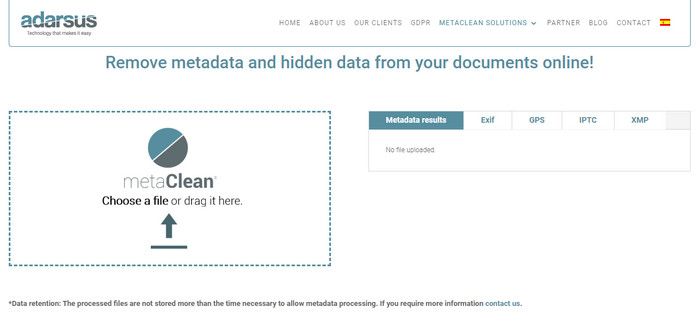
Adarsus – Remove Metadata יכול לעזור לך להסיר מטא־דאטה אונליין, ובחינם. בשונה מהממירים האחרים שלמעלה, אין צורך להוריד את הכלי לשולחן העבודה כדי להשתמש בו, משום שזהו כלי אינטרנט; כדי לגשת אליו תצטרך חיבור לאינטרנט. אם ברצונך להתנסות בהסרת מטא־דאטה בחינם, עקוב אחר השלבים הבאים.
שלב 1. פתח את הדפדפן וחפש את הכלי.
שלב 2. באתר הכלי לחץ על כפתור upload ובחר את הקובץ שממנו תרצה להסיר את המטא־דאטה.
שלב 3. לחץ על Get my File Clean, ותיווצר גרסה של הקובץ ללא מטא־דאטה.
חלק 5. תרשים השוואה לגבי מסיר המטא נתונים ב-Windows, Mac, Online, Android ו- iOS
| תכונות | ממיר וידיאו אולטימטיבי | מאפיינים בווינדוס | תצוגה מקדימה ב-Mac | Exiftool - הצג, ערוך מטא נתונים של תמונה ווידאו (אנדרואיד) | מסיר מטא נתונים של תמונות ווידאו | אדרסוס - הסר מטא נתונים |
| בטוח לשימוש |  | | | | | |
| ידידותי למשתמש | | | | | | |
| נקה את כל המטא נתונים | | |  | | | |
| ערוך מטא נתונים | | | | | | |
| שכפל את הקובץ | | | | | | |
| הגבלה/ים | זה לא זמין במכשירים ניידים ובאינטרנט | לפעמים הנתונים לא נמחקים לחלוטין. | זה לא מסיר מטא נתונים אחרים מלבד מיקום. | לא יעיל כמו הכלי האולטימטיבי. | רוב הזמן, זה נכשל בהסרת המטא נתונים | ישנה הגבלה על גודל הקובץ, שהוא 5MB. |
חלק 6. שאלות נפוצות לגבי הסרת מטא נתונים
האם הסרת מטא נתונים מקטינה את גודל הקובץ?
כן, זה יהיה בגלל שמטא נתונים מוסיפים גודל לקובץ המדיה עם המידע שלו. אתה יכול לחסוך פחות מקום על ידי הסרתו, והוא יהיה קטן יותר מבעבר. עם זאת, המידע שנמצא בקובץ שלך יוסר.
האם לאחר הסרת מטא נתונים, האיכות תשפיע עליו?
לא, זה לא יהיה; האיכות לא תושפע גם אם תשנה או תסיר את המטא נתונים של קובץ המדיה שלך. אז, אל תדאג כי עדיין תהיה לך אותה איכות גם בלי או עם מטא נתונים.
האם לכל פורמטי הקבצים יש מטא נתונים?
לרוב פורמטי המדיה יש מבני מטא־דאטה שונים, אך לא לכל פורמטי המדיה יש מטא־דאטה. במקרים מסוימים פורמטים אינם יכולים להכיל מטא־דאטה בשל המבנה, העיצוב ועוד גורמים רבים.
סיכום
כעת למדנו כיצד להסיר מטא־דאטה מהקובץ כדי להגן על פרטיותך, בפשטות כזו. בעזרת הכלים שהוצגו במאמר זה ניתן להסיר את המטא־דאטה לפני הפרסום ברשת. אף שאנו מציעים חמישה כלים למחיקת מטא־דאטה, אין ספק ביכולות של FVC Video Converter Ultimate, משום שהכלי יכול להסיר לחלוטין את כל הנתונים או חלקים מסוימים מהם במהירות של 1‑2‑3. אם אתה מטיל ספק בביקורת שלנו, תוכל לבדוק את הכלי על‑ידי הורדתו לכונן המחשב ולנסות אותו בעצמך כדי לראות אם הוא באמת עומד בציפיות!
-
 4 דרכים להמיר WMV ל-MKV ב-Mac, Windows ומקוון ללא הפסדים
 רוצה להמיר WMV ל-MKV ב-Mac ו-Windows? מאמר זה מציג את הדרכים הטובות ביותר להמיר WMV ל-MKV במהירות.
-
 4 מצופי המטא נתונים הטובים ביותר באינטרנט ובאופן לא מקוון [עודכן 2022]
 האם אני יכול לבדוק את המטא נתונים של הקובץ שלי? כן, אתה יכול, בעזרת הפוסט הזה נציג בפניך את צופי המטא נתונים השונים שבהם תוכל להשתמש.
-
 ממירי WebM ל-MKV הטובים ביותר שבהם עליך להשתמש כדי להמיר במהירות
 האם אתה מחפש דרכים להמיר קבצי WebM ל-MKV? מאמר זה מציג את ממירי WebM ל-MKV הטובים ביותר שתוכלו לנסות.
