


 ממיר וידאו אולטימטיבי
 מקליט מסך
 תיקון וידאו
 הורדה מאובטחת
כיצד להיפטר מסימן המים של Power Director בחינם [100% עובד]
כשמדובר בבחירה בעורך וידאו ומפיק וידאו מלא-יכולות, אי אפשר לטעות בבחירה ב‑Power Director במכשיר שלך. אפשר לצפות לכך שתקבל תוצאה נפלאה כשתשתמש בו לעריכת וידאו למצגות, וולוגים, מדריכים, הדגמות ועוד. עם זאת, חשוב לדעת שהוא מוסיף סימן מים לסרטונים הערוכים אם אתה משתמש כרגע בגרסה החינמית. יש משתמשים שנעשו מתוסכלים מכך שסימן המים נוסף לסרטון שעליו עבדו קשה. במקום להתוסכל, למה שלא תקרא את המאמר הזה? בוא נלמד איך להיפטר מסימן המים של Power Director בחינם כדי לפתור את הבעיה אחת ולתמיד.

חלק 1. כיצד להיפטר מסימן המים של Power Director בחינם עם הפתרונות המובילים בשוק
ממיר וידיאו אולטימטיבי
הגרסה המעודכנת של FVC Video Converter Ultimate כוללת מסיר סימן מים של וידאו שבו אתה יכול להשתמש כדי להציג את הסרטון ב-PowerDirector למחשב ללא סימן מים. הכלי הזה הפך לכלי השלם שיכול לבצע משימה רב תכליתית בו זמנית ולעשות אותה בצורה מקצועית עם עיבוד מהיר. מה שמדהים אותנו עם הכלי הזה הוא כמה קל להשתמש בו. אם אתה משתמש בזה, אתה לא צריך להיות מקצוען כדי להסיר את סימן המים מהסרטון שלך. עבור המשתמשים המחפשים את מסיר סימני המים הטוב ביותר, אתה לא יכול להשתבש עם הורדת תוכנה זו על שולחן העבודה שלך בחינם. עדיין לא השתכנעתם? הדרך היחידה לשכנע אותך שהוא עושה ביצועים אולטימטיביים היא על ידי העתקת המדריך שאנו מוסיפים כדי שתוכל לעקוב אחריו.
שלב 1. תוכל להוריד את התוכנה הזו בחינם ל‑Windows או ל‑macOS על‑ידי לחיצה על כפתור ההורדה למטה. לאחר שתבחר את הגרסה שברצונך להוריד, התקן מיד את התוכנה ואז פתח אותה.
הורדה חינמיתל-Windows 7 ומעלההורדה מאובטחת
הורדה חינמיתל-MacOS 10.7 ומעלההורדה מאובטחת
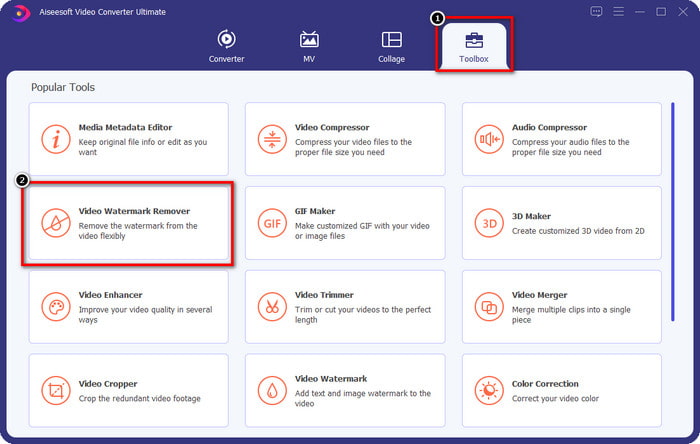
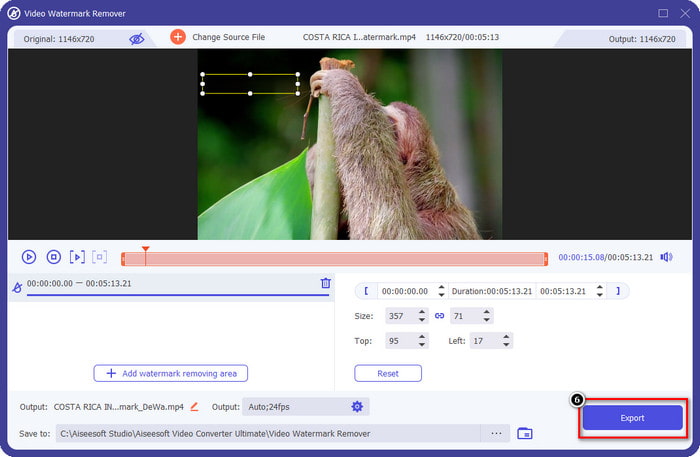
שלב 2. כעת, כשהיא פועלת במערכת, עבור אל Toolbox וחפש את Video Watermark Remover ברשימת הפונקציות.
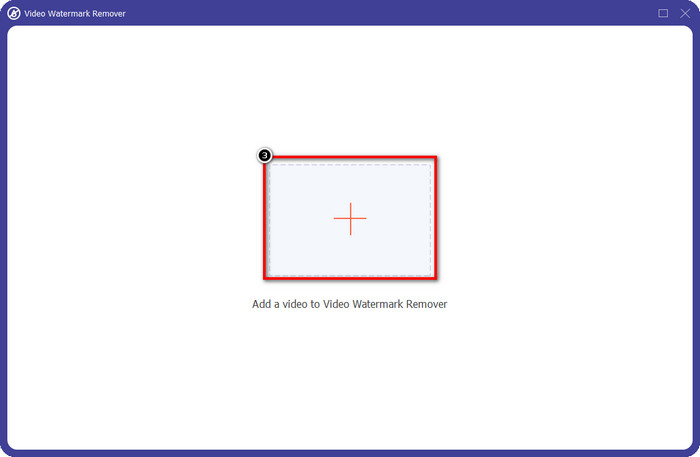
שלב 3. לאחר מכן לחץ על סמל ה‑+ כדי להעלות את קובץ הווידאו שאתה נתקל בו בבעיה.
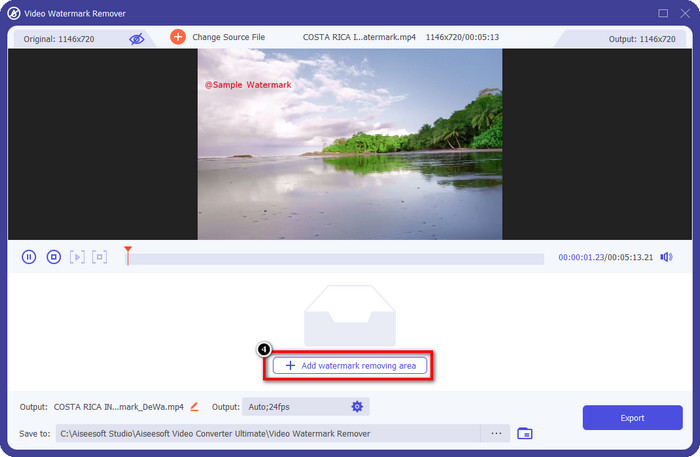
שלב 4. לחץ על Add Watermark Removing Area כדי להתחיל להשתמש בכלי של התוכנה הזו.
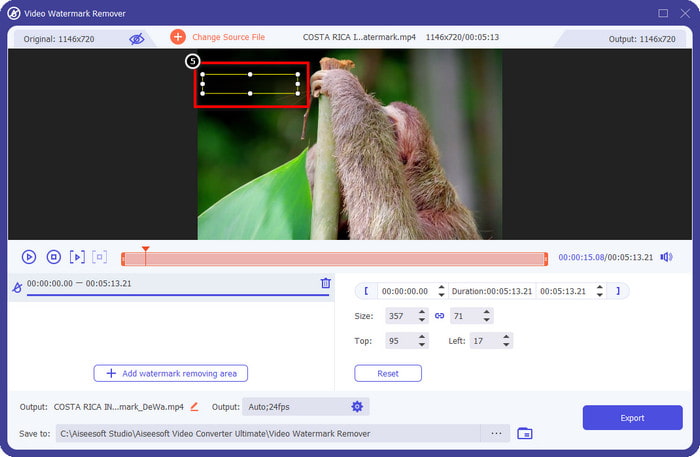
שלב 5. בעזרת העכבר גרור את הצורה המלבנית אל אזור סימן המים ואז שחרר. באפשרותך להתאים את המלבן כדי להדגיש את סימן המים.
שלב 6. לחץ על כפתור Export כדי להתחיל בתהליך הסרת סימן המים. בסיום, תיקייה קופצת תופיע על המסך; לחץ על הקובץ כדי לצפות בסרטון ללא סימן המים.
נגן מדיה VLC
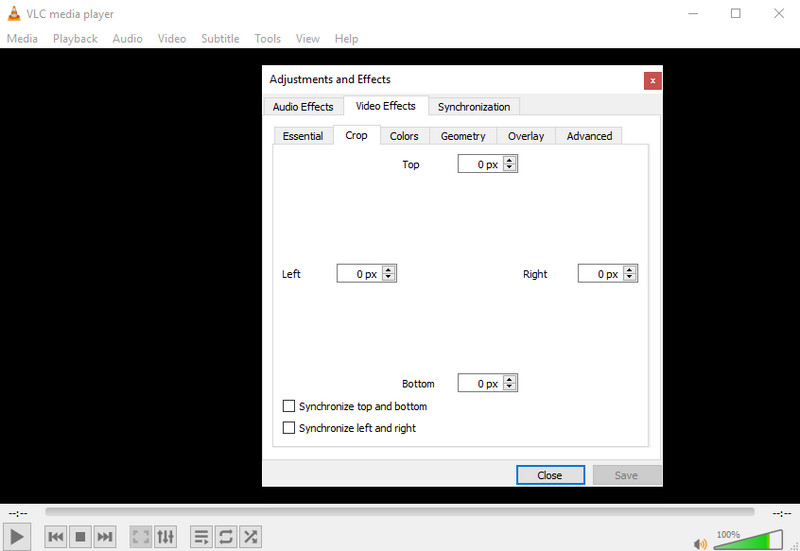
VLC Media Player איננו מסיר סימני מים ייעודי, אבל הוא יכול לבצע את העבודה באמצעות חיתוך סימן המים מתוך הווידאו שיש לך. הכלי הזה הוא לא רק נגן וידאו ומחתך; יש עוד דברים שנגן המדיה הפופולרי הזה יכול להציע לך. אבל אל תצפה שהכלי הזה יהיה מסוגל לעריכה מקצועית וקלה לשימוש, משום שהוא לא כזה. בעת חיתוך הווידאו תצטרך להוסיף את המידות המדויקות כדי לחתוך את סימן המים מתוך הסרטון. אז אם אתה יודע את ערכי ה‑x וה‑y המדויקים של הווידאו, תוכל לעקוב אחרי ההוראות כיצד להסיר את סימן המים "edited by PowerDirector" בעזרת נגן המדיה הזה.
שלב 1. לאחר הורדת התוכנה מ‑VideoLAN.org, פתח את התוכנה. לחץ על Media, ואז על Open File, וחפש בכונן המקומי שמופיע על המסך את קובץ הווידאו שאתה עורך ב‑Power Director.
שלב 2. הווידאו יתחיל להתנגן, לחץ על Tools ואז על Effects and Filter. אפשר גם להשתמש במקלדת על‑ידי לחיצה על Control + E ב‑Windows ו‑Command + E ב‑Mac.
שלב 3. עבור אל Video Effects, Crop והוסף את המידות לוידאו כדי לחתוך את סימן המים.
שלב 4. כדי להחיל את ההתאמות שביצעת, לחץ על Save.
קאפווינג
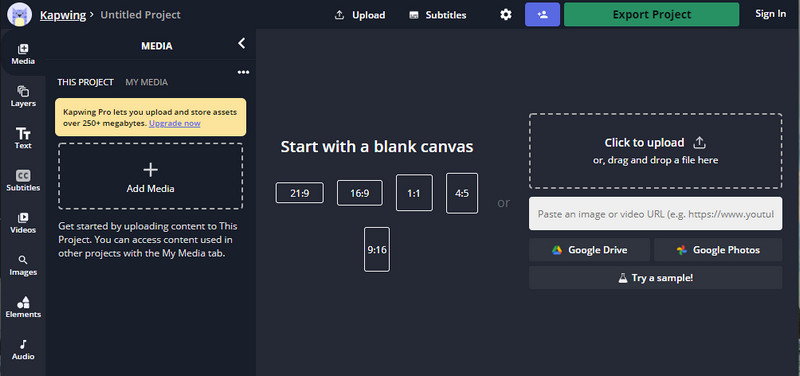
צריך עורך וידאו באינטרנט? נסה להשתמש ב-Kapwing. זהו כלי אינטרנט אינטואיטיבי שבו אתה יכול להשתמש כדי לערוך סרטונים כמו מה שאתה יכול לעשות ב-Power Director. ובכל זאת, זה לא ברמה הנכונה של מנהל הכוח. רוב עריכת הווידאו שאולי תצטרך כבר כאן, כמו חיתוך סימן המים. למרות שהכלי עושה את אותה עבודה כמו VLC בהסרת סימן המים, לכלי זה יש חלונית תצוגה מקדימה שבה אתה יכול לראות את הסרטון החתוך לפני הייצוא. לכן, אם אתה רוצה לשמור סרטונים, אתה עורך ב-Powerdirector ללא סימן מים למחשב; תחילה עליך לחתוך אותם כאן.
שלב 1. פתח את כלי האינטרנט על‑ידי חיפוש שלו בדפדפן, ואז לחץ על Add Media כדי להעלות לכאן את קובץ הווידאו. תתקיים פעולת העלאה, ולכן יהיה עליך להמתין לפני שתוכל להשתמש בווידאו שהעלית.
שלב 2. לחץ על Crop בצד שמאל של הממשק כדי לפתוח את אפשרויות החיתוך שלו.
שלב 3. התאם את המסגרת וודא שסימן המים של הווידאו אינו כלול במסגרת.
אופציונלי: אם אינך רוצה לשנות את ממדי הווידאו באופן ידני, יש למטה אפשרויות זמינות שתוכל להשתמש בהן בחופשיות.
rame ולוודא שסימן המים של הסרטון אינו כלול במסגרת." /]שלב 4. כשמסיימים, לחץ על Done Cropping כדי לשמור את הסרטון שחתכת באמצעות Kapwing.
קשור:
כיצד להסיר את סימן המים מסרטונים שיוצאו מ‑Renderforest
כיצד להסיר את סימן המים של Viva Video מסרטונים
חלק 2. שאלות נפוצות על הסרת סימן מים של Power Director
האם זה בטוח להוריד את Powerdirector ללא סימן מים apk בחינם עבור אנדרואיד?
כן, אתה יכול לבקר בחנות Play ולחפש את השם שלה כדי להוריד את אפליקציית Power Director. עם זאת, גרסת הניסיון החינמית של כלי זה מוסיפה סימן מים. נניח שאתה מנסה להוריד את האפליקציה באתרי צד שלישי כדי לקבל את הגרסה המלאה. במקרה כזה, אסור לך לעשות זאת מכיוון שיכולים להיות וירוסים זדוניים בקובץ לאחר הורדת האנדרואיד שלך. כדי להסיר את סימן המים ב- Powerdirector, עליך לרכוש מפתח רישיון.
כמה עולה אפליקציית Power Director במחשב?
אתה יכול לקבל את Power Director 365 עבור $ 4.08 מחיר התחלתי בכל חודש, אתה יכול ללכת לתוכניות ולמנוי באתר הרשמי שלו. אתה יכול גם לראות את התכונות הכלולות שאתה יכול לקבל ברגע שאתה נצל את התוכנית לבחירתך.
האם ל-Cyberlink PowerDirector יש סימן מים?
כן, זה מוסיף סימן מים ברגע שאתה מייצא את הסרטון בגרסה החינמית של האפליקציה, אך ניתן להימנע מכך. אם אתה רוכש את התוכנה של כל תוכנית או מנוי, לא תצטרך לדאוג לגבי סימן המים מכיוון שלא יתווסף סימן מים של המוצר לאחר ייצוא.
סיכום
אם אתה רוצה לייצא את הסרטונים, אתה יוצר אותם ב- PowerDirector למחשב ללא סימן מים. עליך לרכוש מפתח רישיון עבור תוכנית זו. אבל אם אינך רוצה להוציא לפחות אגורה, בחר בכלים שאנו מוסיפים למאמר זה מכיוון שכלים אלה יכולים להסיר ביעילות את סימן המים בסרטונים הערוכים שלך. עדיין לא השתכנעת עם הכלי שהוספנו במאמר זה? אז זה יעזור אם תנסה אותם קודם, החל מהכלי האולטימטיבי להסרת סימן המים של Power Director.
-
 הסר את סימן המים של אנימוטו בסרטונים בקלות וביעילות
 כיצד להסיר את סימן המים של אנימוטו בסרטון? המשך לקרוא מאמר זה מכיוון שסיפקנו הדרכה מלאה כיצד לעשות זאת.
-
 כיצד להסיר סימן מים מהסרטון באמצעות Final Cut Pro [מדריך שלם]
 יש לך בעיה עם סימן המים בסרטונים? לא אמרנו יותר, כי סיפקנו מדריך כיצד להסיר סימן מים מהסרטון באמצעות Final Cut Pro.
-
 3 דרכים כיצד להסיר סימן מים של WeVideo עם אפקט מיידי
 האם אתה מתקשה לפתור את בעיית סימן המים ש-WeVideo משאיר? אל תדאג יותר, כי אנו מוסיפים את המידע שאתה חייב לדעת.
