


 ממיר וידאו אולטימטיבי
 מקליט מסך
 תיקון וידאו
 הורדה מאובטחת
כיצד להסיר את סימן המים מסרטוני הווידאו המיוצאים מ-Renderforest בסופו של דבר
Renderforest הוא הסכם מלא של תבניות מונפשות מעולות עבור פתחי פתיחה, outros, כותרות, פרסומות וכדומה. אתה יכול להתחיל מאפס או להשתמש בתבניות הזמינות כאן. למרות שאתה לא מומחה לעריכת וידאו, אתה עדיין יכול להתגבר על זה באמצעות פלטפורמת אינטרנט זו. בשל השימוש והיתרון האופטימלי שלה, משתמשים רבים בחרו בפלטפורמה זו כדי ליצור עיצוב איכותי, יעיל, תואם ואמין אם אתה משתמש במנוי.
כך שתוכל להוריד כאן בחינם את הסרטון שערכת, אם תירשם, אך עם סימן מים. סימן המים יוצר בעיה עבור רבים מאתנו שכבר מייצאים לכאן את הסרטון, ועבור מי שאינם יכולים להרשות לעצמם את דמי המנוי של הכלי. בהמשך נפרט מדריכים על הסרת סימן המים מ‑Renderforest תוך שימוש בכלים המועילים ביותר שאספנו במהלך הבדיקה שלנו. נוכל לשתף אותם אתך אם תמשיך לקרוא את החלק הבא של המאמר.

חלק 1. 3 דרכים יעילות כיצד להסיר סימן מים מ-Renderforest Video
ממיר וידיאו אולטימטיבי
FVC Video Converter Ultimate הוא מסיר סימני מים לסרטונים ברמה מרשימה, שיכול להדריך אותך כיצד להסיר את סימן המים של Renderforest. ניתן לסמוך על כלי זה כדי להסיר את סימן המים מהווידאו שלך בלי טרחה. אם נשווה את הכלי האולטימטיבי הזה לאחרים, לכלי זה יש את היכולת להסיר את סימן המים מהווידאו שלך בעזרת טכנולוגיית בינה מלאכותית. עם זאת, זהו הכלי הטוב ביותר להסרת סימן המים מהווידאו שלך בכל פורמט שתעלה. מה הופך את הכלי הזה למצטיין? אינך צריך להיות טכנולוג גדול כדי להשתמש בו; בעזרת המדריך והשלבים הפשוטים שלמטה, תוכל להסיר את סימן המים ש‑Renderforest מצרפת לסרטון.
שלב 1. אנא הורד את התוכנה למחשב השולחני שלך על‑ידי לחיצה על כפתור ההורדה המתאים. לחץ על קובץ ההורדה, התקן אותו, ואז על Start Now כדי להפעיל את התוכנה מיד.
הורדה חינמיתל-Windows 7 ומעלההורדה מאובטחת
הורדה חינמיתל-MacOS 10.7 ומעלההורדה מאובטחת
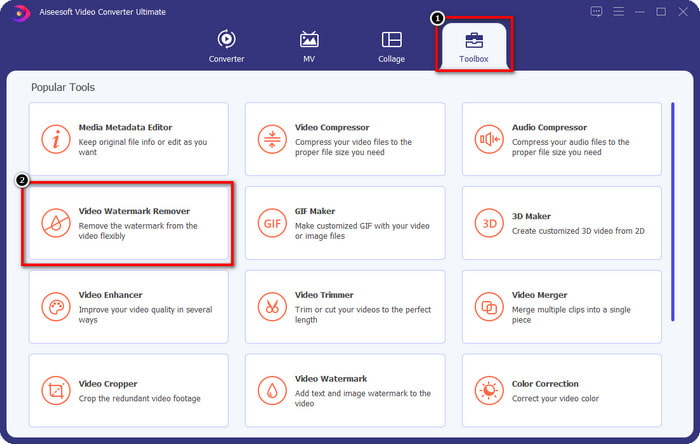
שלב 2. לאחר הפעלת התוכנה, פתח את הארגז כלים, ולאחר מכן לחץ על Video Watermark Remover שבתוכו.
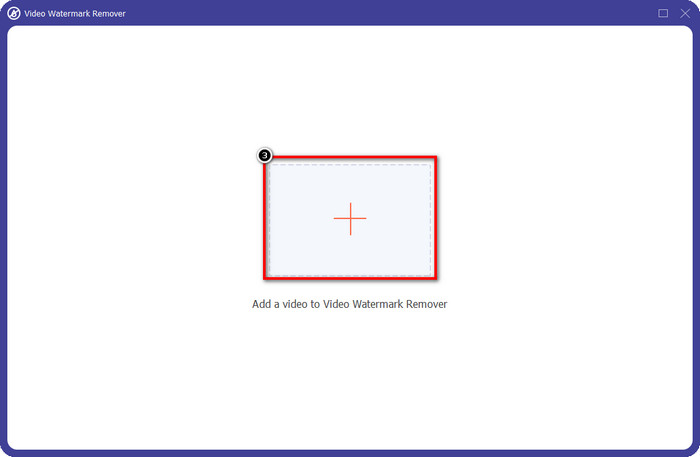
שלב 3. לחץ על סמל ה+ שעל המסך שלך כדי להעלות את סרטון ה‑Renderforest שהוצאת עם סימן מים.
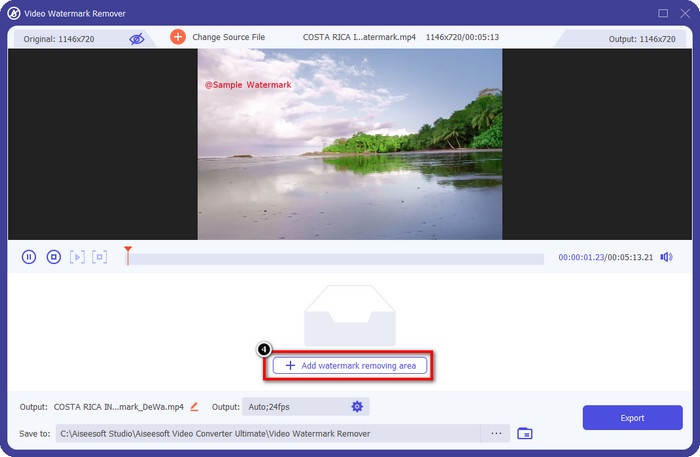
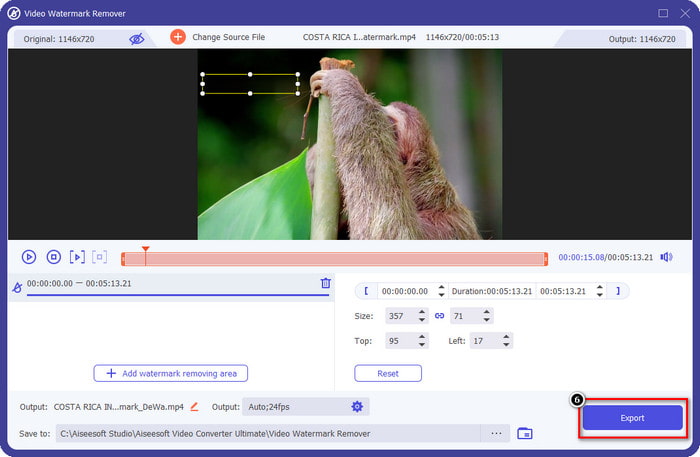
שלב 4. לחץ על Add Removing Watermark Area כדי להתחיל להסיר את סימן המים של Renderforest.
שלב 5. בחלון החדש שעל המסך, גרור את תיבת הבחירה והתאם אותה לגודל סימן המים. באפשרותך להתאים את תיבת הבחירה בחופשיות לפי הצורך.
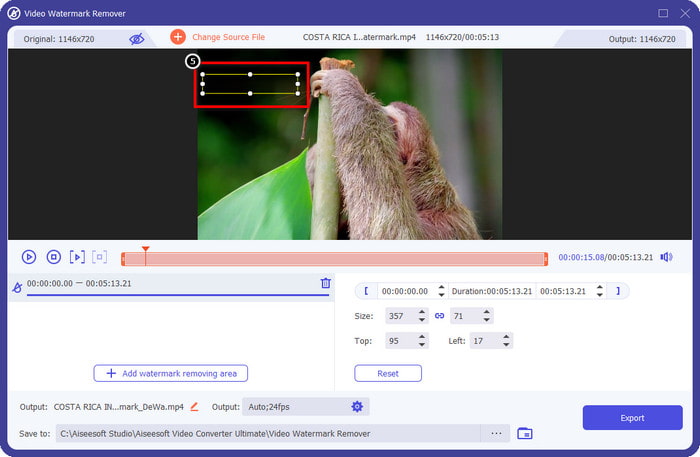
שלב 6. כעת, כאשר תיבת הבחירה מזהה את סימן המים בווידאו שלך, לחץ על Export כדי להתחיל להסיר ולשמור את הסרטון ללא סימן מים. התוכנה תעבד את הסרטון במהירות, ותוכל להשתמש בווידאו ללא סימן המים המפריע.
קשור:
הסר את הלוגו עכשיו
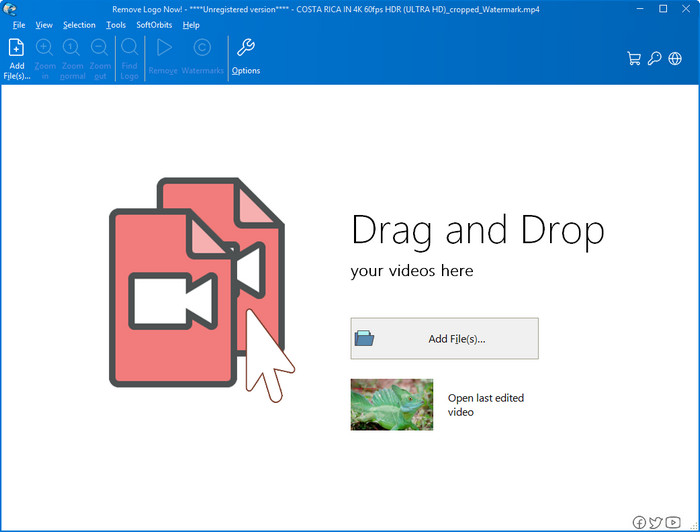
הבא ברשימה שלנו, Remove Logo Now ביסס מוניטין מצוין בהסרת סימני מים שמונחים על גבי הווידאו במחשבי Windows. בעזרת הכלי הזה, אינך צריך מומחיות כדי לדעת כיצד להסיר את סימן המים של Renderforest במחשב. לאחר הסרת סימן המים, אם תתבונן מקרוב, ייתכן שיופיעו שאריות במקום שבו היה סימן המים. אך אם לא תבחן זאת לעומק, לא תבחין בסימן המים או בשאריות בסרטון שיוצא. המדריך שלהלן ילמד אותך כיצד להסיר את סימן המים מהווידאו שלך במכשירי Windows.
שלב 1. הורד והתקן את Remove Logo Now על המחשב השולחני שלך, ואז עקוב אחר תהליך ההתקנה.
שלב 2. הפעל את התוכנה, ולאחר מכן לחץ על Add Files כדי להעלות לכאן את הסרטון. אפשר גם לגרור ולשחרר את הווידאו לכאן להעלאת קבצים יעילה יותר.
שלב 3. בחר באיזה כלי ברצונך להשתמש כדי לסמן את סימן המים. לאחר שבחרת, הדגש את סימן המים ולחץ על Remove.
שלב 4. לחץ על Start כדי להתחיל בתהליך הסרת סימן המים שהתוכנה מספקת.
מסיר סימני מים באינטרנט

אם אינך אוהב להוריד תוכנות למחשב השולחני אבל עדיין רוצה לדעת כיצד להסיר את סימן המים של Renderforest, נסה להשתמש בVideo Watermark Remover Online. באפשרותך להשתמש במסיר סימני המים האוטומטי הזה כדי להסיר את סימן המים מהווידאו שלך בחינם, מבלי להוריד אותו למחשב. בדומה לכלים שהוזכרו כאן, גם אם אתה מתחיל בעריכת וידאו או בהסרת סימן מים, תוכל להשתלט על השימוש בכלי הזה בתוך כמה דקות. תוכל לעקוב אחר המדריך שלהלן כדי לדעת כיצד להשתמש בו.
שלב 1. פתח את מסיר סימני המים המקוון על‑ידי חיפוש שלו בדפדפן האינטרנט המועדף עליך.
שלב 2. לחץ על סמל ענן ההעלאה באתר הראשי כדי להכניס את הסרטון שייצאת מ‑Renderforest.
שלב 3. המתן לסיום תהליך ההעלאה, משום שהוא מסיר אוטומטית את סימן המים מהווידאו שלך, ואז לחץ על Download כדי לקבל את הסרטון ללא סימן המים.
חלק 2. שאלות נפוצות על איך להסיר סימן מים של Renderforst
כמה עולה דמי המנוי לרנדרפורסט?
Renderforest תומך בשלושה סוגים שונים של תמחור שאתה יכול להשתמש בהם; $ 14.99 עבור Lite, $24.99 עבור Pro ו-$29.99 עבור Business מדי חודש. לתמחור זה יש מטרה שונה זה מזה; אתה יכול ללכת לאתר הראשי שלו כדי לראות מהם המתגייסים הזמינים במנוי שאתה רוצה להשתמש בו.
האם ניתן להסיר את סימן המים מ-Renderforest Video ללא כלי?
כן, אתה יכול להסיר את סימן המים ב-Renderforest שלך מבלי להשתמש בכלי, וכך היא על ידי רכישת תשלום חודשי או שנתי על התוכנה. כך שכאשר אתה מייצא את קובץ הווידאו, לא יתווסף לו סימן מים.
מהי התוכנית הטובה ביותר עבור Renderforest; חודשי או שנתי?
המנוי החודשי הוא בחירה טובה אם אתה רוצה להשתמש בכלי כמה פעמים, אבל אם תחליט להשתמש בתוכנה במשך זמן רב, עדיף להיעזר בתוכנית שנתית כי זה יעלה לך פחות מהחידוש של כל חודש. אבל לפני שתנצל, אתה יכול להשתמש ב-Renderforest בחינם על ידי רישום חשבונך כאן, ולאחר מכן נסה להשתמש בתבניות האחרות שהוא מספק בחינם.
סיכום
אכן מאמר זה מספק ראיות חזקות להסרת סימן המים של Renderforest בחינם באמצעות שלושת מסירי סימני המים המועילים ביותר שתוכלו להשתמש בהם. אם אתה משתמש Windows וברצונך להסיר את סימן המים משולחן העבודה שלך, עליך לנסות להשתמש בלוגו הסר כעת. אבל אם אתה לא אוהב להוריד תוכנה, אתה חייב לנסות להשתמש במסיר סימני מים באינטרנט מכיוון שאתה יכול להשתמש בכלי זה כדי להסיר סימני מים ביעילות.
אבל אם אתה משתמש Windows או Mac שרוצה מסיר סימני מים יעיל, אז ללא ספק, מסיר סימני המים הטוב ביותר שאתה יכול להשתמש בו הוא FVC Video Converter Ultimate. זהו מסיר סימני המים האולטימטיבי שתוכל להשתמש בו כדי להסיר את סימן המים שמטריד את סרטון ה-Renderforest שלך ביעילות ובמקצועיות.
-
 2 דרכים להסיר סימן מים VSDC ב-Windows ו-Mac במהירות
 האם אתה מחפש דרך להסיר סימן מים VSDC מהסרטונים שלך? במאמר זה אנו מספקים כלים שתוכלו להשתמש בהם כדי להיפטר מסימן המים.
-
 הסר את סימן המים של אנימוטו בסרטונים בקלות וביעילות
 כיצד להסיר את סימן המים של אנימוטו בסרטון? המשך לקרוא מאמר זה מכיוון שסיפקנו הדרכה מלאה כיצד לעשות זאת.
-
 כיצד להסיר סימן מים מהסרטון באמצעות Final Cut Pro [מדריך שלם]
 יש לך בעיה עם סימן המים בסרטונים? לא אמרנו יותר, כי סיפקנו מדריך כיצד להסיר סימן מים מהסרטון באמצעות Final Cut Pro.
