


 ממיר וידאו אולטימטיבי
 מקליט מסך
 תיקון וידאו
 הורדה מאובטחת
הדרכה מלאה כיצד להסיר את סימן המים של Weibo שתצטרך לדעת
Weibo היא פלטפורמת מדיה חברתית ידועה המשמשת לשיתוף, הפצה וקבלת מידע כמו טוויטר שאתה יכול להשתמש בו לעתים קרובות בסין. אתה יכול גם לפרסם ולהוריד תמונות ממוזערות, תמונות וסרטונים כאן. עם זאת, יהיה סימן מים ברגע שאתה מייצא אותו. משתמשים רבים רוצים להסיר אותו מכיוון שהוא מפריע לחזות החזותית של התוכן.
למרות שיש אלפי מסירי סימני מים זמינים, רק מעט כלים יכולים להתמודד ביעילות עם הסרת סימני מים. לכן, אם אינך אוהב את סימן המים על המדיה החזותית שאתה מוריד, מאמר זה מרכז את הכלים הטובים ביותר לשימוש. בדקנו אותם כדי להוכיח שהם פונקציונליים ומעשיים בהסרת סימן המים. כדי ללמד אותך כיצד להסיר את סימן המים של Weibo, עליך להמשיך לקרוא את המאמר בקצב רציף.

חלק 1. כיצד להסיר סימן מים מסרטון Weibo באמצעות מסיר סימני המים האולטימטיבי
סימן המים של Weibo יכול להיות בעייתי בכלים אחרים, משום שרוב הכלים משאירים מריחה של סימן המים. אולם אם תשתמש בFVC Video Converter Ultimate, לא תישאר שום מריחה של סימן המים. לא משנה עד כמה סימן המים גדול או קטן, הכלי הזה יכול למחוק אותו ביעילות ללא כל זכר. כך תוכל ליהנות מצפייה בווידאו שאתה מייצא מ-Weibo. במילים אחרות, הסרת סימן המים בעזרת הכלי הזה היא פשוטה מאוד.
יתר על כן, אתה יכול להשתמש בכלי זה גם לדברים אחרים, כמו חיתוך, מיזוג, דחיסה, חיתוך, יצירת GIF ועוד. ואם אתה רוצה להוסיף סימן מים לסרטון שלך כדי שאף אחד לא יוכל לגנוב אותו ממך, אתה יכול להשתמש בתוכנה הזו כדי לעשות זאת. זוהי תוכנת ה-all-in-one הדרושה בשולחן העבודה שלך. האם אתה רוצה לדעת כיצד להסיר את סימן המים מהסרטון של Weibo? אתה יכול לעקוב אחר השלבים הבאים כאשר אנו מסבירים כיצד לעשות זאת שלב אחר שלב.
הורדה חינמיתל-Windows 7 ומעלההורדה מאובטחת
הורדה חינמיתל-MacOS 10.7 ומעלההורדה מאובטחת
': לפני שתבצע את השלבים הבאים, ודא שייצאת את סרטון ה-Weibo שברצונך להסיר עליו את סימן המים כדי שתוכל למצוא אותו בתיקייה בקלות.
שלב 1. ראשית, עליך להוריד את התוכנה למחשב השולחני שלך ולבחור את הגרסה בהתאם למערכת ההפעלה. לאחר התקנת התוכנה, עקוב אחר תהליך ההתקנה של WinRAR שיופיע על המסך, לחץ על Start Now כדי להפעיל אותה והמשך.
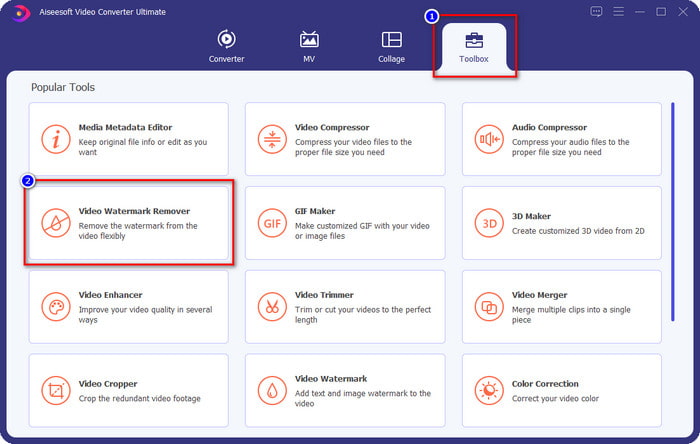
שלב 2. עבור אל לשונית Toolbox וחפש את Video Watermark Remover; לחץ עליו.
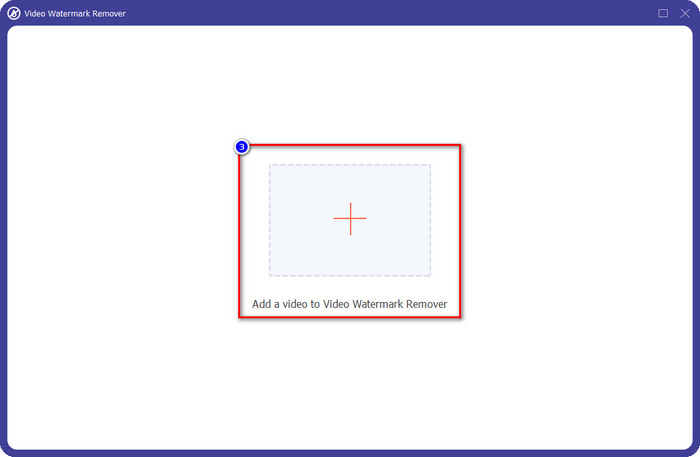
שלב 3. לחץ על כפתור ה-+, אתר בתיקייה את סרטון ה-Weibo עם סימן המים שהורדת קודם לכן, לחץ על הקובץ ולחץ על Open כדי להעלות אותו כעת.
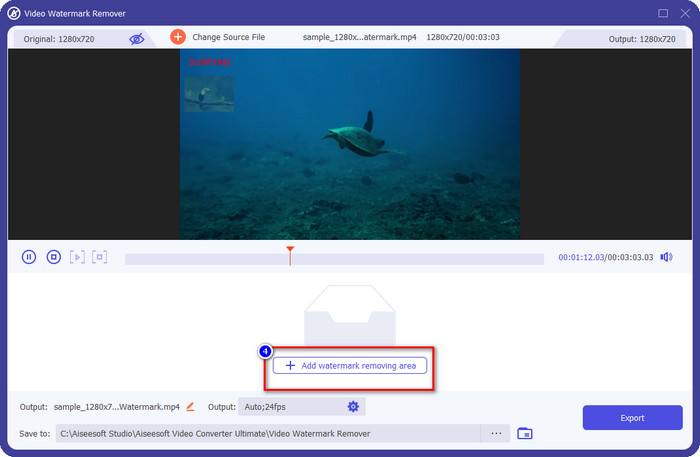
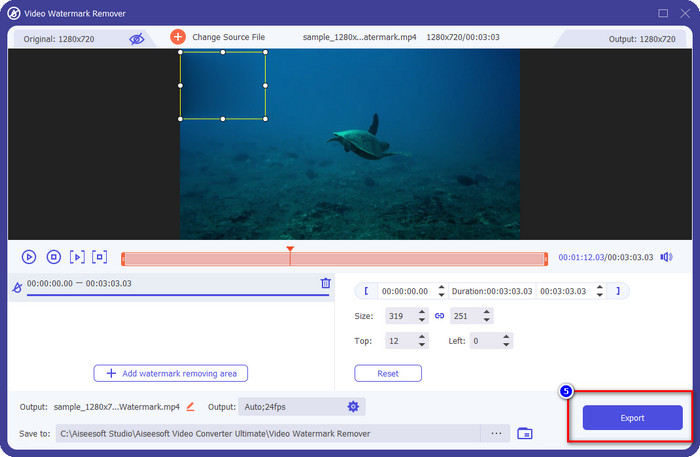
שלב 4. בחלון החדש שיופיע, לחץ על Add Watermark Removing Area כדי להמשיך בהסרת סימן המים.
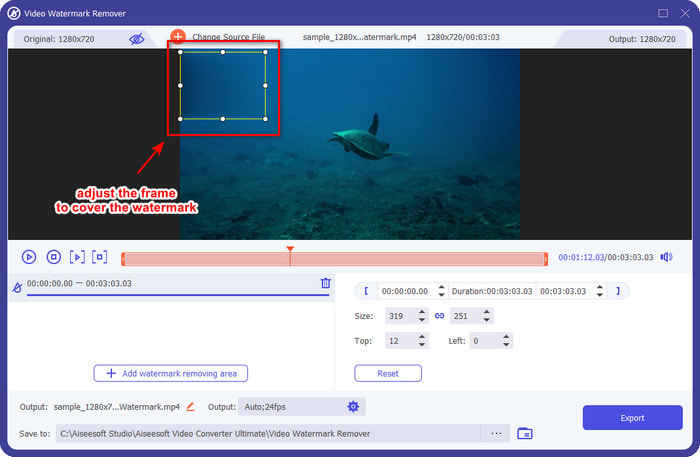
שלב 5. גרור והחזק את תיבת הבחירה כך שתכסה את סימן המים; תוכל גם להגדיל או להקטין אותה בהתאם לדרישותיך ולכסות אותו לפני הייצוא.
שלב 6. לאחר שמיקמת את תיבת הבחירה על סימן המים, לחץ על Export כדי להסיר את סימן המים מהווידאו שהעלית. אין צורך להמתין זמן רב, משום שהוא תומך בתהליך מהיר במיוחד; בתוך כמה שניות יהיה לך סרטון Weibo ללא סימן מים.
חלק 2. כיצד להסיר סימן מים מתצלום Weibo באמצעות הגרסה החינמית באינטרנט
איך לשמור תמונות מ-Weibo ללא סימן מים? אינך יכול לשמור תמונה ללא סימן מים אם היא מיוצאת מתוך Weibo. אך ניתן להשתמש ב-FVC Free Watermark Remover כדי למחוק את סימן המים מתמונות. זהו מסיר סימני מים מלא עבור תמונות עם סימן מים. מבחינת פונקציונליות, אפשר לומר שהכלי הזה טוב בהרבה ממסירי סימני מים אחרים הזמינים ברשת. לכן, אם ברצונך להסיר סימן מים מתמונה, זו הבחירה הראשונה שכדאי לך לנסות. למרות שהוא יכול להסיר סימן מים מתמונה, הוא אינו מסוגל להסיר סימן מים מסרטונים, כפי שהכלי האולטימטיבי יכול לעשות עבורך.
עם זאת, הוא חינמי לשימוש, וממשק האינטרנט שלו נקי, כך שאפילו לא תראה שום מודעה שיכולה להפריע לך. רוצה לדעת איך להשתמש בכלי אינטרנט זה? לאחר מכן בצע את השלבים המצוינים למטה כדי לנסות זאת בעצמך.
הערה: זהה לסרטון, הקפד להוריד את תמונת Weibo שברצונך לקבל וודא שאתה מציב אותה על תיקייה גלויה וקלה לגישה.
שלב 1. כדי לגשת למסיר סימני המים ברשת, לחץ על קישור זה כדי לפתוח אותו.
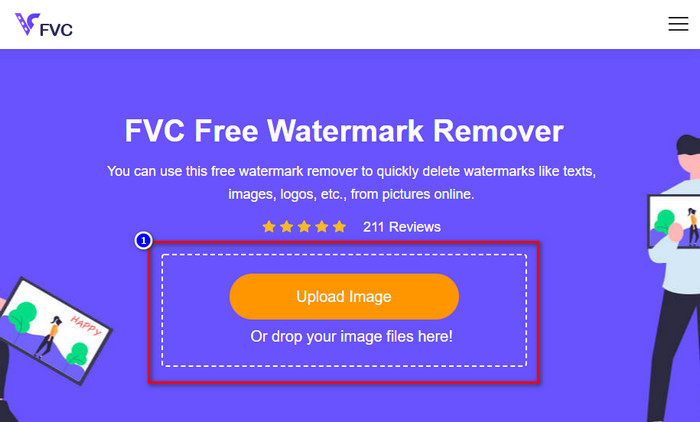
שלב 2. בממשק האינטרנט, לחץ על Upload Image, ואז תופיע תיקייה על המסך; מצא את התמונה ולחץ על Open כדי להעלות אותה.
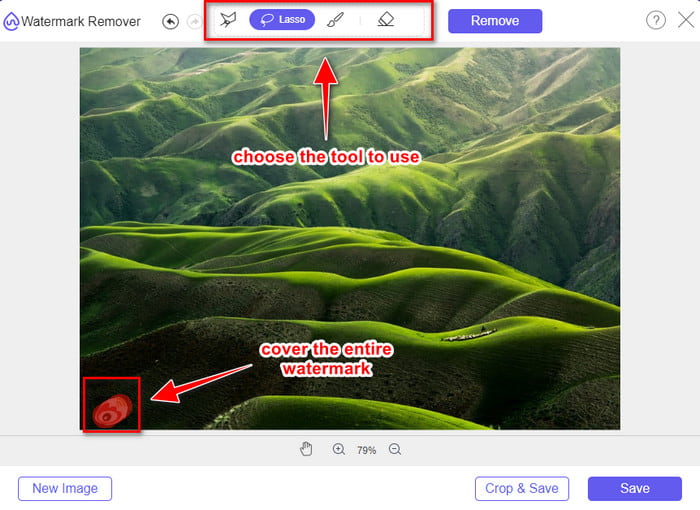
שלב 3. כאן תוכל לטוות קו סביב סימן המים כדי להסיר אותו, וודא שכל מילימטר מסימן המים נמצא בתוך הסימון שיצרת.
שלב 4. לחץ על Remove כדי למחוק את סימן המים שבתמונה שלך.
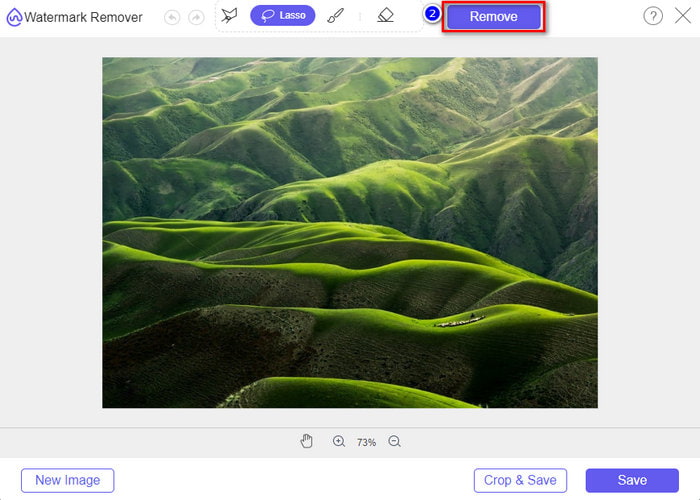
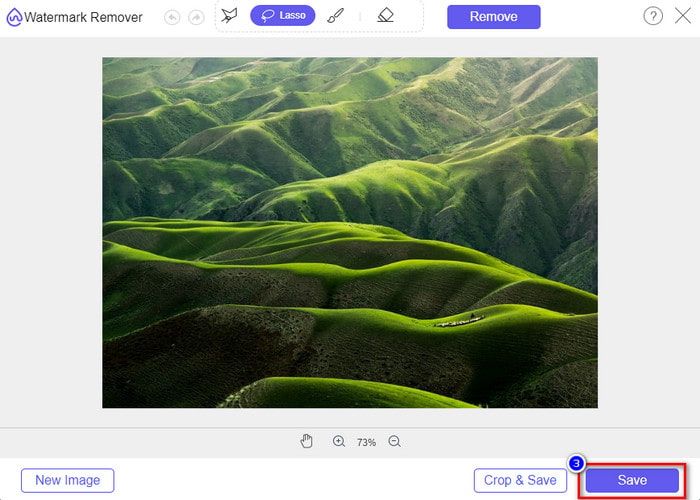
שלב 5. לאחר הסרת סימן המים מתמונת ה-Weibo, לחץ על Save כדי להוריד את תמונת ה-Weibo ללא סימן מים.
קשור:
חלק 3. שאלות נפוצות על איך להסיר סימן מים של Weibo
מדוע סימן המים של Weibo הפך מטושטש לאחר ייצוא שלו?
כלים מסוימים מטשטשים את סימן המים כך שלא ניתן לראות אותו במדיה החזותית שהם ייצאו ב- Weibo. אבל לא כל הכלים מטשטשים סימני מים; חלקם מסירים את סימן המים על המדיה החזותית ללא כל עקבות. לכן, אם אתה רוצה להסיר את סימן המים ב- Weibo מבלי לטשטש אותו, אתה חייב להכיר את הכלי שהזכרנו למעלה כדי לעזור לך להסיר אותו.
האם אני יכול לכסות את הלוגו של Weibo בקובץ המיוצא?
כן אתה יכול. בדרך זו, לא תראה את סימן המים של Weibo על הקובץ. עם זאת, התעסקות בו תכסה חלקים מסוימים של הקובץ, כך שבמקום לעזור לך, זה עלול להחמיר את הקובץ. לכן, יש צורך במסיר סימן מים כדי למחוק את סימן המים של הקובץ.
האם לכל הקבצים המיוצאים ב- Weibo יש סימן מים?
ייצוא כל סוג של קובץ בפלטפורמת מיקרובלוגינג זו ישאיר סימן. לא משנה מה זה, סימני מים מתווספים לקובץ. ובכל זאת, אתה יכול להסיר אותו עם הכלי שהזכרנו קודם לכן במאמר זה.
סיכום
מדהים, נכון? ל-FVC יש את הכלי שאתה צריך כדי להסיר מיידית את סימן המים של Weibo מסרטונים ותמונות. גם אם אין לך ניסיון או אינך מקצוען בסוג כזה של עריכה, העריכה אפשרית עם הכלים שהוזכרו לעיל. לכן, אם ברצונך להסיר סימן מים מתמונה, בין אם יובאה מ-Weibo ובין אם לאו, FVC Free Watermark Remover הוא הכלי היחיד שתזדקק לו. אך עבור סרטונים ו-GIF-ים, עליך להשתמש בתוכנה מקצועית, קלה לשימוש ובמחיר נגיש, כמו FVC Video Converter Ultimate. למה אתה מחכה? הסר את סימן המים מהמדיה החזותית שלך כדי ליהנות ממנה ללא כל זכר לסימן.
-
 הדרך הטובה ביותר כיצד להוסיף סימן מים לסרטון בפוטושופ ב-Windows ו-Mac
 רוצים לדעת איך מוסיפים סימן מים לסרטון בפוטושופ? במקרה כזה, מאמר זה יספק לך את הדבר או שניים שתצטרך לדעת.
-
 3 הפתרונות הטובים ביותר כיצד להסיר סימן מים מסרטונים בקלות
 רוצה להסיר את סימן המים המעצבן בסרטון? עם הבלוג הזה, אתה יכול ללמוד את הרעיונות השונים להסרת סימן המים בסרטון.
-
 4 הדרכים הטובות ביותר להסיר את סימן המים מ-GIF [מקוון ולא מקוון]
 צריך להסיר סימן מים מ-GIF? בעזרת הכלי במאמר זה, תלמדו את הסגנונות השונים עם מסיר סימני המים השונה הזמין בפלטפורמה שלכם.
