


 ממיר וידאו אולטימטיבי
 מקליט מסך
 תיקון וידאו
 הורדה מאובטחת
הדרכים המהירות והקלות ביותר לקצר וידאו עם הכלים הטובים ביותר
חיתוך או קיצור של סרטון הוא חשוב מכיוון שהוא מדגיש רק את הקליפים הדרושים מהסרטון שלך. חיתוך סרטון פירושו להסיר את תחילת הסוף של וידאו קליפ. המרכיב הבסיסי הזה של העריכה הכרחי כדי שלא תאבד את תשומת הלב של הקהל שלך. לכן, אם אתה רוצה לקצר או לקצר את הסרטון הארוך שלך, תלמד במאמר זה את הדרכים כיצד לקצר סרטון.

חלק 1. 2 שיטות לקיצור סרטון על גוזם באמצעות האפליקציה הטובה ביותר
הFVC Video Converter Ultimate הוא כלי שולחני מצוין לקיצוץ הווידאו שלך. לכלי זה ממשק תוכנה אינטואיטיבי והוא חינמי לשימוש. ממיר לא־מקוון זה מאפשר לך להוסיף מקטעים לקובץ הווידאו שלך. בנוסף, יש בו פונקציה שמאפשרת לפצל במהירות את הווידאו לחלקים שונים לפי בחירתך. ואם אתה מחפש כלי שיכול למזג קבצים בפורמטים שונים לקובץ אחד, היישום הזה יכול לעשות זאת עבורך.
יתרה מזו, כלי זה מציע תכונות מתקדמות רבות, כמו יוצר GIF, ממזג וידאו, מסיר סימני מים מווידאו ועוד. ומה שעוד יותר טוב הוא שהוא תומך בפורמטים רבים, כולל MP4, WMV, FLV, AVI, MPG, WebM, MKV ועוד למעלה מ־1000 פורמטים נוספים. לכן, אם ברצונך להשתמש באפליקציה זו כדי לקצר את הווידאו שלך, יש לנו שתי שיטות שתוכל לעקוב אחריהן.
שיטה 1. השתמש ב-Video Trimmer של FVC
שלב 1. תחילה, הורד את FVC Video Converter Ultimate בלחיצה על כפתור ההורדה שלהלן. עקוב אחר תהליך ההתקנה ולאחר מכן הפעל את האפליקציה.
הורדה חינמיתל-Windows 7 ומעלההורדה מאובטחת
הורדה חינמיתל-MacOS 10.7 ומעלההורדה מאובטחת
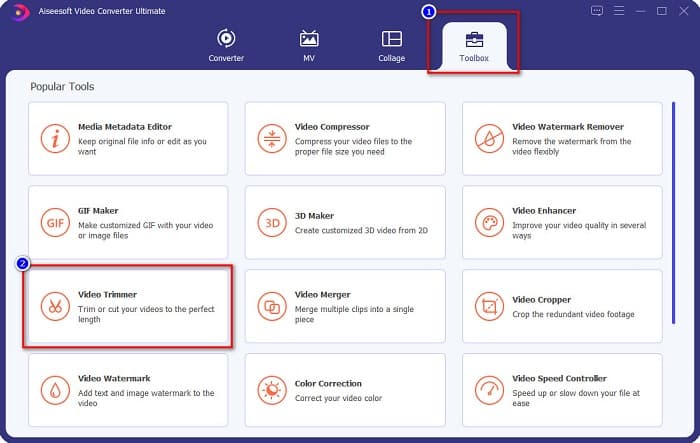
שלב 2. לאחר מכן, בחר בלשונית ארגז כלים (Toolbox) הממוקמת מעל ממשק התוכנה. לאחר מכן, בלוח ארגז הכלים, לחץ על Video Trimmer.
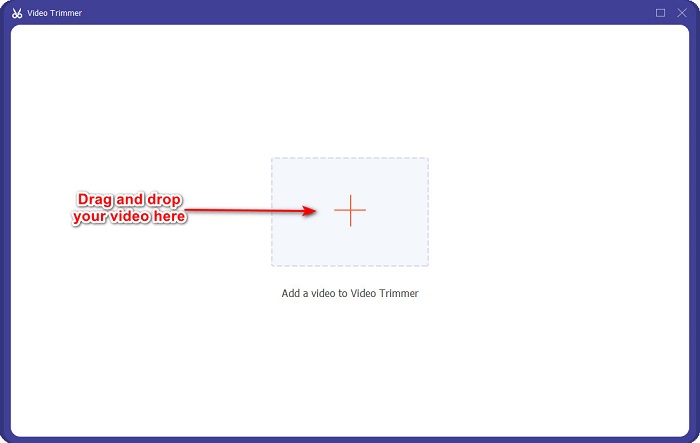
שלב 3. ואז, בממשק הבא, לחץ על סמל ה+ או גרור ושחרר את הווידאו שלך אל סימן ה־+.
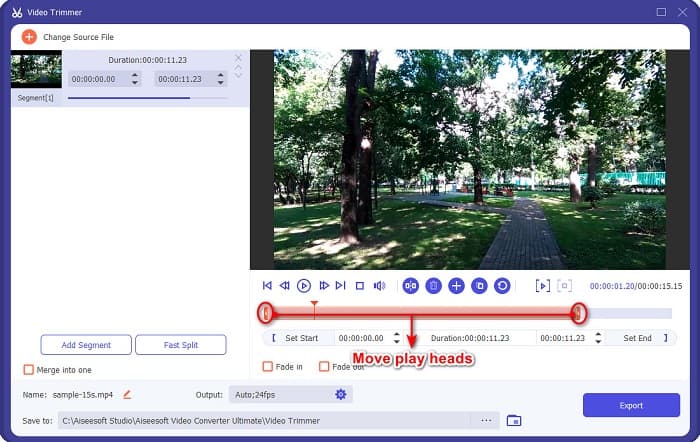
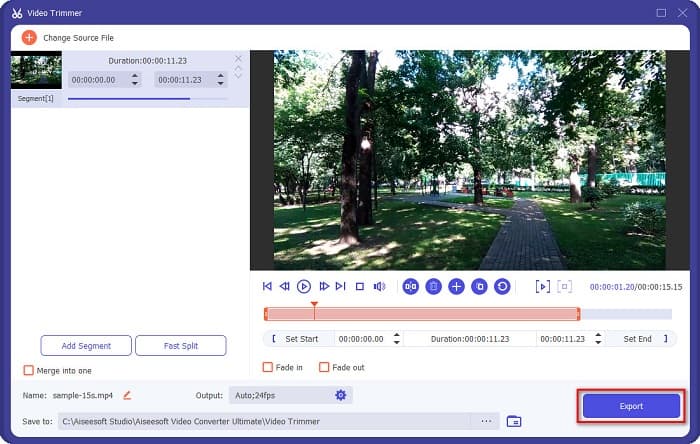
שלב 4. לאחר מכן, הזז את כפתורי ראש ההשמעה לאורך הרצוי. החץ מציין את מיקום התצוגה המקדימה של הווידאו שלך, וראשי ההשמעה מציינים את האורך של הווידאו. באפשרותך לראות את השינויים הזמניים בווידאו שלך בחלון התצוגה המקדימה.
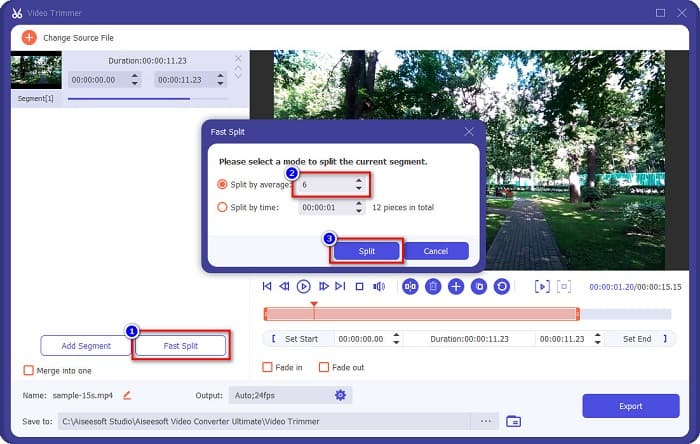
אופציונלי. אם אתה רוצה דרך פשוטה יותר לפצל את הווידאו שלך למקטעים:
1. לחץ על כפתור Fast Split.
2. בחר את מספר החלקים שברצונך שיהיו בווידאו שלך, ולאחר מכן לחץ על Split.
3. אם אינך רוצה לפצל את הסרטון שלך, המשך לשלב הבא.
שלב 5. לבסוף, לחץ על כפתור הExport כדי להחיל את השינויים על הווידאו שלך. הפלט יישמר אוטומטית בקבצי המחשב שלך.
שיטה 2. השתמש במשנה מהירות הווידאו של FVC
ל-FVC Video Converter Ultimate יש גם תכונה שבה אתה יכול לשנות את מהירות הווידאו שלך במהירויות של 0.125x, 0.25x, 0.5x, 0.75x, 1.25x, 1.5x, 2x, 4x ו-8x. ואם אתה רוצה לקצר את אורך הסרטון שלך, התאם את הסרטון למהירות מהירה. לשלבים מפורטים יותר, עקוב אחר המדריך שלהלן.
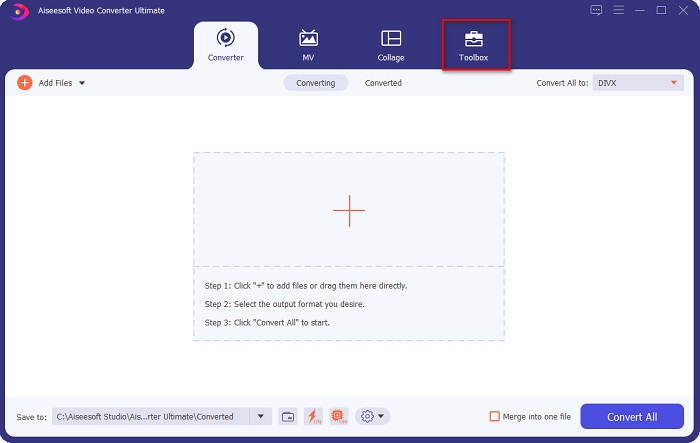
שלב 1. פתח את FVC Video Converter Ultimate. ובממשק הראשי של התוכנה לחץ על האפשרות Toolbox (ארגז כלים).
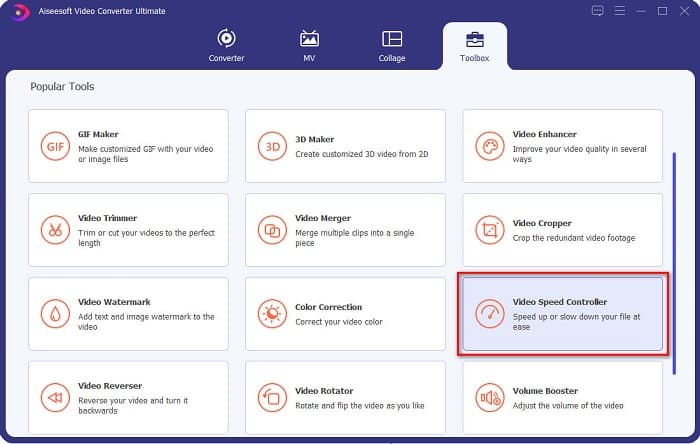
שלב 2. לאחר מכן לחץ על Video Speed Controller והמשך לשלב הבא.
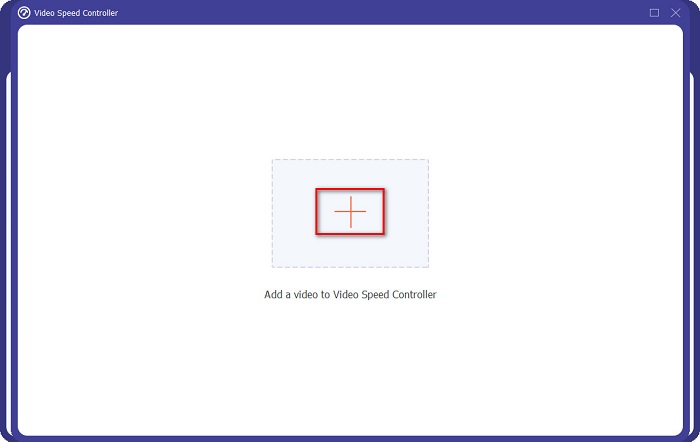
שלב 3. לאחר מכן לחץ על סמל ה+ כדי להעלות את הווידאו שברצונך לקצץ. תיקיות המחשב שלך יופיעו, שם תבחר את הווידאו ותעלה אותו לממשק התוכנה.
שלב 4. כדי לקצר את הווידאו שלך, בחר את מהירות ההפעלה מ־1.25x ועד 8x.
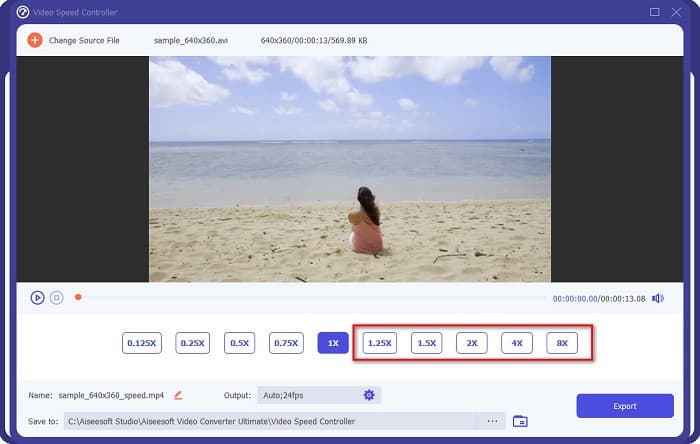
שלב 5. בשלב האחרון, לחץ על כפתור Export כדי לשמור את השינויים בווידאו שלך. לאחר מכן הפלט יישמר אוטומטית בקבצי המחשב שלך.
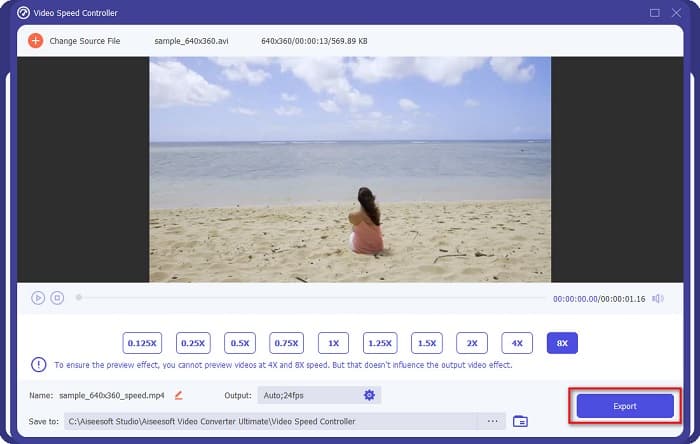
עבור אורך וידאו קצר יותר, בחר במהירות פי 8.
יתרונות
- הוא תומך בפורמטים רבים של קבצים, כולל MOV, MKV, AVI, MP4, WMV, WMA, MPEG ו-1000+ פורמטים.
- יש לו ממשק תוכנה קל לשימוש.
- זה מאפשר לך לפצל במהירות את הסרטון שלך בכמה קליקים בלבד.
- ניתן להורדה בכל פלטפורמות חוצות מדיה, כמו Windows, Mac ולינוקס.
חסרונות
- תחילה קנה את האפליקציה לפני גישה לתכונות האחרות שלה.
חלק 2. 2 גוזם וידאו מקוון לנסות
אם אתה רוצה לחתוך את הסרטון שלך מבלי להוריד שום דבר, ישנם גוזמי וידאו מקוונים שבהם אתה יכול להשתמש. פירטנו את גוזמי הווידאו המקוונים הטובים ביותר שאנשים רבים משתמשים בהם בחלק זה.
חתוך וידאו
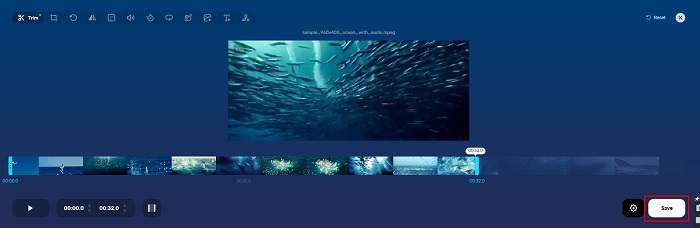
Trim Video הוא כלי מקוון לקיצוץ וידאו שקל להשתמש בו בזכות ממשק המשתמש האינטואיטיבי שלו. זהו כלי שימושי מכיוון שאינו דורש התקנה, בניגוד לכלים מקוונים אחרים. בנוסף, יש בו פונקציה שבה ניתן לסובב את הווידאו ב־90, 180 או 270 מעלות. כמו כן, אינך צריך לחשוש לגבי אבטחת הנתונים שלך, משום שהכלי הזה מוגן פרטיות. עם זאת, מכיוון שמדובר ביישום מבוסס־אינטרנט, הוא מכיל פרסומות שעלולות להסיח את דעתך.
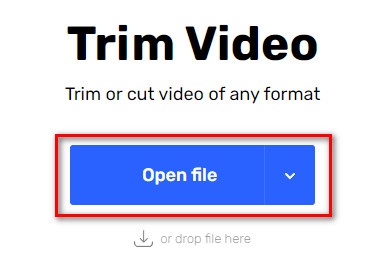
שלב 1. בדפדפן שלך, חפש online video trimmer. לאחר מכן לחץ על אתר Trim Video. בממשק הראשי של התוכנה לחץ על כפתור Open File.
שלב 2. לאחר מכן, התאם את כפתורי ראש ההשמעה לאורך הרצוי.
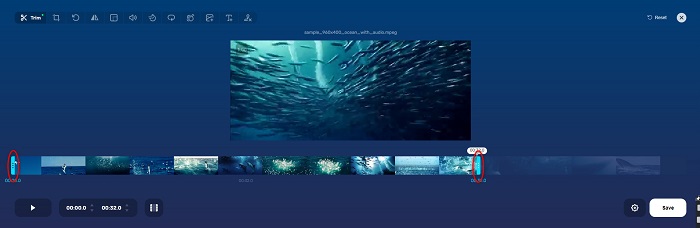
שלב 3. לחץ על כפתור הSave כדי לשנות את אורך הווידאו שלך.
יתרונות
- יש לו GUI קל לשימוש.
- יש לו תכונות לחתוך ולסובב את הסרטון שלך.
- זה בטוח לשימוש.
חסרונות
- הוא מכיל פרסומות מטרידות.
- יש לו תהליך טעינה והעלאה איטי.
קלידאו
עוד כלי מקוון לקיצוץ וידאו הוא Clideo. לכלי מקוון זה יש ממשק משתמש פשוט, מה שהופך אותו לידידותי למשתמש. הוא גם תומך ברוב פורמטי הקבצים הסטנדרטיים, כמו AVI, MP4, VOB, MPG, MOV ועוד. בנוסף, כלי זה מטיל רמת אבטחה גבוהה, כלומר הנתונים שלך בטוחים ולא יהיו נגישים לצפייה על ידי אחרים. מעבר לכך, Clideo אינו מכיל פרסומות שעלולות להסיח את דעתך.
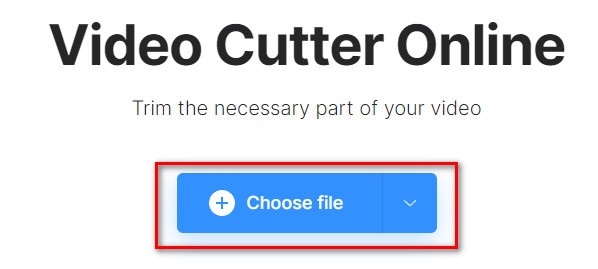
שלב 1. בדפדפן שבו אתה משתמש, חפש Clideo video trimmer. ובממשק הראשון של התוכנה לחץ על כפתור Choose File. תיקיות המחשב שלך יופיעו, ושם תבחר את הווידאו שברצונך לקצר.
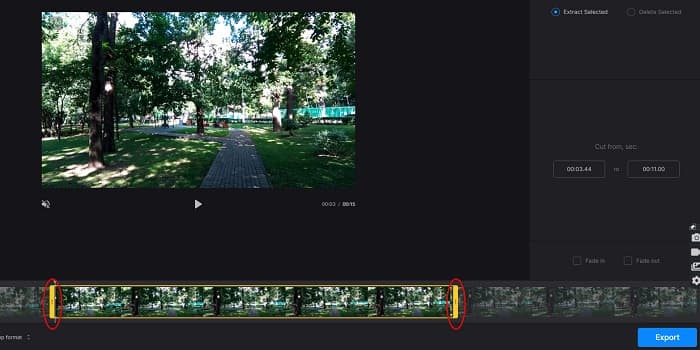
שלב 2. הזז את כפתורי ראש ההשמעה אל האורך שבו אתה רוצה שהווידאו שלך יהיה.
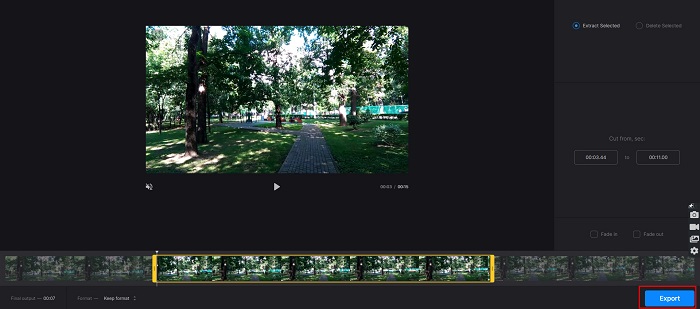
שלב 3. בשלב האחרון, לחץ על כפתור הExport כדי לשנות את אורך הווידאו שלך.
יתרונות
- יש לו ממשק קל לשימוש.
- זה בטוח לשימוש.
- הוא אינו מכיל פרסומות.
חסרונות
- ייתכן שתחווה תהליך איטי כאשר חיבור האינטרנט שלך איטי.
חלק 3. שאלות נפוצות לגבי איך לקצר וידאו
איך לקצר וידאו באייפון?
ראשית, פתח את אפליקציית התמונות ובחר את הסרטון שברצונך לחתוך. לאחר מכן הקש על ערוך. לאחר מכן, הזז את המחוונים לאורך הסרטון הרצוי והקש על סיום כדי לשמור שינויים מהסרטון שלך.
האם חיתוך הסרטון שלך משפיע על האיכות?
לא. רוב כלי החיתוך אינם משפיעים על איכות הסרטון שלך. אבל אם אתה מבטיח לכלי שלא משפיע על האיכות כשאתה מקצר את הסרטון שלך, השתמש ב-FVC Video Converter Ultimate.
האם קיצור הסרטון משפיע על גודל הקובץ?
כן. ככל שהסרטון שלך קצר יותר, כך גודל הקובץ קטן יותר. לעומת זאת, אם הסרטון שלך ארוך, הוא מכיל גודל קובץ עצום.
סיכום
זה הכול לגבי איך לקצר וידאו באמצעות חותך (trimmer) ומשנה מהירות וידאו. כל הכלים המפורטים מציגים תוצאות מצוינות ומבטיחים לך ביצועים גבוהים. אך אם אתה מחפש את הכלי הטוב ביותר, העשיר בתכונות ונפוץ מאוד כאשר מדובר בקיצור הווידאו שלך, FVC Video Converter Ultimate הוא הכלי המתאים ביותר עבורך.
-
 כיצד לגזור ולמזג שירים ברשת - 4 הדרכים הטובות ביותר שכדאי להכיר
 כשרוצים לחתוך ולמזג שירים באופן מקוון ליצירת קטע מוסיקה, תוכלו ללמוד עוד על 4 הכלים המקוונים הטובים ביותר לקליפ השירים ולשלב קבצים מתוך המאמר.
-
 גלה את גוזם MP4 הטוב ביותר עם נוהל ומידע
 האם אתה רוצה ללמוד איך לחתוך סרטונים כמו הוולוגים שבהם אתה צופה? לאחר מכן המשך לקרוא את הפוסט הזה כדי לדעת באילו גוזמי MP4 אתה יכול להשתמש.
-
 5 חותכי MP3 לחתוך כל אודיו בקלות [2022 עודכן]
 האם אתה צריך חותך MP3 כדי לחתוך את האודיו? במקרה זה, קרא את המאמר הזה מכיוון שאנו מספקים את הכלים שאתה יכול לסמוך עליהם המספקים חיתוך קל לשמע.
