


 ממיר וידאו אולטימטיבי
 מקליט מסך
 תיקון וידאו
[סקירה מלאה] מהם עורך המטא-נתונים הטובים ביותר של וידאו בשולחן העבודה
מטא-נתונים של וידאו יכולים לעזור לך בדרכים רבות; דוגמה מצוינת היא סידור הקבצים שלך לפי זמן ותאריך, מחברים, גודל קובץ ועוד רבים – בעצם, לצורך ארגון. למרות שמטא-נתונים קיימים בכל קובץ מדיה, אנו צריכים לערוך אותם מסיבות מסוימות. עם זאת, בחירה באיזה עורך להשתמש עלולה להיות משימה קשה, משום שיש שפע של עורכי מטא-נתונים שניתן למצוא בשוק. כדי להקל על העומס הזה, נסייע לך לסקור עורכים שונים של נתונים שתוכל למצוא בשוק, שמציעים רק מצוינות. כל הפרטים והכלים נבדקו בקפידה כדי להציע לך סקירה כנה של כל תוכנה. בוא נצלול ליותר מידע על חמשת עורכי המטא-נתונים לוידאו המובילים שניתן לסמוך עליהם.

חלק 1. 5 של עורכי מטא-נתוני הווידאו הטובים ביותר הזמינים בשולחן העבודה במצב לא מקוון
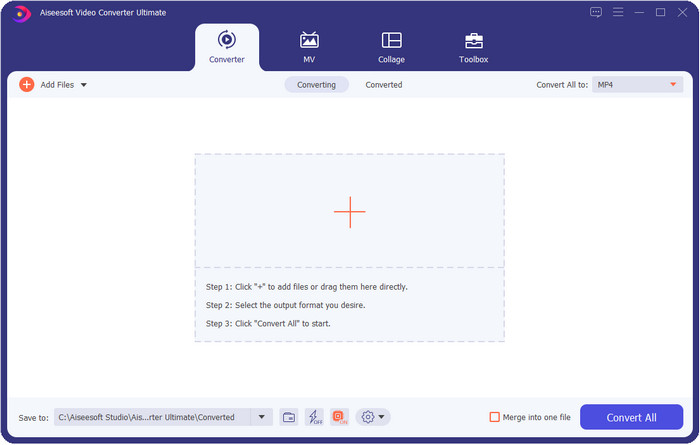
Video Converter Ultimate [מומלץ מאוד]
הורדה חינמיתל-Windows 7 ומעלההורדה מאובטחת
הורדה חינמיתל-MacOS 10.7 ומעלההורדה מאובטחת
מערכות הפעלה נתמכות: Windows, Mac ו-Linux
Video Converter Ultimate הוא עורך מטא-נתונים לוידאו הטוב ביותר לצפייה, להסרה ולעריכה של המטא-נתונים בקובץ שלך. עורך מטא-נתונים זה אינו העורך הרגיל שתוכל להשתמש בו, משום שהוא חבילה מלאה של תכונות שניתן לשלוט בהן במהירות בפרק זמן קצר. עם הכלי הזה, תוכל להוסיף פרטים רבים ומדהימים למטא-נתונים שלך, כמו הערות, תמונת עטיפה, שנה, ז׳אנר אם מדובר במוזיקה, ועוד רבים – בפחות משנייה. רוצה לדעת מה הפתיע אותנו בכלי? בניגוד לתוכנות אחרות שיוצרות עותק של הקובץ שערכת – מה שלא חסכוני במקום – אם תשתמש בכלי הזה, הקובץ שתעלה לכלי האולטימטיבי לא ייצור עותק, והמטא-נתונים שתוסיף יחולו על אותו קובץ שהעלית; זה חוסך מקום. בנוסף, אם אתה צריך כלי מקיף, זהו הבחירה המושלמת לכל המשתמשים שזקוקים לצופה מטא-נתונים ב-Mac וב-Windows.
יתרונות
- הוא תומך בפורמטים מרובים שבהם אתה יכול להעלות, כגון MP4, MKV, AVI, FLV, MP3 ועוד יותר מ-1000 פורמטי מדיה כדי לשנות או להסיר את המטא נתונים בקלות.
- זה מאפשר לכל משתמש לקבל חוויה קלה בעריכת המטא נתונים.
- זוהי הבחירה הטובה ביותר עבור משתמשי Windows ו-Mac להוריד את עורך המטא נתונים הזה בכונן שלהם.
- הסר בקלות מטא נתונים של קבצים מרובים בכמה לחיצות.
חסרונות
- רכישת הכלי והורדתו חיונית, אך היא תהיה שווה כל שקל וכונן מחשב.
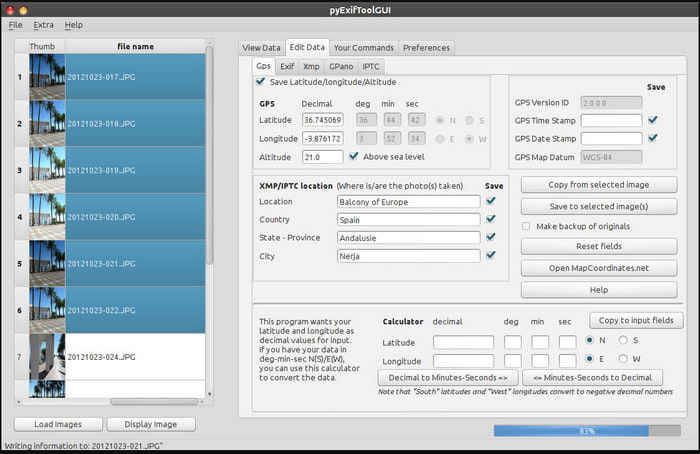
ExifTool
מערכות הפעלה נתמכות: Windows, Mac ו-Unix
ExifTool הוא עורך מטא-נתונים לוידאו מוכר ב-Windows, Mac ו-Unix שניתן לגשת אליו בקלות בחינם. הוא תומך במספר פורמטים של וידאו ותמונה כדי לשנות או להסיר את המטא-נתונים. בנוסף, הכלי הזה מאפשר לך לערוך מטא-נתונים מרובים בקבצים שונים בו-זמנית. בניגוד לעורכים אחרים ברשימה זו, ניתן לראות שיש הרבה מה שקורה בכלי הזה; לכן, אם אתה חדש בעריכת מטא-נתונים, תזדקק לזמן כדי להבין את הכלי.
יתרונות
- חינם להורדה.
- זה יכול בקלות לערוך ולהציג את המטא נתונים.
חסרונות
- ממשק ואפשרויות מבלבלים בשימוש.
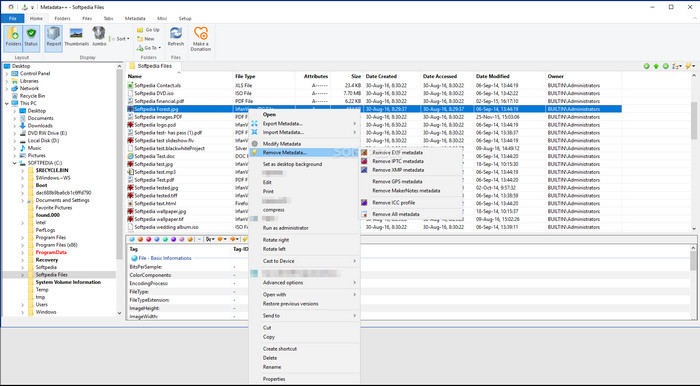
מטא נתונים++
מערכות הפעלה נתמכות: Windows
אם אתה רוצה להסתמך על עורך מטא-נתונים לוידאו בקוד פתוח ב-Windows, ייתכן שתשתמש ב-Metadata++. כלי זה עוזר לך להוסיף או להסיר במהירות את המטא-נתונים בקובץ באמצעות קיצורי מקשים, כדי להימנע משימוש תכוף בעכבר. עם זאת, העורך אינו יעיל כמו האחרים ברשימה זו, אך עדיין אפשר לסמוך עליו אם תרצה להשתמש בו.
יתרונות
- מקשי קיצור זמינים לתהליך מהיר של עריכת מטא נתונים.
- הוסף בקלות מטא נתונים על קבצים שלא.
- חינם להורדה ב-Windows.
חסרונות
- ה-GUI מיושן.
- צריך להבין יותר מדי פונקציות לפני שתשתמש בהן.
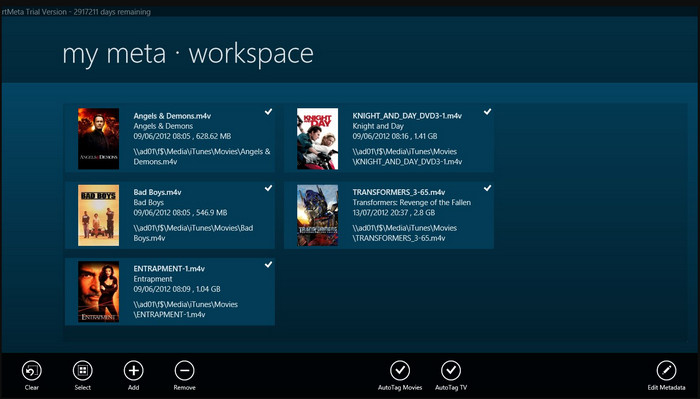
MyMeta
מערכות הפעלה נתמכות: Windows
MyMeta הוא עורך מטא-נתונים לוידאו שבעזרתו ניתן לערוך מיידית קובצי MP4, M4V ו-MOV. לכלי זה יש תכונה שיוצרת אוטומטית מטא-נתונים ותמונת עטיפה על סמך התוצאות מהאינטרנט. בנוסף, אפשר להשתמש בכלי זה כדי לתייג את הקבצים לפי המידע. למרות שהכלי מצוין, הפורמטים שהוא תומך בהם הם רק MP4, M4V ו-MOV.
יתרונות
- קל לשימוש.
- התג האוטומטי מאפשר לך להעתיק את המטא נתונים של קובץ מסוים תוך כמה קליקים.
- GUI מסודר.
חסרונות
- זה תומך רק ב-MP4, M4V ו-MOV. אז אם אתה מנסה להעלות לכאן פורמט אחר, זה לא נתמך.
- חלק מהתכונות אינן מתאימות לדרישות המשתמש.
נגן מדיה VLC
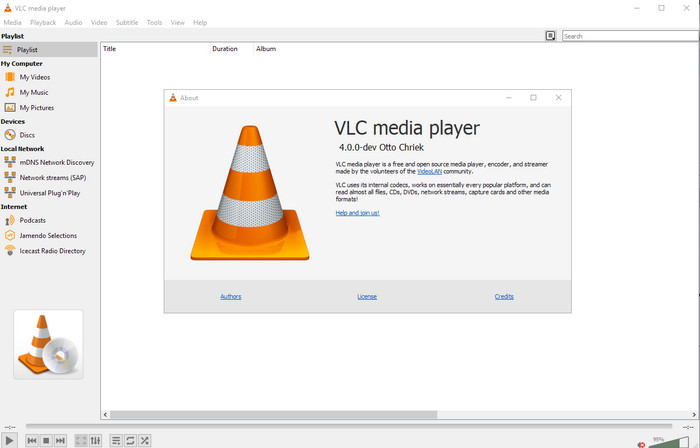
מערכות הפעלה נתמכות: Windows, Mac, Linux
נגן המדיה VLC Media Player נוצר לצפייה בקובצי מדיה, אבל אפשר גם להשתמש בעורך מטא-נתונים לוידאו בקוד פתוח זה כדי לערוך את המטא-נתונים של הקובץ. כפי שאמרנו, הוא מסוגל לנגן בקלות מגוון רחב של פורמטים בעזרת מקודדים שונים על כמעט כל פלטפורמה שניתן לחשוב עליה, משום שהוא נגן וידאו מהשורה הראשונה. למרות שהוא יכול לנגן פורמטים רבים, התמיכה בעריכת מטא-נתונים מוגבלת ואינה רחבה כמו זו של כלים אחרים שהוזכרו.
יתרונות
- עורך מטא נתונים בקוד פתוח להורדה.
- ידידותי למשתמש.
- זמין בכל מערכות ההפעלה.
חסרונות
- הוא תומך בפורמט ממוצע להעלאה.
- ה-GUI של הכלי מיושן.
חלק 2. תרשים השוואה על עורך מטא נתונים של וידאו
| תכונות | Video Converter Ultimate [מומלץ מאוד] | ExifTool | מטא נתונים++ | MyMeta | נגן מדיה VLC |
| הוסף והסר מטא נתונים |  | | | | |
| ידידותי למשתמש | | | | | |
| תומך בפורמטים רחבי טווח | |  | | | |
| הבחירה הטובה ביותר למתחילים | | | | | |
| ערוך מטא נתונים של אצווה | | | | | |
חלק 3. כיצד להוסיף, להסיר ולערוך מטא נתונים באמצעות עורך המטא נתונים המומלץ ביותר
אם בחרת להשתמש ב-Video Converter Ultimate כעורך המטא-נתונים לוידאו שלך, מומלץ לעקוב אחר השלבים המופיעים להלן. בלי לבזבז זמן, בוא נמשיך בקצב ונתחיל להשתמש בכלי האולטימטיבי למשימה האולטימטיבית הזו.
שלב 1. הורד את הכלי על ידי לחיצה על כפתור ההורדה המוצג למטה; בחר אם אתה משתמש ב-Windows או ב-Mac. לאחר סיום תהליך ההורדה, עליך ללחוץ על הקובץ כדי להתקין אותו מיד, ואז להפעיל אותו לאחר שההתקנה הסתיימה.
הורדה חינמיתל-Windows 7 ומעלההורדה מאובטחת
הורדה חינמיתל-MacOS 10.7 ומעלההורדה מאובטחת
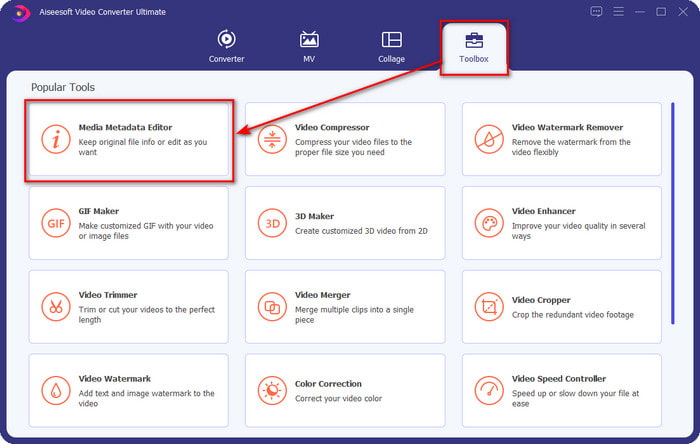
שלב 2. לאחר שהפעלת את הכלי, לחץ על החלק של Toolbox, ותחתיו חפש את Media Metadata Editor; לחץ עליו לפני המעבר לשלב הבא.
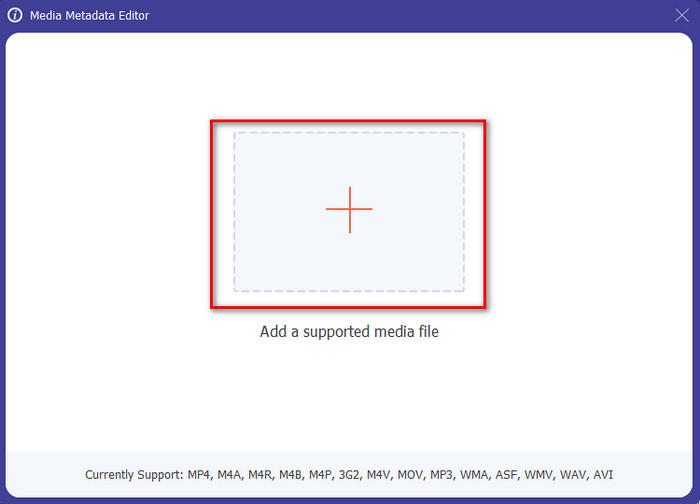
שלב 3. הוסף את הקובץ על ידי לחיצה על הסמל +, ותיקייה תופיע על המסך שלך; בחר את קובץ המדיה שברצונך לערוך לו את המטא-נתונים ולחץ על Open.
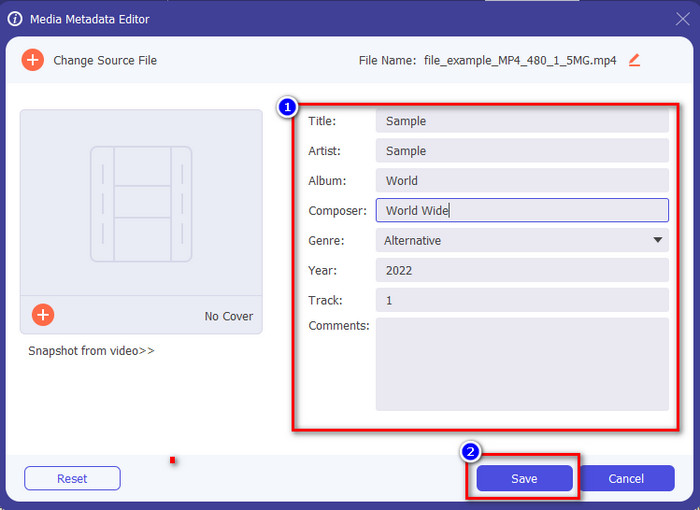
שלב 4. בחלון החדש שיופיע על הצג שלך, תוכל כעת לערוך, להסיר ולהוסיף מטא-נתונים ב-תיבות הטקסט המוצגות. אם אתה מרוצה מהמטא-נתונים, לחץ על Save כדי להחיל את המטא-נתונים על הקובץ. קליל, נכון? ובכן, לזה הכלי האולטימטיבי מסוגל.
חלק 4. שאלות נפוצות על עורך מטא נתונים של וידאו
האם אני יכול לראות מטא נתונים באינטרנט?
כן, באפשרותך להשתמש ב-FVC Free Video Converter Online כדי לצפות במטא-נתונים של וידאו באינטרנט; עקוב אחרי השלבים שלהלן כדי לדעת כיצד לצפות בהם. תחילה, לחץ על ה-קישור כדי לפתוח לשונית חדשה בדפדפן; קישור זה יעביר אותך אוטומטית לאתר הרשמי של ממיר FVC אונליין. לאחר מכן, לחץ על Add Files to Convert; אם זו הפעם הראשונה שאתה משתמש בכלי, יהיה עליך להוריד את המשגר וללחוץ על הקובץ כדי להתקין אותו. לחץ עליו שוב, והפעם תיקיית מחשב תופיע; בחר את הקובץ שעבורו אתה רוצה לצפות במטא-נתונים ולחץ על Open כדי להמשיך. חלון חדש יופיע על המסך; לחץ על סמל ה-i, ואז תוכל לראות את המטא-נתונים של הווידאו.
מהם החלקים של מטא נתונים?
מטא-נתונים כוללים סוגים שונים של מידע על קובץ המדיה: שם המחבר, היצירה, המיקום, ההגדרות, המכשיר ששימש, תאריך, שעה, ז׳אנר אם מדובר במוזיקה, תמונה ועוד רבים. אך ברוב המקרים, המטא-נתונים תלויים במהות הקובץ; אם הקובץ הוא ספר קולי, המטא-נתונים יהיו שונים מאלה של קובץ וידאו.
האם ID3 הוא מדגם של מטא נתונים?
ID3 הוא מיכל מטא נתונים הנראה על קבצי מדיה MP3; בעיקרון, על קבצי אודיו.
סיכום
התוכנות שהצגנו במאמר זה יכולות לעזור לך לצפות, לערוך, להוסיף או להסיר את המטא-נתונים של הווידאו, גם אם אין לך ידע מעמיק במטא-נתונים. כעת, כאשר יש לך את חמשת העורכים המובילים בשוק, הגיע הזמן לבחור באיזה כלי תסמוך למשימה הזו. אם אתה מרגיש שאתה עדיין מתלבט, נמליץ להשתמש ב-Video Converter Ultimate מסיבות רבות. בניגוד לכלים אחרים, התוכנה הזו יכולה לבצע את המשימה בתוך כמה שניות. אם עדיין אינך מאמין למה שאנו אומרים, עליך להוריד את הכלי כדי לנסות אותו ולגלות את שאר היכולות שהוא מציע.
-
 4 מצופי המטא נתונים הטובים ביותר באינטרנט ובאופן לא מקוון [עודכן 2025]
 האם אני יכול לבדוק את המטא נתונים של הקובץ שלי? כן, אתה יכול, בעזרת הפוסט הזה נציג בפניך את צופי המטא נתונים השונים שבהם תוכל להשתמש.
-
 חמשת מחלצי המטא נתונים המובילים הזמינים באינטרנט ובאופן לא מקוון [2025]
 אתה יכול למצוא מספר מחלצי מטא נתונים בשוק, אך כיום, אנו בוחרים רק את חמשת מחלצי התגים הנבחרים ביותר לפי הקהל.
-
 7 עורכי תגי מוזיקה פופולריים ב-Windows, Mac ומכשירים ניידים
 תגי מוזיקה פופולריים לשימוש עבור סידור המוזיקה בספרייה שלך לפי הנתונים שבפנים. מה אם אתה רוצה לשנות את זה? קרא את הפרטים למטה כדי לדעת יותר.
