


 ממיר וידאו אולטימטיבי
 מקליט מסך
 תיקון וידאו
[מוכח] 2 מעורכי התגים הטובים ביותר הזמינים לשימוש ב-Windows ו-Mac
רוב קבצי האודיו שהקלטנו ב-Windows הם בפורמט WMA, וניתן לערוך את המטא־דטה שלהם בעזרת עורך מטא־דטה ל-WMA. עם זאת, בחירת עורך המטא־דטה המתאים לשימוש בשולחן העבודה עלולה להיות משימה לא פשוטה עבור משתמשים. אבל כיום, המשימה הזו כבר לא קשה כפי שנדמה, הודות לשני עורכים שניתן להשתמש בהם ב-Windows וב-Mac. רוצים לדעת מי הם השניים האלה? אם תמשיכו לקרוא את המאמר, נספק סקירה הוגנת בין שתי התוכנות שניתן להוריד ולבדוק איזו טובה יותר. המשיכו לעקוב ותיהנו מקריאת הפוסט הזה בבלוג כדי להכיר את שני הכלים המצוינים שלא כדאי לפספס בשנת 2022.

חלק 1. השתמש בעורך התגים האולטימטיבי של WMA הזמין ב-Windows וב-Mac כדי לערוך תגיות WMA
ראשון ברשימה שלנו הוא עורך המטא נתונים הטוב ביותר של WMA FVC Video Converter Ultimate, הכלי שמציג עורך רב עוצמה עבור התגים שלהם שכולם אוהבים. עם הכלי הזה, אתה יכול לטפל בבעיה הזו בקלות כמו מקצוען, גם אם אין לך ניסיון בעריכת תגי ה-WMA שלך. בניגוד לעורכי תגים אחרים, לא תזדקק לידע עצום על עורך מטא נתונים זה כיצד להשתמש בו; תוך כמה לחיצות וחלק של שנייה, תקבל את ה-WMA שלך מתויג מבלי להזיע.
רוצים עוד? אחד מהמאפיינים הטובים ביותר שהכלי הזה מציע הוא ארגז הכלים (Toolbox), שבו תוכלו לבצע פעולות רבות שכלים אחרים אינם מציעים, כמו דחיסה, חיתוך, הוספת או הסרת סימן מים, היפוך ועוד רבים נוספים. כך שכל משימה הקשורה לקובץ מדיה שתעלו בדעתכם יכולה להיות מטופלת בקלות בעזרת הסיוע שתקבלו מהכלי הזה. בנוסף לכך, תוכלו להמיר את פורמט ה-WMA שלכם ליותר מ-1000 פורמטים חדשים במהירות, בעזרת תהליך המרה מהיר במיוחד. מרשים, נכון? ובכן, לזה מסוגל הכלי האולטימטיבי. וכדי ללמוד כיצד להוסיף תגית WMA, השלבים שלהלן יעזרו לכם לבצע זאת כמו מומחים.
שלב 1. ראשית, לחצו על כפתור ההורדה למטה, בחרו אם אתם משתמשים כרגע ב-Windows או ב-Mac. התקינו מיד ולאחר סיום התהליך הפעילו את התוכנה.
הורדה חינמיתל-Windows 7 ומעלההורדה מאובטחת
הורדה חינמיתל-MacOS 10.7 ומעלההורדה מאובטחת
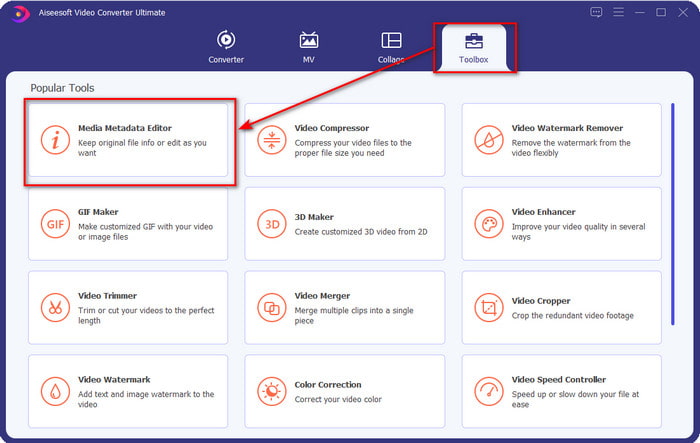
שלב 2. בחלק העליון, לחצו על Toolbox, ועשו את אותו הדבר על Media Metadata Editor.
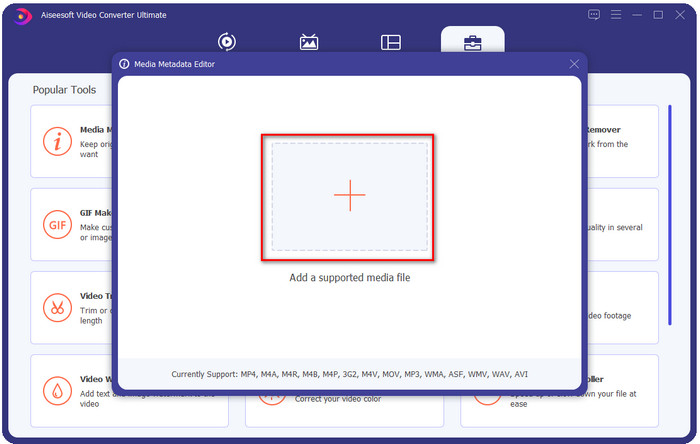
שלב 3. הוסיפו את הקובץ על־ידי לחיצה על סמל ה-+ בחלון הקטן שיופיע, מצאו את קובץ ה-WMA בתיקייה ולחצו על Open כדי להמשיך לשלב הבא.
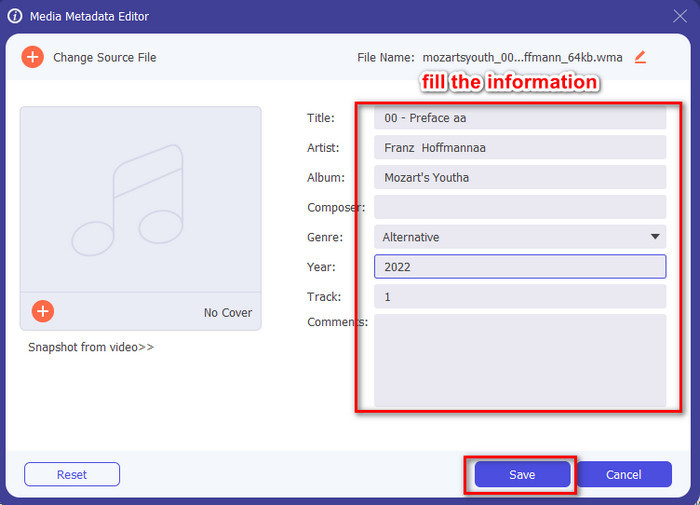
שלב 4. באזור זה תוכלו לערוך את המטא־דטה או התגיות בקובץ ה-WMA שלכם ולמלא את ה-textbox בהתאם. לאחר כל זאת, לחצו על Save כדי להחיל את השינויים שביצעתם בקובץ האודיו. כך סימנתם את המטא־דטה בקובץ האודיו במהירות של 1-2-3.
חלק 2. השתמש בעורך התגים החינמי של WMA הזמין ב-Windows ו-Mac כדי לשנות מטא נתונים של WMA
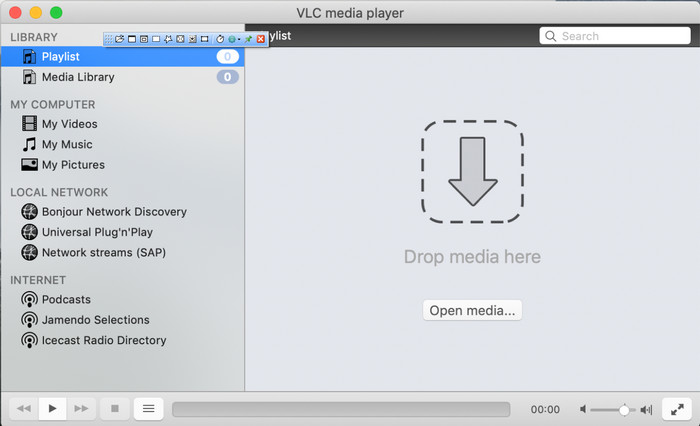
VLC Player הוא עורך תגיות WMA נוסף שניתן להוריד בחינם ב-Windows וב-Mac. נגן מדיה זה יכול לעזור לכם לערוך תגיות בקבצי וידאו ואודיו. בניגוד לתוכנה הראשונה שהוזכרה, כלי זה לא נועד במקור להוספת מטא־דטה לכל קובץ מדיה. הוא משמש לניגון קובצי מדיה שונים שנגן המדיה המקורי או המובנה במערכת לא מסוגל לנגן ללא הורדת קודק נוסף. למרות שהכלי יכול להוסיף תגיות, הוא עדיין לא יעיל כמו עורכי תגיות ייעודיים אחרים.
יתר על כן, הכלי הזה הוכיח לנו דברים רבים מכיוון שהוא אמין ובטוח להורדה. בנוסף לתכונות הללו, כלי זה מסוגל גם להמיר, לערוך פשוט ולהקליט מסך אם אתה צריך אחד כזה. אנו יכולים לומר שזהו כלי רב תכליתי שאינו מספק מצוינות כזו בפונקציות אחרות, אך בהפעלת סרטונים הוא ללא ספק הטוב ביותר בשוק.
חלק 3. תרשים השוואה בין Free & Ultimate WMA Tag Editor
כדי להפוך את הסקירה לפשוטה עוד יותר להבנה, אנו כוללים טבלת השוואה כדי לדעת איזה כלי עדיף להוריד בכונן שלך. אנא קרא אותו ביסודיות כדי להשוות ולהשוות את ממיר הווידאו FVC ואת נגן ה-VlC ולשפוט אותו, שהוא עורך המטא נתונים הטוב ביותר של WMA.
| ממיר וידיאו אולטימטיבי | לעומת | נגן VLC |
 | זמין ב-Windows ו-macOS | |
| תומך במגוון רחב של פורמטים לעריכת תגים |  |
| פונקציות רב תכליתיות כגון חיתוך, חיתוך, עריכה ועוד | |
| ידידותי למשתמש | |
| ממשק המשתמש הגרפי הטוב ביותר | |
חלק 4. שאלות נפוצות על עורך מטא נתונים של WMA
האם אני יכול לשחק WMA ב-VLC?
כן, תוכלו לנגן בקלות קובץ WMA ב-VLC מפני שהוא נתמך. אם ברצונכם לדעת עוד על VLC, תוכלו לקרוא את המאמר הזה; באמצעות לחיצה על קישור זה תלמדו על VLC ועל חלופות נוספות הזמינות לו.
מה זה WMA?
WMA הוא פורמט אודיו המשמש לאחסון סדרת קודקים של אודיו שפותחו על־ידי Microsoft בסיוע המלחין שלה סטאן לה־פארד (Stan LePard). פורמט אודיו זה הוא אחד המתחרים המוכרים של פורמט האודיו הסטנדרטי MP3. עם זאת, הפורמט איננו נפוץ כפי שאולי הייתם מצפים, ולכן אם תרצו להעביר קובץ עם סיומת .wma, צפו לכך שתזדקקו לאפליקציית צד שלישי אם המשתמשים בצד השני לא עובדים עם Windows. אז מה כדאי לעשות? האם אפשר להמיר קובץ WMA ל-MP3 כדי להפוך אותו לתואם למקבל? בעזרת מאמר זה תלמדו כיצד להמיר WMA ל-MP3 ב-Windows, ב-Mac ובאונליין.
האם אני צריך Codec נוסף כדי לשחק WMA?
זה תלוי בתוכנית שבה אתה משתמש כעת; אם אתה משתמש ב-Windows, לא תצטרך להוריד קודק נוסף כדי להפעיל את קובץ השמע על שולחן העבודה שלך. עם זאת, לא כולם היו משתמשי Windows, כך שהמרת קובץ השמע היא הדרך הטובה ביותר להפוך את ה-WMA לתואם למכשירים שלך. אם אתה מחפש ממיר, אנו מציעים לך לבחור את ממיר האודיו הטוב ביותר שתוכל להוריד ב-Windows וב-Mac, FVC Video Converter Ultimate. בצע את השלבים הבאים אם אתה רוצה לדעת. הורד את הכלי על שולחן העבודה שלך, ואז התקן אותו בשלב הבא. פתח את הכלי ולחץ על הסמל + כדי להעלות את קובץ ה-WMA; בצד ימין למעלה, לחץ על המר הכל ל ובחר את פורמט האודיו הזמין ברשימה. לחץ על המר הכל כדי להתחיל בתהליך ההמרה. קל כמו זה.
סיכום
כעת, לאחר שיש לנו רעיון לגבי FVC Video Converter Ultimate ונגן VLC, הגיע הזמן לבחור את עורך תגי ה-WMA הטוב ביותר שבו כדאי להשתמש. כלים אלה נהדרים לעריכת תגיות קבצי ה-WMA שלך, כך שבין אם אתה מעדיף, תוכל להתמודד עם עריכת התגים במהירות. אבל אם אתה רוצה כלי מקצועי שיתמודד עם המשימה הזו, לכו על הכלי האולטימטיבי. על ידי לחיצה על כפתור ההורדה, תוכל להשתמש בזה בשתי מערכות ההפעלה כדי להתאים את תגי ה-WMA שלך.
-
 מה זה מטא נתונים: למד את המידע הבסיסי על מטא נתונים
 מה זה מטא נתונים? האם זה חשוב? מהם החלקים של מטא נתונים? יש לך את אותה שאלה? במאמר זה, תלמד את המידע הבסיסי על מטא נתונים.
-
 4 מצופי המטא נתונים הטובים ביותר באינטרנט ובאופן לא מקוון [עודכן 2025]
 האם אני יכול לבדוק את המטא נתונים של הקובץ שלי? כן, אתה יכול, בעזרת הפוסט הזה נציג בפניך את צופי המטא נתונים השונים שבהם תוכל להשתמש.
-
 6 מסנני Snapchat מונפשים של Snapchat ב-Snapchat
 רוצה לדעת מהן הדרכים הטובות ביותר להוסיף מסננים לסרטוני Snapchat? ובכן, אתה יכול ללחוץ על זה וללמוד את המסננים השונים שבהם אתה יכול להשתמש כדי להחיל על סרטוני Snapchat.
