


 वीडियो कनवर्टर अंतिम
 स्क्रीन अभिलेखी
 वीडियो मरम्मत
Apple डिवाइस के लिए MP3 को M4R में बदलने के सबसे सुविधाजनक तरीके
क्या आपने कभी सोचा है कि अपने पसंदीदा म्यूज़िक को iPhone की रिंगटोन में बदल दें? क्या यह संभव भी है? बिल्कुल, यह संभव है। आपको बस इसके लिए फाइल को कनवर्ट करना होता है। हमें पहले इसे कनवर्ट करने की ज़रूरत क्यों होती है? ताकि हम इसे रिंगटोन के रूप में सेट कर सकें। किसी खास फाइल को सॉन्ग रिंगटोन बनाने के लिए ज़रूरी है कि वह M4R फॉर्मेट में हो। इसलिए आपको अपने लिए सबसे अच्छा MP3 से M4R iTunes कनवर्टर ढूंढना होगा। यह लेख आपके MP3 फाइल को कनवर्ट करने के अलग‑अलग तरीके बताता है, खास तौर पर नीचे दिए गए कंटेंट को पढ़कर बैच में MP3 को M4R में कनवर्ट करने के तरीके भी बताए गए हैं।.

भाग 1. MP3 को M4R में बदलने का सबसे व्यवहार्य तरीका
वीडियो कन्वर्टर अल्टीमेट अब तक का सबसे भरोसेमंद टूल है जिसका उपयोग आप एमपी 3 को एम 4 आर में बदलने के लिए कर सकते हैं। न केवल एक फ़ाइल बल्कि यह MP3 से MP4 में बैच रूपांतरण भी कर सकती है। यह एक कनवर्टर है जो एचडी वीडियो और दोषरहित ऑडियो का उत्पादन कर सकता है। वास्तव में, यह आदर्श है और इसके लिए इसकी मूल गुणवत्ता खोए बिना फ़ाइल को परिवर्तित करने की अनुशंसा की जाती है। सामान्य कनवर्टर की तुलना में गति 30x तेज है। साथ ही, यदि आप अपने फोन में सेव करने के लिए किसी प्लेलिस्ट को कनवर्ट कर रहे हैं तो निश्चित रूप से यह टूल आपके लिए काम कर सकता है। सहज और कोई पसीना नहीं। इस बीच यहां कुछ अन्य विशेषताएं हैं जिनका आप ऑडियो परिवर्तित करने के अलावा आनंद ले सकते हैं। साथ ही, यदि आप इसका उपयोग करने का निर्णय लेते हैं, तो आपके संदर्भ के लिए एक चरण-दर-चरण मार्गदर्शिका नीचे लिखी गई थी।
मेटाडेटा संपादित करें।
हाई-स्पीड GPU त्वरण।
रीयल-टाइम तकनीकी सहायता।
कंप्रेसिंग वीडियो समर्थित है।
स्टेप 1. इसका इस्तेमाल करने के लिए नीचे दिए गए डाउनलोड बटन पर क्लिक करके ऐप प्राप्त करें। Windows या Mac पर ऐप डाउनलोड हो जाने के बाद इसे लॉन्च करें।.
फ्री डाउनलोडWindows 7 या बाद के संस्करण के लिएसुरक्षित डाउनलोड
फ्री डाउनलोडMacOS 10.7 या बाद के संस्करण के लिएसुरक्षित डाउनलोड
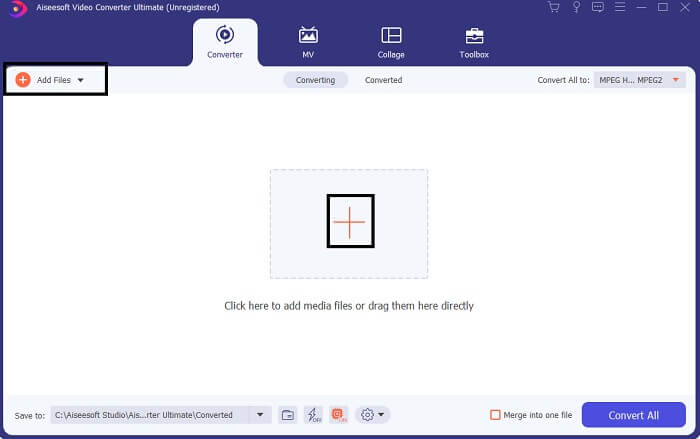
स्टेप 2. टूल के मुख्य इंटरफ़ेस पर आपको फाइल अपलोड करने के दो विकल्प दिखेंगे। या तो बीच में मौजूद प्लस साइन आइकन पर क्लिक करें, या ऊपर बाईं ओर स्थित Add Files बटन पर क्लिक करें। टारगेट फाइल चुनें और उसे अपलोड करें।.
स्टेप 3. मनचाहा आउटपुट पाने के लिए, इंटरफ़ेस के ऊपर दाईं ओर स्थित ड्रॉप‑डाउन मेन्यू पर क्लिक करके फॉर्मेट बदलें।.
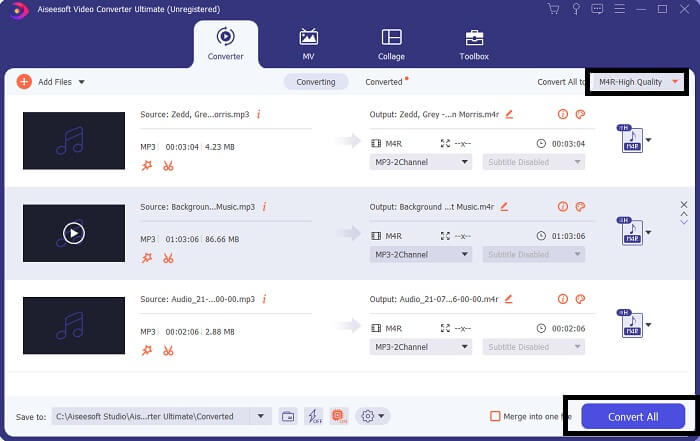
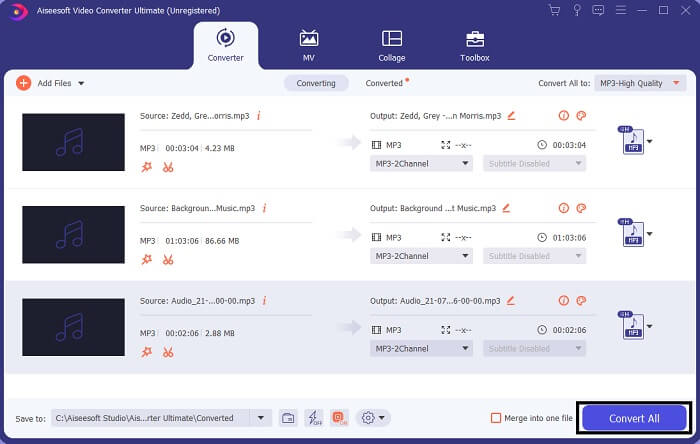
स्टेप 4. अंत में, मुख्य इंटरफ़ेस के नीचे दाईं ओर स्थित Convert All बटन पर क्लिक करें। फिर फाइल के कनवर्ट होने तक इंतज़ार करें।.
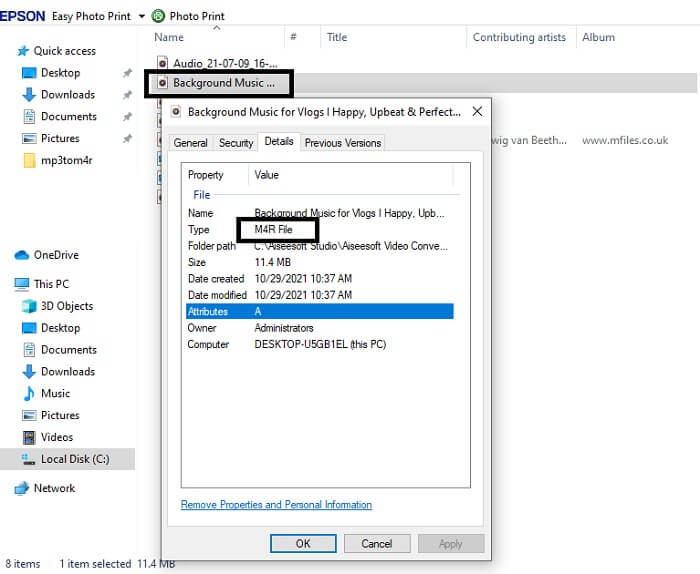
स्टेप 5. अब वह फ़ोल्डर खोलें जहाँ ऑडियो आउटपुट सेव हुआ है और इसे अपने iPhone में ट्रांसफर करें। इसके लिए आप किसी ट्रांसफर टूल या ऐप का इस्तेमाल कर सकते हैं। इंटरनेट पर आपको कई सिफारिशें मिल जाएँगी। आपको बस सर्च करना है और उसके बाद इसे अपने iPhone की रिंगटोन बनाने की प्रक्रिया को फॉलो करना है।.
भाग 2. एमपी3 को एम4आर ऑनलाइन में बदलने के लिए कुछ बेहतरीन उपकरण
FVC फ्री ऑनलाइन ऑडियो कन्वर्टर
कनवर्ट करने के लिए प्रीमियम टूल अच्छा होता है, लेकिन व्यवहारिक टूल से बेहतर कुछ नहीं। आपकी ज़रूरत को ध्यान में रखते हुए, FVC ने इस टूल का एक फ्री वर्ज़न बनाया है। FVC Free Audio Converter आपका फ्री एक्सेस टूल है, जिसे आप कभी भी और कहीं भी इस्तेमाल कर सकते हैं। आपको बस काम करने वाला इंटरनेट और सपोर्टेड ब्राउज़र चाहिए। यह MP3 से M4R iPhone रिंगटोन कनवर्टर हाई‑क्वालिटी, लॉसलेस ऑडियो तैयार कर सकता है। आउटपुट काफ़ी संतोषजनक होता है और वह भी बिना पैसा खर्च किए। रुको, और भी है—क्या आप जानते हैं कि यह बैच कन्वर्ज़न भी कर सकता है? हाँ, बिल्कुल! साथ ही, अगर आप इसे इस्तेमाल करेंगे तो आपको इसके कुछ और उल्लेखनीय फीचर्स भी मिलेंगे। दूसरी ओर, आपकी सुविधा के लिए एक गाइड भी लिखा गया है।.
कनवर्ट की गई फ़ाइल की गुणवत्ता मूल के समान है।
◆ 100% मुफ़्त और उपयोग में सुरक्षित।
रूपांतरण पर आकार में कोई सीमा नहीं।
बैच रूपांतरण समर्थित है।
स्टेप 1. टूल तक पहुँचने के लिए FVC Free Audio Converter की आधिकारिक वेबसाइट पर जाएँ।.
स्टेप 2. वहाँ से, Add Files to Convert पर क्लिक करें। पहली बार उपयोग करने वाले यूज़र के लिए, आपको Open FVC Launcher पर क्लिक करके एक्सेस की अनुमति देनी होगी। इसके बाद आपकी स्क्रीन पर एक विंडो दिखाई देगी, जहाँ से आप वह फाइल खोजकर चुन सकते हैं जिसे आप कनवर्ट करना चाहते हैं।.
फ़ाइलों को बैच में कनवर्ट करने के लिए डेस्कटॉप संस्करण डाउनलोड करें।.
स्टेप 3. फाइल अपलोड करने के बाद, आपको एक और विंडो पॉप‑अप होती दिखेगी। नीचे वाले हिस्से में, आउटपुट फाइल का फॉर्मेट बदलने के लिए M4R पर टिक करें।.
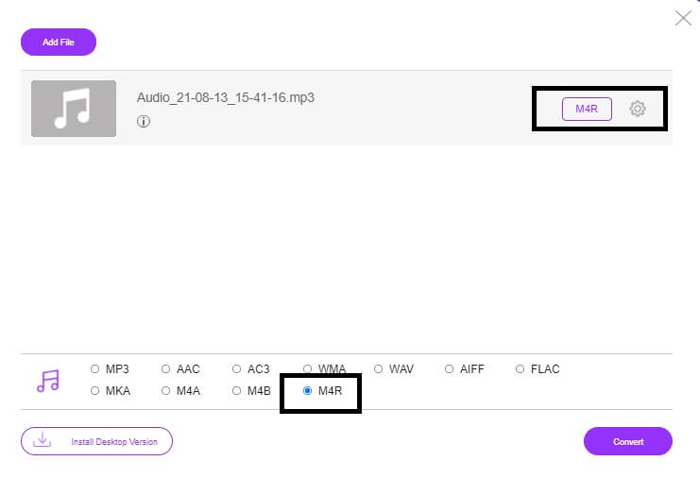
स्टेप 4. फिर कन्वर्ज़न शुरू करने के लिए Convert बटन पर क्लिक करें।.
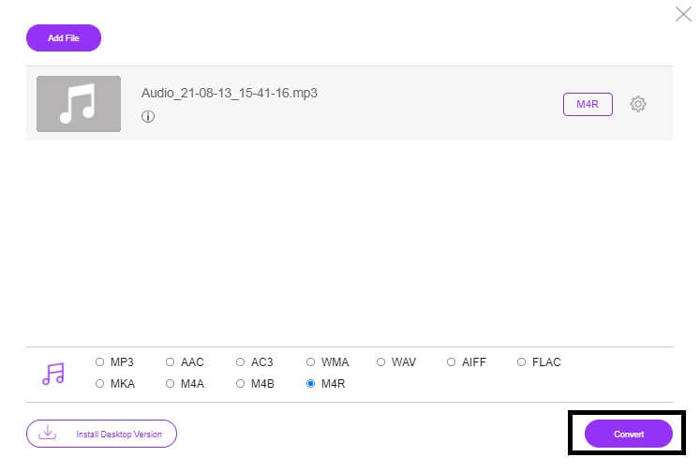
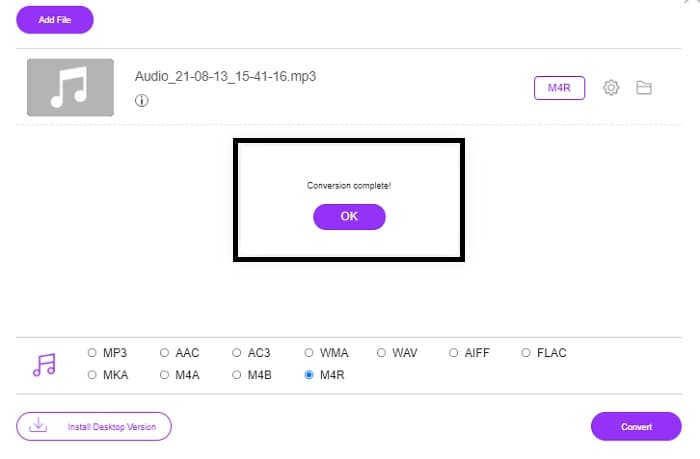
स्टेप 5. अंत में, वह फ़ोल्डर चुनें जहाँ आप फाइल को सेव करना चाहते हैं, और फाइल अपने आप वहीं सेव हो जाएगी। इसके बाद उसे अपने iPhone में ट्रांसफर करें। यह जान लें कि आप बैच कन्वर्ज़न भी कर सकते हैं, इसलिए खुद को सीमित न रखें।.
संबंधित:
फ़ाइल कनवर्टर द्वारा M4ROnline
सरल, फिर भी भरोसेमंद—इसके यूज़र्स इस ऑनलाइन टूल को इसी तरह वर्णित करते हैं। डिफ़ॉल्ट रूप से, इसे खास तौर पर Mp3 को M4R में कनवर्ट करने के लिए बनाया गया है। जैसा कि इसके नाम से ही स्पष्ट है, यही इसका मुख्य काम है। यह अलग‑अलग वेब ब्राउज़रों पर काम करता है, इसलिए आपको इसे डाउनलोड या खरीदने की ज़रूरत नहीं। जब आप वेबसाइट पर जाएँगे, तो आप टूल का बेहद सिंपल इंटरफ़ेस देखेंगे। यह बिल्कुल सीधा‑सादा है, जहाँ आपको सिर्फ Browse बटन पर क्लिक करके अपलोडिंग और कन्वर्ज़न प्रक्रिया शुरू करनी होती है। अगर आप इसे आज़माना चाहते हैं, तो सलाह दी जाती है कि आधिकारिक वेबसाइट पर जाएँ और खुद अनुभव करें। इस तरह, यह टूल एक अच्छा विकल्प साबित होता है। टूल के इस्तेमाल की प्रक्रिया जानने के लिए आप नीचे दिए गए स्टेप‑बाय‑स्टेप निर्देश भी देख सकते हैं।.
स्टेप 1. सबसे पहले आपको M4R Online के आधिकारिक पेज पर जाना है और फिर Browse पर क्लिक करना है।.
स्टेप 2. अपने फ़ोल्डर से फाइल चुनें और Upload File बटन पर क्लिक करें।.
स्टेप 3. जब आपको “completed” संदेश दिखे, तो फाइल को डाउनलोड करने के लिए उस पर क्लिक करें।.
ऑनलाइन-convert.com
यह एक ऐसा टूल है जो काफी समय से सेवा प्रदान कर रहा है। यह कहना सुरक्षित है कि बहुत से लोगों ने अपनी कन्वर्ज़न ज़रूरतों के लिए इस ऑनलाइन टूल को काफ़ी मददगार पाया है। वरना अगर यह उपयोगी साबित न हुआ होता, तो यह आज तक अस्तित्व में नहीं होता। साइट के होम पेज पर जाने पर, आपको वहाँ सभी उपलब्ध टूल दिखाई देंगे—Audio converter, video converter, image converter, document converter, Ebook converter—ये सब एक ही होम पेज पर मौजूद हैं। इन्हें एक साथ संकलित करने से यूज़र के लिए ज़रूरी टूल ढूंढना आसान हो जाता है। इसीलिए, यह MP3 से M4R iTunes कनवर्टर की इस सूची में शामिल किए जाने के लायक है। दूसरी ओर, आपके संदर्भ के लिए इसे इस्तेमाल करने का तरीका नीचे दिया गया है।.
स्टेप 1. टूल की आधिकारिक साइट पर जाएँ और Audio Converter चुनें।.
स्टेप 2. Drop down पर क्लिक करें और आउटपुट फॉर्मेट चुनें, फिर GO पर क्लिक करें।.
स्टेप 3. इसके बाद एक नई विंडो दिखाई देगी। वहाँ Choose Files बटन पर क्लिक करें और फाइल अपलोड करें। कन्वर्ज़न प्रक्रिया शुरू करने के लिए Start Conversion पर क्लिक करें। जब फाइल तैयार हो जाएगी, तो वह अपने आप आपके पीसी पर डाउनलोड हो जाएगी।.
MP3 बनाम M4R
MP3 प्रारूप 1993 में मूविंग पिक्चर एक्सपर्ट्स ग्रुप (MPEG) द्वारा जारी किया गया था। यह संगीत को संग्रहीत करने के लिए मानक था क्योंकि यह अन्य असम्पीडित प्रारूपों की तुलना में ऑडियो को बहुत छोटे आकार में संपीड़ित कर सकता था। यह आजकल भी व्यापक रूप से उपयोग किया जाता है, विशेष रूप से ऑनलाइन ऑडियो वितरित करने के लिए।
Apple iTunes के साथ बनाए गए कस्टम iPhone रिंगटोन को सहेजने के लिए M4R फ़ाइल का उपयोग किया जाता है। आम तौर पर, कंप्यूटर से आईओएस डिवाइस में रिंगटोन का एक टुकड़ा स्थानांतरित करते समय आप इस प्रारूप को देख सकते हैं। ITunes के साथ बनाई गई M4R फ़ाइलों में आमतौर पर कॉपीराइट सुरक्षा शामिल होती है।
भाग 3. MP3 को M4R में बदलने के बारे में अक्सर पूछे जाने वाले प्रश्न
M4R क्या है?
यह विशेष रूप से Apple द्वारा बनाया गया एक फ़ाइल एक्सटेंशन है और iPhone और अन्य Apple उपकरणों के लिए रिंगटोन के रूप में सख्ती से उपयोग किया जाता है। यह गुणवत्ता के मामले में M4A और MP4 जितना ही अच्छा है।
क्या iTunes से अलग MP3 से M4R कन्वर्टर है?
निश्चित रूप से, वहाँ हैं। आप ऊपर दिए गए टूल में से चुन सकते हैं या रिपिंग करके विंडोज मीडिया प्लेयर का उपयोग करने पर विचार कर सकते हैं। यदि आप सभी प्रक्रियाओं से नहीं गुजरना चाहते हैं, तो आप केवल ऑनलाइन उपलब्ध मुफ्त टूल का उपयोग कर सकते हैं। वे रिपिंग की लंबी प्रक्रिया से गुजरने के बजाय सीधे ऑडियो को आपके वांछित प्रारूप में परिवर्तित करते हैं।
रिंगटोन के रूप में उपयोग करने के लिए मुझे अपनी फ़ाइल को MP3 से M4R में बदलने की आवश्यकता क्यों है?
यह बहुत जरूरी है। फ़ाइल को रिंगटोन माना जाने के लिए, फ़ाइल को डिफ़ॉल्ट रूप से M4R प्रारूप में होना चाहिए जिसे आपकी रिंगटोन के रूप में चलाया जा सके।
निष्कर्ष
इन सबके साथ, निश्चित रूप से आप ऊपर सूचीबद्ध उपकरणों पर भरोसा कर सकते हैं। आपको बस यह एक्सेस करना है कि आपकी आवश्यकताओं के आधार पर कौन सा टूल आपके लिए मददगार हो सकता है। यदि आप एक छात्र और नियमित नागरिक हैं जो कनवर्ट करना चाहते हैं और मैक पर एमपी3 को एम4आर में मुफ्त में बदलना चाहते हैं या आप जिस भी डिवाइस का उपयोग कर रहे हैं, आप मुफ्त टूल का उल्लेख कर सकते हैं। व्यावसायिक उपयोग के लिए, वीडियो कनवर्टर अल्टीमेट का उपयोग करने की अनुशंसा की जाती है। यदि आप कनवर्ट करने के लिए और टूल के बारे में अधिक जानना चाहते हैं तो आप हमेशा इस पृष्ठ पर वापस जा सकते हैं।
-
 [मुफ्त और ऑनलाइन] छवि के साथ एमपी3 को एमपी4 में बदलने के 3 तरीके
 उच्च गुणवत्ता में एमपी 3 को MP4 में कैसे परिवर्तित करें? यह पोस्ट विंडोज और मैक पर चित्रों के साथ एमपी 3 को एमपी 4 में बदलने के लिए 3 कुशल और मुफ्त तरीकों को दिखाती है।
-
 MP3 को WAV फॉर्मेट में कैसे बदलें, इस बारे में जानें
 क्या आप जानना चाहते हैं कि MP3 को WAV में कैसे बदलें? निर्धारित करें कि कौन-से उपकरण आपको प्राप्त होने वाले सर्वोत्तम गुणवत्ता रूपांतरण प्रदान करते हैं।
-
 M4A को WAV में कैसे बदलें [पीसी और मैक] पर दिशानिर्देश
 विस्तृत चरणों और आपके द्वारा चुने जा सकने वाले विभिन्न टूल के साथ M4A को WAV में बदलने के तरीके के बारे में अधिक जानें।

