


 वीडियो कनवर्टर अंतिम
 स्क्रीन अभिलेखी
 वीडियो मरम्मत
VOB को AVI ऑनलाइन और ऑफलाइन में बदलने के 3 तरीके जानें
VOB फाइलें निजी स्ट्रीम को स्टोर करने के लिए उपयोग की जाती हैं और यह MPEG-2 की तरह हानिपूर्ण वीडियो संपीड़न का उपयोग करती हैं। इसके अलावा, अगर हम दोनों की तुलना करें तो उनकी संरचना लगभग समान है। हालाँकि, .vob फ़ाइलों की एक सीमा और विशिष्टता होती है, इससे पहले कि आप उनका उपयोग भी कर सकें। और उसके कारण आप अपने स्थानीय मीडिया प्लेयर पर आसानी से VOB फ़ाइल नहीं चला सकते। तो अब, इसे खोलने का तरीका खोजने में अपना समय बचाने के लिए, हमारा सुझाव है कि आपको नीचे एक कनवर्टर चुनकर इसे परिवर्तित करने की आवश्यकता है। उस स्थिति में, हम आपके लिए सबसे अच्छा कनवर्टर प्रस्तुत करते हैं जिसके साथ हम आ सकते हैं और सीख सकते हैं कि सूची में मौजूद टूल के साथ वीओबी को एवीआई में ऑनलाइन या ऑफलाइन कैसे परिवर्तित किया जाए।
भाग 1. VOB को AVI ऑनलाइन में कैसे बदलें
यदि आपका बजट कड़ा है, तो हम सुझाव देते हैं कि आप अपने लिए किसी मुफ्त टूल का उपयोग करें। इंटरनेट पर खोज करने के बाद हमें पता चला कि एक ऐसा टूल है जिसे सबसे अच्छा ऑनलाइन कन्वर्टर माना जाता है, और वह है FVC Free Video Converter। इसके अलावा, यह टूल हर उस उपयोगकर्ता को बेहद सरल और आसानी से उपयोग करने योग्य इंटरफ़ेस देता है जिसने इसे पहले से इस्तेमाल किया है, और सभी इस बात से प्रभावित हैं कि यह टूल कितना अच्छा काम करता है। इसलिए, अगर आप भी यह देख कर प्रभावित होना चाहते हैं कि यह कन्वर्टर कितना अच्छा है, तो नीचे दिए गए चरणों का पालन करके VOB फाइल को AVI फॉर्मेट में बदलकर देखें।.
स्टेप 1. सीधे कन्वर्टर की वेबसाइट पर जाने के लिए इस लिंक पर क्लिक करें।.
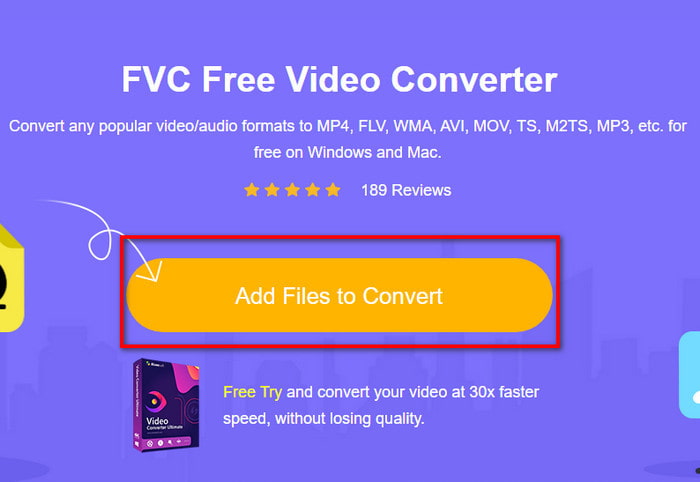
स्टेप 2. वेबसाइट पर, इंस्टॉलर डाउनलोड करने के लिए Add Files to Convert पर क्लिक करें। चिंता की बात नहीं है, फाइल सिर्फ कुछ KB की है। फिर टूल को लॉन्च करने के लिए उस पर दोबारा क्लिक करें और फोल्डर में अपनी फाइल ढूँढें, फाइल मिल जाने पर आगे बढ़ने के लिए Open पर क्लिक करें।.
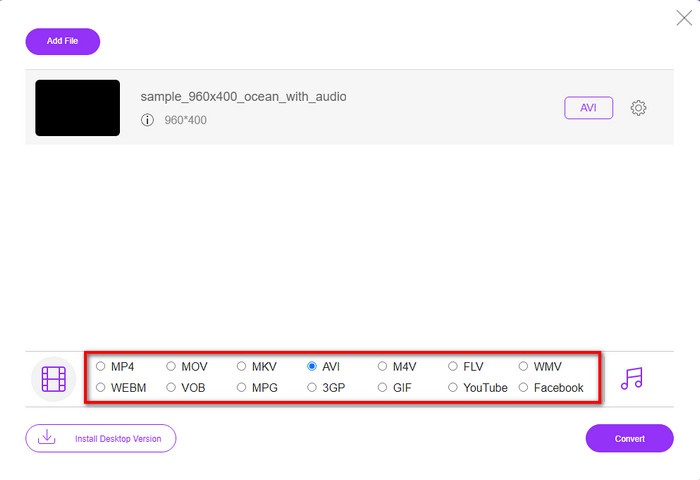
स्टेप 3. FVC का नया इंटरफ़ेस आपकी स्क्रीन पर दिखाई देगा। नीचे दी गई सूची में से AVI फॉर्मेट या कोई भी अन्य फॉर्मेट चुनें जिसमें आप फाइल को बदलना चाहते हैं।.
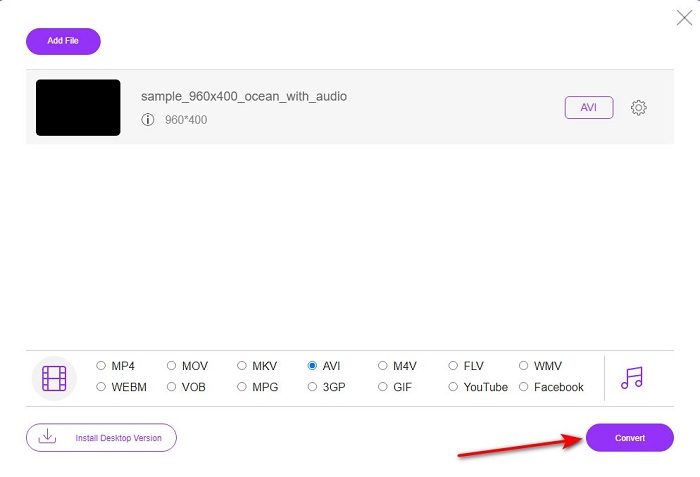
स्टेप 4. फॉर्मेट चुनने के बाद, फाइल को कन्वर्ट करने की प्रक्रिया शुरू करने के लिए Convert पर क्लिक करें।.
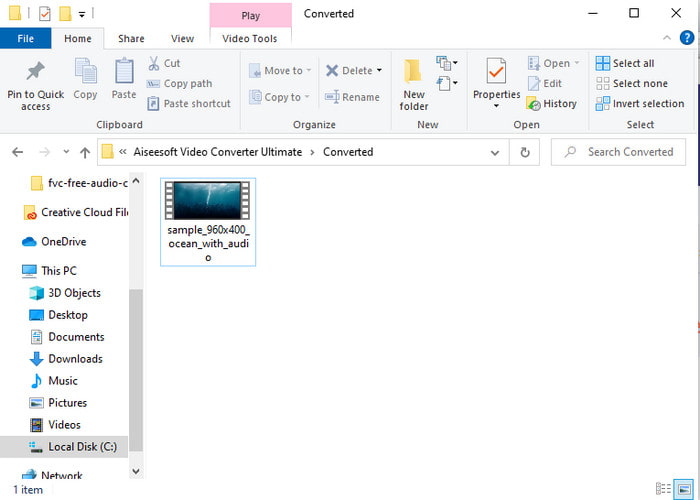
स्टेप 5. इस प्रक्रिया में अनुमानित रूप से एक मिनट से भी कम समय लगेगा, और कन्वर्ज़न पूरा होने पर नया कन्वर्ट किया गया फाइल वाला फोल्डर आपके सामने खुल जाएगा।.
भाग 2. विंडोज़ और मैक पर वीओबी को एवीआई में कैसे बदलें
फेनोमेनल कन्वर्टर का उपयोग करें: FVC वीडियो कन्वर्टर अल्टीमेट
यदि आप VOB से AVI कन्वर्टर डाउनलोड करना चाहते हैं तो यह सबसे अच्छा विकल्प होना चाहिए जिसे आप बनाना पसंद करेंगे। FVC वीडियो कन्वर्टर अल्टीमेट हमेशा अंतिम उपकरण के रूप में अपने नाम के अनुरूप रहता है जो आपके द्वारा आने वाली हर अंतिम स्थिति को हल करता है, विशेष रूप से परिवर्तित करने पर। यह सॉफ्टवेयर बताए गए दो टूल्स से काफी अलग है। हो सकता है कि आप सोच रहे हों कि ऐसा क्यों है, और यह केवल इसलिए है क्योंकि यह पूरी तरह से किसी पर भी फिट बैठता है चाहे आप समर्थक हों या शुरुआती। जब हम इस टूल को आजमाते हैं तो हमारा समग्र प्रदर्शन पहले से ही अद्भुत होता है और हम प्रभावित होते हैं कि रूपांतरण कितनी तेजी से किया जा सकता है। और अब, यदि आप अभूतपूर्व रूपांतरण का अनुभव करना चाहते हैं, तो हम बात कर रहे हैं तो नीचे दिए गए चरणों का पालन करें।
स्टेप 1. इसे उपयोग करने से पहले आपको इसे डाउनलोड करना होगा। डाउनलोड पूरा होने के बाद इसे इंस्टॉल करें, सेट‑अप पूरा करें और Start Now पर क्लिक करें।.
फ्री डाउनलोडWindows 7 या बाद के संस्करण के लिएसुरक्षित डाउनलोड
फ्री डाउनलोडMacOS 10.7 या बाद के संस्करण के लिएसुरक्षित डाउनलोड
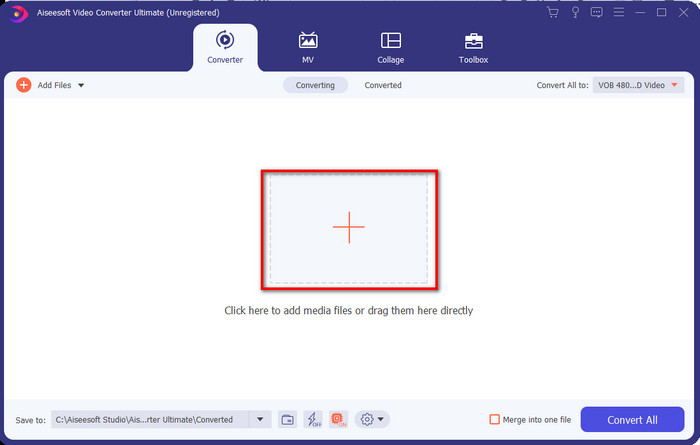
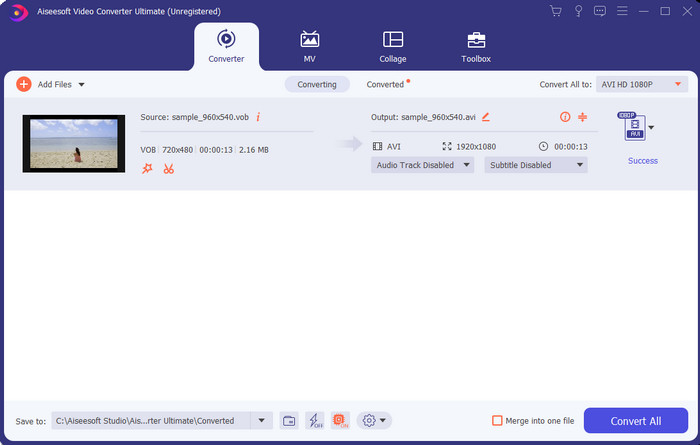
स्टेप 2. इंस्टॉलेशन पूरा होने के बाद सॉफ्टवेयर खोलें। इसके बाद आपके स्क्रीन पर इस तरह का इंटरफ़ेस दिखाई देगा। इंटरफ़ेस के बीच वाले हिस्से पर + बटन पर क्लिक करें, जिससे आपकी स्क्रीन पर एक फोल्डर दिखाई देगा। अगला चरण शुरू करने के लिए Open पर क्लिक करें।.
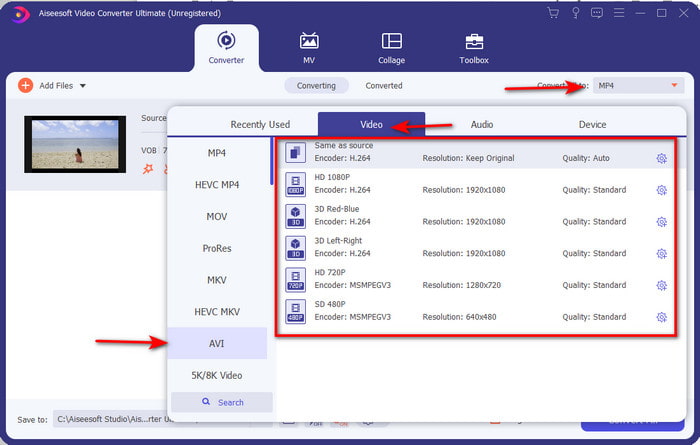
स्टेप 3. इंटरफ़ेस के ऊपर बाएँ हिस्से में मौज़ूद Convert All to बटन पर क्लिक करें और वीडियो कैटेगरी की सूची से AVI फॉर्मेट चुनें।.
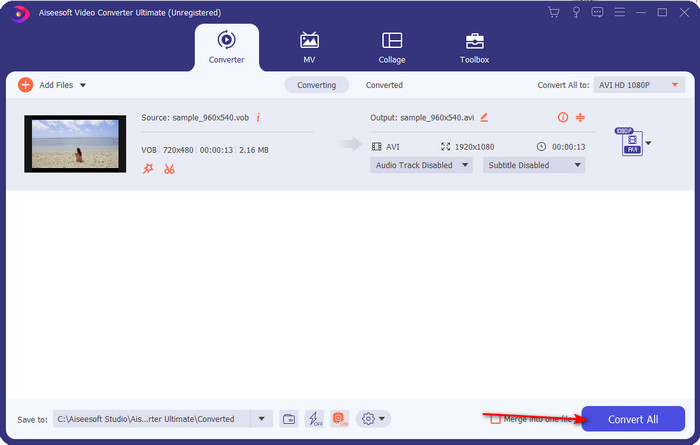
स्टेप 4. जब आप फॉर्मेट चुनने का काम पूरा कर लें, तो कन्वर्ज़न शुरू करने के लिए Convert All पर क्लिक करें।.
स्टेप 5. ज़्यादा इंतज़ार करने की जरूरत नहीं है क्योंकि यह कुछ ही सेकंड में पूरा हो सकता है। प्रक्रिया समाप्त होने पर कन्वर्ट की गई मीडिया फाइल वाला फोल्डर अपने‑आप आपकी स्क्रीन पर खुल जाएगा। फिर उस फाइल पर क्लिक करें, अपना .vob फाइल का नया वर्ज़न देखें और आनंद लें।.
फ्री टूल का इस्तेमाल करें: हैंडब्रेक
यदि आप किसी मुफ्त टूल की तलाश में हैं, तो HandBrake इसमें आपकी मदद कर सकता है, और इसे काम करने के लिए इंटरनेट कनेक्टिविटी की ज़रूरत नहीं है, बिलकुल FVC Video Converter Ultimate की तरह। इसके अलावा, इसे कोई भी अपने घर, ऑफिस या कहीं और डेस्कटॉप पर मुफ्त में डाउनलोड और उपयोग कर सकता है। हालांकि, अगर आप इस टूल को डाउनलोड करते हैं, तो इसे इस्तेमाल करने से पहले आपको .NET 5.0 नाम की एक अलग फाइल डाउनलोड करनी होगी। कुछ उपयोगकर्ताओं को यह थोड़ा परेशान करने वाला लगता है, क्योंकि टूल डाउनलोड करने के बाद उन्हें एक और फाइल दोबारा डाउनलोड करनी पड़ती है। लेकिन अगर आप प्रभावी और मुफ्त कन्वर्ज़न प्रक्रिया चाहते हैं, तो HandBrake VOB to AVI का इस्तेमाल करके कन्वर्ट करने की कोशिश करें और नीचे दिए गए चरणों का पालन करें।.
स्टेप 1. सबसे पहले टूल को अपने कंप्यूटर ड्राइव पर इंस्टॉल करें।.
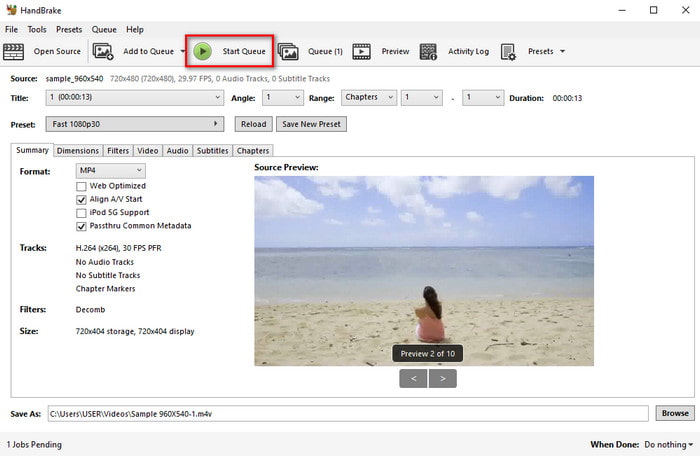
स्टेप 2. File पर क्लिक करें और अपने फोल्डर में से .vob फाइल को ढूँढें।.
स्टेप 3. Format पर क्लिक करें, उपलब्ध सूची में से विकल्प चुनें, फिर Start Queue पर क्लिक करें।.
भाग 3. VOB फ़ाइलों को AVI प्रारूप में बदलने के लिए उपयोग किया जाने वाला सबसे अच्छा कनवर्टर कौन सा है
| विशेषताएं | FVC मुफ्त वीडियो कनवर्टर | FVC वीडियो कन्वर्टर अंतिम | HandBrake |
| कनवर्टिंग प्रारूप |  | | |
| हार्डवेयर और रूपांतरण त्वरण |  | | |
| इंटरनेट कनेक्टिविटी | | | |
| वीडियो एन्हांसर या संपादन | | | |
| कार्यक्रम समर्थित | वेब आधारित उपकरण | डेस्कटॉप-आधारित टूल | डेस्कटॉप-आधारित टूल |
भाग 4. वीओबी और एवीआई के बारे में अक्सर पूछे जाने वाले प्रश्न
VOB में और कौन सी फाइलें हो सकती हैं?
VOB एक मल्टी-प्लेक्स डीवीडी प्रारूप है और इस वजह से इसमें न केवल वीडियो और ऑडियो बल्कि उपशीर्षक, नेविगेशन सामग्री और मेनू भी शामिल हो सकते हैं।
मैं अपने मीडिया प्लेयर पर VOB फ़ाइलें क्यों नहीं चला सकता?
VOB फाइल आपके मीडिया प्लेयर पर न चलने की एक वजह यह है कि इस फॉर्मेट को मीडिया प्लेयर से बहुत कम स्तर का समर्थन मिलता है। आप यहाँ क्लिक करके उपलब्ध VOB प्लेयर्स प्राप्त कर सकते हैं। अगर आपको अब भी यह समस्या हो रही है, तो इसका एक व्यावहारिक समाधान यह है कि ऊपर बताए गए किसी भी कन्वर्टर की मदद से इसे कन्वर्ट कर लें।.
VOB फाइलें बहुत बड़ी क्यों होती हैं?
इस प्रारूप के इतने बड़े होने का एकमात्र कारण यह है कि इसमें एक डीवीडी में अलग-अलग डेटा होना चाहिए। साथ ही, हम वीडियो की लंबाई की संभावना को भी नहीं छोड़ सकते। या वीओबी फाइलों को कंप्रेस करने का तरीका जानने के लिए यहां क्लिक करें।
निष्कर्ष
तो अब, अगर आप VOB फाइल को कन्वर्ट करना चाहते हैं तो इसे ऊपर उपलब्ध टूल्स की मदद से आसानी से किया जा सकता है। इसके अलावा, FVC वीडियो कन्वर्टर अल्टीमेट वह कनवर्टर है जो वास्तव में उल्लिखित अन्य ऑनलाइन और ऑफलाइन टूल में से एक है। क्योंकि आप विंडोज़ में और यहां तक कि मैक पर भी आसानी से VOB को AVI में बदल सकते हैं। यदि आपको अभी भी पता नहीं है कि क्या उपयोग करना है तो हम दृढ़ता से सुझाव देते हैं कि आपको एक स्पष्ट आउटपुट का अनुभव करने और चकित होने के लिए अभूतपूर्व टूल डाउनलोड करना होगा।
-
 VOB to MP4 - बल्क में फ्री में VOB फाइल को MP4 में कन्वर्ट करने के 3 तरीके
 यह लेख MP4 कन्वर्टर्स और संबंधित ट्यूटोरियल के लिए 3 मुक्त VOB का परिचय देता है। आप आसानी से विंडोज / मैक / ऑनलाइन पर मुफ्त में वीओबी को MP4 फाइलों में बदल सकते हैं।
-
 VOB को FLV में बदलने के सर्वोत्तम तरीके [मुफ्त और ऑनलाइन शामिल]
 VOB फ़ाइल को FLV फ़ाइल में कनवर्ट करना चाहते हैं? आप डेस्कटॉप या ऑनलाइन कन्वर्टर्स के साथ कार्य को आसानी से पूरा कर सकते हैं। इस गाइड को पढ़ें और जानें कि VOB को FLV में आसानी से और जल्दी से कैसे बदला जाए।
-
 VOB फाइल क्या है और VOB फाइल को फ्री में GIF में कैसे बदलें
 क्या आप VOB फ़ाइलों के बारे में अधिक जानना चाहते हैं और रिप्ड होने के बाद इसे कैसे साझा करना चाहते हैं? या आपको VOB को GIF में बदलने की आवश्यकता क्यों है? तो इस लेख को ध्यान से पढ़ें।
