


 वीडियो कनवर्टर अंतिम
 स्क्रीन अभिलेखी
 वीडियो मरम्मत
गुणवत्ता को कम किए बिना AMV को MOV में बदलना सीखें
AMV एक स्वामित्व (प्रोप्राइटरी) वीडियो फ़ॉर्मैट है, जिसका उपयोग S1 MP3 और MP4 मीडिया प्लेयर्स पर वीडियो प्लेबैक स्टोर करने के लिए किया जाता है। यह .amv फ़ाइल एक्सटेंशन लो‑रेज़ोल्यूशन होती है और इसे इस पोर्टेबल मीडिया प्लेयर में फ़ाइल रखने के लिए अधिक कंप्रेस किया जाता है। हालाँकि यह फ़ॉर्मैट अभी भी मौजूद है, लेकिन यह पुराना फ़ॉर्मैट होने की वजह से फ़ोन के लिए इस मीडिया प्लेयर का कम्पैटिबल वर्शन ढूँढना मुश्किल है। किसी कम्पैटिबल मीडिया प्लेयर को खोजने की बजाय, क्यों न आप AMV फ़ाइलों को किसी नए फ़ॉर्मैट में कनवर्ट कर लें, जिसे व्यापक रूप से सपोर्ट मिलता हो, जैसे MOV। इसलिए, अगर आप यह जानना चाहते हैं कि AMV को MOV में कनवर्ट करने का सबसे अच्छा तरीका क्या है, तो आइए जाँच‑पड़ताल शुरू करते हैं।.

भाग 1. एएमवी और एमओवी के बारे में संक्षिप्त परिचय
एक्शन मीडिया वीडियो या एएमवी का विचार एमपी 4 को एक सार्वभौमिक प्रारूप के रूप में बदलना है क्योंकि यह प्रारूप बेहतर और बहुत अधिक संकुचित है। साथ ही, यह प्रारूप AVI प्रारूप का बेहतर संस्करण है। लेकिन इस नए युग के माध्यम से प्रारूप की अवहेलना की गई है क्योंकि इसे रिज़ॉल्यूशन गुणवत्ता में सुधार के लिए कोई अपडेट प्राप्त नहीं होता है। और अब, यदि आप इस प्रारूप को हमारे मोबाइल उपकरणों पर संग्रहीत करते हैं और इसे खेलते हैं तो उम्मीद है कि आप इसे नहीं खेल सकते क्योंकि प्रारूप असमर्थित है। इसलिए यदि आप इस प्रारूप के तहत एक वीडियो चलाना चाहते हैं, तो आपको एएमवी के लिए एक तृतीय-पक्ष मीडिया प्लेयर डाउनलोड करना होगा। जबकि MOV, इस प्रारूप को बहुत अधिक समर्थन प्राप्त होता है क्योंकि यह मूल फ़ाइल स्वरूप है जिसे QuickTime विकसित करता है।
भाग 2। अल्टीमेट डेस्कटॉप सॉफ्टवेयर के साथ एएमवी को एमओवी में बदलें
FVC वीडियो कन्वर्टर अंतिम
इस प्रोफ़ेशनल वीडियो कनवर्टर की मदद से AMV को MOV में बदलें, जो ऐसा बेहतरीन आउटपुट देता है जिसकी टक्कर कोई नहीं ले सकता, FVC Video Converter Ultimate। यह कनवर्टर PC और Mac दोनों पर उपलब्ध है, और दोनों में इस टूल द्वारा दिए गए एक‑जैसे उन्नत फ़ीचर्स मौजूद हैं। इसके अलावा, तेज़ कन्वर्ज़न और हार्डवेयर ऐक्सेलरेशन, जो PC पर मिलता है, वह Mac पर भी उपलब्ध है। बहुत‑से यूज़र्स पहले ही अपनी समस्या का समाधान करने के लिए इस सॉफ़्टवेयर को अपनी पहली पसंद बना चुके हैं। साथ ही, इस टूल का उपयोग करने से पहले आपको इसे FVC से ख़रीदना होगा। हालाँकि इसके लिए भुगतान करना पड़ता है, फिर भी आपको सैकड़ों डॉलर खर्च नहीं करने पड़ेंगे, और इसकी क़ीमत वसूल हो जाएगी। तो बिना देर किए, आइए इस टूल को परखते हैं और देखते हैं कि क्या हम इसके नाम के मुताबिक़ वाक़ई ‘अल्टिमेट’ कन्वर्ज़न हासिल कर सकते हैं।.
FVC Video Converter Ultimate के साथ AMV को MOV में कनवर्ट करने के चरण:
चरण 1. नीचे दिए गए बटन पर क्लिक करके FVC Video Converter Ultimate अपने डेस्कटॉप पर डाउनलोड करें; डाउनलोड पूरा होने के बाद सॉफ़्टवेयर इंस्टॉल करें।.
फ्री डाउनलोडWindows 7 या बाद के संस्करण के लिएसुरक्षित डाउनलोड
फ्री डाउनलोडMacOS 10.7 या बाद के संस्करण के लिएसुरक्षित डाउनलोड
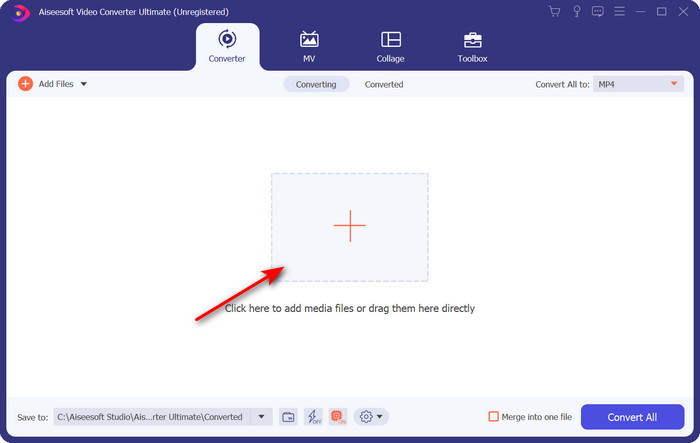
चरण 2. सॉफ़्टवेयर खोलें और .amv अपलोड करने के लिए + चिह्न पर क्लिक करें। फ़ोल्डर में फ़ाइल खोजें और उसे जोड़ने के लिए Open दबाएँ।.
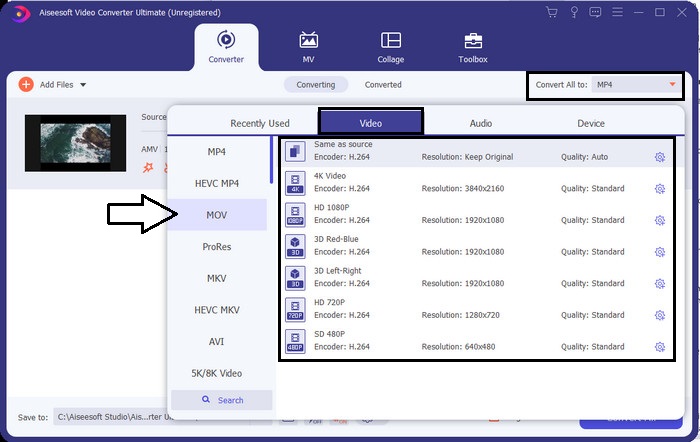
चरण 3. फ़ॉर्मैट को MOV में बदलने के लिए Convert All to: पर क्लिक करें, और MOV या अपनी मनचाही फ़ॉर्मैट चुनें।.
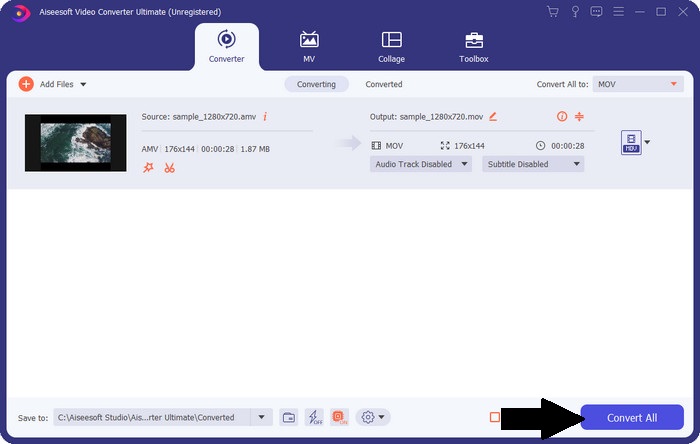
चरण 4. AMV फ़ाइल को MOV में बदलने के लिए Convert All पर क्लिक करें और कन्वर्ज़न प्रक्रिया शुरू करें।.
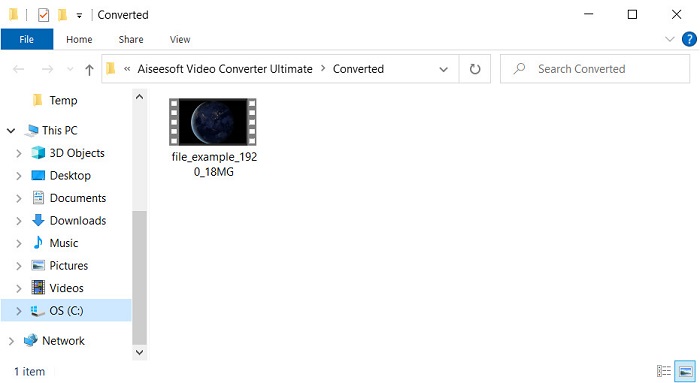
चरण 5. फ़ाइल को कनवर्ट होने में केवल कुछ ही सेकंड लगेंगे। फिर उस फ़ोल्डर के दिखने का इंतज़ार करें जिसमें वह .mov फ़ाइल होगी जो आपने अभी बनाई है; उसे अपने डिफ़ॉल्ट मीडिया प्लेयर पर देखने के लिए फ़ाइल पर क्लिक करें।.
भाग 3. उपलब्ध 2 ऑनलाइन सेवा कनवर्टर के साथ AMV को MOV में बदलें
1. कन्वर्टफाइल्स
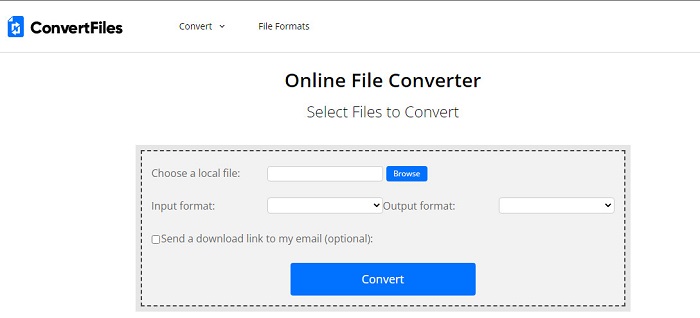
सबसे बेहतरीन ऑनलाइन कनवर्टर्स में से एक जिसे आप अपने पसंदीदा ब्राउज़र पर खोल सकते हैं, वह है ConvertFiles। यह ऑनलाइन टूल आपके फ़ॉर्मैट को बिना किसी दिक्कत के नए फ़ॉर्मैट में कनवर्ट कर सकता है। साथ ही, यह टूल कुछ सीमित फ़ॉर्मैट्स का सेट सपोर्ट करता है, जिनमें से आप चुन सकते हैं। हालाँकि, यहाँ कनवर्ट की हुई फ़ाइल को डाउनलोड करने में काफ़ी समय लग जाता है क्योंकि यह तेज़ कन्वर्ज़न उपलब्ध नहीं कराता। एक और नकारात्मक बात यह है कि इंटरफ़ेस पर बहुत सारे विज्ञापन (ऐड्स) हैं। डाउनलोडिंग प्रक्रिया और विज्ञापनों की समस्या के बावजूद, एक मुफ़्त ऑनलाइन टूल के रूप में यह टूल अच्छा काम करता है।.
ConvertFiles के साथ AMV को MOV में कनवर्ट करने के चरण:
चरण 1. अपना पसंदीदा ब्राउज़र खोलें और ConvertFiles सर्च करें।.
चरण 2. वेबसाइट खुल जाने पर फ़ोल्डर से फ़ाइल चुनने के लिए Browse पर क्लिक करें; Output Format पर जाएँ, MOV ढूँढें, और Convert पर क्लिक करें।.
चरण 3. कन्वर्ज़न पूरा हो जाने पर, नीले रंग में हाइलाइट किए गए लिंक पर क्लिक करें और फ़ाइल अपने कंप्यूटर पर डाउनलोड करें।.
2. एम कनवर्टर
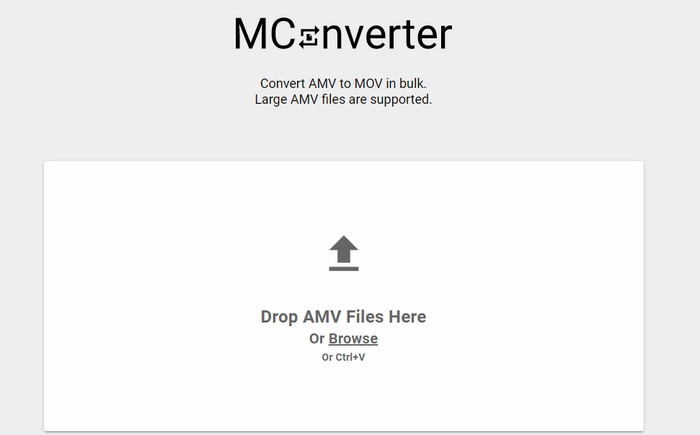
क्या आप इंटरफ़ेस पर कोई विज्ञापन नहीं चाहते ताकि आप AMV को MOV में बिना रुकावट कनवर्ट कर सकें? तो अपने ब्राउज़र पर उपलब्ध MConverter का उपयोग करके देखें। यह टूल बैच कन्वर्ज़न को भी सपोर्ट करता है, जिससे आपका कन्वर्ज़न FVC Video Converter Ultimate की तरह ज़्यादा प्रभावी हो जाता है। हालाँकि, इस ऑनलाइन टूल की कमी यह है कि आप 200MB से अधिक फ़ाइल साइज़ अपलोड नहीं कर सकते। तो अगर आप लंबी वीडियो कनवर्ट करना चाहते हैं और उसका साइज़ सपोर्टेड साइज़ से ज़्यादा है, तो यह आपके लिए सही विकल्प नहीं है। लेकिन अगर आप ConvertFiles से बेहतर कन्वर्ज़न अनुभव चाहते हैं, तो नीचे दिए गए चरणों का पालन करें।.
MConverter के साथ AMV को MOV में कनवर्ट करने के चरण:
चरण 1. अपने सर्च इंजन पर MConverter सर्च करें और उसे खोलें।.
चरण 2. फ़ाइल जोड़ने के लिए Upload बटन पर क्लिक करें, वेब टूल के लोड होने तक कुछ पल प्रतीक्षा करें, MOV खोजें और उस पर क्लिक करें। जैसे ही आप MOV फ़ॉर्मैट पर क्लिक करेंगे, फ़ाइल का कन्वर्ज़न शुरू हो जाएगा।.
चरण 3. फ़ाइल को सेव करने के लिए Download All दबाएँ।.
भाग 4. एएमवी और एमओवी के बारे में अक्सर पूछे जाने वाले प्रश्न
क्या मैं अपने MP4 को AMV में बदल सकता हूँ?
आप अपनी MP4 फ़ाइलों को AMV में बदल सकते हैं ताकि उन्हें ऑनलाइन तेज़ी से ट्रान्सफ़र किया जा सके। ख़ास तौर पर अगर वीडियो एक घंटे लंबी है, तो हम सुझाव देते हैं कि आप .mp4 फ़ाइलों को .amv में कनवर्ट कर लें, क्योंकि दोनों फ़ॉर्मैट्स की तुलना में AMV का साइज़ काफ़ी छोटा होता है।.
क्या वीएलसी एएमवी का समर्थन करता है?
अच्छी बात यह है कि आप VLC Media Player की मदद से .amv फ़ाइलें चला सकते हैं, भले ही यह फ़ॉर्मैट पुराना हो। लेकिन क्या आप जानते हैं कि ऐसे मीडिया प्लेयर्स भी हैं जो इस प्लेयर से बेहतर हैं? तो अगर आप जानना चाहते हैं कि वे कौन‑से मीडिया प्लेयर्स हैं, तो आपको यह लिंक क्लिक करना होगा और VLC के 5 विकल्प मीडिया प्लेयर्स के बारे में जानना होगा।.
मैं अपने एएमवी को एवीआई में कैसे बदलूं?
AMV, AVI का बेहतर वर्शन माना जाता है; हालाँकि, अगर हम गुणवत्ता की बात करें तो AVI, इस पुराने फ़ॉर्मैट की तुलना में ज़बरदस्त परफ़ॉर्मेंस देता है। साथ ही, AVI लगभग सभी प्लेटफ़ॉर्म्स के साथ बहुत अच्छी कम्पैटिबिलिटी रखता है। तो अब अगर आप अपनी AMV फ़ाइलों को बेहतर गुणवत्ता में और हर प्लेटफ़ॉर्म पर देखना चाहते हैं, तो आपको यह सीखना होगा कि AMV को AVI में कैसे कनवर्ट करें।.
निष्कर्ष
चर्चा यहीं समाप्त होनी चाहिए; भले ही हम अपनी डिस्क पर एक एएमवी फाइल स्टोर करना चाहते हैं, संगतता समस्या एक कारण है जिसे हमें इसे परिवर्तित करने की आवश्यकता है। आखिरकार, एएमवी को पहले लोकप्रिय कहा जाता है क्योंकि यह कंटेनर फ़ाइल को कैसे संपीड़ित करता है। हालाँकि, आज भी आपको इसका उपयोग करने के लिए इसे एक नए प्रारूप में परिवर्तित करने पर विचार करना चाहिए। इसके अलावा, यहां दिए गए समाधान प्रभावी रूप से परिवर्तित होते हैं। फिर भी, FVC वीडियो कन्वर्टर अल्टीमेट अन्य दो टूल की तुलना में शानदार प्रदर्शन करता है। इसलिए, यदि आप सबसे अच्छे टूल का अनुभव करना चाहते हैं, तो इसे अपने कंप्यूटर पर डाउनलोड करना और ऊपर दिए गए चरणों को कॉपी करना आवश्यक है।
-
 विंडोज और मैक पर एमपीवी को एमपी 3 में आसानी से कन्वर्ट करने के लिए 4 सर्वश्रेष्ठ तरीके
 जब आप MOV फ़ाइलों से MP3 ऑडियो फ़ाइलों को निकालना चाहते हैं, तो आप लेख से वांछित फ़ाइलें प्राप्त करने के लिए MP3 कन्वर्टर्स के लिए 4 सबसे कुशल MOV के बारे में अधिक जान सकते हैं।
-
 MKV को MOV - MOV को MKV कैसे कन्वर्ट करें
 मैं मैक पर एमकेवी को एमओवी में कैसे बदल सकता हूं? क्या iMovie MKV पढ़ सकता है? MOV प्रारूप का क्या अर्थ है? यह पोस्ट एमकेवी को एमओवी को मुफ्त ऑनलाइन और पेशेवर वीडियो कन्वर्टर्स में बदलने में आपकी मदद करने के लिए 2 सरल तरीके बताती है।
-
 FLV to MOV - मैक / पीसी / ऑनलाइन फ्री में MOV में FLV कैसे कन्वर्ट करें
 FLV को MOV में कैसे बदलें? मैं मैक पर FLV को MOV में कैसे बदलूँ? क्या YouTube FLV को MOV में ऑनलाइन बदलने का कोई निःशुल्क तरीका है? यह पोस्ट FLV फ़ाइलों को MOV में बदलने के लिए MOV कन्वर्टर्स के लिए 3 FLV साझा करता है।
