


 वीडियो कनवर्टर अंतिम
 स्क्रीन अभिलेखी
 वीडियो मरम्मत
पता लगाएँ कि आपकी FLV फ़ाइलों को MKV में बदलने के लिए MKV कन्वर्टर्स के लिए सर्वश्रेष्ठ 3 FLV क्या हैं
क्या आप इंटरनेट पर मुफ्त में FLV को MKV में कनवर्ट करने के सबसे अच्छे तरीके की तलाश करते‑करते थक गए हैं? यह महज़ एक संयोग हो सकता है, लेकिन आज हमने आपके लिए सबसे अच्छे FLV कनवर्टर ढूंढ लिए हैं; बेशक, हमने केवल बेहतरीन विकल्प ही चुने हैं। आपकी खोज को और ज़्यादा आसान बनाने के लिए, नीचे दिया गया लेख पूरा पढ़ते रहें, क्योंकि इसमें आप FLV और MKV के बारे में, और उन कनवर्टरों के बारे में बहुत कुछ जानेंगे जिन्हें आप इस्तेमाल कर सकते हैं।.

भाग 1। FLV को MKV में मुफ्त में बदलने के 2 तरीके
पहला रास्ता। FLV को MKV में बदलने के लिए ऑनलाइन कन्वर्टर का उपयोग करें
यह ऑनलाइन कनवर्टर निस्संदेह FLV को MKV में ऑनलाइन बदलने के लिए बड़े ट्रांसकोडरों में से एक है। FVC Free Video Converter Online एक साधारण और आसानी से समझ में आने वाला ऑनलाइन कनवर्टर है जिसे आप वेब पर इस्तेमाल कर सकते हैं। लेकिन यह टूल इंटरनेट पर निर्भर है, यानी अगर आपके पास इंटरनेट कनेक्शन नहीं है, तो रूपांतरण के लिए यह आपका अंतिम विकल्प नहीं रहेगा। हालांकि यह टूल इंटरनेट‑आधारित है, फिर भी इसके इंटरफ़ेस पर कोई विज्ञापन नहीं हैं जो आपको परेशान करें, और यह मैलवेयर‑फ्री है। तो अब, अगर आप इस टूल का व्यावहारिक अनुभव लेना चाहते हैं, तो नीचे दिए गए चरणों का पालन अवश्य करें।.
चरण 1. इस लिंक पर क्लिक करें और नए टैब में FVC Free Video Converter Online खोलें।.
चरण 2. Add Files to Convert बटन पर क्लिक करें ताकि आपके कंप्यूटर का फ़ोल्डर खुले। जिस FLV फ़ाइल को आप कनवर्ट करना चाहते हैं उसे चुनें और अपलोड करने के लिए Open दबाएँ।.
फ़ाइलों को बैच में कनवर्ट करने के लिए डेस्कटॉप संस्करण डाउनलोड करें।.
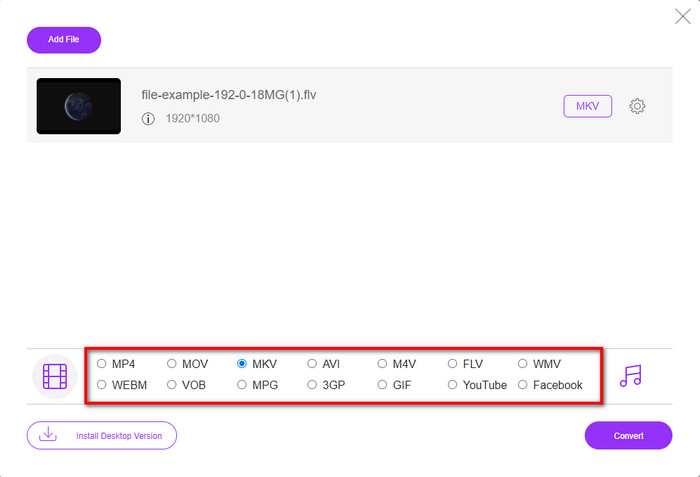
चरण 3. नीचे दी गई फ़ॉर्मैट सूची में से MKV फ़ॉर्मैट चुनें।.
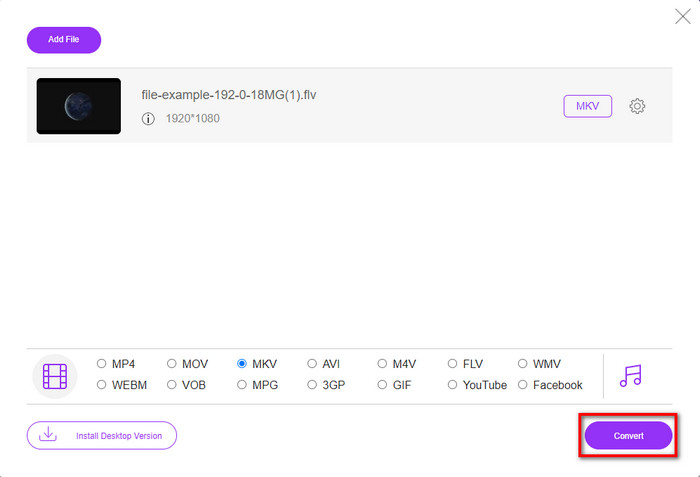
चरण 4. Convert बटन पर क्लिक करके रूपांतरण प्रक्रिया शुरू करें, और कनवर्ट की गई फ़ाइल अपने‑आप आपके कंप्यूटर ड्राइव में सहेज दी जाएगी।.
दूसरा रास्ता। विंडोज और मैक पर डाउनलोड करने के लिए उपलब्ध फ्री कन्वर्टर का उपयोग करें
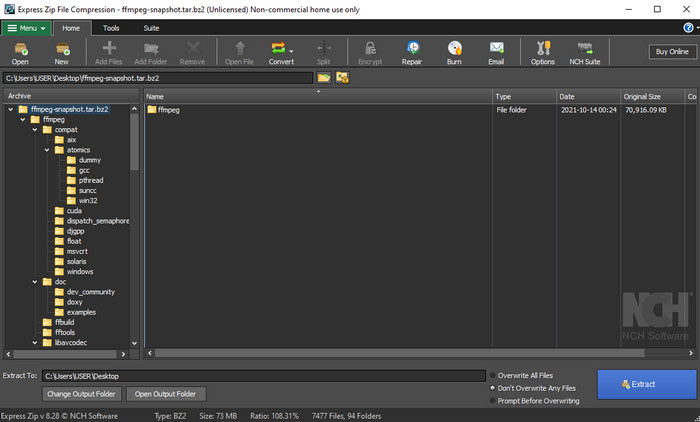
FFmpeg वह क्लासिक कनवर्टर नहीं है जिसे आप आमतौर पर इस्तेमाल करते हैं। भले ही यह सामान्य ग्राफिकल कनवर्टर नहीं है, फिर भी यह आपकी FLV फ़ाइल को कनवर्ट कर सकता है। तो अब, इस टूल को अलग क्या बनाता है? यह CLI‑आधारित इंटरफ़ेस का उपयोग करता है, यानी कनवर्ट करने से पहले आपको इसे कमांड देकर निर्देश देना होता है, या सरल शब्दों में कहें तो आपको टाइप करना पड़ता है। अगर यह कनवर्टर आपको रोचक लग रहा है, तो नीचे दिए गए विवरण पढ़ें और इन चरणों का पालन करके FFmpeg का उपयोग करके FLV से MKV में रूपांतरण करें।.
चरण 1. FFmpeg.exe डाउनलोड करें और खोलें।.
चरण 2. अपने कंप्यूटर पर कमांड प्रॉम्प्ट खोलें।.
चरण 3. CMD का उपयोग करके FLV फ़ाइल के स्थान तक जाएँ। फिर यह कोड कॉपी करें और कमांड प्रॉम्प्ट में पेस्ट करें: ffmpeg -i input.flv -vn -ar 44100 -ac 2 -b:a 192k output.mkv इसके बाद, प्रक्रिया शुरू करने के लिए कीबोर्ड पर Enter दबाएँ।.
भाग 2। दोषरहित रूप से सर्वश्रेष्ठ FLV से MKV कनवर्टर के साथ FLV को MKV में बदलें
तीसरा रास्ता। FLV को WMV में बदलने के लिए व्यावसायिक कनवर्टर का उपयोग करें
ऊपर बताए गए पहले दो कनवर्टरों से अभी भी संतुष्ट नहीं हैं? अगर ऐसा है, तो आपको FVC Video Converter Ultimate ज़रूर आज़माना चाहिए। क्यों? क्योंकि यह कम मेहनत में भी आपको प्रोफेशनल क्वालिटी का आउटपुट देता है। साथ ही, यह आपके FLV फ़ाइल को MKV, AVI, MOV, AVI, MP4 और 200+ अन्य फ़ॉर्मैट में कनवर्ट करने के लिए और भी ज़्यादा फ़ॉर्मैट सपोर्ट करता है। अभी भी प्रभावित नहीं हुए? शायद आप वीडियो में कुछ ‘मैजिक’ जोड़ना चाहते हों? उस स्थिति में, यह कनवर्टर आपके लिए सौभाग्य की बात है, क्योंकि यह उन्नत वीडियो एडिटिंग फीचर्स भी प्रदान करता है जिनका आप उपयोग कर सकते हैं। क्या आपको संदेह है कि यह टूल आपके लिए बहुत जटिल हो सकता है? अगर हाँ, तो नीचे लिखे चरणों का पालन करें और इस FLV से MKV कनवर्टर को इस्तेमाल करना सीखें।.
चरण 1. इस कनवर्टर का इस्तेमाल करने से पहले, नीचे दिए गए डाउनलोड बटन पर क्लिक करके इसे डाउनलोड करें। डाउनलोड के बाद इंस्टॉलेशन प्रॉम्प्ट का पालन करें और फिर इसे लॉन्च करें।.
फ्री डाउनलोडWindows 7 या बाद के संस्करण के लिएसुरक्षित डाउनलोड
फ्री डाउनलोडMacOS 10.7 या बाद के संस्करण के लिएसुरक्षित डाउनलोड
चरण 2. जिस FLV फ़ाइल को आप कनवर्ट करना चाहते हैं उसे जोड़ने के लिए + बटन दबाएँ। इंटरफ़ेस पर खुलने वाले फ़ोल्डर में FLV फ़ाइल ब्राउज़ करें और आगे बढ़ने के लिए Open दबाएँ।.
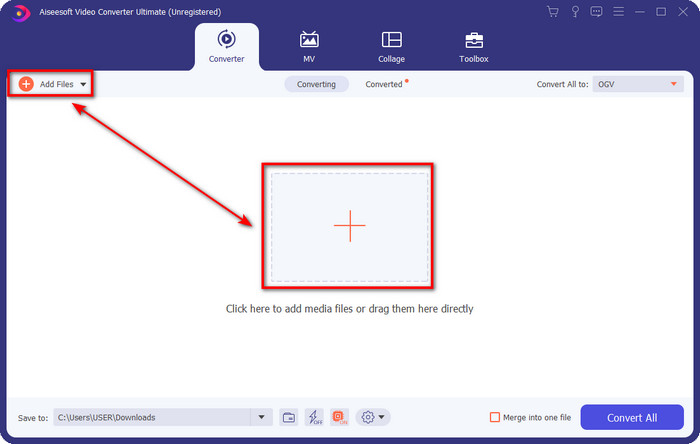
चरण 3. इसके बाद, यूज़र इंटरफ़ेस के ऊपर दाएँ कोने में दिए गए drop-down बटन पर क्लिक करके फ़ॉर्मैट को MKV में बदलें।.
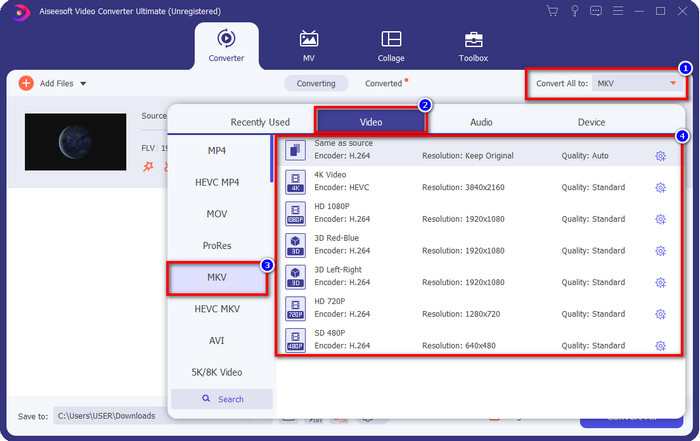
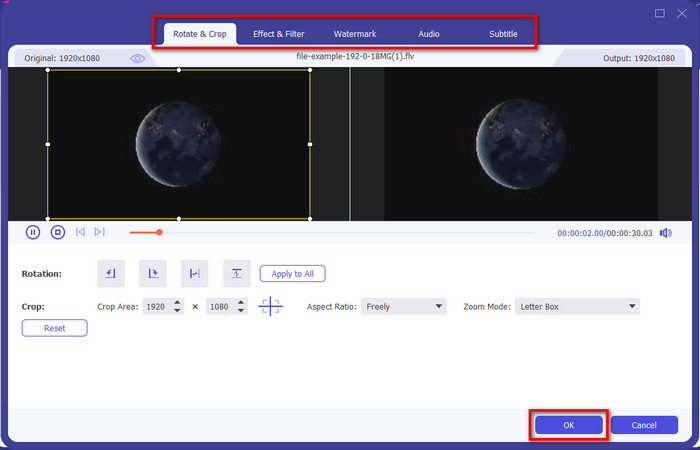
वैकल्पिक. हो सकता है आपको वीडियो एडिट करने की ज़रूरत हो; ऐसी स्थिति में आप चाहें तो wand बटन पर क्लिक कर सकते हैं। एक नया इंटरफ़ेस खुलेगा; इसमें आप Rotate, Crop, Effects, Filter, Watermark, Audio, और Subtitle जैसे विकल्पों का उपयोग कर सकते हैं। अपनी कल्पना को सीमित न करें, जो चाहें करें, और आपने जो भी ‘मैजिक’ किया है उसे लागू करने के लिए OK पर क्लिक करें।.
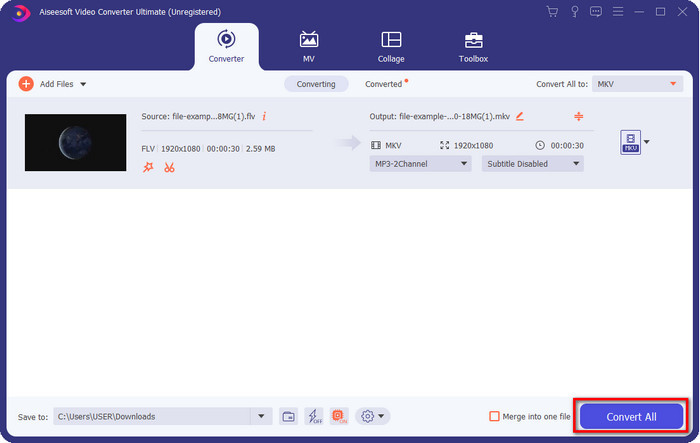
चरण 4. अंत में, FLV को MKV फ़ॉर्मैट में बदलने के लिए Convert All पर क्लिक करें। यह प्रक्रिया एक मिनट से भी कम समय लेगी, इसलिए आपको ज़्यादा इंतज़ार नहीं करना पड़ेगा। रूपांतरित FLV के साथ एक फ़ोल्डर आपकी स्क्रीन पर अपने‑आप दिखाई देगा।.
संबंधित:
भाग 3. FLV और MKV में क्या अंतर है
FLV और MKV सबसे अच्छे कंटेनरों में से एक होने के लिए जाने जाते हैं जिन्हें हर कोई जानता है। लेकिन कुछ और करने से पहले, आइए तुलना करें और दो प्रारूपों के बारे में अधिक विस्तृत जानकारी देखें।
FLV सभी वेबसाइटों पर जाना जाता है क्योंकि यह वेब पेजों पर लोकप्रिय है, मुख्यतः क्योंकि Adobe ने इसे बनाया है। इसके अलावा, .flv ऑनलाइन वीडियो स्ट्रीम चलाता है क्योंकि वे अन्य प्रारूप की तुलना में लोड करना बहुत आसान है। साथ ही, इस प्रारूप पर वीडियो देखने या देखने से पहले इस प्रारूप को प्लग-इन-प्ले की आवश्यकता होती है, या आप आसानी से फ़्लैश प्लेयर डाउनलोड कर सकते हैं। भले ही प्रारूप उत्कृष्ट है, इसके द्वारा उपयोग किए जाने वाले प्लग-इन-प्ले पहले ही बंद हो चुके हैं, जिसका अर्थ है कि प्रारूप सबसे अच्छा विकल्प नहीं है। हालाँकि, कई मीडिया प्लेयर अभी भी इस प्रारूप और इसका उपयोग करने वाले उपयोगकर्ताओं का समर्थन करते हैं।
एमकेवी सबसे भविष्य जैसा प्रारूप उपलब्ध होने के लिए जाना जाता है। अगर हम इसकी तुलना करने वाले होते तो यह प्रारूप बहुत मायने में किसी अन्य प्रारूप की तरह नहीं होता। उदाहरण के लिए, इस प्रारूप में निर्मित संरचना MP4 या AVI के समान नहीं है, लेकिन यह अलग है। डिज़ाइन और इसकी अनूठी मीडिया फ़ाइल भंडारण इसे और अधिक प्रभावशाली बनाते हैं। आजकल, यह चुनना कठिन है कि कौन सा प्रारूप पुराना है, और एक एमकेवी है।
यदि हम विवरण में अधिक खोज करते हैं, तो हमें कई कारण मिलेंगे कि आपको FLV को MKV में बदलने की आवश्यकता क्यों है। हालांकि दो प्रारूपों में मीडिया सामग्री शामिल है, एमकेवी एफएलवी से अधिक शक्तिशाली है। इसलिए, यदि आप MKV अद्वितीय शक्ति प्राप्त करना चाहते हैं, तो आपको अपनी फ़ाइल को इस प्रारूप में परिवर्तित करना होगा।
एफएलवी बनाम एमकेवी
Adobe Flash Player ने FLV का उपयोग मूवी और टीवी शो जैसी वीडियो सामग्री वितरित करने के लिए किया। आजकल, Adobe अब प्लेयर विकसित नहीं करता है और सुरक्षा कारणों से उपयोगकर्ताओं को इसे अनइंस्टॉल करने की अनुशंसा करता है। हालांकि, आप अभी भी कई गैर-एडोब/मैक्रोमीडिया कार्यक्रमों पर एफएलवी प्रारूप का उपयोग कर सकते हैं।
2002 में जारी किया गया Matroska मल्टीमीडिया कंटेनर प्रारूप, एक ओपन-सोर्स प्रारूप है जिसमें कई वीडियो, ऑडियो, छवि और उपशीर्षक ट्रैक शामिल हो सकते हैं। तो, आप इसका उपयोग लघु वीडियो क्लिप, टीवी शो और फिल्मों को आसानी से स्टोर करने के लिए कर सकते हैं। यह एनीमे फैन-सबबिंग के लिए काफी लोकप्रिय है।
भाग 4. FLV से MKV रूपांतरण के बारे में अक्सर पूछे जाने वाले प्रश्न
क्या FLV को MKV में ऑनलाइन बदलना सुरक्षित है?
ठीक है, यदि आप वेब टूल का उपयोग करते हैं तो प्रारूप परिवर्तित करना सुरक्षित होना चाहिए। हालांकि, सभी ऑनलाइन कन्वर्टर्स आपके फाइल फॉर्मेट को कन्वर्ट करने के लिए सुरक्षित नहीं हैं। क्योंकि कुछ प्रवृत्तियां हैं, गलत कनवर्टर का उपयोग करने पर कई अप्रत्याशित त्रुटियां होंगी। उदाहरण के लिए, गुणवत्ता हानि एक व्यापक समस्या है, कनवर्ट करने के बाद फ़ाइल डाउनलोड करने पर वायरस, एकाधिक पॉप-अप विज्ञापन, संक्रामक मैलवेयर, और बहुत कुछ। इसलिए, यदि आप एक सुरक्षित रूपांतरण प्रक्रिया ऑनलाइन करना चाहते हैं, तो आपको इसके बजाय FVC फ्री वीडियो कन्वर्टर ऑनलाइन का उपयोग करना चाहिए।
क्या FLV को परिवर्तित करने में समय लगेगा?
रूपांतरण प्रक्रिया कई कारकों पर निर्भर करेगी, और उनमें से एक वह उपकरण है जिसका आप उपयोग कर रहे हैं और फ़ाइल का आकार। यदि आपके पास एक बड़ी FLV फ़ाइल है, तो आपको FVC वीडियो कन्वर्टर अल्टीमेट का उपयोग करना चाहिए, विशेष रूप से जल्दी में। चूंकि यह उपकरण बिजली की गति की प्रक्रिया प्रदान करता है, इसलिए इसका उपयोग करने के लिए आपको इंटरनेट कनेक्शन की आवश्यकता नहीं होगी। और अब, यदि आप एक ऐसे कनवर्टर की तलाश में हैं जो आपके प्रारूप को तेजी से संसाधित कर सके, तो अंतिम उपकरण विकल्प है।
मैं अपनी FLV फ़ाइल क्यों नहीं खोल सकता?
आप अपनी FLV फ़ाइलें क्यों नहीं खोल सकते, इसके कई कारण हैं। नोट करें; यह निम्नलिखित विवरण आपके द्वारा FLV फ़ाइल नहीं खोलने के सौवें कारणों में से एक है। सबसे पहले, यदि फ़ाइल में दरार है या उसमें वायरस है, तो आप FLV नहीं खोल सकते। दूसरा, आपके द्वारा उपयोग किए जा रहे ऐप पर वीडियो फ़ाइल असमर्थित होने वाली सबसे आम समस्या है। तीसरा, यदि आप इंटरनेट पर एक FLV फ़ाइल डाउनलोड करते हैं, तो ऐसी स्थिति होगी कि फ़ाइल इसे चलाने के लिए कुछ महत्वपूर्ण जानकारी खो देती है। हालांकि यह एक समस्या है, फिर भी हम आपके FLV को किसी अन्य प्रारूप में परिवर्तित करके इसमें सहायता कर सकते हैं। लेकिन याद रखें, यदि FLV क्षतिग्रस्त या अपूर्ण है, तो आप प्रारूप को बदलकर उसे पुनर्स्थापित नहीं कर सकते।
निष्कर्ष
हमने यह जान लिया कि FLV को MKV में अलग‑अलग तरीकों से कैसे कनवर्ट किया जा सकता है। यदि हमें फ़ॉर्मैट को नए वर्ज़न में बदलना हो, तो ऊपर बताए गए टूल्स इस्तेमाल करने के लिए बेहद अच्छे हैं। अब, यह आपके हाथ में है कि आप कौन‑सा टूल और कौन‑सा तरीका चुनते हैं जो आपके फ़ॉर्मैट को बदलने के लिए आपको सबसे बेहतर लगे। ऊपर दिए गए तीनों टूल्स में से किसी का भी उपयोग करें, आपकी सफलता लगभग तय है, लेकिन अगर आप प्रोफेशनल आउटपुट चाहते हैं और अपनी वीडियो फ़ाइल का सर्वश्रेष्ठ रूप सामने लाना चाहते हैं, तो आपको FVC Video Converter Ultimate चुनना चाहिए। किसी अतिरिक्त व्याख्या की ज़रूरत नहीं, क्योंकि यह टूल आपकी ज़रूरतों की हर कमी को पूरा कर देगा।.
-
 दोषरहित तरीके से FLV को PSP में बदलने के 3 उपाय
 FLV को PSP में कैसे बदलें? यहां आपको विंडोज़ और मैक पर फ्लैश वीडियो को पीएसपी समर्थित प्रारूपों (डब्लूएमवी, एमपी4, एवीआई, एफएलवी, आदि) में बदलने के लिए चरण-दर-चरण मार्गदर्शिका मिलेगी।
-
 FLV को WMA ऑडियो में बदलने के 2 तरीके [मुफ्त और ऑनलाइन]
 FLV वीडियो से WMA ऑडियो निकालना चाहते हैं? मैक ओएस एक्स और विंडोज 10/8/7 पर तेज रूपांतरण गति के साथ एफएलवी (फ्लैश वीडियो) को डब्लूएमए (विंडोज मीडिया ऑडियो) में बदलने के लिए यहां 2 मुफ्त डब्लूएमए ऑडियो एक्सट्रैक्टर्स हैं।
-
 [हल] FLV वीडियो को एनिमेटेड GIF फ़ाइलों में मुफ्त में कैसे बदलें
 यदि आप बेहतर भेजने के लिए FLV वीडियो सेगमेंट से GIF बनाना चाहते हैं, तो आप इस लेख से आसानी से FLV वीडियो को GIF फ़ाइलों में कनवर्ट करने के तरीके के बारे में अधिक जान सकते हैं।

