


 वीडियो कनवर्टर अंतिम
 स्क्रीन अभिलेखी
 वीडियो मरम्मत
ऑडियो को प्रभावी ढंग से रिकॉर्ड करने के लिए ऑडियो रिकॉर्डिंग सॉफ्टवेयर की संपूर्ण समीक्षा
यदि आप विशेषज्ञ हों या शौकिया, आपके पास किसी विशेष उद्देश्य के लिए ऑडियो को सँभालने और निखारने के लिए ऑडियो रिकॉर्डिंग सॉफ़्टवेयर होना ज़रूरी है। इसके अलावा, अपने डिवाइस पर उपयुक्त ऑडियो रिकॉर्डर चुनना भी चुनौतीपूर्ण हो सकता है, क्योंकि बाज़ार में बहुत सारे विकल्प मौजूद हैं। कई तरह के ऑडियो रिकॉर्डिंग प्रोग्राम को आज़माने के बजाय, हम आपके लिए चार ऐसे रिकॉर्डर लेकर आए हैं जो हमें आपकी ज़रूरतों के अनुरूप लगे, ताकि आपको कई प्रोग्राम डाउनलोड करने या किसी हानिकारक सॉफ़्टवेयर तक पहुँचने का जोखिम न उठाना पड़े। नीचे दी गई ऑडियो रिकॉर्डर की सूची को अच्छी तरह परखा गया है ताकि आपको केवल बेहतरीन विकल्प मिलें, न कि कमज़ोर प्रदर्शन करने वाले रिकॉर्डर।.

भाग 1। विंडोज और मैकओएस पर 4 सर्वश्रेष्ठ ऑडियो रिकॉर्डिंग सॉफ्टवेयर
1. एफवीसी स्क्रीन रिकॉर्डर
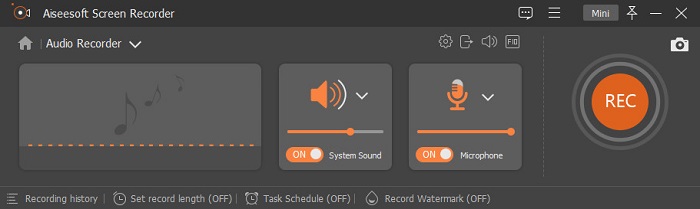
क्या आपको कंप्यूटर से ऑडियो रिकॉर्ड करने की ज़रूरत है, पर समझ नहीं आ रहा कि क्या इस्तेमाल करें? अगर ऐसा है, तो हम पेश करते हैं बाज़ार में सबसे बेहतरीन और सबसे ज़्यादा चुना जाने वाला रिकॉर्डर, FVC Screen Recorder। इसका शानदार यूज़र इंटरफ़ेस है, जो उपयोगकर्ताओं को बिना किसी जटिल प्रक्रिया के सॉफ़्टवेयर के साथ काम करने देता है। इसके अलावा, उपयोगकर्ताओं को अक्सर बैकग्राउंड शोर की समस्या होती है, तो इसके नए जोड़े गए नॉइज़ कैंसलेशन की मदद से आप छोटे-मोटे बैकग्राउंड शोर की परेशानी के बिना रिकॉर्ड कर सकते हैं। साथ ही, इसमें कई फीचर हैं जो आपको प्रभावी ढंग से रिकॉर्ड करने में मदद करेंगे। जानना चाहते हैं कि ये क्या हैं? तो आइए FVC Screen Recorder की प्रमुख विशेषताओं का संक्षिप्त परिचय देखते हैं।.

स्क्रीन अभिलेखी
4,988,518+ डाउनलोड- यह अल्ट्रा-हाई ऑडियो क्वालिटी के साथ साउंड रिकॉर्ड करता है।
- ऑडियो रिकॉर्ड 24/7 जब तक आपके पास आपके कंप्यूटर ड्राइव पर पर्याप्त स्टोरेज है।
- आप एक ही समय में माइक के साथ सिस्टम साउंड रिकॉर्ड कर सकते हैं।
- आपकी आवाज रिकॉर्ड करने के बेहतर अनुभव के लिए माइक्रोफ़ोन एन्हांसमेंट उपलब्ध है।
- जरूरत पड़ने पर आप माइक ऑडियो की जांच कर सकते हैं।
मुफ़्त डाउनलोडWindows 7 या उसके बाद के वर्ज़न के लिएसुरक्षित डाउनलोड
मुफ़्त डाउनलोडMacOS 10.7 या उसके बाद के वर्ज़न के लिएसुरक्षित डाउनलोड
पेशेवरों
- कार्यक्रम उपयोगकर्ताओं को मैक या विंडोज पर ऑडियो रिकॉर्ड करने के लिए एक उच्च रोमांचकारी अनुभव देता है।
- मूल संपादन सुविधाएँ उपलब्ध हैं, जैसे ऑडियो को काटना या ट्रिम करना।
- रिकॉर्ड किए गए ऑडियो को आसानी से खोजने के लिए इसमें एक अंतर्निहित रिकॉर्डिंग इतिहास है।
विपक्ष
- यह रिकॉर्डिंग के दौरान ऑडियो में प्रभाव जोड़ने का समर्थन नहीं करता है।
- उपयोग करने से पहले खरीद लें।
2. दुस्साहस
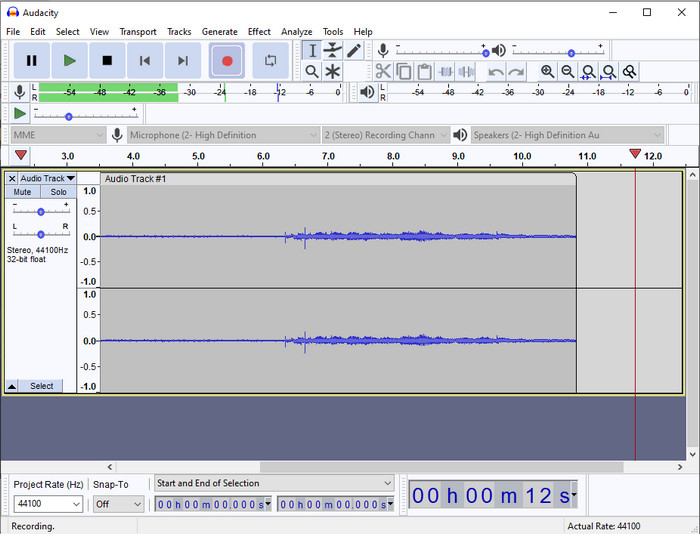
अगर आपको अपनी ऑडियो रिकॉर्डिंग सँभालने के लिए एक प्रो टूल की ज़रूरत है, तो Audacity मददगार है। यह प्रो-ऑडियो रिकॉर्डर पहले ही लाखों पॉडकास्टरों की ऑडियो रिकॉर्डिंग की यात्रा में मदद कर चुका है। अगर आपको मुफ़्त में एक उन्नत रिकॉर्डर चाहिए, तो यह ऑडियो रिकॉर्डर उनमें से एक है। हालाँकि इसमें कुछ प्रो रिकॉर्डिंग सुविधाएँ हैं, फिर भी इसके कमजोर GUI की वजह से इस टूल से अच्छी तरह परिचित होना कठिन है। भले ही यह प्रोफ़ेशनल रिकॉर्डिंग के लिए अच्छा रिस्पॉन्ड करता हो, फिर भी इसकी कुछ सुविधाओं, जैसे नॉइज़ कैंसलेशन, को अभी और बेहतर करने की ज़रूरत है। इसके बावजूद, Audacity कंप्यूटर ऑडियो को ऐसे पेशेवर ढंग से रिकॉर्ड करता है, जैसा हर रिकॉर्डर नहीं कर पाता।.
पेशेवरों
- सभी डेस्कटॉप प्लेटफॉर्म पर डाउनलोड करने के लिए नि:शुल्क।
- यह प्रो के लिए विशेषज्ञ संपादन सुविधाएँ प्रदान करता है।
- इसमें कुछ उन्नत सुविधाएँ हैं जिनकी आपको पॉडकास्ट बनाने के लिए आवश्यकता होगी।
विपक्ष
- सॉफ्टवेयर का जीयूआई पुराना है।
- इसकी कुछ विशेषताओं के उन्नयन की आवश्यकता है।
- नौसिखियों और उन लोगों के लिए सबसे अच्छा विकल्प नहीं है जो रिकॉर्ड करना नहीं जानते हैं।
3. क्विकटाइम प्लेयर
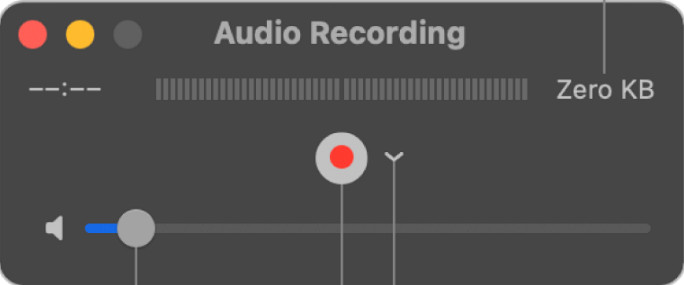
यदि ज़रूरत पड़े, तो QuickTime Player को Mac पर एक ऑडियो रिकॉर्डर के रूप में भी इस्तेमाल किया जा सकता है। हालाँकि रिकॉर्डिंग के लिए यह प्लेयर उतना सक्षम और प्रभावी नहीं है, आप ऑडियो आउटपुट में देरी और कम गुणवत्ता का अनुभव कर सकते हैं। फिर भी, अगर आपको अपने Mac पर जल्दी से कोई ऑडियो रिकॉर्ड करना है, तो यह एक विकल्प है, क्योंकि इसे डाउनलोड करने की ज़रूरत नहीं पड़ती और इसका इस्तेमाल निस्संदेह सुरक्षित है। लेकिन यदि आप एक प्रोफ़ेशनल हैं और बेहतरीन ऑडियो रिकॉर्डिंग सॉफ़्टवेयर ढूँढ रहे हैं, तो यह आपके लिए सही टूल नहीं है।.
पेशेवरों
- यह पहले से ही हर macOS पर उपलब्ध है।
- नि: शुल्क, सुरक्षित और उपयोग में आसान।
विपक्ष
- यह इस सूची के अन्य ऑडियो रिकॉर्डर जितना प्रभावी नहीं है।
- ऑडियो की अंतिम आउटपुट गुणवत्ता कम है।
- प्रो रिकॉर्डिंग और संपादन के लिए सबसे अच्छा विकल्प नहीं है।
संबंधित:
Mac पर QuickTime का उपयोग करके ऑडियो के साथ स्क्रीन कैसे रिकॉर्ड करें
QuickTime को MP4 में कैसे कनवर्ट करें
4. ओसेनऑडियो
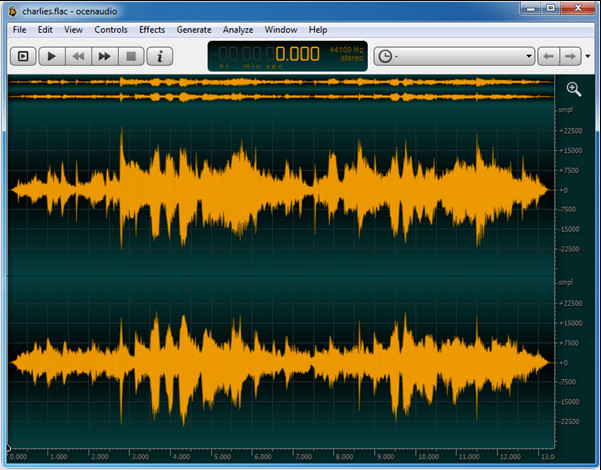
यदि आपको Windows 10 या उससे ऊपर पर ऑडियो रिकॉर्ड करने के लिए एक मल्टीप्लेक्स रिकॉर्डर चाहिए, तो Oceanaudio आपकी मदद करेगा। इस टूल का इंटरफ़ेस लगभग Audacity जैसा है, लेकिन इसका GUI समझना अपेक्षाकृत आसान है। और विस्तार से कहें तो, यह रिकॉर्डर जटिलता और कई ऐसे फीचर प्रदान करता है जो ऑडियो रिकॉर्डिंग में आपके काम आएँगे। हालाँकि इसका इस्तेमाल थोड़ा मुश्किल हो सकता है और इसे उपयोग करना सीखने के लिए आपको ट्यूटोरियल देखना पड़ सकता है, लेकिन अंत में यह क़ीमत वसूल साबित होता है। तो अगर आपको Audacity से बेहतर इंटरफ़ेस वाला एडिटर चाहिए, तो यह आपका चुनाव होना चाहिए।.
पेशेवरों
- यह रिकॉर्डिंग के लिए उन्नत तकनीक का उपयोग करता है।
- ऑडियो रिकॉर्डिंग करना एक विशेषज्ञ की पसंद है।
- रिकॉर्डिंग करते समय आप अपनी आवाज सुन सकते हैं।
विपक्ष
- यह उपयोगकर्ता के अनुकूल नहीं है।
- शुरुआती इस उपकरण का उपयोग करते समय भ्रमित हो सकते हैं।
भाग 2. ऑडियो रिकॉर्डर सॉफ्टवेयर के बारे में तुलना चार्ट
| विशेषताएं | FVC स्क्रीन रिकॉर्डर | धृष्टता | द्रुत खिलाड़ी | ओसेनाडियो |
| रिकॉर्ड सिस्टम ध्वनि और माइक |  | | | |
| रिकॉर्डिंग संपादित करें | | |  | |
| हार्डवेयर एक्सिलरेशन | | | | |
| वास्तविक समय पूर्व सुनो | | | | |
| मूल गुणवत्ता बचाओ | | | | |
| सर्वश्रेष्ठ यूजर इंटरफेस | | | | |
भाग 3. ऑडियो रिकॉर्डर सॉफ्टवेयर के बारे में अक्सर पूछे जाने वाले प्रश्न
क्या सिंच ऑडियो रिकॉर्डर सबसे अच्छा ऑडियो रिकॉर्डर है?
हाल ही में हमारा Cinch Audio Recorder के बारे में एक रिव्यू आया है। अगर आप इस ऑडियो रिकॉर्डर के बारे में और जानना चाहते हैं, तो आपको यह लिंक क्लिक करना चाहिए और रिकॉर्डर के बारे में और विस्तृत जानकारी प्राप्त करनी चाहिए।.
एक अच्छे ऑडियो रिकॉर्डर के गुण क्या हैं?
एक अच्छा ऑडियो रिकॉर्डर चुनने से पहले आपको बुनियादी मानकों को जानना होगा। सबसे पहले, यह आपके माइक्रोफ़ोन पर आसानी से ऑडियो कैप्चर करने में सक्षम होना चाहिए। दूसरा, यह सुरक्षित और मैलवेयर मुक्त है। तीसरा, यदि आपको उपकरण खरीदने की आवश्यकता होगी, तो उपकरण को स्वयं उपयोगकर्ताओं को उत्कृष्टता प्रदान करनी चाहिए। चौथा, प्रभावकारिता दर का मतलब है कि रिकॉर्डिंग में उपकरण बहुत प्रभावी होना चाहिए। उपयोगकर्ताओं को रिकॉर्ड करने में मदद करने के लिए पाँचवाँ, बुनियादी या उन्नत सुविधाएँ उपलब्ध होनी चाहिए। अपनी सहायता के लिए ऑडियो रिकॉर्डर चुनने से पहले, आप इन मानकों पर निर्भर रह सकते हैं।
विंडोज 10 पर ऑडियो कैसे रिकॉर्ड करें?
Windows 10 पर रिकॉर्ड करने से पहले, आपको सबसे अच्छा रिकॉर्डर चुनना होगा, जैसे कि FVC Video Recorder। इसे अपने डेस्कटॉप पर डाउनलोड करें, तुरंत टूल इंस्टॉल करें और लॉन्च करें। इसके बाद, Audio Recorder वाला विकल्प चुनें और उस पर क्लिक करें। अब आप फ़्लोटिंग टूलबार पर सिस्टम साउंड या माइक को ऑन करके उन्हें अपनी रिकॉर्डिंग में आसानी से जोड़ सकते हैं। जब आप रिकॉर्ड करने के लिए तैयार हों, तो शुरू करने के लिए गोल लाल बटन पर क्लिक करें। अगर आपको रिकॉर्डिंग समाप्त करनी हो, तो रोकने के लिए चौकोर बटन पर क्लिक करें; इसके बाद एक नया इंटरफ़ेस खुलेगा, जिसमें आपकी बनाई गई सभी ऑडियो रिकॉर्डिंग की सूची दिखाई देगी।.
निष्कर्ष
अब हमने उन ऑडियो रिकॉर्डिंग सॉफ़्टवेयर के बारे में जान लिया है, जो आपके डेस्कटॉप पर उपलब्ध हैं। यहाँ बताए गए सभी टूल आपकी रिकॉर्डिंग में मदद करेंगे। लेकिन, अगर आप ऐसा रिकॉर्डर ढूँढ रहे हैं जो दूसरों से बेहतर प्रदर्शन करे, तो FVC Screen Recorder आपके लिए होना चाहिए। अब भी इस ऑडियो रिकॉर्डर को लेकर संदेह है? तो ऐसे में, इसे डाउनलोड करना ही इसका परीक्षण करने और यह जानने का एकमात्र तरीका है कि यह वैसा ही काम करता है जैसा हमने इस लेख में कहा है।.
-
 शीर्ष 4 निःशुल्क एआईएफएफ ध्वनि रिकॉर्डर जो उच्च गुणवत्ता वाले ऑडियो का उत्पादन करते हैं
 यह लेख एआईएफएफ और कुछ सबसे लोकप्रिय उपकरणों के बारे में बात करता है जिनका उपयोग आप उच्च गुणवत्ता वाले एआईएफएफ प्रारूप का उत्पादन करने के लिए कर सकते हैं।
-
 IPhone पर ऑडियो कैसे रिकॉर्ड करें, इस पर सर्वश्रेष्ठ तकनीकों में से 3
 कठिनाई हो रही है क्योंकि आप iPhone पर ऑडियो रिकॉर्डिंग ठीक से नहीं कर सकते हैं? फिर iPhone पर ऑडियो रिकॉर्ड कैसे करें और उपलब्ध टूल क्या हैं, यह जानने के लिए इस लेख को पढ़ें।
-
 शानदार वॉयस रिकॉर्डर में से 7 सभी प्लेटफार्मों में सुलभ
 क्या आप सीखना चाहते हैं कि ऑडियो रिकॉर्डिंग कैसे करें? फिर इस लेख पर जाएं क्योंकि हम सबसे अच्छे ऑडियो रिकॉर्डर के बारे में बात करते हैं जो आपकी आवश्यकताओं के अनुरूप हो सकता है।
