


 वीडियो कनवर्टर अंतिम
 स्क्रीन अभिलेखी
 वीडियो मरम्मत
डेस्कटॉप, ऑनलाइन, आईओएस और एंड्रॉइड पर आसानी से टिकटॉक वॉटरमार्क कैसे निकालें
TikTok आपके मोबाइल फ़ोन पर डाउनलोड की जा सकने वाली सबसे तेज़ी से बढ़ती वीडियो‑शेयरिंग ऐप्स में से एक बन गया है। YouTube के विपरीत, TikTok पर आमतौर पर छोटी वीडियो फ़िल्में होती हैं, और इसी वजह से यह ऐप इस्तेमाल करना एक ट्रेंड बन गया। कई उपयोगकर्ताओं को एक समस्या का सामना करना पड़ता है: जब वे TikTok से अपनी वीडियो डाउनलोड करते हैं, तो उन पर हमेशा वॉटरमार्क होता है। लेकिन क्या आप जानते हैं कि आप इसे हटा सकते हैं? सवाल है, इसे कैसे हटाएँ? अगर आप जानना चाहते हैं कि TikTok वॉटरमार्क कैसे हटाएँ, तो इस समस्या का हल जानने के लिए हमारे साथ अंत तक बने रहें।.

भाग 1. विंडोज और मैकओएस पर टिक्कॉक वॉटरमार्क को आसानी से कैसे निकालें
टिकटोक वॉटरमार्क हटाने के लिए एक प्रभावी तरीका चाहिए? खैर, वीडियो कन्वर्टर अल्टीमेट यहां है और आपकी मदद के लिए तैयार है। यह टूल पहले ही हज़ारों उपयोगकर्ताओं की समस्याओं का समाधान कर चुका है, जिसमें वॉटरमार्क हटाना भी शामिल है। इस टूल से आप पूरे वीडियो के वॉटरमार्क और एंडिंग वॉटरमार्क को आसानी से हटा सकते हैं। क्या आपको उपकरण की क्षमताओं पर संदेह है? सबसे पहले, हमें इस पर संदेह हुआ, लेकिन हमने पाया कि पूरी तरह से जांच के कारण आपके डाउनलोड किए गए टिकटॉक वीडियो पर वॉटरमार्क हटाने का यह सबसे प्रभावी तरीका है।
तो अब, यदि आपके पास भी वही विचार है जो हमने पहले किया था, तो आप नीचे दिए गए चरणों को पढ़ने और उनका पालन करने का प्रयास कर सकते हैं और जितनी जल्दी हो सके टिकटॉक वॉटरमार्क से छुटकारा पाने का तरीका सीख सकते हैं। चरणों का पालन करने से पहले आपको अपने कंप्यूटर ड्राइव पर पहले टिकटोक वीडियो डाउनलोड और ट्रांसफर करना होगा।

FVC वीडियो कन्वर्टर अंतिम
5,689,200+ डाउनलोड- टिकटॉक पर एक्सपोर्ट किए गए वीडियो पर टिकटॉक वॉटरमार्क हटाने के लिए यह सबसे अच्छा टूल है।
- यह कटिंग, क्रॉपिंग, मर्जिंग, कंप्रेसिंग और बहुत कुछ जैसी उन्नत सुविधाओं का समर्थन करता है।
- यह MP4, MOV, MKV, AVI, MKV, FLV, आदि जैसे अपलोड और निर्यात करने के लिए कई स्वरूपों का समर्थन करता है।
- यह शुरुआती लोगों के लिए सबसे अच्छा विकल्प है जो एक आसान प्रक्रिया और पेशेवर स्पर्श चाहते हैं।
फ्री डाउनलोडWindows 7 या बाद के संस्करण के लिएसुरक्षित डाउनलोड
फ्री डाउनलोडMacOS 10.7 या बाद के संस्करण के लिएसुरक्षित डाउनलोड
वीडियो के किनारों को काटकर टिकटॉक का वॉटरमार्क कैसे हटाएं
स्टेप 1. सबसे पहले, नीचे दिए गए डाउनलोड बटन पर क्लिक करके अपने कंप्यूटर पर इस टूल को डाउनलोड करें। आप जिस प्लेटफ़ॉर्म का उपयोग कर रहे हैं, उसे चुनें; डाउनलोड होने के बाद इसे तुरंत इंस्टॉल करें और ये सभी प्रक्रिया पूरी होने के बाद टूल को लॉन्च करें।.
फ्री डाउनलोडWindows 7 या बाद के संस्करण के लिएसुरक्षित डाउनलोड
फ्री डाउनलोडMacOS 10.7 या बाद के संस्करण के लिएसुरक्षित डाउनलोड
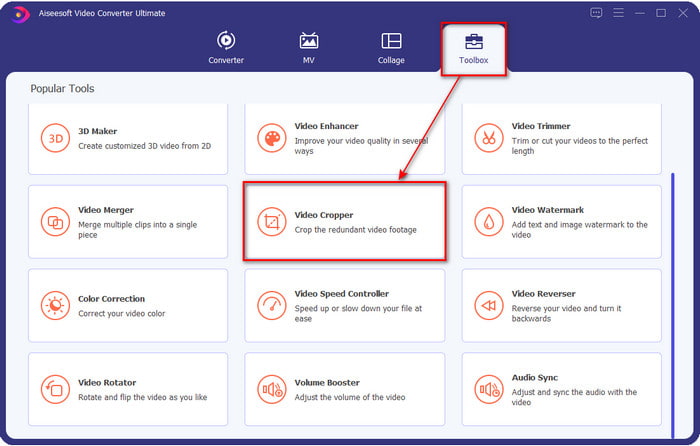
स्टेप 2. टूल के ऊपरी हिस्से में सबसे पहले Toolbox पर क्लिक करें, फिर Video Cropper चुनें।.
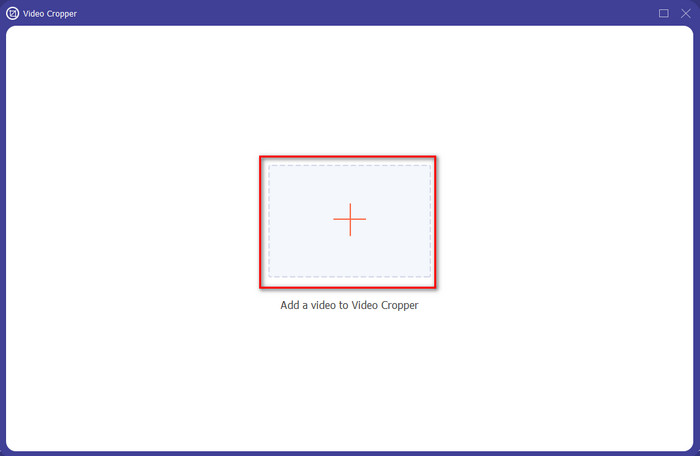
स्टेप 3. नए विंडो पर TikTok वीडियो अपलोड करने के लिए + बटन दबाएँ। फ़ोल्डर में जाकर वीडियो ढूँढें और अगला चरण शुरू करने के लिए Open पर क्लिक करें।.
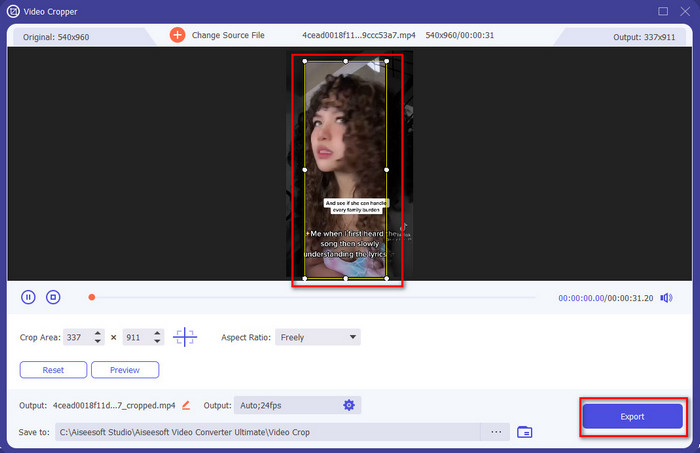
स्टेप 4. छोटे‑छोटे डॉट्स को ड्रैग करके फ्रेम को समायोजित करें और यह सुनिश्चित करें कि वॉटरमार्क फ्रेम के अंदर न आए। यह हो जाने के बाद, TikTok वीडियो को अपने कंप्यूटर पर डाउनलोड करने के लिए Export पर क्लिक करें।.
वैकल्पिक: वीडियो को काटकर टिकटॉक वीडियो पर एंडिंग वॉटरमार्क हटाएं
एक बार जब आप क्रॉप करके टिकटॉक वीडियो के किनारों पर वॉटरमार्क हटा देते हैं, तो अब वीडियो की लंबाई को काटकर वीडियो के अंत में वॉटरमार्क को हटाने का समय आ गया है। इसके अलावा, हमने अंतिम वॉटरमार्क को हटाने के लिए इस चरण को सूचीबद्ध किया है। आइए जानें बिना देर किए खत्म होने वाले टिकटॉक वीडियो से वॉटरमार्क कैसे हटाएं।
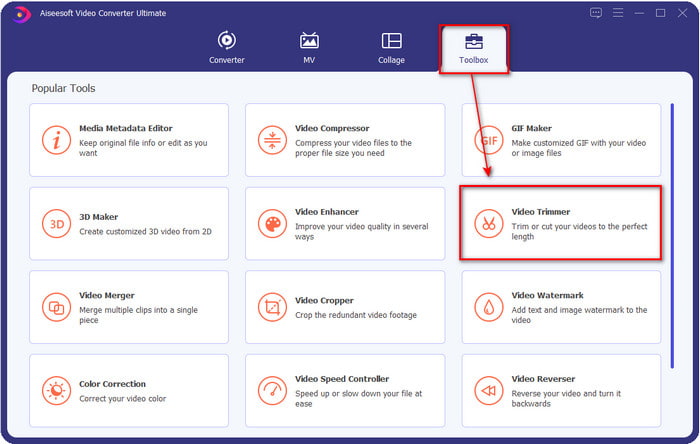
स्टेप 1. Toolbox सेक्शन के अंदर Video Cutter पर क्लिक करें।.
स्टेप 2. + बटन पर क्लिक करके फ़ाइल ब्राउज़ करें; जब आपको पहले क्रॉप किया हुआ वीडियो मिल जाए, तो आगे बढ़ने के लिए Open पर क्लिक करें।.
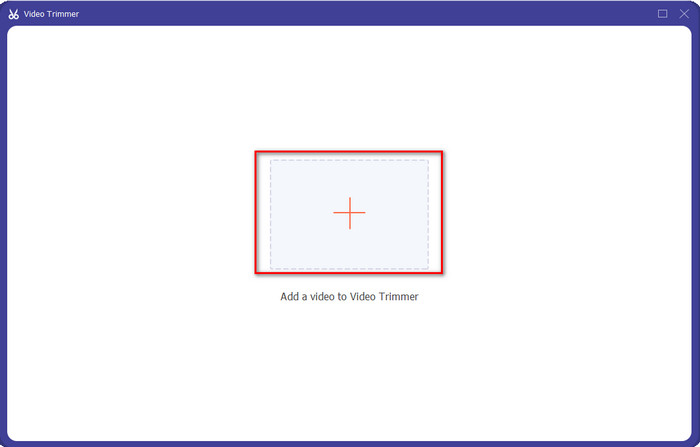
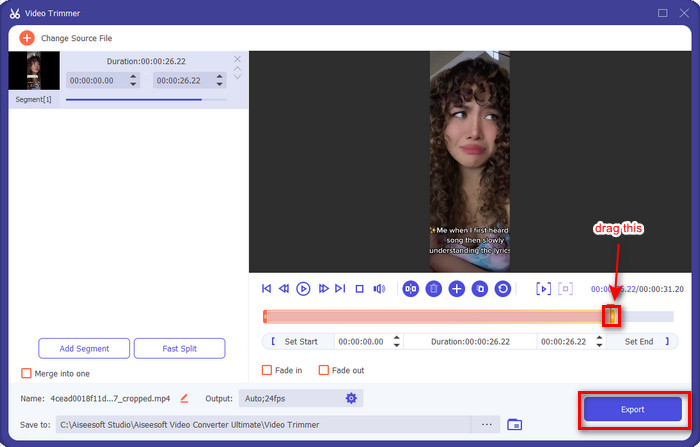
स्टेप 3. वीडियो के playback in and out को पकड़कर मूव करें ताकि अंत में आने वाला वॉटरमार्क हटाया जा सके। Export बटन पर क्लिक करने से वीडियो अंत वाले वॉटरमार्क के बिना सेव हो जाएगा। इस तरह, आपने सफलतापूर्वक अंत का वॉटरमार्क हटा दिया है।.
संबंधित:
वीडियो में सबटाइटल्स कैसे जोड़ें
भाग 2. iPhone और Android फोन पर टिकटॉक लोगो कैसे निकालें
Android बिल्ट-इन क्रॉपर का उपयोग करें
यदि आप एक Android उपयोगकर्ता हैं, तो आप अपने फ़ोन में अंतर्निहित संपादक का उपयोग करके टिकटॉक वॉटरमार्क को निःशुल्क हटा सकते हैं। हालाँकि इसमें एक अंतर्निहित संपादक है, लेकिन इसके द्वारा समर्थित संपादन सुविधा सीमित है। लेकिन अगर आप इसका इस्तेमाल करना चाहते हैं, तो आप अपनी गैलरी में जा सकते हैं सबसे पहले टिकटॉक वीडियो देखें। इसके अतिरिक्त, सभी एंड्रॉइड फोन में ये सुविधाएं नहीं होती हैं, लेकिन आप इसे देख सकते हैं, और यदि आपके पास एक है, तो नीचे दिए गए चरणों का पालन करें।
स्टेप 1. Edit पर क्लिक करें, फिर Next पर क्लिक करें।.
स्टेप 2. उसके बाद Crop & Rotate पर क्लिक करें, दिए गए आस्पेक्ट रेशियो में से एक चुनें, और आगे बढ़ने के लिए check दबाएँ।.
स्टेप 3. बदलावों को अंतिम आउटपुट पर लागू करने के लिए Save दबाएँ।.
आईओएस बिल्ट-इन क्रॉपर का उपयोग करें।
Android की तरह, आप भी अपने iOS पर बिल्ट-इन क्रॉपर का उपयोग कर सकते हैं और सीख सकते हैं कि अपने iPhone पर TikTok वॉटरमार्क कैसे निकालें। सबसे पहले, अपने आईओएस डिवाइस पर टिकटॉक वीडियो डाउनलोड करें और इसे अपने फोटोज पर खोलें। फिर, नीचे दिए गए चरणों का पालन करें।
स्टेप 1. Edit पर क्लिक करें, फिर crop आइकन पर क्लिक करें।.
स्टेप 2. अपनी ज़रूरत के अनुसार उसे मूव करके frame size को समायोजित करें।.
स्टेप 3. बदलावों को सेव करने के लिए Done पर क्लिक करें।.
भाग 3. वेब पर टिकटॉक वॉटरमार्क कैसे निकालें
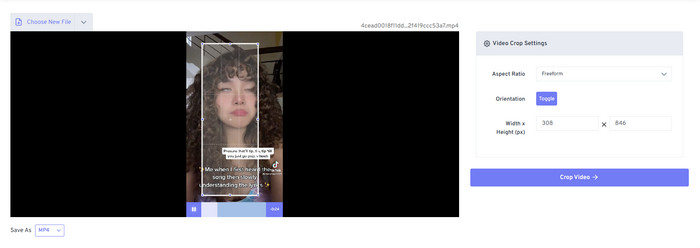
क्या आप ऑनलाइन मुफ्त तरीक़े से TikTok वॉटरमार्क हटाना चाहते हैं? अगर हाँ, तो आप Free Video Convert – Video Cropper का इस्तेमाल कर सकते हैं। इसके नाम से ही पता चलता है कि यह मुफ़्त है और सभी यूज़र्स के लिए सुलभ है; आपको बस वीडियो के वॉटरमार्क वाले हिस्से को क्रॉप करना होगा। यह टूल उन लोगों के लिए बेहतरीन है जो वॉटरमार्क रिमूवर डाउनलोड नहीं करना चाहते लेकिन वॉटरमार्क हटाना चाहते हैं। लेकिन अगर आपके पास अच्छी इंटरनेट कनेक्टिविटी नहीं है, तो मानकर चलें कि यह वेब टूल आपके लिए सबसे अच्छा विकल्प नहीं होगा।.
स्टेप 1. अपना सर्च इंजन खोलें, वीडियो क्रॉपर खोजें और उस पर क्लिक करें।.
स्टेप 2. जिस TikTok वीडियो को आप जोड़ना चाहते हैं, उसे ऐड करने के लिए Choose File दबाएँ।.
स्टेप 3. फ्रेम को इस तरह मूव करें कि वॉटरमार्क उसके अंदर न आए। फिर इसे अपनी ड्राइव पर सेव करने के लिए Crop Video and Download दबाएँ।.
भाग 4. टिकटॉक वॉटरमार्क हटाने के बारे में अक्सर पूछे जाने वाले प्रश्न
टिकटोक वॉटरमार्क क्यों है?
टिकटोक ने अपने निर्यात किए गए वीडियो पर एक वॉटरमार्क जोड़ा है ताकि अन्य उपयोगकर्ताओं को ऐप को बढ़ावा देने के लिए एक सरल लेकिन प्रभावी तरीका बनाया जा सके जिन्होंने इसका उपयोग नहीं किया है। इस तरह, यदि उपयोगकर्ता इसे सहेजते हैं, इसे ऑनलाइन पोस्ट करते हैं, और इसे दूसरों द्वारा देखते हैं, तो टिकटोक किसी को अपने ऐप का विज्ञापन करने के लिए भुगतान नहीं करेगा।
क्या टिकटॉक जैसा कोई ऐप है?
यदि आप पहले से ही टिकटोक से प्यार करते हैं तो कुछ टिकटोक जैसे ऐप हैं जिनका आप उपयोग करना चाहेंगे। ये हैं डबस्मैश, क्लैश, लोमोटिफ और चीज़। इन ऐप्स के साथ, आप टिकटॉक पर एक अलग या लगभग समान अनुभव होने पर भी वीडियो बनाने का आनंद ले सकते हैं।
मैं टिकटोक पर कितने समय तक वीडियो ले सकता हूं?
लेटेस्ट अपडेट में आप चाहें तो 3 मिनट का वीडियो रिकॉर्ड कर सकते हैं। इस तरह, जो उपयोगकर्ता एक लंबा वीडियो रिकॉर्ड करना चाहते हैं, वे वीडियो को काटने और रीटेक करने के बजाय इसे एक बार में बना सकते हैं।
निष्कर्ष
अब जबकि हमने आपको TikTok वॉटरमार्क हटाना सिखा दिया है, तो अब इसे करने की बारी आपकी है। इस लेख में बताए गए सभी टूल TikTok से एक्सपोर्ट की गई हर वीडियो से वॉटरमार्क हटाने में बेहतरीन काम करते हैं। हालाँकि ये सभी टूल अच्छे विकल्प हैं, फिर भी हम Video Converter Ultimate का उपयोग करना ज़्यादा पसंद करते हैं, क्योंकि यह TikTok वॉटरमार्क को किनारों से, यहाँ तक कि वीडियो के बिलकुल किनारे से भी हटाने की सुविधा देता है। तो अब, अगर आप अभी भी सोच रहे हैं कि आपको क्या इस्तेमाल करना चाहिए, तो ऊपर दिया गया हमारा हाउ‑टू गाइड ज़रूर पढ़ें।.
-
 TRP को WMV प्रारूप में बदलने के लिए 2 पेशेवर कन्वर्टर्स [गाइड]
 क्या आप उन उपयोगकर्ताओं में से एक हैं जिनके पास टीआरपी फ़ाइल के साथ जटिल समय है? यदि हां, तो टीआरपी को WMV में कैसे बदलें और अधिक जानने के लिए इस लेख को पढ़ना जारी रखें।
-
 FLV को MKV में मुफ्त में बदलने के 3 अद्भुत और सिद्ध तरीके
 FLV को MKV में बदलने का समाधान खोज रहे हैं? उस स्थिति में, FLV फ़ाइलों और उपलब्ध टूल को कनवर्ट करने का तरीका निर्धारित करने के लिए नीचे दिए गए पूर्ण विवरण को पढ़ना जारी रखें।
-
 विंडोज़ और मैक पर 3GP को WMV में बदलने के लिए 2 विशेषज्ञ युक्तियाँ [2022]
 जानना चाहते हैं कि विशेषज्ञ तरीके से 3GP को WMV में कैसे बदलें? यदि ऐसा है, तो निम्नलिखित को पढ़ने से आपको यह निर्धारित करने में मदद मिलेगी कि आप किन 3GP कन्वर्टर्स का उपयोग कर सकते हैं।
