


 वीडियो कनवर्टर अंतिम
 स्क्रीन अभिलेखी
 वीडियो मरम्मत
समझें कि मेटाडेटा क्या है: प्रकार, उदाहरण, महत्व और इसे कैसे देखें
मेटाडेटा किसी भी फ़ाइल के लिए आवश्यक होता है क्योंकि यह मीडिया फ़ाइल के बारे में बहुत‑सी बातें समझाता है। लेकिन सवाल यह है कि मेटाडेटा क्या है? इसका उपयोग क्या है? मेटाडेटा के उदाहरण क्या हैं? क्या मेटाडेटा होना ज़रूरी है? इन सभी सवालों के जवाब आपको इस लेख में आगे चलकर मिलेंगे। इसके अलावा, हम आपको एक बेहतरीन मेटाडेटा एडिटर भी बताएँगे, जिसकी मदद से आप अपनी मीडिया फ़ाइल का मेटाडेटा जोड़ या संपादित कर सकते हैं। नीचे पूरी जानकारी पढ़ें और मेटाडेटा के बारे में और जानें।.

भाग 1. मेटाडेटा क्या है
परिभाषा
मेटाडेटा मीडिया फ़ाइल से छिपे डेटा के बारे में डेटा है। मेटाडेटा क्या है? मान लीजिए आप फ़ाइल सामग्री और अन्य विशेषताओं को पहचानना चाहते हैं, तो मेटाडेटा एक धोखा कोड है। प्रत्येक मीडिया फ़ाइल में मेटाडेटा होता है, और यदि आपके पास एक संगठित मीडिया फ़ाइल होने वाली है, तो मेटाडेटा आपको फ़ाइल को व्यवस्थित करने में मदद करेगा यदि आप मीडिया फ़ाइल लाइब्रेरी के साथ काम कर रहे हैं। अब जब हमारे पास मेटाडेटा का एक विचार है, तो आइए मेटाडेटा के प्रकारों को देखें।
मेटाडेटा के विभिन्न प्रकार क्या हैं
क्या आप जानते हैं कि मेटाडेटा के विभिन्न प्रकार होते हैं? यदि नहीं, तो नीचे आपको छह अन्य मेटाडेटा संरचनाओं और डेटा संग्रहीत करने के उनके उद्देश्य को समझने में मदद मिलेगी। तो अब, यह जानने के लिए कि मेटाडेटा के उदाहरण क्या हैं, नीचे दिए गए चार्ट को पढ़ें।
| मेटाडेटा के प्रकार | विवरण |
| वर्णनात्मक मेटाडेटा | यह किसी विशेष वस्तु के संसाधनों की पहचान करता है, जिसमें शीर्षक, सार, लेखक और कीवर्ड जैसे कई तत्व शामिल हैं। |
| प्रशासनिक मेटाडेटा | इसका उपयोग किस प्रकार के संसाधन, डेटा का निर्माण या अधिग्रहण, अनुमति और स्वभाव जैसी जानकारी को प्रबंधित करने के लिए किया जाता है। |
| संदर्भ मेटाडेटा या व्याख्यात्मक मेटाडेटा | आंतरिक डेटा किसी के दृष्टिकोण से सामग्री और गुणवत्ता सांख्यिकीय डेटा का वर्णन करता है। |
| सांख्यिकीय मेटाडेटा | यह सांख्यिकीय डेटा प्रक्रिया का संग्रह, प्रसंस्करण और उत्पादन करके इसका वर्णन करता है। |
| कानूनी मेटाडेटा | जानकारी में कॉपीराइट स्वामी, सार्वजनिक लाइसेंसिंग और स्वामित्व के बारे में डेटा शामिल है। |
| संरचनात्मक मेटाडेटा | डेटा इसके प्रकार, संस्करण, संबंधों और अन्य डिजिटल सामग्री विशेषताओं का वर्णन करता है। |
मेटाडेटा का महत्व क्या है?
मेटाडेटा क्या है और इसके प्रकारों के बारे में पहले ही ऊपर बताया जा चुका है; अब, हमें इसके महत्व को निर्धारित करना होगा। मेटाडेटा के साथ, आप मीडिया फ़ाइल के बारे में अन्य जानकारी, जैसे लेखक, दिनांक और समय, विभिन्न डिजिटल सामग्री, और बहुत कुछ जान सकते हैं। साथ ही, यदि आप अपनी मीडिया फ़ाइल को सुरक्षित रखना चाहते हैं, तो वॉटरमार्क का उपयोग करने के बजाय इसका उपयोग करने के सर्वोत्तम तरीकों में से एक है। इसलिए, अगर आपकी मीडिया फ़ाइल में मेटाडेटा है, तो आप कई ऐसे काम कर सकते हैं जिन पर आपको विश्वास नहीं हो रहा है कि आप कर सकते हैं, जैसे कि इसे अपने फ़ोल्डर या लाइब्रेरी में व्यवस्थित करना।
भाग 2. विभिन्न प्लेटफार्मों पर मेटाडेटा कैसे देखें
क्या आप जानते हैं कि आप एक विशेष उपकरण स्थापित किए बिना अपने उपकरणों के माध्यम से अपनी मीडिया फ़ाइल पर अपने मेटाडेटा की जांच कर सकते हैं? जानना चाहते हैं कि इसे कैसे करें? उस स्थिति में, आपकी मीडिया फ़ाइल पर मेटाडेटा क्या है, इसके बारे में अधिक जानने के लिए आपको निम्नलिखित विवरण अवश्य पढ़ना चाहिए।
विंडोज यूजर्स के लिए
चरण 1. अपने डेस्कटॉप पर फ़ाइल खोजें और माउस पर राइट‑क्लिक बटन दबाएँ।.
चरण 2. इसके बाद Properties पर क्लिक करें और Details ढूँढ़ें; इसके अंदर आपको अपने वीडियो का मेटाडेटा दिखाई देगा।.
मैक उपयोगकर्ताओं के लिए
चरण 1. Finder में मीडिया फ़ाइल ब्राउज़ करें, माउस का राइट बटन दबाएँ और Tools पर क्लिक करें।.
चरण 2. इसके अंदर Show Inspector पर क्लिक करें।.
चरण 3. एक और विंडो दिखाई देगी, फिर Exit पर टैप करें, और आपको अपनी फ़ाइल का मेटाडेटा दिखाई देगा।.
आईफोन यूजर्स के लिए
चरण 1. Photos ऐप खोलें।.
चरण 2. वह वीडियो या इमेज चुनें जिसका मेटाडेटा आप जाँचना चाहते हैं।.
चरण 3. i आइकन पर क्लिक करें, और मेटाडेटा आपकी स्क्रीन पर दिखाई देगा।.
Android उपयोगकर्ताओं के लिए
चरण 1. अपने डिवाइस पर Google Photos लॉन्च करें – अगर यह आपके फ़ोन पर डाउनलोड नहीं है, तो पहले इसे Play Store से डाउनलोड करें।.
चरण 2. फ़ाइल खोलें और मेटाडेटा देखने के लिए i आइकन पर क्लिक करें।.
भाग 3. डेस्कटॉप पर सर्वश्रेष्ठ मेटाडेटा संपादक के साथ मेटाडेटा को कैसे संपादित या जोड़ें?
सबसे अच्छे मेटाडेटा एडिटर के साथ, आप आसानी से उस मीडिया फ़ाइल में मेटाडेटा जोड़ सकते हैं जिसमें मेटाडेटा नहीं है, या मौजूदा मेटाडेटा को एडिट कर सकते हैं। FVC Video Converter Ultimate हर मीडिया फ़ाइल में मेटाडेटा बदलने या जोड़ने के लिए एक बिल्कुल उपयुक्त टूल है। तो, मेटाडेटा का उपयोग किस लिए होता है, यह जानने के लिए आप नीचे दिए गए चरणों का पालन करें और आसानी से जानें कि मेटाडेटा में और क्या‑क्या चीजें जोड़ी जा सकती हैं।.
चरण 1. नीचे दिए गए डाउनलोड बटन पर टैप करके इस टूल को अपने Windows या macOS पर डाउनलोड करें, डाउनलोड की गई फ़ाइल पर क्लिक करें, इंस्टॉलेशन प्रक्रिया का पालन करें और इसे खोलें।.
फ्री डाउनलोडWindows 7 या बाद के संस्करण के लिएसुरक्षित डाउनलोड
फ्री डाउनलोडMacOS 10.7 या बाद के संस्करण के लिएसुरक्षित डाउनलोड
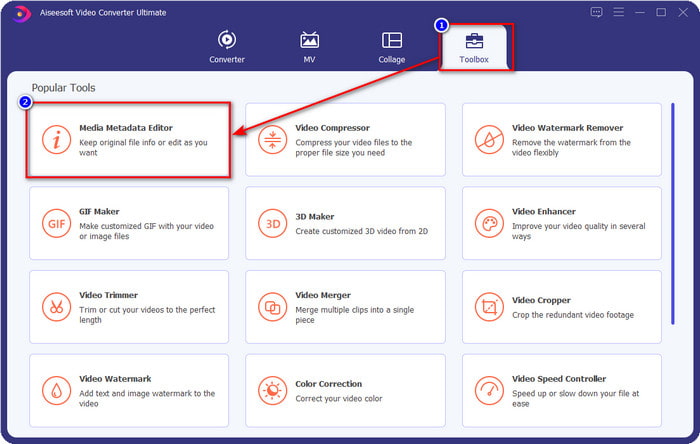
चरण 2. Toolbox सेक्शन में जाएँ और Media Metadata Editor ढूँढ़ें; इसे खोलने के लिए उस पर क्लिक करें।.
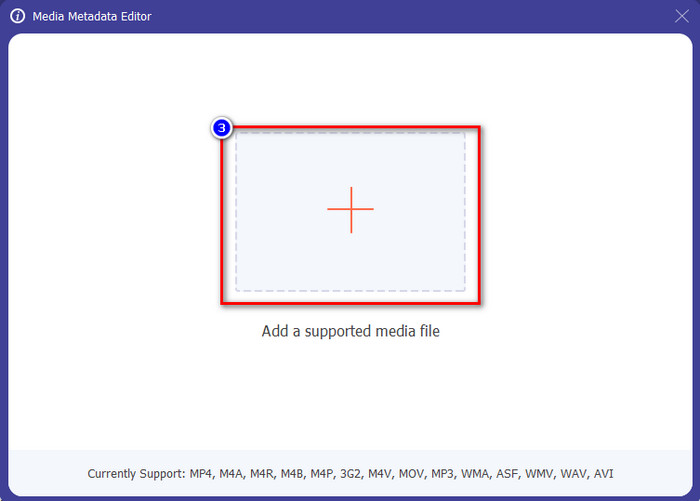
चरण 3. आपकी स्क्रीन पर नई विंडो पॉप‑अप होगी; जिस वीडियो का मेटाडेटा आप जोड़ना या एडिट करना चाहते हैं, उसे जोड़ने के लिए + बटन पर टैप करें। अपने कंप्यूटर के फ़ोल्डर में वीडियो ढूँढ़ें और आगे बढ़ने के लिए Open पर क्लिक करें।.
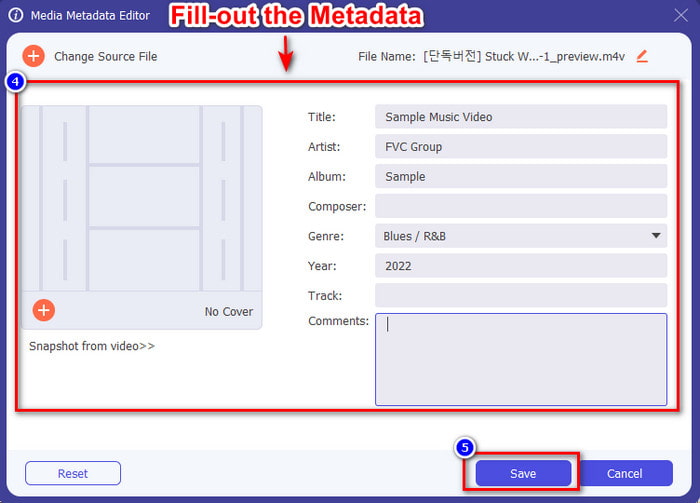
चरण 4. टूल के लोड होने तक इंतज़ार करें, और मेटाडेटा एडिटर दिखाई देगा; इस क्षेत्र में आप text box भरकर अपना निजी मेटाडेटा जोड़ सकते हैं। ज़रूरी जानकारी जोड़ने के बाद, मीडिया को मेटाडेटा सहित डाउनलोड करने के लिए Save पर क्लिक करें। बिना किसी मेहनत के, आपने अपनी फ़ाइल पर मेटाडेटा जोड़ या संपादित कर लिया होगा।.
संबंधित:
iMovie में वॉटरमार्क कैसे जोड़ें
भाग 4. मेटाडेटा के बारे में अक्सर पूछे जाने वाले प्रश्न
मेटाडेटा जोड़ने के बाद फ़ाइल का आकार बड़ा क्यों हो जाता है?
यदि मेटाडेटा के कारण मीडिया फ़ाइल का आकार बड़ा हो जाए तो आपको आश्चर्य नहीं होना चाहिए क्योंकि यह होगा। इसके पीछे कारण यह है कि मेटाडेटा प्रत्येक मीडिया फ़ाइल पर संग्रहीत एक तत्व है; मेटाडेटा वीडियो के आकार में योगदान देता है।
क्या मेटाडेटा वीडियो की गुणवत्ता को प्रभावित करता है?
अगर आप मेटाडेटा वाला वीडियो जोड़ते, संपादित करते या डाउनलोड करते हैं, तो भी वीडियो की गुणवत्ता नहीं बदलेगी।
जोड़ने के लिए महत्वपूर्ण मेटाडेटा क्या है?
मान लीजिए कि आप बिना मेटा जानकारी वाली फ़ाइल में मेटाडेटा जोड़ना चाहते हैं। आपको महत्वपूर्ण चीजों को भरना होगा: लेखक का नाम, शीर्षक, तिथि और समय। सभी चीजें महत्वपूर्ण हैं, लेकिन ये मेटाडेटा का अनिवार्य हिस्सा हैं।
निष्कर्ष
अंततः, अब हमारे पास मेटाडेटा के बारे में व्यापक जानकारी है; आप जो भी सवालों से परेशान थे, उनका जवाब इस पोस्ट में मिल चुका है। अब जबकि आप मेटाडेटा के बारे में जान चुके हैं, तो आपको अपने फ़ाइलों में मेटाडेटा ज़रूर जोड़ना चाहिए ताकि आप उन पर एक अतिरिक्त सुरक्षा परत लगा सकें, और इसमें डेस्कटॉप पर मौजूद सबसे अच्छे मेटाडेटा एडिटर की मदद लें। निस्संदेह, FVC Video Converter Ultimate ऐसा परफेक्ट टूल है जिसे हर कोई अपनी फ़ाइल पर आसानी से मेटाडेटा लगाने या पहले से मौजूद मेटाडेटा को एडिट करने के लिए इस्तेमाल कर सकता है। इस सॉफ़्टवेयर की मदद से आप बहुत‑सी चीजें कर सकते हैं; जानना चाहते हैं कि वे क्या हैं? तो डाउनलोड बटन पर क्लिक करके आप इसके बाकी शानदार फीचर्स भी देख सकते हैं।.
-
 टिकटोक पर वीडियो और तस्वीरें एक साथ जोड़ने के 3 प्रभावी तरीके
 जानना चाहते हैं कि टिकटोक वीडियो पर इमेज कैसे जोड़ें? उस स्थिति में, अपने टिकटोक वीडियो में छवियों को आसानी से जोड़ने का तरीका जानने के लिए इस लेख को क्लिक करें और पढ़ें।
-
 शीर्ष 3 बेहतरीन वीडियो संपादकों के साथ वीडियो में टेक्स्ट जोड़ें [आसानी से]
 वीडियो में टेक्स्ट जोड़ना सही टूल के साथ एक आसान काम है। इसलिए, आज हम आपके लिए विभिन्न टूल प्रस्तुत करेंगे जिनका उपयोग आप अपने वीडियो को साझा करने से पहले उसमें टेक्स्ट जोड़ने के लिए कर सकते हैं।
-
 प्रामाणिक समीक्षा 6 टेक्स्ट वीडियो ऐप्स के बारे में [2022]
 जानना चाहते हैं कि टेक्स्ट वीडियो ऐप्स क्या हैं जिनका आप पूरे प्लेटफॉर्म पर उपयोग कर सकते हैं? यह लेख बाजार में उपलब्ध छह टेक्स्ट वीडियो ऐप्स की वास्तविक समीक्षा प्रदान करेगा।
