


 वीडियो कनवर्टर अंतिम
 स्क्रीन अभिलेखी
 वीडियो मरम्मत
विस्तृत चरणों के साथ OGG मेटाडेटा को आसानी से संपादित करना सीखें
आपकी ओजीजी फाइलों पर टैग के साथ, जिस डिवाइस का आप वर्तमान में उपयोग कर रहे हैं वह समझ सकता है कि फाइल में क्या है। एक बार मेटाडेटा संलग्न हो जाने पर, यह टैग को शीघ्रता से खोजने के लिए निर्धारित करके इसे ठीक से व्यवस्थित करने में आपकी सहायता कर सकता है। इसलिए, यदि आपकी OGG फ़ाइलों में मेटाडेटा नहीं है, तो उसे जोड़ना आवश्यक है। हालांकि OGG के लिए टैग संपादक की खोज करना आसान है, हम सुनिश्चित नहीं हैं कि वे उपयोग करने के लिए पूरी तरह से सुरक्षित हैं या नहीं। उन्हें आज़माने और असफल होने के बजाय, हम आपके लिए प्रति टूल समस्या निवारण करेंगे। इसलिए, 100% सफलता आश्वासन के साथ OGG मेटाडेटा को मैन्युअल रूप से संपादित करने का तरीका जानने के लिए इस पोस्ट को पढ़ते रहें।

भाग 1. विंडोज़ पर बाहरी प्रोग्राम डाउनलोड किए बिना ओजीजी मेटाडेटा संपादित करें
Windows पर, आप बिना कोई अतिरिक्त टूल डाउनलोड किए आसानी से OGG मेटाडेटा को Properties का उपयोग करके संपादित कर सकते हैं। हालांकि यह नीचे दिए गए समर्पित सर्वोत्तम टूल जितना प्रभावी नहीं है, लेकिन इसकी मदद से काम किया जा सकता है। इसलिए, यदि आप जानना चाहते हैं कि इस मेटाडेटा एडिटर का उपयोग कैसे करें, तो आप नीचे दिए गए चरणों का पालन कर सकते हैं।.
विंडोज़ पर गुणों का उपयोग करने के लाभ:
इसे डाउनलोड करना कभी भी इसका उपयोग करने के लिए आवश्यक नहीं है, और यहां तक कि आपके पास इंटरनेट का उपयोग भी नहीं है।
उपयोग में आसान और किसी भी उपयोगकर्ता द्वारा उपयोग किया जा सकता है जो मेटाडेटा संपादित करना चाहते हैं।
यह OGG, MP3, WAV, WMA, और कई अन्य प्रारूपों की एक विस्तृत श्रृंखला का समर्थन करता है।
विंडोज़ पर गुणों के साथ आसानी से ओजीजी टैग कैसे संपादित करें:
चरण 1. अपने डेस्कटॉप पर OGG फ़ाइल ढूँढें और फ़ाइल पर राइट‑क्लिक करें; जो मेनू खुलेगा, उसमें से Properties पर क्लिक करें।.
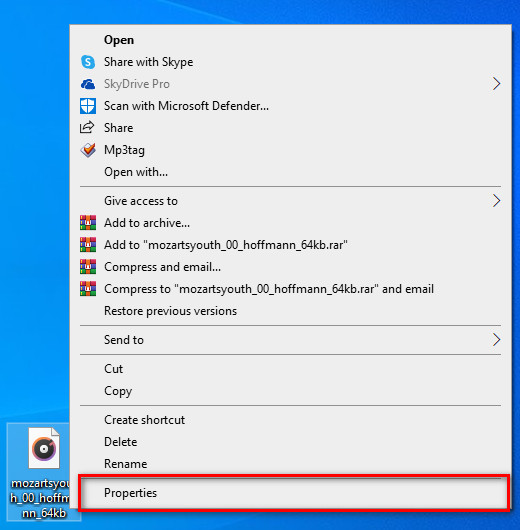
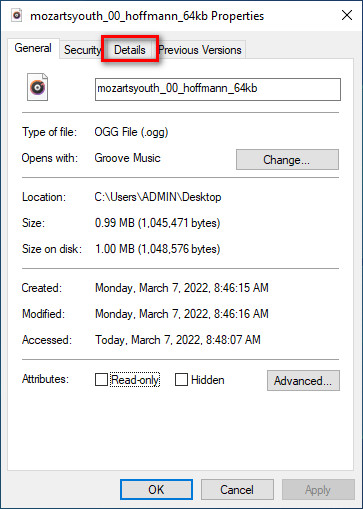
चरण 2. Properties पर क्लिक करने के बाद, आपकी स्क्रीन पर एक पैनल दिखाई देगा। Details टैब पर जाएँ, हर टैग पर टैप करें और उसे भरें।.
चरण 3. Properties में किए गए बदलावों को सहेजने के लिए OK दबाएँ।.
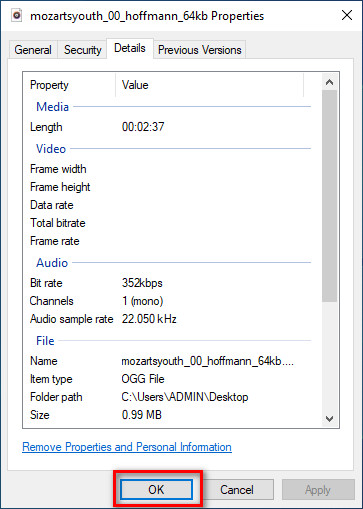
युक्ति: यह फ़ंक्शन कभी-कभी आपके द्वारा OGG फ़ाइल में जोड़े गए मेटाडेटा को सहेजता नहीं है। इसलिए, यदि ऐसा होता है, तो आपको इसे फिर से करना होगा और शुरुआत से ही शुरू करना होगा।
भाग 2। विंडोज और मैक पर ओजीजी मेटाडेटा संपादित करने के लिए सबसे अनुशंसित ओजीजी टैग संपादक [पेशेवर रूप से]
OGG को संपादित करने का सबसे अच्छा तरीका Windows और Mac पर उपलब्ध एक शक्तिशाली, फिर भी सरल टैग एडिटर FVC Video Converter Ultimate का उपयोग करना है। इस टूल की मदद से आप कुछ ही क्लिक में OGG का मेटाडेटा मैन्युअल रूप से बदल सकते हैं। Properties के विपरीत, आपको अपनी मीडिया फ़ाइल के टैग को एडिट करने या ठीक करने में कोई समस्या नहीं आएगी। हालाँकि, इसके सभी बेहतरीन फ़ीचर्स का पूरा लाभ उठाने के लिए आपको इस टूल को डाउनलोड और खरीदना होगा, जो आपको किसी और टूल में नहीं मिलेंगे।.
मेटाडेटा पर इसकी संपादन क्षमता के अलावा, यह टूल आपको अपनी ओजीजी फ़ाइल पर संग्रहीत उच्च-गुणवत्ता वाले ऑडियो को बनाए रखते हुए अपनी ओजीजी फ़ाइल को एक नए ऑडियो प्रारूप में बदलने की अनुमति देता है। आप चाहें तो अपने वीडियो और ऑडियो पर बुनियादी संपादन भी कर सकते हैं, जैसे कि कटिंग, ट्रिमिंग, मर्जिंग, क्रॉपिंग, और बहुत कुछ, लेकिन यह उन्नत संपादन भी कर सकता है; आप टूलबॉक्स पर उन्नत संपादन देख सकते हैं। शायद आपको लगता है कि इस उपकरण के बारे में अंतिम बात क्या है; खैर, यह सभी की उम्मीदों पर खरा उतरता है, और अल्टीमेट नाम सिर्फ एक नाम नहीं है, बल्कि यह टूल की क्षमता भी है। इसलिए, यदि आप ओजीजी मेटाडेटा को संपादित करने के लिए उपकरण का उपयोग करना चाहते हैं, तो आप अपनी उंगली की नोक पर सफल होने के लिए नीचे दिए गए चरणों की प्रतिलिपि बना सकते हैं।
FVC वीडियो कन्वर्टर अल्टीमेट [अनुशंसित] का उपयोग करने का लाभ:
◆ यह एक पेशेवर टैग संपादक है जो आपकी ऑडियो फ़ाइल के मेटाडेटा में आसानी से हेरफेर कर सकता है, भले ही आप पेशेवर न हों।
यह वीडियो प्रारूपों सहित OGG, MP3, WAV, WMA, AIFF, और 1000+ अधिक जैसे अपलोड करने के लिए प्रारूपों की एक विस्तृत श्रृंखला का समर्थन करता है।
मेटाडेटा, रिज़ॉल्यूशन, गुणवत्ता, कटिंग आदि को संपादित करने में शुरुआत करने वालों के लिए यह सबसे अच्छा विकल्प है।
यदि आप कर सकते हैं तो विंडोज और मैक सिस्टम दोनों पर सॉफ्टवेयर डाउनलोड करने में सक्षम।
वीडियो और ऑडियो से संबंधित विभिन्न कार्यों में आपकी सहायता करने के लिए टूलबॉक्स पर अतिरिक्त कार्य और सुविधाएं उपलब्ध हैं।
FVC वीडियो कन्वर्टर अल्टीमेट के साथ एक प्रो की तरह OGG टैग्स को कैसे संपादित करें:
चरण 1. नीचे दिए गए डाउनलोड बटन को दबाएँ और अपने उपयोग में आ रहे सही ऑपरेटिंग सिस्टम का चयन करें। डाउनलोड पूरा हो जाने पर, आपने जो सॉफ़्टवेयर फ़ाइल डाउनलोड की है उस पर क्लिक करें, ताकि उसे अपनी ड्राइव पर इंस्टॉल कर सकें। अपनी पसंद के अनुसार सेट‑अप करें; अंत में, टूल को लॉन्च करने के लिए Start Now पर क्लिक करें।.
फ्री डाउनलोडWindows 7 या बाद के संस्करण के लिएसुरक्षित डाउनलोड
फ्री डाउनलोडMacOS 10.7 या बाद के संस्करण के लिएसुरक्षित डाउनलोड
चरण 2. जब आप अपने डेस्कटॉप पर सॉफ़्टवेयर खोल लें, तो Toolbox सेक्शन में जाएँ और Media Metadata Editor ढूँढें; आगे बढ़ने के लिए इस फ़ीचर पर क्लिक करें।.
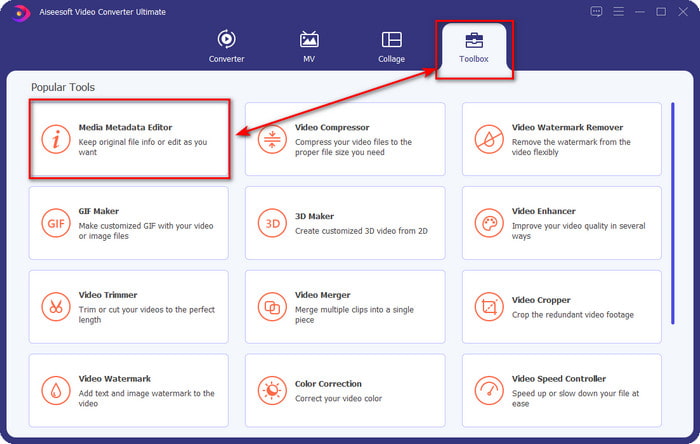
चरण 3. अपने डेस्कटॉप ड्राइव पर सेव OGG फ़ाइल को खोजने के लिए + आइकन पर क्लिक करें। .ogg फ़ाइलनाम को चुनें और फ़ाइल को टूल में अपलोड करने के लिए Open पर क्लिक करें।.
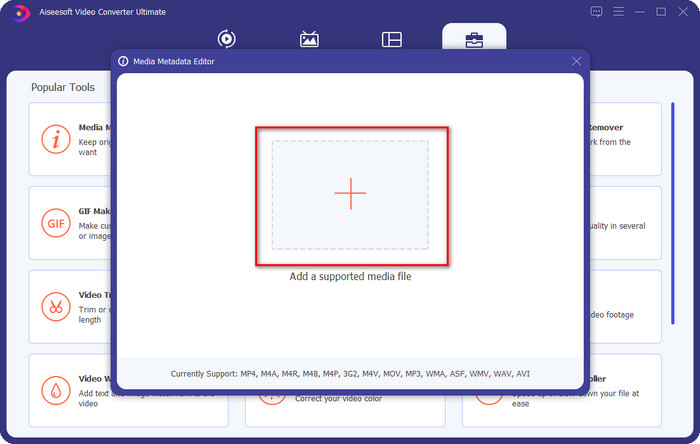
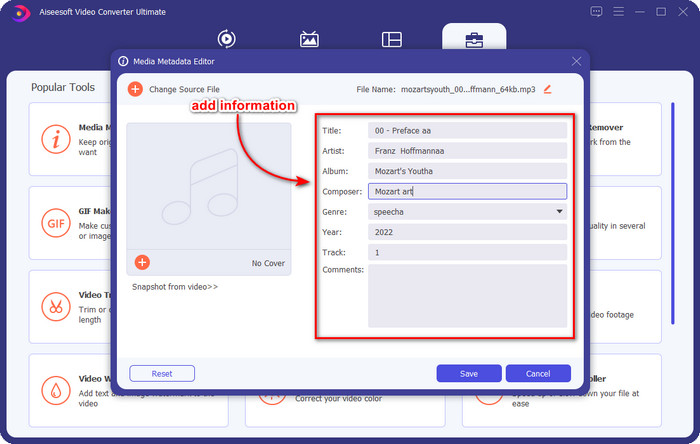
चरण 4. जो मिनी विंडो आपकी स्क्रीन पर दिखाई देगी, उस पर OGG का मेटाडेटा एडिट या हटाएँ, हर textbox पर क्लिक करें और वह जानकारी जोड़ें जिसे आप OGG पर लागू करना चाहते हैं। यदि आप चाहें तो OGG ऑडियो फ़ाइल पर एक इमेज भी जोड़ सकते हैं, लेकिन यह सुनिश्चित करें कि इमेज आपके डेस्कटॉप पर सेव हो।.
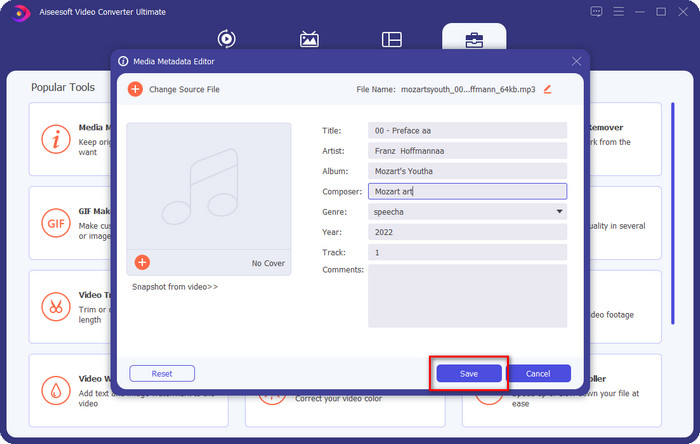
चरण 5. जब आप अपनी OGG फ़ाइल पर आवश्यक जानकारी जोड़ना पूरा कर लें, तो फ़ाइल को मेटाडेटा के साथ सेव करने के लिए Save पर क्लिक करें। इस तरह, आपने अब दोनों ऑपरेटिंग सिस्टम पर सुरक्षित और तेज़ी से इस्तेमाल किए जा सकने वाले सर्वश्रेष्ठ OGG मेटाडेटा एडिटर की मदद से एडिट किया हुआ OGG मेटाडेटा अपने डेस्कटॉप पर जोड़ लिया है।.
भाग 3. OGG मेटाडेटा के संपादन के बारे में अक्सर पूछे जाने वाले प्रश्न
क्या मैं Mac पर OGG फ़ाइल का उपयोग कर सकता हूँ?
OGG फ़ाइलें किसी भी Apple डिवाइस पर सपोर्ट नहीं होती हैं, लेकिन आप Mac पर न चलने वाली OGG फ़ाइल को चलाने के लिए थर्ड‑पार्टी ऐप का उपयोग कर सकते हैं। जानना चाहते हैं कैसे? अगर हाँ, तो इस लिंक पर क्लिक करें, क्योंकि हमने OGG के बारे में जानकारी और Mac पर OGG फ़ाइलों को आसानी से कैसे चलाएँ पर विवरण इकट्ठा किए हैं।.
क्या OGG MP3 से ज्यादा लोकप्रिय है?
लोकप्रियता के लिहाज से, MP3 OGG की तुलना में बहुत अधिक समर्थित है क्योंकि अगर हम उनकी तुलना करें तो यह बहुत अधिक लचीला है। दोनों अच्छे ऑडियो कंटेनर हैं, और उनके पास अलग-अलग ऑडियो स्ट्रेंथ हैं। लेकिन गुणवत्ता के लिहाज से, OGG, MP3 से कहीं बेहतर है, लेकिन कम समर्थित है।
क्या मैं उच्च गुणवत्ता वाला ओजीजी रिकॉर्ड कर सकता हूं?
बिलकुल, हाँ, आप OGG रिकॉर्ड कर सकते हैं। लेकिन कौन‑सा टूल OGG फ़ॉर्मेट को सपोर्ट करता है? अगर कोई है, तो क्या वह सबसे अच्छा OGG रिकॉर्डर है जिसे मैं इस्तेमाल कर सकता हूँ? इन सभी सवालों के जवाब आपको मिल जाएँगे अगर आप इस लिंक पर क्लिक कर आगे पढ़ते हैं।.
निष्कर्ष
कमाल है, है ना? जी हाँ, ऊपर दी गई समाधानों से आप OGG मेटाडेटा को एडिट करने के लिए बहुत कुछ कर सकते हैं। यदि आपको ज़रूरत है, तो ये आपके OGG फ़ाइल टैग की समस्या को हल करने के लिए जानी‑मानी विधियाँ हैं। अगर आप यहाँ लिखी जानकारी पर विश्वास नहीं करते, तो आपको दोनों तरीकों को आज़माना चाहिए, और हम आपको OGG के टैग एडिट करने में सफलता का भरोसा दिला सकते हैं। लेकिन अगर आप OGG पर टैग एडिट करने के लिए एक प्रो टूल चाहते हैं, तो आपको यह काम पूरा करने के लिए अल्टीमेट टूल का उपयोग करना चाहिए। FVC Video Converter Ultimate किसी भी मीडिया प्रकार पर किसी भी टैग को एडिट करने के लिए निस्संदेह सबसे अच्छा विकल्प है। यदि आपको लगता है कि यह आपके लिए सही टूल है, तो हम सुझाव देते हैं कि टैग को आसानी से एडिट करने के लिए ऊपर दिए गए चरणों को पढ़ें।.
-
 विंडोज, मैक और मोबाइल उपकरणों पर 7 लोकप्रिय संगीत टैग संपादक
 संगीत टैग आपके पुस्तकालय में संगीत की व्यवस्था के लिए अंदर के डेटा के अनुसार उपयोग करने के लिए लोकप्रिय हैं। क्या होगा अगर आप इसे बदलना चाहते हैं? अधिक जानने के लिए नीचे विवरण पढ़ें।
-
 2022 में 4 सुझाए गए ऑडियोबुक मेटाडेटा संपादक
 अगर आपको ऑडियोबुक टैग एडिटर के बारे में कोई जानकारी नहीं है तो यह लेख आपकी मदद करेगा। नीचे दिए गए प्रत्येक विवरण और उपयोग किए जाने वाले टूल को पढ़कर इसे बेहतर तरीके से जानें।
-
 शीर्ष 5 मुफ्त एमपी3 टैग संपादक ऑनलाइन और ऑफलाइन उपलब्ध हैं
 क्या आप जानना चाहते हैं कि एमपी3 टैग कैसे संपादित करें? उस स्थिति में, पढ़ना जारी रखें। आज के लिए, हम आपको 5 सर्वश्रेष्ठ एमपी3 टैग संपादक प्रदान करते हैं जिनका आप उपयोग कर सकते हैं।
