


 वीडियो कनवर्टर अंतिम
 स्क्रीन अभिलेखी
 वीडियो मरम्मत
[सिद्ध] विंडोज 10/11 और मैक पर WAV फ़ाइलों के गुणों को सहजता से कैसे संपादित करें
यदि आप पीसी पर ऑडियो बिटस्ट्रीम संग्रहीत करना चाहते हैं, तो निस्संदेह WAV वह मानक ऑडियो फ़ॉर्मैट है जिसका आपको उपयोग करना चाहिए। RIFF की नकल के रूप में, WAV फ़ाइलों का मेटाडेटा INFO चंक्स में होता है। हालाँकि यह केवल ऑडियो से अधिक डेटा भी संग्रहीत कर सकता है, कभी‑कभी WAV फ़ाइलों में मौजूद डेटा सटीक नहीं होता। इसलिए, यदि आपकी WAV फ़ाइलों पर मौजूद डेटा गलत है, तो आपको यह मार्गदर्शिका अवश्य उपयोग करनी चाहिए ताकि आप जान सकें कि Windows 10/11 और Mac पर WAV फ़ाइलों के गुण (properties) को कैसे संपादित करें, जिनमें आसान और विस्तृत चरण दिए गए हैं।.

भाग 1. विंडोज़ पर सर्वश्रेष्ठ टूल्स के साथ डब्ल्यूएवी फाइलों के गुणों को कैसे संपादित करें
विंडोज़ और मैक पर सर्वश्रेष्ठ मेटाडेटा संपादक - एफवीसी वीडियो कन्वर्टर अल्टीमेट
विंडोज 10/11 और मैक पर डब्ल्यूएवी फाइलों के गुणों को संपादित करना सीखना कोई बड़ी समस्या नहीं है, जिसे आप उक्त प्लेटफॉर्म पर डाउनलोड कर सकते हैं। FVC वीडियो कन्वर्टर अल्टीमेट सबसे अच्छा कनवर्टर प्रस्तुत करता है और शीर्ष पायदान मेटाडेटा संपादकों में से एक है जिसे आप अपने डेस्कटॉप पर उपयोग और डाउनलोड कर सकते हैं। बाजार और इस सूची के अन्य उपकरणों के विपरीत, यह उपकरण WAV सहित 1000+ मीडिया फ़ाइलों पर एक शक्तिशाली टैग संपादक प्रस्तुत करता है।
इसके अतिरिक्त, यहां तक कि आपने मेटाडेटा टैग संपादित करने का अनुभव किया है या नहीं किया है; आप अल्टीमेट कन्वर्टर का उपयोग करके इसे जल्दी से समझ सकते हैं। इस उपकरण के साथ कोई भी जटिल कार्य तेजी से नहीं किया जा सकता है, जिससे सॉफ्टवेयर अद्वितीय और शक्तिशाली हो जाता है। जानना चाहते हैं कि टूल का उपयोग कैसे करें? आप हमारे द्वारा नीचे दी गई गाइड का अनुसरण कर सकते हैं और कार्य को सफलतापूर्वक पूरा करने के लिए चरणों को कॉपी कर सकते हैं।
चरण 1. कृपया नीचे दिए गए डाउनलोड बटन पर क्लिक करें और उपयुक्त डाउनलोड बटन चुनें। फिर टूल को इंस्टॉल व सेट‑अप करें और उसे लॉन्च करें।.
फ्री डाउनलोडWindows 7 या बाद के संस्करण के लिएसुरक्षित डाउनलोड
फ्री डाउनलोडMacOS 10.7 या बाद के संस्करण के लिएसुरक्षित डाउनलोड
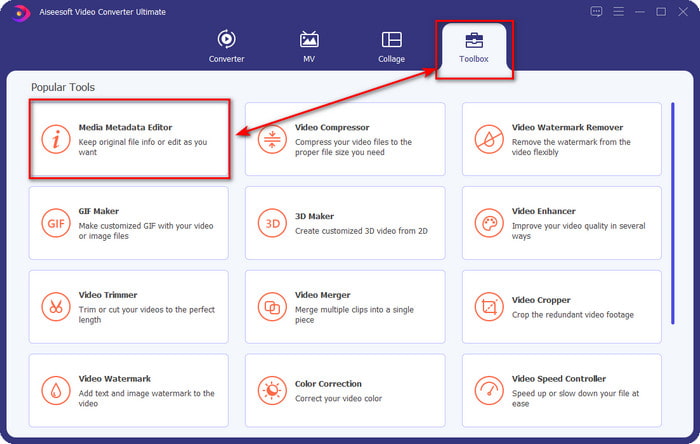
चरण 2. सॉफ़्टवेयर खोलने के बाद, अब आपको Toolbox सेक्शन में जाना होगा, और वहाँ नीचे दी गई सूची में से Media Metadata Editor चुनना होगा।.
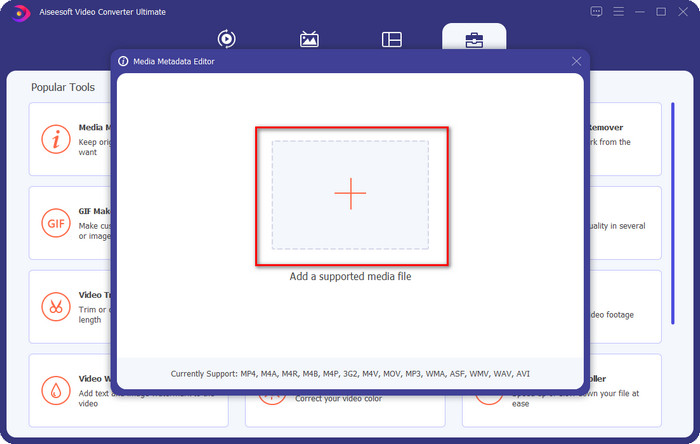
चरण 3. अपनी स्क्रीन पर दिख रहे + बटन पर क्लिक करके फ़ाइल जोड़ें, अपने कंप्यूटर के फ़ोल्डर में वह WAV फ़ाइल ढूँढें जिसमें आप मेटाडेटा जोड़ना चाहते हैं, फिर Open दबाएँ।.
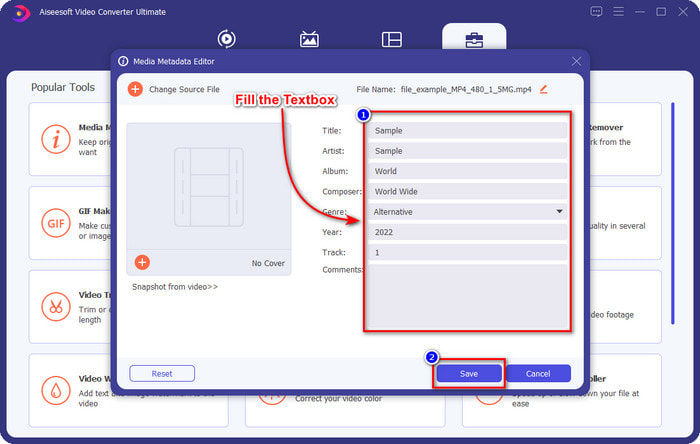
चरण 4. textbox में दी गई जानकारी को संपादित करें या हटा दें; यदि आप इन्हें सफलतापूर्वक भर लेते हैं, तो परिवर्तन लागू करने के लिए आप Save पर क्लिक कर सकते हैं। और इस तरह, आपने इस अल्टीमेट टूल की मदद से WAV फ़ाइलों पर टैग्स को संपादित करना सीख लिया है।.
धृष्टता
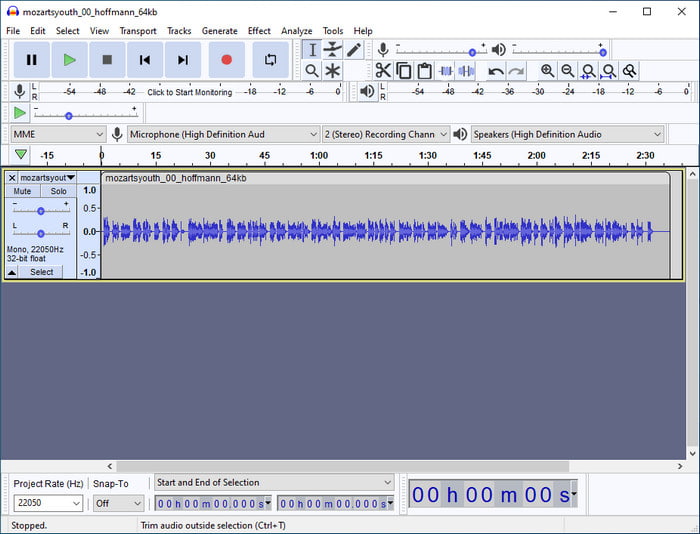
आप जिन बेहतरीन सॉफ़्टवेयरों का उपयोग अपने ऑडियो को बेहतर बनाने के लिए कर सकते हैं, उनमें से एक है Audacity। यह Windows सॉफ़्टवेयर एक शक्तिशाली एन्हांसर और एडिटर प्रदान करता है, जिसे आप मुफ़्त में उपयोग करना पसंद करेंगे। यह न केवल आपकी ऑडियो फ़ाइल को बेहतर बना सकता है, बल्कि ज़रूरत पड़ने पर आपकी ऑडियो फ़ाइल पर मौजूद टैग्स को भी बदल सकता है। यदि आप जानना चाहते हैं कि इस टूल का उपयोग करके WAV फ़ाइलों के गुणों को कैसे संपादित करें, तो आप नीचे दिए गए मार्गदर्शक का पालन कर सकते हैं।.
चरण 1. Windows पर Audacity डाउनलोड करें, फिर उसे खोलें।.
चरण 2. उसके बाद अपनी पसंद की WAV फ़ाइल को खिंच कर लाएँ और छोड़ें (drag and drop), Edit पर क्लिक करें, और उसके अंतर्गत Metadata पर क्लिक करें।.
चरण 3. अपनी WAV फ़ाइल के टैग्स संपादित करने के लिए Value के अंतर्गत प्रत्येक खांचे (square) पर टैप करें, फिर लागू करने के लिए OK पर क्लिक करें, उसके बाद File और Save Project पर क्लिक करें।.
भाग 2. मैक पर शीर्ष सॉफ़्टवेयर के साथ WAV फ़ाइलों के गुणों को कैसे संपादित करें?
संगीत टैग प्रो
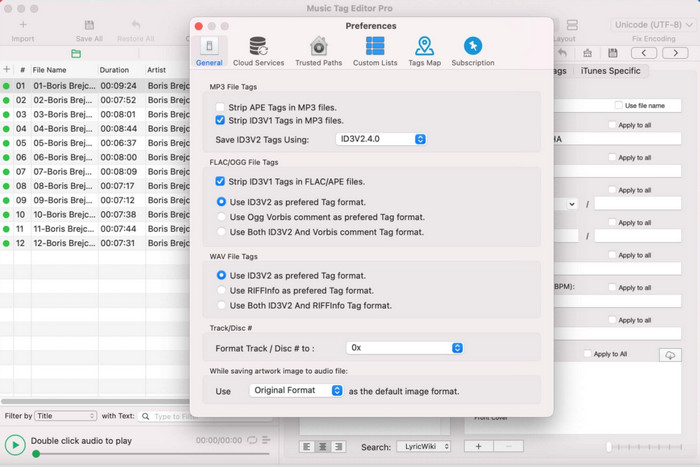
Music Tag Pro एक सॉफ़्टवेयर है जिसे आप Mac पर डाउनलोड कर सकते हैं ताकि ऑडियो और वीडियो फ़ाइल के मेटाडेटा को संपादित कर सकें। यह फ़ाइलों के मेटाडेटा को बदलने के लिए मेटाडेटा टैग्स को bulk में भी संपादित कर सकता है, जिससे काम अधिक कुशल हो जाता है। Mac पर इस टैग एडिटर के कुल प्रदर्शन के कारण, कई उपयोगकर्ता इसका उपयोग करना पसंद करते हैं और यदि आप Appstore पर देखें तो इस पर बहुत से अच्छे कमेंट्स छोड़ते हैं। हालाँकि आपकी मीडिया फ़ाइल पर जानकारी सीमित होती है, फिर भी इस टूल से काम किया जा सकता है। यदि आप इसका उपयोग करना चाहते हैं, तो यह ट्यूटोरियल आपको Mac पर WAV फ़ाइलों के गुणों को कैसे संपादित करें, सिखाएगा।.
चरण 1. Appstore पर इस टूल को खोजें, फिर इसे डाउनलोड करें।.
चरण 2. WAV फ़ाइलें जोड़ने के लिए Import बटन पर क्लिक करें।.
चरण 3. WAV फ़ाइलों पर क्लिक करें, प्रत्येक कॉलम में मौजूद टैग्स को संपादित करें, और WAV फ़ाइल का संपादन पूरा होने पर Save All पर क्लिक करें।.
Mac . के लिए टैग संपादक
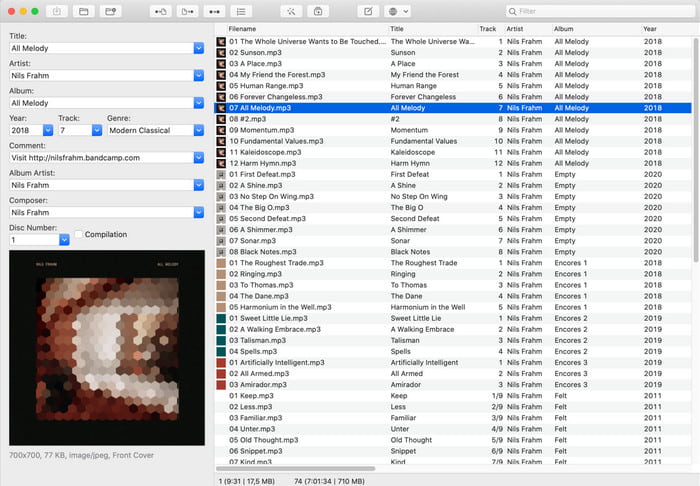
Tag Editor for Mac एक उपयोगी सॉफ़्टवेयर है जो आपकी ऑडियो फ़ाइलों, जैसे WAV, पर टैग्स जोड़ने में मदद करता है। इस सॉफ़्टवेयर के साथ आप किसी भी ऑडियो फ़ाइल पर आसानी से मेटाडेटा जोड़ सकते हैं, बिना उन्हें घटिया बनाए, जैसा कि अल्टीमेट टूल कर सकता है। साथ ही, इसे केवल इसके टैग एडिटिंग फीचर्स के लिए ही नहीं सराहा जाता, बल्कि इसकी तेज़ कस्टमर सर्विस के लिए भी, जो मदद की ज़रूरत वाले ग्राहकों को सेवा देती है। यदि आपको इसका उपयोग करके WAV फ़ाइलों के गुणों को कैसे संपादित करें, इस पर चरण‑दर‑चरण ट्यूटोरियल चाहिए, तो नीचे पढ़ें।.
चरण 1. अपना Appstore खोलें और वहाँ से Tag Editor डाउनलोड करें; उसके बाद इसे खोलें।.
चरण 2. WAV फ़ाइलें जोड़ने के लिए ऊपर दिए गए + बटन पर क्लिक करें, और वे अपने‑आप नीचे दी गई सूची में आ जाएँगी।.
चरण 3. मेटाडेटा बदलने के लिए Edit पर क्लिक करें, फिर बदलावों को सहेजने के लिए Save पर क्लिक करें।.
भाग 3. WAV फ़ाइलों पर गुण संपादित करने के बारे में अक्सर पूछे जाने वाले प्रश्न
मेटाडेटा संपादित करने के बाद WAV की ऑडियो गुणवत्ता क्यों कम हो जाती है?
कुछ उपकरण आपकी WAV फ़ाइल की ऑडियो गुणवत्ता को कम कर सकते हैं; कई उपयोगकर्ता इस समस्या के बारे में शिकायत करते हैं, भले ही उन्होंने इसकी गुणवत्ता संपादित नहीं की हो। इसलिए, यदि आप अपने द्वारा उपयोग किए जाने वाले सॉफ़्टवेयर के बारे में सुनिश्चित नहीं हैं, तो यह निर्धारित करने के लिए एक विश्वसनीय समीक्षा पढ़ना बेहतर है कि क्या आपके द्वारा इसे निर्यात करने के बाद ऑडियो गुणवत्ता खो जाएगी।
क्या मैं अपना WAV मेटाडेटा देख सकता हूँ?
बिलकुल, हाँ, आप कर सकते हैं। यदि आप नहीं जानते कि Windows, Mac और ऑनलाइन सेवाओं का उपयोग करके अपने मीडिया फ़ाइल के मेटाडेटा को कैसे देखें, तो इस लिंक पर क्लिक करें: how to view your media file's metadata।.
क्या WAV पर मेटाडेटा आवश्यक है?
निश्चित रूप से, हाँ। मेटाडेटा, आपके पास मौजूद प्रत्येक मीडिया फ़ाइल, चाहे ऑडियो हो या वीडियो, के लिए महत्वपूर्ण होता है। इसलिए, अपनी WAV फ़ाइल पर मेटाडेटा जोड़ना आपके लिए और आपकी लाइब्रेरी के लिए मददगार हो सकता है, ताकि वह प्रत्येक WAV फ़ाइल को लेखक के नाम, शीर्षक, समय, तिथि, स्थान और बहुत‑सी अन्य चीज़ों के अनुसार व्यवस्थित कर सके। यदि आप अपनी WAV फ़ाइल में मेटाडेटा जोड़ने के लिए आश्वस्त नहीं हैं, तो हम सुझाव देते हैं कि आप इस लेख को पढ़ें ताकि metadata के बारे में और अधिक जान सकें।.
निष्कर्ष
इस लेख की मदद से अब हमें Windows 10/11 और Mac पर WAV फ़ाइलों के गुणों को कैसे संपादित करें, इस पर पर्याप्त जानकारी मिल गई है। यदि आप दोनों सिस्टम के उपयोगकर्ता हैं, तो आप इन्हें मुफ़्त में उपयोग कर सकते हैं, लेकिन कुछ टूल्स पेड भी हैं। फिर भी, आप जो भी चुनें, हमारा मानना है कि मेटाडेटा को संपादित करना आसान है। लेकिन यदि आप अपने लिए एक कम‑खर्च वाला मेटाडेटा एडिटर रखना चाहते हैं जो WAV टैग्स को आसानी से संपादित कर सके, तो आपको अल्टीमेट टूल चुनना चाहिए। FVC Video Converter Ultimate वह बजट‑फ्रेंडली प्रोफेशनल मेटाडेटा एडिटर है जिसे आप Windows और Mac दोनों पर उपयोग कर सकते हैं। यदि आप इसे डाउनलोड करते हैं, तो आप इस टूल द्वारा दी जाने वाली शानदार सुविधाओं को देख सकते हैं, तो डाउनलोड बटन पर क्लिक करें और इसे उपयोग करें।.
-
 MP4 मेटाडेटा को बहुत ही चतुर तरीके से संपादित और ठीक कैसे करें
 क्या आप जानना चाहते हैं कि MP4 मेटाडेटा को कैसे ठीक किया जाए? उस स्थिति में, MP4 टैग को आसानी से ठीक करने के तरीके जानने के लिए इस लेख की पूरी सामग्री पढ़ें।
-
 Windows और Mac पर MP3 मेटाडेटा को ठीक करने और संपादित करने के लिए 4 सर्वोत्तम तरीके
 MP3 मेटाडेटा को आसानी से संपादित करने के रहस्यों को जानना चाहते हैं? यह ब्लॉग आपको अलग-अलग तकनीकों के साथ अलग-अलग टूल सिखाएगा, जिन तक आप आसानी से पहुंच सकते हैं।
-
 OGG मेटाडेटा को संपादित करने के 2 सर्वोत्तम तरीके आपको मुफ़्त में आज़माने चाहिए
 OGG मेटाडेटा संपादित करने की आवश्यकता है? ठीक है, आप सही सॉफ़्टवेयर का उपयोग करके आसानी से टैग संपादित कर सकते हैं। यदि आपके पास एक भी नहीं है तो इस लेख को पढ़ना अनिवार्य है।
