


 वीडियो कनवर्टर अंतिम
 स्क्रीन अभिलेखी
 वीडियो मरम्मत
 सुरक्षित डाउनलोड
बेहतरीन कन्वर्टर्स का उपयोग करके अविश्वसनीय रूप से MOV को DivX में मुफ्त में कनवर्ट करें
आजकल कई प्रकार के फ़ाइल फ़ॉर्मेट मौजूद हैं, और यह तय करना मुश्किल होता है कि आप अपने प्लेटफ़ॉर्म पर किस प्रकार की फ़ाइल का उपयोग करें। और हर फ़ाइल के अलग-अलग फ़ंक्शन, कोडेक्स और फ़ाइल साइज़ होते हैं। यह लेख इन दो फ़ॉर्मेट्स को समझने पर केंद्रित होगा और यह बताएगा कि आप अपने MOV फ़ाइल को DivX फ़ाइल फ़ॉर्मेट में कैसे बदल सकते हैं। इसलिए, Mac और Windows पर मुफ़्त में MOV को DivX में बदलने के लिए इस लेख को अंत तक पढ़ें।.

भाग 1. MOV को DivX में क्यों बदलें
MOV फ़ाइल एक मीडिया फ़ाइल स्वरूप है जिसे QuickTime फ़ाइल स्वरूप (QTFF) में सहेजा गया है। यह आमतौर पर इस्तेमाल किया जाने वाला प्रारूप है क्योंकि यह फिल्मों, टीवी कार्यक्रमों और वीडियो क्लिप को स्टोर कर सकता है। इसके अलावा, Apple ने इस फ़ाइल स्वरूप को विकसित किया, जिससे यह मैक द्वारा समर्थित सभी मीडिया प्लेयर पर चलने योग्य हो गया। इसलिए, यदि आप अपनी MOV फ़ाइल को अन्य Windows OS मीडिया प्लेयर पर चलाने योग्य बनाना चाहते हैं, तो आपको MOV को DivX फ़ाइल स्वरूप में बदलने की आवश्यकता है।
भाग 2. अंतिम कनवर्टर का उपयोग करके मैक पर MOV को DivX में कैसे बदलें
बाज़ार में आपको मिलने वाले सबसे ज़्यादा उपयोग किए जाने वाले और संभवतः सबसे अच्छे ऑफ़लाइन कन्वर्टर्स में से एक है FVC Video Converter Ultimate। इस कन्वर्टर में शानदार फ़ीचर्स हैं, जैसे कि फ़ाइल पर इफ़ेक्ट्स जोड़ना, क्रॉप और रोटेट करना, और इसमें 3D मेकर भी है। इसके अलावा, यह कन्वर्टर MOV, DivX, XviD, AVI, MP4, MKV, FLV, WMV और 1000+ से अधिक फ़ाइल फ़ॉर्मेट्स को सपोर्ट करता है। हालाँकि यह कन्वर्टर MOV को DivX फ़ाइल में प्रोफ़ेशनल-स्तर के आउटपुट के साथ बदल सकता है, फिर भी इसका इंटरफ़ेस इस्तेमाल में आसान है, जो इसे एक यूज़र-फ्रेंडली टूल बनाता है। FVC Video Converter Ultimate के बारे में और जानने के लिए नीचे दिए गए विवरण पढ़ें।.
विशेषताएँ:
यह बिजली-बोल्ट गति रूपांतरण प्रक्रिया के साथ फ़ाइलों को परिवर्तित कर सकता है।
यह MOV, DivX, XviD, MP4, AVI, WebM, M4V, और कई अन्य सहित 1000+ फ़ाइल-प्रारूपों का समर्थन करता है।
यह कई फ़ाइल स्वरूपों को एक में मर्ज करने के लिए बैच रूपांतरण प्रदान करता है।
◆ आपकी फ़ाइल को संपादित करने, बढ़ाने और संपीड़ित करने जैसी उन्नत सुविधाएँ हैं।
मैक और विंडोज सहित सभी क्रॉस-मीडिया प्लेटफॉर्म पर डाउनलोड करने योग्य।
यहाँ FVC वीडियो कन्वर्टर अल्टीमेट का उपयोग करके MOV को DivX में बदलने के सरल चरण दिए गए हैं।
स्टेप 1. कृपया नीचे दिए गए Download बटन पर क्लिक करके Mac के लिए FVC Video Converter Ultimate डाउनलोड करें। और फिर इंस्टॉलेशन प्रक्रिया का पालन करें।.
फ्री डाउनलोडWindows 7 या बाद के संस्करण के लिएसुरक्षित डाउनलोड
फ्री डाउनलोडMacOS 10.7 या बाद के संस्करण के लिएसुरक्षित डाउनलोड
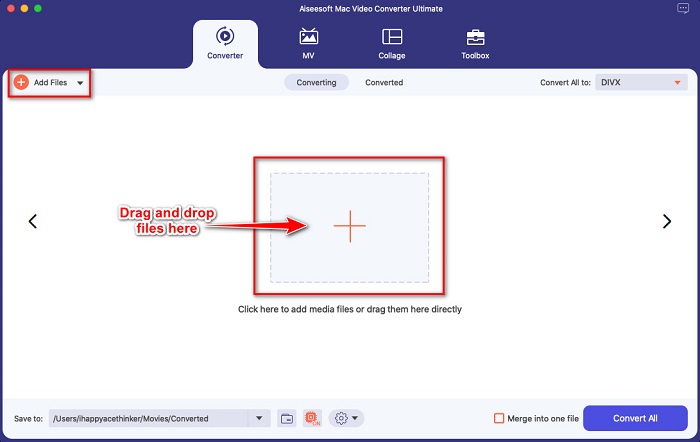
स्टेप 2. इसके बाद सॉफ़्टवेयर के मुख्य इंटरफ़ेस पर, Add Files बटन पर क्लिक करें या अपने MOV फ़ाइल को + साइन वाले बटन पर ड्रैग और ड्रॉप करें।.
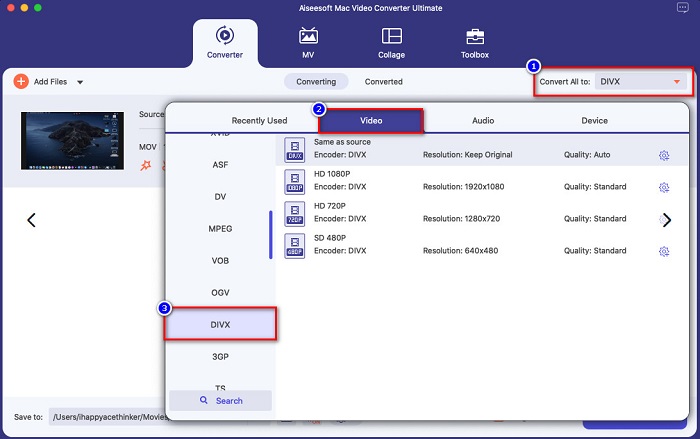
स्टेप 3. फिर Convert All to बटन पर क्लिक करके अपना आउटपुट फ़ाइल फ़ॉर्मेट चुनें, और फिर Divx फ़ाइल फ़ॉर्मेट चुनें।.
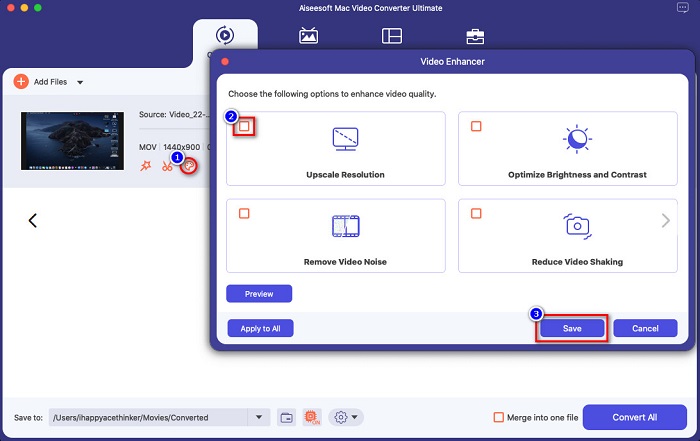
विकल्पिक. अगर आप अपनी वीडियो फ़ाइल को एन्हांस करना चाहते हैं, तो paint-like icon पर क्लिक करें। और फिर, जिन विकल्पों से आप अपनी फ़ाइल को एन्हांस करना चाहते हैं, उनके बॉक्स पर टिक लगाएँ। लागू करने के लिए Save पर क्लिक करें। लेकिन अगर आप ऐसा नहीं करना चाहते, तो अगला भाग जारी रखें।.
स्टेप 4. अंत में, MOV को DivX फ़ाइल फ़ॉर्मेट में ट्रांसकोड करना शुरू करने के लिए Convert All बटन पर क्लिक करें।.
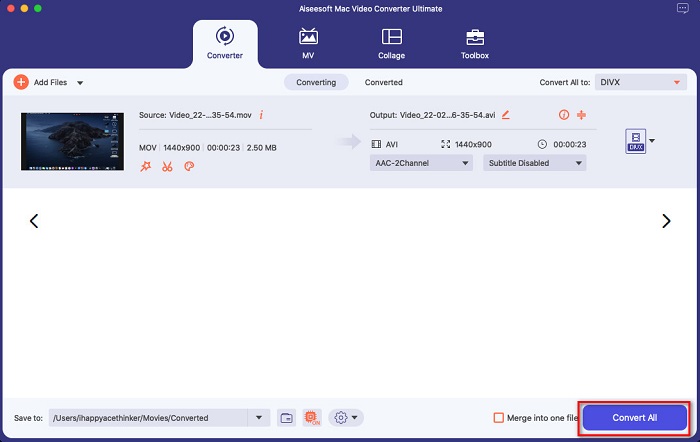
बस कुछ सेकंड प्रतीक्षा करें, और बस! आप अपनी MOV फ़ाइल को ABC की तरह सरल DivX फ़ाइल में कनवर्ट कर सकते हैं।
भाग 3. 2 MOV को DivX ऑनलाइन में बदलने के विकल्प
यदि आप अपनी MOV फ़ाइल को DivX में कनवर्ट करते समय कुछ भी डाउनलोड नहीं करना चाहते हैं, तो आपके उपयोग के लिए हमारे पास दो विकल्प हैं। हमने प्रसिद्ध कन्वर्टर्स की कोशिश की जो वेब पर पाए जा सकते हैं और उनमें से दो को सर्वश्रेष्ठ चुना।
विकल्प 1. कन्वर्टियो
जब आप MOV से DivX कन्वर्टर्स सर्च करेंगे, तो शायद आप इस कन्वर्टर को सर्च पेज के नतीजों में देखेंगे। Convertio एक ऑनलाइन कन्वर्टर है जो आपको MOV को DivX में ऑनलाइन मुफ़्त में बदलने की सुविधा देता है। यह MOV, DivX, MPG, WebM, M4V और अन्य कई फ़ॉर्मेट्स को सपोर्ट करता है। इसके अलावा, इसका सॉफ़्टवेयर इंटरफ़ेस इस्तेमाल में आसान है, जिससे यह शुरुआती लोगों के लिए उपयुक्त टूल बन जाता है। हालाँकि, चूँकि यह इंटरनेट पर निर्भर टूल है, आप धीमी कन्वर्ज़न प्रक्रिया का अनुभव कर सकते हैं।.
स्टेप 1. अपने ब्राउज़र पर Convertio सर्च करें। टूल के मुख्य इंटरफ़ेस पर, Choose Files बटन पर क्लिक करें। आपके कंप्यूटर की फ़ाइलें दिखाई देंगी, फिर अपनी MOV फ़ाइल चुनें।.

स्टेप 2. अगला, जिस आउटपुट फ़ॉर्मेट में आप फ़ाइल कन्वर्ट करना चाहते हैं, उसे चुनने के लिए drop-down बटन पर क्लिक करें। Video पैनल पर क्लिक करें, फिर DivX फ़ाइल फ़ॉर्मेट पर क्लिक करें।.

स्टेप 3. आख़िरी स्टेप के लिए कन्वर्ज़न प्रक्रिया शुरू करने हेतु Convert बटन पर क्लिक करें।.

विकल्प 2. इवानो
यदि आप Mac उपयोगकर्ता हैं, तो आपने शायद इस ऑनलाइन कन्वर्टर को देखा होगा। Evano एक ऑनलाइन कन्वर्टर है जो आपको MOV को DivX में कन्वर्ट करने की सुविधा देता है। इस ऑनलाइन कन्वर्टर का यूज़र इंटरफ़ेस सरल है और यह विभिन्न ऑडियो और वीडियो फ़ॉर्मेट्स को सपोर्ट करता है। इसके अलावा, इसमें अन्य कई ऑनलाइन कन्वर्टर्स की तरह कोई विज्ञापन नहीं हैं।.
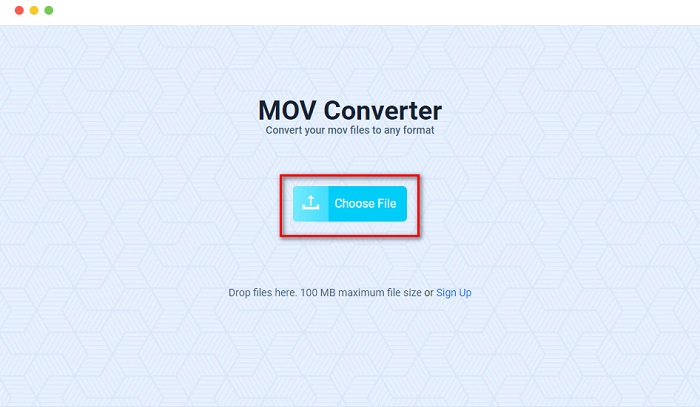
स्टेप 1. अपने भरोसेमंद ब्राउज़र पर Evano ऑनलाइन कन्वर्टर को सर्च करें। और सॉफ़्टवेयर के मुख्य इंटरफ़ेस पर, Choos File बटन पर क्लिक करें, फिर आपके कंप्यूटर के फ़ोल्डर्स दिखाई देंगे जहाँ से आप अपनी MOV फ़ाइल को अपलोड करने के लिए चुनेंगे।.
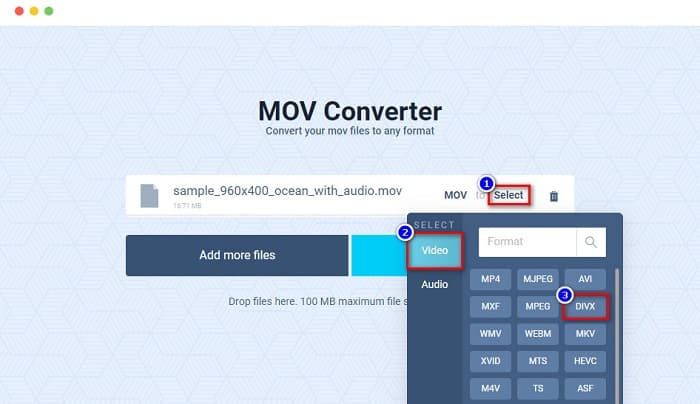
स्टेप 2. फ़ाइल अपलोड करने के बाद, जिस आउटपुट फ़ॉर्मेट में आप फ़ाइल कन्वर्ट करना चाहते हैं, उसे चुनने के लिए Select विकल्प पर क्लिक करें। और फिर DivX फ़ॉर्मेट पर क्लिक करें।.
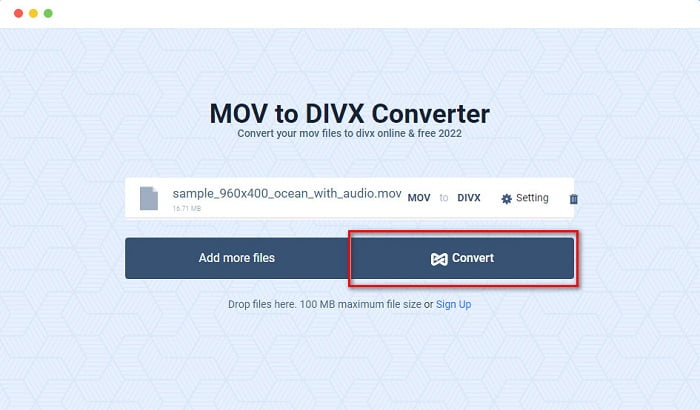
स्टेप 3. और फिर, MOV को DivX में कन्वर्ट करने के लिए Convert बटन पर क्लिक करें।.
भाग 4. फ्रीवेयर कनवर्टर का उपयोग करके कनवर्ट कैसे करें
अपने MOV फ़ाइल को DivX फ़ाइल में बदलने का एक और तरीका है किसी फ़्रीवेयर कन्वर्टर का उपयोग करना। सबसे ज़्यादा उपयोग किए जाने वाले फ़्रीवेयर कन्वर्टर्स में से एक है Prism Video File Converter। यह कन्वर्टर मुफ़्त में डाउनलोड किया जा सकता है और Windows तथा Mac दोनों पर उपलब्ध है। इसका उपयोग करना सुरक्षित भी है, इसलिए कई लोग इस ऐप का उपयोग करके फ़ाइलें कन्वर्ट करते हैं। हालाँकि, कुछ लोगों को इस कन्वर्टर का इंटरफ़ेस कुछ हद तक समझने में मुश्किल लगता है। फिर भी, MOV को DivX में मुफ़्त में कन्वर्ट करने का यह एक बेहतरीन तरीका है।.
स्टेप 1. अपने Mac डिवाइस पर Prism Video File Converter डाउनलोड करें। इंस्टॉलेशन प्रक्रिया का पालन करें, फिर ऐप खोलें। अपनी MOV फ़ाइल को सॉफ़्टवेयर के मुख्य इंटरफ़ेस पर अपलोड करने के लिए Add File(s) बटन पर क्लिक करें।.
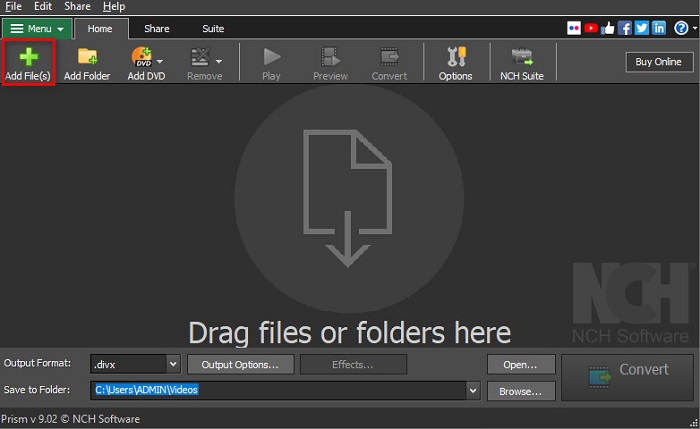
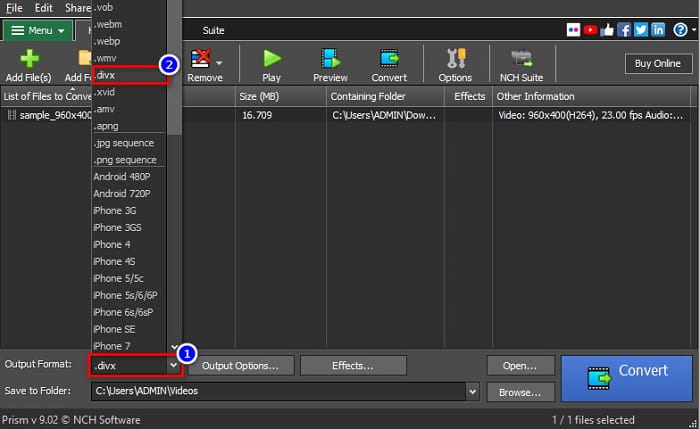
स्टेप 2. फिर Output Format के बगल में मौजूद drop-down बटन पर, DivX फ़ाइल फ़ॉर्मेट पर क्लिक करें।.
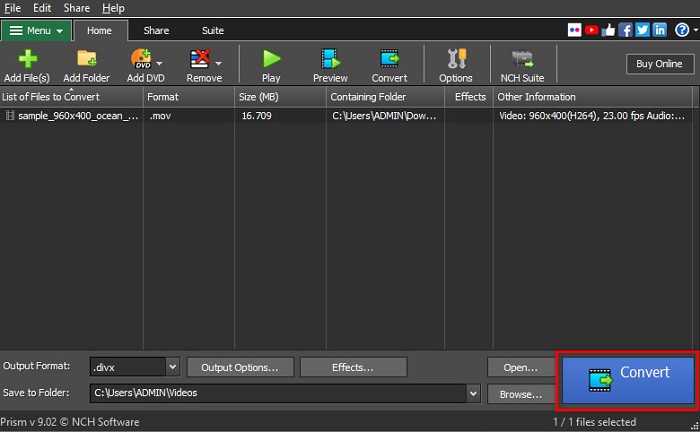
स्टेप 3. समाप्त करने के लिए, सॉफ़्टवेयर के इंटरफ़ेस के दाएँ निचले कोने में स्थित Convert बटन पर क्लिक करें।.
भाग 5. MOV और DivX की तुलना
| MOV | बनाम | डिवएक्स |
| केवल Apple उपकरणों द्वारा समर्थित | समर्थित डिवाइस | मैक और विंडोज सहित लगभग सभी उपकरणों द्वारा समर्थित |
| असम्पीडित | संपीडित/असंपीड़ित | दबा हुआ |
| बड़ा फ़ाइल आकार शामिल है | फाइल का आकार | छोटा फ़ाइल आकार है |
| वीडियो संपादन में MOV सबसे अच्छा उपयोग है | के लिए सबसे अच्छा उपयोग | फ़ाइल आकार को उसके मूल फ़ाइल आकार के बारहवें हिस्से तक संपीड़ित करने के लिए DivX सबसे अच्छा उपयोग है |
| वीडियो | कोडेक | वीडियो |
भाग 6. MOV को DivX में बदलने के बारे में अक्सर पूछे जाने वाले प्रश्न
क्या आप Windows Media Player पर MOV चला सकते हैं?
दुर्भाग्य से, नहीं। Windows Media Player MOV फ़ाइल फ़ॉर्मेट्स को सपोर्ट नहीं करता। लेकिन अगर आप Windows Media Player पर MOV फ़ाइल चलाना चाहते हैं, तो आप MOV को WMV फ़ॉर्मेट में कन्वर्ट कर सकते हैं। MOV को WMV में कन्वर्ट करने के बारे में और जानने के लिए इस लिंक पर क्लिक करें।.
क्या MOV को DivX में बदलने से फ़ाइल का आकार प्रभावित होता है?
हां। फ़ाइल का आकार छोटा हो जाएगा क्योंकि DivX फ़ाइल मूल आकार के बारहवें हिस्से तक संकुचित हो सकती है।
क्या QuickTime DivX फ़ाइलों का समर्थन करता है?
नहीं। QuickTime Mac के लिए एक इनबिल्ट मीडिया प्लेयर है जो DivX फ़ाइल फ़ॉर्मेट्स को सपोर्ट नहीं करता। हालाँकि, आप DivX फ़ाइलों को MKV में कन्वर्ट कर सकते हैं, जिसे QuickTime सपोर्ट करता है।.
निष्कर्ष
बस इतना ही! अब आपको MOV को DivX में कन्वर्ट करने के समाधान सर्च करने की आवश्यकता नहीं है, क्योंकि आपको ज़रूरी सारी जानकारी यहाँ मिल गई है। ऊपर बताए गए ऑफ़लाइन, ऑनलाइन और फ़्रीवेयर कन्वर्टर्स आपके MOV फ़ाइल को DivX में बदलने के सर्वोत्तम तरीक़े हैं। आप कौन सा कन्वर्टर इस्तेमाल करेंगे, यह आप पर निर्भर है, लेकिन अगर आप टॉप-परफ़ॉर्मिंग कन्वर्टर का इस्तेमाल करना चाहते हैं, तो अभी FVC Video Converter Ultimate डाउनलोड करें।.
-
 विंडोज़/मैक पर एमओवी फाइलों को एफएलवी में बदलने के 2 आसान तरीके
 MOV को FLV में फ्री में कैसे बदलें? यहां डेस्कटॉप और ऑनलाइन पर सर्वश्रेष्ठ वीडियो कन्वर्टर्स हैं जो आपकी MOV फ़ाइल को सेकंड में FLV में परिवर्तित करने के लिए बिना एक पैसा दिए हैं।
-
 MOV से GIF - मैक, पीसी और ऑनलाइन फ्री पर MOV को एनिमेटेड GIF में कैसे बदलें
 जीआईएफ क्या है? वीडियो को जीआईएफ में कैसे बदलें? MOV को एनिमेटेड GIF में ऑनलाइन कैसे बदलें? यह पोस्ट मैक/पीसी पर MOV को ऑनलाइन GIF में बदलने के 3 तरीके बताती है।
-
 पीसी और मैक पर MOV को AVI में बदलने के 4 प्रभावी तरीके [2021]
 क्या आप जानना चाहते हैं कि वेब पर AVI कनवर्टर के लिए बेहतरीन MOV क्या है? और FVC अल्टीमेट वीडियो कन्वर्टर आपके लिए एक क्यों हो सकता है।
