


 वीडियो कनवर्टर अंतिम
 स्क्रीन अभिलेखी
 वीडियो मरम्मत
 सुरक्षित डाउनलोड
ड्रीमस्टाइम वॉटरमार्क को उन 4 तरीकों से हटाएं जिन्हें आपको जानना आवश्यक है
यदि आपको अपनी प्रस्तुति या प्रोजेक्ट के लिए रेडी-टू-यूज़ छवियों की आवश्यकता है, तो आप ड्रीमस्टाइम चुनने में कभी गलत नहीं हो सकते। यह ऐप आपको किसी भी समय उपयोग के लिए तैयार रॉयल्टी-मुक्त स्टॉक फ़ोटो दे सकता है। यह पहले से ही कम कीमत पर उच्च-गुणवत्ता वाले आउटपुट के साथ एक विशिष्ट छवि की तलाश करने वाले उपयोगकर्ताओं की मदद करता है। यद्यपि आप यहां 15 छवियों को मुफ्त में डाउनलोड कर सकते हैं, जब आप यहां डाउनलोड की गई छवि का उपयोग करते हैं तो यह उत्पाद ऐप को बढ़ावा देने के लिए वॉटरमार्क छोड़ देता है।
हम यह नहीं कह सकते कि इसकी उपयोगिता बेहतरीन नहीं है और इमेज की कीमतें भी कम हैं, लेकिन हम सभी इसके लिए क्रेडिट खरीदने में सक्षम नहीं होते। अब चिंता मत कीजिए! क्योंकि हम आपके लिए समाधान लेकर आए हैं। नीचे दी गई जानकारी में वे तरीके शामिल हैं जिनकी मदद से आप अंतिम आउटपुट पर आने वाले Dreamstime वॉटरमार्क को हटा सकते हैं।.

भाग 1. क्रेडिट खरीद कर ड्रीमस्टाइम वॉटरमार्क कैसे हटाएं
हम खरीदारी के विकल्प को पीछे नहीं छोड़ सकते क्योंकि यह सबसे प्रभावी ड्रीमस्टाइम वॉटरमार्क रिमूवर विकल्प है जिसका आप उपयोग कर सकते हैं। इससे पहले कि हम आगे बढ़ें, आपको यह जानना होगा कि ड्रीमस्टाइम को आपके पास होना चाहिए ताकि आप वॉटरमार्क के बिना एक छवि खरीद सकें। नाम क्रेडिट एक ड्रीमस्टाइम मुद्रा है; यह वास्तविक धन का उपयोग करता है और इसे डिजिटल में परिवर्तित करता है जिसे ड्रीमस्टाइम स्वीकार करता है। मान लीजिए कि आपके पास ड्रीमस्टाइम पर क्रेडिट नहीं है। उस स्थिति में, आप डाउनलोड करने के लिए क्रेडिट खरीदने के लिए नीचे दिए गए चरणों का पालन कर सकते हैं और उत्पादों के किसी भी लोगो के बिना छवि रख सकते हैं।
कदम 1. Dreamstime की आधिकारिक वेबसाइट खोलें, और फिर यहां क्रेडिट खरीदने से पहले आपको एक खाता बनाना होगा। यदि आपका पहले से ही यहां अकाउंट है, तो इसको सही तरह से इस्तेमाल करने के लिए पहले लॉग इन करें।.
कदम 2. जब आप अपना अकाउंट Dreamstime पर लॉग इन कर लें, तो Price and Download Plans पर क्लिक करें, फिर Credit Package पर जाएँ ताकि आप देख सकें कि इसमें कौन‑कौन से उपलब्ध रेट शामिल हैं।.
कदम 3. जो जानकारी मांगी जा रही है उसे पूरा‑पूरा भरें, फिर भुगतान को प्रोसेस करने के लिए Complete Checkout पर क्लिक करें। इतना आसान है—अब आपने Dreamstime पर इमेज खरीदने के लिए क्रेडिट को करंसी की तरह खरीद लिया है।.
भाग 2। वेब पर मुफ्त में ड्रीमस्टाइम वॉटरमार्क कैसे निकालें
FVC फ्री वॉटरमार्क रिमूवर ऑनलाइन
आपके द्वारा उपयोग किए जा सकने वाले सबसे प्रसिद्ध ड्रीमस्टाइम वॉटरमार्क रिमूवर में से एक एफवीसी फ्री वॉटरमार्क रिमूवर ऑनलाइन के अलावा कोई नहीं है। आप इस टूल का लाभ उठाकर उस वॉटरमार्क को हटा सकते हैं जो आपकी छवि में है। प्रदर्शन के लिहाज से यह ऑनलाइन टूल आपकी सोच के बारे में अधिक सक्षम है, विशेष रूप से छवि पर लोगो, वॉटरमार्क, टिकटें, दिनांक, वस्तु आदि को हटाने में। क्या आपको अभी भी इस उपकरण पर संदेह नहीं है? उस स्थिति में, हमारे द्वारा नीचे जोड़े गए चरणों को पढ़ें, और आप ड्रीमस्टाइम द्वारा जोड़े गए वॉटरमार्क को हटाने के लिए भी उनका अनुसरण कर सकते हैं।
कदम 1. इस लिंक पर क्लिक करते ही आपके ब्राउज़र में एक नया टैब खुलेगा।.
कदम 2. Dreamstime से वॉटरमार्क लगे जिन फोटो को आपने एक्सपोर्ट किया है, उन्हें इम्पोर्ट करने के लिए Upload Image पर क्लिक करें।.
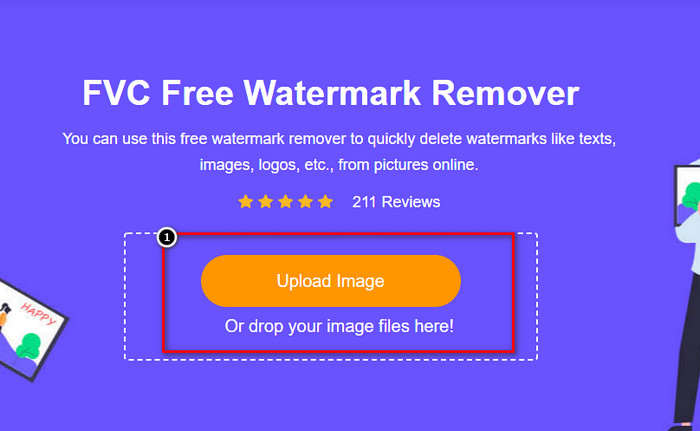
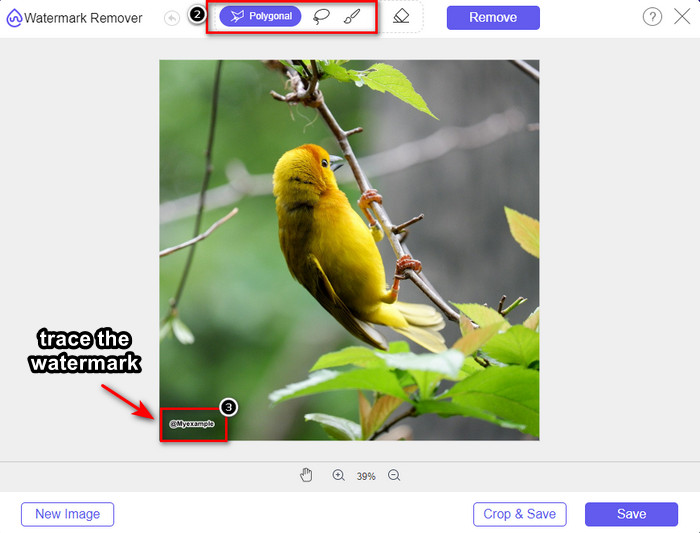
कदम 3. आप वॉटरमार्क को ट्रेस करने के लिए उपलब्ध टूल्स का उपयोग कर सकते हैं, कोई एक चुनें और उससे वॉटरमार्क को ट्रेस करें।.
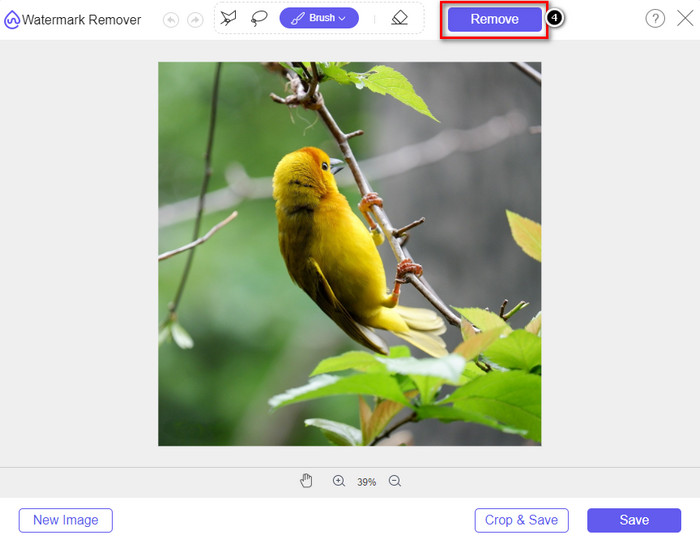
कदम 4. इमेज को एक्सपोर्ट करने से पहले सबसे पहले Remove आइकन पर क्लिक करें।.
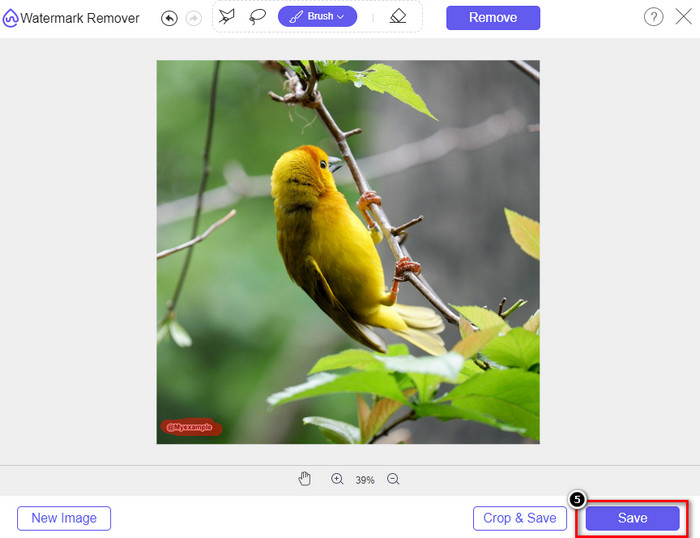
कदम 5. अंत में, यहाँ हाइलाइट किए गए एम्बेडेड वॉटरमार्क के बिना इमेज को सेव करने के लिए Download पर क्लिक करें।.
वॉटरमार्क रिमूवर.आईओ
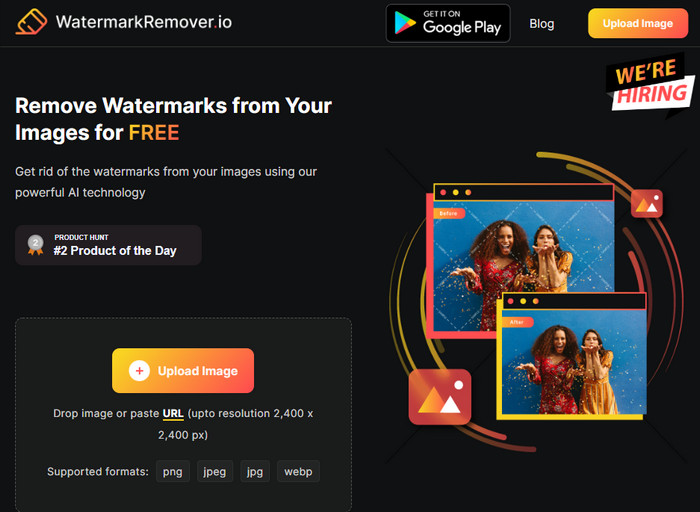
WatermarkRemover.io एक ऑनलाइन Dreamstime फोटो वॉटरमार्क रिमूवर टूल है जिसे आप इस काम में इस्तेमाल कर सकते हैं। यह टूल पहले बताए गए ऑनलाइन वॉटरमार्क रिमूवर की तरह ही मुफ्त है। आपको इस टूल पर साइन‑इन करने की चिंता नहीं करनी पड़ेगी क्योंकि यह किसी भी ब्राउज़र पर इस्तेमाल किया जा सकता है। यह आपके इमेज से वॉटरमार्क हटाने के लिए AI‑टेक का भी उपयोग करता है। आपकी मदद के लिए, आपको नीचे दी गई अगली जानकारी को पढ़ते रहना होगा।.
कदम 1. अपने ब्राउज़र में इसे सर्च करके इस वॉटरमार्क रिमूवर की ऑफिशियल वेबसाइट खोलें।.
कदम 2. जिस फोटो से आप वॉटरमार्क हटाना चाहते हैं, उसे अपलोड करने के लिए Upload Image आइकन पर क्लिक करें।.
कदम 3. जब आप वॉटरमार्क वाली इमेज अपलोड कर लें, तो Download Image पर क्लिक करें, क्योंकि यह आपके इमेज से वॉटरमार्क अपने‑आप हटा देगा।.
भाग 3। अंतिम समाधान का उपयोग करके वीडियो पर ड्रीमस्टाइम वॉटरमार्क कैसे निकालें
आप Dreamstime वॉटरमार्क को वीडियो से हटाने के लिए FVC Video Converter Ultimate जैसा एक Dreamstime वॉटरमार्क रिमूवर डाउनलोड कर सकते हैं। यह सबसे लचीला टूल है, हमेशा तैयार, और किसी भी समय काम को पूरा कर देता है। यह टूल आपके वीडियो के साथ आने वाली दिक्कतों से निपटता है, जैसे कम गुणवत्ता वाली ऑडियो, लो रेज़ोल्यूशन, फ़ॉर्मेट का सपोर्ट न होना, और परेशान करने वाला वॉटरमार्क। जिन सॉफ़्टवेयर को आप सिर्फ वॉटरमार्क हटाने के लिए इंस्टॉल करते हैं, उनकी तुलना में यह परफॉर्मेंस, प्रोसेसिंग स्पीड और उपयोग में आसानी के मामले में गजब का है। अपने कदम मिलाए रखें क्योंकि हम आपको अब विस्तार से बताएँगे कि वीडियो से वॉटरमार्क कैसे हटाएँ।.
कदम 1. सबसे पहले, आपको नीचे दिए गए डाउनलोड बटन पर क्लिक करके यह सॉफ़्टवेयर अपने डेस्कटॉप पर डाउनलोड करना होगा। सही वर्ज़न चुनें, जल्दी‑से सेट‑अप पूरा करें, और सॉफ़्टवेयर को लॉन्च करें।.
फ्री डाउनलोडWindows 7 या बाद के संस्करण के लिएसुरक्षित डाउनलोड
फ्री डाउनलोडMacOS 10.7 या बाद के संस्करण के लिएसुरक्षित डाउनलोड
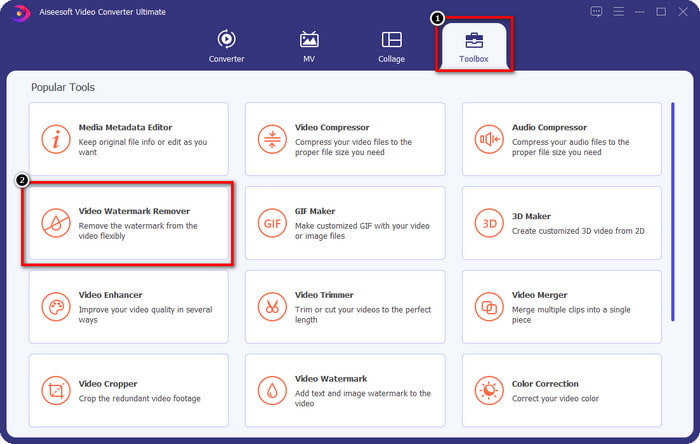
कदम 2. इस सॉफ़्टवेयर में मौजूद मल्टीफंक्शनल Toolbox खोलें, फिर Video Watermark Remover चुनें।.
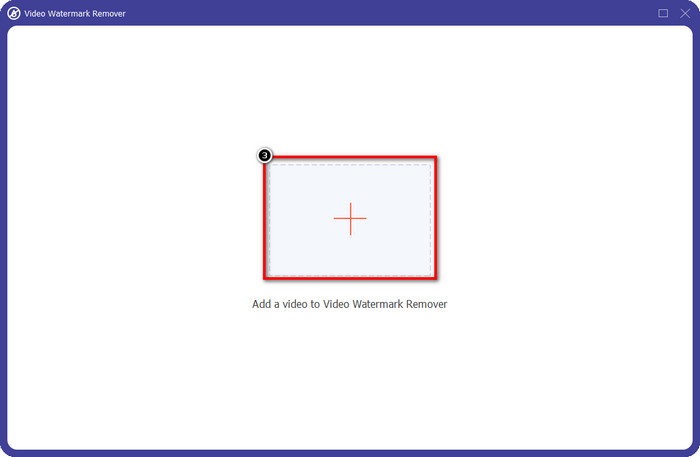
कदम 3. इसके बाद, आपने जो वीडियो डाउनलोड किया है उसे अपलोड करने और Dreamstime वॉटरमार्क हटाने की शुरुआत करने के लिए + आइकन पर क्लिक करें।.
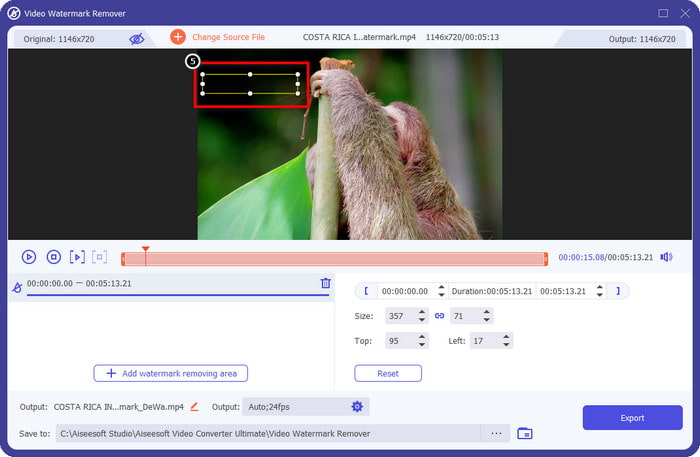
कदम 4. फिर Add Watermark Removing Area पर क्लिक करें ताकि आप वॉटरमार्क पर सेलेक्शन बॉक्स रख सकें।.
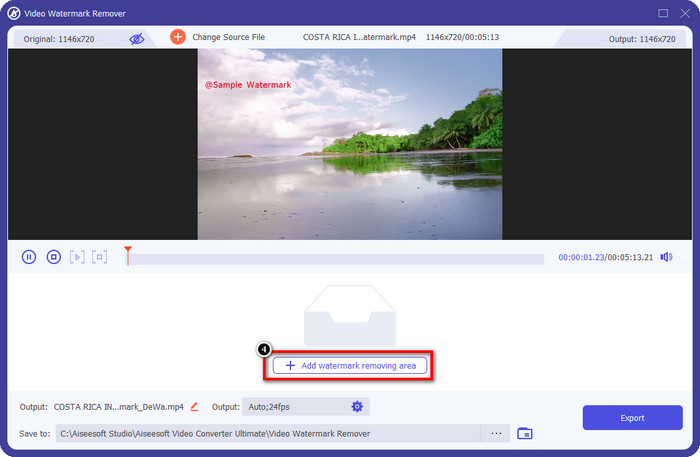
कदम 5. Add Watermark Removing Area पर क्लिक करने के बाद, आपकी स्क्रीन पर एक आयताकार आकार दिखाई देगा, उसे वॉटरमार्क पर रखें ताकि उसे हटाया जा सके।.
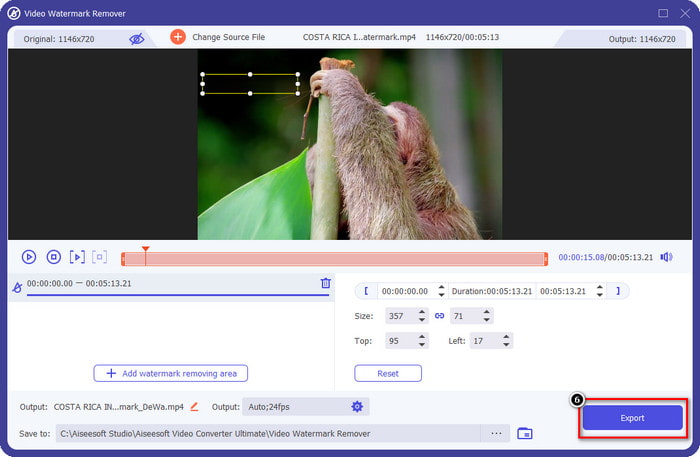
कदम 6. Dreamstime का वॉटरमार्क हटाकर वीडियो डाउनलोड करने के लिए Export बटन पर क्लिक करें।.
संबंधित:
भाग 4. ड्रीमटाइम वॉटरमार्क को हटाने के बारे में अक्सर पूछे जाने वाले प्रश्न
क्या मैं ड्रीमटाइम खरीदने के बाद वॉटरमार्क को असीमित रूप से हटा सकता हूं?
यदि आपने क्रेडिट खरीदा है तो आप ऐसा नहीं कर सकते हैं, लेकिन आप आगे बढ़ सकते हैं और थोड़ा और नीचे स्क्रॉल कर सकते हैं, और आप देखेंगे कि यदि आप इसे नियमित रूप से उपयोग कर रहे हैं तो असीमित इमेज एक्सेस है जिसका आप स्वयं लाभ उठा सकते हैं। इसकी कीमत दुनिया भर के विभिन्न क्षेत्रों या स्थानों में समान नहीं है।
ड्रीमस्टाइम किस प्रकार के कार्ड का समर्थन करता है?
अब जब आपने यहां क्रेडिट या सदस्यता शुल्क खरीदने का फैसला कर लिया है, तो आप अपने मास्टर कार्ड, वीजा, एमेक्स और अन्य प्रमुख क्रेडिट कार्ड का उपयोग कर सकते हैं; आप दूसरों को जानने के लिए इसे आधिकारिक वेबसाइट पर देख सकते हैं।
क्या मैं बिना वॉटरमार्क के वीडियो खरीदने के लिए ड्रीमस्टाइम पर क्रेडिट का उपयोग कर सकता हूं?
आप वीडियो या इस प्लेटफॉर्म के किसी भी उत्पाद को खरीदने के लिए क्रेडिट का उपयोग कर सकते हैं। क्रेडिट का उद्देश्य केवल छवियों और वीडियो के लिए नहीं है; आप इसका उपयोग यहां ऑडियो खरीदने के लिए भी कर सकते हैं।
निष्कर्ष
ड्रीमस्टाइम वॉटरमार्क कैसे निकालें? ठीक है, आप पहले से ही जानते हैं कि हम जिन दो टूल को सूचीबद्ध करते हैं और आपके द्वारा उपयोग किए जा सकने वाले अंतिम वॉटरमार्क रिमूवर वाले वीडियो के साथ अपनी छवियों में वॉटरमार्क से कैसे निपटें। इसलिए, यदि आपके पास वीडियो या छवियों पर वॉटरमार्क की समस्या है, तो आप उपरोक्त सॉफ़्टवेयर का स्वतंत्र रूप से उपयोग कर सकते हैं और हमारे द्वारा जोड़े गए ट्यूटोरियल का अनुसरण कर सकते हैं। समस्या को अलविदा न कहें क्योंकि यह हल हो गई है!
-
 विंडोज़ और मैक पर वीएसडीसी वॉटरमार्क को जल्दी से हटाने के 2 तरीके
 क्या आप अपने वीडियो पर वीएसडीसी वॉटरमार्क हटाने का तरीका ढूंढ रहे हैं? इस लेख के साथ, हम ऐसे उपकरण प्रदान करते हैं जिनका उपयोग आप वॉटरमार्क से छुटकारा पाने के लिए कर सकते हैं।
-
 वीडियो पर एनिमोटो वॉटरमार्क को आसानी से और प्रभावी ढंग से हटाएं
 वीडियो पर एनिमोटो वॉटरमार्क कैसे हटाएं? इस लेख को पढ़ना जारी रखें क्योंकि हमने इसे कैसे करना है पर एक संपूर्ण ट्यूटोरियल प्रदान किया है।
-
 फ़ाइनल कट प्रो का उपयोग करके वीडियो से वॉटरमार्क कैसे निकालें [पूरी गाइड]
 वीडियो पर वॉटरमार्क के साथ कोई समस्या है? अब और नहीं कहा, क्योंकि हमने फ़ाइनल कट प्रो का उपयोग करके वीडियो से वॉटरमार्क हटाने के बारे में एक ट्यूटोरियल प्रदान किया है।
