


 वीडियो कनवर्टर अंतिम
 स्क्रीन अभिलेखी
 वीडियो मरम्मत
 सुरक्षित डाउनलोड
2 संभावित तरीकों से स्मार्टड्रा में वॉटरमार्क कैसे निकालें
यदि आपको चार्ट, ड्रॉइंग और मैपिंग बनाने का एक आसान और शक्तिशाली तरीका चाहिए, और फिर उन्हें एंटरप्राइज़‑स्तरीय क्वालिटी में प्रस्तुत करना हो, तो SmartDraw का उपयोग करें। आप अपनी कल्पनाओं को SmartDraw की मदद से हकीकत में बदल सकते हैं। क्या यह टूल मुफ़्त है? आप इसे सात दिन के फ्री ट्रायल के साथ उपयोग कर सकते हैं, लेकिन उस पर वॉटरमार्क होगा। एक्सपोर्ट की गई फ़ाइल पर वॉटरमार्क से निपटना आपके लिए झंझट भरा हो सकता है। यहाँ हम आपको इस ब्लॉग पोस्ट से परिचित कराते हैं, क्योंकि हम केवल बेहतरीन टूल पेश करते हैं जो बाज़ार में मिलते हैं और वॉटरमार्क हटाने में प्रभावी ढंग से काम करते हैं। नीचे दी गई जानकारी पढ़ते रहें ताकि आप दो प्रभावी तरीकों से यह जान सकें कि SmartDraw में वॉटरमार्क कैसे हटाएँ।.

भाग 1. लाइसेंस कुंजी खरीदकर स्मार्ट ड्रा में वॉटरमार्क कैसे निकालें [आधिकारिक संस्करण]
SmartDraw से वॉटरमार्क कैसे निकालें? यह पहला तरीका है जिससे हम आपका परिचय कराएंगे, और यह इस उपकरण के लिए लाइसेंस कुंजी खरीद कर है। यह प्लेटफ़ॉर्म आपको विभिन्न प्रकार की योजनाएँ प्रदान करता है जिन्हें आप प्राप्त कर सकते हैं जिससे आपके अंत को लाभ होगा। इसके अलावा, आप इस उपकरण के लिए एक महीने का एक्सेस नहीं खरीद सकते हैं, इसलिए यदि आप इसकी लाइसेंस कुंजी खरीदने की योजना बना रहे हैं, तो आपको मासिक बिल भेजा जाएगा, लेकिन आप जो कुल भुगतान करेंगे, वह इसके वार्षिक संस्करण में होगा। यदि आप इस उपकरण के प्रदर्शन की सराहना करते हैं और इसे खरीदना चाहते हैं, तो आप नीचे दिए गए चरणों का पालन कर सकते हैं।
लाइसेंस कुंजी के साथ स्मार्टड्रा में वॉटरमार्क कैसे निकालें, इस पर चरण:
चरण 1. SmartDraw की आधिकारिक वेबसाइट खोलें, और यह सुनिश्चित करें कि आप सही वेबसाइट पर ही जा रहे हैं ताकि लेन‑देन सुरक्षित रहे।.
चरण 2. वेबसाइट पर Buy पर क्लिक करें ताकि उपलब्ध प्लान देख सकें।.
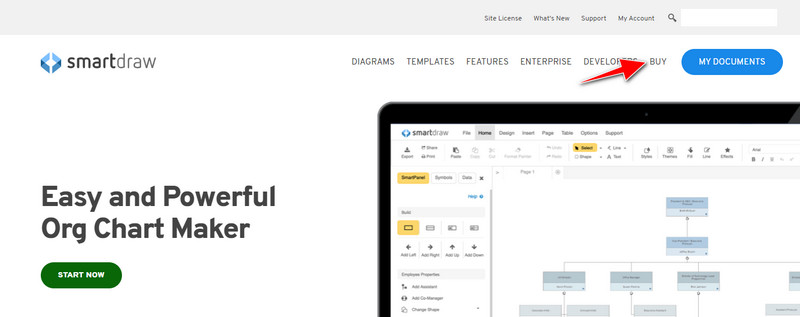
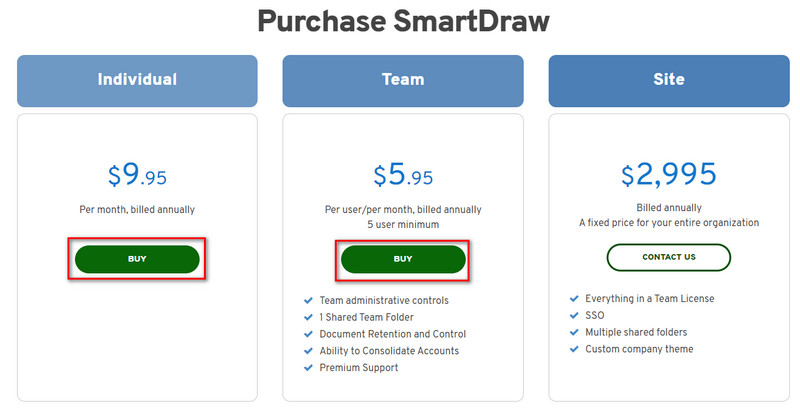
चरण 3. आप SmartDraw को Individual, Team, या Site के रूप में खरीद सकते हैं। यदि आप Individual या Team संस्करण खरीदना चाहते हैं, तो Buy Now पर क्लिक करें।.
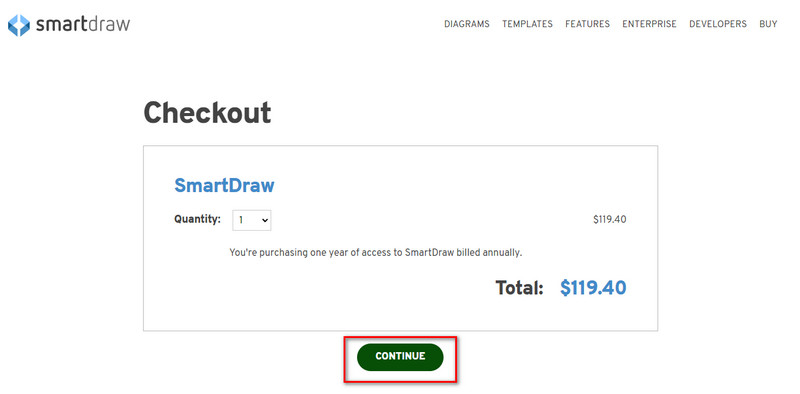
चरण 4. दाईं तरफ़ आपको टूल का सालाना कुल बिल दिखाई देगा; प्रोसेस आगे बढ़ाने के लिए Continue पर क्लिक करें।.
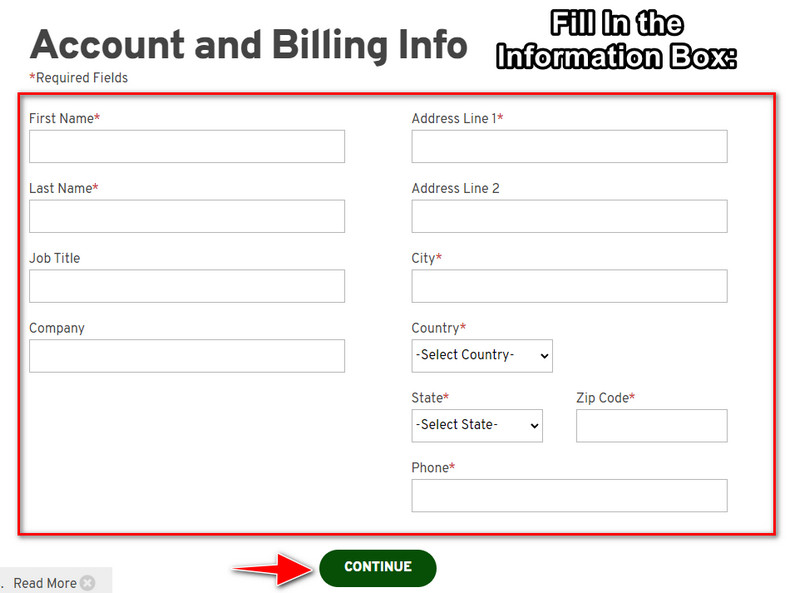
चरण 5. अपना अकाउंट और बिलिंग से जुड़ी जानकारी भरें, फिर लाइसेंस की प्राप्त करने के लिए आगे बढ़ने हेतु Continue दबाएँ।.
भाग 2। वेब सेवा का उपयोग करके मुफ्त में स्मार्ट ड्रा में वॉटरमार्क कैसे निकालें [कोई कीमत नहीं]
SmartDraw के ट्रायल वर्ज़न से बिना खरीदे वॉटरमार्क कैसे हटाएँ? इसके लिए आपको FVC Free Watermark Remover Online का उपयोग करना होगा। यह वॉटरमार्क रिमूवर आपके इस्तेमाल के लिए तैयार है। आपकी इमेज से वॉटरमार्क हटाने के लिए आपको किसी तरह की विशेषज्ञता की ज़रूरत नहीं, क्योंकि इस टूल का इस्तेमाल करना बिल्कुल मुश्किल नहीं है। भले ही आप विशेषज्ञ हों, फिर भी आप अपनी इमेज से अवांछित वॉटरमार्क या ऑब्जेक्ट हटाने के लिए इस सॉफ़्टवेयर का इस्तेमाल कर सकते हैं। इस वॉटरमार्क रिमूवर की मदद से आपकी तस्वीर पर ऐसा कोई दाग नहीं रहेगा जिसे यह हटा न सके। क्या आप लाइसेंस की ख़रीदने के बजाय इस सॉफ़्टवेयर को आज़माना चाहते हैं? अगर हाँ, तो नीचे दिए गए ट्यूटोरियल पर ध्यान दें, जिसके ज़रिए आप इमेज से वॉटरमार्क को प्रभावी ढंग से हटा सकते हैं।.
ग्राफ़ या आरेख पर स्मार्टड्रा के वॉटरमार्क को नि:शुल्क हटाने के चरण:
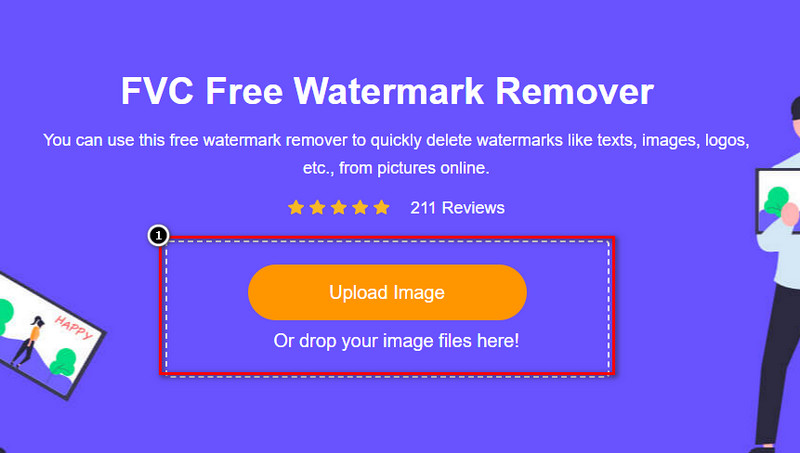
चरण 1. वेब ब्राउज़र पर वेब टूल खोजने की बजाय, आप इसे खोलने के लिए इस लिंक पर क्लिक कर सकते हैं; यह आपके सर्च इंजन में एक नया टैब खोल देगा।.
चरण 2. अपने माउस का उपयोग करते हुए, आपने SmartDraw पर जो भी इमेज ग्राफ़ या डायग्राम बनाया है उसे ड्रैग और ड्रॉप करके अपलोड करें।.
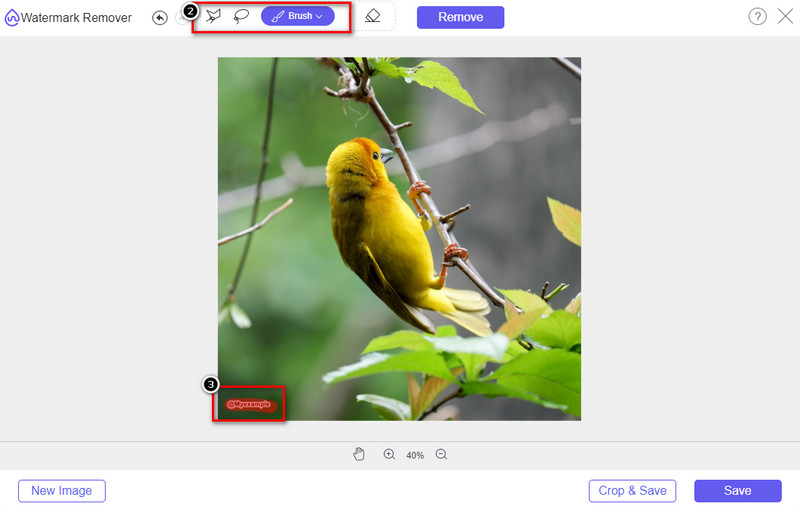
चरण 3. अब जबकि ऑनलाइन वॉटरमार्क रिमूवर खुल चुका है, इमेज पर मौजूद वॉटरमार्क को हाइलाइट करने के लिए अपनी पसंद का टूल चुनें।.
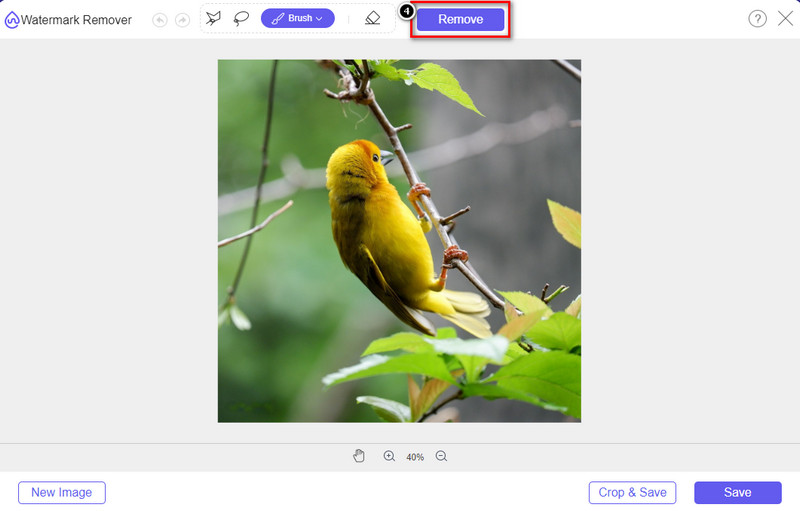
चरण 4. अपलोड की गई इमेज पर वॉटरमार्क या लोगो को हाइलाइट करने के बाद Remove दबाएँ।.
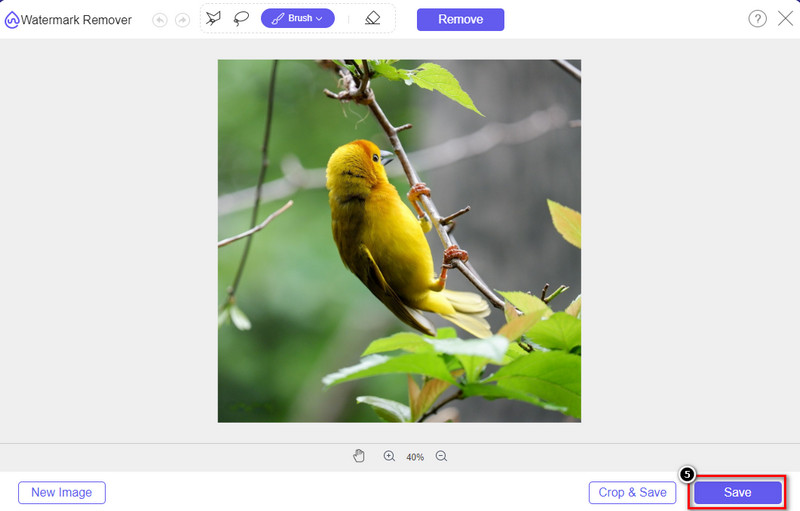
चरण 5. वॉटरमार्क हटाने की प्रक्रिया पूरी होने तक प्रतीक्षा करें, और फिर ग्राफ़ या डायग्राम डाउनलोड करने के लिए Save पर क्लिक करें। आपकी स्क्रीन पर एक फ़ोल्डर दिखाई देगा; अब वह ग्राफ़ या डायग्राम जाँचें जिसे आपने बिना वॉटरमार्क के बनाया है।.
FVC Free Watermark Remover Online का उपयोग करने के लाभ:
ऐप डाउनलोड करना जरूरी नहीं है क्योंकि यह वेब पर उपलब्ध है।
छवियों की एक विस्तृत श्रृंखला का समर्थन करें, और यह वॉटरमार्क को प्रभावी ढंग से हटा सकता है।
यह एक समर्पित वॉटरमार्क रिमूवर है जो उच्च गुणवत्ता वाले आउटपुट का उत्पादन करता है।
निर्यात के बाद अंतिम आउटपुट में कोई वॉटरमार्क नहीं जोड़ा जाता है।
कितनी बार उपयोग और फ़ाइल आकार पर कोई सीमा नहीं है।
भाग 3। अतिरिक्त भाग - विस्तृत चरणों के साथ स्मार्टड्रा पर चार्टिंग, ग्राफ या आरेख कैसे बनाएं
पिछला भाग आपको सिखाता है कि स्मार्टड्रा वॉटरमार्क से कैसे छुटकारा पाया जाए। इस भाग में, हम आपको सिखाएंगे कि SmartDraw की सहायता से चार्ट, ग्राफ़ और आरेख कैसे बनाया जाता है; यह कैसे करना है, यह जानने के लिए आप नीचे दिए गए चरणों का पालन कर सकते हैं।
चरण 1. ग्राफ़, चार्ट, या डायग्राम बनाने के लिए इसकी आधिकारिक वेबसाइट पर जाएँ।.
चरण 2. अब जब आपने आधिकारिक वेबसाइट खोल ली है, तो Start Now पर क्लिक करें और अपना अकाउंट खोलें।.
चरण 3. बाईं तरफ़ से चुनें कि आप किस प्रकार का टेम्पलेट बनाना या इस्तेमाल करना चाहते हैं।.
चरण 4. हर फ़्लोचार्ट में आवश्यक जानकारी जोड़ें। वेबसाइट के बाएँ भाग में आपको अतिरिक्त विकल्प भी मिलेंगे जिनका आप उपयोग कर सकते हैं।.
चरण 5. Export बटन पर क्लिक करें, जो फ़ॉर्मेट आप चाहते हैं उसे चुनें, और प्रक्रिया शुरू करने के लिए उस पर क्लिक करें। यदि आप फ्री वर्ज़न का उपयोग कर रहे हैं, तो एक्सपोर्ट पर वॉटरमार्क होगा; वॉटरमार्क हटाने के लिए आप भाग 2 में दिए गए स्टेप्स को दोहरा सकते हैं।.
अधिक पढ़ें:
अपनी इमेज से B612 वॉटरमार्क कैसे हटाएँ
WOW Slider वॉटरमार्क मुफ़्त में कैसे हटाएँ
भाग 4. स्मार्टड्रा वॉटरमार्क कैसे निकालें पर अक्सर पूछे जाने वाले प्रश्न
क्या स्मार्टड्रा पीएनजी छवियों को निर्यात कर सकता है?
हां, आपके पास पीएनजी प्रारूप में एक पारदर्शी चार्ट हो सकता है। हालाँकि, यदि आप मुफ्त संस्करण का उपयोग करते हैं तो यह एक वॉटरमार्क जोड़ देगा। आप आधिकारिक संस्करण खरीद सकते हैं, इसलिए निर्यात की गई छवि पर वॉटरमार्क होगा।
SmartDraw की कीमत कितनी है?
अगर आप SmartDraw पर कोई प्लान खरीदने वाले हैं, तो आप उसका प्लान $ 5.95 से शुरू करके खरीद सकते हैं. आप आधिकारिक वेबसाइट पर इसके द्वारा प्रदान की जाने वाली अन्य कीमतों की जांच कर सकते हैं।
स्मार्टड्रा के प्रीमियम संस्करण को खरीदने का क्या फायदा है?
आप व्यक्तिगत योजनाओं के लिए वॉटरमार्क के बिना टीम व्यवस्थापक नियंत्रण, टीम फ़ोल्डर, प्रीमियम समर्थन और निर्यात चित्र प्राप्त कर सकते हैं। अन्य प्रीमियम लाभों के लिए, आप आधिकारिक वेबसाइट पर जा सकते हैं और देख सकते हैं कि आपको कौन सी सुविधाएँ और कार्य मिल सकते हैं।
निष्कर्ष
अब जब आप जानते हैं कि स्मार्टड्रा को बिना वॉटरमार्क के कैसे सहेजना है, दो तरीकों से हम जोड़ते हैं। या तो आप इसे खरीदते हैं या निर्यात की गई फ़ाइल पर वॉटरमार्क हटाने के लिए किसी टूल का उपयोग करते हैं। यदि आप उपकरण खरीदना पसंद नहीं करते हैं, तो आपको इसका उपयोग करना चाहिए क्योंकि यह वॉटरमार्क को खत्म करने के लिए सबसे कुशल वेब टूल है। अगर आपको लगता है कि इस लेख ने समस्या को हल करने में आपकी मदद की, तो आप हमें 5-स्टार का दर्जा देते हैं।
-
 GIF से वॉटरमार्क हटाने के 4 बेहतरीन तरीके [ऑनलाइन और ऑफलाइन]
 GIF से वॉटरमार्क हटाने की आवश्यकता है? इस लेख में टूल के साथ, आप अपने प्लेटफॉर्म पर उपलब्ध विभिन्न वॉटरमार्क रिमूवर के साथ विभिन्न शैलियों को जानेंगे।
-
 किसी भी मीडिया फ़ाइल में मेटाडेटा निकालने के 5 सबसे आसान तरीके
 मेटाडेटा कैसे निकालें? क्या यह करना कठिन है? क्या मुझे टैग हटाने के लिए कोई मुफ़्त टूल खरीदने या उपयोग करने की ज़रूरत है? इन सभी सवालों के जवाब इस लेख में हैं।
-
 बकाया Photobucket वॉटरमार्क रिमूवर ऑनलाइन और ऑफलाइन
 इन अद्भुत Photobucket वॉटरमार्क रिमूवर का उपयोग करके अपनी तस्वीरों से Photobucket वॉटरमार्क हटाने का तरीका जानें। तरीके जानने के लिए इस लेख को पढ़ें।
