


 वीडियो कनवर्टर अंतिम
 स्क्रीन अभिलेखी
 वीडियो मरम्मत
 सुरक्षित डाउनलोड
ऑनलाइन और ऑफलाइन फोटो एनलार्जर एप्लिकेशन आपको मिस नहीं करना चाहिए
किसी इमेज का आकार बदलना थोड़ा जोखिम भरा हो सकता है, क्योंकि जब आप किसी तस्वीर को बड़ा करते हैं, तो उसकी क्वालिटी घट सकती है। कुछ लोग अपनी फ़ोटो का आकार बदलकर बेहतर क्वालिटी पाना चाहते हैं। एक तस्वीर हज़ारों पिक्सेल से बनी होती है, और जब आप उसे बड़ा करने की कोशिश करते हैं, तो उसका साइज बढ़ने पर पिक्सेल दिखाई देने लगते हैं, जिससे इमेज की क्वालिटी खराब हो सकती है। इसलिए, अगर आप अपनी इमेज को बड़ा करना चाहते हैं लेकिन उसकी क्वालिटी नहीं खोना चाहते, तो हमारे पास आपके लिए ये शानदार टूल हैं। बेहतरीन फोटो एनलार्जर टूल्स के बारे में जानने के लिए इस पोस्ट को ध्यान से पढ़ें।.

भाग 1. सर्वश्रेष्ठ फोटो एनलार्जर्स ऑनलाइन
ऑनलाइन फोटो एनलार्जर का उपयोग करना सबसे अच्छा विकल्प है क्योंकि आप अपने डिवाइस पर जगह बचाएंगे। एक ऑनलाइन टूल को आपके डिवाइस पर कुछ भी डाउनलोड करने की आवश्यकता नहीं होगी, जब तक कि आपके पास तेज इंटरनेट स्पीड हो। साथ ही, अधिकांश ऑनलाइन एप्लिकेशन मुफ्त में उपलब्ध हैं। इसके साथ ही कहा जा रहा है, यहां शीर्ष तीन सर्वश्रेष्ठ इमेज रीसाइज़र ऑनलाइन हैं I
FVC फ्री इमेज अपस्केलर
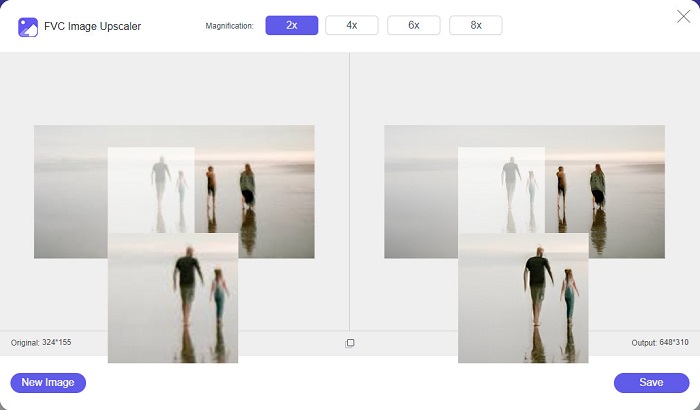
FVC Free Image Upscaler बेहतरीन ऑनलाइन पिक्चर रीसाइज़र की सूची में सबसे ऊपर है। यह ऑनलाइन ऐप इस्तेमाल करने के लिए फ्री और सुरक्षित है। आप अपनी इमेज को 2x, 4x, 6x और 8x तक बड़ा कर सकते हैं, वह भी बिना क्वालिटी खोए। इसके अलावा, यह लगभग सभी इमेज फ़ॉर्मैट जैसे PNG, JPG, JPEG और BMP को सपोर्ट करता है। इस टूल की सबसे खास बात यह है कि इसमें AI (Artificial Intelligence) टेक्नोलॉजी का इस्तेमाल होता है, जो आपकी इमेज के ब्लर हिस्सों को अपने आप पहचानकर उन्हें बेहतर बनाती है। साथ ही, आप इसे सभी वेब ब्राउज़र, जैसे Google, Firefox और Safari पर एक्सेस कर सकते हैं। FVC Free Image Upscaler एक शुरुआती-फ्रेंडली टूल है, इसलिए अगर आप नए यूज़र हैं, तो यह टूल आपके लिए बेहतरीन विकल्प हो सकता है।.
पेशेवरों
- यह आपकी छवि को दोषरहित रूप से बड़ा करता है।
- इसमें तेजी से बढ़ने की प्रक्रिया है।
- यह आपको खोए हुए पिक्सेल, रंग बनावट और बहुत कुछ ठीक करने की अनुमति देता है।
- आप इसे अपने विंडोज या मैक डिवाइस पर इस्तेमाल कर सकते हैं।
विपक्ष
- यह एक इंटरनेट पर निर्भर टूल है।
फोटो Enlarger.com
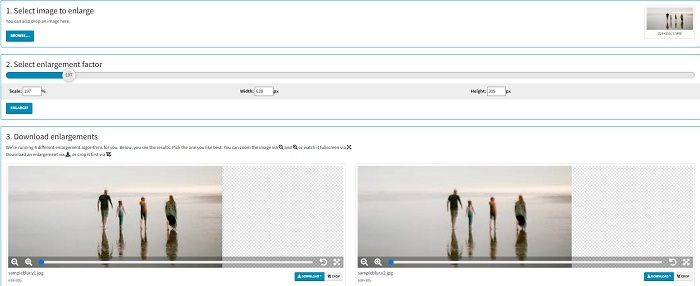
Photo Enlarger.com एक ऑनलाइन फोटो एनलार्जर है, जिसे बहुत से शुरुआती यूज़र इसकी सिंपल यूज़र इंटरफ़ेस की वजह से इस्तेमाल करते हैं। यह ऑनलाइन फोटो रीसाइज़र आपको एनलार्जमेंट फैक्टर चुनकर अपनी इमेज को बड़ा करने देता है। इसके अलावा, आप अपनी इमेज का स्केल, चौड़ाई (width) और ऊँचाई (height) का प्रतिशत भी एडजस्ट कर सकते हैं। Photo Enlarger.com आपको चार अलग-अलग रिज़ॉल्यूशन और एनलार्जमेंट फैक्टर के साथ रिज़ल्ट देता है। आप इन इमेजेज़ को आसानी से डाउनलोड भी कर सकते हैं।.
इसके अलावा, आप अपनी छवि के अनावश्यक हिस्सों को हटाने के लिए बढ़े हुए छवि आउटपुट को क्रॉप कर सकते हैं। हालांकि, इसमें कई परेशान करने वाले विज्ञापन शामिल हैं जो छवि को बड़ा करते समय आपको परेशान कर सकते हैं। बहरहाल, यह आपकी छवि को बड़ा करने के लिए एक प्रभावी उपकरण है।
पेशेवरों
- यह पीएनजी और जेपीजी जैसे सबसे आम छवि प्रारूपों का समर्थन करता है।
- यह मुफ़्त और उपयोग करने के लिए सुरक्षित है।
- आप इसे Google और Firefox सहित लगभग सभी वेब ब्राउज़र पर उपयोग कर सकते हैं।
विपक्ष
- यह इंटरनेट पर निर्भर है।
- इसके कई विज्ञापन हैं।
इमेज एनलार्जर डॉट कॉम
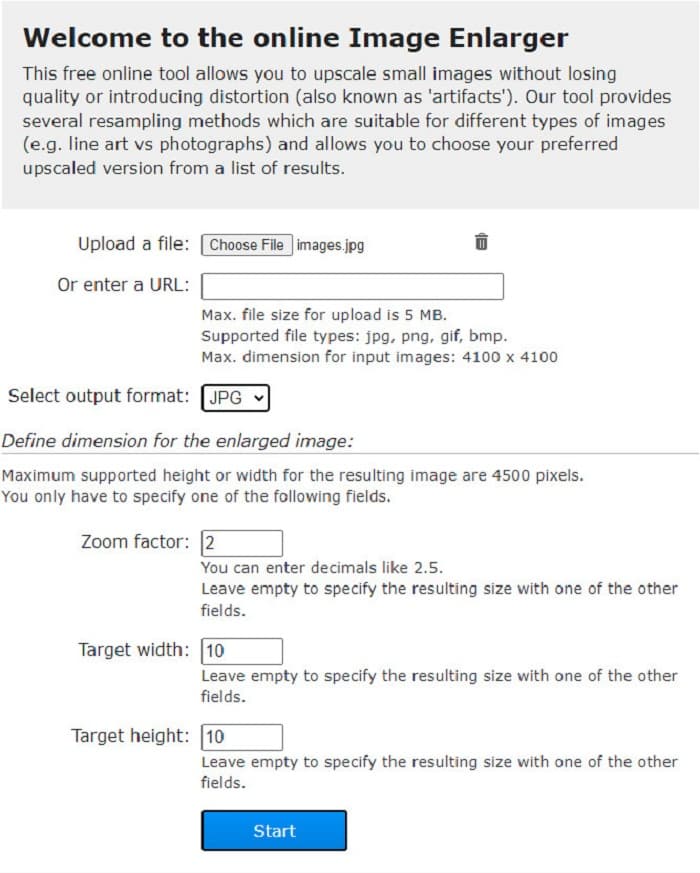
एक और ऑनलाइन फ्री इमेज एक्सपैंडर, जिसका इस्तेमाल आप अपनी इमेज को बड़ा करने के लिए कर सकते हैं, वह है Image Enlarger.com। यह ऑनलाइन फोटो रीसाइज़र आपको आपकी इमेज का ज़ूम फैक्टर, चौड़ाई और ऊँचाई एडजस्ट करने देता है। इसके अलावा, इसका इंटरफ़ेस सहज (इंट्यूटिव) है, जिसकी वजह से यह एक यूज़र-फ्रेंडली टूल बन जाता है। साथ ही, यह PNG और JPG जैसे सबसे आम इमेज फ़ॉर्मैट को सपोर्ट करता है। Image Enlarger.com अधिकतम 4500 पिक्सेल तक की ऊँचाई और चौड़ाई सपोर्ट करता है। इसके अलावा, यह अलग-अलग प्रकार की इमेज के लिए अलग-अलग रिसैम्पलिंग मेथड भी प्रदान करता है। इस ऑनलाइन टूल की कमी यह है कि अगर आपका इंटरनेट कनेक्शन स्लो हो, तो इमेज को बड़ा करना मुश्किल हो जाता है।.
पेशेवरों
- यह उपयोग में सुरक्षित साधन है।
- यह उपयोग करने के लिए स्वतंत्र है।
विपक्ष
- इसमें ऐसे विज्ञापन शामिल हैं जो आपको विचलित कर सकते हैं।
- आप अपने छवि आउटपुट का पूर्वावलोकन नहीं कर सकते।
भाग 2. सर्वश्रेष्ठ फोटो विस्तारक ऑफ़लाइन
लोग कभी-कभी एक नियमित छवि संपादक के बजाय एक छवि विस्तारक सॉफ़्टवेयर का उपयोग करना पसंद करते हैं क्योंकि जब आप छवि को बड़ा करने के लिए एक मानक छवि संपादक का उपयोग करते हैं तो यह इसकी गुणवत्ता को बर्बाद कर सकता है। यही कारण है कि हमने बाजार में सर्वश्रेष्ठ ऑफ़लाइन छवि विस्तारकों की खोज की और उनमें से सर्वश्रेष्ठ का चयन किया। ये फोटो विस्तारक जो हम प्रस्तुत करेंगे वे विंडोज या मैक उपकरणों पर डाउनलोड करने के लिए उपलब्ध हैं। आगे की हलचल के बिना यहां शीर्ष तीन सबसे शक्तिशाली ऑफ़लाइन फोटो रीसाइज़र हैं।
स्मिला एनलार्जर
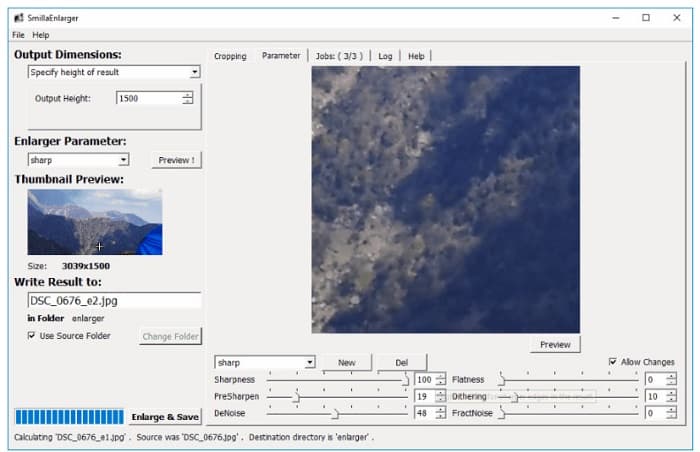
Smilla Enlarger एक ऑफ़लाइन इमेज एनलार्जर है, जिसकी मदद से आप अपनी इमेज का साइज आसानी से बदल सकते हैं। यह सॉफ़्टवेयर एप्लिकेशन आपके Windows कंप्यूटर के लिए एक फ्री और ओपन-सोर्स ऐप है। इसके अलावा, आप इसके क्रॉप ऑप्शंस का उपयोग करके उस किसी भी इमेज को बड़ा कर सकते हैं, जिसे यह टूल सपोर्ट करता है। आप इमेज के डाइमेंशन और एनलार्जमेंट पैरामीटर्स सेट करके उसकी शार्पनेस और नॉइज़ को भी नियंत्रित कर सकते हैं। ये सभी विकल्प आपको अपनी इमेज के लिए मनचाहा एनलार्जमेंट चुनने में मदद करेंगे।.
इसके अलावा, यह लगभग सभी छवि प्रारूपों का समर्थन करता है, जैसे कि PNG, JPEG, JPG और WebP प्रारूप। इसके अलावा, आप इस टूल से अपना आउटपुट देख सकते हैं क्योंकि यह आपको अपनी छवि का पूर्वावलोकन करने में सक्षम बनाता है। इस ऐप का नकारात्मक पक्ष यह है कि इसकी अन्य अनूठी विशेषताओं तक पहुँचने से पहले आपको ऐप को खरीदना होगा।
पेशेवरों
- यह एक उपयोगकर्ता के अनुकूल उपकरण है।
- यह विंडोज़ कंप्यूटर पर डाउनलोड करने के लिए मुफ़्त है।
- आपकी छवि को बढ़ाने के लिए इसमें एन्हांसमेंट प्रोफाइल हैं।
विपक्ष
- इसमें कभी-कभी धीमी अपलोडिंग प्रक्रिया होती है।
इमेज एनलार्जर को फिर से शेड करें
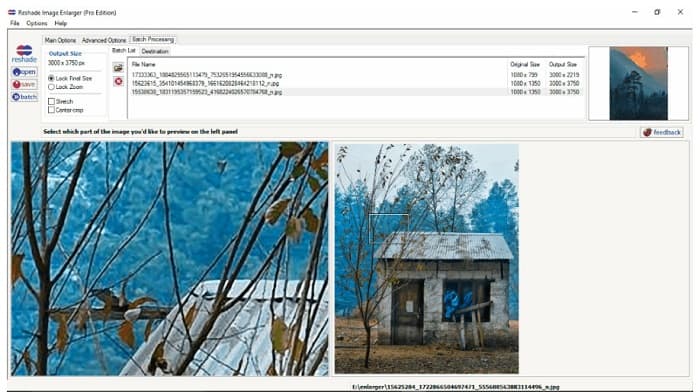
Reshade Image Enlarger एक फोटो एनलार्जर ऐप है, जिसे आप अपनी इमेज को बड़ा या बेहतर करने के लिए डाउनलोड कर सकते हैं। Reshade Image Enlarger एक AI इमेज एनलार्जर भी है, क्योंकि यह अपनी AI टेक्नोलॉजी के ज़रिए आपकी इमेज को अपने आप बेहतर कर देता है। इसके अलावा, यह टूल आपकी पसंद के अनुसार कस्टम चौड़ाई और ऊँचाई सेट करके इमेज को बड़ा करता है, साथ ही क्रॉपिंग फीचर्स, डिनॉइज़िंग, आर्टिफैक्ट्स को कम करने आदि के विकल्प देता है। इस एप्लिकेशन की एक और शानदार बात यह है कि इसके एडवांस्ड ऑप्शंस की मदद से आप JPEG कंप्रेशन, प्रोसेसिंग फिडेलिटी और आउटपुट इमेज के स्मूथ ग्रेडिएंट को कंट्रोल कर सकते हैं। और इसके बैच प्रोसेसिंग फीचर का इस्तेमाल करने के लिए Batch Processing टैब पर जाएँ।.
पेशेवरों
- आप इसे विंडोज और मैक सहित सभी मीडिया प्लेटफॉर्म पर डाउनलोड कर सकते हैं।
- इसमें एक बैच विस्तार प्रक्रिया है।
- इसमें उपयोग करने के लिए उन्नत सुविधाएँ हैं।
विपक्ष
- इसमें हार्ड-टू-ऑपरेट यूजर इंटरफेस है।
एक तेज स्केलिंग
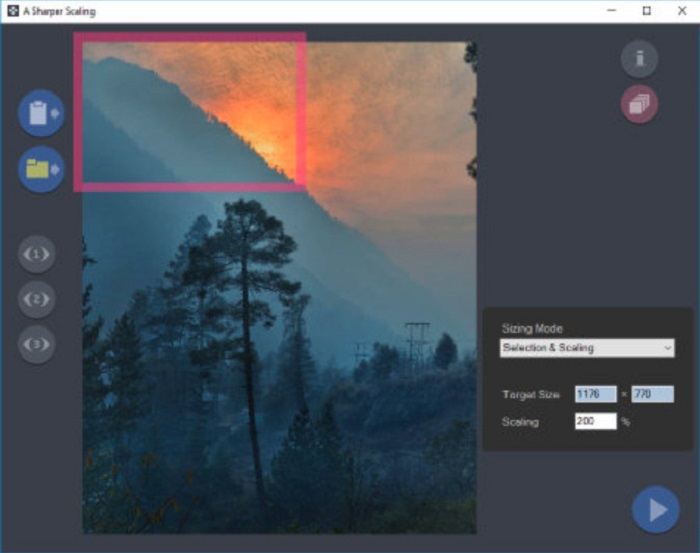
एक और फोटो मैग्नीफ़ायर, जिसका इस्तेमाल करना वाकई फ़ायदेमंद है, वह है A Sharper Scaling ऐप। अगर आप अपनी इमेजेज़ का साइज बदलना चाहते हैं, तो यह सॉफ़्टवेयर एप्लिकेशन एक बेहतरीन टूल है। हालाँकि यह ऊपर बताए गए अन्य ऑफ़लाइन टूल्स की तुलना में थोड़ा अधिक एडवांस्ड है, फिर भी यह आपको बहुत अच्छे रिज़ल्ट देता है। इसके अलावा, A Sharper Scaling आपकी इमेज के किसी हिस्से को बड़ा करके उसे बिना नॉइज़ बढ़ाए शार्प करता है, जिससे आपकी इमेज क्रिस्प और शार्प दिखती है। इस टूल की सबसे प्रभावशाली बात यह है कि यह आपकी इमेजेज़ को बैच में भी जल्दी से बड़ा कर सकता है, वह भी क्वालिटी खोए बिना। साथ ही, इसका इंटरफ़ेस इस्तेमाल में आसान है, जिससे यह शुरुआती यूज़र्स के लिए भी अनुकूल है। इसलिए, अगर आप अपनी इमेज को जल्दी से रीसाइज़ करना चाहते हैं, तो A Sharper Scaling निश्चित रूप से आपकी मदद करेगा।.
पेशेवरों
- आप अपनी छवि को बड़ा करने के लिए मोड का चयन कर सकते हैं।
- यह एक साथ कई छवियों को बड़ा कर सकता है
- यह पीएनजी, जेपीजी और जेपीईजी जैसे मानक फ़ाइल स्वरूपों का समर्थन करता है।
विपक्ष
- इसमें उपयोग करने के लिए कुछ संपादन विकल्प हैं।
- इसकी धीमी निर्यात प्रक्रिया है।
केसन इमेजनर
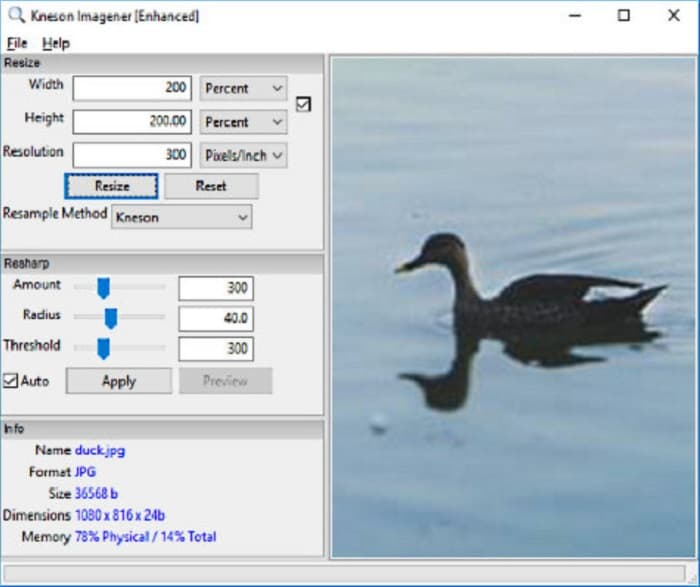
Kneson Imagener भी PC के लिए सबसे बेहतरीन फोटो एनलार्जर में से एक है। यह शानदार ऐप लगभग सभी मीडिया प्लेटफ़ॉर्म पर फ्री डाउनलोड के लिए उपलब्ध है। इसके अलावा, यह आपको आपकी इमेज को प्रतिशत, पिक्सेल, इंच और सेंटीमीटर के आधार पर बड़ा करने देता है। साथ ही, आप अपनी इमेज का रिज़ॉल्यूशन बदलकर उसकी क्वालिटी भी बेहतर कर सकते हैं। अगर आप अपनी इमेज का साइज कम करके डिवाइस में स्पेस बचाना चाहते हैं, तो भी आप इस टूल का उपयोग कर सकते हैं।.
इसके अलावा, यहाँ उपलब्ध रीसैंपलिंग विधियाँ हैं जिनका उपयोग आप अपनी छवि को बड़ा करने के लिए कर सकते हैं: नॉर्मल, बिलिनियर, बाइबिक, केन्सन और केन्सन प्रोग्रेसिव। लेकिन ध्यान दें कि यदि आप इस सॉफ़्टवेयर एप्लिकेशन को डाउनलोड करना चाहते हैं, तो आपको न्यूज़लेटर के लिए इसकी वेबसाइट पर एक कार्यशील ईमेल आईडी दर्ज करनी होगी। उसके बाद, आपको अपने ईमेल पर एक डाउनलोड लिंक मिलेगा जहाँ आप ऐप को पूरी तरह से डाउनलोड कर सकते हैं।
पेशेवरों
- इसमें क्रॉपिंग फीचर है।
- आप अपनी छवि की रीशार्प राशि, त्रिज्या और सीमा समायोजित कर सकते हैं।
- इसका एक सरल यूजर इंटरफेस है।
विपक्ष
- इसे डाउनलोड करने के लिए आपको एक कामकाजी ईमेल में नामांकन करना होगा।
संबंधित:
सभी वेब ब्राउज़र के लिए 7 बेहतरीन पिक्सेल एन्हांसर, जिन्हें आपको ज़रूर आज़माना चाहिए
सर्वश्रेष्ठ फोटो रीसाइज़र ऐप: ऑनलाइन, ऑफलाइन, Android और iPhone
भाग 3. फोटो एनलार्जर ऐप्स के बारे में अक्सर पूछे जाने वाले प्रश्न
क्या मैं अपनी छवि का आकार कम कर सकता हूँ?
हाँ। अपनी छवि के रिज़ॉल्यूशन, पिक्सेल और प्रारूप को समायोजित करके। आपकी छवि का रिज़ॉल्यूशन, पिक्सेल और प्रारूप उसका आकार निर्धारित करते हैं। इसलिए, यदि आप अपनी छवि का आकार कम करना चाहते हैं, तो एक फोटो कंप्रेसर टूल का उपयोग करें।
क्या मैं एडोब फोटोशॉप में अपना फोटो बड़ा कर सकता हूं?
एडोब फोटोशॉप कई पेशेवरों के लिए आदर्श है क्योंकि आप अपनी छवि को दोषरहित और उत्कृष्ट गुणवत्ता के साथ बड़ा कर सकते हैं। हालाँकि, बहुत से लोगों को इस टूल का उपयोग करके फोटो को बड़ा करने में कठिनाई होती है क्योंकि इसमें एक हार्ड-टू-ऑपरेट इंटरफ़ेस है।
क्या इमेज को बड़ा करने के लिए Kapwing Photo Resizer एक बेहतरीन ऐप है?
Kapwing Photo Resizer एक मुफ़्त ऑनलाइन छवि विस्तारक है जिसकी बहुत से लोग अनुशंसा करते हैं। यह आपकी छवि को दोषरहित रूप से बढ़ाने या बड़ा करने के लिए भी एक शानदार ऐप है।
निष्कर्ष
ऊपर बताए गए सभी फोटो एनलार्जर इंटरनेट पर उपलब्ध सबसे बेहतरीन इमेज एनलार्जर में शामिल हैं। हम यह भी भरोसा दिलाते हैं कि ऊपर उल्लेखित सभी एप्लिकेशन इस्तेमाल के लिए सुरक्षित हैं और दी गई सभी जानकारी सटीक है। लेकिन अगर आप किसी फ्री और ऑनलाइन टूल का इस्तेमाल करना पसंद करते हैं, तो हम आपको सबसे अच्छा ऑनलाइन इमेज एनलार्जर FVC Free Image Upscaler इस्तेमाल करने की सलाह देते हैं।.
-
 पुरानी फोटो बहाली ऑनलाइन और ऑफलाइन [आसान कदम]
 एक पुरानी तस्वीर को पुनर्स्थापित करना चाहते हैं? इन टूल्स से आप पुरानी फोटो बहाली प्रक्रिया को जानेंगे। सबसे सरल तरीके जानने के लिए इस पोस्ट को पढ़ें।
-
 तस्वीर की गुणवत्ता ऑनलाइन और एडोब फोटोशॉप पर कैसे ठीक करें
 यदि आपके पास निम्न-गुणवत्ता वाली छवि है, तो आपको अपनी फ़ोटो के रिज़ॉल्यूशन को ठीक करने की आवश्यकता है। अगर आप पिक्चर क्वालिटी को ठीक करना सीखना चाहते हैं, तो इस लेख को पूरा पढ़ें।
-
 आपके द्वारा उपयोग किए जाने वाले सभी वेब ब्राउज़रों के लिए शीर्ष 7 पिक्सेल एन्हांसर
 यदि आप उपयोग करने के लिए सर्वश्रेष्ठ पिक्सेल एन्हांसर जानना चाहते हैं, तो आप इस पोस्ट को बेहतर तरीके से देख सकते हैं। यह लेख सभी वेब ब्राउज़रों के लिए सात सर्वश्रेष्ठ फोटो पिक्सेल एन्हांसर्स की सूची देता है।
