


 वीडियो कनवर्टर अंतिम
 स्क्रीन अभिलेखी
 वीडियो मरम्मत
 सुरक्षित डाउनलोड
एमएक्सएफ को एमकेवी में बदलने के लिए परीक्षण और सिद्ध तरीके
क्या आप VLC मीडिया प्लेयर और अन्य प्रोग्राम पर अपनी MXF फ़ाइल चलाने में परेशानी का सामना कर रहे हैं? इसका मतलब है कि VLC आपकी फ़ाइल को ठीक से पहचान नहीं पा रहा है। ऐसे में, आपको अपनी MXF फ़ाइल को किसी अन्य फ़ाइल फ़ॉर्मेट में कन्वर्ट करना होगा। आप इसे MKV फ़ाइल में बदल सकते हैं, क्योंकि इसे VLC मीडिया प्लेयर और अन्य प्रोग्रामों पर चलाया जा सकता है। इस स्थिति में, हम आपको तेज़ी से MXF को MKV में कन्वर्ट करने के बेहतरीन और सबसे प्रभावी तरीक़े दिखाएँगे। ज़्यादा ज़रूरी जानकारी पाने के लिए यह लेख पढ़ें।.

भाग 1: एमएक्सएफ को एमकेवी में बदलने का सबसे शानदार तरीका
यदि आप टॉप-क्लास वीडियो कन्वर्टरों में से किसी एक की तलाश कर रहे हैं, तो आप Video Converter Ultimate आज़मा सकते हैं। यह आपको MXF को MKV फ़ाइल फ़ॉर्मेट में बदलने में मदद करता है। साथ ही यह अनेक फ़ाइल फ़ॉर्मेट सपोर्ट करता है, जैसे M4V, SWF, MTS, MP4, WMV, FLV, AVI, 3GP और 100+ अन्य। इस टूल का सबसे अच्छा अनुभव यह है कि आप अपनी MXF फ़ाइल को अन्य कन्वर्टरों की तुलना में 30 गुना तेज़ कन्वर्ट कर सकते हैं। और साथ ही, आप एक बार में कई वीडियो फ़ाइलों को कन्वर्ट कर सकते हैं, क्योंकि इसमें बैच कन्वर्ज़न फ़ंक्शन मौजूद है। लेकिन अभी और भी है। यदि आपकी MXF वीडियो पर वॉटरमार्क है, तो आप कन्वर्ट करने से पहले उसे टूलबॉक्स फीचर्स का उपयोग करके हटा सकते हैं। टूलबॉक्स पैनल के अंतर्गत आपको Video Watermark Remover फ़ंक्शन मिलेगा। साथ ही, यदि कभी आप अपना वीडियो उल्टा (रिवर्स) चलाना चाहते हैं, तो Video Converter Ultimate आपकी मदद करेगा! यह टूल Video Reverser फ़ंक्शन भी देता है, जिससे आप आसानी से अपना वीडियो रिवर्स कर के पीछे की ओर चला सकते हैं।.
विशेषताएँ
◆ विभिन्न वीडियो फ़ाइल स्वरूपों को कनवर्ट करें।
◆ संगीत वीडियो बनाने के लिए अच्छा है।
◆ वीडियो या फोटो कोलाज बनाने के लिए बिल्कुल सही।
जेपीजी, पीएनजी, जीआईएफ आदि जैसे छवि प्रारूपों को परिवर्तित करने में सक्षम।
◆ वीडियो में सुधार के लिए टूलबॉक्स विकल्प प्रदान करता है।
◆ वीडियो और ऑडियो को कंप्रेस करने में सक्षम।
◆ यह एक वीडियो को 0.125 गुना धीमा कर सकता है और इसे सामान्य गति से 8 गुना तेज कर सकता है।
पेशेवरों
- इसकी एक अल्ट्रा-स्पीड रूपांतरण प्रक्रिया है, जो अन्य अनुप्रयोगों की तुलना में 30 गुना तेज है।
- एक क्लिक में कई फाइलों को कन्वर्ट कर सकते हैं।
- उपयोगकर्ताओं को छवियों या वीडियो से GIF को अनुकूलित करने में सक्षम बनाता है।
- शुरुआती लोगों के लिए उपयुक्त और एक सरल इंटरफ़ेस है।
- MP4, AVI, FLV, WMV, WEBM, MOV, और अन्य जैसे 1000+ फ़ाइल स्वरूपों को परिवर्तित कर सकता है।
विपक्ष
- भुगतान किए गए संस्करण पर और अधिक शानदार सुविधाओं का अनुभव किया जा सकता है।
एमएक्सएफ फ़ाइल को एमकेवी प्रारूप में बदलने के लिए नीचे दिए गए सरल चरणों का पालन करें।
चरण 1: नीचे दिए गए Download बटन पर क्लिक करके अपने Windows या Mac पर Video Converter Ultimate डाउनलोड करें। इंस्टॉलेशन प्रक्रिया पूरी करें और एप्लिकेशन चलाएँ।.
फ्री डाउनलोडWindows 7 या बाद के संस्करण के लिएसुरक्षित डाउनलोड
फ्री डाउनलोडMacOS 10.7 या बाद के संस्करण के लिएसुरक्षित डाउनलोड
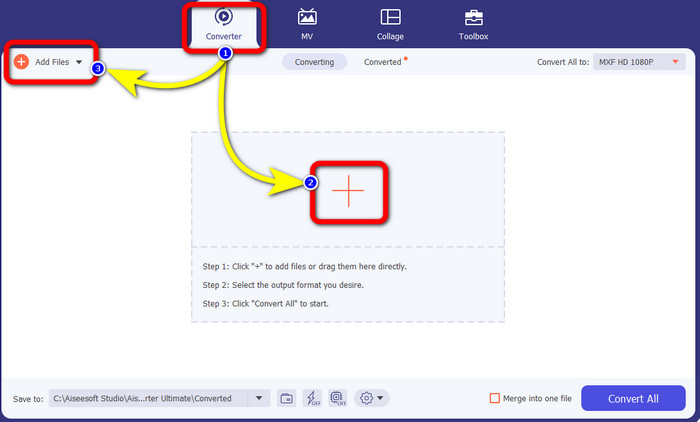
चरण 2: जब इंटरफ़ेस दिखाई दे, तो Converter पैनल चुनें। जिस MXF फ़ाइल वाले वीडियो को आप कन्वर्ट करना चाहते हैं, उसे जोड़ने के लिए Plus आइकन दबाएँ। आप अपना वीडियो जोड़ने के लिए Add Files बटन भी चुन सकते हैं।.
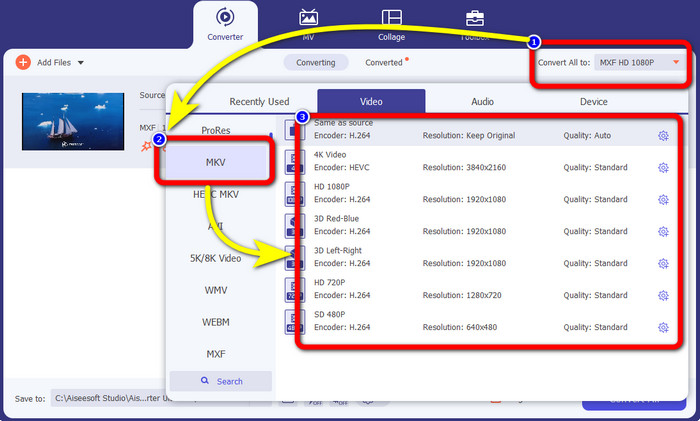
चरण 3: फ़ाइल जोड़ने के बाद, Convert All to विकल्प पर क्लिक करें। फ़ॉर्मेट विकल्प दिखाई देंगे, फिर MKV फ़ाइल फ़ॉर्मेट चुनें।.
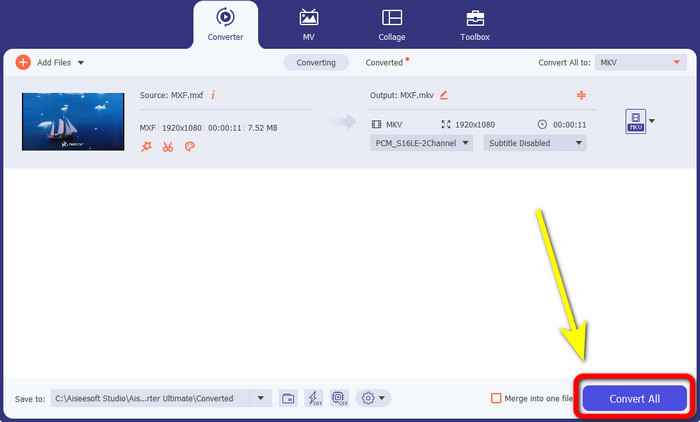
चरण 4:आख़िर में, आप Convert All बटन पर क्लिक करके अपनी MXF फ़ाइल को MKV फ़ॉर्मेट में कन्वर्ट कर सकते हैं।.
भाग 2: एमएक्सएफ को एमकेवी में बदलने के लिए ऑनलाइन तरीके
एफवीसी मुफ्त वीडियो कन्वर्टर ऑनलाइन का उपयोग करना
जब ऑनलाइन MXF को MKV फ़ॉर्मेट में कन्वर्ट करने की बात आती है, तो FVC Free Video Converter Online आपके लिए है। यह ऑनलाइन टूल और भी कई फ़ाइलों को कन्वर्ट कर सकता है, जैसे MP4, MOV, FLV, GIF, MPG, 3GP, MKV, VOB, WEBM आदि। इसके इस्तेमाल को लेकर चिंता करने की ज़रूरत नहीं है, क्योंकि फ़ाइलें कन्वर्ट करने के लिए इसमें सिर्फ़ तीन आसान स्टेप हैं, जो हर तरह के यूज़र, ख़ासकर शुरुआती लोगों के लिए बिल्कुल उपयुक्त हैं। इसके अलावा, यह ऑनलाइन टूल 1080p तक की वीडियो क्वालिटी सपोर्ट करता है। यह Google Chrome, Mozilla Firefox, Microsoft Edge और अन्य कई ब्राउज़र पर भी उपलब्ध है। साथ ही, वीडियो फ़ॉर्मेट कन्वर्ट करने के अलावा, आप MP3, M4A, AAC, AC3, WMA, FLAC आदि जैसे ऑडियो फ़ॉर्मेट भी कन्वर्ट कर सकते हैं।.
FVC फ्री वीडियो कन्वर्टर ऑनलाइन का उपयोग करके अपनी MXF फाइल को MKV में बदलें।
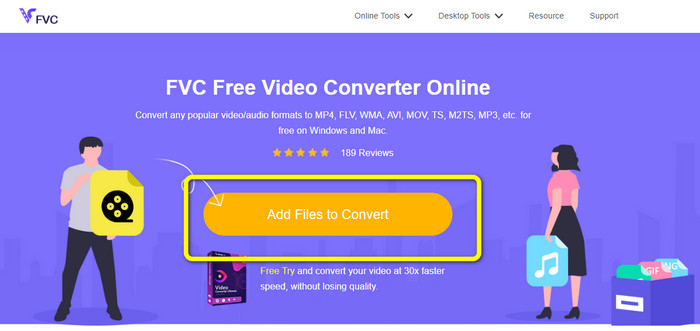
चरण 1: FVC Free Video Converter Online वेबसाइट पर जाएँ। अपने MXF फ़ाइल वाले वीडियो को अपलोड करने के लिए बीच में मौजूद Add File to Convert बटन पर क्लिक करें।.
चरण 2: MXF फ़ाइल अपलोड करने के बाद आपकी स्क्रीन पर एक छोटा बॉक्स दिखाई देगा। फिर आप नीचे की तरफ़ फ़ॉर्मेट विकल्प देखेंगे। अपना मनचाहा फ़ॉर्मेट चुनें, यानी MKV फ़ाइल फ़ॉर्मेट।.
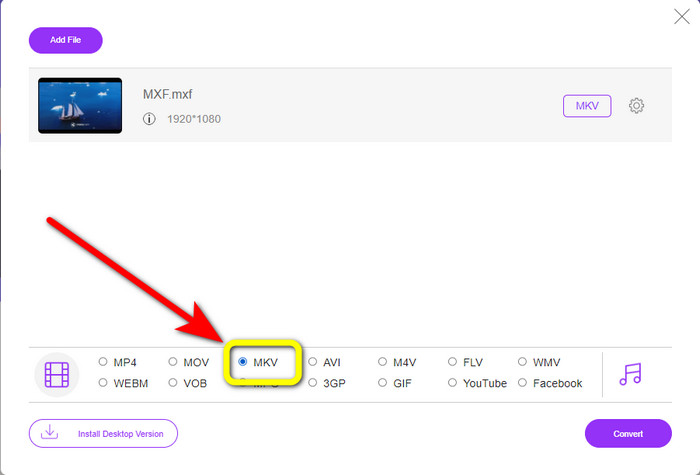
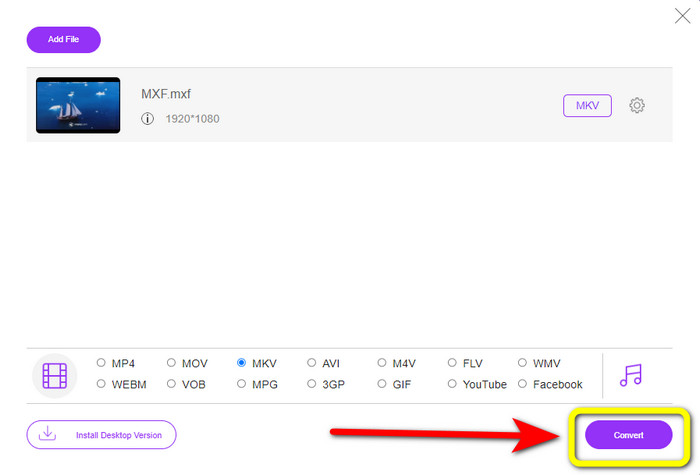
चरण 3: आख़िरी चरण के लिए, MXF फ़ाइल को MKV में कन्वर्ट करने के लिए Convert बटन दबाएँ। कन्वर्ज़न प्रक्रिया पूरी होने तक इंतज़ार करें और अपना वीडियो सेव करें। आप इसी टूल का उपयोग करके MXF को WMV में भी कन्वर्ट कर सकते हैं।.
कन्वर्टियो का उपयोग करना
Convertio एक और ऑनलाइन टूल है जिसका इस्तेमाल आप MXF को MKV फ़ाइल फ़ॉर्मेट में कन्वर्ट करने के लिए कर सकते हैं। यह ऑनलाइन सॉफ़्टवेयर आपकी वीडियो फ़ाइल को 37 फ़ॉर्मेट में कन्वर्ट कर सकता है, जिनमें MP4, MOV, WEBM, AVI, MTS, MPEG, XVID, DIVX और अन्य शामिल हैं। आप GIF, MP3, AAC, FLAC, M4R आदि जैसे इमेज और ऑडियो फ़ॉर्मेट भी कन्वर्ट कर सकते हैं। कन्वर्ट करने के अलावा, Convertio आपको वीडियो कंप्रेस करने, वीडियो में सबटाइटल जोड़ने, मीम बनाने और वीडियो एडिट करने की सुविधा भी देता है। हालाँकि, इतने सारे अच्छे टूल और फीचर्स होने के बावजूद, इस ऑनलाइन सॉफ़्टवेयर के फ्री वर्ज़न में कुछ सीमाएँ हैं। दुख की बात है कि आप सिर्फ़ 100MB तक की फ़ाइलों को ही कन्वर्ट कर सकते हैं। इसका मतलब है कि अनलिमिटेड फ़ाइलें कन्वर्ट करने और ज़्यादा फीचर्स का अनुभव करने के लिए आपको सब्सक्रिप्शन ख़रीदना होगा। MXF फ़ाइल को MKV फ़ॉर्मेट में कन्वर्ट करने के लिए नीचे दिए गए आसान निर्देशों का पालन करें।.
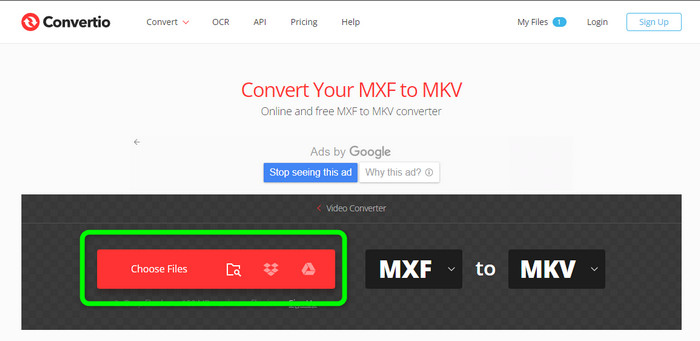
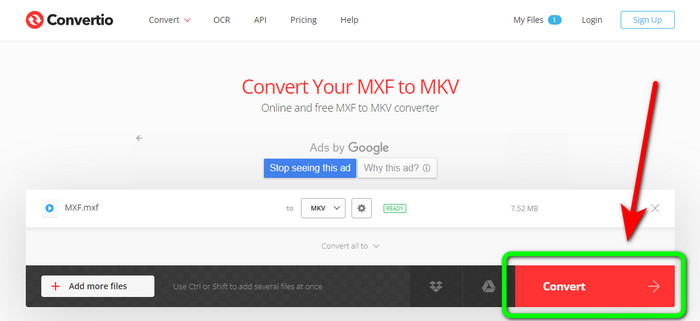
चरण 1: Convertio वेबसाइट पर जाएँ। अपनी MXF फ़ाइल जोड़ने के लिए Choose Files बटन पर क्लिक करें।.
चरण 2: जब फ़ाइल अपलोड हो जाए, तो फ़ॉर्मेट विकल्प पर क्लिक करें और MKV फ़ाइल फ़ॉर्मेट चुनें।.
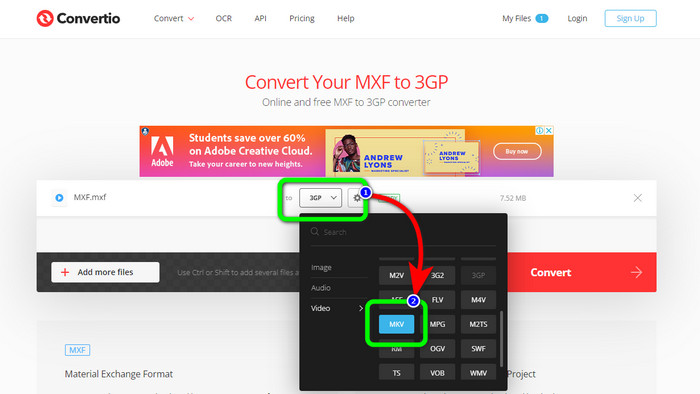
चरण 3: अपनी मनचाही फ़ाइल फ़ॉर्मेट, यानी MKV फ़ाइल, चुनने के बाद आप Convert बटन पर क्लिक कर सकते हैं। फ़ाइल कन्वर्ट होने की प्रक्रिया पूरी होने तक इंतज़ार करें और उसे अपने डिवाइस पर सेव करें।.
क्लाउडकन्वर्ट का उपयोग करना
यदि आप अभी भी MXF को MKV में कन्वर्ट करने के लिए किसी और ऑनलाइन कन्वर्टर की तलाश में हैं, तो आपको Cloudconvert पर ज़रूर जाना चाहिए। यह ऑनलाइन टूल विभिन्न फ़ाइलों को कन्वर्ट करने के लिए अच्छा है, जैसे MKV, FLV, AVI, WEBM, WMV आदि। इसके अलावा, आप कई फ़ाइलों को बिना वीडियो की गुणवत्ता खोए कन्वर्ट कर सकते हैं। हालाँकि, इस सॉफ़्टवेयर के फ्री वर्ज़न का उपयोग करते समय आप एक दिन में सिर्फ़ 25 फ़ाइलें ही कन्वर्ट कर सकते हैं। ऐसे में, यदि आप और ज़्यादा फ़ाइलें कन्वर्ट करना चाहते हैं, तो आपको सब्सक्रिप्शन ख़रीदना होगा। साथ ही, कभी-कभी आपके इंटरनेट कनेक्शन की स्पीड के अनुसार कन्वर्ज़न प्रक्रिया धीमी हो सकती है। लेकिन, Cloudconvert केवल आठ आउटपुट फ़ाइल फ़ॉर्मेट ही सपोर्ट करता है, जो कई यूज़र्स के लिए पर्याप्त नहीं हो सकता। यदि आप अपनी वीडियो को MXF फ़ाइल से MKV फ़ॉर्मेट में कन्वर्ट करने के लिए तैयार हैं, तो नीचे दिए गए स्टेप्स का उपयोग करें।.
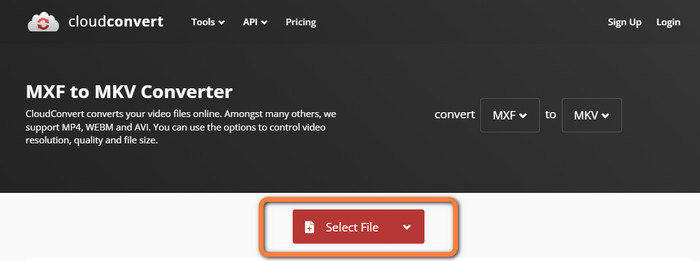
चरण 1: Cloudconvert की वेबसाइट पर जाएँ। जिस MXF फ़ाइल को आप MKV में कन्वर्ट करना चाहते हैं, उसे जोड़ने के लिए Select File बटन पर क्लिक करें।.
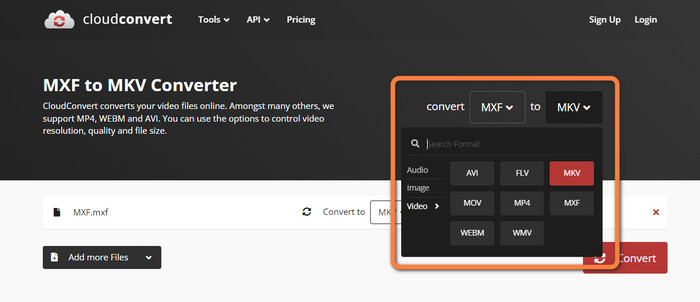
चरण 2: MXF फ़ाइल जोड़ने के बाद, फ़ॉर्मेट विकल्पों पर जाएँ और MKV फ़ाइल फ़ॉर्मेट चुनें।.
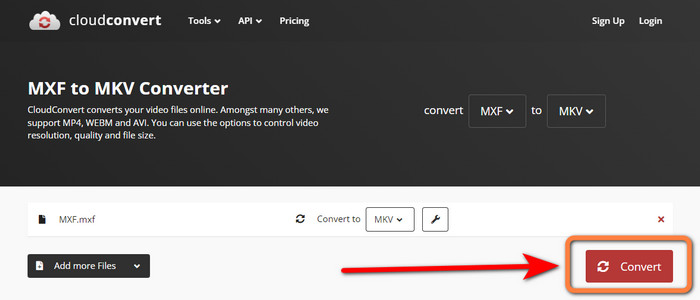
चरण 3: आख़िरी चरण यह है कि Convert बटन दबाएँ। फिर कन्वर्ज़न प्रक्रिया पूरी होने तक इंतज़ार करें और अपनी अंतिम वीडियो सेव करें। यह टूल आपको TRP को MKV में कन्वर्ट करने में भी मदद करता है।.
भाग 3: एमएक्सएफ बनाम एमकेवी की तुलना करें
| MXF | MKV | |
| दस्तावेज़ विस्तारण | .एमएक्सएफ | mkv |
| विवरण | एमएक्सएफ नामक एक मल्टीमीडिया कंटेनर प्रारूप विभिन्न कंप्यूटरों के बीच वीडियो के आदान-प्रदान को तेज करने के लिए वीडियो, ऑडियो और मेटाडेटा रखता है। एमएक्सएफ फाइलें अक्सर फिल्मों और टीवी विज्ञापनों के लिए उपयोग की जाती हैं जिन्हें सिनेमाघरों में प्रदर्शित किया जाएगा। | Matroska मल्टीमीडिया कंटेनर प्रारूप, या MKV, अन्य प्रकार के वीडियो, ऑडियो और उपशीर्षक ट्रैक (जैसे USF या SRT) को एक फ़ाइल में जोड़ता है। लघु फिल्मों और ऑडियो नमूनों का ऑनलाइन वितरण अक्सर एमकेवी फाइलों का उपयोग करता है। |
| डेवलपर | द सोसाइटी ऑफ़ मोशन पिक्चर एंड टेलीविज़न इंजीनियर्स | कोरकोडेक, इंक। |
| माइम प्रकार | आवेदन / एमएक्सएफ | वीडियो/x-matroska |
| वीडियो कोडेक्स | MPEG-4 AVC/H.264, MPEG-1, MPEG-2, MPEG-4 विज़ुअल, आदि। | MPEG-1, थियोरा, रियल वीडियो, Microsoft MPEG4 V2, VP8, MVC, आदि। |
| संबद्ध कार्यक्रम | फाइल व्यूअर प्लस एडोब प्रीमियर प्रो विंडोज मीडिया प्लेयर | वीएलसी मीडिया प्लेयर डिवएक्स प्लेयर एमएक्स प्लेयर जीओएम प्लेयर केएमप्लेयर पॉटप्लेयर |
भाग 4: एमएक्सएफ को एमकेवी में बदलने के बारे में अक्सर पूछे जाने वाले प्रश्न
1. एमकेवी एक कंटेनर या कोडेक है?
Matroska द्वारा उपयोग किए जाने वाले वीडियो के लिए मल्टीमीडिया कंटेनर प्रारूप को MKV फ़ाइल के रूप में जाना जाता है। एक्स्टेंसिबल बाइनरी मेटा लैंग्वेज एमकेवी की नींव है, जो कई वीडियो और ऑडियो संपीड़न प्रारूपों का समर्थन करती है। एमकेवी एक कंटेनर है, कोडेक नहीं, जो इसके और अन्य वीडियो प्रारूपों के बीच मुख्य अंतर है।
2. क्या MKV MP4 से बेहतर है?
वे दोनों शानदार हैं। एक ब्राउज़र में वीडियो चलाने के लिए, MP4 अधिक व्यापक रूप से समर्थित है और फ़ाइल ओवरहेड कम है। ब्लू-रे डिस्क और डीवीडी को वीडियो फ़ाइलों में परिवर्तित करने के लिए MKV कंटेनर का व्यापक रूप से उपयोग किया जाता है।
3. क्या एमएक्सएफ एक वीडियो फाइल है?
निश्चित रूप से हां। एमएक्सएफ ऑडियो और वीडियो के लिए एक फाइल फॉर्मेट है। एमएक्सएफ फाइलों में अंदर मीडिया के बारे में जानकारी होती है। सूचना को मेटाडेटा के रूप में भी जाना जाता है, जिसमें फ्रेम आकार, फ्रेम दर, निर्माण तिथि आदि शामिल हैं।
निष्कर्ष
यह लेख डेस्कटॉप टूल्स और ऑनलाइन एप्लिकेशन का उपयोग करके MXF को MKV में कन्वर्ट करने के सबसे उत्कृष्ट, परीक्षण किए गए और सिद्ध तरीक़े प्रदान करता है। यदि आप आसानी से और तुरंत अनलिमिटेड फ़ाइलें कन्वर्ट करना चाहते हैं, तो आप FVC Free Video Converter Online पर जा सकते हैं।.
-
 एमकेवी को डिवएक्स ऑनलाइन और ऑफलाइन में मुफ्त में कैसे बदलें
 क्या आप मुफ्त में MKV को DivX फॉर्मेट में बदलने के सर्वोत्तम तरीकों की तलाश कर रहे हैं। सर्वश्रेष्ठ MKV से DivX ऑनलाइन और ऑफलाइन कन्वर्टर्स जानने के लिए पढ़ना जारी रखें
-
 एएमवी को एमकेवी में मुफ्त में बदलने के तरीके के बारे में सर्वोत्तम प्रक्रियाएं
 क्या आप AMV को MKV में आसानी से मुफ्त में बदलना चाहते हैं? हम आपको पर्याप्त जानकारी और कनवर्टर के साथ सबसे अच्छा एप्लिकेशन देंगे जिसका आप उपयोग कर सकते हैं। आगे बढ़ते हैं!
-
 इन अल्टीमेट कन्वर्टर्स का उपयोग करके आसानी से MTV को MKV में बदलें
 क्या आप एमटीवी को एमकेवी में बदलने की उत्कृष्ट विधि जानना चाहते हैं? यह पोस्ट फाइलों को ऑनलाइन और आपके विंडोज/मैक पर कनवर्ट करने के तीन आसान तरीके बताती है
