


 वीडियो कनवर्टर अंतिम
 स्क्रीन अभिलेखी
 वीडियो मरम्मत
 सुरक्षित डाउनलोड
M2TS को M4V फ़ाइल स्वरूप में कैसे बदलें, इस पर सबसे आसान तरीके
भविष्य की ओर बढ़ते हुए कई फ़ॉर्मेट, जैसे M2TS, को पर्याप्त समर्थन नहीं मिल रहा है। इस फ़ॉर्मेट में अब भी मूल Blu-ray Audio Video कंटेनर का उपयोग होता है, जो डेटा को MPEG-2 स्ट्रीम के ज़रिए ट्रांसपोर्ट करता है। कुछ डिवाइस, जैसे iPhone, iPod और Android, इस फ़ॉर्मेट की संरचना को पढ़ नहीं सकते। इसलिए आप इन डिवाइसों पर इस फ़ॉर्मेट तक पहुँच नहीं सकते। लेकिन अगर आपके पास अभी भी यह फ़ॉर्मेट है, तो इसे M4V जैसे दूसरे फ़ाइल फ़ॉर्मेट में बदल लें। और अगर आप इसे कनवर्ट करना चाहते हैं, तो यह लेख पढ़ें। हम आपको यह सिखाने के लिए बेहतरीन तरीके बताएँगे कि M2TS को M4V में कैसे बदलें।.

भाग 1: M2TS को M4V में बदलने का मुफ्त तरीका
अगर आप FVC Free M2TS Converter का उपयोग करते हैं, तो आपको अपने M2TS फ़ाइलों को कनवर्ट करने की चिंता फिर कभी नहीं करनी पड़ेगी। इस मुफ़्त टूल से आप M2TS फ़ाइलों को M4V, MP4 (HD H.264/MPEG-4 AVC वीडियो), MOV, AVI, TS, VOB, MKV, FLV, SWF, ASF, WMV, MP3, M4A, OGG, WAV, WMA, FLAC और अन्य कई मानक वीडियो फ़ॉर्मेट में कनवर्ट कर सकते हैं। साथ ही, यह टूल बैच कन्वर्ज़न प्रक्रिया देता है। इसका मतलब है कि आप एक ही बार में कई फ़ाइलों को तुरंत कनवर्ट कर सकते हैं। इसके अतिरिक्त, इसमें अल्ट्रा-स्पीड कन्वर्ज़न प्रक्रिया है। यह अन्य आम कनवर्टरों की तुलना में 50 गुना तेज़ी से फ़ाइलें कनवर्ट कर सकता है।.
इसके अलावा, FVC फ्री M2TS कन्वर्टर न केवल कई फाइलों को परिवर्तित करने में विश्वसनीय है। यह एक अंतर्निहित वीडियो संपादक भी प्रदान करता है। यह कई M2TS फ़ाइलों को एक साथ लोड करना और उन्हें एक में मर्ज करना आसान बनाता है। इसके अतिरिक्त, आप प्रत्येक वीडियो फ़ाइल के लिए एक विशिष्ट थीम चुन सकते हैं, जैसे जन्मदिन, परिवार, भोजन, सेटिंग, खेल, या हैलोवीन जैसे त्यौहार। इस तरह, आप सुनिश्चित कर सकते हैं कि आपको एक आकर्षक और शानदार वीडियो मिलेगा। अंत में, यह उपकरण उपयोग करने के लिए सुरक्षित है। यह रूपांतरण प्रक्रिया के दौरान ऑडियो और छवि हानि से बचना सुनिश्चित करेगा।
विशेषताएँ
M2TS, M4V, MP4, MOV, AVI, FLV, WMV, और अन्य जैसी विभिन्न वीडियो फ़ाइलों को कनवर्ट करें।
◆ औसत रूपांतरण गति की तुलना में 50 गुना तेज उच्च गति रूपांतरण प्रक्रिया प्रदान करता है।
◆ एक साथ कई फाइलों को कनवर्ट करें।
◆ वीडियो को बेहतर बनाने के लिए एक वीडियो एन्हांसर फ़ंक्शन प्रदान करता है।
◆ एक टुकड़ा बनाने के लिए कई वीडियो मर्ज करें।
FVC फ्री M2TS कन्वर्टर का उपयोग करके कई M2TS फ़ाइलों को एक M4V में बदलने का तरीका जानने के लिए नीचे दी गई सरल प्रक्रिया का पालन करें।
चरण 1: नीचे दिए गए Download बटन पर क्लिक करके FVC Free M2TS Converter अपने कंप्यूटर पर डाउनलोड करें। फिर इंस्टॉलेशन प्रक्रिया पूरी करें और एप्लिकेशन को लॉन्च करें।.
मुफ़्त डाउनलोडWindows 7 या बाद के संस्करणों के लिएसुरक्षित डाउनलोड
मुफ़्त डाउनलोडMacOS 10.7 या बाद के संस्करणों के लिएसुरक्षित डाउनलोड
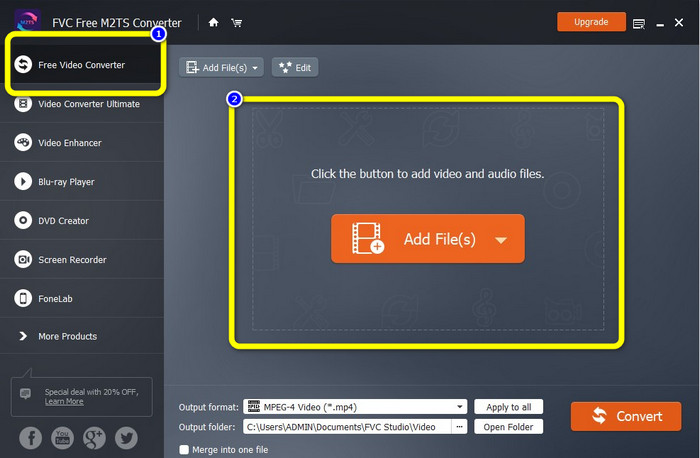
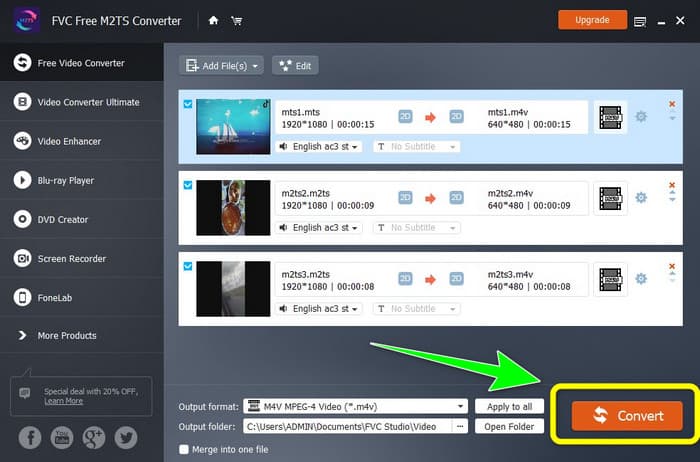
चरण 2: इंटरफ़ेस के बाएँ हिस्से में Free Video Converter विकल्प चुनें। फिर जिस M2TS वीडियो फ़ाइल को आप कनवर्ट करना चाहते हैं उसे जोड़ने के लिए Add File बटन पर क्लिक करें।.
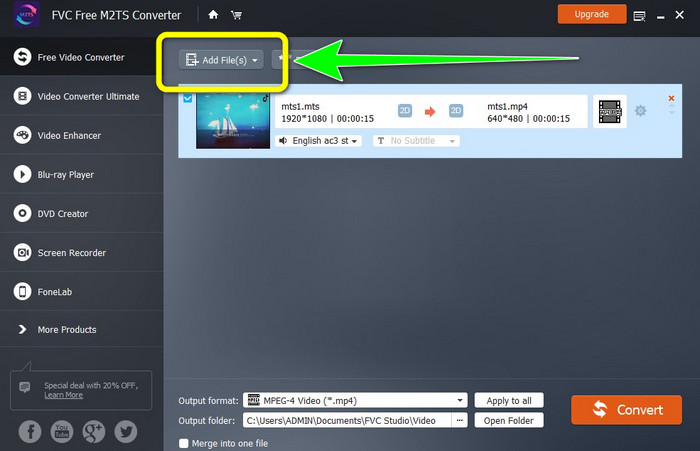
चरण 3: अगर आप कई M2TS वीडियो फ़ाइलें जोड़ना चाहते हैं, तो Add Files बटन पर क्लिक करें।.
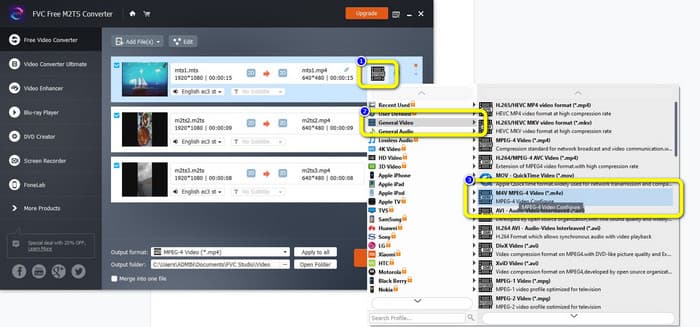
चरण 3: इंटरफ़ेस के दाएँ हिस्से में Video प्रतीक पर जाएँ। General Video विकल्प चुनें और अपना इच्छित फ़ॉर्मेट M4V चुनें।.
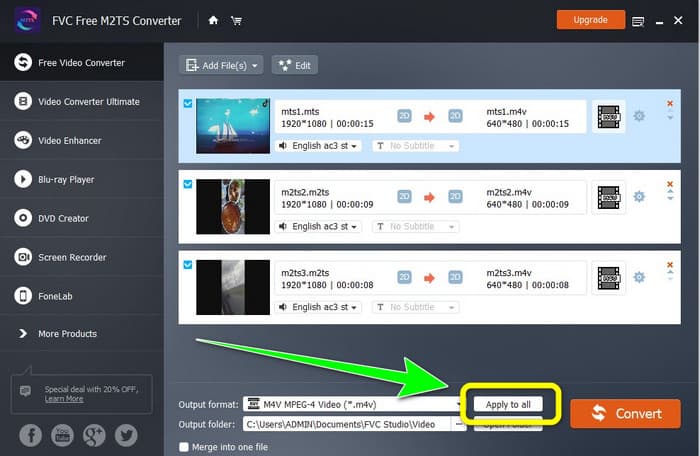
चरण 4: अन्य M2TS फ़ाइलों का आउटपुट फ़ॉर्मेट बदलने के लिए आप यही प्रक्रिया दोहरा सकते हैं। आप Apply to all बटन पर भी क्लिक कर सकते हैं ताकि सभी फ़ाइलों का आउटपुट फ़ॉर्मेट तुरंत M4V में बदल जाए।.
चरण 5: जब आप सभी M2TS फ़ाइलों को M4V फ़ॉर्मेट में सेट कर लें, तो Convert बटन पर क्लिक करें। कन्वर्ज़न प्रक्रिया पूरी होने तक प्रतीक्षा करें और फिर अपनी वीडियो फ़ाइलों को अपनी पसंद की लोकेशन पर सेव करें।.
भाग 2: M2TS को M4V में बिना किसी नुकसान के कन्वर्ट करने का सबसे अच्छा तरीका
यदि आप कई M2TS फ़ाइलों को एक ही M4V में बदलने का कोई और बेहतरीन तरीका चाहते हैं, तो आप Video Converter Ultimate आज़मा सकते हैं। इस डाउनलोड करने योग्य एप्लिकेशन की मदद से आप बैच कन्वर्ज़न प्रक्रिया के कारण आसानी से बिना गुणवत्ता खोए M2TS को M4V में कनवर्ट कर सकते हैं। इसके अलावा, इसकी कन्वर्ज़न स्पीड अन्य कनवर्टरों की तुलना में 30 गुना तेज़ है। इस तरह, आप अधिक फ़ाइलें कनवर्ट कर सकते हैं और समय भी बचा सकते हैं। साथ ही, Video Converter Ultimate का इंटरफ़ेस सहज और उपयोग में आसान है, जो सभी प्रकार के उपयोगकर्ताओं के लिए उपयुक्त है और फ़ाइलों को कनवर्ट करने के सरल चरण देता है।.
इसके अलावा, यह कन्वर्टर और भी बेहतरीन सुविधाएँ प्रदान करता है। यदि आप कई M2TS वीडियो को जोड़ना चाहते हैं और उन्हें एक ही टुकड़े में बनाना चाहते हैं, तो आप इस एप्लिकेशन का उपयोग कर सकते हैं क्योंकि इसमें वीडियो मर्जर टूल है। इस तरह, आप अपने M2TS वीडियो को आसानी से मर्ज कर सकते हैं। साथ ही, यह टूल आपको कोलाज बनाने की अनुमति देता है, जिसमें आप छवियों और वीडियो को जोड़ सकते हैं। आप कई निःशुल्क टेम्प्लेट और फ़िल्टर का भी उपयोग कर सकते हैं। तो आप एक सुंदर कोलाज बना सकते हैं। वीडियो कन्वर्टर अल्टीमेट का उपयोग करके आप और अधिक सुविधाओं का आनंद ले सकते हैं।
विशेषताएँ
M4V, M2TS, MP4, AVI, FLV, MKV, WMV, VOB, MOV, SWF, आदि सहित 100+ वीडियो फ़ाइल स्वरूपों को कनवर्ट करें।
◆ निःशुल्क फ़िल्टर और टेम्प्लेट के साथ एक अद्भुत कोलाज बनाएं।
◆ संगीत वीडियो निर्माता की पेशकश करें।
◆ वीडियो संपादन के लिए टूलबॉक्स प्रदान करता है।
◆ 30x तेज रूपांतरण गति के साथ बैच रूपांतरण प्रक्रिया प्रदान करता है।
FVC वीडियो कन्वर्टर अल्टीमेट का उपयोग करके एक साथ कई M2TS फ़ाइलों को परिवर्तित करने के लिए नीचे दिए गए विस्तृत चरणों का उपयोग करें।
चरण 1: अपने कंप्यूटर पर Video Converter Ultimate डाउनलोड करें। इसे डाउनलोड करने के लिए नीचे दिए गए Download बटन पर क्लिक करें। उसके बाद एप्लिकेशन खोलें।.
फ्री डाउनलोडWindows 7 या बाद के संस्करण के लिएसुरक्षित डाउनलोड
फ्री डाउनलोडMacOS 10.7 या बाद के संस्करण के लिएसुरक्षित डाउनलोड
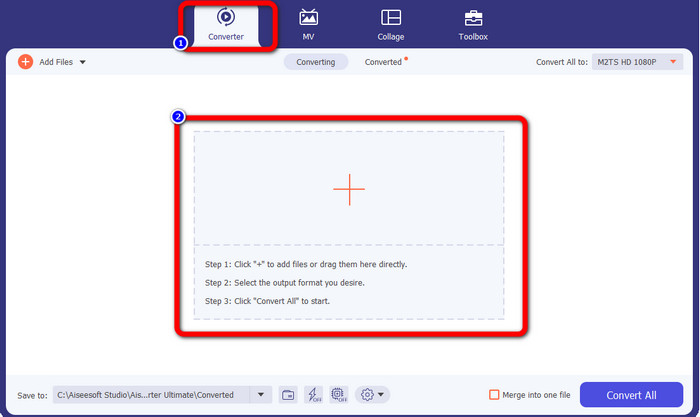
चरण 2: Converter पैनल चुनें और अपनी M2TS फ़ाइलें जोड़ने के लिए Plus चिन्ह वाले बटन पर क्लिक करें।.
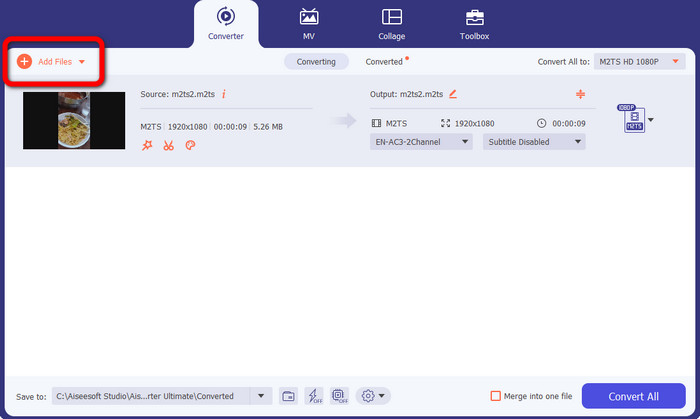
चरण 3: और अधिक M2TS फ़ाइलें जोड़ने के लिए इंटरफ़ेस के बाएँ हिस्से में Add File बटन पर क्लिक करें।.
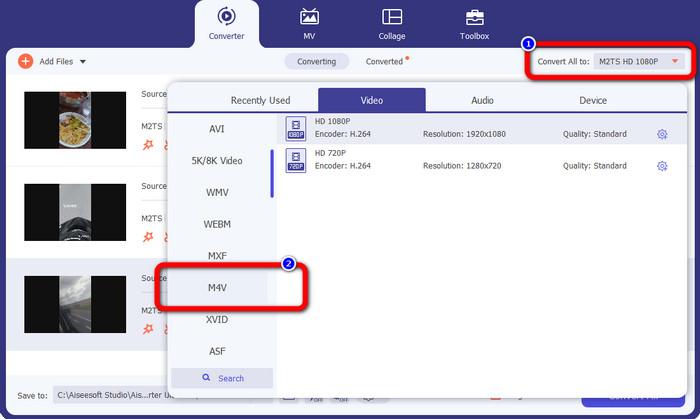
चरण 4: इन्हें M4V फ़ाइल में कनवर्ट करने के लिए Convert All to बटन पर क्लिक करें ताकि फ़ॉर्मेट विकल्प दिखाई दें। उसके बाद M4V फ़ाइल फ़ॉर्मेट चुनें।.
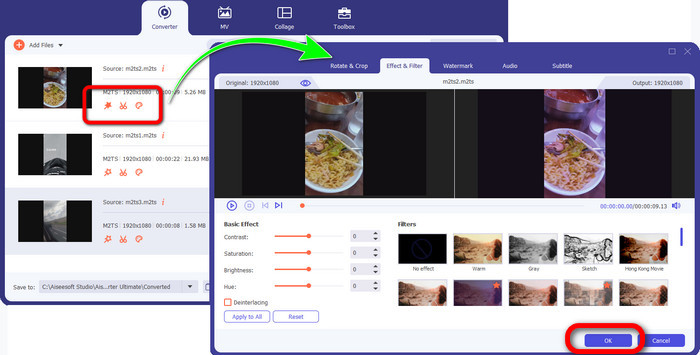
चरण 4: अपनी वीडियो को एडिट करने के लिए इन एडिटिंग टूल्स पर क्लिक करें। आप वीडियो को एन्हांस कर सकते हैं, एडिट कर सकते हैं, फ़िल्टर और इफ़ेक्ट जोड़ सकते हैं और उन्हें काट सकते हैं। एडिटिंग पूरी होने पर OK पर क्लिक करें।.
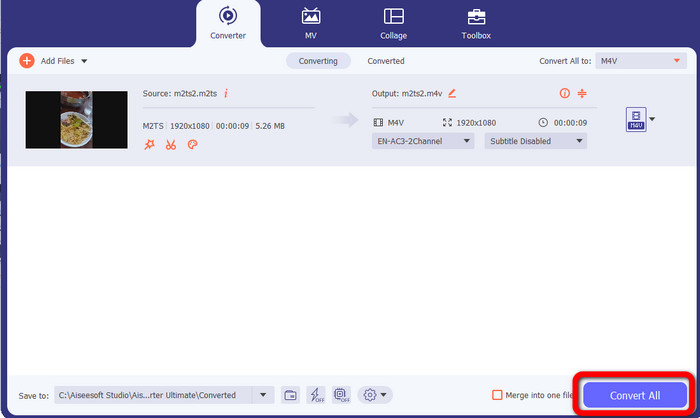
चरण 5: वीडियो एडिट करने के बाद, आप Convert All बटन पर क्लिक करके उन्हें कनवर्ट कर सकते हैं। कन्वर्ज़न प्रक्रिया के बाद अपनी वीडियो सेव करें।.
भाग 3: M2TS क्या है?
फ़ाइल एक्सटेंशन: .m2ts
ब्लू-रे डिस्क ऑडियो-वीडियो (BDAV) MPEG-2 ट्रांसपोर्ट स्ट्रीम (M2TS) कंटेनर फ़ाइल स्वरूप M2TS फ़ाइल नाम एक्सटेंशन का उपयोग करता है। यह कई ऑडियो, वीडियो और अन्य स्ट्रीम के लिए नियोजित है। MPEG-2 ट्रांसपोर्ट स्ट्रीम कंटेनर इसकी नींव के रूप में कार्य करता है। ब्लू-रे डिस्क और एवीसीएचडी पर, इस कंटेनर प्रकार का अक्सर उच्च गुणवत्ता वाले वीडियो के लिए उपयोग किया जाता है। ब्लू-रे डिस्क एसोसिएशन ने M2TS विकसित किया। सभी संबद्ध कार्यक्रम ऑल प्लेयर, वीएलसी मीडिया प्लेयर, पॉट प्लेयर और एमपीलेयर हैं।
भाग 4: M4V क्या है?
फ़ाइल एक्सटेंशन: .m4v
Apple ने M4V फ़ाइल स्वरूप बनाया, MP4 मानक के समान एक वीडियो कंटेनर प्रारूप। प्राथमिक अंतर यह है कि M4V फ़ाइलों में प्रतिलिपि सुरक्षा हो सकती है। अपने आईट्यून्स स्टोर में, ऐप्पल एम4वी प्रारूप का उपयोग करके वीडियो फाइलों को एन्कोड करता है। इस प्रारूप के लिए संबद्ध प्रोग्राम हैं Apple QuickTime Player, Apple iTunes, Media Player Classic, KMPlayer, Real Player, Zoom Player, और VLC Media Player।
अधिक पढ़ें:
वेब और डेस्कटॉप पर बेहतरीन कनवर्टरों के साथ M2TS को AVI में कैसे कनवर्ट करें
ऑनलाइन और ऑफ़लाइन M2TS को FLV में कनवर्ट करने का बेहतरीन तरीका
भाग 5: M2TS को M4V में बदलने के बारे में अक्सर पूछे जाने वाले प्रश्न
क्या M2TS MP4 से बेहतर है?
चूंकि M2TS अधिक मेमोरी बचाता है और उच्च-रिज़ॉल्यूशन वाला है, इसलिए इसके लिए अधिक स्थान की आवश्यकता होती है। MP4 स्टोरेज स्पेस सेविंग के लिए M2TS से बेहतर है।
M2TS को M4V में बदलने के लिए हैंडब्रेक का उपयोग कैसे करें?
हैंडब्रेक डाउनलोड करें। फिर ओपन सोर्स पर जाएं और M2TS फाइल को जोड़ें। इसके बाद फॉर्मेट ऑप्शन पर जाएं और M4V को सेलेक्ट करें। इसके बाद स्टार्ट एनकोड बटन पर क्लिक करें।
क्या MTS, M2TS के समान है?
कार्यक्षमता के संदर्भ में, MTS और M2TS फ़ाइलें समान हैं। ये दोनों HD फाइलें AVCHD वीडियो फॉर्मेट से जुड़ी हैं। M2TS फाइल एक्सटेंशन को MTS फाइल एक्सटेंशन में बदलना संभव है और इसके विपरीत।
निष्कर्ष
ऊपर की चर्चा से आप यह और अच्छी तरह समझ पाएँगे कि M2TS को M4V में कैसे कनवर्ट करें। ये दोनों डाउनलोड करने योग्य एप्लिकेशन फ़ाइलें कनवर्ट करने के लिए आपके लिए बेहतरीन कनवर्टर हैं। ये तेज़ी से और बिना गुणवत्ता खोए कनवर्ट कर सकते हैं।.
-
 MOV को M4V फ़ाइल स्वरूप में कैसे बदलें, इस पर विभिन्न तरीके
 क्या आप MOV फाइल को M4V फॉर्मेट में बदलने के लिए एक प्रभावी तरीका चाहते हैं? फिर, यह लेख आपकी इच्छा प्रदान करेगा। यहां सबसे अच्छे कन्वर्टर्स हैं जिनका आप उपयोग कर सकते हैं।
-
 GIF को तुरंत M4V में बदलने की बेहतरीन तकनीकें
 यह गाइडपोस्ट आपको GIF को M4V में बदलने के लिए सबसे प्रभावी रणनीति प्रदान करता है। साथ ही, हम आपको उन सर्वोत्तम दो कन्वर्टर्स से परिचित कराएंगे जिन्हें आप आजमा सकते हैं।
-
 SWF को कुशलतापूर्वक M4V में बदलने की सरल प्रक्रिया
 SWF को M4V में ऑनलाइन बदलने और डाउनलोड करने योग्य एप्लिकेशन का उपयोग करने के सरल तरीकों को सीखने का यह अवसर न चूकें। जानने के लिए इस पोस्ट को पढ़ें!
