


 वीडियो कनवर्टर अंतिम
 स्क्रीन अभिलेखी
 वीडियो मरम्मत
 सुरक्षित डाउनलोड
FLAC को MP3 में कैसे कन्वर्ट करें: हाई-क्वालिटी ऑडियो कंप्रेशन के लिए गाइड
क्या आप चाहते हैं कि आपके उच्च‑गुणवत्ता वाले FLAC ऑडियो फ़ाइलें आपके डिवाइस पर ज़्यादा जगह न लें? उन्हें व्यापक रूप से संगत MP3 फ़ॉर्मेट में बदलना इस समस्या को बिना ज़्यादा साउंड क्वालिटी खोए हल कर सकता है। इस गाइड पोस्ट में हम आपको चरण‑दर‑चरण पूरा प्रक्रिया बताएँगे कि FLAC को MP3 में कैसे बदलें। हम बेहतरीन टूल्स, तेज़ और प्रभावी कन्वर्ज़न के टिप्स से लेकर, कन्वर्ज़न के दौरान अधिकतम गुणवत्ता बनाए रखने के तरीकों तक सब कुछ कवर करेंगे। अपनी पसंदीदा धुनों का किसी भी डिवाइस पर आनंद लें, बिना स्टोरेज स्पेस की चिंता किए।.

1. FVC वीडियो कन्वर्टर अल्टीमेट
FVC Video Converter Ultimate एक व्यापक वीडियो कन्वर्ज़न सॉफ़्टवेयर है जो न सिर्फ़ कई तरह के वीडियो फ़ॉर्मेट बदलता है बल्कि ऑडियो कन्वर्ज़न को भी सपोर्ट करता है। यह वीडियो और ऑडियो फ़ाइलों को कन्वर्ट, डाउनलोड, एडिट और बर्न करने के लिए एक ऑल‑इन‑वन समाधान है। अपनी वीडियो कन्वर्ज़न क्षमताओं के अलावा, FVC Video Converter Ultimate विभिन्न फ़ॉर्मेट्स के बीच ऑडियो फ़ाइलों को भी कन्वर्ट कर सकता है, जिनमें FLAC से MP3 में कन्वर्ज़न भी शामिल है। यह WAV, AAC, M4A, WMA और कई अन्य जैसे व्यापक रेंज के ऑडियो फ़ॉर्मेट्स को सपोर्ट करता है। इस FLAC से MP3 कन्वर्टर का उपयोग करना सीखने के लिए नीचे दिए गए चरणों का पालन करें।.
चरण 1. प्रोग्राम इंस्टॉल करें
सबसे पहले, आपको अपने कंप्यूटर पर यह प्रोग्राम इंस्टॉल करना होगा। इसके लिए, किसी एक Free Download बटन पर क्लिक करके टूल डाउनलोड करें। इसके बाद सेटअप विज़ार्ड के निर्देशों का पालन करते हुए इसे इंस्टॉल करें। फिर प्रोग्राम को कंप्यूटर पर लॉन्च करें ताकि आप इसका वास्तविक इंटरफ़ेस देख सकें।.
फ्री डाउनलोडWindows 7 या बाद के संस्करण के लिएसुरक्षित डाउनलोड
फ्री डाउनलोडMacOS 10.7 या बाद के संस्करण के लिएसुरक्षित डाउनलोड
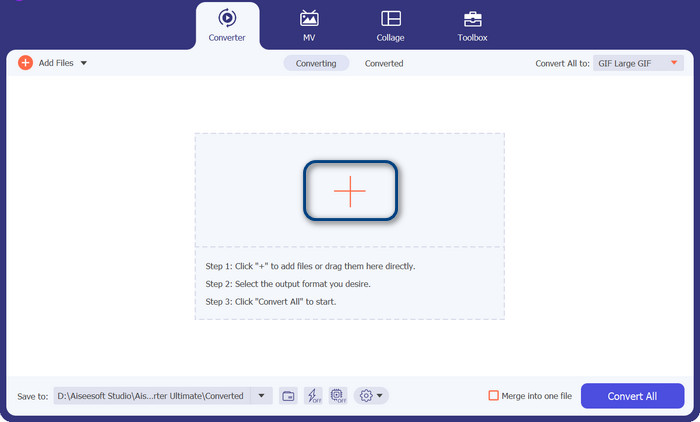
चरण 2. एक FLAC या MP3 फ़ाइल जोड़ें
यदि आप MP3 को FLAC या इसके विपरीत में बदलना चाहते हैं, तो कृपया मुख्य इंटरफ़ेस से धन चिह्न बटन दबाकर एक ऑडियो फ़ाइल जोड़ें। आप अपनी इच्छानुसार एक या अधिक ऑडियो फाइलों का चयन कर सकते हैं। बाद में, आपको मुख्य इंटरफ़ेस से उनका थंबनेल देखना चाहिए।
चरण 3. आउटपुट फ़ॉर्मेट निर्धारित करें
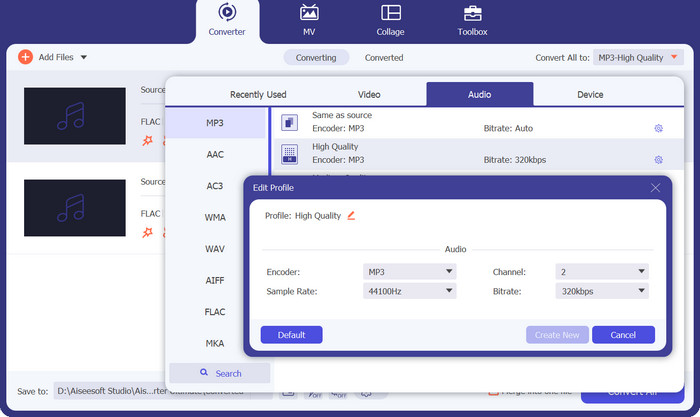
अब, टूल के दाहिने ऊपरी हिस्से में मौजूद Profile मेनू पर क्लिक करें। मेनू खुलने पर Audio टैब चुनें और MP3 खोजें। यदि आप MP3 से FLAC में कन्वर्ट करना चाहते हैं, तो आउटपुट फ़ाइल के रूप में FLAC फ़ॉर्मेट चुनें। चाहें तो अपनी पसंद के अनुसार आउटपुट सेटिंग्स को एडिट भी कर सकते हैं।.
चरण 4. FLAC में कन्वर्ट करें
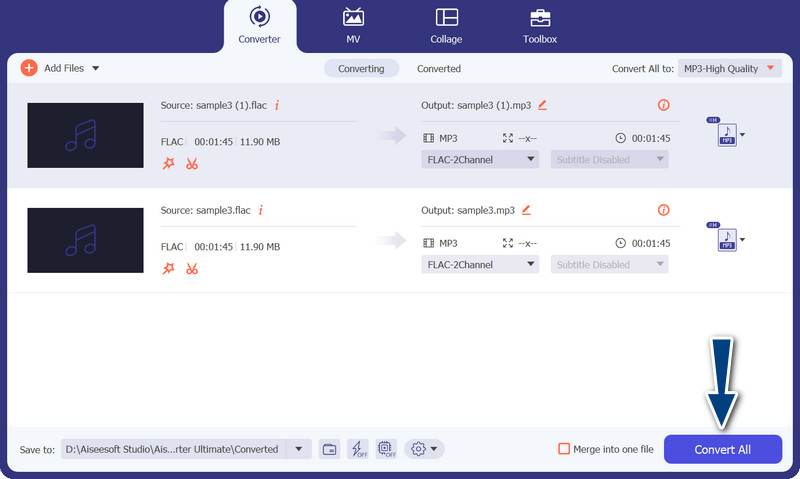
इस बार, वह आउटपुट फ़ोल्डर सेट करें जहाँ आप कन्वर्ट की गई फ़ाइलें सेव करना चाहते हैं। यह इंटरफ़ेस के सबसे निचले हिस्से में स्थित होता है। उस पर क्लिक करके आउटपुट फ़ोल्डर निर्धारित करें। अब जब सब सेट हो जाए, तो Convert All बटन दबाकर कन्वर्ज़न शुरू करें। इस तरह आप इस MP3 to FLAC या FLAC to MP3 कन्वर्टर का उपयोग कर सकते हैं।.
पेशेवरों
- यह एक उपयोगकर्ता के अनुकूल इंटरफेस और परिवर्तित करने के लिए उपयोग में आसान उपकरण प्रदान करता है।
- सॉफ्टवेयर में वीडियो संपादित करने की विशेषताएं शामिल हैं।
- गुणवत्ता से समझौता किए बिना तेज रूपांतरण गति।
विपक्ष
- यह एक भुगतान किया हुआ FLAC से MP3 कन्वर्टर है।
- स्रोत के आधार पर रूपांतरण गुणवत्ता भिन्न हो सकती है।
2. मुफ्त वीडियो कन्वर्टर ऑनलाइन
यदि आप एक फ्री प्रोग्राम की तलाश में हैं और यह सीखना चाहते हैं कि FLAC को MP3 में ऑनलाइन कैसे कन्वर्ट करें, तो आपको Free Video Converter Online का उपयोग करने पर विचार करना चाहिए। नाम से ही स्पष्ट है कि यह उपयोगकर्ताओं को उनकी वीडियो या ऑडियो फ़ाइलें बिल्कुल मुफ़्त में कन्वर्ट करने में मदद करता है। इसके अलावा, यह आपको अपनी पसंद के अनुसार आउटपुट को एडिट करने की आज़ादी देता है। साथ ही, इसकी कन्वर्ज़न स्पीड भी कम नहीं है। जब तक आपके पास इंटरनेट कनेक्शन है, आप अपेक्षित आउटपुट की उम्मीद कर सकते हैं। नीचे दिए गए चरणबद्ध गाइड को देखकर जानें कि यह मुफ़्त FLAC to MP3 कन्वर्टर टूल कैसे काम करता है:
चरण 1. कोई वेब ब्राउज़र खोलें और अपनी पसंद के ऑनलाइन वीडियो कन्वर्टर पर जाएँ।.
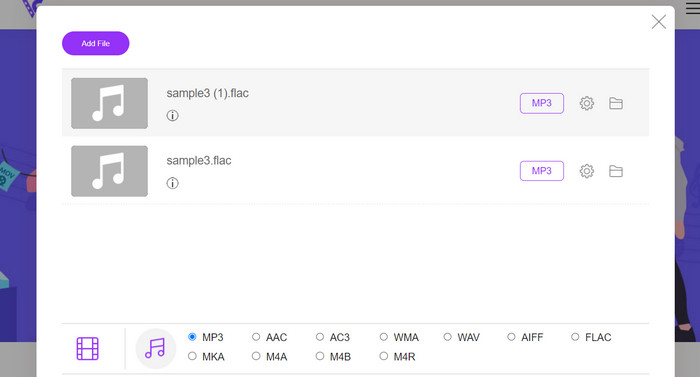
चरण 2. Add Files to Convert पर क्लिक करके आप वह FLAC फ़ाइल अपलोड कर सकते हैं जिसे आप FLAC से MP3 में कन्वर्ट करना चाहते हैं।.
चरण 3. उपलब्ध फ़ॉर्मेट्स की सूची में से Audio फ़ॉर्मेट मेनू के अंतर्गत MP3 को आउटपुट फ़ॉर्मेट के रूप में चुनें। इसके बाद MP3 फ़ाइल के लिए मनचाहा बिटरेट या आउटपुट क्वालिटी चुनें।.
चरण 4. कन्वर्ज़न प्रक्रिया शुरू करने के लिए Convert बटन पर क्लिक करें। फ़ाइल के आकार और आपके इंटरनेट कनेक्शन की स्पीड के अनुसार कन्वर्ज़न पूरा होने में कुछ मिनट लग सकते हैं।.
पेशेवरों
- किसी भी समय सर्वोत्तम निःशुल्क FLAC से MP3 कन्वर्टर तक पहुँचें।
- इसके लिए न्यूनतम तकनीकी विशेषज्ञता की आवश्यकता होती है।
- यह कंप्यूटर पर समय और संग्रहण स्थान बचा सकता है।
विपक्ष
- यह डेस्कटॉप सॉफ़्टवेयर के समान स्तर के अनुकूलन की पेशकश नहीं करता है।
- यह एक स्थिर और तेज़ इंटरनेट कनेक्शन की मांग करता है।
भाग 2। मोबाइल पर FLAC को MP3 या MP3 को FLAC में बदलें
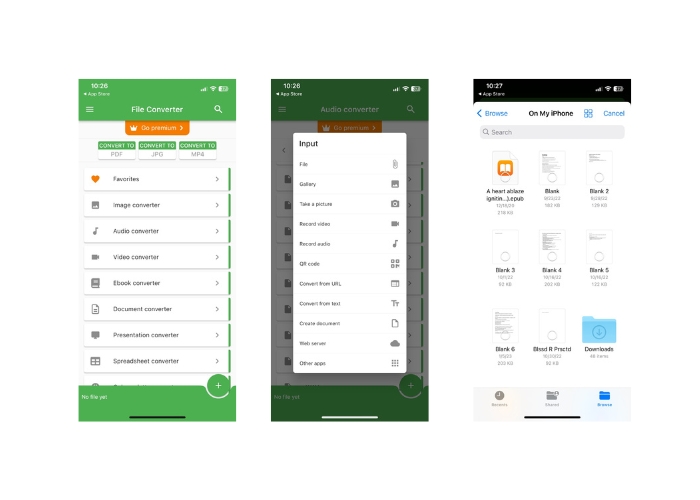
फ़ाइल कन्वर्टर iOS उपकरणों के लिए उपलब्ध एक मुफ़्त मोबाइल ऐप है जो आपको ऑडियो और वीडियो फ़ाइलों सहित विभिन्न फ़ाइल स्वरूपों को परिवर्तित करने की अनुमति देता है। ऐप एक सरल और उपयोग में आसान इंटरफ़ेस प्रदान करता है जो आपको किसी अतिरिक्त सॉफ़्टवेयर की आवश्यकता के बिना फ़ाइलों को परिवर्तित करने की अनुमति देता है। ऐप FLAC, MP3, WAV, M4A, और बहुत कुछ सहित ऑडियो और वीडियो प्रारूपों की एक विस्तृत श्रृंखला का समर्थन करता है।
इसका मतलब है कि आप बिना किसी परेशानी के अपनी ऑडियो और वीडियो फाइलों को एक फॉर्मेट से आसानी से बदल सकते हैं। फ़ाइल कन्वर्टर की असाधारण विशेषताओं में से एक इसकी बैच कन्वर्ट FLAC को MP3 करने की क्षमता है। इसका मतलब है कि आप एक साथ कई फाइलों को कन्वर्ट कर सकते हैं, जिससे आपका समय और मेहनत बचती है।
चरण 1. App Store से File Converter ऐप्लिकेशन डाउनलोड और इंस्टॉल करें। ऐप खोलें, फिर Audio विकल्प चुनें।.
चरण 2. उपलब्ध ऑडियो कन्वर्ज़न विकल्पों की सूची में से FLAC to MP3 चुनें।.
चरण 3. जिन FLAC फ़ाइलों को आप कन्वर्ट करना चाहते हैं, उन्हें जोड़ने के लिए + बटन का उपयोग करें। फ़ाइलें जोड़ने के बाद, यदि आप चाहें तो कन्वर्ज़न सेटिंग्स बदल सकते हैं। आउटपुट क्वालिटी, बिटरेट और अन्य विकल्प सभी को कस्टमाइज़ किया जा सकता है।.
चरण 4. कन्वर्ज़न प्रक्रिया शुरू करने के लिए एक बार फिर Convert बटन पर टैप करें। कन्वर्ट की गई MP3 फ़ाइलें आपके डिवाइस पर लोकली सेव हो जाएँगी।.
पेशेवरों
- यह एक साथ कई फाइलों को कन्वर्ट कर सकता है।
- रूपांतरण प्रक्रिया अपेक्षाकृत तेज़ है।
विपक्ष
- इसकी फ़ाइल आकार सीमा 250 एमबी है।
- यह उन्नत विकल्प प्रदान नहीं करता है।
अधिक पढ़ें:
WAV से MP3 – WAV को MP3 में बदलने के लिए शीर्ष 5 मुफ़्त कन्वर्टर्स
Mac और Windows पर शीर्ष 3 FLAC मेटाडेटा एडिटर्स [2023 अपडेटेड]
भाग 3. FLAC और MP3 को बदलने के बारे में अक्सर पूछे जाने वाले प्रश्न
क्या मैं Mac पर FLAC को MP3 में बदल सकता हूँ?
हाँ आप कर सकते हैं। यदि आपके मैक पर आईट्यून्स स्थापित है, तो आप इसका उपयोग एफएलएसी फाइलों को एमपी3 में बदलने के लिए कर सकते हैं। बस एफ़एलएसी फ़ाइलों को आईट्यून में आयात करें, उन फ़ाइलों को चुनें जिन्हें आप कनवर्ट करना चाहते हैं, और फिर फ़ाइल> कन्वर्ट> एमपी 3 संस्करण बनाएं पर जाएं। कनवर्ट की गई MP3 फ़ाइलें आपकी iTunes लाइब्रेरी में सहेजी जाएंगी।
क्या ऑडेसिटी बैच FLAC को MP3 में बदल सकता है?
हाँ, ऑडेसिटी Mac पर FLAC फ़ाइलों को MP3 में बैच-रूपांतरित कर सकता है। ऐसा करने के लिए, पहले ऑडेसिटी खोलें और एक एडिट चेन बनाएं जिसमें एक्सपोर्ट मल्टीपल कमांड शामिल हों। एक्सपोर्ट मल्टीपल डायलॉग बॉक्स में, फाइल टाइप को MP3 फाइल्स पर सेट करें और अपनी पसंद के हिसाब से MP3 एक्सपोर्ट ऑप्शन को कॉन्फ़िगर करें।
क्या FLAC को MP3 में बदलने से ऑडियो की गुणवत्ता प्रभावित होगी?
हाँ, FLAC को MP3 में बदलने से ऑडियो गुणवत्ता का कुछ नुकसान होता है, क्योंकि MP3 एक हानिपूर्ण संपीड़न प्रारूप है। हालाँकि, एक अच्छे एनकोडर और उचित सेटिंग्स के साथ, आप गुणवत्ता के नुकसान को कम कर सकते हैं और फिर भी एक सभ्य-ध्वनि एमपी 3 फ़ाइल के साथ समाप्त हो सकते हैं।
निष्कर्ष
FLAC से MP3 में कन्वर्ज़न बड़े ऑडियो फ़ाइलों को अधिक प्रबंधनीय बनाने का एक सुविधाजनक तरीका हो सकता है, जबकि ध्वनि की अच्छी गुणवत्ता भी काफ़ी हद तक बनी रहती है। इस काम के लिए इतने सारे टूल उपलब्ध हैं, जिनमें डेस्कटॉप सॉफ़्टवेयर और मोबाइल ऐप्स शामिल हैं, कि उपयोगकर्ता आसानी से अपनी ज़रूरत के अनुसार उपयुक्त समाधान चुन सकते हैं। हालाँकि, यह ध्यान रखना ज़रूरी है कि लॉसलेस फ़ॉर्मेट से MP3 जैसे लॉसी फ़ॉर्मेट में कन्वर्ट करने पर कुछ न कुछ ऑडियो क्वालिटी का नुकसान होना स्वाभाविक है, और उपयोगकर्ताओं को आगे बढ़ने से पहले विभिन्न कन्वर्ज़न तरीकों के फायदे‑नुकसान पर विचार करना चाहिए। कुल मिलाकर, यदि सही ढंग से और सावधानी के साथ किया जाए, तो FLAC से MP3 में कन्वर्ट करना बड़ी ऑडियो फ़ाइलों को मैनेज करने का एक प्रभावी तरीका हो सकता है।.
-
 एमपी3 प्लेयर डाउनलोड - 2023 के 10 सर्वश्रेष्ठ मुफ्त एमपी3 म्यूजिक प्लेयर
 सबसे अच्छा एमपी 3 संगीत खिलाड़ी क्या है? मैं एक एमपी 3 प्लेयर पर संगीत कैसे डालूं? एमपी 3 म्यूजिक प्लेयर डाउनलोड कैसे करें? यह पोस्ट आपको विंडोज पीसी और मैक के लिए 10 सर्वश्रेष्ठ मुफ्त एमपी 3 खिलाड़ियों की विस्तृत समीक्षा देता है।
-
 वीडियो को एमपी3 फॉर्मेट में कैसे बदलें पर हैंड्स-ऑन ट्यूटोरियल
 वीडियो को MP3 में बदलने में समस्या आ रही है? फिर, आपको इस राइट-अप पर भरोसा करना चाहिए क्योंकि हम जांच करते हैं कि कौन सा कनवर्टर सबसे अच्छा रूपांतरण प्रदान करता है।
-
 5 MP3 कटर किसी भी ऑडियो को आसानी से काटने के लिए [2023 अपडेटेड]
 क्या आपको ऑडियो ट्रिम करने के लिए MP3 कटर की आवश्यकता है? उस स्थिति में, इस लेख को पढ़ें क्योंकि हम वे उपकरण प्रदान करते हैं जिन पर आप निर्भर हो सकते हैं जो ऑडियो के लिए आसान कटिंग प्रदान करते हैं।
