


 वीडियो कनवर्टर अंतिम
 स्क्रीन अभिलेखी
 वीडियो मरम्मत
 सुरक्षित डाउनलोड
श्रिंकिंग ऑडियो: छोटे फाइल साइज के लिए WAV को OGG फॉर्मेट में कैसे कन्वर्ट करें
यदि आप बड़े ऑडियो फ़ाइलों के साथ काम कर रहे हैं, तो वे आपके कंप्यूटर या मोबाइल डिवाइस की बहुत सी मेमोरी घेर सकती हैं। इन फ़ाइलों को WAV से OGG फ़ॉर्मेट में बदलने से इनका आकार काफी कम हो जाता है, जिससे उन्हें प्रबंधित और ट्रांसमिट करना आसान हो जाता है। इस पोस्ट में, हम WAV फ़ाइलों को OGG फ़ॉर्मेट में बदलने के फ़ायदों पर नज़र डालेंगे और आपको इसे चरण-दर-चरण करके दिखाएँगे। हम इस काम के लिए कुछ बेहतरीन प्रोग्रामों पर भी चर्चा करेंगे ताकि आपको सर्वोत्तम ऑडियो गुणवत्ता मिल सके। इसलिए, चाहे आप एक संगीतकार हों, पॉडकास्टर हों, या कोई ऐसा व्यक्ति जो अपनी ऑडियो रिकॉर्डिंग्स को व्यवस्थित करना चाहता हो, यह लेख आपके लिए है।.

भाग 1. ओजीजी बनाम डब्ल्यूएवी की तुलना
यहां एक तुलना चार्ट है जो डब्ल्यूएवी को ओजीजी में परिवर्तित करने के बीच के अंतरों को रेखांकित करता है। आप अपने संदर्भ के लिए उन्हें देख सकते हैं।
| WAV | ऑग | |
| फ़ाइल का साइज़ | विशाल | छोटा |
| दबाव | असम्पीडित | दबा हुआ |
| ऑडियो गुणवत्ता | उच्च गुणवत्ता | उच्च गुणवत्ता |
| अनुकूलता | व्यापक रूप से संगत | कम संगत |
| मंच का समर्थन | सभी प्लेटफार्मों पर समर्थित | कुछ प्लेटफार्मों पर सीमित समर्थन |
| संपादन | संपादित करना आसान है | संपादित करना थोड़ा अधिक कठिन है |
भाग 2. WAV को OGG या OGG को WAV में बदलने का सबसे अच्छा तरीका
1. FVC वीडियो कन्वर्टर अल्टीमेट
FVC Video Converter Ultimate एक शक्तिशाली वीडियो कनवर्ज़न सॉफ़्टवेयर है जो आपको आपकी WAV ऑडियो फ़ाइलों को संकुचित OGG फ़ॉर्मेट में तेज़ी और आसानी से बदलने में मदद कर सकता है। इसकी सहज और उपयोगकर्ता-अनुकूल इंटरफ़ेस की बदौलत आप आसानी से अपनी WAV फ़ाइलें चुन सकते हैं, OGG फ़ॉर्मेट चुन सकते हैं, और कुछ ही क्लिक में कनवर्ज़न प्रक्रिया शुरू कर सकते हैं।.
इसके अतिरिक्त, FVC वीडियो कन्वर्टर अल्टीमेट में उन्नत वीडियो संपादन सुविधाएँ शामिल हैं, जो आपको रूपांतरण से पहले ट्रिम करने, क्रॉप करने, वॉटरमार्क जोड़ने और अपनी ऑडियो फ़ाइलों में विभिन्न फ़िल्टर लागू करने की अनुमति देती हैं। यदि आपको अपनी ऑडियो फ़ाइलों को OGG प्रारूप में बदलने से पहले मामूली समायोजन करने या उनकी गुणवत्ता में सुधार करने की आवश्यकता है, तो यह सुविधा सहायक हो सकती है। इसलिए, यदि आप OGG को WAV या इसके विपरीत बैच-रूपांतरित करना चाहते हैं, तो नीचे दिए गए चरणों का पालन करें:
चरण 1. प्रोग्राम इंस्टॉल करें और OGG या WAV फ़ाइलें आयात करें
FVC Video Converter को आधिकारिक वेबसाइट से डाउनलोड और इंस्टॉल किया जा सकता है। एप्लिकेशन लॉन्च करें और कनवर्ट की जाने वाली ऑडियो फ़ाइल आयात करने के लिए Plus साइन बटन चुनें।.
Free DownloadWindows 7 या बाद के वर्ज़न के लिएसिक्योर डाउनलोड
Free DownloadMacOS 10.7 या बाद के वर्ज़न के लिएसिक्योर डाउनलोड
चरण 2. आउटपुट फ़ॉर्मेट के रूप में OGG चुनें
Profile ड्रॉपडाउन मेन्यू पर क्लिक करके और उपलब्ध फ़ॉर्मेट की सूची में से OGG चुनकर, आप आउटपुट फ़ॉर्मेट के रूप में OGG चुन सकते हैं। आवश्यकता होने पर आप Settings बटन चुनकर आउटपुट सेटिंग्स भी बदल सकते हैं। इससे आप बिट रेट, सैंपलिंग रेट और चैनल जैसे पैरामीटर्स बदल सकते हैं।.
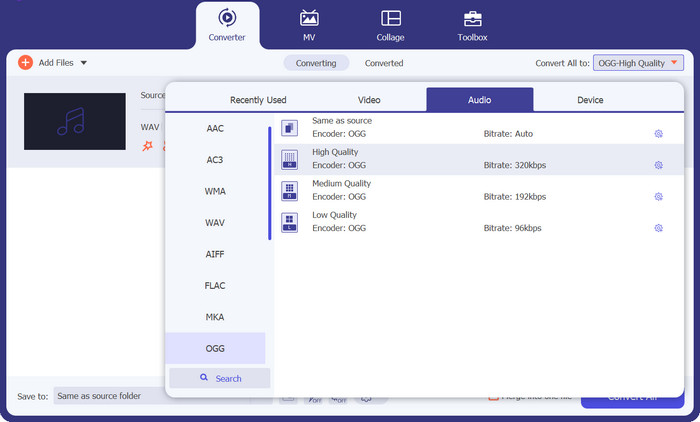
चरण 3. आउटपुट लोकेशन दर्ज करें
Output Folder फ़ील्ड के बगल में स्थित Browse बटन चुनकर, आप वह आउटपुट फ़ोल्डर चुन सकते हैं जहाँ आप कनवर्ट की गई फ़ाइल सहेजना चाहते हैं।.
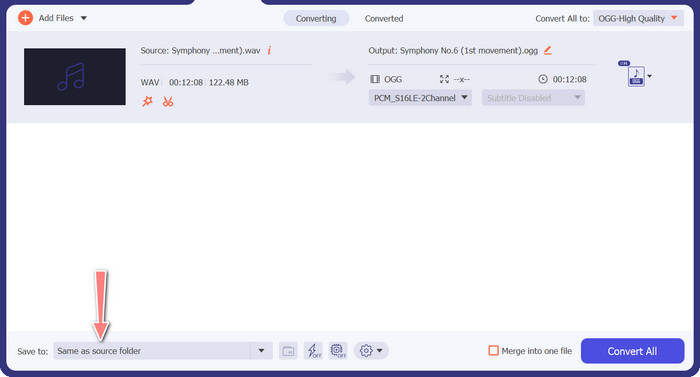
चरण 4. WAV से OGG फ़ाइल कनवर्ज़न
जब आप अपनी सेटिंग्स से संतुष्ट हों, तो कनवर्ज़न शुरू करने के लिए Convert All बटन पर क्लिक करें। FVC Free Video Converter आपकी WAV फ़ाइल को OGG फ़ॉर्मेट में कनवर्ट करना शुरू कर देगा। प्रगति पट्टी (progress bar) यह दिखाती है कि कनवर्ज़न प्रक्रिया कितनी आगे बढ़ चुकी है और अनुमानित शेष समय कितना है।.
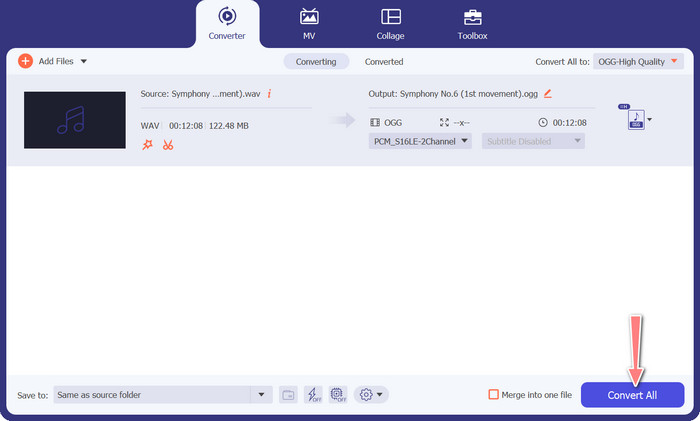
2. मुफ्त ऑडियो कनवर्टर ऑनलाइन
Free Audio Converter Online ऑनलाइन WAV को OGG में कनवर्ट करने के लिए एक शक्तिशाली टूल है। उपयोगकर्ता इसके सरल इंटरफ़ेस का उपयोग करके तेज़ी से WAV या OGG फ़ाइलें जोड़ सकते हैं और उन्हें OGG फ़ॉर्मेट में बदल सकते हैं। कनवर्टर उपयोगकर्ताओं को आउटपुट सेटिंग्स, जैसे बिट रेट और सैंपलिंग रेट, बदलने की भी अनुमति देता है ताकि वे अपनी पसंद के अनुसार OGG फ़ाइलों की गुणवत्ता प्राप्त कर सकें। कनवर्ज़न प्रक्रिया तेज़ और सरल है, और उपयोगकर्ता अपनी बदली हुई फ़ाइलें सीधे वेबसाइट से डाउनलोड कर सकते हैं।.
चरण 1. अपने पसंदीदा वेब ब्राउज़र का उपयोग करके Free Video Converter Online वेबसाइट पर जाएँ।.
चरण 2. Add Files to Convert बटन पर क्लिक करके वह OGG फ़ाइल अपलोड करें जिसे आप WAV में कनवर्ट करना चाहते हैं।.
चरण 3. Audio फ़ॉर्मेट मेन्यू की समर्थित फ़ॉर्मेट की सूची में से आउटपुट फ़ॉर्मेट के रूप में OGG चुनें। आप OGG फ़ाइल के लिए बिटरेट और आउटपुट गुणवत्ता भी निर्दिष्ट कर सकते हैं।.
चरण 4. कनवर्ज़न प्रक्रिया शुरू करने के लिए Convert बटन पर क्लिक करें। इस तरह आप OGG को WAV में ऑनलाइन कनवर्ट कर सकते हैं।.
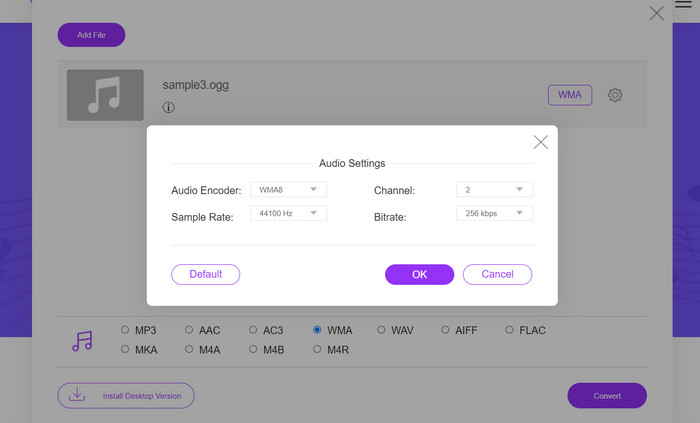
भाग 2. ऑडेसिटी के साथ OGG को WAV या WAV को OGG में बदलें
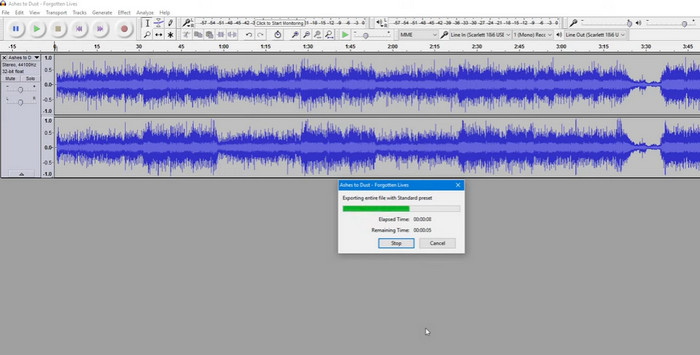
यह टूल एक ओपन-सोर्स ऑडियो एडिटिंग सॉफ्टवेयर है जो MP3 फाइलों को OGG फाइलों में बदल सकता है। ऑडेसिटी रूपांतरण के अलावा विभिन्न प्रकार के संपादन उपकरण और प्रभाव प्रदान करता है, जिससे उपयोगकर्ता अपनी ऑडियो फ़ाइलों को ट्वीक और बढ़ा सकते हैं, जिससे यह ऑडियो संपादन और रूपांतरण संचालन के लिए एक बहुमुखी उपकरण बन जाता है।
इसके अलावा, ऑडेसिटी विंडोज, मैकओएस और लिनक्स के लिए उपलब्ध है, जिससे यह व्यापक रूप से उपलब्ध है। अपनी परिष्कृत क्षमताओं और उपयोग में आसानी के कारण WAV फ़ाइलों को OGG प्रारूप में बदलने की इच्छा रखने वाले किसी भी व्यक्ति के लिए ऑडेसिटी एक अच्छा विकल्प है। यह प्रोग्राम कैसे काम करता है यह जानने के लिए नीचे दी गई गाइड की जांच करें।
चरण 1. अपने पीसी पर Audacity डाउनलोड और इंस्टॉल करें। Audacity खोलें, फिर वह OGG या WAV फ़ाइल खोलें जिसे आप एडिट करना चाहते हैं। आप यह File > Open चुनकर, फिर अपने कंप्यूटर पर WAV फ़ाइल तक नेविगेट करके और उसे चुनकर कर सकते हैं।.
चरण 2. जब WAV फ़ाइल Audacity में खुल जाए, तो File पर क्लिक करें, फिर Export चुनें। Export Audio डायलॉग बॉक्स में, फ़ाइल टाइप के रूप में OGG Vorbis Files चुनें।.
चरण 3. आप Quality स्लाइडर को खींचकर अपनी OGG फ़ाइल की गुणवत्ता समायोजित कर सकते हैं। उच्च गुणवत्ता सेटिंग्स फ़ाइल आकार बढ़ाएँगी, जबकि कम गुणवत्ता सेटिंग्स फ़ाइल आकार घटाएँगी, लेकिन गाने की गुणवत्ता कम हो सकती है।.
पेशेवरों
- इसमें WAV को OGG में बैच में बदलने की क्षमता है।
- Windows, macOS, और Linux पर OGG को WAV में बदलें।
विपक्ष
- कार्यक्रम में एक समर्पित समर्थन समुदाय नहीं है।
भाग 3. वीएलसी के साथ ओजीजी को डब्ल्यूएवी या डब्ल्यूएवी को ओजीजी में कनवर्ट करें
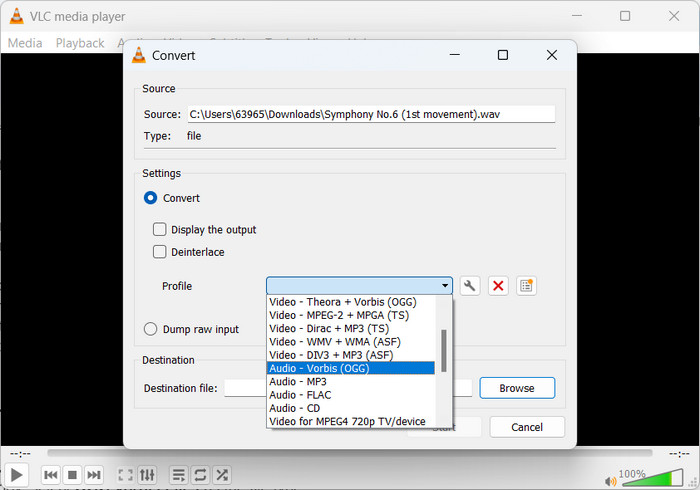
वीएलसी मीडिया प्लेयर एक शक्तिशाली मल्टीमीडिया टूल है जिसका व्यापक रूप से विभिन्न प्रकार की मीडिया फ़ाइलों को चलाने के लिए उपयोग किया जाता है। कई उपयोगकर्ताओं को यह पता नहीं हो सकता है कि मैक टूल के लिए OGG को WAV में बदलने के साथ-साथ यह प्रोग्राम भी अच्छी तरह से काम करता है। अपने बिल्ट-इन कन्वर्टर टूल के साथ, वीएलसी मीडिया प्लेयर जल्दी और आसानी से डब्ल्यूएवी फाइलों को ओजीजी प्रारूप में परिवर्तित कर सकता है, जिससे उपयोगकर्ता विभिन्न प्रारूपों में अपने पसंदीदा संगीत का आनंद ले सकते हैं। आपकी सभी ऑडियो रूपांतरण आवश्यकताओं के लिए, VLC मीडिया प्लेयर एक सीधा और उपयोगकर्ता के अनुकूल समाधान प्रदान करता है, चाहे आप एक फ़ाइल या फ़ाइलों के बैच को परिवर्तित करना चाह रहे हों। MP3 फ़ाइल को OGG फ़ाइल में बदलने का तरीका जानने के लिए इन चरणों का पालन करें:
चरण 1. वीडियो चलाने के लिए VLC चलाएँ और प्लेयर के मेन्यू बार से चुनें। एक ड्रॉपडाउन मेन्यू में Convert / Save विकल्प दिखाई देगा; इसे चुनें।.
चरण 2. Add बटन पर क्लिक करके, File Selection क्षेत्र से वह WAV फ़ाइल चुनें जिसे आप कनवर्ट करना चाहते हैं। जब आप फ़ाइल को कनवर्ट या सेव करने के लिए तैयार हों, तो Convert / Save बटन पर क्लिक करने का समय है।.
चरण 3. Profile ड्रॉपडाउन मेन्यू पर क्लिक करें और अपनी पसंदीदा प्रोफ़ाइल के रूप में Audio - Vorbis (OGG) चुनें।.
चरण 4. कनवर्ट की गई फ़ाइल के लिए नया स्थान और फ़ाइल नाम निर्दिष्ट करने के लिए Destination फ़ाइल सेक्शन के दाईं ओर स्थित Browse बटन पर क्लिक करें। विंडो के निचले हिस्से में Start बटन पर क्लिक करके कनवर्ज़न शुरू किया जा सकता है।.
पेशेवरों
- उपभोक्ता - अनुकूल इंटरफ़ेस।
- यह कई वीडियो और ऑडियो फॉर्मेट को सपोर्ट करता है।
विपक्ष
- संभावित ऑडियो गुणवत्ता हानि।
अधिक पढ़ें:
MP3 को OGG में कनवर्ट करें और बेहतर साउंड क्वालिटी का आनंद लें
डेस्कटॉप या ऑनलाइन पर MP4 को WAV में मुफ़्त में कैसे कन्वर्ट करें [2023]
भाग 4. OGG को WAV में बदलने के बारे में अक्सर पूछे जाने वाले प्रश्न
क्या मैं एक साथ कई WAV फ़ाइलों को OGG प्रारूप में बदल सकता हूँ?
हाँ, FVC वीडियो कन्वर्टर अल्टीमेट सहित कई ऑडियो रूपांतरण सॉफ़्टवेयर, बैच रूपांतरण का समर्थन करते हैं जो आपको एक साथ WAV को OGG प्रारूप में परिवर्तित करने की अनुमति देता है।
क्या ओजीजी फाइलों को वापस डब्ल्यूएवी प्रारूप में परिवर्तित करना संभव है?
हाँ, ऑडियो रूपांतरण सॉफ़्टवेयर का उपयोग करके OGG फ़ाइलों को वापस WAV प्रारूप में परिवर्तित करना संभव है। हालाँकि, ध्यान रखें कि यदि मूल WAV फ़ाइल को OGG स्वरूप में संपीड़ित किया गया था, तो ऑडियो गुणवत्ता प्रभावित हो सकती है।
क्या मैं अपनी WAV फ़ाइलों को OGG के अलावा अन्य ऑडियो प्रारूपों में परिवर्तित कर सकता हूँ?
हाँ, अधिकांश ऑडियो रूपांतरण सॉफ़्टवेयर MP3, AAC, FLAC, और बहुत कुछ सहित ऑडियो प्रारूपों की एक विस्तृत श्रृंखला का समर्थन करता है।
निष्कर्ष
अपनी फ़ाइलों को WAV से OGG फ़ॉर्मेट में कनवर्ट करने से कई लाभ मिल सकते हैं, जैसे फ़ाइल आकार कम होना और उच्च गुणवत्ता वाली ऑडियो को बनाए रखना। साथ ही, सही ऑडियो कनवर्ज़न टूल और थोड़ी-सी जानकारी के साथ, आप आसानी से अपनी ऑडियो फ़ाइलों को उस फ़ॉर्मेट में बदल सकते हैं जो आपकी ज़रूरतों के लिए सबसे उपयुक्त हो।.
-
 विंडोज और मैक के लिए उत्कृष्ट ओजीजी प्लेयर आपको मिस नहीं करना चाहिए
 जब आप अपने पसंदीदा ऑडियो को ओजीजी प्रारूप में खेलना चाहते हैं, खासकर जब कम भंडारण होता है। आप इस लेख के 5 सर्वश्रेष्ठ ओजीजी खिलाड़ियों के बारे में अधिक जान सकते हैं।
-
 MP3 को WAV फॉर्मेट में कैसे बदलें, इस बारे में जानें
 क्या आप जानना चाहते हैं कि MP3 को WAV में कैसे बदलें? निर्धारित करें कि कौन-से उपकरण आपको प्राप्त होने वाले सर्वोत्तम गुणवत्ता रूपांतरण प्रदान करते हैं।
-
 OGG मेटाडेटा को संपादित करने के 2 सर्वोत्तम तरीके आपको मुफ़्त में आज़माने चाहिए
 OGG मेटाडेटा संपादित करने की आवश्यकता है? ठीक है, आप सही सॉफ़्टवेयर का उपयोग करके आसानी से टैग संपादित कर सकते हैं। यदि आपके पास एक भी नहीं है तो इस लेख को पढ़ना अनिवार्य है।
