


 वीडियो कनवर्टर अंतिम
 स्क्रीन अभिलेखी
 वीडियो मरम्मत
 सुरक्षित डाउनलोड
स्पष्ट और स्पष्ट ध्वनि के लिए सर्वश्रेष्ठ WebM से WAV कन्वर्टर्स का अनावरण
क्या आप अपने श्रवण अनुभव को उच्च स्तर तक बढ़ाने के लिए तैयार हैं? हमारे पास आपके लिए एक रोमांचक संभावना है। इस चर्चा में, हम WebM फ़ाइलों को WAV प्रारूप में परिवर्तित करने के क्षेत्र में गहराई से उतरेंगे, जो ध्वनि की गुणवत्ता बढ़ाने और ऑडियो फ़ाइलों के बेहतरीन पहलुओं को निखारने का एक इष्टतम तरीका है।
यह गाइड उन व्यक्तियों की सहायता करने के उद्देश्य से है, जिनकी संगीत, पॉडकास्ट या कंटेंट क्रिएशन में रुचि है, ताकि वे अपने ऑडियो कंटेंट की संभावनाओं का पूर्ण रूप से अनुकूलन कर सकें। अग्रणी ऑडियो कन्वर्टर्स को खोजने, व्यावहारिक जानकारियाँ प्राप्त करने, और उच्च‑गुणवत्ता तथा विशिष्ट श्रव्य आउटपुट की यात्रा शुरू करने के लिए तैयार हो जाएँ। आइए WebM को WAV फ़ॉर्मेट में बदलने की जटिलताओं की जाँच‑पड़ताल शुरू करें।.

भाग 1. WebM को WAV ऑफ़लाइन में बदलने का सर्वोत्तम तरीका
Video Converter Ultimate आपकी WAV से WebM कन्वर्ज़न की निर्बाध जरूरतों के लिए एक बेहतरीन समाधान है। यह शक्तिशाली प्रोग्राम सॉफ़्टवेयर आपके ऑडियो ट्रांसफ़ॉर्मेशन को बेहद आसान बनाने के लिए तैयार किया गया है, जिससे आप WAV फ़ाइलों को लोकप्रिय WebM फ़ॉर्मेट में बिना किसी झंझट के बदल सकते हैं। इसकी कस्टम सेटिंग सुविधा के साथ, उपयोगकर्ता अपनी पसंद के अनुसार आउटपुट को ढाल सकते हैं। इसका मतलब है कि आप बिटरेट, सैम्पल रेट और ऑडियो चैनल जैसे पैरामीटर समायोजित कर सकते हैं।.
मुख्य विशेषताएँ
◆ FVC के उन्नत रूपांतरण एल्गोरिदम उच्च गुणवत्ता वाले रूपांतरण सुनिश्चित करते हैं, जिससे आपकी WAV फ़ाइलों की निष्ठा और स्पष्टता बनी रहती है। इसके परिणामस्वरूप उत्कृष्ट ऑडियो गुणवत्ता का अनुभव प्राप्त होता है।
◆ FVC द्वारा प्रस्तुत बैच रूपांतरण सुविधा एक साथ कई WAV फ़ाइलों को WebM में परिवर्तित करने की अनुमति देती है, जिसके परिणामस्वरूप समय और प्रयास का अधिक कुशल उपयोग होता है।
◆ एफवीसी वीडियो कन्वर्टर अल्टिमेट में ऑडियो और वीडियो प्रारूपों का एक व्यापक स्पेक्ट्रम है जो इसे समायोजित कर सकता है, जो आपकी रूपांतरण आवश्यकताओं को पूरा करने में अनुकूलनशीलता और बहुमुखी प्रतिभा की गारंटी देता है।
स्टेप 1. सॉफ़्टवेयर लॉन्च करें
नीचे दिए गए Free Download बटन को दबाकर टूल प्राप्त करें। ध्यान रखें कि अपने ऑपरेटिंग सिस्टम के अनुसार सही इंस्टॉलर डाउनलोड करें। आप Mac और Windows इंस्टॉलर में से चुन सकते हैं। इसके बाद, अपने कंप्यूटर पर प्रोग्राम लॉन्च करें।.
Free DownloadWindows 7 या बाद के वर्ज़न के लिएसिक्योर डाउनलोड
Free DownloadMacOS 10.7 या बाद के वर्ज़न के लिएसिक्योर डाउनलोड
स्टेप 2. WebM फ़ाइलें जोड़ें
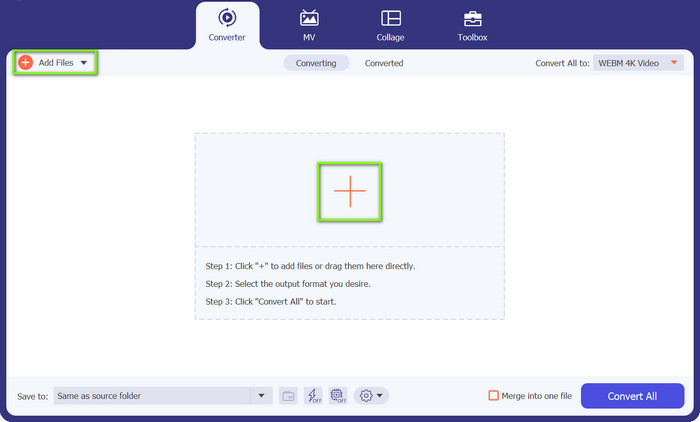
प्रोग्राम के मुख्य इंटरफ़ेस पर दिखने वाले Plus साइन बटन पर क्लिक करें। अगला चरण, अपने कंप्यूटर से वह फ़ाइल चुनें जिसे आप कन्वर्ट करना चाहते हैं। वैकल्पिक रूप से, आप ऊपर बाएँ कोने में मौजूद Add Files बटन पर क्लिक करके WebM फ़ाइलों के किसी फ़ोल्डर को भी अपलोड कर सकते हैं।.
स्टेप 3. आउटपुट फ़ॉर्मेट निर्दिष्ट करें
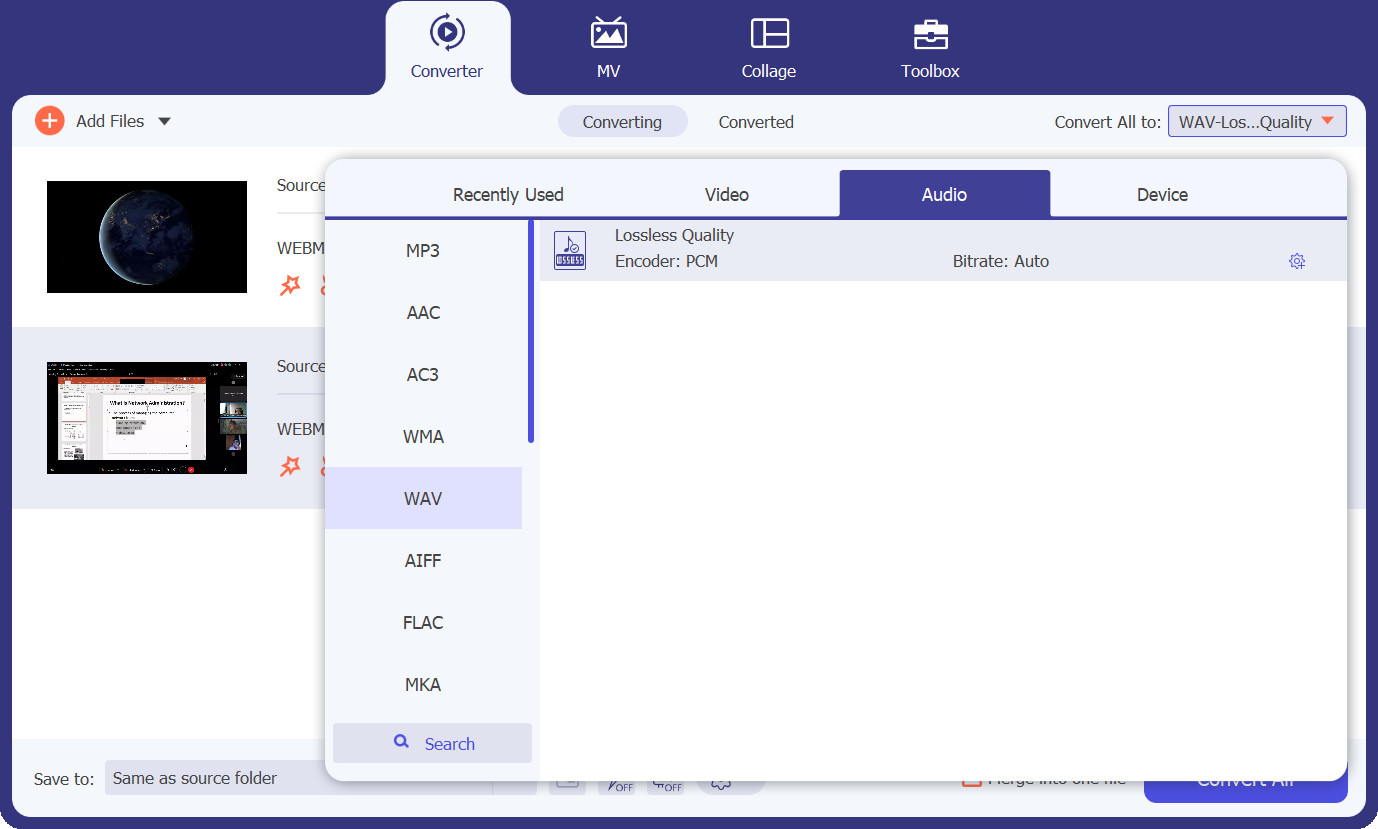
अब Profile टैब पर जाएँ और ड्रॉप‑डाउन बटन पर क्लिक करके फ़ॉर्मेट विकल्पों को खोलें। इसके बाद आपके पास कन्वर्ज़न के लिए तीन मुख्य टैब होंगे। Audio टैब चुनें, WAV फ़ॉर्मेट खोजें और अपनी ज़रूरत के अनुसार गुणवत्ता चुनें।.
स्टेप 4. कन्वर्ज़न शुरू करें
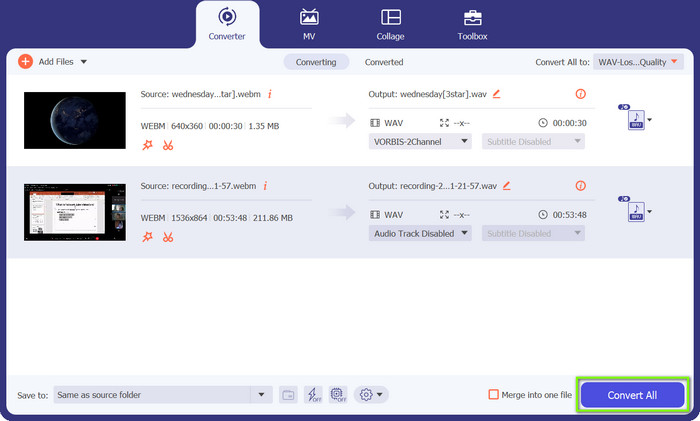
सब कुछ तैयार है। अब आप कन्वर्ज़न प्रक्रिया शुरू कर सकते हैं। ऐसा करने के लिए, नीचे दाएँ कोने में स्थित Convert All बटन पर क्लिक करें, और कन्वर्ज़न प्रक्रिया शुरू हो जाएगी। आप यही प्रक्रिया अपनाकर WAV को WebM में भी कन्वर्ट कर सकते हैं।.
भाग 2. वेबएम को मुफ्त में ऑनलाइन डब्ल्यूएवी में बदलने का सबसे अच्छा तरीका
दूसरी ओर, हमारे पास Free Video Converter Online है, जो सीधे आपके वेब ब्राउज़र से WAV से WebM कन्वर्ज़न के लिए आपकी बिना झंझट वाला समाधान है। इस ऑनलाइन कन्वर्टर की मदद से, आप बिना किसी सॉफ़्टवेयर इंस्टॉलेशन के, अपनी WAV फ़ाइलों को तेज़ी से और आसानी से लोकप्रिय WebM फ़ॉर्मेट में बदल सकते हैं। इसी तरह, यह टूल आपको अपनी ऑडियो या वीडियो फ़ाइलों के पैरामीटर कस्टमाइज़ करने की सुविधा देता है। इस WebM से WAV कन्वर्टर के बारे में अधिक जानने के लिए नीचे दिए गए मुख्य फीचर्स देखें।.
मुख्य विशेषताएँ
◆ ऑनलाइन कनवर्टर एक उपयोगकर्ता-अनुकूल इंटरफ़ेस का दावा करता है जो रूपांतरण प्रक्रिया को सुविधाजनक बनाता है, जो सीमित तकनीकी दक्षता वाले उपयोगकर्ताओं के लिए इसे सरल बनाता है।
◆ तेज़ और प्रभावी: मुफ़्त FVC वीडियो कनवर्टर ऑनलाइन उच्च-गुणवत्ता वाले आउटपुट और तेज़ प्रोसेसिंग समय को बनाए रखते हुए WAV फ़ाइलों को WebM प्रारूप में कुशल रूपांतरण प्रदान करता है।
◆ आपकी फ़ाइलों की गोपनीयता और सुरक्षा अत्यंत महत्वपूर्ण है और इसकी गारंटी है। ऑनलाइन FVC वीडियो कनवर्टर रूपांतरण के दौरान उपयोगकर्ता डेटा की सुरक्षा की गारंटी देता है।
स्टेप 1. अपने वेब ब्राउज़र का उपयोग करके Free FVC Video Converter Online वेबसाइट पर जाएँ।.
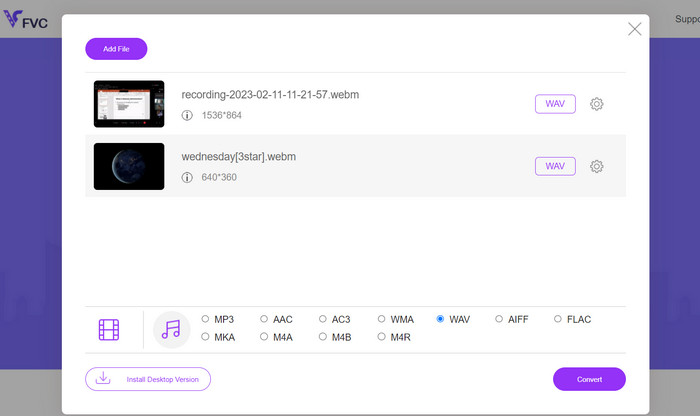
स्टेप 2. अपने लोकल स्टोरेज से WAV फ़ाइल अपलोड करने के लिए Add Files to Convert बटन पर क्लिक करें। अगला चरण, इच्छित आउटपुट फ़ॉर्मेट के रूप में WAV चुनें। वैकल्पिक रूप से, अपनी पसंद के अनुसार बिटरेट, रेज़ोल्यूशन या ऑडियो क्वालिटी जैसी अतिरिक्त सेटिंग्स समायोजित करें।.
स्टेप 3. कन्वर्ज़न प्रक्रिया शुरू करने के लिए Convert बटन दबाएँ। कन्वर्ज़न पूरा होने पर, आउटपुट फ़ाइलें स्वतः डाउनलोड होकर आपके कंप्यूटर के फ़ोल्डर में सहेज ली जाएँगी।.
भाग 3. FFmpeg के साथ WebM को WAV में बदलें
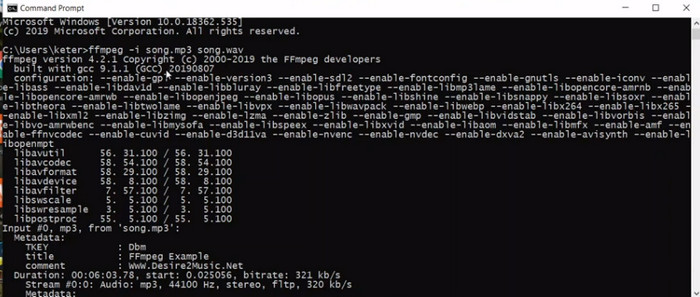
FFmpeg एक बहुमुखी कमांड-लाइन टूल है जो आपको आसानी से WebM को WAV में बदलने में सक्षम बनाता है। एक शक्तिशाली मल्टीमीडिया ढांचे के रूप में, FFmpeg ऑडियो और वीडियो रूपांतरण, हेरफेर और स्ट्रीमिंग सहित अपनी विस्तृत क्षमताओं के लिए प्रसिद्ध है। FFmpeg के साथ, आप विभिन्न कार्यों को करने के लिए इसके कमांड-लाइन इंटरफ़ेस का उपयोग कर सकते हैं, जिसमें आपकी WebM फ़ाइलों को WAV प्रारूप में परिवर्तित करना शामिल है, जो अपने उच्च-गुणवत्ता, असंपीड़ित ऑडियो के लिए जाना जाता है।
स्टेप 1. अपने विशेष ऑपरेटिंग सिस्टम के लिए आधिकारिक प्रलेखन का पालन करते हुए, अपने सिस्टम पर FFmpeg डाउनलोड और इंस्टॉल करें।.
स्टेप 2. कमांड‑लाइन इंटरफ़ेस तक पहुँचने के लिए कमांड प्रॉम्प्ट (Windows) या टर्मिनल (macOS/Linux) लॉन्च करें। कन्वर्ज़न कमांड को निष्पादित करें: अपने WebM फ़ाइल को WAV में बदलने के लिए निम्न कमांड संरचना का उपयोग करें: ffmpeg -i input.webm output.wav.
स्टेप 3. input.webm को अपनी WebM फ़ाइल के पथ और फ़ाइल नाम से बदलें, और output.wav को अपनी कन्वर्ट की गई WAV फ़ाइल के लिए इच्छित फ़ाइल नाम और लोकेशन से बदलें।.
स्टेप 4. कमांड को निष्पादित करने और WebM से WAV कन्वर्ज़न प्रक्रिया शुरू करने के लिए Enter दबाएँ। इस तरह FFmpeg, WebM को WAV में कन्वर्ट करता है।.
अधिक पढ़ें:
तेज़ी से कन्वर्ट करने के लिए आपको ज़रूर इस्तेमाल करने चाहिए ये बेहतरीन WebM से MKV कन्वर्टर्स
FLAC और WAV को आसानी से कैसे कन्वर्ट करें (फ्री और पेड)
भाग 4. प्रस्तुत कार्यक्रमों की तुलना
नीचे दी गई तुलना तालिका के माध्यम से यह निर्धारित करने के लिए कि कौन सा कनवर्टर आपकी आवश्यकताओं के लिए सबसे उपयुक्त है, अपनी विशिष्ट आवश्यकताओं, प्राथमिकताओं और तकनीकी विशेषज्ञता के स्तर पर विचार करें।
| पहलू | वीडियो कनवर्टर अंतिम | मुफ्त वीडियो कनवर्टर ऑनलाइन | FFmpeg |
| अनुकूलन विकल्प | आउटपुट सेटिंग्स के अनुकूलन की अनुमति देता है | सीमित अनुकूलन विकल्प | व्यापक अनुकूलन विकल्प |
| रूपांतरण की गति | कुशल और तेज़ रूपांतरण | इंटरनेट कनेक्शन पर निर्भर करता है | सिस्टम प्रदर्शन पर निर्भर करता है |
| बैच रूपांतरण | फ़ाइलों के बैच रूपांतरण का समर्थन करता है | फ़ाइलों के बैच रूपांतरण का समर्थन करता है | आदेश निष्पादन पर निर्भर करता है |
| क्रॉस-प्लेटफ़ॉर्म संगतता | विंडोज़, मैकओएस और लिनक्स के लिए उपलब्ध है | किसी भी वेब ब्राउज़र पर पहुंच योग्य | विभिन्न प्लेटफार्मों के लिए उपलब्ध है |
| ऑडियो गुणवत्ता संरक्षण | उच्च गुणवत्ता वाला ऑडियो रूपांतरण सुनिश्चित करता है | सेटिंग्स के आधार पर गुणवत्ता भिन्न हो सकती है | ऑडियो गुणवत्ता बरकरार रखता है |
भाग 5. WebM को WAV में परिवर्तित करने के बारे में अक्सर पूछे जाने वाले प्रश्न
क्या मैं रूपांतरण के दौरान ऑडियो सेटिंग्स को अनुकूलित कर सकता हूँ?
वीडियो कन्वर्टर अल्टीमेट और एफएफएमपीईजी व्यापक अनुकूलन विकल्प प्रदान करते हैं, जिससे आप नमूना दर, बिटरेट आदि जैसे मापदंडों को समायोजित कर सकते हैं। मुफ्त वीडियो कनवर्टर ऑनलाइन में सीमित अनुकूलन विकल्प हो सकते हैं।
क्या WebM को WAV में परिवर्तित करने में बहुत अधिक समय लगता है?
रूपांतरण समय विभिन्न कारकों पर निर्भर करता है, जिसमें फ़ाइल का आकार, आपके कंप्यूटर या इंटरनेट कनेक्शन की गति (ऑनलाइन टूल के लिए), और कनवर्टर की दक्षता शामिल है। आम तौर पर, रूपांतरण प्रक्रिया अपेक्षाकृत त्वरित होती है।
क्या मैं किसी भी ऑपरेटिंग सिस्टम पर WebM को WAV में बदल सकता हूँ?
हां, एफवीसी वीडियो कन्वर्टर अल्टिमेट और एफएफएमपीईजी जैसे कन्वर्टर्स विंडोज, मैकओएस और लिनक्स सहित कई ऑपरेटिंग सिस्टम के लिए उपलब्ध हैं, जो विभिन्न प्लेटफार्मों पर अनुकूलता सुनिश्चित करते हैं।
निष्कर्ष
जब आपके पास सही कन्वर्टर होता है, तो आप आसानी से WebM को WAV में कन्वर्ट कर सकते हैं, और बेहतर ऑडियो क्वालिटी, बहुआयामी उपयोगिता और संगतता को अनलॉक कर सकते हैं। बेदाग ऑडियो के फ़ायदे उठाएँ और अपनी कन्वर्ट की गई फ़ाइलों के साथ नई संभावनाओं का अन्वेषण करें।.
-
 WMV कन्वर्टर्स के लिए शीर्ष 3 सर्वश्रेष्ठ वेबएम आपको चूकना नहीं चाहिए
 WebM फ़ाइल को WMV फ़ाइल में बदलने का तरीका खोज रहे हैं? हमने आज बाजार में कुछ प्रसिद्ध कन्वर्टर्स की कोशिश की और उनमें से सबसे अच्छा और उपयोग करने में आसान चुना।
-
 इमर्सिव ऑडियो प्लेबैक के लिए एमकेवी को डब्ल्यूएवी में बदलें
 सर्वश्रेष्ठ MKV से WAV कन्वर्टर्स की खोज करें जो असाधारण ध्वनि गुणवत्ता प्रदान करते हैं। निष्पक्ष समीक्षाएं पढ़ें और अपनी ऑडियो फाइलों को सहजता से बदलने के लिए सही उपकरण खोजें।
-
 WAV प्लेयर - Android, iPhone, PC और Mac के लिए शीर्ष 5 WAV प्लेयर ऐप
 एंड्रॉइड फोन पर WAV फाइलें कैसे खेलें? कौन सा खिलाड़ी WAV खेल सकता है? यह पोस्ट एंड्रॉइड, आईफोन, मैक और पीसी के लिए 5 सर्वश्रेष्ठ मुफ्त WAV खिलाड़ियों को साझा करता है।
