


 वीडियो कनवर्टर अंतिम
 स्क्रीन अभिलेखी
 वीडियो मरम्मत
 सुरक्षित डाउनलोड
[फिक्स्ड] त्रुटि कोड 102630 को ठीक करने के लिए त्वरित और मैनुअल गाइड
क्या आपने कभी अपना पसंदीदा वीडियो देखने की कोशिश करते समय एरर कोड 102630 की झुंझलाहट झेली है? हम समझते हैं; यह ऐसा है जैसे मनोरंजन के बीच में ही कोई पेचीदा पहेली आ खड़ी हो जाए। लेकिन तनाव लेने की ज़रूरत नहीं है – हम आपके साथ हैं! इस विस्तृत गाइड में, हम न सिर्फ़ आपको इस तरह के वीडियो एरर से निपटने के लिए एक आसान और असरदार समाधान देंगे, बल्कि पूरे ट्रबलशूटिंग प्रोसेस से भी गुजरेंगे, ताकि समस्या बिना झंझट के हल हो सके। तो अगर आप इस डिजिटल रुकावट के कारण सिर खुजाते‑खुजाते थक चुके हैं और अपने पसंदीदा शो मिस कर रहे हैं, तो आगे पढ़ते रहें और वह उपाय जानें जो आपकी चिंता खत्म कर देगा। आइए शुरू करें और मिलकर इन वीडियो समस्याओं को हमेशा के लिए अलविदा कहें!

भाग 1. त्रुटि कोड 102630 क्या है
त्रुटि कोड 102630 एक त्रुटि है जो आम तौर पर ऑनलाइन देखने या स्ट्रीमिंग करते समय दिखाई देती है जो दर्शकों को परेशान करती है। इस वीडियो त्रुटि के प्रकट होने के संभावित कारण निम्नलिखित हैं:
नेटवर्क कनेक्टिविटी से जुड़ी समस्याएँ।
त्रुटि कोड 102630 डिवाइस के नेटवर्क कनेक्शन में समस्या का संकेत हो सकता है। यह इंटरनेट सेवा प्रदाता, कमज़ोर या अस्थिर वाई-फाई सिग्नल या नेटवर्क हार्डवेयर से जुड़ी समस्याओं के कारण हो सकता है।
सर्वर या सेवा का अनुपलब्ध होना।
यह त्रुटि तब प्रकट हो सकती है जब आप जिस सर्वर या सेवा तक पहुँचने का प्रयास कर रहे हैं वह अस्थायी रूप से बंद है या रखरखाव के दौर से गुज़र रही है। आम तौर पर, सर्वर या सेवा के वापस ऑनलाइन होने पर यह समस्या अपने आप हल हो जाती है।
सॉफ़्टवेयर या सिस्टम की खराबी।
संभावित कारण सॉफ्टवेयर या सिस्टम में ही निहित है, जहां बग, गड़बड़ियां या संगतता संबंधी समस्याएं त्रुटि कोड 102630 को ट्रिगर कर सकती हैं। इसका कारण अनुचित कॉन्फ़िगरेशन या दूषित फ़ाइलें हो सकती हैं।
फ़ायरवॉल या सुरक्षा सेटिंग्स।
त्रुटि कोड 102630 फ़ायरवॉल या सुरक्षा सेटिंग के कारण सर्वर या सेवा से कनेक्शन बाधित होने का परिणाम हो सकता है। यह अत्यधिक सख्त सुरक्षा कॉन्फ़िगरेशन या अन्य सॉफ़्टवेयर या सेटिंग के साथ टकराव के कारण हो सकता है।
टाइमआउट या रिक्वेस्ट फेल होना।
क्लाइंट और सर्वर के बीच संचार व्यवधान, जो टाइमआउट या अनुरोध विफलता के रूप में प्रकट होता है, त्रुटि कोड 102630 को जन्म दे सकता है। यह धीमी नेटवर्क गति, भीड़भाड़ या सर्वर की प्रतिक्रिया से संबंधित समस्याओं जैसे कारकों से प्रभावित हो सकता है।
अस्वीकरण: यह मानना ज़रूरी है कि ये केवल सामान्य संभावनाएँ हैं, और एरर कोड 102630 का वास्तविक कारण उपयोग किए जा रहे सॉफ़्टवेयर या सिस्टम की विशिष्टता के आधार पर बदल सकता है। मूल कारण की पहचान आम तौर पर एक लक्षित दृष्टिकोण और उस खास संदर्भ पर विचार करने की मांग करती है जिसमें यह एरर आता है।.
भाग 2. त्रुटि कोड 102630 को ठीक करने का त्वरित तरीका
टूटी या चलने लायक नहीं रह गई वीडियो फ़ाइलों की मरम्मत, जो अलग‑अलग कारणों से (जैसे वीडियो एरर कोड 102630 आदि) प्ले नहीं हो पा रही हों, को Video Repair टूल की मदद से प्रभावी ढंग से हल किया जा सकता है। इसके लिए सबसे अच्छा टूल है FVC Video Repair। यह टूल नवीनतम AI एल्गोरिदम का उपयोग करते हुए पूरी तरह स्वचालित पुनर्स्थापन प्रक्रिया प्रदान करता है, और MP4, MOV, तथा 3GP जैसे फ़ॉर्मैट में हाई रेज़ोल्यूशन, फ़्रेम रेट और बिटरेट को बरकरार रखता है। इसके आसान‑से‑समझ आने वाले इंटरफ़ेस, उच्च रिपेयर सफलता दर और रिपेयर के बाद फ़ाइल की पुष्टि के लिए प्रीव्यू सुविधा के चलते, इसमें बहुत कम मेहनत करनी पड़ती है। इसे इस्तेमाल करने के लिए नीचे दिए गए चरणों का पालन करें:
चरण 1. सबसे पहले, इसकी आधिकारिक वेबसाइट पर जाएँ और फ़्री डाउनलोड बटन पर क्लिक करें।.
फ्री डाउनलोडWindows 7 या उससे बाद के लिएसुरक्षित डाउनलोड
फ्री डाउनलोडMacOS 10.7 या उससे बाद के लिएसुरक्षित डाउनलोड
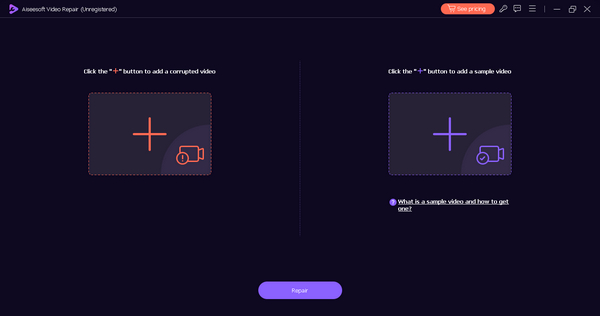
चरण 2. अब, टूल को चलाएँ और 102630 एरर कोड वाली वीडियो जोड़ने के लिए Red Plus बटन पर क्लिक करें, फिर सैंपल वीडियो जोड़ने के लिए Blue Plus बटन पर क्लिक करें।.
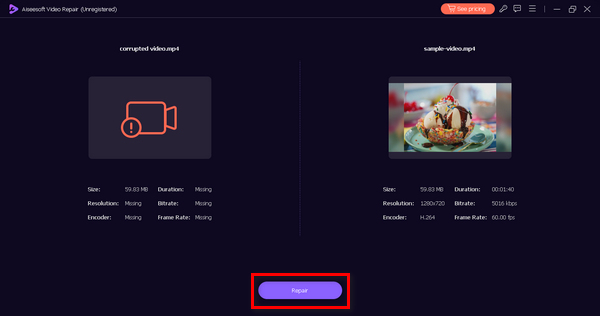
चरण 3. रिपेयर प्रक्रिया शुरू करने के लिए Repair बटन पर क्लिक करें।.
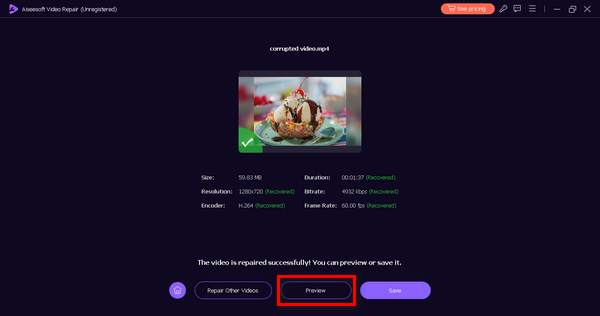
चरण 4. अंत में, Preview बटन पर क्लिक करके जाँचें कि 102630 एरर कोड सफलतापूर्वक हल हो गया है या नहीं। अगर सब ठीक लगे, तो आप फ़ाइल को सेव कर सकते हैं।.
FVC वीडियो रिपेयर वास्तव में एक बहुमुखी उपकरण है, जो किसी भी तरह की वीडियो समस्या और परेशानी को दूर करता है। और इसके आसान इंटरफ़ेस के साथ, हर कोई इसे बिना किसी उलझन और तनाव के इस्तेमाल कर सकता है।
भाग 3. त्रुटि कोड 102630 को ठीक करने के लिए मैन्युअल तरीके
त्रुटि कोड 102630 को ठीक करने के लिए आप निम्नलिखित मैन्युअल तरीके अपना सकते हैं:
विधि 1: इंटरनेट कनेक्शन की जाँच करना
वीडियो स्ट्रीमिंग के लिए एक स्थिर इंटरनेट कनेक्शन महत्वपूर्ण है। त्रुटि कोड 102630 तब हो सकता है जब कनेक्शन कमज़ोर या अस्थिर हो। एक मजबूत इंटरनेट कनेक्शन की जाँच करके और सुनिश्चित करके, आप प्लेबैक के दौरान रुकावटों की संभावना को कम करते हैं, जिससे त्रुटि को प्रभावी ढंग से संबोधित किया जा सकता है।
इसे ठीक करने के लिए, आपको ऑनलाइन किसी स्पीड टेस्ट टूल से अपनी इंटरनेट कनेक्शन की जाँच करनी होगी, और अगर स्पीड धीमी हो, तो अपने राउटर या इंटरनेट कनेक्शन को रीस्टार्ट करने की कोशिश करें। यह साधारण‑सा कदम अक्सर चीजों को बेहतर बना देता है। आप चाहें तो स्ट्रीमिंग अनुभव बेहतर करने के लिए किसी दूसरे नेटवर्क पर भी स्विच कर सकते हैं। प्लेबैक के दौरान रुकावट से बचने और एरर कोड 224002, 102630 वगैरह जैसी समस्याओं से निपटने के लिए मज़बूत और स्थिर कनेक्शन बेहद ज़रूरी है। हालाँकि, अगर आपका इंटरनेट कनेक्शन अच्छा है और फिर भी यह एरर कोड आता रहता है, तो विधि 2 पर जाएँ।.
विधि 2: वेब ब्राउज़र अपडेट करना
अपने वेब ब्राउज़र को अपडेट करना ज़रूरी है, क्योंकि नए वर्शन में अक्सर बग फ़िक्स और सुधार शामिल होते हैं। ये अपडेट विभिन्न वेबसाइटों और स्ट्रीमिंग सेवाओं के साथ ब्राउज़र की संगतता को बढ़ाते हैं, जिससे त्रुटि कोड 102630 जैसी त्रुटियों का सामना करने की संभावना कम हो जाती है।
अपने वेब क्रोम ब्राउज़र को अपडेट करने के लिए, नीचे दिए गए चरणों का पालन करें:
चरण 1. अपने Chrome पर, दाएँ ऊपरी कोने में दिए गए Customize Control बटन पर क्लिक करें।.
चरण 2. इसके बाद Help पर जाएँ।.
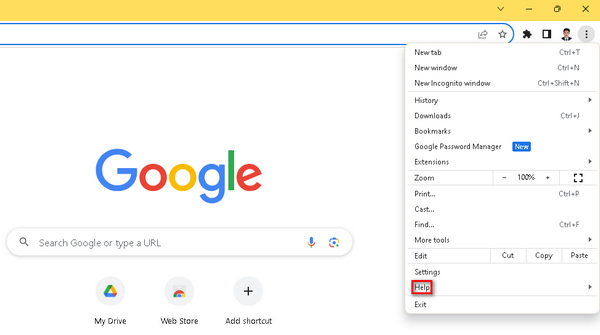
चरण 3. फिर About Google Chrome चुनें। अब, अगर कोई नया वर्ज़न उपलब्ध है, तो आपको Update Google Chrome का विकल्प दिखाई देगा, जिस पर क्लिक करना होगा। स्क्रीन पर दिए गए निर्देश आपका मार्गदर्शन करेंगे। अगर अपडेट उपलब्ध नहीं है, तो आपको Relaunch बटन दिखाई देगा।.
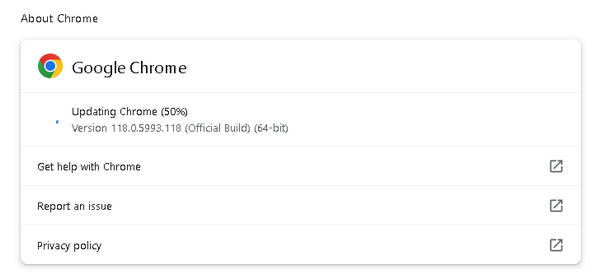
पुराने ब्राउज़र का इस्तेमाल करने से अक्सर ऐसी कम्पैटिबिलिटी समस्याएँ पैदा हो जाती हैं जिन्हें अपडेट करने से दूर किया जा सकता है। और यह भी कि Chrome पर वीडियो न चलने की समस्या को दूर करने का यह एक सार्वभौमिक समाधान है। इसलिए जब भी अपडेट उपलब्ध हो, Chrome को अपडेट करना ज़रूरी है।.
विधि 3: ब्राउज़र एक्सटेंशन और ऐड-ऑन बंद करना
ब्राउज़र एक्सटेंशन और ऐड-ऑन कभी-कभी वीडियो स्ट्रीमिंग सहित वेबसाइटों और सेवाओं के सामान्य कामकाज को बर्बाद कर सकते हैं। इन एक्सटेंशन और स्ट्रीमिंग प्लेटफ़ॉर्म के बीच टकराव त्रुटि कोड 102630 को ट्रिगर कर सकता है। ब्राउज़र एक्सटेंशन और ऐड-ऑन को बंद या अक्षम करके, आप हस्तक्षेप के संभावित स्रोतों को समाप्त करते हैं, वीडियो प्लेबैक को सुचारू बनाते हैं और त्रुटि को हल करते हैं।
Chrome में एक्सटेंशन हटाने के चरण:
चरण 1. अपने Chrome पर जाएँ।.
चरण 2. Customize Control बटन पर क्लिक करें और Extensions खोजें।.
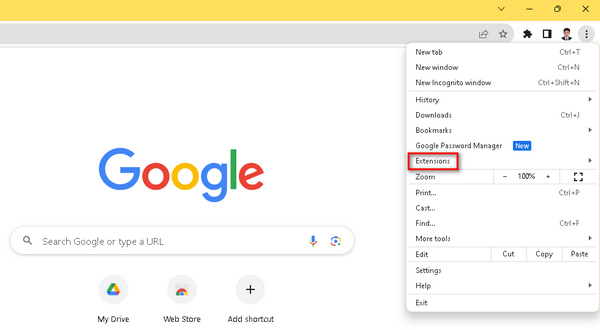
चरण 3. वहाँ आपको एक्सटेंशन और ऐड‑ऑन की एक सूची मिलेगी, जिन्हें आप अपनी मर्ज़ी से हटा सकते हैं।.
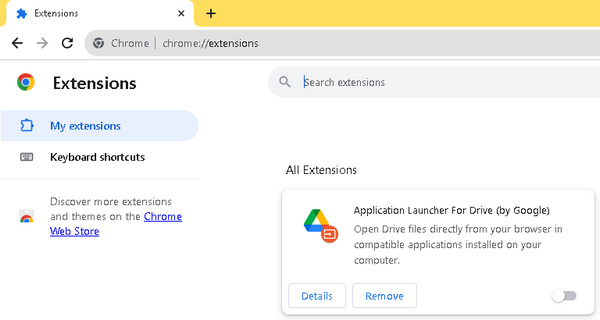
अनावश्यक थर्ड-पार्टी एक्सटेंशन वीडियो प्लेयर के साथ टकराव की संभावना रखते हैं, जिससे प्लेबैक के दौरान व्यवधान उत्पन्न होता है। त्रुटि कोड 102630 जैसे वीडियो त्रुटि कोड से निपटने के दौरान, यह समझना आवश्यक है कि ये एक्सटेंशन व्यवधान में योगदान कर सकते हैं। अपने स्ट्रीमिंग अनुभव को बेहतर बनाने के लिए, न केवल आपको अपना ब्राउज़र अपडेट करना चाहिए, बल्कि किसी भी अनावश्यक एक्सटेंशन को हटाना भी उतना ही महत्वपूर्ण है।
भाग 4. त्रुटि कोड 102630 के बारे में अक्सर पूछे जाने वाले प्रश्न
Iview पर त्रुटि कोड 102630 क्या है?
iview पर त्रुटि कोड 102630 आमतौर पर वीडियो प्लेबैक समस्या को इंगित करता है। यह त्रुटि विभिन्न कारकों, जैसे अस्थिर इंटरनेट कनेक्शन, सर्वर समस्याओं या संगतता समस्याओं के कारण उत्पन्न हो सकती है। इसे हल करने के लिए, अपने इंटरनेट कनेक्शन की जाँच करने, अपने ब्राउज़र को अपडेट करने और दृश्य की आवश्यकताओं के साथ संगतता सुनिश्चित करने पर विचार करें।
मुझे वीडियो प्लेबैक त्रुटियाँ क्यों मिलती रहती हैं?
लगातार वीडियो प्लेबैक त्रुटियाँ कई समस्याओं से उत्पन्न हो सकती हैं। सामान्य कारणों में अस्थिर इंटरनेट कनेक्शन, पुराने ब्राउज़र संस्करण, असंगत वीडियो प्रारूप या ब्राउज़र एक्सटेंशन के साथ टकराव शामिल हैं। इसे संबोधित करने के लिए, अपने इंटरनेट कनेक्शन की जाँच करने, अपने ब्राउज़र को अपडेट करने और अनावश्यक ब्राउज़र एक्सटेंशन को बंद करने जैसे समस्या निवारण चरणों का प्रयास करें।
यूट्यूब पर त्रुटि कोड 102630 क्या है?
YouTube पर त्रुटि कोड 102630 एक प्लेबैक त्रुटि है जो नेटवर्क समस्याओं, ब्राउज़र समस्याओं या एक्सटेंशन के साथ टकराव के कारण हो सकती है। इसे हल करने के लिए, अपने इंटरनेट कनेक्शन की जाँच करें, अपने ब्राउज़र को अपडेट करें और ब्राउज़र एक्सटेंशन को अक्षम या अपडेट करने पर विचार करें। इसके अतिरिक्त, यह सुनिश्चित करना कि आपका डिवाइस YouTube की सिस्टम आवश्यकताओं को पूरा करता है, इस त्रुटि को रोकने में मदद कर सकता है।
निष्कर्ष
इस गाइड के साथ एरर कोड 102630 को समझना और सुलझाना आसान हो जाता है। FVC Video Repair जैसे स्वचालित समाधानों से लेकर मैन्युअल तरीकों तक, उपयोगकर्ताओं को एक व्यापक रणनीति मिलती है। गहन जानकारी और सोचे‑समझे ट्रबलशूटिंग कदमों से लैस यह गाइड उपयोगकर्ताओं को बिना रुकावट के डिजिटल मनोरंजन का आनंद लेने में सक्षम बनाती है।.
-
 इन 3 सिद्ध तरीकों से त्रुटि 0xc00d36c4 को ठीक करें [2024]
 वीडियो चलाते समय 0xc00d36c4 वीडियो त्रुटि कोड का अनुभव कर रहे हैं? इसे हल करने के त्वरित चरणों के लिए हमारी मार्गदर्शिका का पालन करें और निर्बाध वीडियो प्लेबैक का आनंद लें।
-
 वीडियो त्रुटि कोड 224002 को प्रभावी ढंग से जल्दी से कैसे ठीक करें
 क्या आपको त्रुटि कोड 224002 को जल्दी से ठीक करने का सबसे अच्छा समाधान खोजने में कठिनाई हो रही है? इस लेख में उन्हें जानें और उन्हें आसानी से अपने आप ठीक करें।
-
 वीडियो 0xc00d36e5 त्रुटि को शीघ्रता और प्रभावी ढंग से ठीक करें
 वीडियो चलाने का प्रयास करते समय 0xc00d36e5 त्रुटि से जूझ रहे हैं? एक सहज वीडियो प्लेबैक अनुभव के लिए इस त्रुटि को ठीक करने के सरल लेकिन प्रभावी तरीके जानें।
