


 वीडियो कनवर्टर अंतिम
 स्क्रीन अभिलेखी
 वीडियो मरम्मत
आईफोन, एंड्रॉइड और ऑनलाइन पर इमोजी को बड़ा कैसे बनाएं
क्या इमोजी को वाकई बड़ा करना संभव है? शायद आप में से किसी ने कभी इस बारे में सोचा होगा, और इसका जवाब है हाँ। इमोजी बड़े दिखाई दे सकते हैं क्योंकि उन्हें इमेज या कैरेक्टर की तरह इस्तेमाल किया जाता है, जिन्हें उनके इस्तेमाल के हिसाब से छोटा किया जा सकता है।
इमोजी भावनाएँ व्यक्त करने का एक मज़ेदार तरीका हैं, लेकिन कभी‑कभी वे बहुत छोटे दिखाई देते हैं, खासकर ऐसी चैट या पोस्ट में जहाँ आप चाहते हैं कि वे ज़्यादा नज़र आएँ। सौभाग्य से, इमोजी को बड़ा बनाने के कई तरीके हैं, चाहे आप iPhone या Android पर मैसेज कर रहे हों या ऑनलाइन कोई इमोजी बना रहे हों। यह सीखना यक़ीनन मज़ेदार और आसान होगा, तो चलिए शुरू करते हैं और देखते हैं कि आप सीधे अपने डिवाइस से इमोजी कैसे बड़े कर सकते हैं।.

भाग 1. ऑनलाइन इमोजी को बड़ा कैसे करें
चूँकि इमोजी को बड़ा करना संभव है, इसलिए यहाँ पहला तरीका बताया गया है जिससे आप उन्हें आसानी से बड़ा कर सकते हैं। कई ऑनलाइन टूल उपलब्ध हैं जो इमेज को बड़ा करने की क्षमता रखते हैं। इमोजी को इमेज ही माना जाता है, इसलिए इस टूल से उपयोगकर्ता कुछ ही क्लिक में अपने इमोजी को बड़ा कर सकते हैं।
FVC Free Image Upscaler नाम से ही स्पष्ट है कि यह एक ऑनलाइन इमेज अपस्केलर टूल है जो उपयोगकर्ताओं को अपनी फ़ोटो को बड़ा करने की सुविधा देता है। इसमें इमोजी को उनके सामान्य आकार से ज़्यादा बड़ा करना भी शामिल है।.
मुख्य विशेषताएं:
• छवि अपस्केलिंग के लिए उन्नत एआई रिज़ॉल्यूशन तकनीक।
• धुंधली छवि खंडों की स्वचालित पहचान और संवर्द्धन।
• खोए हुए पिक्सल, रंग, बनावट और बारीक विवरणों की सटीक बहाली।
• पोर्ट्रेट विशेषताओं की उत्कृष्ट पहचान और प्राकृतिक बहाली।
• छवि विस्तार विकल्पों में बहुमुखी प्रतिभा: उच्च गुणवत्ता के साथ 2×, 4×, या 8×।
• निर्बाध छवि संवर्धन और विस्तार के लिए उपयोगकर्ता के अनुकूल ऑनलाइन इंटरफ़ेस।
FVC फ्री इमेज अपस्केलर के साथ इमोजी को बड़ा बनाने के चरण:
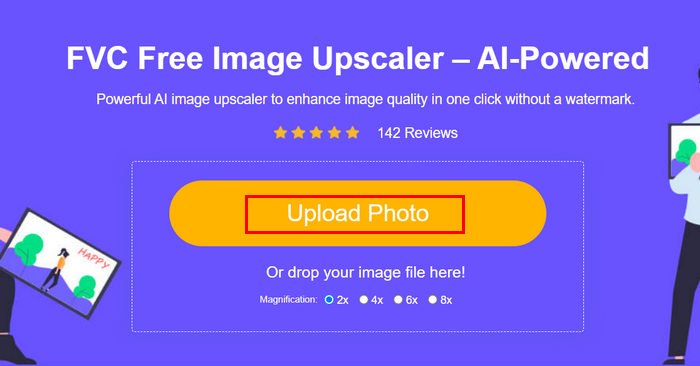
स्टेप 1. सबसे पहले आधिकारिक FVC Free Image Upscaler वेबसाइट पर जाएं।.
स्टेप 2. अब, Upload Photo बटन पर क्लिक करें और वह इमेज चुनें जिसे आप एन्हांस करना चाहते हैं।.
स्टेप 3. अपलोड करने के बाद, टूल आपकी इमेज का प्रीव्यू दिखाएगा। विवरण को नज़दीक से देखने के लिए Magnifier विकल्प का उपयोग करें।.
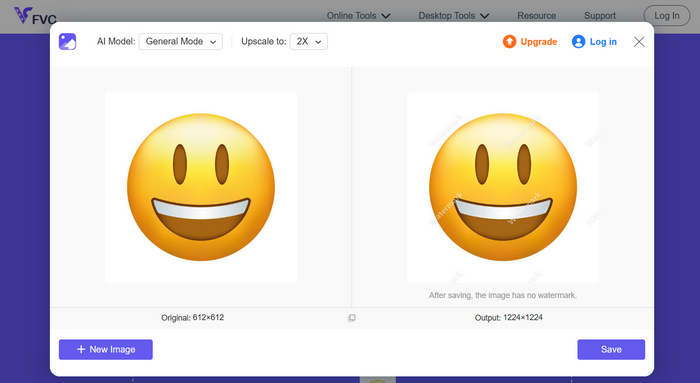
स्टेप 4. जब आप प्रीव्यू से संतुष्ट हों, तो अपनी एन्हांस्ड इमेज डाउनलोड करने के लिए Save बटन पर क्लिक करें।.
FVC इमेज अपस्केलर के साथ, आप कुछ ही क्लिक में अपने इमोजीज़ को आसानी से बड़ा कर सकते हैं। इसके अलावा, इसकी सरलता और सहज इंटरफ़ेस इसे किसी भी प्रकार के उपयोगकर्ता के लिए एक उपयोगी टूल बनाता है।
रुचि हो तो यह जानने के लिए यहाँ क्लिक करें कि तस्वीर से इमोजी कैसे हटाएँ।.
भाग 2. iPhone पर इमोजी को बड़ा कैसे करें
अगर आप किसी थर्ड-पार्टी ऐप का इस्तेमाल नहीं करना चाहते, तो आप अपने iPhone की सेटिंग के ज़रिए सीधे अपने इमोजी को बड़ा कर सकते हैं। इस तरीके से डिस्प्ले का साइज़ थोड़ा बढ़ जाता है, जिससे आपके मैसेज और ऐप्स में टेक्स्ट और इमोजी भी बड़े हो जाते हैं।
iPhone पर इमोजी को बड़ा कैसे करें:
स्टेप 1. अपने iPhone पर Settings ऐप खोलें। यहीं से आप सभी डिस्प्ले और एक्सेसिबिलिटी विकल्पों को कस्टमाइज़ कर सकते हैं।.
स्टेप 2. नीचे स्क्रॉल करें और अपने फ़ोन की विज़ुअल सेटिंग्स तक पहुँचने के लिए Display & Brightness पर टैप करें।.
स्टेप 3. इस सेक्शन के अंदर Display Zoom विकल्प ढूँढें और उस पर टैप करें। इस फ़ीचर से आप स्क्रीन पर दिखने वाले कंटेंट का आकार बदल सकते हैं।.
स्टेप 4. Larger Text या Zoomed view विकल्प चुनें। ऐसा करने से आपकी स्क्रीन पर दिखने वाली हर चीज़, जिसमें इमोजी भी शामिल हैं, बड़ी नज़र आएगी।.
स्टेप 5. बदलाव लागू करने के लिए Done पर टैप करें। एक बार सेट करने के बाद आपका iPhone थोड़ी देर के लिए रीस्टार्ट होगा और आप देखेंगे कि अब आपके इमोजी, टेक्स्ट और आइकॉन बड़े और देखना आसान हो गए हैं।.
हालाँकि यह तरीका इमोजी को बड़ा तो करता है, लेकिन यह आपकी स्क्रीन पर मौजूद बाकी सभी चीज़ों को भी बड़ा कर देता है, जिसमें ऐप आइकन और टेक्स्ट भी शामिल हैं। इसलिए, अगर आप पूरे डिस्प्ले में कोई बदलाव किए बिना सिर्फ़ इमोजी को बड़ा करना चाहते हैं, तो यह विकल्प शायद आपके लिए सही न हो।
भाग 3. एंड्रॉइड पर इमोजी को बड़ा कैसे करें
अगर आप एंड्रॉइड डिवाइस इस्तेमाल कर रहे हैं और अपने इमोजी को बड़ा करना चाहते हैं, तो आप PicWish AI फोटो एडिटर का इस्तेमाल कर सकते हैं। यह ऐप आपको इमोजी की क्वालिटी खोए बिना उन्हें आसानी से बड़ा करने की सुविधा देता है। आप कोई भी इमोजी या उसका स्क्रीनशॉट अपलोड कर सकते हैं, और फिर उसे बड़ा करने के लिए रिसाइज़ या अपस्केल टूल का इस्तेमाल कर सकते हैं, साथ ही उसे स्पष्ट और विस्तृत भी रख सकते हैं।
एंड्रॉइड पर इमोजी को बड़ा बनाने के चरण:
स्टेप 1. अपने Android फ़ोन पर ऐप स्टोर में PicWish AI Photo Editor खोजें और उसे डाउनलोड करें।.
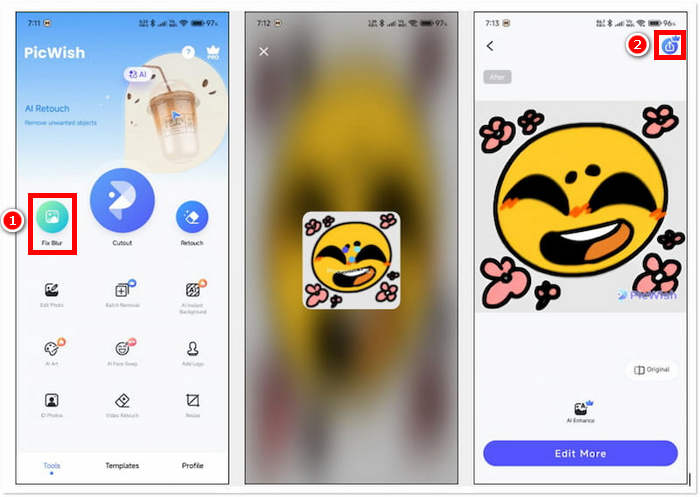
स्टेप 2. इसके बाद ऐप खोलें और मुख्य स्क्रीन पर Fix Blur विकल्प ढूँढकर आगे बढ़ने के लिए उस पर टैप करें।.
स्टेप 3. इसके बाद, अपने डिवाइस की गैलरी से वह इमोजी चुनें जिसे आप बड़ा करना चाहते हैं।.
स्टेप 4. इमोजी बड़ा हो जाने के बाद, बढ़े हुए इमोजी को अपने डिवाइस की गैलरी में सेव करने के लिए Save बटन पर टैप करें।.
ऐप जब इमोजी का विश्लेषण कर लेता है, तो आप पाएँगे कि अपस्केलिंग को एडजस्ट करने के लिए कोई विकल्प उपलब्ध नहीं है। ऐसे में आपके पास सिर्फ़ इतना विकल्प रहता है कि आप बड़े किए गए इमोजी को सीधे सेव कर लें। इससे प्रक्रिया तेज़ और बिना झंझट के हो जाती है, लेकिन अगर आप अंतिम आकार या क्वालिटी पर ज़्यादा नियंत्रण चाहते हैं तो यह एक कमी भी हो सकती है। फिर भी, PicWish आपके iPhone पर तुरंत इमोजी को बड़ा बनाने के लिए एक सुविधाजनक विकल्प है, वह भी बिना एडवांस एडिटिंग स्किल्स की ज़रूरत के।.
भाग 4. इमोजी को बड़ा बनाने के बारे में अक्सर पूछे जाने वाले प्रश्न
संदेशों में अकेले भेजे जाने पर इमोजी बड़े क्यों दिखाई देते हैं?
जब आप iMessage, WhatsApp या Messenger जैसे मैसेजिंग ऐप्स में कोई इमोजी भेजते हैं, तो ऐप उसे बेहतर दृश्यता और ज़ोर देने के लिए अपने आप बड़ा कर देता है। यह सुविधा इमोजी को ज़्यादा भावपूर्ण और ध्यान देने योग्य बनाने के लिए बनाई गई है, लेकिन यह तभी काम करती है जब इमोजी के साथ टेक्स्ट या अन्य इमोजी न हों।
क्या मैं अपनी पूरी स्क्रीन बदले बिना इमोजी को बड़ा कर सकता हूँ?
हाँ। आप अपने फ़ोन की डिस्प्ले सेटिंग एडजस्ट करने के बजाय, इमोजी को बड़ा करने के लिए FVC फ्री इमेज अपस्केलर और पिकविश जैसे ऑनलाइन टूल या ऐप का इस्तेमाल कर सकते हैं।
क्या मैं अपनी चैट में बड़े इमोजी कॉपी और पेस्ट कर सकता हूं?
हाँ। किसी ऑनलाइन टूल या ऐप का उपयोग करके इमोजी को बड़ा करने के बाद, आप उसे एक इमेज के रूप में सेव कर सकते हैं और फिर उसे कॉपी कर सकते हैं या अपने संदेशों या सोशल मीडिया पोस्ट में डाल सकते हैं।
कुछ इमोजी बड़ी स्क्रीन पर भी छोटे क्यों दिखते हैं?
इमोजी का आकार आपके डिवाइस में इस्तेमाल किए जाने वाले ऐप और फ़ॉन्ट शैली पर निर्भर करता है। कुछ प्लेटफ़ॉर्म टेक्स्ट से मेल खाने के लिए इमोजी का आकार अपने आप बदल देते हैं, इसलिए बड़ी स्क्रीन पर भी, वे छोटे दिखाई दे सकते हैं, जब तक कि आप डिस्प्ले को एडजस्ट न करें या इमेज को बड़ा करने वाले टूल का इस्तेमाल न करें।
निष्कर्ष
देखा, इमोजी को बड़ा बनाना संभव भी है और आसान भी। और अब जब आपको यह तरीका पता है, तो आप बस यह आज़मा सकते हैं कि कौन‑सा तरीका आपके लिए ज़्यादा सुविधाजनक है। चाहे यह आपके फ़ोन की सेटिंग्स के ज़रिए हो, किसी ऐप से या किसी ऑनलाइन टूल से, हर विकल्प आपको अपने को और ज़्यादा मज़ेदार और क्रिएटिव तरीक़े से व्यक्त करने देता है। बस ध्यान रहे कि कुछ तरीक़ों में हल्की‑फुल्की सीमाएँ हो सकती हैं, लेकिन समग्र रूप से इमोजी को बड़ा बनाने का यह आसान‑सा ट्रिक आपकी बातचीत को और भी अलग और आकर्षक बना सकती है।.
-
 डिस्कॉर्ड इमोजी के लिए छवियों को संपीड़ित करने के 3 तरीके [गाइड]
 यदि आप डिस्कॉर्ड इमोजी के लिए छवियों को उनके सख्त फ़ाइल आकार प्रतिबंध के कारण संपीड़ित करने की विधि की तलाश कर रहे हैं, तो इस लेख को पढ़ें और 3 आसान तरीकों से मार्गदर्शन प्राप्त करें।
-
 वीडियो से इमोजी कैसे निकालें, इस पर चरण-दर-चरण मार्गदर्शिका
 अपने वीडियो पर इमोजी से नाराज़ महसूस कर रहे हैं? यह पोस्ट आपको बेहतरीन टूल का उपयोग करके अपने वीडियो से तुरंत इमोजी हटाने की सर्वोत्तम प्रक्रिया बताएगी।
-
 आफ्टर इफेक्ट्स में आसानी से वीडियो से वॉटरमार्क कैसे निकालें
 यह लेख आफ्टर इफेक्ट्स का उपयोग करके वीडियो से वॉटरमार्क हटाने में मदद करेगा। साथ ही, यह परेशान करने वाली वस्तुओं को दूर करने के लिए सर्वोत्तम विकल्प प्रदान करेगा।
