


 वीडियो कनवर्टर अंतिम
 स्क्रीन अभिलेखी
 वीडियो मरम्मत
 सुरक्षित डाउनलोड
सर्वश्रेष्ठ ओजीजी वॉयस रिकॉर्डर सभी प्लेटफार्मों में ओजीजी रिकॉर्ड करने में मदद करता है
OGG is the best audio file format rather than the MP3. This open-source audio format is preserved by Xiph.org. This type of format is used by the gaming industry as their audio format. Because it sounds better and it compresses a file a lot smaller. However, users tend to find it hard because some of the recorders don't support this format because the standard audio format is the MP3. The list below are the best OGG recorders that support this format. To dig into more detailed steps & information. Read carefully to understand the features of the different tools that will suit your demand as a user and maybe in the future as their customer.

भाग 1. पीसी और मैक उपयोगकर्ताओं के लिए सर्वश्रेष्ठ ओजीजी रिकॉर्डर सॉफ्टवेयर
नीचे दी गई सूची में सर्वश्रेष्ठ ओजीजी रिकॉर्डर हैं जो सभी विभिन्न कार्यों में चरणों और सूचनाओं के साथ उपलब्ध हैं।
FVC फ्री ऑडियो रिकॉर्डर

A tool that specialized in recording an audio format. FVC Free Audio Recorder is known as the best online tool you may search over the web. This open-source tool can help you to record audio recordings that you may need anywhere with an internet connection. Also, it is a good choice to be your OGG recorder. To provide more comprehensive details about this amazing tool, continue reading and follow the steps on how to do the audio recording.
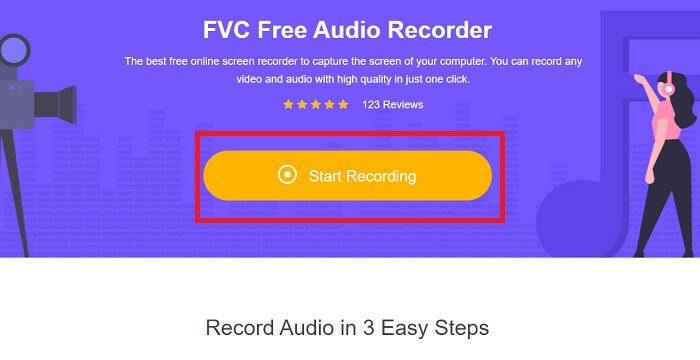
Step 1. Click this link to proceed to the webpage of the tool. Click the Start Recording and launch the tool.
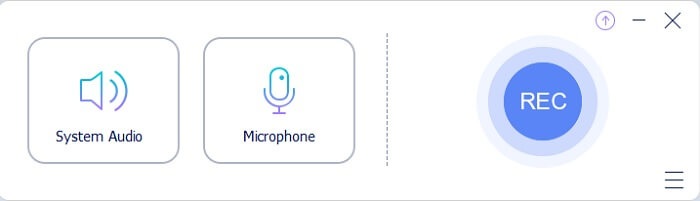
Step 2. A floating toolbar like this will appear on the display.
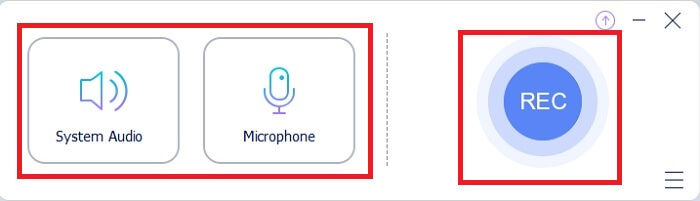
Step 3. Turn On the Speaker to add the system sound and Mic to add your voice. Click the Round button to start recording.
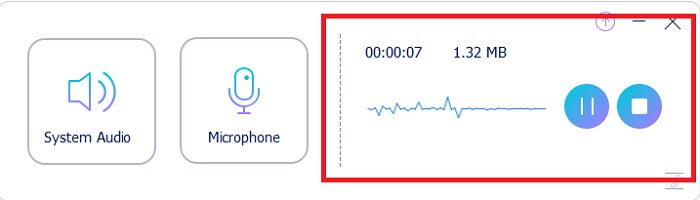
Step 4. After clicking the record button. You encounter this display which means it has already started.
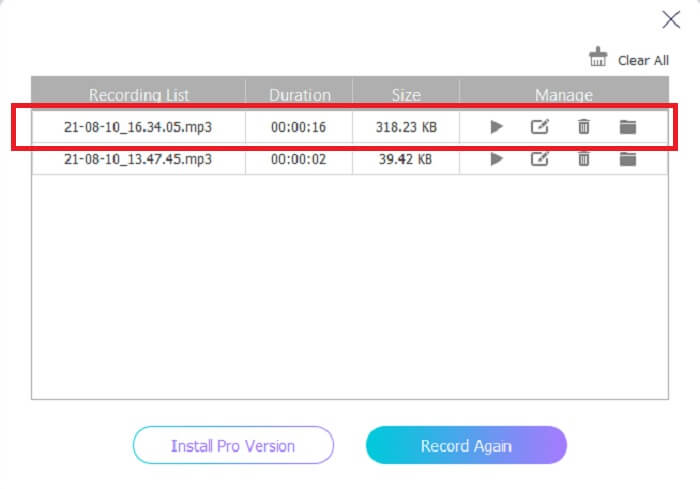
Step 5. If recording is finished, click the Stop button and it automatically saves into your device.The history list of your recording in your screen. Enjoy the recording output at its finest.
पेशेवरों
- इसके ऑन-पॉइंट निर्देश के कारण उपयोगकर्ता के अनुकूल।
- यह एक संपीड़ित ऑडियो प्रारूप का उत्पादन करता है इसलिए यह भंडारण के अनुकूल भी है।
- ओपन-सोर्स इसलिए यह किसी के लिए भी उपलब्ध है जो टूल का उपयोग करना चाहता है।
विपक्ष
- इसका उपयोग करने से पहले इसे इंटरनेट कनेक्शन की आवश्यकता होती है।
- इसमें प्रीमियम की तरह नॉइज़ कैंसिलेशन नहीं है।
भाग 2. सभी ऑपरेटिंग सिस्टम के लिए अन्य उपयोगी OGG रिकॉर्डर
1. एफवीसी स्क्रीन रिकॉर्डर
If you think that the tool above is a smart tool, To give you a more specific example, if Galileo Galilei is the father of modern science, then this tool is the father of the modern recording system. FVC Screen Recorder is the best recorder whether it is an audio or video format. It gives you the one-of-the-best output and yet you will never break a sweat to use the tool itself. Unlike the other tools, this tool is a program to give the user the best experience you can ever imagine. So now, if you are one of the users who finds it hard to record your audio. Then follow these simple steps provided below and follow the steps thoroughly.
Step 1. Download the tool according to your operating system specification. This will only take a few seconds to be downloaded then installed. Change the Preference based on your wants and click Finish to proceed.
मुफ़्त डाउनलोडWindows 7 या उससे बाद के लिएसुरक्षित डाउनलोड
मुफ़्त डाउनलोडMacOS 10.7 या उससे बाद के लिएसुरक्षित डाउनलोड
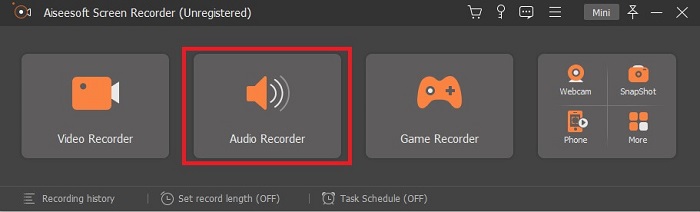
Step 2. In the toolbar click the Audio Recorder.
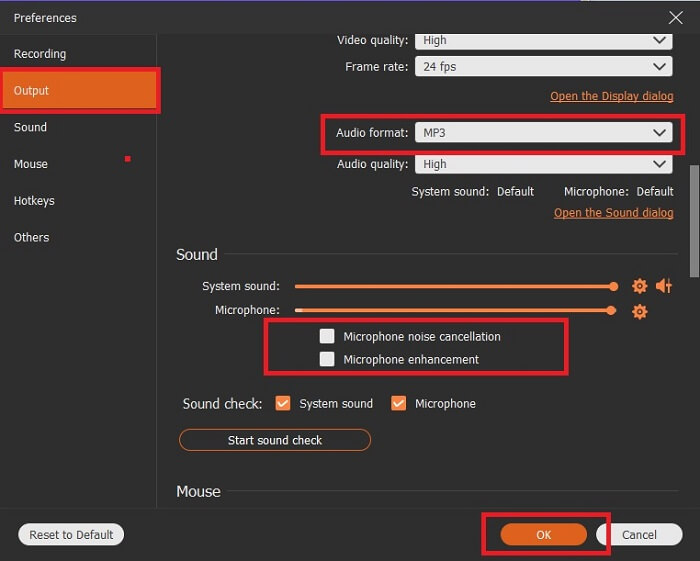
Step 3. Find the Gear icon to adjust the other options. Proceed to the Output to change it to MP3, WMAformat or whatever format you want. By scrolling down the wheel mouse. Other options you may use while recording it include Noise cancelling and Microphone enhancement. Click the OK to proceed.
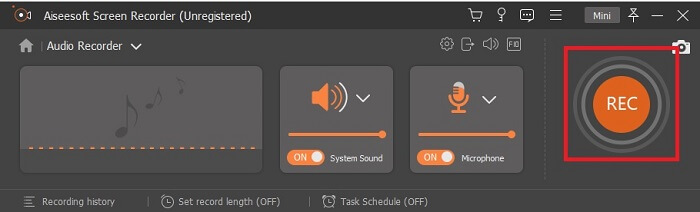
Step 4. After adjusting the settings. In the toolbar, open your Speaker and Microphone to add the audio output to your recording. After all, click the Round-shape button to start recording.
Step 5. If you want to end the recording, click the Square button to Stop. Click Save and Next to proceed. Then play your OGG voice recorder on any media platform.
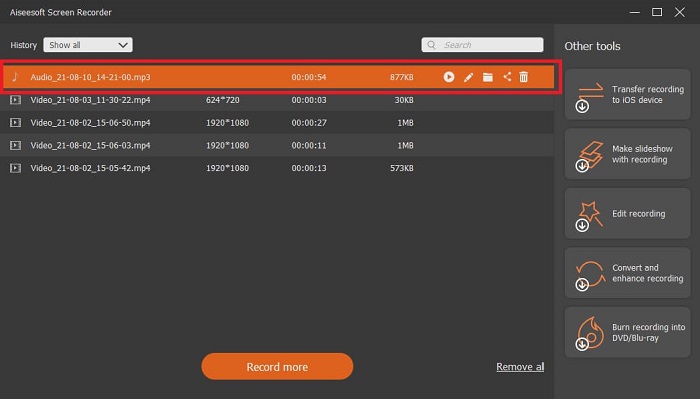
पेशेवरों
- आप क्रिस्टल क्लियर ऑडियो के साथ इस टूल से कहीं भी किसी भी समय रिकॉर्ड कर सकते हैं।
- यह उस उपयोगकर्ता के लिए एक शानदार अनुभव प्रदान करता है जो पहले से ही इस टूल का उपयोग करता है।
- ऑल-इन-वन रिकॉर्डिंग।
विपक्ष
- पे-टू-यूज़।
- इसे आपके स्टोरेज के 2.4mb की जरूरत है।
2. स्क्रीनकास्ट-ओ-मैटिक
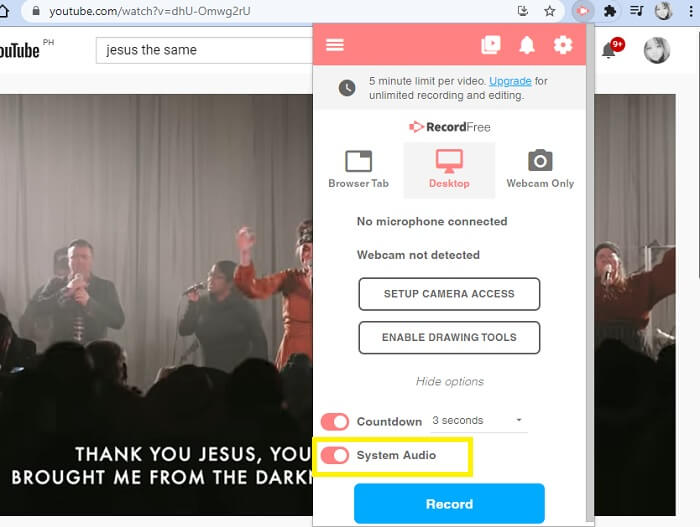
एक और बेहतरीन स्क्रीन रिकॉर्डिंग टूल जो काम करेगा। Screencast-O-Matic आपको वेब पर मिलने वाले सर्वोत्तम टूल में से एक है। यह आपकी रिकॉर्डिंग को आसान और कुशल बनाता है। यदि आप ऑनलाइन वेबसाइट पर जाते हैं तो इसका ऑनलाइन टूल भी है लेकिन ऑनलाइन टूल को ही समाप्त करने की प्रक्रिया में एक या दो मिनट का समय लगेगा। इसलिए, यदि आप लाइन में प्रतीक्षा करने के प्रशंसक नहीं हैं तो यह आपके लिए सबसे अच्छा विकल्प नहीं है। लेकिन अगर आप इंतजार करना पसंद करते हैं तो यह अंत तक इसके लायक है।
पेशेवरों
- Camtasia की तुलना में इसका उपयोग करना आसान है।
- सुरक्षा पासवर्ड वाले व्यक्ति के बजाय एक संगठन के रूप में कार्य करें।
- बहुत आकर्षक और यह एक ठीक रिकॉर्डर है।
विपक्ष
- टूल इंटरफ़ेस ऑन-पॉइंट है लेकिन यह मोनोक्रोमैटिक है इसलिए उम्मीद करें कि यह रंग में नरम है जो इसे उपयोग करने के लिए कम दिलचस्प बनाता है।
- यह केवल उपयोगकर्ता को मुफ्त संस्करण में अधिकतम 15 मिनट रिकॉर्ड करने की अनुमति देता है।
3. शेयरएक्स
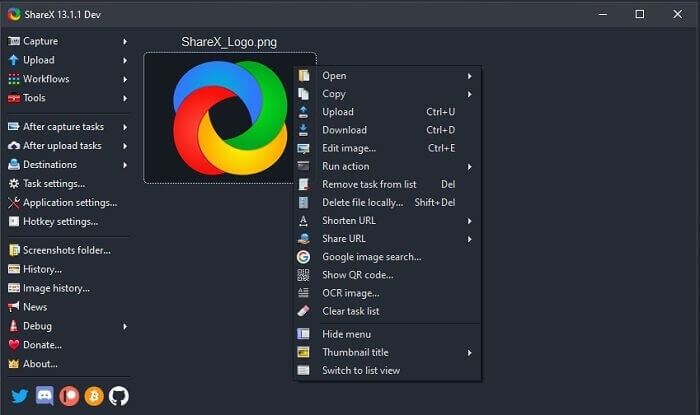
One of the tools you may encounter on the web if you’re searching for a screen recorder. It is only available for Windows OS only. It only means that if you’re a Mac user or Linux then this tool will not work on your OS because it doesn’t support those programs. Share can easily be placed at the top 20 best screen recorders that are available over the web. Because it supports over 80 destinations you may transfer the final output.
पेशेवरों
- अनुकूलन उपकरण।
- यदि आवश्यक हो तो स्वयं के संपादन उपकरण प्रदान करता है।
- रिकॉर्डिंग को आसान बनाने के लिए शॉर्टकट-की बदलें।
विपक्ष
- इस उपकरण के लिए किसी नए व्यक्ति के लिए भारी। इस उपकरण का उपयोग करना सीखना बट में दर्द है।
- मैक उपयोगकर्ताओं के लिए उपलब्ध नहीं है।
भाग 3. तुलना चार्ट
| विशेषताएं | FVC फ्री ऑडियो रिकॉर्डर | FVC स्क्रीन रिकॉर्डर | स्क्रीनकास्ट-ओ-मैटिक | शेयरएक्स |
| ऑडियो रिकॉर्डिंग |  | | | |
| शोर रद्द |  | | | |
| माइक्रोफ़ोन एन्हांसमेंट | | | | |
| उपकरण की जटिलता | ऑन-पॉइंट ऑनलाइन रिकॉर्डिंग निर्देश। | उपयोग में आसान क्योंकि यह पहले से ही उपकरण में इंगित किया गया है कि इसका उद्देश्य क्या है और यह कैसे कार्य करता है। | यह कम विवरण के साथ उपयोग में आसान टूल है। | नए उपयोगकर्ता के लिए उपकरण की जटिलता कठिन है। |
| उपलब्ध प्लेटफार्म | सभी ऑपरेटिंग सिस्टम। | सभी ऑपरेटिंग सिस्टम। | विंडोज पीसी, मैक और क्रोमबुक। | विंडोज 7 SP1 या बाद का। |
| उपलब्ध ऑडियो प्रारूप | एमपी3 और ओजीजी | MP3, WMA, AAC, M4A, FLAC, OGG, Opus और भी बहुत कुछ। | ऑडियो अलग से रिकॉर्ड नहीं किया जा सकता। | एमपी3 और WAV |
| मूल्य सीमा | मुफ़्त ऑनलाइन टूल | 1 महीने के लिए: $25.00 एक साल के लिए: $31.20 लाइफटाइम लाइसेंस के लिए: $55.20 | इसका एक मुफ्त संस्करण है। प्रीमियम एकल के लिए। डीलक्स $1.65/माह प्रधान $4.00/माह टीम की योजना के लिए। आप टीम डीलक्स या टीम प्रीमियर सेट कर सकते हैं। | मुक्त और खुला स्रोत कार्यक्रम। |
भाग 4. OGG रिकॉर्डर के बारे में अक्सर पूछे जाने वाले प्रश्न
साउंड रिकॉर्डर से ओजीजी फाइल कैसे बनाएं?
ऊपर दी गई सूची की तरह एक ऑडियो रिकॉर्डर का उपयोग करें। अधिक विस्तृत जानकारी के लिए OGG के लिए ऑडियो आउटपुट स्वरूप के साथ रिकॉर्ड करने के तरीके के बारे में जानकारी और चरणों के लिए ऊपर दिया गया लेख पढ़ें।
सबसे अच्छा ऑडियो प्रारूप कौन सा है? एमपी3 या ओजीजी?
OGG सबसे अच्छा ऑडियो फ़ाइल स्वरूप है। लेकिन उपयोगकर्ता MP3 का उपयोग करते हैं क्योंकि यह OGG से अधिक मानक है। फिर भी, OGG में कम संग्रहण और सर्वोत्तम ऑडियो आउटपुट वाला मेटाडेटा होता है, उदाहरण के लिए कलाकार का नाम और ट्रैक डेटा।
मेरे मीडिया प्लेयर में मेरा ओजीजी प्रारूप क्यों नहीं चलाया जा सकता है?
Some of the media players don't support this type of format. So, you may use FVC Free Online Video Converter as your converter. This will allow the user to convert the OGG file into MP3 or another audio format you may like so that it can be played. Or you may use FVC Free Video Player or other OGG players to play this type of format, because this tool plays almost all the different types of audio-video format.
निष्कर्ष
चर्चा के अंत में, आपने इसे पढ़कर और अपनी मांग के अनुरूप कौन सा टूल चुनकर अब एक नया ज्ञान प्राप्त कर लिया है। इस आलेख में विभिन्न विकल्पों को चरणों और टूल के बारे में कुछ जानकारी के साथ सूचीबद्ध किया गया है। बस चरणों का पालन करें और इसे पढ़ने में समय दें ताकि आप इसे समझ सकें। आपको समझदारी से चुनाव करना चाहिए।
But to set an example, FVC Screen Recorder fits the demand of the user. As a user you must prioritize your needs and wants in a recorder. For example, if the recorder is easy to use, best for recording audio, available to almost all the platforms, if it is pay-to-use it needs to be cheap yet the quality output is the best. All of the said examples are all here in FVC Screen Recorder. Don’t settle for less because you deserve more.
-
 स्नैगिट 2025 समीक्षा – फायदे, नुकसान और सबसे अच्छा विकल्प
 Snagit का सबसे अच्छा विकल्प क्या है? क्या Snagit की तरह एक स्क्रीन कैप्चर टूल है? यह पोस्ट Snagit की समीक्षा करेगी और स्क्रीन पर कब्जा करने के लिए Snagit का सबसे अच्छा विकल्प साझा करेगी।
-
 क्विक स्क्रीन रिकॉर्डिंग - मैक और पीसी पर ऑडियो के साथ रिकॉर्ड वीडियो
 मैक पर ऑडियो के साथ रिकॉर्डिंग स्क्रीन काम में आती है। अंतर्निहित खिलाड़ी, क्विकटाइम प्लेयर कर सकते हैं। उसकी पोस्ट पढ़ें और मैक और पीसी पर ध्वनि के साथ स्क्रीन पर कब्जा करने का तरीका जानें।
-
 डीयू रिकॉर्डर समीक्षा 2025: सुरक्षा&मूल्य&कार्य&उपयोग&रेटिंग
 DU रिकॉर्डर iPhone और Android के लिए एक स्क्रीन और ऑडियो रिकॉर्डर है। क्या यह डाउनलोड करने लायक है? क्या ये सुरक्षित है? पूर्ण समीक्षा पढ़ें यह देखने के लिए कि क्या ऐप आपके लिए सही है।
