


 वीडियो कनवर्टर अंतिम
 स्क्रीन अभिलेखी
 वीडियो मरम्मत
 सुरक्षित डाउनलोड
विंडोज, मैक, ऑनलाइन और मोबाइल फोन पर सर्वश्रेष्ठ टूल के साथ MP3 संपादित करें
MP3 का पूरा नाम MPEG-1 Audio Layer III है, और यह एक फ़ाइल फ़ॉर्मेट है जो संगीत को कंप्रेस्ड (संपीड़ित) रूप में स्टोर करता है। इस तरह की फ़ाइलें अनकंप्रेस्ड संगीत फ़ाइलों की तुलना में काफ़ी छोटी होती हैं, जिससे इन्हें स्टोर करना और ट्रांसफर करना आसान हो जाता है। जैसे-जैसे ज़्यादा संगीत बनाया जा रहा है, लोग MP3 को बेहतर बनाने के लिए उन्हें आसानी से एडिट करने के तरीक़े ढूँढ रहे हैं। इसकी वजह यह है कि कई बार एडिट किया गया MP3 मूल अनकंप्रेस्ड संगीत से भी बेहतर लग सकता है। समस्या यह है कि एडिटिंग सॉफ़्टवेयर महंगे हो सकते हैं और उन्हें चलाने के लिए एक शक्तिशाली कंप्यूटर की ज़रूरत पड़ती है। सौभाग्य से, यह गाइड आपको सबसे ज़्यादा सुझाए गए MP3 एडिटर्स का इस्तेमाल करना सिखाएगी, ताकि आप हर उस प्लेटफ़ॉर्म पर अपना संगीत एडिट कर सकें जिसे आप इस्तेमाल करते हैं। इसलिए, आपकी ज़रूरत चाहे जो भी हो, शुरुआत करने के लिए यह सबसे अच्छी जगह है!

भाग 1. ऑल-इन-वन MP3 एडिटर के साथ MP3 संपादित करने के लिए सर्वश्रेष्ठ विकल्प
MP3 फ़ाइल को एडिट करने वाला पहला सॉफ़्टवेयर है FVC-चुना हुआ Video Converter Ultimate। हाँ, यह एक मीडिया कन्वर्टर है जो केवल वीडियो ही नहीं बल्कि ऑडियो फ़ाइलों के लिए भी समर्पित है। यह आपको आसानी से वॉल्यूम को दोगुना ज़्यादा या बिल्कुल धीमा करने की सुविधा देता है। आप बिना किसी जटिल तकनीकी सेटिंग में फँसे, ऑडियो को तेज़ या धीमा भी कर सकते हैं।.
इसके अलावा, यह बैकग्राउंड नॉइज़ को हटा सकता है, अवांछित भागों को काट सकता है, फ़ाइलों को खंडों में विभाजित कर सकता है, और यहाँ तक कि वॉयस रिकॉर्डिंग को भी संपादित कर सकता है। इसके अलावा, यह एक उपयोग में आसान इंटरफ़ेस प्रदान करता है, भले ही आप ऑडियो संपादन के साथ शुरुआती हों, यह प्रोग्राम इन सभी चीजों को कुछ ही चरणों में करना आसान बनाता है। आपको इसकी उन्नत तकनीक भी पसंद आएगी, जैसे कि हार्डवेयर त्वरण, NVIDIA, Intel, AMD, और AI-संचालित संपादन उपकरण जिनका आप उपयोग कर सकते हैं।
मुख्य विशेषताएँ:
• ऑडियो रूपांतरण जो 120 गुना तेजी से रूपांतरित होता है।
• 1000 से अधिक विभिन्न प्रारूपों के लिए समर्थन।
• ऑडियो फ़ाइलों को सहजता से विभाजित, काटें और मर्ज करें।
• बिना किसी सीमा के MP3 लंबाई संपादित करें।
• ऑडियो फ़ाइलों को अपने इच्छित आकार में संपीड़ित करें।
• MP3 फ़ाइल के एनकोडर, नमूना दर, चैनल और बिटरेट को संशोधित करें।
फ्री डाउनलोडWindows 7 या बाद के संस्करण के लिएसुरक्षित डाउनलोड
फ्री डाउनलोडMacOS 10.7 या बाद के संस्करण के लिएसुरक्षित डाउनलोड
FVC के साथ ऑडियो फ़ाइलें कैसे एडिट करें
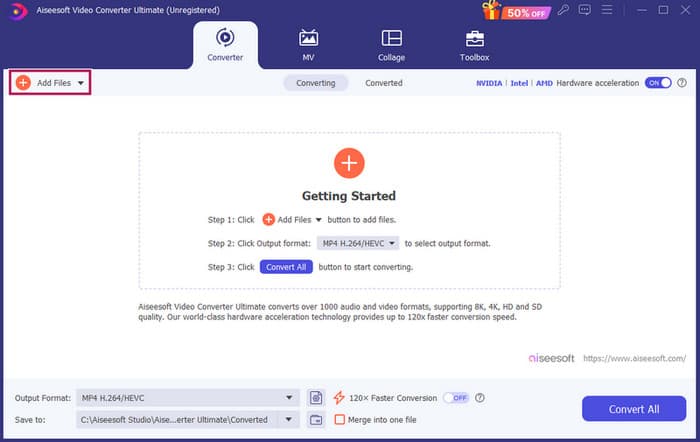
स्टेप 1. सॉफ़्टवेयर लॉन्च करने के बाद, आप Add Files बटन दबाकर MP3 फ़ाइलें जोड़ सकते हैं। वैकल्पिक रूप से, आप उनकी लोकेशन से फ़ाइलों को खींचकर (ड्रैग करके) सीधे एडिटिंग सॉफ़्टवेयर में छोड़ (ड्रॉप) सकते हैं।.
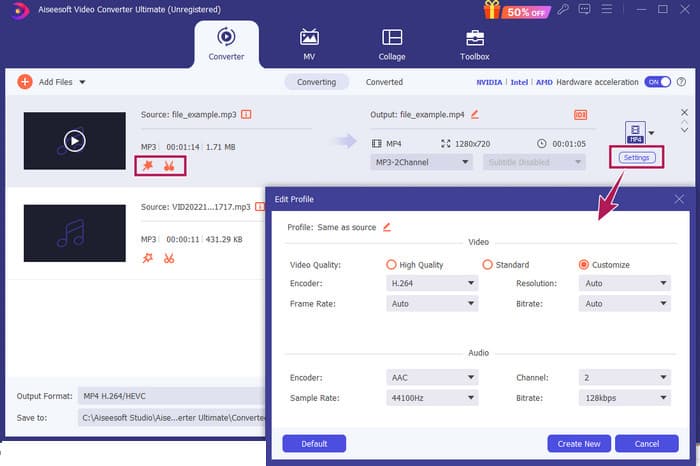
स्टेप 2. जैसे ही फ़ाइलें लोड हो जाएँ, आप थंबनेल पर Star बटन पर क्लिक करके वॉल्यूम और डिले सेटिंग्स तक पहुँच सकते हैं। Scissors बटन का इस्तेमाल मर्जर, स्प्लिटर और कटर तक पहुँचने के लिए किया जाता है। और निश्चित ही, Settings बटन से आप प्रोफ़ाइल मॉडिफ़ायर तक पहुँच सकते हैं।.
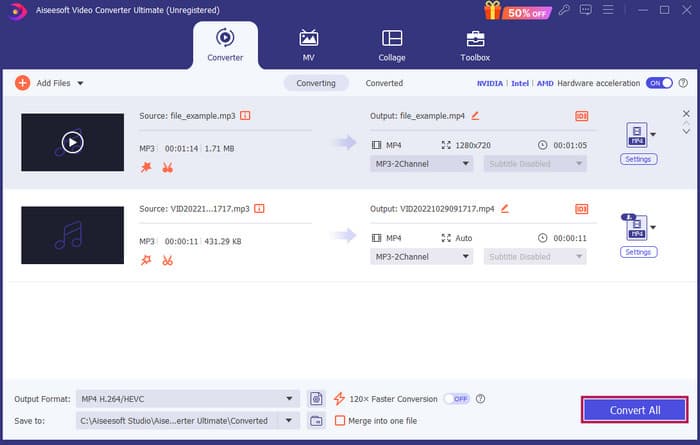
स्टेप 3. फ़ाइलों को एडिट करने के बाद, आपको Convert All बटन पर क्लिक करना होगा। और इस तरह आप Windows 10 पर FVC के साथ MP3 एडिट कर सकते हैं।.
फ़ैसला: FVC Video Converter Ultimate न केवल MP3 को बेहतर बनाने या संशोधित करने के लिए आपका भरोसेमंद समाधान बन सकता है, बल्कि कन्वर्ज़न के लिए भी एक बढ़िया टूल है। हमें इसकी सादगी और तेज़ ऑडियो एडिटिंग बहुत पसंद आई। हालाँकि टूलबॉक्स के ज़्यादातर टूल वीडियो फ़ाइलों के लिए हैं, फिर भी इनमें शक्तिशाली ऑडियो एडिटर्स मौजूद हैं। इसलिए, यह हमारे अनुसार शुरुआती उपयोगकर्ताओं के लिए प्रभावी और आसान फ़ाइल एडिटिंग का एक व्यक्तिगत रूप से चुना गया बेहतरीन विकल्प है।.
भाग 2. विंडोज़ पर एडोब ऑडिशन के साथ MP3 संपादित करें
Adobe Audition पेशेवर ऑडियो एडिटिंग के लिए सबसे मशहूर विकल्पों में से एक है, जिसे संगीतकार, पॉडकास्टर और साउंड इंजीनियर सभी इस्तेमाल करते हैं। यह अपने शक्तिशाली होने के साथ-साथ आसान उपयोग के लिए जाना जाता है। साथ ही इसमें एक साथ कई साउंडट्रैक रिकॉर्ड और एडिट करने, बनाए जाते ही तुरंत सुने जा सकने वाले स्पेशल इफ़ेक्ट्स जोड़ने, और आपके प्रोजेक्ट्स में इस्तेमाल करने के लिए साउंड्स की लाइब्रेरी जैसी सुविधाएँ मौजूद हैं। आप इसे एक पुराने प्रोग्राम Cool Edit Pro के आधुनिक और बेहतर संस्करण के रूप में भी देख सकते हैं। इसके अलावा, आप MP3 फ़ाइलों को एडिट कर सकते हैं और लेआउट को अपनी पसंद के अनुसार कस्टमाइज़ कर सकते हैं, और यह एक साथ 40 अलग-अलग साउंडट्रैक पर काम करने की सुविधा देता है। इसमें मिक्सिंग बोर्ड एडिटिंग टूल्स हैं और साथ ही आपके प्रोजेक्ट में म्यूज़िकल इंस्ट्रूमेंट्स जोड़ने का टूल भी है।.
मुख्य विशेषताएँ:
• केवल एक क्लिक से ढेर सारी ऑडियो फ़ाइलों को संपादित करें।
• अपने ऑडियो को अद्भुत बनाने के लिए शानदार फिल्टर और प्रभाव जोड़ें।
• एक परिष्कृत ध्वनि बनाने के लिए विभिन्न ऑडियो ट्रैक्स को संयोजित करें।
• शक्तिशाली उपकरणों के साथ अपने स्वर को ठीक करें और बढ़ाएं।
Adobe Audition के साथ ऑडियो फ़ाइलें कैसे एडिट करें
स्टेप 1. प्रोग्राम खोलें और File-Open पर जाकर MP3 फ़ाइलें इम्पोर्ट करें।.
स्टेप 2. एडिट करने के लिए, एक सिंगल ट्रैक को डिटेल में एडिट करने हेतु Waveform Editor का इस्तेमाल करें। कई ऑडियो ट्रैक्स के लिए Multitrack Editor का उपयोग करें।.
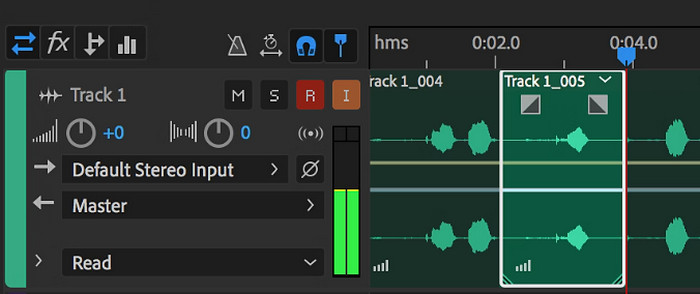
स्टेप 3. एडिटिंग पूरी हो जाने के बाद, आप प्रोग्राम के अन्य टूल्स, जैसे इफ़ेक्ट्स आदि को भी एक्सप्लोर कर सकते हैं। जब जो ज़रूरी हो वह सब हो जाए, तब आप ऑडियो प्रोजेक्ट को सेव करने की प्रक्रिया आगे बढ़ा सकते हैं। इस तरह आप Windows पर Adobe Audition के साथ MP3 एडिट कर सकते हैं।.
फ़ैसला: निस्संदेह, Adobe Audition एक बेहतरीन और क्लासिक ऑडियो एडिटर है। यही वजह है कि आज भी बहुत से एडिटर्स इसे इस्तेमाल करते हैं। लेकिन शुरुआत करने वाले जिनको पेचीदा नेविगेशन नहीं पसंद, उनके लिए Adobe Audition सबसे अच्छा विकल्प नहीं हो सकता।.
भाग 3. मैक पर iTunes के साथ MP3 संपादित करें
आईट्यून्स आपके संगीत प्रबंधक की तरह है, जो आपके सभी पसंदीदा गानों को आपके कंप्यूटर पर व्यवस्थित रखता है। इसे एक डिजिटल बॉक्स के रूप में कल्पना करें जहाँ आप अपने संगीत संग्रह को कलाकार, एल्बम या यहाँ तक कि शैली के अनुसार आसानी से क्रमबद्ध कर सकते हैं। यह आपको किसी भी गुम जानकारी को ठीक करने की सुविधा भी देता है, जैसे कि गाने के शीर्षक या कलाकार के नाम, ताकि आप हमेशा वह पा सकें जो आप खोज रहे हैं। इस मीडिया प्लेयर स्लैश एडिटर के साथ, आप अलग-अलग मूड या गतिविधियों के लिए कस्टम साउंडट्रैक या प्लेलिस्ट बना सकते हैं, जैसे कि वर्कआउट मिक्स या आराम करने के लिए प्लेलिस्ट।
सबसे अच्छी बात? iTunes बहुत ही उपयोगकर्ता के अनुकूल है। भले ही आप तकनीक के जानकार न हों, आप आसानी से और जल्दी से अपने पुस्तकालय में गाने जोड़ सकते हैं, उन्हें व्यवस्थित कर सकते हैं, और बिना किसी परेशानी के उन्हें वापस चला सकते हैं। हालाँकि यह अन्य प्रोग्रामों की तरह शानदार संपादन नहीं कर सकता है, लेकिन यह आपके MP3 फ़ाइलों की शुरुआत या अंत से अवांछित मौन को ट्रिम करने जैसे बुनियादी कार्यों के लिए एक बढ़िया विकल्प है। हम कुछ सरल चरणों में मैक और विंडोज पर MP3 को संपादित करने का तरीका जानेंगे!
मुख्य विशेषताएँ:
• ऑडियो फ़ाइलों की डिजिटल लाइब्रेरी का प्रबंधन और निर्माण करता है।
• MP3 के अलावा, यह WAV, AIFF, Apple Lossless और AAC सहित विभिन्न ऑडियो प्रारूपों का भी समर्थन करता है।
• यह एमपी3 फ़ाइल की जानकारी जैसे कलाकार, एल्बम, शैली और रिलीज़ वर्ष को संपादित करने की अनुमति देता है।
iTunes के साथ ऑडियो फ़ाइलें कैसे एडिट करें
स्टेप 1. प्रोग्राम लॉन्च करें और MP3 फ़ाइल लोड करें। File सेक्शन में जाएँ और Add File to Library विकल्प चुनें या इसी तरह का विकल्प चुनें। फिर अपने डिवाइस से वह MP3 चुनें जिसे आप ट्रिम करना चाहते हैं।.
स्टेप 2. अब फिर से File में जाएँ और Library चुनें। सुनिश्चित करें कि MP3 वहाँ लिस्टेड है। फिर उस पर राइट-क्लिक करें और Get Info चुनें।.
स्टेप 3. अब आप ट्रिमिंग पॉइंट्स सेट कर सकते हैं। ऐसा करने के लिए Get Info विंडो में जाएँ, Options देखें, और फिर Start और Stop टाइम खोजें। अब उस हिस्से की शुरुआत और समाप्ति का समय सेट करें जिसे आप रखना चाहते हैं। हो जाने पर, OK बटन पर क्लिक करके बदलाव सेव कर लें।.
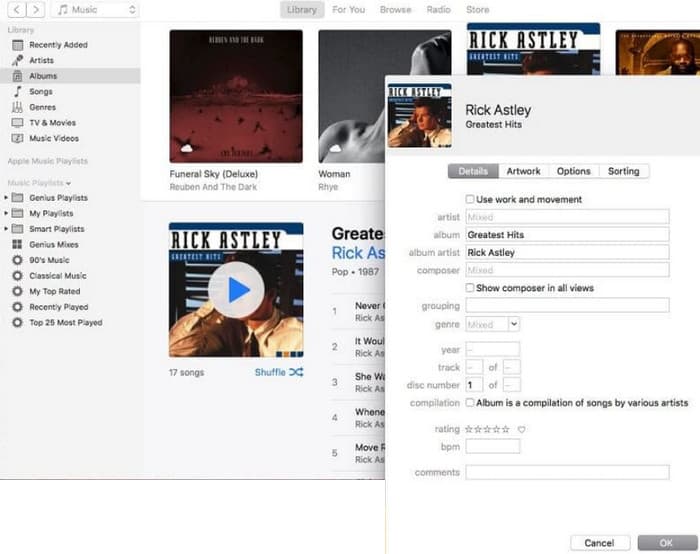
फ़ैसला: iTunes ज़रूरत पड़ने पर बेसिक MP3 एडिटिंग और एन्हांसमेंट दे सकता है। लेकिन चूँकि यह MP3 को पूरी तरह एडिट करने वाला समर्पित ऑडियो एडिटर नहीं है, इसलिए इसकी सीमित सुविधाओं से आप निराश हो सकते हैं।.
भाग 4. ऑनलाइन MP3 संपादक के साथ MP3 संपादित करें
Clideo उन लोगों के लिए एक उम्दा MP3 कटर और एडिटर है जो अपनी MP3 फ़ाइलों को काटने के लिए ऑनलाइन ऑडियो एडिटर इस्तेमाल करना चाहते हैं। यह एक वेब टूल है जो किसी भी डिवाइस पर काम करता है, इसलिए आपको कोई सॉफ़्टवेयर डाउनलोड करने की ज़रूरत नहीं पड़ती। Clideo आपको ऑडियो के ख़ास हिस्सों को काटने की सुविधा देता है, या तो सटीक स्टार्ट और एंड टाइम सेट करके या फिर स्क्रीन पर मार्कर्स को खींचकर (ड्रैग करके)।.
इसके अलावा, यह विभिन्न फ़ाइल प्रकारों का समर्थन करता है, इसलिए आप अपनी किसी भी संगीत फ़ाइल को संपादित कर सकते हैं। इसके अलावा, क्लाइडियो आपको अपनी क्लिप की शुरुआत और अंत में एक सहज ध्वनि संक्रमण के लिए फ़ेड-इन और फ़ेड-आउट जैसे प्रभाव जोड़ने की अनुमति देता है। कुल मिलाकर, क्लाइडियो एक उपयोगकर्ता के अनुकूल और बहुमुखी उपकरण है जो आपकी ऑडियो फ़ाइलों को संपादित करना आसान बनाता है।
मुख्य विशेषताएँ:
• अपनी ऑडियो फ़ाइलों के अवांछित भागों को आसानी से काटें।
• फ़ेड-इन और फ़ेड-आउट प्रभाव जोड़ें।
• यह विभिन्न ऑडियो प्रारूपों का समर्थन करता है।
Clideo के साथ ऑडियो फ़ाइलें कैसे एडिट करें
स्टेप 1. Clideo के आधिकारिक पेज पर पहुँचने के बाद, उसके ऑडियो कटर में जाएँ।.
स्टेप 2. MP3 फ़ाइलें अपलोड करने के लिए Choose File बटन पर क्लिक करें। फ़ाइल इम्पोर्ट हो जाने के बाद आप उसे एडिट करना शुरू कर सकते हैं।.
स्टेप 3. ड्रैगर को अपनी पसंद के साइज तक सेट करें, फिर बदलाव सेव करने के लिए Export पर क्लिक करें।.
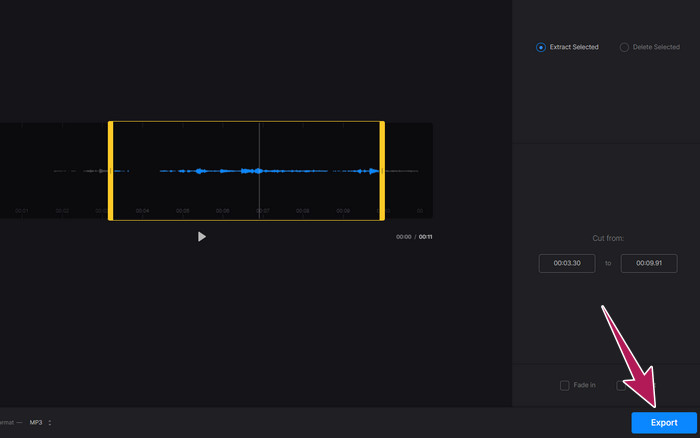
फ़ैसला: Clideo एक ऑनलाइन टूल है जो MP3 और अन्य फ़ाइल प्रकारों, जैसे वीडियो, को एडिट करने के लिए कई टूल्स प्रदान करता है। हालाँकि, आपको यह याद रखना चाहिए कि Clideo जैसे ऑनलाइन टूल सुरक्षा के मामले में अनिश्चित हो सकते हैं, क्योंकि वे ऑफ़लाइन टूल्स की तुलना में ज़्यादा असुरक्षित होते हैं।.
भाग 5. iPhone/Android पर मोबाइल ऐप से MP3 संपादित करें
अंतिम MP3 एडिटर जो मैं सुझाता हूँ, वह एक ऐप है जो आप Android और iOS पर प्राप्त कर सकते हैं। इसका नाम है WavePad और इसमें बहुत सी फ़ीचर्स हैं, इसलिए शुरुआत में यह थोड़ा जटिल लग सकता है। इस ऐप के ज़रिए आप क्लिप्स को काट और ट्रिम कर सकते हैं, अपनी आवाज़ की पिच बदल सकते हैं और बैकग्राउंड नॉइज़ तक हटा सकते हैं। इसके अलावा, यह iPhone और Android पर MP3 को ढेर सारे साउंड इफ़ेक्ट्स और म्यूज़िक के साथ एडिट करने देता है जिन्हें आप अपनी रिकॉर्डिंग में मुफ़्त में जोड़ सकते हैं। इसमें एक इन-बिल्ट इक्वलाइज़र है, जो आपके ऑडियो को बिल्कुल सही सुनाई देने में मदद करता है। MP3 के अलावा, WavePad ज़्यादातर आम साउंड फ़ाइल फ़ॉर्मेट्स के साथ भी काम करता है।.
मुख्य विशेषताएँ:
• ध्वनि को काटें, कॉपी करें, पेस्ट करें और प्रभाव जोड़ें।
• MP3, WAV और AIFF जैसे विभिन्न ऑडियो प्रारूपों के लिए समर्थन।
• अलग-अलग ध्वनि गुणवत्ता सेटिंग्स हैं.
WavePad के साथ ऑडियो फ़ाइलें कैसे एडिट करें
स्टेप 1. ऐप लॉन्च करें, तीन लाइनों पर टैप करें, और File-Import from the Audio टैब्स चुनें। इससे आप वह MP3 फ़ाइल अपलोड कर पाएँगे, जिसे आपको एडिट करना है।.
स्टेप 2. स्क्रीन के ऊपरी हिस्से में टूल ऑप्शंस पर दाएँ की ओर स्वाइप करके एडिटिंग टूल्स तक पहुँचें।.
स्टेप 3. ऐसा कर लेने के बाद, आप REC बटन पर टैप करके उस हिस्से को रिकॉर्ड कर सकते हैं जिसे आप फ़ाइल से रखना चाहते हैं। फिर उसे सेव करें और अपने डिवाइस पर एक्सपोर्ट कर लें।.
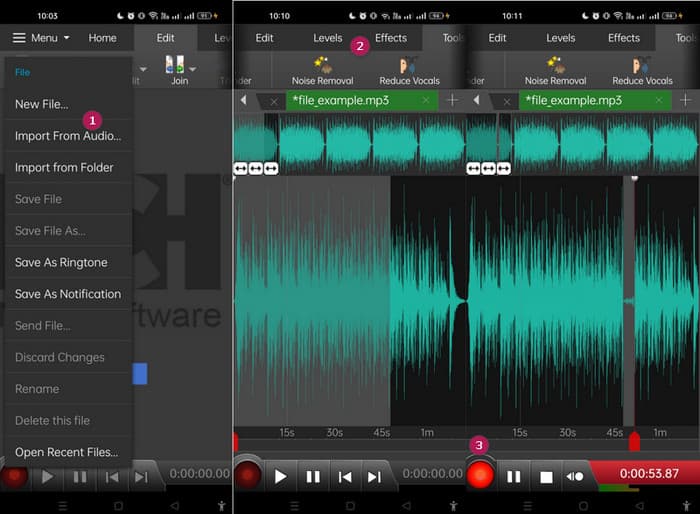
फ़ैसला: WavePad के मुफ़्त संस्करण में ज़्यादातर फ़ीचर्स मौजूद हैं, लेकिन $3 प्रति माह की एक पेड विकल्प भी है जो विज्ञापनों को हटा देता है और आपको सभी साउंड इफ़ेक्ट्स तथा अलग-अलग फ़ॉर्मेट्स में फ़ाइल सेव करने जैसी पूरी सुविधाएँ देता है। इससे आप Android या iPhone पर MP3 को और ज़्यादा उन्नत तरीके से एडिट कर पाएँगे।.
भाग 6. MP3 संपादन के बारे में अक्सर पूछे जाने वाले प्रश्न
क्या मैं Apple Music में कोई गाना ट्रिम कर सकता हूँ?
नहीं। दुर्भाग्यवश, आप एप्पल म्यूज़िक में सीधे गानों को ट्रिम नहीं कर सकते।
क्या माइक्रोसॉफ्ट के पास ऑडियो एडिटर है?
एमपी3 संपादन के लिए ऑडेसिटी जैसे कई ऑडियो संपादक उपलब्ध हैं, जिन्हें आप माइक्रोसॉफ्ट स्टोर से डाउनलोड कर सकते हैं।
मैं विंडोज मीडिया प्लेयर में MP3 फ़ाइल को कैसे ट्रिम करूँ?
दुर्भाग्य से, Windows Media Player में खुद MP3 फ़ाइलों को ट्रिम करने के लिए कोई बिल्ट-इन एडिटिंग सुविधाएँ नहीं हैं।.
निष्कर्ष
कम से कम अब आप पहले से कहीं बेहतर तरीक़े से MP3 एडिट करने के सबसे अच्छे उपाय जान चुके हैं। ऊपर बताए गए बेहतरीन ऑडियो एडिटर्स के साथ आप निश्चित रूप से अपनी मनचाही ऑडियो क्वालिटी हासिल कर पाएँगे! ये टूल अलग-अलग प्लेटफ़ॉर्म्स के लिए व्यापक समाधान देते हैं, जिससे आपके डिवाइस या ऑपरेटिंग सिस्टम चाहे जो भी हों, लचीलापन और सुविधा सुनिश्चित होती है। चाहे आप डेस्कटॉप एप्लिकेशन पसंद करें, ऑनलाइन टूल या मोबाइल ऐप, आप आसानी से प्रोफ़ेशनल क्वालिटी एडिट्स कर सकते हैं। साधारण ट्रिमिंग और मर्जिंग से लेकर उन्नत इफ़ेक्ट्स और एन्हांसमेंट तक, सही एडिटर आपके MP3 फ़ाइलों को प्रभावी ढंग से बदल सकता है। उपलब्ध विकल्पों को आज़माएँ और आज ही अपनी ऑडियो ट्रैक्स को बेहतरीन बनाने की शुरुआत करें।.
-
 2024 में विंडोज, मैक, आईओएस और एंड्रॉइड के लिए शीर्ष 10 एफएलवी प्लेयर
 एफएलवी प्लेयर आपको अपने विंडोज, मैक, एंड्रॉइड, आईओएस डिवाइस पर अपनी एफएलवी फाइलों तक आसानी से पहुंचने में मदद करता है। सबसे अच्छे FLV फ़ाइल प्लेयर देखें जिन्हें आप अभी डाउनलोड कर सकते हैं।
-
 मूल गुणवत्ता के साथ QuickTime MOV फ़ाइलें खेलने के लिए 8 सर्वश्रेष्ठ MOV खिलाड़ी
 बस विंडोज और मैक दोनों के लिए उपलब्ध 8 सर्वश्रेष्ठ एमओवी खिलाड़ियों के बारे में अधिक जानें। आप मूल गुणवत्ता के साथ MOV फ़ाइलों को चलाने के लिए वांछित और उपयुक्त एक चुन सकते हैं।
-
 उच्च दृश्य गुणवत्ता के साथ MP4 फ़ाइलें खेलने के लिए अपना सर्वश्रेष्ठ MP4 प्लेयर प्राप्त करें
 10 नवीनतम MP4 वीडियो प्लेयर सॉफ़्टवेयर की सिफारिशों से अपना सर्वश्रेष्ठ MP4 प्लेयर पढ़ें और प्राप्त करें। आप विंडोज़ और मैक पर MP4 वीडियो फ़ाइलों को बिना लैग के आसानी से चला सकते हैं।
