


 वीडियो कनवर्टर अंतिम
 स्क्रीन अभिलेखी
 वीडियो मरम्मत
 सुरक्षित डाउनलोड
Android के लिए रिंगटोन निर्माता | अपने लिए सही उपकरण खोजें
कभी-कभी, हमारे Android डिवाइस पर डिफ़ॉल्ट रिंगटोन बहुत पुरानी और हमारी शैली से बाहर लग सकती है, और निश्चित रूप से, हम ऐसा नहीं चाहते हैं। अपनी रिंगटोन को वैयक्तिकृत करना आपके डिवाइस को वास्तव में आपकी आवाज़ देने का एक शानदार तरीका है, जो आपकी अनूठी शैली और प्राथमिकताओं को दर्शाता है।
इसके साथ ही, हम पाँच सबसे लोकप्रिय रूप से इस्तेमाल किए जाने वाले Android रिंगटोन मेकर्स की समीक्षा करेंगे, और प्रत्येक का मूल्यांकन करेंगे ताकि आप अपनी पसंद और ज़रूरतों के अनुसार सबसे उपयुक्त टूल चुन सकें। क्या आप अपने Android रिंगटोन को पर्सनलाइज़ करने के लिए तैयार हैं? आगे पढ़ते रहें!

भाग 1. Android के लिए सर्वश्रेष्ठ रिंगटोन निर्माता
FVC द्वारा चुना गया Video Converter Ultimate
कीमत:
• लाइफटाइम लाइसेंस: $49.96
• 1‑महीने का लाइसेंस: $14.50
• बिज़नेस लाइसेंस: $119.00
Android के लिए बेहतरीन रिंगटोन मेकर्स की सूची में पहला टूल है FVC द्वारा चुना गया Video Converter Ultimate। यह टूल उपयोगकर्ताओं को ऑडियो फ़ाइलों को कनवर्ट, ट्रिम और कस्टमाइज़ करके उच्च‑गुणवत्ता वाली Android रिंगटोन बनाने की सुविधा देता है। इसकी ऑडियो ट्रिमिंग सुविधा की मदद से आप किसी भी ऑडियो फ़ाइल के हिस्से को आसानी से निकालकर रिंगटोन बना सकते हैं। इसके अलावा, यह टूल प्रोसेस और एडिट की गई ऑडियो की मूल साउंड क्वालिटी को बनाए रखता है, जिससे उपयोगकर्ताओं को साफ़, स्पष्ट और प्रोफ़ेशनल लगने वाली रिंगटोन मिलती हैं।.
FVC द्वारा चुने गए Video Converter Ultimate का उपयोग करने के चरण:
चरण 1. सबसे पहले, इस टूल को डाउनलोड करें और इंस्टॉल करें।.
फ्री डाउनलोडWindows 7 या बाद के संस्करण के लिएसुरक्षित डाउनलोड
फ्री डाउनलोडMacOS 10.7 या बाद के संस्करण के लिएसुरक्षित डाउनलोड
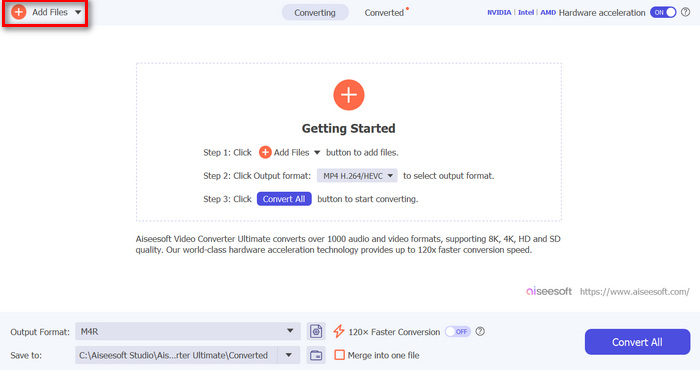
चरण 2. उसके बाद, Add Files बटन पर क्लिक करें। इससे आप वह MP3 फ़ाइल इंपोर्ट कर पाएँगे जिसे आप अपनी Android रिंगटोन के रूप में कस्टमाइज़ करना चाहते हैं।.
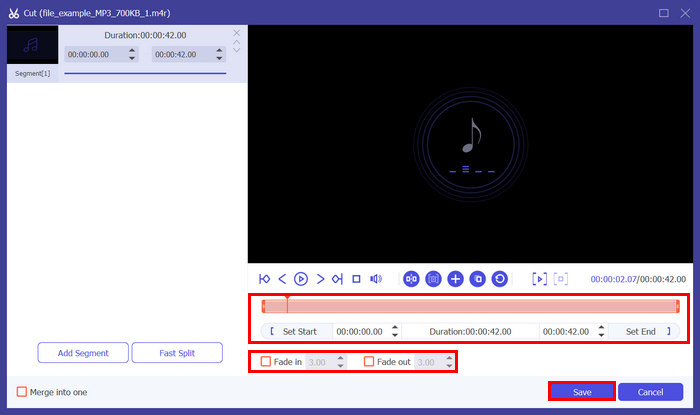
चरण 3. अपनी Android रिंगटोन को एडिट करने और उसमें पर्सनल टच जोड़ने के लिए Cut बटन पर क्लिक करें। वहाँ से, आप Bar लाइन को उस जगह तक खिसकाकर जहाँ आप ऑडियो को काटना चाहते हैं, आसानी से ऑडियो को स्प्लिट कर सकते हैं और Split बटन दबा सकते हैं। इसके अलावा, अपनी रिंगटोन में फ़ेड इफ़ेक्ट जोड़ने के लिए Fade in और Fade out पर क्लिक करें। जब सब हो जाए, तो Save बटन पर क्लिक करें।.
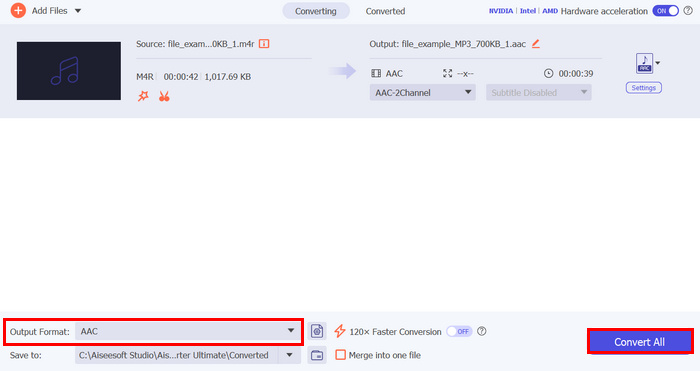
चरण 4. अब अपनी फ़ाइलों को कनवर्ट करना शुरू करने के लिए Convert All बटन पर क्लिक करें। कनवर्ट की गई फ़ाइलें सीधे आपके कंप्यूटर के फ़ोल्डर में सेव हो जाएँगी।.
FVC द्वारा चुने गए इस वीडियो कन्वर्टर अल्टीमेट के बारे में सबसे अच्छी बात यह है कि यह एंड्रॉइड डिवाइस के लिए रिंगटोन बनाने का एक अत्यधिक कुशल और उपयोगकर्ता के अनुकूल तरीका प्रदान करता है। सटीक ऑडियो ट्रिमिंग, विस्तृत ऑडियो प्रारूपों का समर्थन और उच्च-गुणवत्ता वाले आउटपुट सहित इसकी व्यापक विशेषताएं इसे एक असाधारण एंड्रॉइड रिंगटोन निर्माता उपकरण के रूप में अलग करती हैं।
भाग 2. रिंगटोन मेकर: रिंगटोन बनाएं
कीमत: निःशुल्क
रिंगटोन मेकर: क्रिएट रिंगटोन एक निःशुल्क ऐप है जो उपयोगकर्ताओं को अपने Android डिवाइस के लिए अपनी रिंगटोन को निजीकृत करने की अनुमति देता है। इसके साथ, उपयोगकर्ता ऑडियो गाने का एक हिस्सा काट सकते हैं और उन्हें रिंगटोन के रूप में उपयोग कर सकते हैं। ऐप एक संगीत संपादक, अलार्म टोन निर्माता, रिंगटोन कटर और अधिसूचना टोन निर्माता के रूप में भी कार्य करता है। अंत में, आप ऐप के भीतर वॉयस रिकॉर्ड कर सकते हैं जिसे आप रिंगटोन के रूप में संपादित और उपयोग भी कर सकते हैं।
Ringtone Maker: create ringtone का उपयोग करने के चरण:
चरण 1. सबसे पहले आपको Play Store से यह ऐप इंस्टॉल करना होगा।.
चरण 2. ऐप खोलने के बाद, अपने डिवाइस में मौजूद फ़ोटो और मीडिया तक पहुँचने की अनुमति दें।.
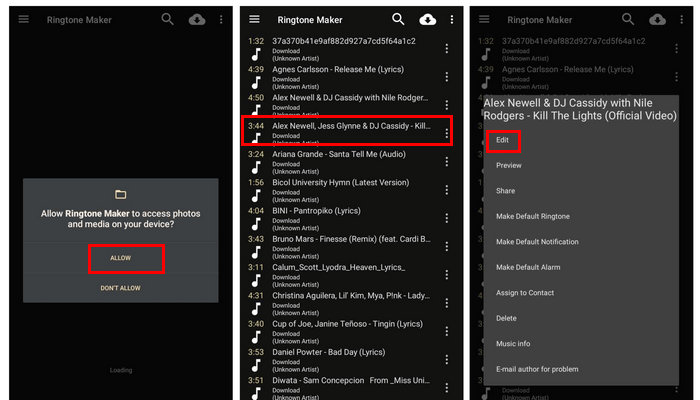
चरण 3. अब आप अपनी फ़ाइलों में मौजूद सभी ऑडियो फ़ाइलें देखेंगे। वहाँ से वह ऑडियो चुनें जिसे आप रिंगटोन के रूप में बनाना चाहते हैं।.
चरण 4. इसके बाद, तीन डॉट्स पर टैप करें और Edit चुनें। उस हिस्से को ट्रिम करने के लिए जिसे आप रिंगटोन बनाना चाहते हैं, कर्सर को बाएँ से दाएँ खिसकाएँ।.
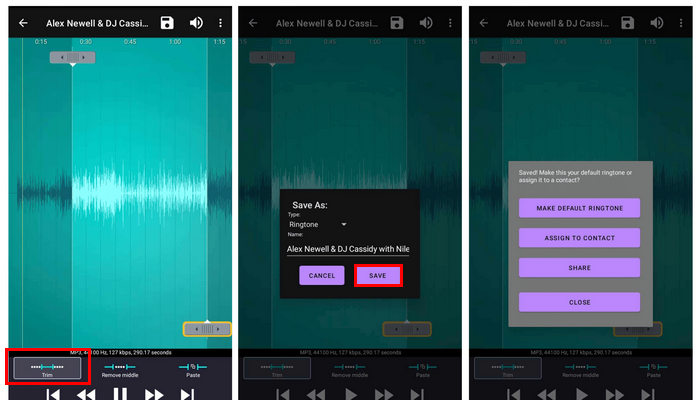
चरण 5. अंत में, नई बनाई गई Android रिंगटोन को एक्सपोर्ट करने के लिए Save बटन पर टैप करें।.
Android के लिए इस रिंगटोन निर्माता के उपयोग में आसानी इसे सर्वश्रेष्ठ रिंगटोन निर्माताओं में से एक बनाती है। हालाँकि, इसकी कुछ सीमाएँ हैं। हालाँकि यह रिंगटोन बनाने और संपादित करने के लिए आवश्यक सुविधाएँ प्रदान करता है, लेकिन इसमें कुछ उन्नत संपादन विकल्पों का अभाव है जो अधिक विस्तृत अनुकूलन के लिए आवश्यक हो सकते हैं।
भाग 3. ज़ेड्ज
कीमत: मुफ़्त / इन‑ऐप ख़रीद: प्रति आइटम $0.49–$399.99
अगर आप अपने Android डिवाइस पर अपनी खुद की रिंगटोन बनाने का विचार नहीं चाहते हैं, तो यह टूल आपके लिए आदर्श है। Zedge एक ऐसा टूल है जो उपयोगकर्ताओं को धुनों के विशाल चयन से पहले से तैयार रिंगटोन को स्वतंत्र रूप से चुनने और उसका आनंद लेने की अनुमति देता है। हालाँकि उपयोगकर्ता इस टूल से स्क्रैच से रिंगटोन बना सकते हैं, फिर भी यह व्यक्तिगत संपर्कों, संदेश अलर्ट, अलार्म, डिफ़ॉल्ट रिंगटोन और बहुत कुछ के लिए रिंगटोन को अनुकूलित करने का समर्थन करता है।
Zedge का उपयोग करने के चरण:
चरण 1. सबसे पहले, आपको अपने Android फ़ोन पर Zedge रिंगटोन ऐप डाउनलोड करके खोलना होगा।.
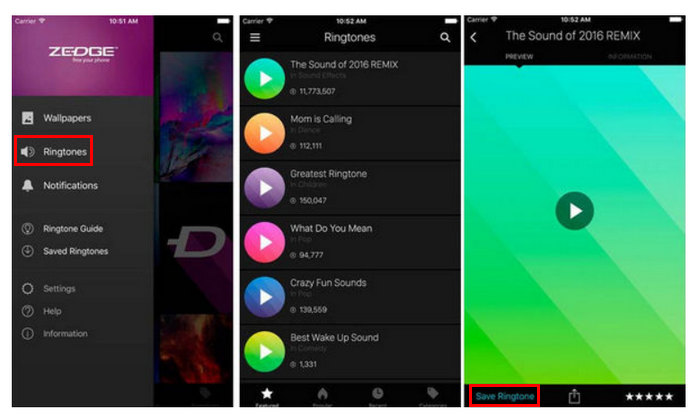
चरण 2. उसके बाद, इस रिंगटोन ऐप में Ringtones श्रेणी चुनें, और आपको टोन की एक लंबी सूची दिखाई देगी।.
चरण 3. अंत में, उस साउंड का प्रीव्यू करें जिसे आप मोबाइल रिंगटोन के रूप में सेट करना चाहते हैं। Save Ringtone विकल्प चुनें। इसके बाद, यह Android के लिए रिंगटोन मेकर अपने‑आप आपकी रिंगटोन बदल देगा।.
ज़ेड्ज उन लोगों के लिए आदर्श है जो अपने एंड्रॉइड डिवाइस के लिए पहले से तैयार रिंगटोन का उपयोग करना पसंद करते हैं। हालाँकि, इस ऐप की समस्या लगातार पॉप-अप विज्ञापन हैं जो कुछ हद तक परेशान कर सकते हैं, और इन-ऐप खरीदारी महंगी हो सकती है। इन मुद्दों के बावजूद, मुफ़्त संस्करण बहुत सारी सुविधाएँ प्रदान करता है, जो इसे कई उपयोगकर्ताओं के लिए सुविधाजनक विकल्प बनाता है।
भाग 4. निःशुल्क रिंगटोन निर्माता
कीमत: निःशुल्क
अगर आप अपने Android के लिए रिंगटोन बनाने के लिए ऑनलाइन तरीका पसंद करते हैं, तो फ्री रिंगटोन मेकर आपके लिए सबसे सही हो सकता है। Android के लिए यह रिंगटोन मेकर इस्तेमाल करना बहुत आसान है। यह आपको केवल वह ऑडियो फ़ाइल अपलोड करने देगा जिसे आप अपनी रिंगटोन के रूप में बनाना चाहते हैं, और फिर ट्रिमिंग और वॉल्यूम एडजस्ट करने जैसी सभी एडिटिंग सुविधाएँ एक ही पेज पर होंगी। लेकिन ध्यान दें कि यह टूल आउटपुट के लिए केवल दो प्रमुख ऑडियो फ़ॉर्मेट का समर्थन करता है। दुर्भाग्य से, यह टूल इनपुट के रूप में M4R का समर्थन नहीं करता है, जो कि सबसे आम रिंगटोन फ़ॉर्मेट है।
Free Ringtone Maker का उपयोग करने के चरण:
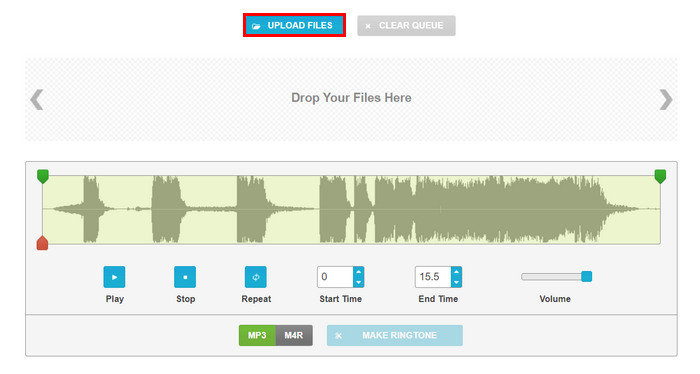
चरण 1. जिस ऑडियो फ़ाइल को आप रिंगटोन के रूप में उपयोग करना चाहते हैं, उसे इंपोर्ट करने के लिए Upload Files बटन पर क्लिक करें या फ़ाइलों को सीधे टूल के मुख्य इंटरफ़ेस पर ड्रैग करें।.
चरण 2. अब अपना ऑडियो काटने के लिए, हरे रंग के कर्सर को खिसकाकर अपनी पर्सनलाइज़्ड Android रिंगटोन के शुरू और अंत का समय निर्धारित करें, या आप Start Time और End Time बॉक्स में सीधे वह समय दर्ज कर सकते हैं जहाँ से आप चाहते हैं कि यह शुरू या समाप्त हो। वहीं, volume बढ़ाने के लिए वॉल्यूम लेवल को खींचें।.
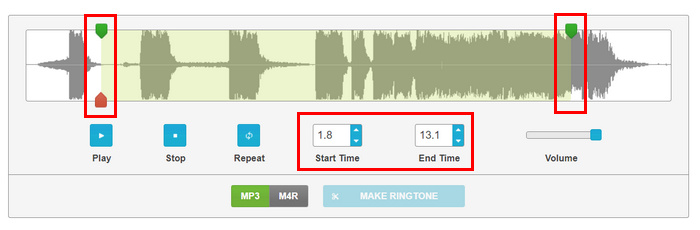
चरण 3. फ़ॉर्मैट के लिए, MP3 और M4R में से चुनें। यह इस बात पर निर्भर करता है कि आपका Android डिवाइस कौन‑सा रिंगटोन फ़ॉर्मैट सपोर्ट करता है।.
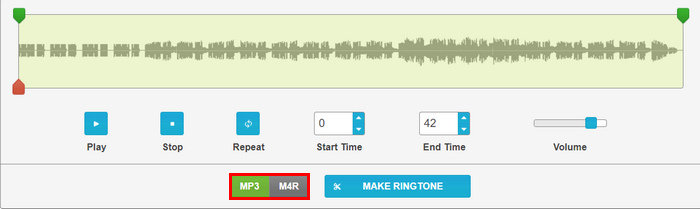
चरण 4. सब सेट हो जाने के बाद, Make Ringtone बटन पर क्लिक करें।.
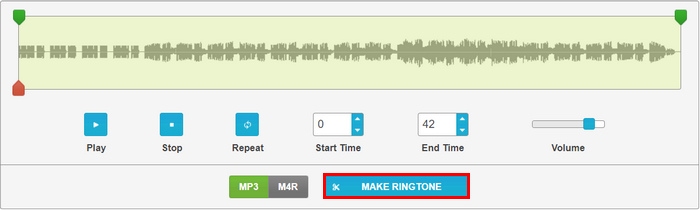
Android के लिए इस रिंगटोन निर्माता के बारे में प्रभावशाली बात यह है कि आप एक पृष्ठ पर सभी अनुकूलन सेटिंग्स को आसानी से नेविगेट कर सकते हैं। आपको अपना खुद का Android रिंगटोन बनाने के लिए जटिल टैब या किसी अन्य मेनू पर जाने की आवश्यकता नहीं है।
भाग 5. रिंगटोन मेकर: म्यूजिक कटर
कीमत:
• Php. 48.00 प्रति माह
• Php. 289.00 प्रति वर्ष
• लाइफटाइम खरीद के लिए Php. 635
एंड्रॉइड के लिए यह मुफ़्त रिंगटोन निर्माता उपयोगकर्ताओं को नई रिंगटोन संपादित करने और बनाने की अनुमति देता है। यह टूल MP3, FLAC, OGG, AAC, WAV, AMR और MP4 जैसे कई प्रारूपों का समर्थन करता है। इसके अलावा, आप अंतर्निहित रिकॉर्डर का उपयोग करके ऑडियो संपादित करने या रिकॉर्ड करने के लिए अपने डिवाइस पर गाने या संगीत खोज सकते हैं।
Ringtone Maker: Music Cutter का उपयोग करने के चरण
चरण 1. अपने Play Store से ऐप डाउनलोड करें और इंस्टॉल करें।.
चरण 2. अब Trim Audio बटन पर टैप करें ताकि उस ऑडियो फ़ाइल का चयन कर सकें जिसे आप अपनी Android रिंगटोन बनाना चाहते हैं। वहाँ से अपना ऑडियो चुनें।.
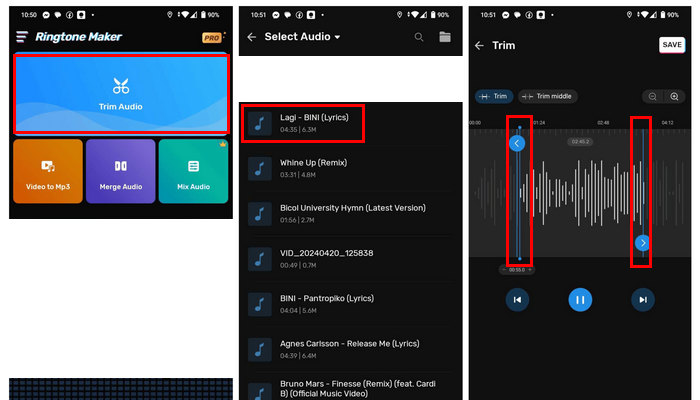
चरण 3. अगला, ऑडियो के हिस्से को ट्रिम करने के लिए, Blue line को समायोजित करें ताकि वह आपके मनचाहे टाइमिंग से मेल खाए।.
चरण 4. अगर आप अपनी वॉल्यूम बदलना चाहते हैं, तो Volume बटन पर टैप करें; आप इसे बाएँ से दाएँ खिसकाकर एडजस्ट कर सकते हैं।.
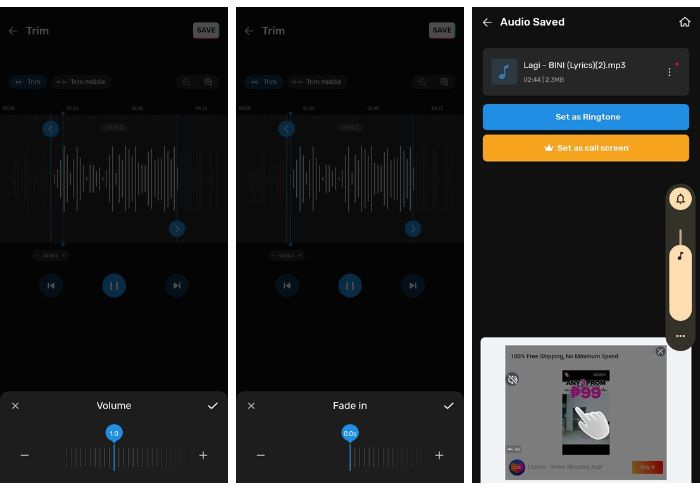
आप वॉल्यूम को 2.0 तक तभी बढ़ा सकते हैं जब आप इस टूल का निःशुल्क संस्करण उपयोग कर रहे हों।
चरण 5. अपनी रिंगटोन में फ़ेड‑इन और फ़ेड‑आउट जोड़ने के लिए, Fade in और Fade out दोनों बटनों पर टैप करें।.
चरण 6. सारी कस्टमाइज़ेशन पूरी होने के बाद, Save बटन को चुनें।.
यह ऐप Android के लिए रिंगटोन बनाने के लिए अच्छा है, खासकर इसलिए क्योंकि यह मुफ़्त है और इस्तेमाल में आसान है। हालाँकि, सिस्टम में कुछ समस्याएँ हैं क्योंकि यह थोड़ा बग वाला था। साथ ही, आप अपने फ़ोन पर आउटपुट को सहेजने के लिए फ़ाइल स्थान नहीं चुन सकते हैं, जो थोड़ा प्रतिबंधात्मक है। ऐप में बग है और बहुत सारे विज्ञापन दिखाता है।
भाग 6. Android के लिए रिंगटोन निर्माता के बारे में अक्सर पूछे जाने वाले प्रश्न
एंड्रॉइड के लिए सबसे अच्छा रिंगटोन निर्माता कौन सा है?
Android के लिए सबसे अच्छा रिंगटोन मेकर आपकी ज़रूरतों और पसंद पर निर्भर करता है। यदि आप उन्नत सुविधाओं वाला एक व्यापक टूल चाहते हैं, तो FVC‑चुना गया Video Converter Ultimate एक बेहतरीन विकल्प है। यह सटीक ऑडियो ट्रिमिंग (उदाहरण के लिए, MP3 ट्रिम) प्रदान करता है, कई प्रकार के ऑडियो फ़ॉर्मैट सपोर्ट करता है और उच्च‑गुणवत्ता वाला आउटपुट देता है। जो उपयोगकर्ता पहले से बनी रिंगटोन और आसान इंटरफ़ेस पसंद करते हैं, उनके लिए Zedge आदर्श है, भले ही इसमें लगातार आने वाले विज्ञापन और महँगी इन‑ऐप ख़रीदें हों।.
क्या ज़ेड्ज रिंगटोन वास्तव में मुफ़्त हैं?
हां। Zedge मुफ़्त है। हालाँकि, ऐप में इन-ऐप खरीदारी शामिल है जो प्रति आइटम $0.49 से $399.99 तक है।
एंड्रॉइड के लिए सबसे अच्छी मुफ्त रिंगटोन साइट कौन सी है?
Android के लिए सबसे अच्छी मुफ़्त रिंगटोन साइट वास्तव में व्यक्तिगत ज़रूरतों पर निर्भर करती है। Zedge अपने मुफ़्त रिंगटोन और अनुकूलन विकल्पों की विशाल लाइब्रेरी के कारण एक लोकप्रिय विकल्प है। Free Ringtone Maker एक सरल इंटरफ़ेस के साथ ऑनलाइन व्यक्तिगत रिंगटोन बनाने के लिए एक और अच्छा विकल्प है, हालाँकि इसमें सीमित प्रारूप समर्थन है।
निष्कर्ष
निष्कर्ष में, Android के लिए सही रिंगटोन निर्माता ढूँढना वास्तव में मायने रखता है क्योंकि यह अनुकूलित रिंगटोन बनाने की प्रक्रिया को सरल बनाने में मदद करता है। इसलिए, आप जिस भी टूल का उपयोग करने की योजना बना रहे हैं, उनमें से प्रत्येक अद्वितीय सुविधाएँ प्रदान करता है जो आपको सर्वोत्तम संभव तरीके से मदद करेगा। अपने Android रिंगटोन को निजीकृत करने के लिए तैयार हैं? इनमें से कोई भी टूल अभी आज़माएँ!
-
 स्पॉटिफाई गाने को अपनी रिंगटोन बनाएं – इसे कैसे प्राप्त करें?
 क्या आप अपने पसंदीदा Spotify गाने को अपने फ़ोन की रिंगटोन बनाने की कोशिश कर रहे हैं, लेकिन यह नहीं जानते कि इसे कैसे लगाया जाए? इस लेख में, आप सीखेंगे कि इसे कैसे सेट किया जाए।
-
 iPhone पर MP3 को रिंगटोन में बदलें: शुरुआती गाइड
 क्या आप iPhone पर MP3 को रिंगटोन में बदलना चाहते हैं, लेकिन यह नहीं जानते कि कहां और कैसे शुरू करें? यह लेख आपको इस रूपांतरण को आसानी से प्राप्त करने में मदद करने के लिए तीन तरीके प्रदान करता है।
-
 यूट्यूब से रिंगटोन कन्वर्टर टूल: 5 सबसे संक्षिप्त टूल
 क्या आप YouTube वीडियो को रिंगटोन में बदलने के तरीके खोज रहे हैं? आज ही इन पांच कन्वर्टर टूल को आजमाएं और बिना इंटरनेट के कहीं भी अपनी रिंगटोन बजाएं।
