


 वीडियो कनवर्टर अंतिम
 स्क्रीन अभिलेखी
 वीडियो मरम्मत
सर्वश्रेष्ठ डिवएक्स कन्वर्टर्स में से 2: विंडोज और पीसी पर डिवएक्स को एफएलवी में कैसे बदलें
DivX DVD में उपयोग होने वाले शुरुआती स्वामित्व‑आधारित मूवी कंटेनरों में से एक है। यह कम्प्रेशन फ़ॉर्मैट उच्च‑गुणवत्ता वाला वीडियो कम स्टोरेज क्षमता में संग्रहीत करने में मदद करता है। हालाँकि DivX फ़ाइलें जगह की बचत करती हैं, फिर भी इन्हें चलाने के लिए आपको एक विशेष एन्कोडर इंस्टॉल करना होगा। लेकिन हम इस झंझट से बच सकते हैं यदि फ़ाइल को FLV या किसी अन्य समर्थित फ़ॉर्मैट में बदल दें। क्या आप जानना चाहते हैं कि DivX को FLV में कैसे कन्वर्ट करें? तो नीचे दिए गए सभी विवरण पढ़ें और तय करें कि कौन‑सा कन्वर्टर आपके लिए सबसे उपयुक्त है।.

भाग 1. FVC वीडियो कनवर्टर अल्टीमेट के साथ DivX को FLV में बदलें
यह बेहतरीन DivX कन्वर्टर बाकी कन्वर्टर्स की तुलना में सबसे अच्छा इंटरफ़ेस और रेंडरिंग प्रक्रिया प्रदान करता है। FVC Video Converter Ultimate वह प्रमुख कन्वर्टर बन गया है जिसे आप अपने Windows या Mac पर डाउनलोड कर सकते हैं। इस कन्वर्टर, इसके हार्डवेयर एक्सेलेरेशन और तेज़ कन्वर्ज़न की मदद से फ़ाइलों को बदलना और भी आसान और तेज़ हो गया है। जिन टूल्स को आप डाउनलोड करते हैं या ऑनलाइन इस्तेमाल करते हैं, उनकी तुलना में यह सबसे हल्का होने के साथ‑साथ बेहद शक्तिशाली भी है। साथ ही, आप अपने DivX को FLV, MP4, MOV, AVI, MKV और 200+ से भी ज़्यादा फ़ॉर्मैट में बदल सकते हैं। अब क्या आप यह जानना चाहते हैं कि इस टूल का उपयोग कैसे करें? तो नीचे दिए गए चरणों का पालन करें।.
FVC Video Converter Ultimate की मदद से DivX को FLV में कन्वर्ट करने के चरण:
चरण 1. नीचे दिए गए डाउनलोड बटन पर क्लिक करके FVC Video Converter Ultimate अपने डेस्कटॉप पर डाउनलोड करें। फ़ाइल डाउनलोड हो जाने के बाद, उस पर क्लिक करें, इंस्टॉल करें और उसे जल्दी से सेटअप कर लें।.
फ्री डाउनलोडWindows 7 या बाद के संस्करण के लिएसुरक्षित डाउनलोड
फ्री डाउनलोडMacOS 10.7 या बाद के संस्करण के लिएसुरक्षित डाउनलोड
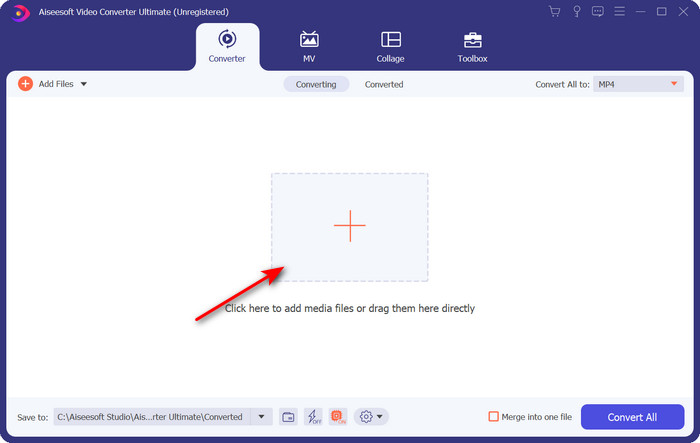
चरण 2. फ़ाइल जोड़ने के लिए + बटन पर क्लिक करें, या यदि आप दो से अधिक फ़ाइलें कन्वर्ट करना चाहते हैं, तो हम सुझाव देते हैं कि उन्हें ड्रैग‑ड्रॉप करके इंटरफ़ेस पर लाएँ।.
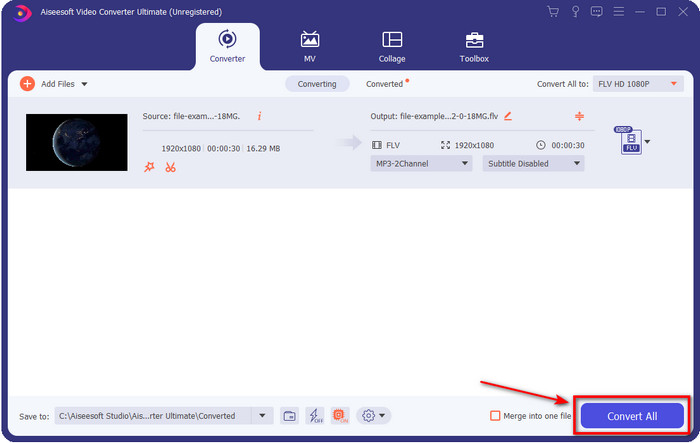
चरण 3. ड्रॉप‑डाउन बटन पर क्लिक करके अपने DivX को FLV में बदलें।.
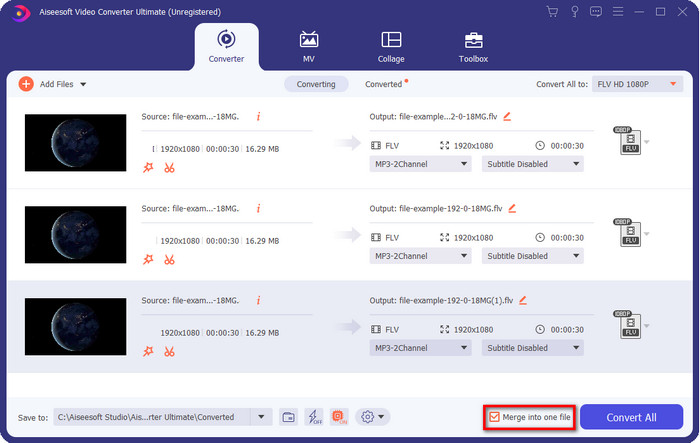
मान लीजिए कि आप अपनी DivX फ़ाइलों को एक में जोड़कर मर्ज करना चाहते हैं, तो कन्वर्ज़न के बाद सभी DivX फ़ाइलों को जोड़ने के लिए बॉक्स पर टिक लगाएँ।.
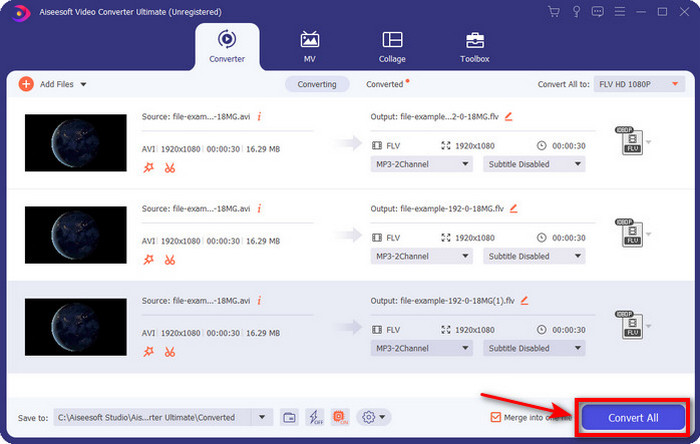
चरण 4. कन्वर्ज़न शुरू करने के लिए Convert All पर क्लिक करें। इंतज़ार करने की ज़रूरत नहीं है, क्योंकि यह प्रक्रिया एक मिनट से भी कम समय लेगी। प्रक्रिया पूरी होने के बाद, परिवर्तित .flv फ़ाइल वाला फ़ोल्डर आपकी स्क्रीन पर दिखाई देगा।.
पेशेवरों
- अन्य ऑनलाइन और ऑफलाइन कन्वर्टर्स की तुलना में DivX को FLV में 30x तेजी से बदलें।
- विंडोज और मैक जैसे सभी ऑपरेटिंग सिस्टम में उपलब्ध है।
- उन्नत वीडियो संपादन सुविधाएँ उपलब्ध हैं।
- बैच रूपांतरण की सहायता से जितनी चाहें उतनी फ़ाइल कनवर्ट करें।
विपक्ष
- आपके कंप्यूटर पर खरीदा और स्थापित करने की आवश्यकता है।
भाग 2. FVC मुफ्त वीडियो कनवर्टर ऑनलाइन के साथ DivX को FLV में बदलें
यदि आप अपने DivX कन्वर्ज़न की समस्या के लिए ऑनलाइन समाधान खोज रहे हैं, तो FVC Free Video Converter Online का उपयोग करें। यह वेब टूल मध्यम‑श्रेणी के कई फ़ॉर्मैट्स को सपोर्ट करता है, सभी सर्च इंजनों के साथ कम्पैटिबल है और पूरी तरह मुफ़्त है। हालाँकि यह कन्वर्टर ऑनलाइन उपलब्ध है, फिर भी आपको इसकी वेबसाइट के इंटरफ़ेस पर परेशान करने वाले विज्ञापनों की चिंता नहीं करनी पड़ेगी। यदि आपको लगता है कि यह ऑनलाइन समाधान आपके लिए सबसे अच्छा विकल्प है, तो नीचे दिए गए विस्तृत चरणों का पालन करें।.
FVC Free Video Converter Online की मदद से DivX को FLV में कन्वर्ट करने के चरण:
चरण 1. सबसे पहले, इस लिंक पर क्लिक करें और ऑनलाइन कन्वर्टर की वेबसाइट खोलें।.
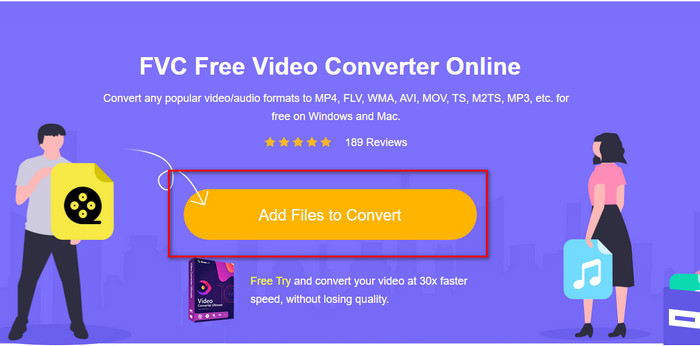
चरण 2. इसके बाद Add Files to Convert बटन पर क्लिक करें और टूल को खुलने की अनुमति दें। फ़ोल्डर से फ़ाइल चुनें और Open दबाएँ।.
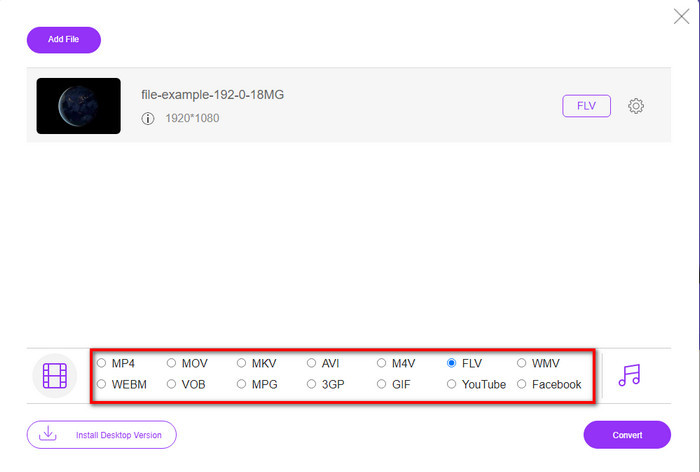
चरण 3. नीचे दिए गए विकल्पों में से FLV या कोई अन्य उपलब्ध फ़ॉर्मैट चुनें।.
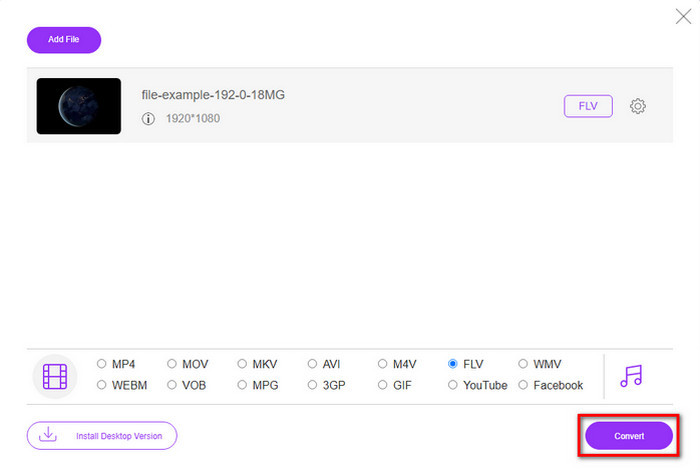
चरण 4. हो जाने पर, प्रक्रिया शुरू करने के लिए Convert पर क्लिक करें।.
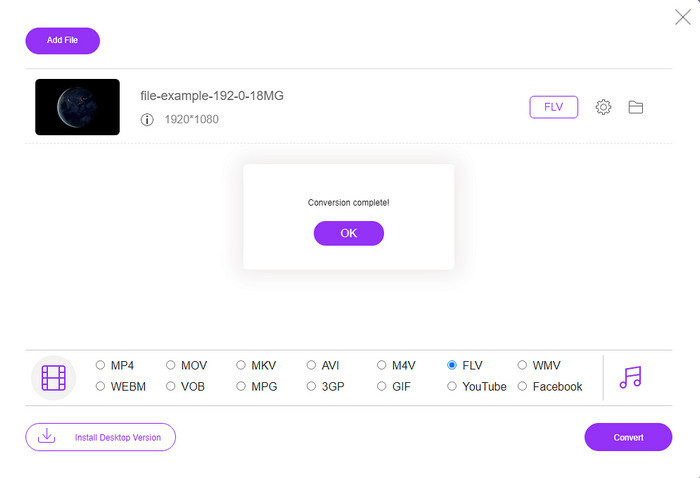
चरण 5. कन्वर्ज़न पूरा हो जाने पर फ़ोल्डर और फ़ाइल के साथ परिणाम आपकी स्क्रीन पर दिखाई देगा।.
पेशेवरों
- अपने ड्राइव पर सॉफ़्टवेयर डाउनलोड करने की आवश्यकता नहीं है।
- मैलवेयर मुक्त और इंटरफ़ेस पर कोई कष्टप्रद विज्ञापन नहीं।
- किसी के लिए भी ऑनलाइन कन्वर्टर्स तक अप्रतिबंधित पहुंच।
विपक्ष
- यह कनवर्ट करने के लिए सीमित स्वरूपों और एन्कोडर्स का समर्थन करता है।
- इसमें उन्नत सुविधाएँ नहीं हैं जैसा कि FVC वीडियो कन्वर्टर अल्टीमेट में है।
भाग 3. डिवएक्स बनाम एफएलवी
डिवएक्स
डिजिटल वीडियो एक्सप्रेस, डिवएक्स के लिए संक्षिप्त, उच्च-संपीड़न वीडियो स्ट्रीम और न्यूनतम गुणवत्ता परिवर्तनों के साथ डीवीडी के लिए सबसे अच्छा प्रारूप है। यह कोडेक लगभग MPEG-4 की तरह काम करता है, लेकिन मुख्य अंतर यह है कि यह मालिकाना है। इसके अलावा, आप उपयुक्त सॉफ़्टवेयर की उचित सहायता के बिना .divx वीडियो नहीं चला सकते हैं। अपने विंडोज़ या मैक पर इसे ठीक से चलाने के बजाय, स्मार्टफ़ोन पर भी, आपको केवल अलर्ट प्राप्त होंगे कि यह प्रारूप असमर्थित है। हालाँकि यह प्रारूप उपयोग करने में थोड़ा कष्टप्रद है, फिर भी यह आपके ड्राइव पर बैंडविड्थ और स्थान बचाने में आपकी मदद करता है।
FLV
हालांकि, एफएलवी या फ्लैश वीडियो एचटीएमएल 5 पर सबसे अधिक इस्तेमाल किया जाने वाला सर्वोच्च पसंद प्रारूप है। यह प्रारूप डिवएक्स से अलग तरह से काम करता है क्योंकि यह प्रारूप वेब पर मीडिया फ़ाइल को कुशलतापूर्वक वितरित करने के लिए एडोब एयर और फ्लैश प्लेयर के समर्थन का उपयोग करता है। साथ ही, मीडिया फ़ाइलों वाले वीडियो-साझाकरण प्लेटफ़ॉर्म पर वीडियो एम्बेड करने के लिए यह लंबा मानक प्रारूप रहा है। हालांकि एफएलवी डिवएक्स से बेहतर है, अगर हम फाइल को कंप्रेस करने की बात करते हैं, तो डिवएक्स एफएलवी से आकार में छोटा है। लेकिन अगर आप अपनी फाइल को ऑनलाइन तेजी से वितरित करना चाहते हैं, तो आपका फाइल एक्सटेंशन .flv होना चाहिए।
भाग 4. DivX से FLV रूपांतरण के बारे में अक्सर पूछे जाने वाले प्रश्न
DivX को परिवर्तित करने के बाद, क्या इसकी गुणवत्ता में परिवर्तन होता है?
हालांकि डिवएक्स फाइलें पुराने संस्करण प्रारूप में हैं, फिर भी यह उच्च गुणवत्ता वाले वीडियो को छोटे आकार में संपीड़ित कर सकती है। इसलिए, अपने DivX को FLV, MP4, MOV, AVI, या किसी अन्य प्रारूप में बदलने के बाद, DivX वीडियो की गुणवत्ता नहीं बदलनी चाहिए। हालाँकि, यदि आप गलत उपकरण का उपयोग करते हैं जो उच्च-गुणवत्ता वाले आउटपुट का समर्थन नहीं करता है, तो गुणवत्ता खोने की अपेक्षा करें। लेकिन हम ऊपर उपलब्ध साधनों का उपयोग करके इससे बच सकते हैं।
मैं Windows Media Player पर DivX फ़ाइलें क्यों नहीं चला सकता?
हालाँकि DivX फ़ाइलें इंटरनेट पर काफ़ी लोकप्रिय हो गई हैं, फिर भी यदि आप सही कोडेक डाउनलोड करते हैं तो इन्हें Windows Media Player पर चलाना संभव है। लेकिन अगर आप इस झंझट में नहीं पड़ना चाहते, तो यह लेख पढ़ें और जानें कि इस फ़ाइल को चलाने के लिए आप कौन‑से 5 DivX प्लेयर इस्तेमाल कर सकते हैं।.
क्या डिवएक्स फाइलों को परिवर्तित करने में समय लगता है?
खैर, यह आपकी डिवएक्स फ़ाइल के आकार पर निर्भर करता है। सभी मामलों में, DivX फ़ाइल जितनी बड़ी होगी, आप उसे रूपांतरित करने के लिए उतनी ही देर प्रतीक्षा करेंगे। मान लीजिए कि आप हार्डवेयर त्वरण और तेज़ रूपांतरण वाले टूल का उपयोग कर रहे हैं। उस स्थिति में, आप भाग्यशाली हैं क्योंकि आपको फ़ाइल को कनवर्ट करने के लिए प्रतीक्षा करने या बहुत समय बिताने की आवश्यकता नहीं होगी।
निष्कर्ष
कुल मिलाकर, ऊपर बताई गई विस्तृत जानकारी हमें यह समझने में मदद करती है कि हमें DivX को FLV में क्यों कन्वर्ट करना चाहिए। किसी भी असुविधा से बचने के लिए सबसे अच्छे आउटपुट के लिए सबसे अच्छे टूल का उपयोग करना ज़रूरी है। इंटरनेट पर खोज करने के बाद, हमें सबसे अच्छे कन्वर्टर मिले जिन्हें आप ऑनलाइन या ऑफ़लाइन इस्तेमाल कर सकते हैं। इसके अलावा, यदि आप ऑनलाइन समाधान के तौर पर FVC Free Video Converter Online का उपयोग करना चाहते हैं, तो आपको दिए गए लिंक पर क्लिक करना होगा। हालाँकि, यदि आप ऐसा टूल चाहते हैं जो 200+ से ज़्यादा फ़ॉर्मैट्स को सपोर्ट करता हो और विशेष फीचर्स के साथ सबसे उत्कृष्ट अंतिम आउटपुट दे, तो आपको FVC Video Converter Ultimate ज़रूर डाउनलोड करना चाहिए।
-
 DivX को MOV में मुफ्त में बदलने के 4 तरीके [ऑनलाइन और ऑफलाइन]
 क्या आप डिवएक्स की सीमाओं के साथ संघर्ष करते हैं, या क्या आपके पास इस प्रारूप में वीडियो तक पहुंचने के लिए मीडिया प्लेयर नहीं हैं? यदि आप इसे MOV प्रारूप में बदलना चाहते हैं, तो अंतराल को भरने के लिए इस लेख को पढ़ना जारी रखें।
-
 M2TS को FLV ऑनलाइन और ऑफलाइन में बदलने का असाधारण तरीका
 क्या आपने कभी किसी भिन्न प्लेटफॉर्म पर M2TS को FLV में बदलने की कोशिश की है? सबसे अच्छा उपयोग में आसान ऑनलाइन टूल और सॉफ़्टवेयर के बारे में अधिक जानने के लिए इस लेख को पढ़ें, जिसे आपको M2TS को FLV में बदलने पर विचार करना चाहिए।
-
 3GP को FLV में बदलने में उपयोग करने के लिए सर्वश्रेष्ठ 3GP से FLV कनवर्टर [2022]
 क्या आपने कभी 3GP को FLV में बदलने का प्रयास किया है, लेकिन आप नहीं जानते कि आप किस प्रकार के कनवर्टर का उपयोग करेंगे? 3GP को FLV में बदलने के बारे में सभी विवरण जानने के लिए इस लेख को पढ़ें।
