


 वीडियो कनवर्टर अंतिम
 स्क्रीन अभिलेखी
 वीडियो मरम्मत
 सुरक्षित डाउनलोड
अपनी FLV वीडियो फ़ाइलों को मुफ्त में 3GP प्रारूप में कैसे बदलें
यह लेख आपको FLV को 3GP में कनवर्ट करने के सबसे अच्छे तरीके दिखाएगा। सर्वेक्षण के अनुसार, बाज़ार में वीडियो फ़ाइल फ़ॉर्मेट की बहुत सारी किस्में मौजूद हैं। डेवलपर्स ने उन्हें अलग‑अलग उद्देश्यों के लिए जारी किया है। उदाहरण के लिए FLV, जिसका पूरा नाम Flash Video है, इंटरनेट पर Adobe Flash Player में चलाने के लिए दृश्य सामग्री को स्टोर करने में इस्तेमाल होता है।.
दूसरी ओर, 3GP, मोबाइल उपकरणों पर बैंडविड्थ और डेटा उपयोग को बचाने के लिए थर्ड जनरेशन पार्टनरशिप प्रोजेक्ट द्वारा बनाया गया मल्टीमीडिया प्रारूप है। दूसरे शब्दों में, बेहतर होगा कि आप FLV को 3GP में बदलें और हैंडसेट पर वीडियो देखें।

भाग 1: डेस्कटॉप पर FLV को 3GP में बदलने का सबसे अच्छा तरीका
FVC Free FLV Converter एक शक्तिशाली वीडियो कनवर्टर है। जैसा कि इसके नाम से स्पष्ट है, यह आपको FLV को 3GP में बिल्कुल मुफ्त कनवर्ट करने देता है। इसके अलावा, यह आपको कई उपयोगी सुविधाएँ देता है, जैसे वीडियो और ऑडियो एडिटिंग। सबसे महत्वपूर्ण बात, इसका उपयोगकर्ता‑अनुकूल इंटरफेस आपको वह फीचर जल्दी खोजने में मदद करता है जिसकी आपको ज़रूरत है।.
सर्वश्रेष्ठ मुफ्त FLV कनवर्टर की मुख्य विशेषताएं
- 1. FLV वीडियो को 3GP जैसे किसी भी मल्टीमीडिया फॉर्मेट में कनवर्ट करें।
- 2. बैच एक ही समय में एकाधिक वीडियो फ़ाइलों को संभालता है।
- 3. मोबाइल उपकरणों पर चलाने के लिए FLV फ़ाइलों को ट्रांसकोड करें।
फ्री डाउनलोडWindows 7 या बाद के संस्करण के लिएसुरक्षित डाउनलोड
फ्री डाउनलोडMacOS 10.7 या बाद के संस्करण के लिएसुरक्षित डाउनलोड
FLV को 3GP में मुफ्त में कैसे बदलें
इसे अपने कंप्यूटर पर इंस्टॉल करने के बाद सर्वश्रेष्ठ फ्री FLV कनवर्टर शुरू करें। यह Windows 10/8/7 और Mac OS X के साथ संगत है। Add File(s) बटन पर क्लिक करें, इससे ओपन‑फ़ाइल डायलॉग खुल जाएगा। वे FLV फाइलें चुनें जिन्हें आप कनवर्ट करना चाहते हैं और Open पर क्लिक करें। इसके बाद वीडियो लाइब्रेरी एरिया में दिखाई देंगे।.

चरण 2: आउटपुट फॉर्मैट सेट करें
नीचे स्थित Profile format ड्रॉपडाउन मेनू पर क्लिक करके उसे विस्तार दें और आपके सामने प्रोफ़ाइल बॉक्स आ जाएगा। Search Profile बॉक्स में 3GP टाइप करें और कीबोर्ड पर Enter कुंजी दबाएँ। फिर आउटपुट फ़ॉर्मेट चुनें। अगर आप वीडियो अपने मोबाइल डिवाइस पर चलाना चाहते हैं, तो निर्माता (manufacturer) चुनें और सीधे सही मॉडल का चयन करें।.

स्टेप 3: FLV को 3GP में कनवर्ट करें
नीचे दिए गए Open Folder बटन पर क्लिक करके आउटपुट को सेव करने के लिए एक विशेष डायरेक्टरी सेट करें। अंत में, Convert बटन पर क्लिक करें ताकि FLV से 3GP में कनवर्ज़न शुरू हो सके। कुछ ही मिनटों में आपको अपनी हार्ड ड्राइव पर 3GP फाइलें मिल जाएँगी।.

भाग 2: FLV को 3GP ऑनलाइन में कैसे बदलें
वेब वीडियो कनवर्टर ऐप्स भी FLV को 3GP में मुफ्त कनवर्ट करने का एक लोकप्रिय तरीका हैं। लेकिन, उनमें से ज़्यादातर में कई तरह की कमियाँ होती हैं, जैसे फ़ाइल साइज़ सीमा, वॉटरमार्क, सुरक्षा संबंधी समस्याएँ इत्यादि। सौभाग्य से, FVC Free Online Video Converter इन समस्याओं को हल करने में आपकी मदद कर सकता है। यह बिना किसी प्रतिबंध के पूरी तरह मुफ़्त है। आउटपुट क्वालिटी भी बेहतरीन है।.
स्टेप 1: वेब ब्राउज़र में https://www.free-videoconverter.net/free-online-video-converter/ पर जाएँ और Add Files to Convert बटन पर क्लिक करके लॉन्चर प्राप्त करें। यह आपके कंप्यूटर की लोकल स्पेस नहीं लेगा।.
फ़ाइलों को बैच में कनवर्ट करने के लिए डेस्कटॉप संस्करण डाउनलोड करें।.
स्टेप 2: Add File मेनू पर क्लिक करें और वे FLV फाइलें अपलोड करें जिन्हें आप कनवर्ट करना चाहते हैं। यह वेब ऐप आपको एक बार में कई वीडियो बैच में कनवर्ट करने की सुविधा देता है।.
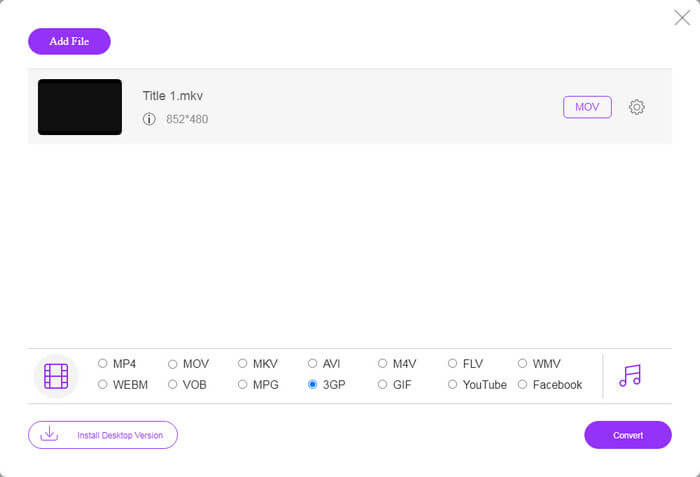
स्टेप 3: नीचे की ओर जाएँ और प्रोफ़ाइल सेक्शन में 3GP चुनें। ऑनलाइन FLV को 3GP में कनवर्ट करना शुरू करने के लिए Convert बटन पर क्लिक करें। अगर आपका नेटवर्क तेज़ है, तो यह कुछ ही सेकंड में पूरा हो जाएगा। फिर 3GP फाइलें अपनी हार्ड ड्राइव पर डाउनलोड कर लें।.
मिस न करें:
भाग 3: VLC के साथ FLV को 3GP में कैसे बदलें
कभी-कभी, फ्रीवेयर पेशेवर सॉफ्टवेयर जितना ही शक्तिशाली होता है। उदाहरण के लिए, वीएलसी एक लोकप्रिय ओपन-सोर्स मीडिया प्लेयर है। यह विंडोज, मैक और लिनक्स पर FLV को 3GP में मुफ्त में बदलने में सक्षम है। बेशक, खर्च स्पष्ट है, जैसे कि उपयोग करना मुश्किल है। इसलिए, हम नीचे दिए गए चरणों को साझा करते हैं:
स्टेप 1: अपने कंप्यूटर पर मुफ्त FLV से 3GP कनवर्टर चलाएँ। पहले आपको इसे इंस्टॉल करना होगा। आधिकारिक वेबसाइट सुरक्षित इंस्टॉलर प्रदान करती है।.
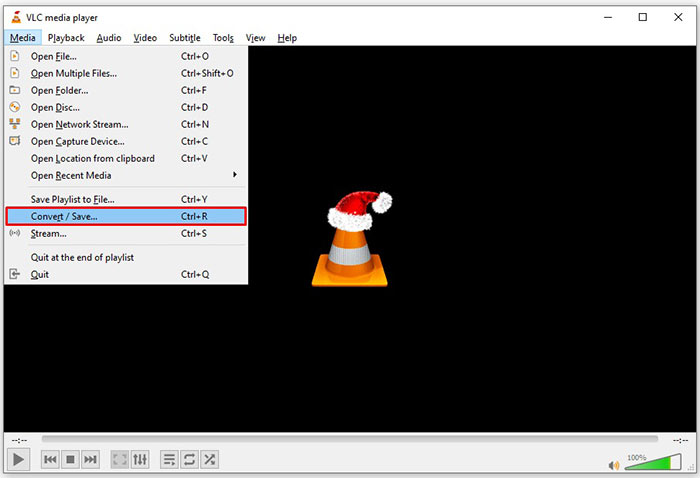
स्टेप 2: ऊपर की रिबन में Media मेनू पर जाएँ और Convert/Save चुनें। इसके बाद ओपन मीडिया डायलॉग पॉप‑अप होगा।.
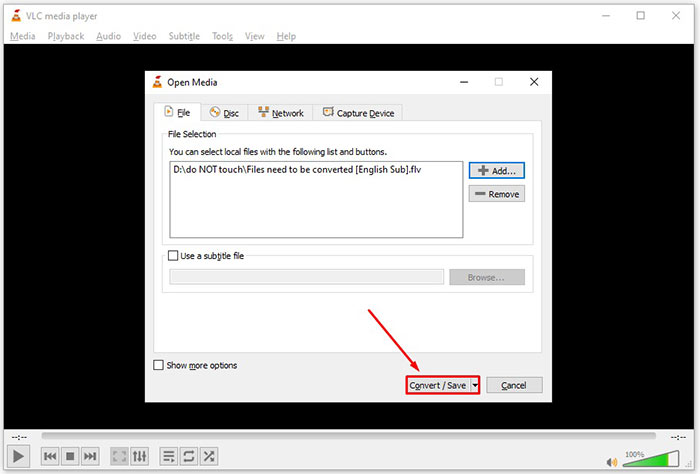
स्टेप 3: Add बटन पर क्लिक करें, वह FLV फ़ाइल ढूँढें जिसे आप कनवर्ट करना चाहते हैं और उसे चुनें, फिर Open पर क्लिक करें। अगली विंडो में जाने के लिए Convert/Save बटन दबाएँ।.
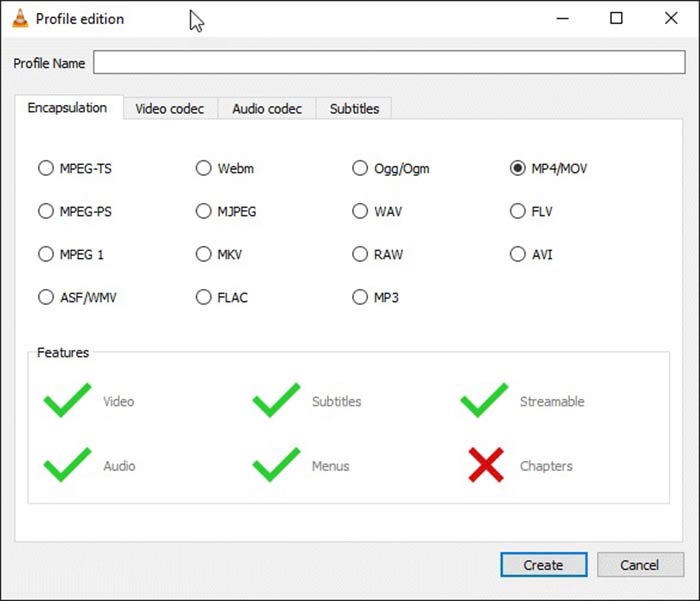
स्टेप 4: Profile के बगल में दी गई ड्रॉपडाउन सूची को खोलें और 3GP या संबंधित वीडियो फ़ॉर्मेट चुनें। यदि आप वीडियो कोडेक या अन्य पैरामीटर बदलना चाहते हैं, तो ड्रॉपडाउन सूची के पास स्थित Profile Edit बटन पर क्लिक करें और 3GP जोड़ें।.
स्टेप 5: Destination सेक्शन में Browse बटन पर क्लिक करें और आउटपुट 3GP फाइल को सेव करने के लिए कोई खास फ़ोल्डर चुनें।.
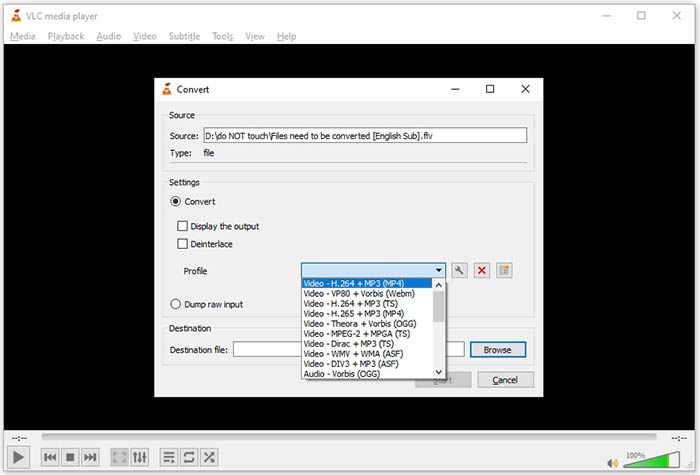
स्टेप 6: जैसे ही आप Start बटन पर क्लिक करते हैं, VLC FLV को 3GP में कनवर्ट करना शुरू कर देगा।.
रूपांतरण पूरा होने में कुछ समय लगता है क्योंकि वीएलसी मूल वीडियो रिकॉर्ड करके काम करता है। इसका मतलब है कि यह प्रक्रिया आपके FLV वीडियो की लंबाई तक खर्च करती है।
एफएलवी बनाम 3जीपी
Adobe Flash Player ने FLV का उपयोग मूवी और टीवी शो जैसी वीडियो सामग्री वितरित करने के लिए किया। आजकल, Adobe अब प्लेयर विकसित नहीं करता है और सुरक्षा कारणों से उपयोगकर्ताओं को इसे अनइंस्टॉल करने की अनुशंसा करता है। हालांकि, आप अभी भी कई गैर-एडोब/मैक्रोमीडिया कार्यक्रमों पर एफएलवी प्रारूप का उपयोग कर सकते हैं।
3rd जनरेशन पार्टनरशिप प्रोजेक्ट (3GPP) ने मल्टीमीडिया कंटेनर फॉर्मेट के रूप में 3GP/3GPP फॉर्मेट तैयार किया। यह वास्तव में ISO मीडिया फ़ाइल स्वरूप पर आधारित है। हम अक्सर इसका उपयोग 3जी मोबाइल फोन और ऑनलाइन के बीच प्रसारित होने वाले वीडियो/ऑडियो स्ट्रीम को बचाने के लिए करते हैं।
भाग 4: FLV को 3GP में बदलने के बारे में अक्सर पूछे जाने वाले प्रश्न
क्या FLV को 3GP में बदलने से वीडियो की गुणवत्ता खराब होगी?
सामान्यतया, वीडियो रूपांतरण गुणवत्ता खो देगा। हालांकि, एक शक्तिशाली वीडियो कनवर्टर प्रोग्राम इस समस्या को ठीक करने और उन्नत तकनीक का उपयोग करके वीडियो की गुणवत्ता को अनुकूलित करने में सक्षम है।
FLV वीडियो को कन्वर्ट करने में कितना समय लगता है?
यह कई कारकों द्वारा निर्धारित किया जाता है, जैसे वीडियो की लंबाई, आपके द्वारा उपयोग किया जाने वाला वीडियो परिवर्तित करने वाला सॉफ़्टवेयर, आपका हार्डवेयर प्रदर्शन और बहुत कुछ। यदि आप वेब वीडियो कनवर्टर का उपयोग कर रहे हैं, तो आपका इंटरनेट कनेक्शन एक आवश्यक तत्व है।
मेरे iPhone पर FLV क्यों नहीं चल रहा है?
iPhone MOV को सपोर्ट करता है, जो MP4, ASF और AVI का हिस्सा है। इसलिए, आप सीधे iPhone पर FLV नहीं खोल सकते। हालाँकि, मोबाइल उपकरणों पर FLV देखने के तरीके हैं। यदि आपकी FLV फ़ाइल Google डिस्क जैसी इंटरनेट सेवाओं द्वारा होस्ट की जाती है, तो अंतर्निहित मीडिया प्लेयर उपलब्ध है। साथ ही, आप VLC जैसे किसी अन्य मीडिया प्लेयर का उपयोग कर सकते हैं।
निष्कर्ष
इस गाइड ने आपको FLV वीडियो फ़ाइलों को कंप्यूटर या ऑनलाइन पर 3GP प्रारूप में बदलने के तीन निःशुल्क तरीके बताए हैं। यदि आप मोबाइल उपकरणों पर FLV वीडियो देखने की तैयारी करते हैं, तो आप इसे FVC मुक्त FLV कनवर्टर के साथ 3GP या अन्य मोबाइल-अनुकूल वीडियो प्रारूपों में बेहतर रूप से परिवर्तित कर सकते हैं। यह न केवल उपयोग में आसान है, बल्कि आपके वीडियो की गुणवत्ता की रक्षा करने में भी सक्षम है। और सवाल? कृपया नीचे एक संदेश छोड़ दें।
-
 कैसे एक पैसा चुकाने के बिना MP4 करने के लिए अपने FLV वीडियो फ़ाइलों को परिवर्तित करने के लिए
 यह मार्गदर्शिका आपकी FLV वीडियो फ़ाइलों को MP4 प्रारूप में विंडोज 10/8/7 / XP और मैक ओएस एक्स में परिवर्तित करने के लिए चार नि: शुल्क तरीके साझा करती है, ताकि आप किसी भी डिवाइस पर वीडियो का आनंद ले सकें।
-
 डेस्कटॉप और ऑनलाइन पर अपने FLV वीडियो को MP3 ऑडियो फाइलों में कैसे बदलें
 FLV को MP3 फ़ाइल में कैसे बदलें? आपको बस इस लेख को ध्यान से पढ़ने, अपनी पसंदीदा विधि खोजने और हमारे चरण-दर-चरण मार्गदर्शिका का पालन करने की आवश्यकता है जो आप चाहते हैं।
-
 FLV को MOV में बदलने के शीर्ष 3 तरीके
 FLV को MOV में कैसे बदलें? मैं मैक पर FLV को MOV में कैसे बदलूँ? क्या FLV को MOV में ऑनलाइन बदलने का कोई मुफ़्त तरीका है? यह पोस्ट FLV फ़ाइलों को MOV में बदलने के लिए MOV कन्वर्टर्स के लिए 3 FLV साझा करता है।

