


 वीडियो कनवर्टर अंतिम
 स्क्रीन अभिलेखी
 वीडियो मरम्मत
एक पूर्वाभ्यास मार्गदर्शिका जिसे आपको M2TS को FLV में बदलने पर विचार करना चाहिए [ऑफ़लाइन और ऑनलाइन]
VOB, WMV और MOV जैसे मीडिया फ़ाइलें सभी M2TS के उदाहरण हैं। तो वास्तव में M2TS क्या है? असल में, M2TS, MPEG-2 Transparent Stream का संक्षिप्त रूप है। ब्लू-रे डिस्क, AVCHD आदि पर उच्च-परिभाषा (HD) वीडियो इस कंटेनर फ़ॉर्मेट में संग्रहीत किए जा सकते हैं। वहीं FLV वह फ़ाइल है जिसकी एक्सटेंशन .flv होती है, जो Flash Video का संक्षिप्त रूप है। FLV फ़ाइल एक्सटेंशन उस वीडियो या ऑडियो फ़ाइल को दर्शाता है जो इंटरनेट पर Adobe Flash Player या Adobe Air के माध्यम से ट्रांसमिट की जाती है। ये दोनों वीडियो फ़ाइल फ़ॉर्मेट आपके लिए अनजान हो सकते हैं, लेकिन M2TS को FLV में कनवर्ट करने के लिए, आपको पहले इन दोनों वीडियो फ़ॉर्मेट्स के उपयोग और कनवर्ज़न के दौरान ध्यान देने योग्य सभी विकल्पों के बारे में जानना ज़रूरी है। अपने दिमाग को तैयार रखें और जो भी जानकारी आप पढ़ने वाले हैं उससे अच्छी तरह अवगत हो जाएँ।.

भाग 1. विंडोज और मैक पर M2TS को FLV में कैसे बदलें
वीडियो कन्वर्टर अल्टीमेट के साथ, विंडोज और मैक दोनों पर M2TS को FLV में कनवर्ट करना एक चिंच है। MP4/MOV/M4V/FLV/M4K/MTS/M2TS/ASF/MP3/VOB/AAC कई लोकप्रिय वीडियो प्रारूपों और ऑडियो प्रारूपों में से कुछ हैं जिनका यह शक्तिशाली कार्यक्रम समर्थन करता है। आपके हाई-डेफिनिशन वीडियो को उनकी मूल गुणवत्ता बनाए रखते हुए कुछ ही सेकंड में FLV जैसे लोकप्रिय प्रारूपों में परिवर्तित किया जा सकता है। इसमें एक बैच रूपांतरण सुविधा है जो आपको गुणवत्ता खोए बिना कई फ़ाइलों को परिवर्तित करने की अनुमति देती है। यह मानते हुए कि आप पहले ही सॉफ़्टवेयर से परिचित हो चुके हैं, अब आप सफलतापूर्वक रूपांतरित होने के सभी आवश्यक चरण सीख सकते हैं:
स्टेप 1: सबसे पहले नीचे दिए गए Free Download बटन पर क्लिक करके सॉफ़्टवेयर को अपने कंप्यूटर पर डाउनलोड करें। फिर, डाउनलोड पूरा होने के बाद सॉफ़्टवेयर को अपने कंप्यूटर पर इंस्टॉल करें, इसके बाद आपकी स्क्रीन पर एक विंडो पॉप अप होगी जो सूचित करेगी कि सॉफ़्टवेयर उपयोग के लिए तैयार है। सॉफ़्टवेयर चलाने के लिए Start Now पर क्लिक करें।.
फ्री डाउनलोडWindows 7 या बाद के संस्करण के लिएसुरक्षित डाउनलोड
फ्री डाउनलोडMacOS 10.7 या बाद के संस्करण के लिएसुरक्षित डाउनलोड
स्टेप 2: दूसरा, जैसे ही आप सॉफ़्टवेयर चलाते हैं, यह आपको सॉफ़्टवेयर के मुख्य इंटरफ़ेस, यानी Converter मेन्यू पर ले जाएगा।.
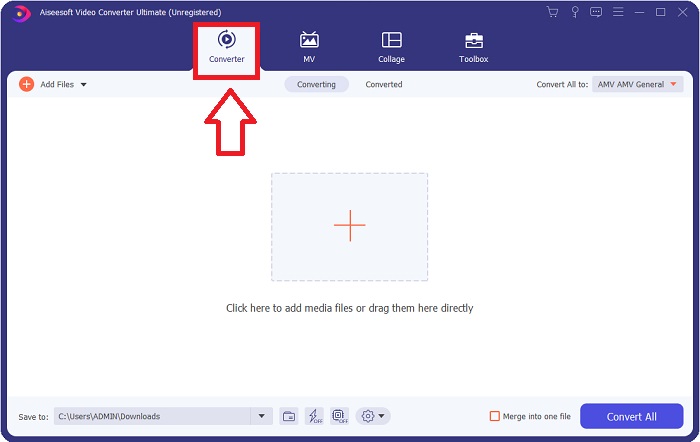
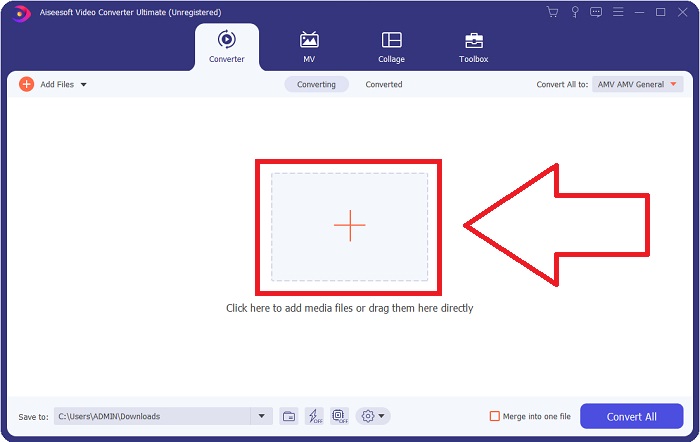
स्टेप 3: फ़ाइल अपलोड करने के लिए, इंटरफ़ेस के बीच में स्थित + आइकन पर क्लिक करें, या आप सीधे अपने कंप्यूटर से वीडियो को ड्रैग करके भी ला सकते हैं।.
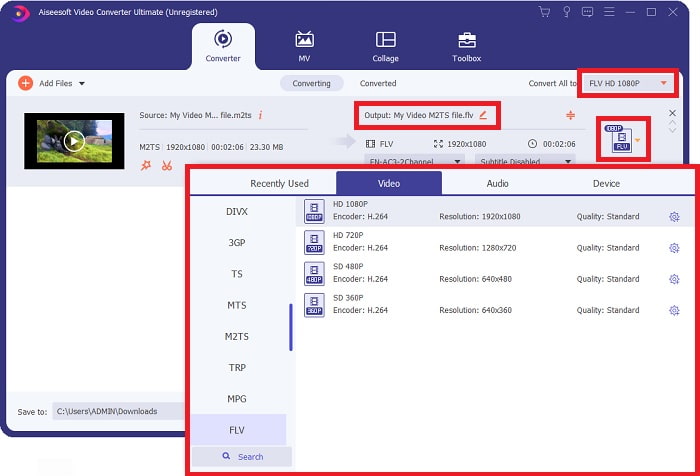
स्टेप 4: कनवर्टर में M2TS फ़ाइल अपलोड करने के बाद, विंडो के दाएँ ऊपरी कोने में Convert All to मेन्यू पर जाएँ और उस पर क्लिक करें। एक नई विंडो दिखाई देगी जिसमें सॉफ़्टवेयर द्वारा सपोर्ट किए जाने वाले सभी अलग-अलग फ़ॉर्मेट्स दिखेंगे, फिर Video की कैटिगरी सूची से FLV वीडियो फ़ॉर्मेट चुनें।.
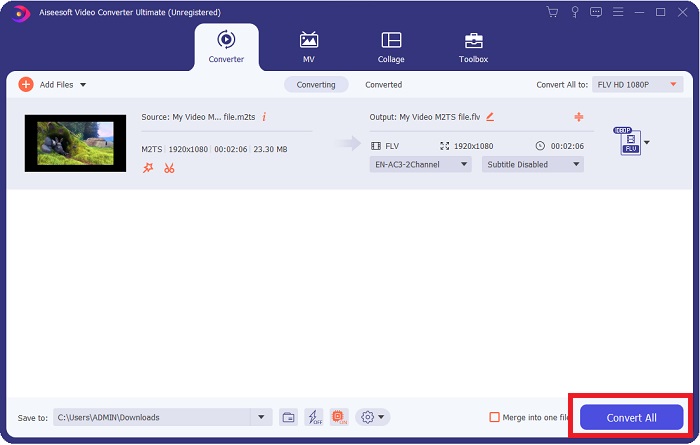
स्टेप 5: अगर आप अब भी यह तय नहीं कर पा रहे हैं कि कौन-सी क्वालिटी चुनें, क्योंकि जो क्वालिटी आप चाहते हैं वह उपलब्ध विकल्पों में नहीं दिख रही है, तो आप गियर आइकन पर क्लिक करके बिटरेट, रेज़ोल्यूशन, फ़्रेम रेट आदि की सारी सेटिंग्स बदल सकते हैं। जब आप सभी बदलावों से संतुष्ट हों, तब आप Convert All पर क्लिक करके अपने वीडियो फ़ाइल को कनवर्ट करना शुरू कर सकते हैं।.
भाग 2. M2TS को FLV ऑनलाइन में बदलने के अन्य नि:शुल्क और प्रभावी तरीके
Free Video Converter Online एक ऑनलाइन टूल है, जो FLV, MP4, MOV, MKV, MTS, ASF, VOB आदि जैसे वीडियो फ़ॉर्मेट्स को दूसरे फ़ॉर्मेट में कनवर्ट करने के लिए उपयुक्त है और अन्य कनवर्ज़न प्लेटफ़ॉर्म्स की तुलना में तेज़ी से काम करता है। अपने तेज़ कनवर्ज़न प्रोसेस के बावजूद, यह ऑनलाइन टूल वीडियो फ़ाइल को उसकी क्वालिटी में किसी भी तरह की समस्या के बिना एक्सपोर्ट करता है। ज़्यादा बात किए बिना, अब उन सभी स्टेप्स पर नज़र डालते हैं जिन्हें आपको फ़ॉलो करना है:
स्टेप 1: Free Video Converter Online की मुख्य वेबसाइट पर जाने के लिए इस लिंक पर क्लिक करें।.
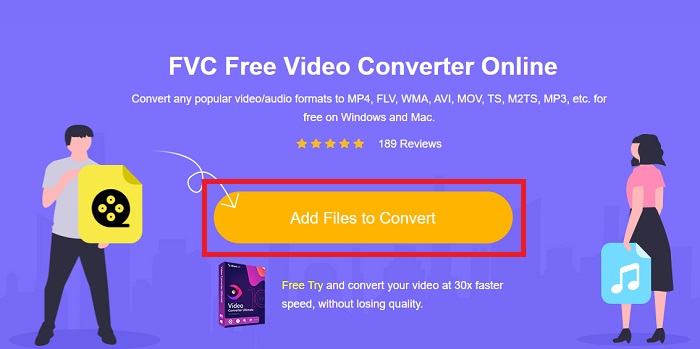
स्टेप 2: फिर Add Files to Convert बटन पर क्लिक करके वह M2TS वीडियो फ़ाइल अपलोड करें जिसे आप FLV वीडियो फ़ॉर्मेट में कनवर्ट करना चाहते हैं।.
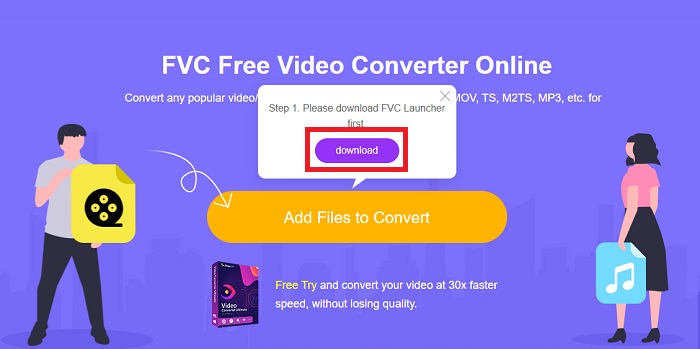
स्टेप 3: फ़ाइल अपलोड करने के बाद, आपकी स्क्रीन के ऊपर एक पॉप-अप विंडो दिखाई देगी जो आपसे इस ऑनलाइन टूल का उपयोग करने के लिए लॉन्चर डाउनलोड करने की अनुमति मांगेगी। डाउनलोड किए गए लॉन्चर पर क्लिक करके उसे अपने कंप्यूटर पर इंस्टॉल करें और कनवर्ट करना शुरू करें।.
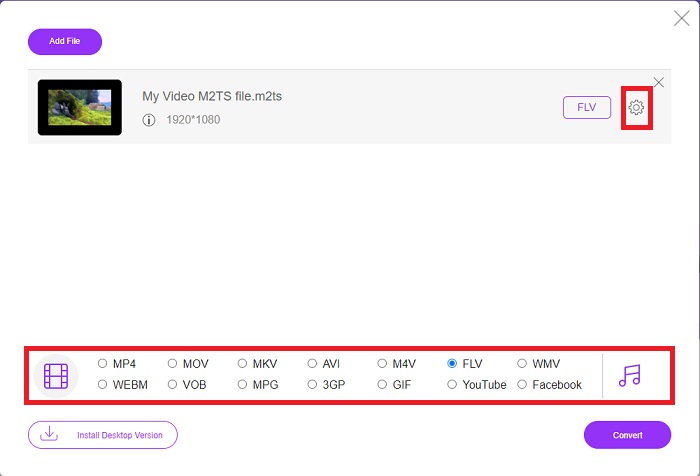
स्टेप 4: इंटरफ़ेस के नीचे मौजूद फ़ॉर्मेट्स की सूची में से FLV वीडियो फ़ॉर्मेट चुनें। साथ ही, आप चुने हुए वीडियो फ़ॉर्मेट के बगल में स्थित गियर आइकन पर क्लिक करके अपने वीडियो आउटपुट की क्वालिटी को एडिट कर सकते हैं। एक और विंडो पॉप अप होगी जिसमें बिटरेट, रेज़ोल्यूशन और फ़्रेम रेट के विकल्प होंगे। इन्हें एडजस्ट करना शुरू करें, और जैसे ही आप सेटिंग्स से संतुष्ट हो जाएँ, OK पर क्लिक करें और कनवर्ज़न की प्रक्रिया आगे बढ़ाएँ।.
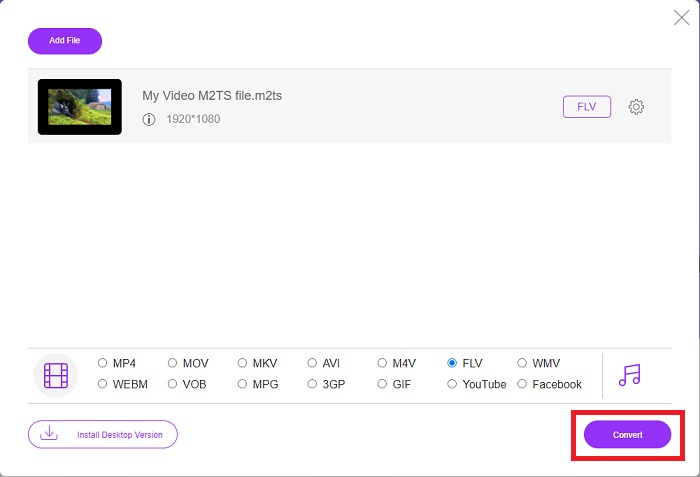
स्टेप 5: अब आप विंडो के दाएँ निचले कोने में स्थित Convert बटन पर क्लिक करके फ़ाइल को कनवर्ट कर सकते हैं।.
भाग 3. M2TS और FLV के बीच तुलना
वीडियो कंटेनर प्रारूप M2TS का उपयोग ब्लू-रे डिस्क, AVCHD, हार्ड ड्राइव और MPEG-2 ट्रांसपोर्ट स्ट्रीम का समर्थन करने वाले अन्य उपकरणों पर उच्च-परिभाषा वीडियो संग्रहीत करने के लिए किया जाता है। ब्लू-रे डिस्क ऑडियो-वीडियो (BDAV) ब्लू-रे डिस्क में इसके व्यापक उपयोग के कारण इस प्रारूप को दिया गया नाम है। डेटा के आकार को कम करने के लिए। CBR ट्रांसपोर्ट स्ट्रीम का उपयोग करने के बजाय, M2TS फ़ाइलों में निहित उच्च गुणवत्ता वाले ऑडियो और वीडियो सामग्री के कारण VBR ट्रांसपोर्ट स्ट्रीम का उपयोग (स्थिर दर) किया जाता है; VideoStudio Pro M2TS फ़ाइलों को संपादित करने के लिए एक उत्कृष्ट एप्लिकेशन है।
| दस्तावेज़ विस्तारण | M2TS | FLV |
| फाइल का प्रकार | ब्लू-रे डिस्क ऑडियो-वीडियो MPEG-2 ट्रांसपोर्ट स्ट्रीम | फ्लैश वीडियो फ़ाइल |
| द्वारा विकसित | ब्लू-रे डिस्क एसोसिएशन | एडोब सिस्टम |
| पेशेवरों | एक MPEG-2 ट्रांसपोर्ट स्ट्रीम-आधारित हाई-डेफिनिशन ब्लू-रे BDAV वीडियो फ़ाइल; ब्लू-रे डिस्क पर वीडियो डेटा संग्रहीत करने के लिए उपयोग किया जाता है; 720p / 1080i प्रस्तावों का समर्थन करता है। | एक प्रचलित वीडियो प्रारूप, FLV का उपयोग हजारों वेबसाइटों द्वारा किया जाता है, अतिरिक्त सुविधाओं की एक विस्तृत श्रृंखला प्रदान करता है, और अधिकांश अन्य वीडियो प्रारूपों की तुलना में छोटे फ़ाइल आकार का उत्पादन करता है। FLV फ़ाइलें उच्च गुणवत्ता वाले वीडियो को तेज़ दर पर वितरित करने के लिए उत्कृष्ट हैं। |
| विपक्ष | एक m2ts फ़ाइल में अध्याय नहीं हो सकते। वे Bluray फ़ोल्डर संरचना में कहीं और रखे जाते हैं। | फ़्लैश फ़ाइल फ़ाइलों को ऑनलाइन चलाने के लिए फ़्लैश प्लग-इन स्थापित होना आवश्यक है। |
| कार्यक्रम वीडियो प्रारूप खोलते हैं | ऑलप्लेयर एमपीलेयर वीएलसी मीडिया प्लेयर पॉटप्लेयर | वीएलसी मीडिया प्लेयर एडोब फ़्लैश प्लेयर |
भाग 4. M2TS को FLV में बदलने के बारे में अक्सर पूछे जाने वाले प्रश्न
मैं एक M2TS फ़ाइल कैसे चला सकता हूँ?
Windows Media Player, SMPlayer, 5KPlayer, Splash, और File Viewer Plus M2TS फ़ाइलें चला सकते हैं। कुछ M2TS प्लेयर विभिन्न प्रकार के ऑपरेटिंग सिस्टम के साथ संगत हैं। वीडियोलैन वीएलसी मीडिया प्लेयर, उदाहरण के लिए, विंडोज, मैक और लिनक्स पर एम2टीएस फाइलों को चला सकता है।
क्या FLV एक उपयुक्त रिकॉर्डिंग प्रारूप है?
FLV फ़ाइल फ़ॉर्मेट का उपयोग Adobe Flash Player करता है। यह सबसे लोकप्रिय और बहुमुखी वीडियो फ़ॉर्मेट्स में से एक है, जो लगभग सभी वीडियो प्लेटफ़ॉर्म्स और ब्राउज़रों को सपोर्ट करता है। YouTube जैसी ऑनलाइन वीडियो स्ट्रीमिंग प्लेटफ़ॉर्म्स FLV फ़ॉर्मेट का उपयोग करके लाभ उठाती हैं। उनके छोटे फ़ाइल साइज के कारण इन्हें डाउनलोड करना आसान होता है। उपलब्ध FLV रिकॉर्डर्स के बारे में और जानने के लिए यहाँ क्लिक करें।.
क्या अभी भी FLV का उपयोग किया जाता है?
वीडियो, बैनर विज्ञापन, एनिमेशन और लाइव स्ट्रीम सभी विकल्प हैं। फ्लैश फिल्मों को काफी समय हो गया है, और वे इंटरनेट पर क्लिप का उपयोग करती हैं। हालाँकि, भले ही FLV प्रारूप अपने रास्ते पर है, यह दुनिया भर में इंटरनेट उपयोगकर्ताओं के लिए एक वीडियो मानक बना हुआ है।
निष्कर्ष
चर्चा को समाप्त करने के लिए, हम सभी सोचते हैं कि M2TS को FLV में बदलने के लिए किसी प्रकार का कनवर्टर उपलब्ध नहीं है। फिर भी, यह लेख आपको दो सबसे अच्छे कन्वर्टर्स का परिचय देकर आपको सही करेगा, जिन पर आपको विचार करने की आवश्यकता है, फ्री वीडियो कन्वर्टर ऑनलाइन या वीडियो कन्वर्टर अल्टीमेट। ये दो कन्वर्टर्स कुछ भी नहीं हैं जो आप मांग सकते हैं क्योंकि यह आपको सभी संभावित पेशेवर-वार टूल और सुविधाएं प्रदान करता है जो फ़ाइल को बेहतर दिखने में फ़ाइल को बदलने में आपकी सहायता कर सकते हैं।
-
 पीसी/मैक पर WMV फ़ाइलों को FLV में बदलने के 2 सबसे आसान तरीके Way
 आप WMV को FLV में कैसे बदल सकते हैं? सबसे पहले, आपको हमारी सिफारिश को पढ़ने और अपनी पसंदीदा विधि खोजने की जरूरत है, और फिर काम को जल्दी से करने के लिए हमारे गाइड का पालन करें।
-
 दोषरहित तरीके से FLV को PSP में बदलने के 3 उपाय
 FLV को PSP में कैसे बदलें? यहां आपको विंडोज़ और मैक पर फ्लैश वीडियो को पीएसपी समर्थित प्रारूपों (डब्लूएमवी, एमपी4, एवीआई, एफएलवी, आदि) में बदलने के लिए चरण-दर-चरण मार्गदर्शिका मिलेगी।
-
 FLV को WMA ऑडियो में बदलने के 2 तरीके [मुफ्त और ऑनलाइन]
 FLV वीडियो से WMA ऑडियो निकालना चाहते हैं? मैक ओएस एक्स और विंडोज 10/8/7 पर तेज रूपांतरण गति के साथ एफएलवी (फ्लैश वीडियो) को डब्लूएमए (विंडोज मीडिया ऑडियो) में बदलने के लिए यहां 2 मुफ्त डब्लूएमए ऑडियो एक्सट्रैक्टर्स हैं।
