


 वीडियो कनवर्टर अंतिम
 स्क्रीन अभिलेखी
 वीडियो मरम्मत
विंडोज/मैक/ऑनलाइन के लिए सर्वश्रेष्ठ M4V से FLV कन्वर्टर्स में से 2
एक वीडियो और ऑडियो कंटेनर, जो मुख्य रूप से हर Apple iTunes पर उपयोग करने के लिए बनाया गया है, M4V। यह फॉर्मेट DRM कॉपीराइट प्रोटेक्शन द्वारा सुरक्षित होता है ताकि कॉपीराइट से जुड़ी समस्याओं से बचा जा सके। ऐसी स्थिति में, यदि आपके पास iTunes पर अपना अकाउंट और उसकी साख (क्रेडेंशियल) न हो, तो इस फ़ाइल को चलाना मुश्किल हो जाता है। इसलिए यदि आप अपने PC या Android फोन पर ये वीडियो देखना चाहते हैं, तो इन्हें चलने योग्य FLV में बदलना जरूरी है। यह जानने के लिए कि M4V को FLV में कैसे बदलें, यह लेख पढ़ें और M4V व FLV के बारे में संक्षिप्त जानकारी प्राप्त करें।.

भाग 1. मैक और पीसी पर M4V को FLV में कनवर्ट करने पर पहली पसंद
यह सबसे प्रभावी कन्वर्टर है जिसका उपयोग करना आपको अवश्य पसंद आएगा, खासकर जब आप Mac या PC पर M4V को FLV में कन्वर्ट करें। FVC Video Converter Ultimate वह कन्वर्टर है जिस पर पहले से ही बहुत‑से उपयोगकर्ता भरोसा करते हैं। इसके अलावा, यदि आप एक बहुउद्देशीय टूल चाहते हैं जो बेहतरीन आउटपुट प्रदान करे, तो यह आपके लिए अनिवार्य है। साथ ही, आप यहाँ किसी भी मीडिया फ़ाइल को कन्वर्ट कर सकते हैं और गुणवत्ता को SD, HD, 1080 यहाँ तक कि 4K वीडियो तक सेट कर सकते हैं। यदि आप इस टूल को अपने ड्राइव पर डाउनलोड करते हैं, तो इससे कम की उम्मीद न करें, क्योंकि इसके नाम में ही लिखा है कि यह अल्टीमेट है। साथ ही, यदि आप इस टूल की अधिकतम कन्वर्ज़न क्षमता का अनुभव करना चाहते हैं, तो नीचे लिखा ट्यूटोरियल अवश्य फॉलो करें।.
FVC Video Converter Ultimate की मदद से M4V को FLV में कैसे कन्वर्ट करें:
स्टेप 1. नीचे दिए गए डाउनलोड बटन पर क्लिक करें, और वह OS चुनें जिसका आप वर्तमान में उपयोग कर रहे हैं। डाउनलोड होने के बाद Install पर क्लिक करें, एक वेलकम इंटरफेस दिखाई देगा, फिर Start Now दबाएँ।.
फ्री डाउनलोडWindows 7 या बाद के संस्करण के लिएसुरक्षित डाउनलोड
फ्री डाउनलोडMacOS 10.7 या बाद के संस्करण के लिएसुरक्षित डाउनलोड
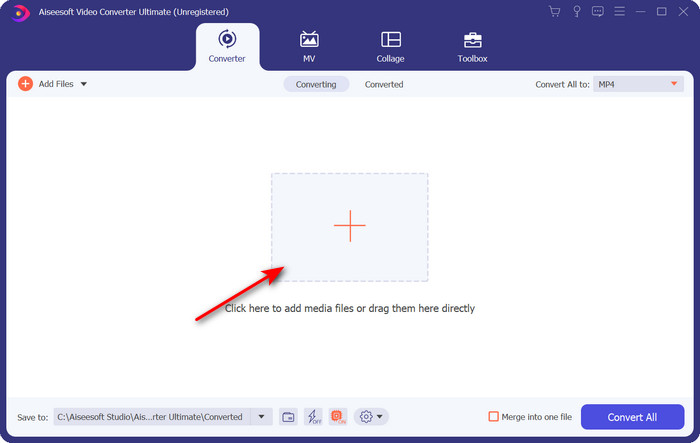
स्टेप 2. टूल शुरू करें, इंटरफेस के बीच में + के निशान पर क्लिक करें और दिखने वाले फ़ोल्डर में से .m4 फ़ाइल चुनें, उस पर क्लिक कर के Open दबाएँ।.
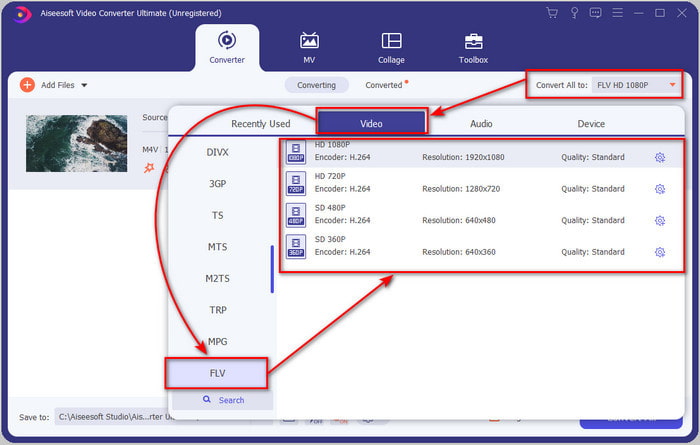
स्टेप 3. जैसे ही .m4v फ़ाइल इंटरफेस पर आ जाए, Convert All to पर क्लिक करें और FLV फॉर्मेट खोजें।.
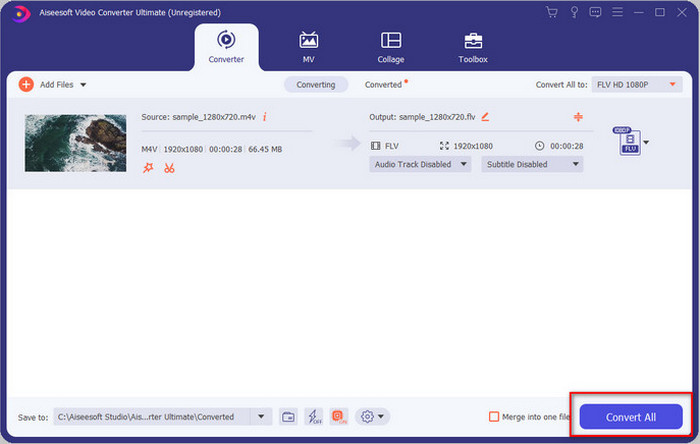
स्टेप 4. आगे बढ़ें और M4V को FLV में बदलने की प्रक्रिया शुरू करने के लिए Convert All पर क्लिक करें।.
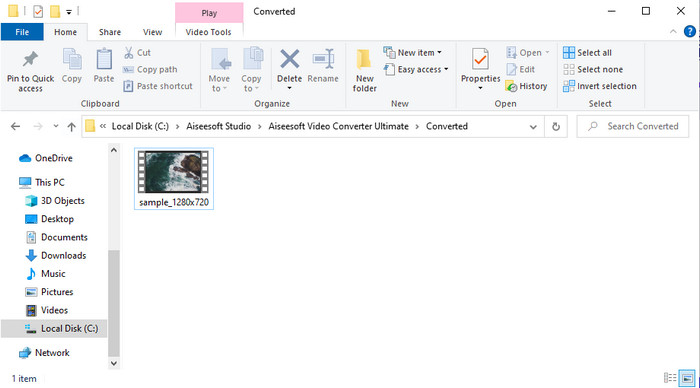
स्टेप 5. इस टूल द्वारा प्रदान की जाने वाली तेज कन्वर्ज़न गति के कारण फ़ाइल को कन्वर्ट करने में एक मिनट से भी कम समय लगेगा। एक फ़ोल्डर खुलेगा जिसमें आपकी कन्वर्ट की हुई फ़ाइल होगी; वीडियो देखने या उसे ऑनलाइन शेयर करने के लिए फ़ाइल पर क्लिक करें।.
पेशेवरों
- सर्वोत्तम अनुभव के लिए तेज़ रूपांतरण और हार्डवेयर त्वरण उपलब्ध हैं।
- पीसी या मैक जैसे सभी प्लेटफॉर्म पर उपलब्ध है।
- उन्हें उत्कृष्ट बनाने के लिए संपादन वीडियो का प्रदर्शन यहां किया जा सकता है।
विपक्ष
- उपयोग करने से पहले भुगतान लेकिन इसकी कीमत सस्ती है।
- उपयोग करने से पहले सॉफ्टवेयर डाउनलोड करें।
भाग 2। ऑनलाइन के माध्यम से M4V को FLV में मुफ्त में परिवर्तित करने पर दूसरा विकल्प
यदि आप सही ऑनलाइन कन्वर्टर का उपयोग करें, तो फ़ाइलों को ऑनलाइन बदलना बहुत प्रभावी ढंग से किया जा सकता है, जैसे कि FVC Free Video Converter Online की मदद से M4V को FLV ऑनलाइन कन्वर्ट करना। यह ऑनलाइन टूल सभी वेब ब्राउज़रों पर, यदि आपके पास इंटरनेट कनेक्शन है, तो सबसे अच्छा कन्वर्टर है। साथ ही, यहाँ आप साइज की कोई सीमा के बिना कन्वर्ज़न कर सकते हैं, लेकिन यहाँ बैच कन्वर्ज़न नहीं कर सकते। यद्यपि यह ऑनलाइन सॉफ़्टवेयर उत्कृष्ट है, फिर भी इंटरनेट कनेक्टिविटी आवश्यक है, इसलिए यदि आपके पास इंटरनेट नहीं है, तो यह अन्य वेब कन्वर्टर्स की तरह आपके लिए विकल्प नहीं होगा। लेकिन यदि आपके पास इंटरनेट कनेक्शन है और आप ऑनलाइन मुफ्त में बेहतरीन कन्वर्ज़न का अनुभव करना चाहते हैं, तो आपको नीचे दिए गए चरणों का पालन करना होगा।.
FVC Free Video Converter Online की मदद से M4V को FLV में कैसे कन्वर्ट करें:
स्टेप 1. FVC द्वारा आपके लिए उपलब्ध कराए गए इस फ्री ऑनलाइन कन्वर्टर पर जाने के लिए इस लिंक पर क्लिक करें।.
स्टेप 2. वेब इंटरफेस पर Add Files to Convert पर क्लिक कर के इंस्टॉलर डाउनलोड करें। इंस्टॉलर डाउनलोड हो जाने पर, फिर से Add Files to Convert पर क्लिक करें, एक फ़ोल्डर खुलेगा, फिर M4V फ़ाइल चुनें।.
फ़ाइलों को बैच में कनवर्ट करने के लिए डेस्कटॉप संस्करण डाउनलोड करें।.
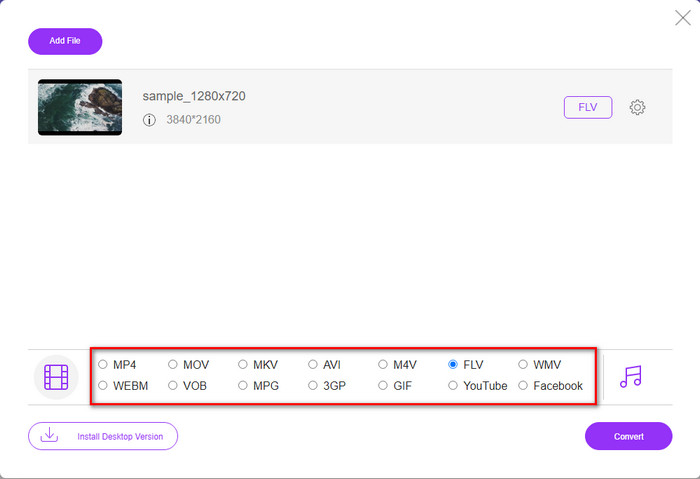
स्टेप 3. एक नया वेब इंटरफेस दिखाई देगा, नीचे दिए गए विकल्पों में से FLV फॉर्मेट को उस पर क्लिक करके चुनें।.
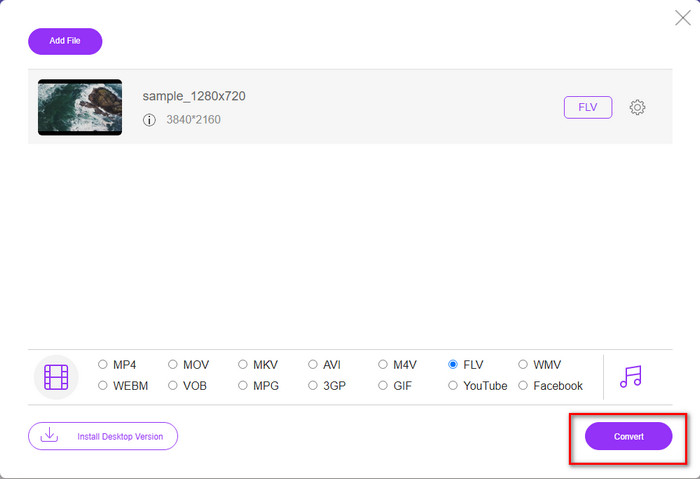
स्टेप 4. अब, M4V को FLV में मुफ्त में कन्वर्ट करना शुरू करने के लिए Convert पर क्लिक करें।.
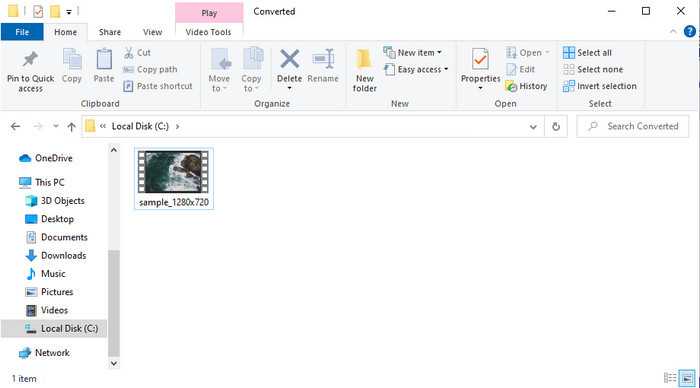
स्टेप 5. कन्वर्ज़न के बाद इंटरफेस पर एक फ़ोल्डर दिखाई देगा; अपनी स्थानीय मीडिया प्लेयर पर चलाने के लिए फ़ाइल पर क्लिक करें।.
पेशेवरों
- सभी वेब ब्राउज़र में मुफ़्त और संगत।
- असीमित फ़ाइल आकार और रूपांतरण।
- प्राथमिक वेब टूल में सुरक्षित और कोई विज्ञापन नहीं।
विपक्ष
- उपकरण का उपयोग करने के लिए इसे इंटरनेट कनेक्टिविटी की आवश्यकता है।
- अपलोड करने और बदलने के लिए कम समर्थित प्रारूप।
भाग 3. M4V और FLV स्वरूपों के बीच अंतर
M4V आपके Apple iTunes स्टोर पर डाउनलोड की गई उच्चतम वीडियो गुणवत्ता को संग्रहीत करता है। यह प्रारूप MP4 के समान है क्योंकि वे एक कंप्रेसर के रूप में MPEG-4 कोडेक का उपयोग करते हैं। लेकिन M4V वीडियो Apple FairPlay DRM कॉपीराइट सुरक्षा के तहत सुरक्षित हैं। इसलिए, इस प्रारूप के तहत वीडियो चलाना मुश्किल है क्योंकि अगर आप उन्हें आईट्यून्स या क्विकटाइम प्लेयर के अलावा किसी अन्य मीडिया प्लेयर पर डालते हैं तो यह तुरंत नहीं चलेगा। फ़ाइल एक्सटेंशन को .mp4 में बदलकर असुरक्षित M4V फ़ाइलों को आपके मीडिया प्लेयर पर एक्सेस किया जा सकता है।
इसके विपरीत, FLV का उपयोग वीडियो और ऑडियो डेटा को जितनी जल्दी हो सके वेब पर स्थानांतरित करने के लिए किया जाता है। फ्लैश वीडियो सबसे अनुकूल प्रारूप है जो हर एचटीएमएल 5 वेबसाइट पर है। हालाँकि, यह प्रारूप बंद कर दिया गया था क्योंकि Adobe Flash पहले ही सेवानिवृत्त हो चुका था। फिर भी, आप इसे अभी भी अपने मीडिया प्लेयर प्लग-इन पर चला सकते हैं, जिसे डाउनलोड करने या रूपांतरित करने के बाद आपको इसकी आवश्यकता होगी।
एम4वी बनाम एफएलवी
M4V Apple द्वारा विकसित किया गया है, जो MPEG 4 का भी उपयोग करता है। M4V फ़ाइलों का उपयोग अक्सर Apple iTunes स्टोर से डाउनलोड किए गए उन वीडियो को संग्रहीत करने के लिए किया जाता है, जैसे संगीत वीडियो, टीवी एपिसोड, आदि। आपको कुछ M4V फ़ाइलें कॉपी-संरक्षित मिल सकती हैं क्योंकि यह उपयोग करता है Apple का फेयरप्ले DRM कॉपीराइट संरक्षण।
Adobe Flash Player ने FLV का उपयोग मूवी और टीवी शो जैसी वीडियो सामग्री वितरित करने के लिए किया। आजकल, Adobe अब प्लेयर विकसित नहीं करता है और सुरक्षा कारणों से उपयोगकर्ताओं को इसे अनइंस्टॉल करने की अनुशंसा करता है। हालांकि, आप अभी भी कई गैर-एडोब/मैक्रोमीडिया कार्यक्रमों पर एफएलवी प्रारूप का उपयोग कर सकते हैं।
भाग 4. M4V से FLV रूपांतरण के बारे में अक्सर पूछे जाने वाले प्रश्न
कौन सा बहतर है; MP4 या M4V?
यदि आप अपनी फ़ाइल की सुरक्षा करना चाहते हैं, तो M4V वह प्रारूप है जिसका आपको उपयोग करना चाहिए क्योंकि यह केवल सेब पर उपलब्ध है, और यह सुरक्षित है। लेकिन मान लीजिए कि आप सभी मीडिया प्लेयर, संपादक, आदि के साथ संगत प्रारूप चाहते हैं। उस स्थिति में, MP4 सार्वभौमिक मीडिया प्रारूप है जिसे आप उपयोग करना पसंद करेंगे।
क्या मैं वीएलसी पर एम4वी खेल सकता हूं?
VLC मुफ्त है और सभी प्लेटफॉर्म्स के साथ संगत है; साथ ही यह लगभग सभी मीडिया फॉर्मेट्स को चला सकता है। लेकिन सुरक्षित M4V यहाँ नहीं चलाया जा सकता क्योंकि वह प्रोटेक्टेड होता है। तो अब, यदि आप .m4v को VLC पर देखना चाहते हैं, तो आपको M4V फ़ाइल को MP4 या AVI में कन्वर्ट करना अनिवार्य है।.
क्या मैं M4V को परिवर्तित करने के बाद गुणवत्ता खो देता हूँ?
M4V को परिवर्तित करने के बाद, इसकी गुणवत्ता को मूल M4V गुणवत्ता की मानक दर को बनाए रखना चाहिए। हालांकि, कुछ कन्वर्टर वीडियो को एचडी, 1080, या 4k में बदलने का समर्थन नहीं करते हैं। इसलिए, आप बेहतर उपकरण चुनते हैं, न कि ठीक उपकरण जो आपकी गुणवत्ता को खोए बिना परिवर्तित करने में आपकी आवश्यकताओं को पूरा करेगा।
निष्कर्ष
कुल मिलाकर, यहाँ बताए गए दोनों ऑनलाइन और ऑफलाइन टूल बेहतरीन हैं, विशेष रूप से तब जब आप M4V को FLV में कन्वर्ट करना चाहते हैं। साथ ही, हमने दोनों फॉर्मेट्स, यानी M4V और FLV के बारे में जानकारी भी प्राप्त की। यद्यपि सुरक्षित M4V फ़ाइल को देखने के लिए उसे बदलना आवश्यक है, फिर भी सही काम के लिए सही टूल चुनना मुश्किल हो सकता है। इसलिए, हम दो ऐसे टूल प्रस्तुत करते हैं जिनका उपयोग आप मुफ्त में फॉर्मेट को बदलने के लिए कर सकते हैं: FVC Free Video Converter Online या फिर FVC Video Converter Ultimate का उपयोग कर के कन्वर्ज़न के नए स्तरों का अनुभव करें। तो अब, यदि आप अपनी M4V फ़ाइलें मुफ्त में देखना चाहते हैं, तो आप किसका इंतज़ार कर रहे हैं? ऊपर दिए गए टूल्स में से एक चुनें, ऊपर बताए गए त्वरित और आसान चरणों का पालन करें, और लीजिए, वीडियो का आनंद लें।.
-
 [गाइड] विंडोज/मैक पर M4V वीडियो को एनिमेटेड GIF में कैसे बदलें?
 यदि आप अपने पसंदीदा M4V वीडियो से एनिमेटेड GIF फाइल बनाना चाहते हैं, तो आप अनुकूलित सेटिंग्स के साथ M4V वीडियो को GIF में बदलने के 2 आसान और कुशल तरीके सीख सकते हैं।
-
 मैक पर iTunes M4V को AVI में कनवर्ट करने के लिए 3 वीडियो कन्वर्टर प्रोग्राम का उपयोग किया जाता है
 एमकेवी को एवीआई प्रारूप में बदलने का कोई विचार नहीं है? जैसा कि हम इस लेख को पढ़ना जारी रखते हैं, हम 3 उपकरण जानेंगे जो इस फ़ाइल प्रारूप को बदलने में आपकी मदद कर सकते हैं।
-
 मुफ्त M4V से MOV कन्वर्टर - M4V को MOV में कैसे बदलें
 यदि आपका मीडिया प्लेयर M4V का समर्थन नहीं करता है, तो क्या आपने कभी अपने iPhone पर मूवी देखने के लिए संघर्ष किया है? इस लेख का मुख्य विषय इसे MOV वीडियो फ़ाइल में बदलना है।

