


 वीडियो कनवर्टर अंतिम
 स्क्रीन अभिलेखी
 वीडियो मरम्मत
2 अतुलनीय तरीकों में एमटीवी को एफएलवी में कैसे बदलें

भाग 1. एमटीवी को एफएलवी ऑफलाइन में कैसे बदलें
Video Converter Ultimate is one of the best MTV to FLV converters. You can change your video format from MTV to FLV in just a few clicks. It allows you to edit and compress MTV videos with the help of this software. This MTV-to-FLV converter is available for use on both Windows and Mac computers, and it is completely free. You can easily convert MTV files to FLV format by downloading and installing the converter app, then importing the videos you want to be converted. For a more in-depth explanation, please refer to the following guide.
Step 1: To start downloading the software, click the Free Download button below this step. After you click it, prepare to install it after a while.
फ्री डाउनलोडWindows 7 या बाद के संस्करण के लिएसुरक्षित डाउनलोड
फ्री डाउनलोडMacOS 10.7 या बाद के संस्करण के लिएसुरक्षित डाउनलोड
Step 2: After installing the software on your computer, run the software and a window will pop on your screen. The software displays the Converter interface on your screen, ready to import a file.
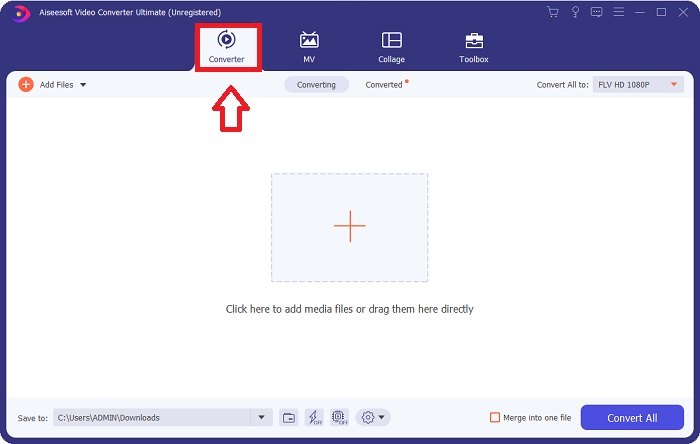
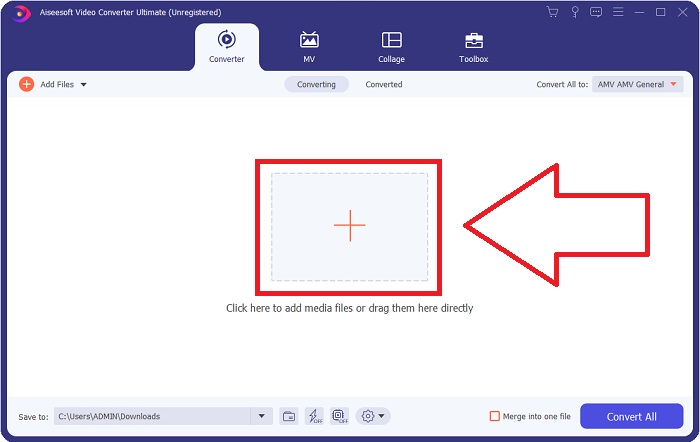
Step 3: To import a file to the software, you must click the + button in the middle of the software's window, or you can simply drag any video files.
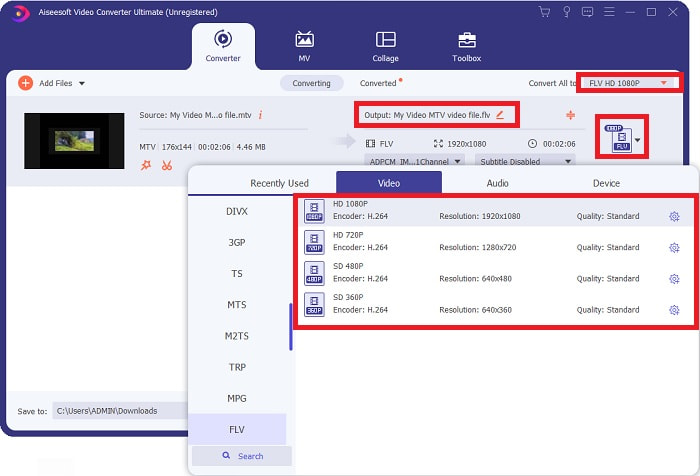
Step 4: It's time for you to choose the FLV video format, located at the right corner of the window near the video output. Click it and navigate the FLV video format and determine which quality you prefer.
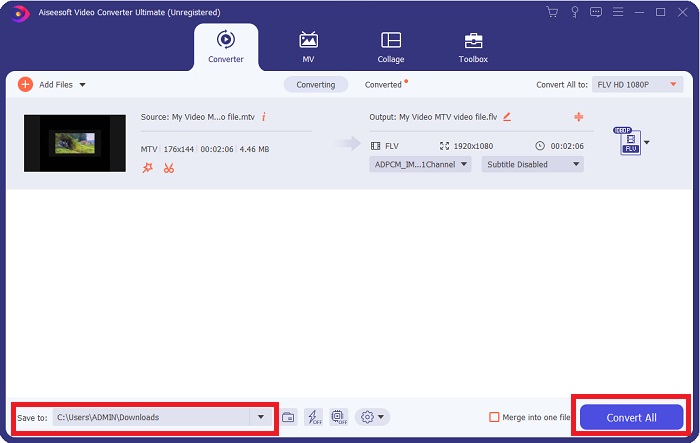
Step 5: You can now convert your file by clicking the Convert All button located at the bottom right corner of the window. And browse the location where you will transfer the converted file by clicking the drop down button near the Save to.
भाग 2. एमटीवी को एफएलवी ऑनलाइन में कैसे बदलें
Here's a free online tool for you to learn about that can convert MTV to FLV. The Free Video Converter Online can convert video and audio formats such as MP4, WMV, and ASF to various formats. You can restore your high-definition videos to popular file types in just a few clicks while maintaining their original visual quality. Converting multiple videos or audio files at once does not compromise quality. Here are the steps you need to take:
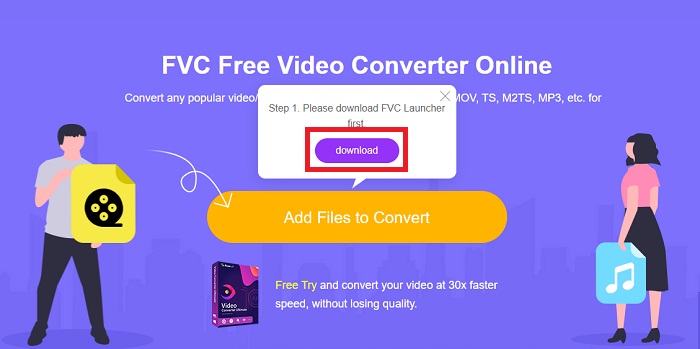
Step 1: Gain access to the main webpage of Free Video Converter Online by clicking this link. After that, you must click the Add Files to Convert button displayed on the main screen to download the launcher that will allow you to operate this online tool. After downloading, click it again to import files from your computer.
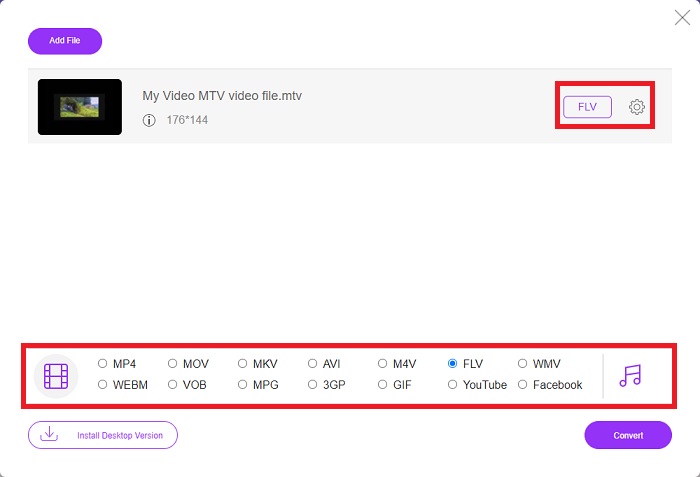
Step 2: Choose the FLV video format from the video format selection located at the bottom part of the window. If you want to know all the specifications of the output video, click the gear icon. Adjust it to your preferred settings and once you finish adjusting, click OK.
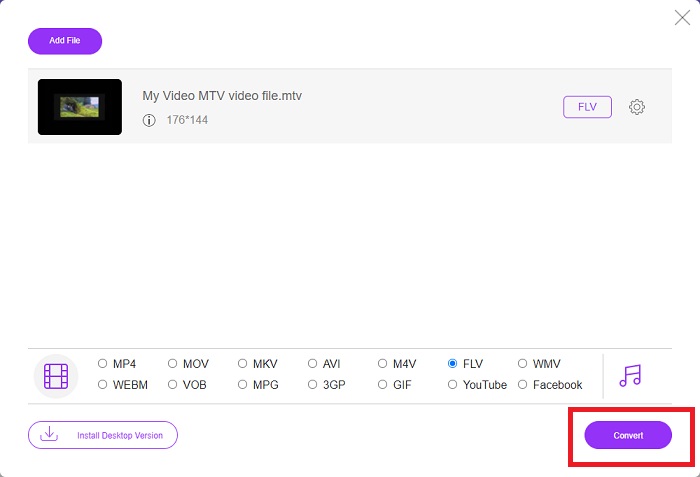
Step 3: Now that you are satisfied with all the adjustments, you can convert your MTV video format to FLV by clicking the Convert button.
संबंधित:
भाग 3. एमटीवी और एफएलवी के बारे में विस्तृत ज्ञान
कुछ चीनी पोर्टेबल MP4 वीडियो प्लेयर वीडियो स्टोर करने के लिए MTV प्रारूप में MTV और FLV वीडियो फ़ाइलों के बारे में विशाल ज्ञान का उपयोग करते हैं। 12 फ्रेम प्रति सेकेंड की दर से, यह एमपी3 ऑडियो को कई छवियों के साथ जोड़ती है। एमटीवी फाइलों और एएमवी फाइलों के बीच कुछ समानताएं हैं, लेकिन स्वरूपण थोड़ा अलग है। कई सस्ते चीनी पोर्टेबल MP4 प्लेयर MP4 वीडियो को स्टोर या प्ले नहीं करते हैं। दूसरी ओर, एमटीवी वीडियो दिखाए जाते हैं। कम-रिज़ॉल्यूशन (128x128 पिक्सेल) और छोटे प्रारूप वाले वीडियो एमटीवी पर मानदंड हैं (एक मिनट का वीडियो लगभग 24 एमबी डेटा है)। मीडिया प्लेयर्स को ज्यादा स्टोरेज स्पेस या प्रोसेसिंग पावर की जरूरत नहीं होती है। कई एमटीवी वीडियो स्टोर करने और चलाने के लिए। भले ही एमटीवी प्रारूप एएमवी प्रारूप की तरह है, जिसका उपयोग चीनी पोर्टेबल मीडिया प्लेयर भी करते हैं, प्रारूप पर्याप्त रूप से भिन्न होते हैं कि प्रत्येक एएमवी-संगत डिवाइस या मीडिया प्लेयर एमटीवी फाइलों को नहीं चला सकता है।
हालांकि, एडोब सिस्टम्स का फ्लैश वीडियो प्रारूप यूट्यूब, हुलु, वीवो और कई अन्य स्ट्रीमिंग वीडियो सेवाओं पर ऑनलाइन वीडियो के लिए उपयोग कर सकता है। IOS को छोड़कर, लगभग हर ऑपरेटिंग सिस्टम Adobe Flash Player (ब्राउज़र प्लग-इन सहित) और तृतीय-पक्ष सॉफ़्टवेयर का उपयोग करके FLV फ़ाइलों को पढ़ और देख सकता है। FLV ओपन-सोर्स सॉफ़्टवेयर और विशिष्ट ब्राउज़रों के माध्यम से iPhone और Android उपकरणों पर चल सकता है। फ्लैश अभी भी आईओएस पर समस्याएं पैदा कर रहा है। Android संस्करण जेलीबीन के उपयोगकर्ता FLV फ़ाइलों का उपयोग कर सकते हैं। केवल FLV प्लेयर प्रोग्राम ही FLV एक्सटेंशन वाली फाइलों को देख सकते हैं। स्क्रीन कैप्चरिंग और रिकॉर्डिंग सॉफ्टवेयर का उपयोग करके FLV वीडियो स्क्रीन रिकॉर्डिंग संभव है।
| दस्तावेज़ विस्तारण | एमटीवी | FLV |
| फाइल का प्रकार | चीनी MP4/MTV प्लेयर | फ्लैश वीडियो फ़ाइल |
| द्वारा विकसित | रॉबर्ट डब्ल्यू पिटमैन | एडोब सिस्टम्स |
| पेशेवरों | एमटीवी प्रारूप के सबसे महत्वपूर्ण लाभों में से एक इसकी दुनिया भर के अधिकांश कंप्यूटरों पर चलाने की क्षमता है। | FLV प्रारूप इंटरनेट पर प्रचलित है। हजारों वेबसाइटें इसका उपयोग करती हैं; यह अन्य वीडियो फ़ाइल एक्सटेंशन की तुलना में काफी अधिक सुविधाएँ प्रदान करता है और अधिकांश अन्य वीडियो प्रारूपों की तुलना में काफी छोटी फ़ाइलें उत्पन्न करता है। FLV वीडियो अच्छी गुणवत्ता प्रदर्शित करने और जल्दी लोड होने के लिए अच्छे हैं। |
| विपक्ष | इसकी खराब ध्वनि वृद्धि क्षमताओं के कारण, इसमें सीमित चित्र रिज़ॉल्यूशन है और यह फ़ुल-स्क्रीन और फ़ुल-मोशन वीडियो प्रदर्शित नहीं कर सकता है। | फ़्लैश फ़ाइल फ़ाइलों को ऑनलाइन चलाने के लिए फ़्लैश प्लग-इन स्थापित होना आवश्यक है। |
| प्रोग्राम जो समर्थन/खुलाते हैं | ◆वीएलसी मीडिया प्लेयर ◆एवीएस मीडिया प्लेयर | ◆वीएलसी मीडिया प्लेयर एडोब फ्लैश प्लेयर |
भाग 4. MTV को FLV में बदलने के बारे में अक्सर पूछे जाने वाले प्रश्न
मैं मैक पर एमटीवी को एफएलवी में कैसे बदलूं?
आप अपनी एमटीवी फाइलों को एफएलवी में बदलने के लिए उपर्युक्त वीडियो कन्वर्टर अल्टीमेट का उपयोग कर सकते हैं। सबसे पहले, आपको अपने मैक पर सॉफ्टवेयर डाउनलोड करना होगा, फिर इसे इंस्टॉलेशन के बाद लॉन्च करना होगा। इसके बाद, प्रोग्राम में अपनी फ़ाइलें जोड़ें और अपना वांछित FLV प्रारूप चुनें। अंत में, एमटीवी से एफएलवी में रूपांतरण शुरू करने के लिए सभी कन्वर्ट बटन पर क्लिक करें।
मैं एमटीवी फाइल कैसे खोलूं?
कुछ एमटीवी फाइलें क्रॉस-प्लेटफॉर्म वीडियोलैन या वीएलसी मीडिया प्लेयर या केवल विंडोज़ ऑनलाइन मीडिया टेक्नोलॉजीज एवीएस मीडिया प्लेयर में नहीं चल सकती हैं। उदाहरण के लिए, कुछ MTV फ़ाइलों का ऑडियो भाग केवल VLC का उपयोग करके चलाया जा सकता है। MTV वीडियो को FFmpeg, AnyMP4 वीडियो कन्वर्टर, या ऑनलाइन मीडिया टेक्नोलॉजीज से AVS वीडियो कन्वर्टर, सभी क्रॉस-प्लेटफ़ॉर्म एप्लिकेशन (विंडोज) का उपयोग करके AVI या MP4 में परिवर्तित किया जा सकता है।
क्या वीएलसी वीडियो को एफएलवी में बदल सकता है?
वीएलसी मीडिया प्लेयर का उपयोग करके एक वीडियो चलाएं। मीडिया टैब में ड्रॉप-डाउन मेनू से कनवर्ट/सहेजें विकल्प चुनें। सिस्टम से .flv वीडियो फाइलों को ओपन मीडिया पेज पर 'जोड़ें' बटन पर क्लिक करके जोड़ा जा सकता है।
निष्कर्ष
Given all the points stated in this entire article, there are two recommended converters you should consider using, its Free Video Converter Online and the Video Converter Ultimate. As stated above, these two have shown their full potential, and it's better than another converter available online.
-
 [ऑनलाइन और मुफ्त] एमटीवी को एवीआई में बदलने के 3 तरीके परेशानी मुक्त
 क्या आपने कभी एमटीवी जैसे वीडियो प्रारूप के बारे में सुना है? चूंकि आप इस प्रारूप के बारे में सब कुछ नहीं जानते हैं और आप एक एमटीवी वीडियो को एवीआई में बदलना चाहते हैं, इस मुद्दे के बारे में अधिक जानने के लिए इस लेख को ध्यान से पढ़ें।
-
 AVI को FLV में मुफ्त में बदलने में आपकी मदद करने के लिए ठोस गाइड Con
 AVI को FLV में बदलने के लिए, आपको एक शक्तिशाली वीडियो कनवर्टर की आवश्यकता है। सौभाग्य से, आप इस एकल लेख से दो और उनके चरण-दर-चरण मार्गदर्शिका सीख सकते हैं।
-
 पीसी/मैक पर WMV फ़ाइलों को FLV में बदलने के 2 सबसे आसान तरीके Way
 आप WMV को FLV में कैसे बदल सकते हैं? सबसे पहले, आपको हमारी सिफारिश को पढ़ने और अपनी पसंदीदा विधि खोजने की जरूरत है, और फिर काम को जल्दी से करने के लिए हमारे गाइड का पालन करें।
