


 वीडियो कनवर्टर अंतिम
 स्क्रीन अभिलेखी
 वीडियो मरम्मत
 सुरक्षित डाउनलोड
Windows और Mac पर RMVB वीडियो फ़ाइलों को FLV में कैसे बदलें
हमारे शोध के अनुसार, बाज़ार में सौ से अधिक वीडियो फ़ॉर्मेट मौजूद हैं। इन्हें अलग-अलग उद्देश्यों के लिए विकसित किया गया है। उदाहरण के लिए, RMVB इंटरनेट पर फिल्में वितरित करने के लिए बिल्कुल उपयुक्त है, क्योंकि फ़ाइल आकार छोटा होता है लेकिन गुणवत्ता बेहतरीन रहती है। ऐनिमी और एशियाई फ़िल्म स्टूडियो इस फ़ॉर्मेट में वीडियो जारी करना पसंद करते हैं। हालाँकि, इसे ज़्यादातर वीडियो प्लेयर या मोबाइल डिवाइस व्यापक रूप से सपोर्ट नहीं करते। इसलिए, यह लेख बेहतरीन RMVB से FLV कन्वर्टर साझा करेगा।.

भाग 1: पीसी के लिए सर्वश्रेष्ठ आरएमवीबी से एफएलवी कन्वर्टर
FVC Free FLV Converter पीसी के लिए सबसे अच्छे RMVB से FLV कन्वर्टरों में से एक है। यह आपको RMVB फिल्मों को FLV फ़ॉर्मेट में बिना गुणवत्ता खोए कन्वर्ट करने की सुविधा देता है। और सबसे महत्वपूर्ण बात, यह कन्वर्टर पूरी तरह मुफ़्त है और किसी भी प्रकार की सीमा के बिना आता है।.
सबसे अच्छे RMVB से FLV कन्वर्टर की मुख्य विशेषताएँ
- 1. बैच जल्दी से RMVB को FLV में बदलें।
- 2. कनवर्ट करने के बाद उच्च गुणवत्ता वाले वीडियो बनाएं।
- 3. कोई भुगतान, पंजीकरण, वॉटरमार्क या अन्य सीमा नहीं।
फ्री डाउनलोडWindows 7 या बाद के संस्करण के लिएसुरक्षित डाउनलोड
फ्री डाउनलोडMacOS 10.7 या बाद के संस्करण के लिएसुरक्षित डाउनलोड
पीसी पर RMVB को FLV में कैसे बदलें
चरण 1: आरएमवीबी फाइलें खोलें
पीसी पर इंस्टॉल करने के बाद सर्वश्रेष्ठ RMVB से FLV कन्वर्टर चलाएँ। होम इंटरफ़ेस में Add File(s) बटन पर क्लिक करें और RMVB फ़ाइलें जोड़ें। इसके बाद आप इनबिल्ट मीडिया प्लेयर के साथ फ़िल्में देख सकते हैं।.

चरण 2: FLV को आउटपुट स्वरूप के रूप में सेट करें
नीचे दिए गए Output format विकल्प पर क्लिक करें और उसे खोलें, और General Video सूची में से FLV चुनें। यदि आप रेज़ोल्यूशन और अन्य विकल्प बदलना चाहते हैं, तो Gear आइकन पर क्लिक करें।.

चरण 3: RMVB को FLV में बदलें
इसके बाद, Open Folder बटन दबाएँ और आउटपुट को सेव करने के लिए कोई विशिष्ट फ़ोल्डर चुनें। अंत में, तुरंत RMVB को FLV में कन्वर्ट करना शुरू करने के लिए Convert बटन पर क्लिक करें।.

भाग 2: शीर्ष 3 RMVB से FLV कन्वर्टर्स ऑनलाइन
शीर्ष 1: FVC मुफ्त ऑनलाइन वीडियो कनवर्टर
FVC Free Online Video Converter ऑनलाइन सबसे अच्छे RMVB से FLV कन्वर्टरों में से एक है। इसका उपयोग मुफ़्त है और फ़ाइल आकार पर कोई सीमा नहीं है। साथ ही, बैच कन्वर्टिंग फ़ीचर बहुत सुविधाजनक है, अगर आपके पास बहुत सारी RMVB फ़िल्में हैं।.
सबसे अच्छे ऑनलाइन RMVB से FLV कन्वर्टर की मुख्य विशेषताएँ
- 1. RMVB को FLV ऑनलाइन में मुफ्त में बदलें।
- 2. प्रयोग करने में आसान।
- 3. समर्थन बैच परिवर्तित।
ऑनलाइन RMVB को FLV में कैसे कन्वर्ट करें
चरण 1: ब्राउज़र में https://www.free-videoconverter.net/free-online-video-converter/ खोलें। लॉन्चर डाउनलोड करने के लिए Add Files to Convert पर क्लिक करें।.
फ़ाइलों को बैच में कनवर्ट करने के लिए डेस्कटॉप संस्करण डाउनलोड करें।.
चरण 2: Add File बटन दबाएँ और वे RMVB फ़ाइलें अपलोड करें जिन्हें आप कन्वर्ट करना चाहते हैं। फिर नीचे FLV चुनें।.

चरण 3: Convert बटन पर क्लिक करें और प्रक्रिया के समाप्त होने की प्रतीक्षा करें। फिर FLV फ़ाइलें डाउनलोड करें।.
शीर्ष 2: CloudConvert
CloudConvert एक क्लाउड-आधारित फ़ाइल कनवर्टर ऐप है। यह आपको प्रति रूपांतरण 1GB तक RMVB फ़ाइलों को निःशुल्क संसाधित करने की अनुमति देता है। इसके अलावा, आप Google डिस्क जैसे विभिन्न स्रोतों से वीडियो अपलोड कर सकते हैं।
CloudConvert RMVB से FLV कन्वर्टर की मुख्य विशेषताएँ
- 1. आरएमवीबी को कंप्यूटर या ऑनलाइन से कन्वर्ट करें।
- 2. बुनियादी कस्टम विकल्प प्रदान करें।
- 3. कनवर्ट करते समय वीडियो ट्रिम करें।
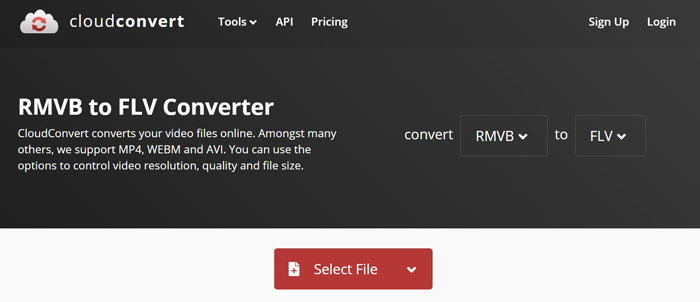
ऑनलाइन RMVB को FLV में कैसे कन्वर्ट करें
चरण 1: अपने ब्राउज़र में https://cloudconvert.com/rmvb-to-flv खोलें। RMVB फ़ाइलें अपलोड करने के लिए Select File बटन पर क्लिक करें।.
चरण 2: वीडियो अपलोड होने के बाद Convert बटन दबाएँ।.
चरण 3: जब प्रक्रिया पूरी हो जाए, तो FLV फ़ाइलें डाउनलोड करें।.
शीर्ष 3: फ्रीकन्वर्ट
FreeConvert CloudConvert के समान है। यह FLV कनवर्टर के लिए एक वेब RMVB भी है। डिफ़ॉल्ट रूप से अधिकतम फ़ाइल आकार 1GB है, लेकिन आप अपने व्यक्तिगत ईमेल से साइन अप कर सकते हैं या अधिक क्षमता प्राप्त करने के लिए योजनाओं के लिए भुगतान कर सकते हैं।
FreeConvert RMVB से FLV कन्वर्टर की मुख्य विशेषताएँ
- 1. RMVB को FLV में ऑनलाइन कन्वर्ट करें।
- 2. उन्नत सेटिंग्स प्रदान करें।
- 3. कनवर्ट करने के बाद वीडियो हटाएं।
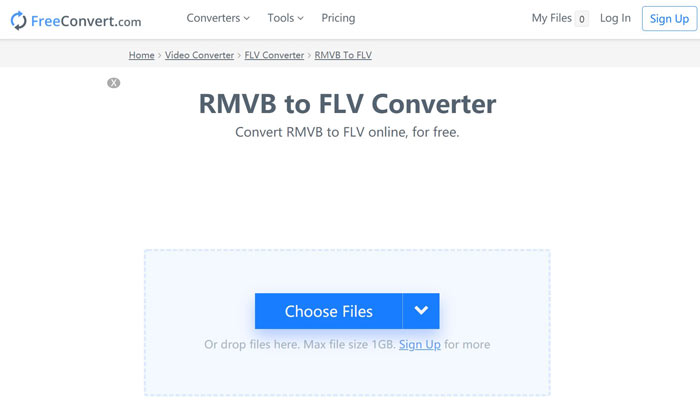
FreeConvert से RMVB को FLV में कैसे कन्वर्ट करें
चरण 1: ब्राउज़र खोलें और https://www.freeconvert.com/rmvb-to-flv पर जाएँ।.
चरण 2: Choose Files बटन पर क्लिक करें और अपने कंप्यूटर से RMVB फ़ाइलें अपलोड करें।.
चरण 3: संकेत मिलने पर Convert To FLV बटन पर क्लिक करें। कन्वर्ज़न के बाद FLV फ़ाइलें डाउनलोड करें।.
आरएमवीबी बनाम एफएलवी
RMVB, मानक रियल मीडिया (.RM) प्रारूप का एक नया रूपांतर है, एक वास्तविक मीडिया वीडियो फ़ाइल स्वरूप है जो एक चर बिटरेट का उपयोग करके संकुचित होता है। यह एशियाई फिल्मों और एनीमे के लिए एक लोकप्रिय प्रारूप है। RMVB फाइलें आकार में छोटी होती हैं और उनकी बिटरेट कम होती है लेकिन गुणवत्ता बेहतर होती है।
Adobe Flash Player ने FLV का उपयोग मूवी और टीवी शो जैसी वीडियो सामग्री वितरित करने के लिए किया। आजकल, Adobe अब प्लेयर विकसित नहीं करता है और सुरक्षा कारणों से उपयोगकर्ताओं को इसे अनइंस्टॉल करने की अनुशंसा करता है। हालांकि, आप अभी भी कई गैर-एडोब/मैक्रोमीडिया कार्यक्रमों पर एफएलवी प्रारूप का उपयोग कर सकते हैं।
भाग 3: RMVB से FLV कनवर्टर के बारे में अक्सर पूछे जाने वाले प्रश्न
RMVB फ़ाइल स्वरूप क्या है?
RMVB एक वेरिएबल बिटरेट द्वारा कंप्रेस्ड रियल मीडिया वीडियो है। यह वीडियो की सामग्री के लिए अनुकूलित है। RMVB मानक रीयल मीडिया फ़ाइल स्वरूप का एक नया रूपांतर है।
क्या विंडोज मीडिया प्लेयर आरएमवीबी फाइलें खोल सकता है?
हालाँकि WMP के नवीनतम संस्करण में बहुत-से कोडेक शामिल हैं, फिर भी Windows Media Player में RMVB नहीं खोला जा सकता। आपको RMVB को MP4 या अन्य लोकप्रिय वीडियो फ़ॉर्मेट में कन्वर्ट करना होगा। या फिर आप अपने RMVB फ़ाइलें खोलने के लिए RMVB प्लेयर का उपयोग कर सकते हैं।.
क्या वीएलसी आरएमवीबी फाइलों को परिवर्तित कर सकता है?
हां, वीएलसी आरएमवीबी फाइलों को खोलने और परिवर्तित करने में सक्षम है, लेकिन काम पूरा करने में काफी समय लगता है। इसके अलावा, उत्पादन की गुणवत्ता खराब है।
निष्कर्ष
अब, आपको विंडोज़ और मैक के लिए कम से कम शीर्ष चार आरएमवीबी से एफएलवी कन्वर्टर्स सीखना चाहिए। वेब वीडियो कनवर्टर ऐप्स बिना इंस्टॉल किए RMVB फ़ाइलों को FLV प्रारूप में बदलने का सुविधाजनक तरीका है। हालांकि, एफवीसी फ्री एफएलवी कन्वर्टर अधिक स्थिर है और बेहतर आउटपुट गुणवत्ता का उत्पादन करता है। और सवाल? कृपया नीचे एक संदेश छोड़ने के लिए स्वतंत्र महसूस करें।
-
 MP4 से FLV | शीर्ष 3 नि: शुल्क कन्वर्टर (ऑनलाइन / मैक / विंडोज)
 यह पोस्ट MP4 से FLV रूपांतरण के लिए विस्तृत गाइड है। आप विंडोज या मैक कंप्यूटर पर आसानी से MP4 को FLV ऑनलाइन में बदलने के लिए शीर्ष 3 मुफ्त कन्वर्टर्स ले सकते हैं।
-
 VOB फाइल क्या है और VOB फाइल को फ्री में GIF में कैसे बदलें
 क्या आप VOB फ़ाइलों के बारे में अधिक जानना चाहते हैं और रिप्ड होने के बाद इसे कैसे साझा करना चाहते हैं? या आपको VOB को GIF में बदलने की आवश्यकता क्यों है? तो इस लेख को ध्यान से पढ़ें।
-
 तेजी से अपलोड करने के लिए FLV वीडियो को कंप्रेस करने के 2 आसान तरीके
 यदि आप FLV वीडियो अपलोड करने में विफल रहते हैं, या फ़ाइलों को साझा करने में समय लगता है, तो आप लेख से FLV वीडियो को संपीड़ित करने के 2 आसान तरीकों के बारे में अधिक विवरण जान सकते हैं।

