


 वीडियो कनवर्टर अंतिम
 स्क्रीन अभिलेखी
 वीडियो मरम्मत
टीआरपी को एफएलवी में बदलने के लिए ऑफलाइन और ऑनलाइन टूल्स के बारे में आपको पता होना चाहिए
TRP एक फ़ाइल फ़ॉर्मेट है, जिसका उपयोग रिकॉर्ड किए गए टेलीविज़न फ़ाइलों को संग्रहीत करने के लिए किया जाता है। चूंकि कम ही प्लेयर इस फ़ाइल प्रकार के मूल रूप को संभाल सकते हैं, इसलिए हो सकता है कि आपको उसे देखने से पहले किसी अन्य फ़ॉर्मेट में कनवर्ट करना पड़े। TRP फ़ाइलों को FLV फ़ाइलों में बदलने के लिए आपको सही सॉफ़्टवेयर टूल का इस्तेमाल करना होगा। सौभाग्य से, हमारा सॉफ़्टवेयर या इसका ऑनलाइन संस्करण इस्तेमाल करके यह काम करना बहुत आसान हो जाता है और पूरे कन्वर्शन प्रक्रिया के दौरान आपको कोई असुविधा नहीं होगी। नीचे दिए गए चरणों का पालन करें और अपने TRP वीडियो को सफलतापूर्वक FLV फ़ॉर्मेट में कनवर्ट करें।.

भाग 1. टीआरपी को एफएलवी में बदलने का ऑफलाइन तरीका
TRP फ़ाइल फ़ॉर्मेट ज़्यादातर वीडियो उपभोक्ताओं के लिए अनजाना है और इसे निर्माता भी अक्सर उपयोग नहीं करते। इसी कारण, अधिकतर सॉफ़्टवेयर और ऑनलाइन टूल इस प्रकार की वीडियो फ़ाइल को सपोर्ट नहीं करते। यही वजह है कि Video Converter Ultimate किसी भी फ़ॉर्मेट से दूसरे फ़ॉर्मेट में वीडियो कनवर्ट करने की ज़रूरत पड़ने पर विचार करने योग्य टूल है। यह सॉफ़्टवेयर आपके TRP फ़ाइल को आपकी पसंद के किसी भी फ़ॉर्मेट में सिर्फ एक क्लिक में बदल सकता है।.
यह वीडियो कनवर्टर टूल उन्नत संपादन सुविधाएँ प्रदान करता है और इसमें एक ग्राफिकल इंटरफ़ेस है जिसका उपयोग करना आसान है, भले ही आपके पास कोई तकनीकी ज्ञान या कौशल न हो। इस एप्लिकेशन की मदद से, आप फ़ाइलों को परिवर्तित कर सकते हैं और सुपर-फास्ट रूपांतरण समय और उच्च-गुणवत्ता वाले आउटपुट से लाभ उठा सकते हैं। यहां हम आपको सरल कदम प्रदान करते हैं जिनका आपको पालन करना चाहिए:
चरण 1: नीचे दिए गए Free Download बटन पर क्लिक करके .exe फ़ाइल डाउनलोड करें, और यह देखें कि आप कौन‑सा OS उपयोग कर रहे हैं। डाउनलोड पूरा होने पर फ़ाइल खोलें और इंस्टॉलेशन प्रक्रिया शुरू करें। इंस्टॉलेशन पूरा होने तक प्रतीक्षा करें, फिर सॉफ़्टवेयर लॉन्च करें।.
फ्री डाउनलोडWindows 7 या बाद के संस्करण के लिएसुरक्षित डाउनलोड
फ्री डाउनलोडMacOS 10.7 या बाद के संस्करण के लिएसुरक्षित डाउनलोड
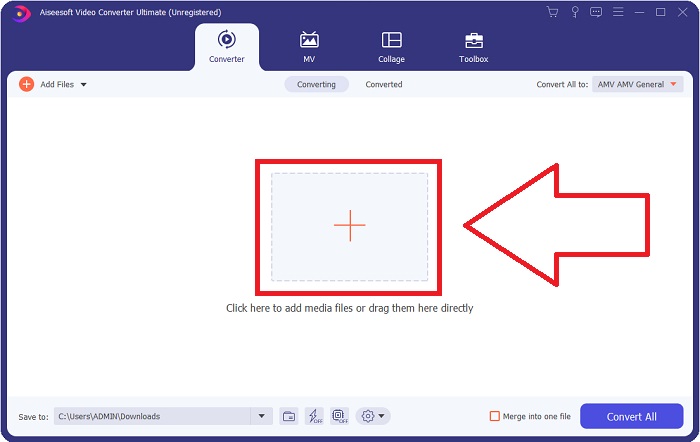
चरण 2: सॉफ़्टवेयर शुरू होते ही एक इंटरफ़ेस दिखाई देगा। वहां बीच में मौजूद + बटन पर क्लिक करें और वह वीडियो फ़ाइल इम्पोर्ट करना शुरू करें जिसे आप कनवर्ट करना चाहते हैं, या फिर फ़ाइल को सीधे खींचकर (drag and drop) वहां छोड़ दें।.
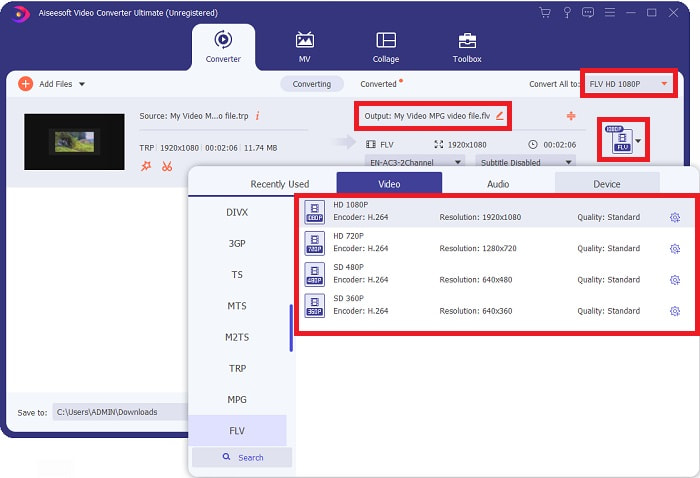
चरण 3: फ़ाइल के दाईं ओर आपको आपके वीडियो का वर्तमान फ़ॉर्मेट दिखाई देगा। जिस फ़ॉर्मेट में आप वीडियो को कनवर्ट करना चाहते हैं, उसे चुनने के लिए उसी पर क्लिक करें; सभी उपलब्ध फ़ॉर्मेट्स की सूची खुल जाएगी। वहां FLV ढूँढें या उसे खोज बार में टाइप करें। दाईं ओर आपके लिए अलग‑अलग वीडियो क्वालिटी विकल्प भी उपलब्ध होंगे।.
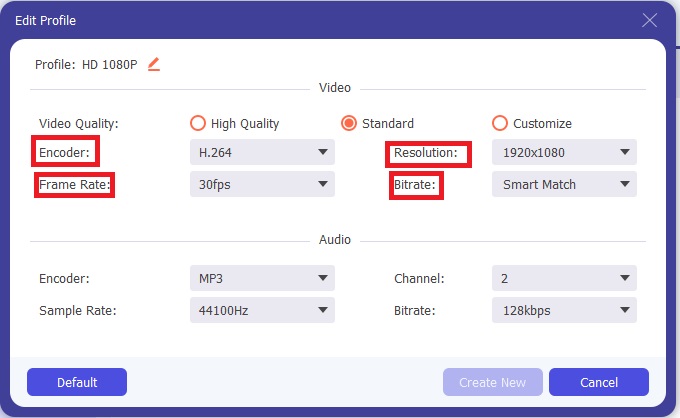
चरण 4: जिन अतिरिक्त फ़ंक्शंस की हम बात कर रहे हैं, उन्हें पाने के लिए चुनी गई वीडियो क्वालिटी के दाईं ओर बने गियर आइकन पर क्लिक करें; एक नया इंटरफ़ेस खुलेगा। यहां आप अपनी ज़रूरत के अनुसार बहुत‑से वीडियो और ऑडियो सेटिंग्स एडिट कर सकते हैं। बदलावों को सुरक्षित रखने के लिए Create New बटन पर क्लिक करें।.
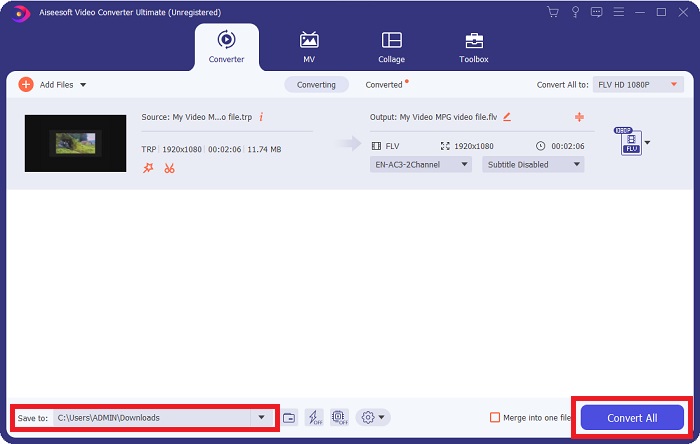
चरण 5: जब आप सभी एडिटिंग और सेटिंग्स को समायोजित (adjust) कर लें, तो कनवर्ज़न प्रक्रिया शुरू करने के लिए इंटरफ़ेस के दाएं निचले कोने में स्थित Convert All बटन पर क्लिक करें और उसके पूरा होने तक प्रतीक्षा करें।.
भाग 2. टीआरपी को एफएलवी में बदलने की ऑनलाइन विधि
अगर आप पूरा सॉफ़्टवेयर इंस्टॉल किए बिना केवल किसी वेब टूल पर जाकर काम निपटाना चाहते हैं, तो वीडियो फ़ाइलों को कनवर्ट करना एक और विकल्प है। इस स्थिति में, हमारे पास सॉफ़्टवेयर का ऑनलाइन संस्करण भी है – FVC Free Video Converter Online। यह वेब टूल सॉफ़्टवेयर में मौजूद अतिरिक्त विकल्पों में से कई प्रदान करता है, हालांकि सभी फ़ीचर्स उपलब्ध नहीं होते। फिर भी, यह अपने उद्देश्य को अपेक्षाकृत कम समय में अच्छी तरह पूरा कर देता है। इस वेब टूल का उपयोग करने के लिए नीचे दिए गए चरणों का पालन करें:
चरण 1: इस लिंक पर क्लिक करके कन्वर्टर के पेज पर सही तरह जाएँ। वहां से आप सबसे पहले वह लॉन्चर डाउनलोड कर सकते हैं, जो आपकी फ़ाइलें इम्पोर्ट करने के लिए ज़रूरी है। प्रक्रिया शुरू करने के लिए पेज के बीच में मौजूद Add Files to Convert बटन पर क्लिक करें।.
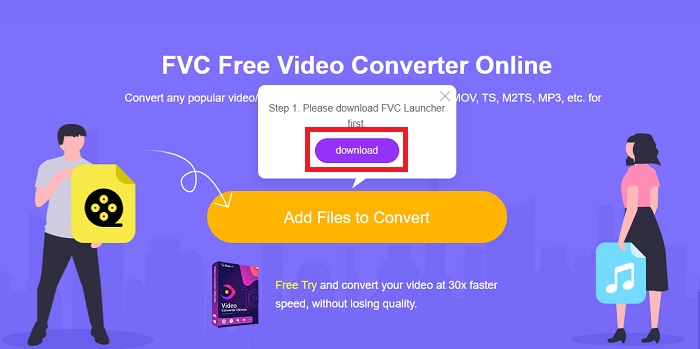
चरण 2: उसी बटन पर दोबारा क्लिक करें और वह वीडियो फ़ाइल अपलोड करें जिसे आप कनवर्ट करना चाहते हैं। फ़ाइल इम्पोर्ट करने के बाद एक नया इंटरफ़ेस दिखाई देगा, जिसमें सभी उपलब्ध फ़ॉर्मेट्स दिखेंगे जिनमें से आप चुन सकते हैं। इस मामले में, FLV चुनें।.
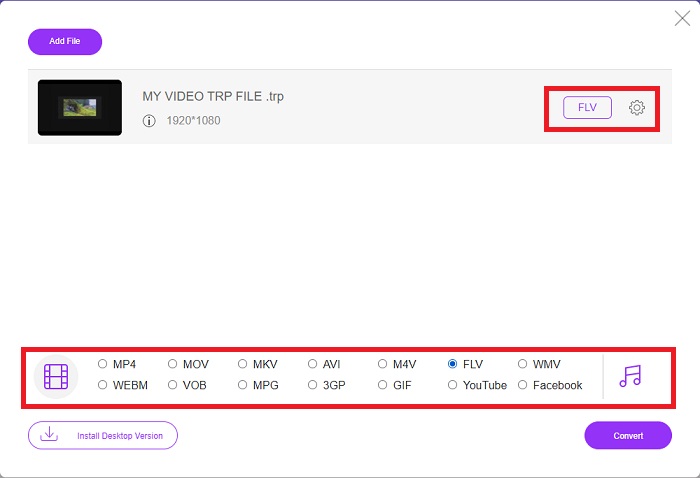
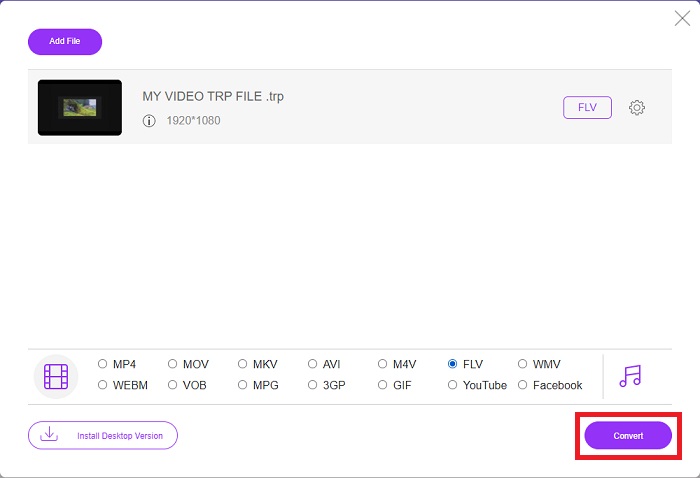
चरण 3: सॉफ़्टवेयर की तरह ही अतिरिक्त विकल्पों के लिए दाईं ओर स्थित गियर आइकन पर क्लिक करें। इसके बाद वीडियो और ऑडियो सेटिंग्स खुलेंगी, जिनकी मदद से आप रिज़ॉल्यूशन, फ़्रेम रेट और कई अन्य मानों के आधार पर अपने वीडियो को और एडिट कर सकते हैं। काम पूरा होने पर बदलावों को सहेजने के लिए OK पर क्लिक करें। अंत में, दाएं निचले कोने में मौजूद Convert बटन पर क्लिक करके कन्वर्ज़न प्रक्रिया शुरू करें।.
संबंधित:
भाग 3. टीआरपी और एफएलवी का विस्तारित ज्ञान
उल्लिखित दो प्रारूपों के बारे में अधिक जानने के लिए, हम आपको संक्षिप्त जानकारी के साथ-साथ दोनों की तुलना भी प्रदान करते हैं।
टीआरपी फाइलें आमतौर पर वीडियोलैन के वीएलसी से जुड़ी होती हैं। टीआरपी फ़ाइल नाम एक्सटेंशन एमपीईजी -2 भाग 1 के साथ उच्च परिभाषा फिल्मों को जमा कर सकता है। टीआरपी फाइलें डिजिटल वीडियो और ऑडियो के रूप में भेजे गए डेटा पैकेट को डिजिटल वीडियो प्रसारण नेटवर्क, रेडियो फ्रीक्वेंसी, या वीडियो रिकॉर्डर जैसे रैखिक रिकॉर्डिंग उपकरणों में संग्रहीत और संग्रहीत कर सकती हैं। कई ऑडियो और वीडियो स्ट्रीम, साथ ही त्रुटि-सुधार कोड, एक TRP फ़ाइल में शामिल होते हैं। उपयोगकर्ता फ़ाइल की सामग्री में मेटाडेटा जैसे कैप्चर टाइम, कैमरा आईडी और स्रोत भी शामिल कर सकते हैं।
दूसरी ओर, .flv एक्सटेंशन वाली एक फाइल फ्लैश वीडियो के लिए है। FLV फ़ाइल एक्सटेंशन Adobe Flash Player या Adobe Air का उपयोग करके इंटरनेट पर भेजी गई वीडियो या ऑडियो फ़ाइल को संदर्भित करता है। फ्लैश वीडियो लंबे समय से इंटरनेट पर लगभग सभी एम्बेडेड वीडियो के लिए प्राथमिक वीडियो प्रारूप रहा है, जिसमें यूट्यूब, हुलु और कई अन्य साइटों पर वीडियो शामिल हैं। दूसरी ओर, स्ट्रीमिंग प्रदाताओं और सॉफ्टवेयर डेवलपर्स ने एडोब के औपचारिक बंद होने के बाद से HTML5 और अन्य प्रारूपों के पक्ष में फ्लैश को छोड़ दिया है।
| टीआरपी | FLV | |
| दस्तावेज़ विस्तारण | टीआरपी | .flv |
| डेवलपर | वीडियोलैन प्रोजेक्ट टीम | एडोब सिस्टम्स शामिल किया गया |
| सहायक कार्यक्रम | एसएमप्लेयर ◆वीएलसी मीडिया प्लेयर ◆एप्पल क्विकटाइम प्लेयर | रियलप्लेयर ◆एप्पल क्विकटाइम प्लेयर मप्लेयर ◆वीएलसी मीडिया प्लेयर |
भाग 4. टीआरपी से एफएलवी रूपांतरण के बारे में अक्सर पूछे जाने वाले प्रश्न
वीएलसी का उपयोग करके टीआरपी वीडियो प्रारूप कैसे खोलें?
एक बार आपके कंप्यूटर पर वीएलसी मीडिया प्लेयर स्थापित हो जाने के बाद, अपनी हार्ड ड्राइव पर टीआरपी वीडियो फ़ाइल का पता लगाएं और इसे सही माउस बटन से चुनें। 'ओपन विथ' ड्रॉप-डाउन मेनू से 'वीएलसी मीडिया प्लेयर' चुनें। सिस्टम इस प्रोग्राम से चलाई जाने वाली वीडियो फ़ाइल को लॉन्च होते ही खोल देगा।
मैं किसी FLV फ़ाइल को Windows Media Player में कैसे परिवर्तित करूं?
आपको सबसे पहले उस FLV फ़ाइल का चयन करना होगा जिसे आप कनवर्ट करना चाहते हैं। आप WMV को उस प्रारूप के रूप में चुन सकते हैं जिसमें आप अपनी FLV फ़ाइल को कनवर्ट करना चाहते हैं। अपनी FLV फ़ाइल को कनवर्ट करने के लिए, ड्रॉप-डाउन मेनू से 'कन्वर्ट' चुनें।
क्या मैं कहीं भी टीआरपी खेल सकता हूं?
टीआरपी को व्यापक रूप से ज्ञात एमपी4, एवीआई, एमओवी, एमकेवी, एफएलवी, डब्लूएमवी, और अन्य प्रारूपों में परिवर्तित करना एक सुझाया गया विकल्प है यदि आप हर जगह और किसी भी डिवाइस या मीडिया प्लेयर पर टीआरपी फाइलों को चलाना चाहते हैं।
निष्कर्ष
कुल मिलाकर, वीडियो कन्वर्टर अल्टीमेट और इसका ऑनलाइन टूल समकक्ष वह है जिसे आप सभी आवश्यक सुविधाएँ प्रदान करते हुए पूरी रूपांतरण प्रक्रिया को पूरा करने के लिए देख रहे हैं। इससे कोई असुविधा नहीं होती है, साथ ही यह दिन के किसी भी समय उपलब्ध है यदि आपके पास अपने डेस्कटॉप पर सॉफ़्टवेयर स्थापित है। आप कभी नहीं जान पाएंगे कि आपको इस तरह के कनवर्टर की आवश्यकता कब होगी, इसलिए हम आपकी आसानी के लिए इस सॉफ़्टवेयर का उपयोग करने की सलाह देते हैं।
-
 विंडोज और मैक पर टीआरपी को एवीआई में कैसे बदलें, इस पर सबसे आसान गाइड
 हो सकता है कि आप टीआरपी वीडियो प्रारूप से परिचित न हों और सोच रहे हों कि आप टीआरपी को एवीआई में कैसे बदलने जा रहे हैं? इस मुद्दे से संबंधित विवरण जानने के लिए इस लेख को और पढ़ें।
-
 एमटीएस को एफएलवी फ्री और ऑनलाइन में बदलने के 3 समाधान
 MTS को FLV में बदलना चाहते हैं? यहां 3 मुफ्त एमटीएस से एफएलवी कनवर्टर सॉफ्टवेयर हैं जिन्हें आप मैक ओएस एक्स और विंडोज 10/8/7 पर एमटीएस को एफएलवी में बदलने का प्रयास कर सकते हैं।
-
 VOB को FLV में बदलने के सर्वोत्तम तरीके [मुफ्त और ऑनलाइन शामिल]
 VOB फ़ाइल को FLV फ़ाइल में कनवर्ट करना चाहते हैं? आप डेस्कटॉप या ऑनलाइन कन्वर्टर्स के साथ कार्य को आसानी से पूरा कर सकते हैं। इस गाइड को पढ़ें और जानें कि VOB को FLV में आसानी से और जल्दी से कैसे बदला जाए।
