


 वीडियो कनवर्टर अंतिम
 स्क्रीन अभिलेखी
 वीडियो मरम्मत
 सुरक्षित डाउनलोड
क्या है एपॉवरसॉफ्ट फ्री एचईआईसी कन्वर्टर और इस्तेमाल करने के लिए वैकल्पिक एचईआईसी कन्वर्टर्स
जब से Apple ने नया उन्नत HEIC इमेज फ़ॉर्मेट पेश किया है, हममें से कई लोगों को यह पसंद आया है, क्योंकि यह कम फ़ाइल आकार में हाई‑रेज़ोल्यूशन इमेज रख सकता है। हालाँकि फ़ाइल आकार को संकुचित (कंप्रेस) करने की क्षमता प्रभावशाली है, हमें यह नहीं भूलना चाहिए कि यह इमेज फ़ॉर्मेट नया है और Apple से असंबंधित अधिकांश प्लेटफ़ॉर्म इसे सपोर्ट नहीं करते। इसलिए, यदि आप चाहते हैं कि HEIC फ़ाइल रिसीवर के लिए उपयुक्त हो, तो आपको इसका फ़ॉर्मेट JPEG में बदलना होगा, विशेषकर तब जब रिसीवर iOS या Mac उपयोगकर्ता न हो। Apowersoft Free HEIC Converter की मदद से आप यह काम जल्दी कर सकते हैं, लेकिन इसे डाउनलोड करने से पहले, कनवर्टर की यह समीक्षा ज़रूर पढ़ें ताकि आप जल्द निर्णय ले सकें कि इसे उपयोग करना है या नहीं।.

भाग 1. पूर्ण Apowersoft मुक्त HEIC कनवर्टर समीक्षा
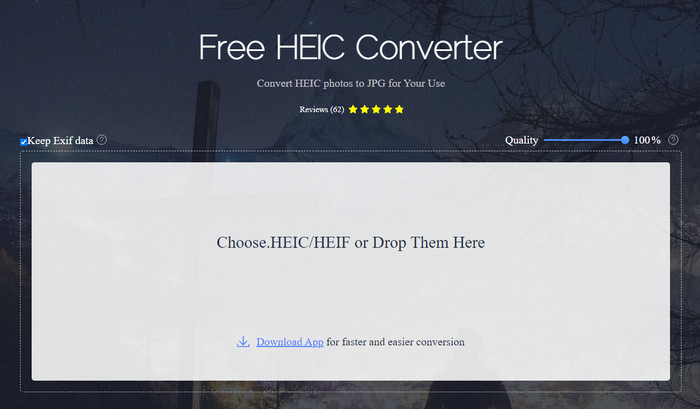
जैसा कि नाम से स्पष्ट है, Apowersoft HEIC Converter आपको अपना HEIC फ़ाइल मुफ़्त में एक संगत JPEG फ़ॉर्मेट में बदलने का अवसर देता है। डेस्कटॉप पर कोई अविश्वसनीय कनवर्टर डाउनलोड करने के बजाय, आप इसे तुरंत बिना कुछ डाउनलोड या अतिरिक्त संसाधन इंस्टॉल किए इस्तेमाल कर सकते हैं। यह वेब टूल एक्सेस करना सुरक्षित है, क्योंकि इसकी आधिकारिक वेबसाइट पर रहते समय आपका कनेक्शन सुरक्षित रहता है। आप HEIC फ़ाइल को यहाँ ड्रैग‑एंड‑ड्रॉप करके आसानी से अपलोड कर सकते हैं। लेकिन यह ऑनलाइन कनवर्टर वेब या डेस्कटॉप पर उपलब्ध अन्य कनवर्टर्स से अलग और ख़ास कैसे है? यदि आप इसे उपयोग करने का निर्णय लेते हैं, तो आपको मिलने वाली मुख्य विशेषताएँ नीचे दी गई हैं।.
Apowersoft Free HEIC Converter की मुख्य विशेषताएँ:
कनवर्टर डाउनलोड करना आवश्यक नहीं है क्योंकि आप वेब पर सॉफ़्टवेयर तक पहुंच सकते हैं।
यह एचईआईसी फाइलों को बैच में या व्यक्तिगत रूप से जेपीईजी प्रारूप में परिवर्तित करने का समर्थन करता है।
रूपांतरण उपलब्ध होने से पहले छवि की गुणवत्ता में हेरफेर करें।
कनवर्ट करने के बाद, आप उसी EXIF फाइल को JPEG फाइल में सेव कर सकते हैं।
अतिरिक्त कदम उठाए बिना HEIC फ़ाइल को स्वचालित रूप से कनवर्ट करें।
पेशेवरों
- वेब टूल इंटरफ़ेस बहुत अच्छा और समग्र दृष्टिकोण है।
- फ़ाइल को JPEG में कनवर्ट करने के बाद एक उच्च-गुणवत्ता वाली छवि बनी रहती है।
- बैच फ़ाइलों को परिवर्तित करना आसान है क्योंकि यह फ़ाइल को एक साथ परिवर्तित करने का समर्थन करता है।
विपक्ष
- हालांकि यह कहता है कि यह मेटाडेटा रखता है, कभी-कभी प्रारूप को परिवर्तित करने के बाद मेटाडेटा खो जाता है।
- आउटपुट स्वरूप एक तक सीमित है, और वह है JPEG।
- कार्य सीमित हैं।
सर्वश्रेष्ठ एपॉवरसॉफ्ट फ्री एचईआईसी कन्वर्टर विकल्प ऑनलाइन और ऑफलाइन का भाग 2
JVC कनवर्टर करने के लिए FVC मुक्त HEIC
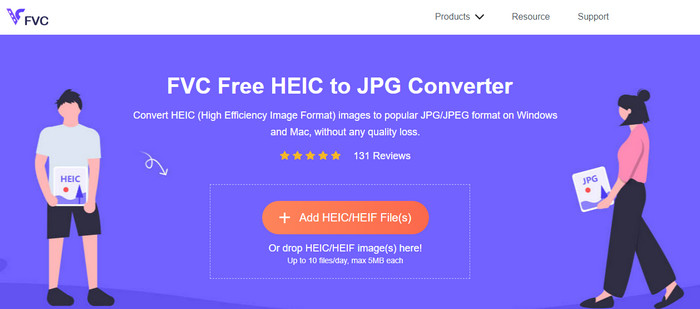
FVC Free HEIC to JPG Converter Apowersoft फ्री HEIC to JPG कनवर्टर का सबसे अच्छा विकल्प है, क्योंकि इसका इंटरफ़ेस सहज (इंट्यूटिव) है, जो आपको कुछ ही सेकंड में काम पूरा करने में मदद करेगा। ऐसे वेब कनवर्टर के साथ आपको टूल का पूरा प्रोग्राम डाउनलोड करने की ज़रूरत नहीं, लेकिन इसका लॉन्चर डाउनलोड करना होगा। हालाँकि लॉन्चर डाउनलोड करना अनिवार्य है, फिर भी कन्वर्ज़न गति के मामले में यह आगे है। भले ही आप HEIC को JPG में बदलने का अनुभव न रखते हों, इस टूल के साथ आप बिना किसी ट्यूटोरियल की मदद के भी यह काम आसानी और प्रभावी ढंग से कर सकते हैं।.
अब तक, वेब टूल ने किसी अन्य ऑनलाइन कन्वर्टर्स की तरह कार्य को संभाला है। लेकिन हम इस तथ्य को नज़रअंदाज़ नहीं कर सकते कि इस वेब टूल की सीमाएं हैं, जैसे प्रत्येक फ़ाइल का फ़ाइल आकार और अनुमत फ़ाइलें जिन्हें आप प्रतिदिन अपलोड कर सकते हैं। लेकिन अगर आप इन सीमाओं को नहीं रखना चाहते हैं, तो हम अनुशंसा करेंगे कि आप इसका डेस्कटॉप संस्करण - Aiseesoft HEIC कन्वर्टर डाउनलोड करें। यह सॉफ्टवेयर विंडोज और मैक दोनों ऑपरेटिंग सिस्टम के लिए उपलब्ध है।
HEICtoJPEG.com
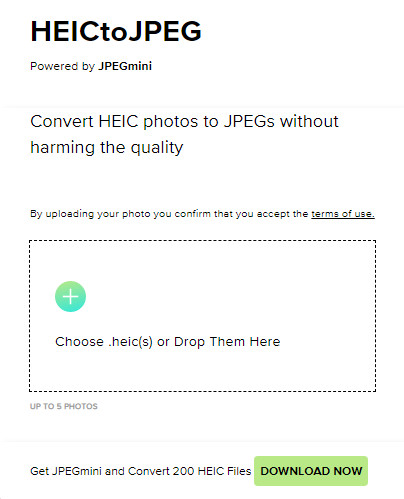
HEICtoJPEG.com Apowersoft HEIC Converter का एक और विकल्प है, जिसे आप वेब पर मुफ़्त और सुरक्षित रूप से एक्सेस कर सकते हैं। जिस टूल की हम समीक्षा कर रहे हैं, उसी की तरह, यहाँ भी आप अपनी HEIC फ़ाइलों को केवल JPEG में कनवर्ट कर सकते हैं। इसलिए यदि आप HEIC फ़ॉर्मेट को सीधे JPEG में, बिना क्वालिटी एडजस्ट किए, बदलना चाहते हैं, तो आपको यही टूल उपयोग करना चाहिए। वेब टूल खोलने के बाद आप फ़ाइल को यहाँ ड्रैग‑एंड‑ड्रॉप कर सकते हैं, और कन्वर्ज़न अपने‑आप शुरू हो जाएगा। साथ ही, आप इस वेब टूल से बैच HEIC कन्वर्ज़न भी कर सकते हैं, और इसके उपयोग पर दैनिक सीमा नहीं है।.
कुल मिलाकर, वेब टूल बहुत अच्छा है क्योंकि यह तेज़ प्रक्रिया के लिए बैच रूपांतरण का समर्थन करता है। हालाँकि, आप अन्य ऑनलाइन टूल की तरह प्रारूप को JPEG में बदलने से पहले उन्नत सेटिंग को मैन्युअल रूप से नहीं बदल सकते। हालांकि वेब टूल एक पेशेवर विकल्प नहीं है, फिर भी यह हमारे जैसे शुरुआती लोगों के लिए सबसे अच्छा है जो हमारे एचईआईसी पर एक साधारण रूपांतरण करना चाहते हैं।
पिक्सिलियन इमेज कन्वर्टर
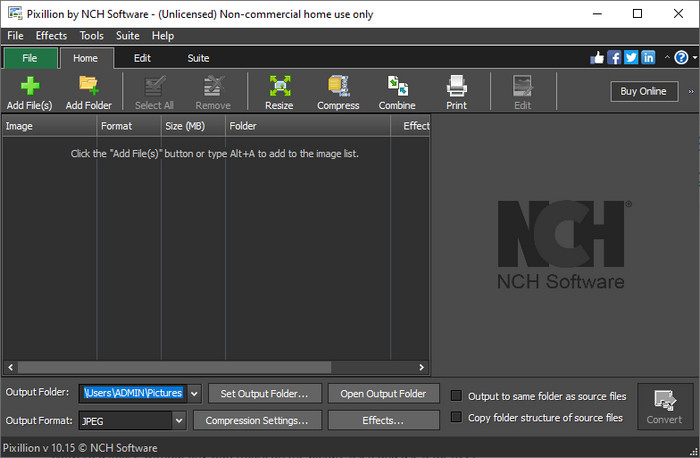
मान लीजिए कि आपका इंटरनेट कनेक्शन स्थिर नहीं है, इसलिए आप Apowersoft Free HEIC Converter का उपयोग नहीं कर सकते क्योंकि यह वेब‑आधारित टूल है। क्या तब भी कन्वर्ट करना संभव है? हाँ, Pixillion Image Converter के साथ। यह ऑफ़लाइन सॉफ़्टवेयर आपको इमेज को JPG, BMP, PNG आदि जैसे अनेक इमेज आउटपुट फ़ॉर्मेट में कन्वर्ट करने देता है। ऐसे टूल के साथ आप HEIC इमेज को एक्सपोर्ट करने से पहले एडजस्ट भी कर सकते हैं; आप इन्हें रिसाइज़, कंप्रेस, एडिट आदि कर सकते हैं — जो सुविधाएँ हमारे द्वारा बताए गए वेब टूल में उपलब्ध नहीं हैं।.
आपके द्वारा अपलोड की गई छवि फ़ाइल से कोई फर्क नहीं पड़ता, आप आसानी से प्रारूप को अपने वांछित आउटपुट में परिवर्तित कर सकते हैं और इसे अपने वर्तमान डिवाइस के साथ संगत बना सकते हैं। बढ़िया, है ना? हां यह है। लेकिन इससे पहले कि आप इसका उपयोग कर सकें, आपको सॉफ़्टवेयर डाउनलोड करने और इसे स्थापित करने की आवश्यकता होगी, जो थोड़ा परेशानी भरा है क्योंकि यह एक और कदम है, खासकर यदि आप एक एचईआईसी फ़ाइल को जेपीजी या अन्य प्रारूप में कनवर्ट करना चाहते हैं। बहरहाल, यह टूल बहुत अच्छा है, और यह आपके विंडोज ऑपरेटिंग सिस्टम पर डाउनलोड करने के लिए स्वतंत्र है।
संबंधित:
भाग 3. Apowersoft HEIC कनवर्टर समीक्षा के बारे में अक्सर पूछे जाने वाले प्रश्न
क्या परिवर्तित HEIC फ़ाइल को Apowersoft फ्री HEIC कन्वर्टर पर निर्यात करने पर वॉटरमार्क होता है?
सौभाग्य से आपके द्वारा यहां कनवर्ट की गई फ़ाइल आपकी छवि पर वॉटरमार्क नहीं छोड़ेगी। तो, आप चित्र पर बिना किसी वॉटरमार्क के परिवर्तित छवि का आनंद ले सकते हैं और इसे मुफ्त में उपयोग कर सकते हैं।
क्या मुझे Apowersoft HEIC कन्वर्टर का उपयोग करने के लिए लॉग इन करने की आवश्यकता है?
आप या तो अपने खाते की जांच के लिए लॉग इन कर सकते हैं, लेकिन यदि आप ऑनलाइन कनवर्टर का उपयोग करना चाहते हैं तो आपको लॉग इन करने की आवश्यकता नहीं होगी। इसलिए, आप इसे टूल की आधिकारिक वेबसाइट पर खींचकर और छोड़ कर और इसे स्वचालित रूप से परिवर्तित करके तुरंत इसका उपयोग कर सकते हैं।
निष्कर्ष
Apowersoft HEIC कन्वर्टर समीक्षा के बाद, अब हम जानते हैं कि क्या यह सबसे अच्छा कनवर्टर है जिसका उपयोग हमें प्रारूप को JPG में परिवर्तित करके अपनी HEIC समस्या को हल करने के लिए करना चाहिए। हालांकि वेब टूल उपयोग करने के लिए स्वतंत्र है और वेब पर पहुंच योग्य है, फिर भी हम इस लेख में कुछ कमियां शामिल करते हैं। इसलिए, यदि आपको लगता है कि यह आपके लिए उपकरण नहीं है, तो तीन विकल्प आपके कनवर्टर पर आपके लिए आवश्यक अंतर को भर सकते हैं, जो कि हम जिस कनवर्टर की समीक्षा करते हैं वह आपको नहीं दे सकता है। लेकिन अगर ये सभी पर्याप्त नहीं हैं, तो हमारा सुझाव है कि आप अंतिम टूल डाउनलोड करें जो आपकी HEIC फ़ाइल को JPEG या PNG में बदल सकता है। जानना चाहते हैं कि यह क्या है? फिर आपको ऊपर दिए गए डाउनलोड बटन पर क्लिक करना होगा ताकि यह आपकी पहुंच में हो, चाहे आप विंडोज या मैक का उपयोग कर रहे हों।
-
 MKV मेटाडेटा को एक पेशेवर की तरह संपादित करने के सर्वोत्तम तरीके [आसान]
 एमकेवी मेटाडेटा को संपादित करने का कोई विचार नहीं है? कुछ उपयोगकर्ताओं को MKV पर टैग संपादित करना मुश्किल लगता है, यदि आप उनमें से एक हैं तो इस लेख को पढ़ें।
-
 Mac और Windows पर शीर्ष 3 FLAC मेटाडेटा संपादक [2023 अपडेट किया गया]
 क्या आप FLAC मेटाडेटा बदलना चाहते हैं? इस मामले में, आपको यह लेख अवश्य पढ़ना चाहिए क्योंकि हम उपयोग करने के लिए नवीनतम FLAC मेटाडेटा संपादक के बारे में पर्याप्त जानकारी प्रदान करते हैं।
-
 WebM मेटाडेटा को शीघ्रता से संपादित करने की सर्वोत्तम तकनीक
 वेबएम मेटाडेटा को संपादित करने के तरीके पर एक ट्यूटोरियल सम्मिलित करते समय हमने नीचे दिए गए पूर्ण विवरण को पढ़ें। इसके बारे में और जानने के लिए इस लिंक पर क्लिक करें।
