


 वीडियो कनवर्टर अंतिम
 स्क्रीन अभिलेखी
 वीडियो मरम्मत
 सुरक्षित डाउनलोड
ऑनलाइन और ऑफलाइन कन्वर्टर्स का उपयोग करके बीएमपी को पीएनजी और जेपीजी में कैसे बदलें
रंगीन तस्वीरों में ब्लेंड्स या ग्रेडिएंट होने पर बिटमैप या BMP फ़ॉर्मेट आदर्श नहीं माना जाता। आजकल इस फ़ॉर्मेट में आपको ज़्यादा फ़ोटो भी नहीं मिलेंगी। तकनीकी रूप से BMP एक पुराना फ़ॉर्मेट है जिसमें लगभग कोई कंप्रेशन नहीं होता। इसलिए, अगर आप BMP इमेज बिना किसी पाबंदी के खोलना चाहते हैं, तो आपको उन्हें आमतौर पर इस्तेमाल होने वाले इमेज फ़ॉर्मेट में बदलना होगा। आप कई तरीकों से अलग–अलग इमेज फ़ॉर्मेट के बीच कन्वर्ट कर सकते हैं। इस लेख में हम सबसे आसान और सीधे–सादे तरीकों की रूपरेखा बताएँगे। तो, अगर आप जानना चाहते हैं कि BMP को JPG या PNG इमेज फ़ॉर्मेट में कैसे बदलें, तो यह लेख पढ़ें। हम कुछ बेहतरीन इमेज कन्वर्टर टूल्स का परिचय देंगे जो आपकी मदद कर सकते हैं।.

भाग 1. बीएमपी बनाम जेपीजी बनाम पीएनजी
| फाइल का प्रारूप | बीएमपी | जेपीजी | पीएनजी |
| फ़ाइल नाम एक्सटेंशन | बीएमपी | जेपीजी | पीएनजी |
| द्वारा विकसित | माइक्रोसॉफ्ट | फ़ोटोग्राफ़ी संबंधी विशेषज्ञों का संयुक्त समूह | पीएनजी विकास समूह |
| विवरण | ए बीएमपी फ़ाइल बिटमैप के लिए छोटा है और उच्चारित बम्प है। Microsoft ने अपने Windows ऑपरेटिंग सिस्टम के लिए BMP फ़ाइल स्वरूप बनाया। यह विभिन्न स्क्रीन और गैजेट्स पर डिजिटल इमेज के रेजोल्यूशन को बनाए रखने के लिए है। रंगीन और श्वेत-श्याम दोनों प्रकार के द्वि-आयामी चित्र संग्रहीत किए जा सकते हैं। बीएमपी फाइलें अब केवल आधुनिक समय में विंडोज-आधारित उपकरणों के साथ ही संगत नहीं हैं। वे अब बड़ी संख्या में Mac और Android उपकरणों के साथ संगत हैं। | The जेपीजी इमेज कंप्रेशन के लिए इमेज फाइल फॉर्मेट सबसे प्रभावी है। उपयोगकर्ता व्यापक रूप से जेपीजी फाइलों का उपयोग करते हैं। इसे जेपीईजी या जेपीजी फाइलों के रूप में भी जाना जाता है। जेपीईजी का पूरा नाम ज्वाइंट एक्सपर्ट्स ग्रुप है। इसके अतिरिक्त, अधिकांश बिटमैप छवियों में .jpg फ़ाइल एक्सटेंशन होता है। प्राथमिक लक्ष्य फाइलों को आकार में छोटा बनाना है। चूँकि JPG एक हानिपूर्ण प्रारूप है, अत्यधिक संपीड़न का छवियों की गुणवत्ता पर प्रभाव पड़ता है। | पोर्टेबल नेटवर्क ग्राफिक्स, ए पीएनजी रेखापुंज परिवार के लिए विस्तार, जो दोषरहित संपीड़न करता है। इसे जीआईएफ, ग्राफिक्स इंटरचेंज फॉर्मेट को बदलने के लिए विकसित किया गया था और इसका पेटेंट नहीं कराया गया है। वे एक पैलेट पर आधारित हो सकते हैं, और आमतौर पर ग्रेस्केल छवियां जो पारदर्शिता प्रदान करती हैं। PNG दोषरहित संपीड़न है। तात्पर्य यह है कि यह जानकारी, बारीकियों और गुणवत्ता को बनाए रखता है। |
भाग 2। बीएमपी को जेपीजी/पीएनजी में बदलने के लिए ऑनलाइन तरीके
एफवीसी फ्री इमेज कन्वर्टर का उपयोग करके बीएमपी को जेपीजी/पीएनजी में बदलें
ऑनलाइन मुफ़्त में BMP को JPG में बदलने के लिए आप FVC Free Image Converter का उपयोग कर सकते हैं। यह ऑनलाइन टूल BMP को PNG या JPG में कन्वर्ट करने की सबसे आसान प्रक्रिया प्रदान करता है। इसके सहज इंटरफ़ेस की वजह से उन्नत और गैर–पेशेवर दोनों तरह के उपयोगकर्ता इस कन्वर्टर का उपयोग कर सकते हैं। आप सिर्फ़ तीन चरणों में इमेज कन्वर्ट कर सकते हैं। इसके अलावा, आप विभिन्न फ़ाइल फ़ॉर्मेट वाली किसी भी इमेज को अपलोड कर सकते हैं। यह PNG, JPG, BMP, GIF, TIFF और अन्य इनपुट फ़ॉर्मेट को सपोर्ट करता है। साथ ही, FVC इमेज फ़ाइल कन्वर्टर बैच कन्वर्शन प्रक्रिया का भी समर्थन करता है। इससे आप एक साथ कई इमेज को कन्वर्ट कर सकते हैं। यह बाज़ार में उपलब्ध अन्य इमेज कन्वर्टरों की तुलना में कहीं अधिक प्रभावी और व्यावहारिक है। यह सभी उपयोगकर्ताओं के लिए सुविधाजनक है, क्योंकि आप एक बार में 40 इमेज फ़ाइलें तक कन्वर्ट कर सकते हैं।.
FVC फ्री इमेज कन्वर्टर एक उच्च-गुणवत्ता वाली छवि की गारंटी देता है। रूपांतरण के बाद, छवि अभी भी मूल जैसी ही दिखाई देगी। इसके अलावा, आप अपनी स्क्रीन पर परेशान करने वाले विज्ञापन नहीं देखेंगे, भले ही वह एक ऑनलाइन छवि परिवर्तक हो। इस तरह, आप अपनी छवियों को परिवर्तित करने पर अधिक ध्यान केंद्रित कर सकते हैं। यह कनवर्टर लगभग सभी ब्राउज़रों में उपलब्ध है। इसमें क्रोम, सफारी, एज, फायरफॉक्स और बहुत कुछ शामिल है। बीएमपी को जेपीजी और पीएनजी प्रारूप में बदलने के लिए आप नीचे दिए गए सरल चरणों का पालन कर सकते हैं।
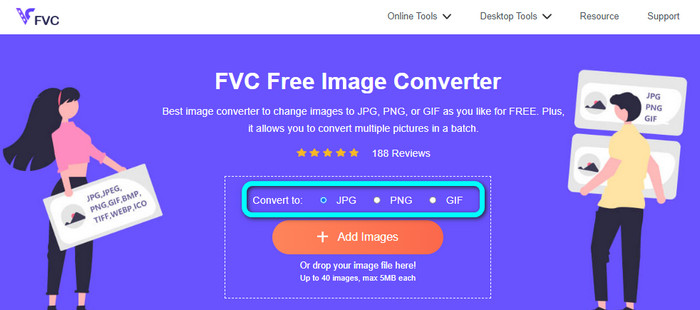
चरण 1: अपने ब्राउज़र में जाएँ और FVC Free Image Converter वेबसाइट पर जाएँ। 'Convert to' विकल्प देखें और अपना मनचाहा फ़ॉर्मेट चुनें। आप JPG या PNG पर क्लिक कर सकते हैं।.
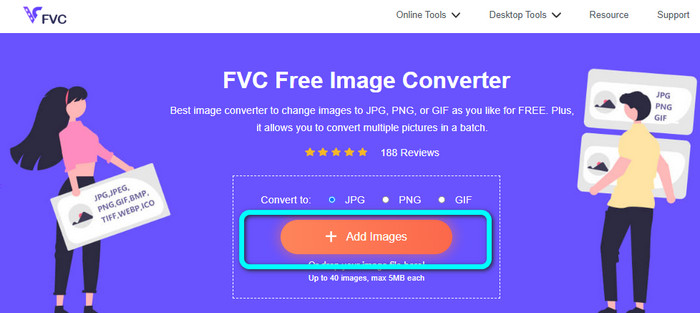
चरण 2: 'Add Images' बटन पर क्लिक करके BMP इमेज जोड़ें। आपके कंप्यूटर की फ़ाइल विंडो स्क्रीन पर दिखाई देगी। वह BMP इमेज फ़ाइल चुनें जिसे आप कन्वर्ट करना चाहते हैं।.
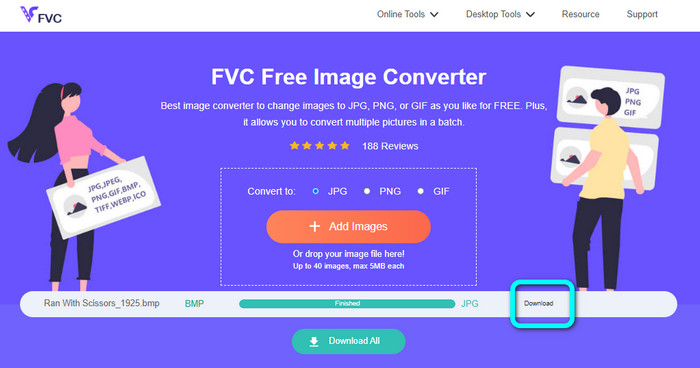
चरण 3: अपलोड करने के बाद, यह फ़ोटो को अपने–आप कन्वर्ट कर देगा। तो, आख़िरी चरण के रूप में, 'Download' बटन पर क्लिक करें और अपनी इमेज को डेस्कटॉप पर सेव कर लें।.
Convertio का उपयोग करके BMP को JPG/PNG में बदलें
Convertio एक और ऑनलाइन टूल है जो BMP को JPG या PNG में कन्वर्ट करने के लिए इस्तेमाल किया जा सकता है। यह एक फ़ाइल कन्वर्टर है जो आपको कई तरह के फ़ॉर्मेट के बीच कन्वर्ट करने देता है। इसमें BMP, JPG, PNG, GIF, SVG और अन्य फ़ॉर्मेट शामिल हैं। इस टूल की मदद से कई इमेज को कन्वर्ट करना आसान हो जाता है। यह बैच कन्वर्शन प्रक्रिया भी प्रदान करता है। इस तरह आप समय बचाने के लिए BMP को JPG में बैच के रूप में कन्वर्ट कर सकते हैं। इसके अलावा, Convertio आपकी प्राइवेसी की गारंटी देता है। इमेज कन्वर्ट करने के बाद यह 24 घंटे के भीतर अपने आप आपका डेटा डिलीट कर देता है। साथ ही, आप इस कन्वर्टर तक अलग–अलग ब्राउज़र से पहुँच सकते हैं। आप इसे Google, Mozilla, Edge आदि पर उपयोग कर सकते हैं।.
हालाँकि, Convertio में कमियाँ हैं। आप केवल 100 एमबी तक की छवि अपलोड कर सकते हैं। यदि आप अपलोड करने के लिए असीमित फ़ाइल आकार चाहते हैं, तो सदस्यता योजना खरीदें। इस कनवर्टर को संचालित करने के लिए आपको इंटरनेट कनेक्शन की भी आवश्यकता है।
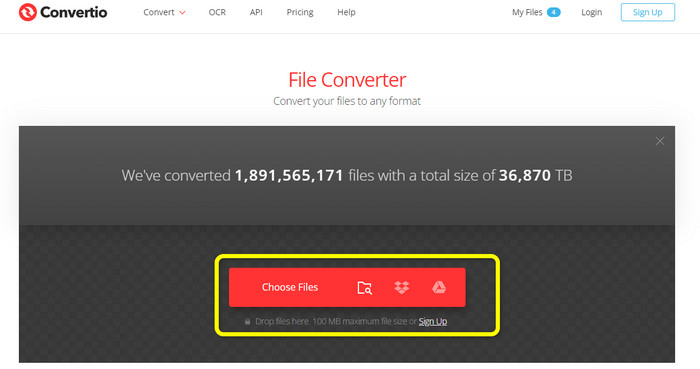
चरण 1: Convertio वेबसाइट पर जाएँ। BMP इमेज फ़ाइल जोड़ने के लिए 'Choose Files' बटन पर क्लिक करें।.
चरण 2: फ़ॉर्मेट विकल्पों में से JPG या PNG फ़ाइल फ़ॉर्मेट चुनें। अगर आप और इमेज जोड़ना चाहते हैं, तो 'Add more files' बटन पर क्लिक करें।.
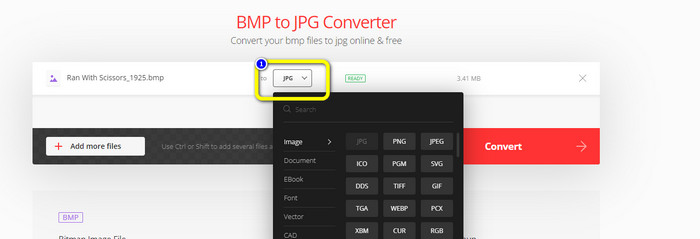
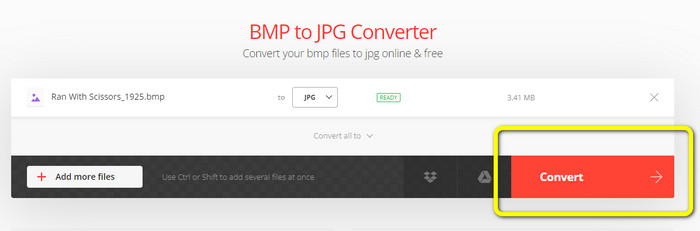
चरण 3: मनचाहा फ़ाइल फ़ॉर्मेट चुनने के बाद 'Convert' बटन पर क्लिक करें। कन्वर्शन प्रक्रिया के पूरा होने का इंतज़ार करें और फिर इमेज को अपने कंप्यूटर पर डाउनलोड करें।.
भाग 3. बीएमपी को जेपीजी/पीएनजी में बदलने के लिए ऑफलाइन तरीके
आप BMP को JPG में कन्वर्ट करने के लिए Video Converter Ultimate का भी उपयोग कर सकते हैं। यह ऑफ़लाइन कन्वर्टर सरल और समझने में आसान कन्वर्शन प्रक्रिया प्रदान करता है। इसका इंटरफ़ेस भी सहज है, जिससे यह खास तौर पर शुरुआती उपयोगकर्ताओं सहित सभी के लिए उपयुक्त है। Video Converter Ultimate बैच कन्वर्शन प्रक्रिया देता है, यानी आप एक साथ कई इमेज कन्वर्ट कर सकते हैं। यह तेज़ कन्वर्शन भी प्रदान करता है, जिससे आप बहुत सारी फ़ाइलों को तुरंत बदल सकते हैं। इसके अलावा, यह कई इमेज फ़ॉर्मेट को सपोर्ट करता है, जैसे JPG, BMP, PNG, GIF, TIFF और अन्य। सिर्फ़ कन्वर्ट करने के अलावा, आप आउटपुट सेटिंग्स से फ़ोटो की क्वालिटी भी बदल सकते हैं। इस तरह आप अपनी पसंद के अनुसार इमेज की गुणवत्ता समायोजित कर सकते हैं। इसके अतिरिक्त, आप इस डाउनलोडेबल कन्वर्टर को Mac और Windows दोनों कंप्यूटरों पर उपयोग कर सकते हैं। BMP फ़ाइल को JPG या PNG फ़ॉर्मेट में कन्वर्ट करने के लिए नीचे दिए गए निर्देशों का पालन करें।.
चरण 1: Mac या Windows पर Video Converter Ultimate डाउनलोड करें। इंस्टॉलेशन पूरा होने के बाद प्रोग्राम को लॉन्च करें। आप नीचे दिए गए 'Download' बटन पर क्लिक करके भी इस कन्वर्टर को प्राप्त कर सकते हैं।.
फ्री डाउनलोडWindows 7 या बाद के संस्करण के लिएसुरक्षित डाउनलोड
फ्री डाउनलोडMacOS 10.7 या बाद के संस्करण के लिएसुरक्षित डाउनलोड
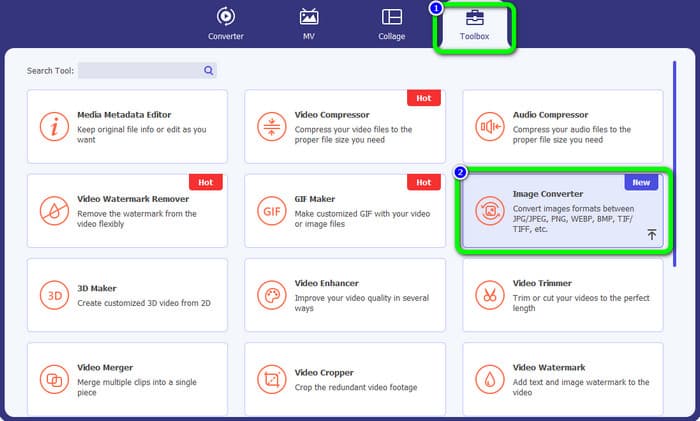
चरण 2: 'Toolbox' पैनल पर जाएँ और 'Image Converter' टूल चुनें। एक नया इंटरफ़ेस दिखाई देगा।.
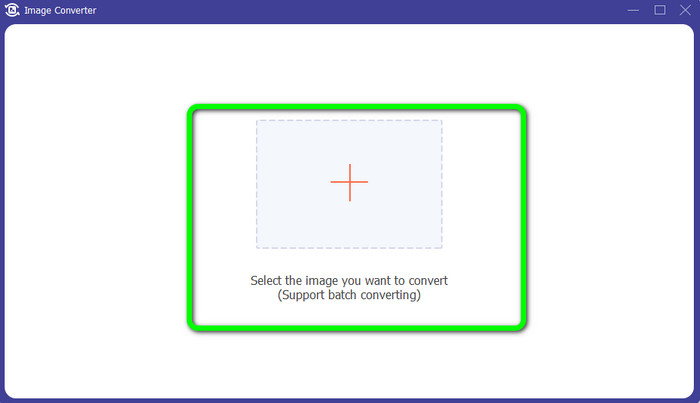
चरण 3: 'Plus' चिन्ह पर क्लिक करें। फिर अपनी फ़ाइल फ़ोल्डर से वह BMP फ़ोटो चुनें जिसे आप कन्वर्ट करना चाहते हैं।.
चरण 4: और फ़ाइलें जोड़ने के लिए 'Add Source File' बटन पर क्लिक करें। फिर फ़ॉर्मेट विकल्प में जाकर अपना मनचाहा आउटपुट फ़ॉर्मेट चुनें। आप PNG और JPG फ़ॉर्मेट का चयन कर सकते हैं।.
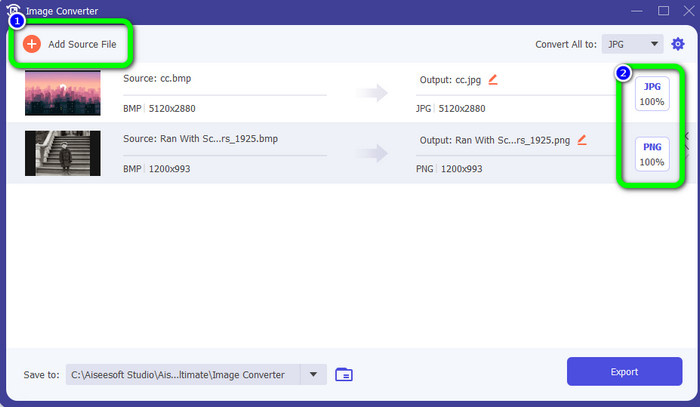
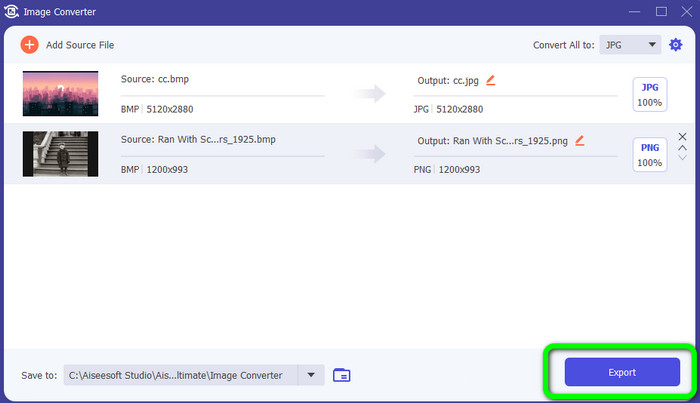
चरण 5: आख़िरी चरण के रूप में 'Export' बटन पर क्लिक करें। कन्वर्शन प्रक्रिया के पूरा होने का इंतज़ार करें। फिर अपने फ़ोल्डर से कन्वर्ट की गई इमेज खोलें।.
भाग 4. बीएमपी को जेपीजी/पीएनजी में बदलने के बारे में अक्सर पूछे जाने वाले प्रश्न
1. बीएमपी को पीएनजी में कैसे बदलें?
अगर आप बैच कन्वर्शन प्रक्रिया करना चाहते हैं, तो FVC Free Image Converter का उपयोग करें। सबसे पहले 'Convert to' विकल्प से PNG फ़ॉर्मेट चुनें। इसके बाद, केवल 'Add Images' बटन पर क्लिक करें। आप कई इमेज फ़ाइलें जोड़ सकते हैं। यह आपको एक बार में 40 इमेज तक अपलोड करने की अनुमति देता है। फिर अपलोड पूरा होने के बाद, टूल अपने–आप आपकी इमेज फ़ाइलों को कन्वर्ट कर देगा। प्रक्रिया समाप्त करने के लिए 'Download All' बटन पर क्लिक करें और उन्हें अपने डेस्कटॉप पर सेव कर लें।.
2. क्या बीएमपी फ़ाइल एनिमेटेड हो सकती है?
दुर्भाग्यवश नहीं। एनिमेशन अक्सर बीएमपी फाइलों के साथ संगत नहीं होता है। फ्लैश का उपयोग करने के बजाय, जीआईएफ फ़ाइल प्रारूप का उपयोग करने के बारे में सोचें। यह छोटे, सरल एनिमेशन बना सकता है जिन्हें साझा और सहेजा जा सकता है।
3. कौन सी बड़ी है, बीएमपी फाइल या जेपीईजी फाइल?
तुलनीय तस्वीरों को देखते हुए एक बीएमपी बड़ा होगा। लेकिन आकार प्रतिबंधों के कारण बीएमपी केवल 4GB जितना बड़ा हो सकता है। जेपीईजी का आकार अप्रतिबंधित है। उदाहरण के लिए, कुछ उपग्रह चित्र जेपीईजी प्रारूप में उपलब्ध हैं।
निष्कर्ष
चूँकि BMP फ़ाइल का आकार बड़ा होता है, इसलिए ज़रूरी है कि उन्हें JPG और PNG जैसे अन्य फ़ॉर्मेट में कन्वर्ट किया जाए। सौभाग्य से, इस लेख ने BMP को JPG और PNG फ़ॉर्मेट में कन्वर्ट करने के उत्कृष्ट तरीक़े प्रदान किए हैं। लेकिन, अगर आप आसान और मुफ़्त तरीक़े से इमेज कन्वर्ट करना पसंद करते हैं, तो FVC Free Image Converter का उपयोग करें।.
-
 जेपीजी को पीएनजी में ऑनलाइन और ऑफलाइन रूपांतरित करने के पूर्ण-स्तरीय तरीके
 JPG को PNG फ़ाइल स्वरूप में बदलने के लिए उपयोगी तरीके खोज रहे हैं? इस गाइडपोस्ट में वह उत्तर है जिसकी आपको आवश्यकता है। इन विधियों को खोजने के लिए लेख पढ़ें
-
 जेपीईजी को जेपीजी में कुशलता से परिवर्तित करें [पांच विधियां सूचीबद्ध हैं]
 आओ और जेपीईजी को जेपीजी छवि फ़ाइल प्रारूप में कनवर्ट करने पर सबसे सरल ट्यूटोरियल प्राप्त करें। इस गाइडपोस्ट पर क्लिक करें और अपने पसंदीदा तरीकों को सीखना शुरू करें
-
 पीएनजी को जेपीजी में तेजी से बदलने के लिए शीर्ष 5 प्रमुख ट्यूटोरियल
 अगर आपको अपनी पीएनजी फ़ाइल को जेपीजी प्रारूप में कनवर्ट करने की ज़रूरत है, तो आप यहां सबसे अच्छे तरीके सीख सकते हैं। आप पीएनजी और जेपीजी फ़ाइल स्वरूपों के बीच अंतर भी जानेंगे
