


 वीडियो कनवर्टर अंतिम
 स्क्रीन अभिलेखी
 वीडियो मरम्मत
 सुरक्षित डाउनलोड
TIFF को JPG और PNG में बदलने के प्रभावी तरीके
TIFF एक इमेज फ़ाइल फ़ॉर्मेट है जो फ़ोटोग्राफ़रों और ग्राफ़िक डिज़ाइनर्स के बीच आम है। इसमें उच्च गुणवत्ता, लचीलापन और लगभग सार्वभौमिक संगतता होती है। लेकिन इसका आकार बड़ा होता है, जिसके कारण इसे दूसरों के साथ या वेब पर साझा करना मुश्किल हो जाता है। ऐसे में सबसे अच्छे समाधानों में से एक है इस फ़ाइल को दूसरे फ़ॉर्मेट में बदलना। JPG और PNG फ़ाइल फ़ॉर्मेट का आकार TIFF से छोटा होता है। इस तरह, TIFF को JPG और PNG में बदलना बेहतर होता है। यह लेख आपको TIFF को JPG/PNG फ़ॉर्मेट में बदलने के बेहतरीन तरीक़े बताएगा। साथ ही, आप इन इमेज फ़ाइल फ़ॉर्मेट्स के बारे में ज़रूरी सारी जानकारी भी जानेंगे। तो, और देर किए बिना, इस पोस्ट को पढ़ते हैं जहाँ हम आपको वह समाधान देते हैं जिसकी आप तलाश कर रहे हैं।.

भाग 1. टीआईएफएफ बनाम जेपीजी बनाम पीएनजी
| फाइल का प्रारूप | टीआईएफ / टीआईएफएफ | जेपीजी | पीएनजी |
| फ़ाइल नाम एक्सटेंशन | .tif / .tiff | जेपीजी | पीएनजी |
| द्वारा विकसित | एल्डस (एडोब द्वारा अधिग्रहित) | फ़ोटोग्राफ़ी संबंधी विशेषज्ञों का संयुक्त समूह | पीएनजी विकास समूह |
| विवरण | 1992 में, टैग छवि फ़ाइल स्वरूप (मनमुटाव) विकसित किया गया था। कई आवश्यकताओं को समायोजित करने के लिए डेवलपर इस लचीले फ़ाइल प्रकार का विस्तार कर सकते हैं। TIF और TIFF फाइलें दोनों छवि फ़ाइल स्वरूप हैं जिनका उपयोग छवियों को संग्रहीत करने के लिए किया जाता है। लेकिन, इन स्वरूपों के बीच कुछ अंतर हैं। TIFF छवि फ़ाइलें एक फ़ाइल में एक से अधिक छवि संग्रहीत करने में सक्षम हैं। दूसरी ओर, TIF फाइलें केवल एक इमेज को स्टोर कर सकती हैं। साथ ही, TIFF फ़ाइलें छवि के संबंध में मेटाडेटा संग्रहीत कर सकती हैं, लेकिन TIF फ़ाइलें नहीं कर सकतीं। | जेपीजी और जेपीईजी समान एक्सटेंशन हैं जो समान डिजिटल छवि प्रारूप को संदर्भित करते हैं। जेपीईजी और जेपीजी प्रारूपों के बीच कोई अंतर नहीं है। फर्क सिर्फ इतना है कि इस्तेमाल किए गए अक्षरों की संख्या है। JPG फ़ाइलें फ़ाइल एक्सटेंशन .jpg के साथ सहेजी जाती हैं, और JPEG फ़ाइलें एक्सटेंशन .jpeg के साथ सहेजी जाती हैं। जेपीईजी ज्वाइंट फोटोग्राफिक्स एक्सपर्ट्स ग्रुप का संक्षिप्त नाम है। | पीएनजी का संक्षिप्त नाम पोर्टेबल नेटवर्क ग्राफिक है। आप उच्च-गुणवत्ता वाली फ़ोटो सहेज सकते हैं और PNG प्रारूप का उपयोग करके उन्हें साझा कर सकते हैं। पीएनजी चौंका देने वाले 16 मिलियन रंगों को संभाल सकता है। यह पारदर्शी और अर्ध-पारदर्शी पृष्ठभूमि का भी समर्थन करता है। PNG छवि फ़ाइल एक खुला प्रारूप है, जिसका अर्थ है कि आप किसी भी छवि संपादन सॉफ़्टवेयर से PNG फ़ाइल को सहेज और खोल सकते हैं। |
भाग 2. TIF/TIFF को JPG/PNG ऑनलाइन में कनवर्ट करने के उत्कृष्ट तरीके
FVC Free Image Converter एक बेहतरीन ऑनलाइन कन्वर्टर है जिसकी मदद से आप TIFF को JPG/PNG में बदल सकते हैं। कन्वर्ज़न की प्रक्रिया भी बहुत आसान है। सिर्फ़ तीन सरल चरणों में इमेज बदली जा सकती हैं। साथ ही बैच कन्वर्ज़न की सुविधा भी दी गई है, यानी आप एक ही बार में कई तस्वीरें बदल सकते हैं। इसका मतलब है कि आप कम समय में ज़्यादा इमेज कन्वर्ट कर सकते हैं। इसे समझना आसान है और इसमें उपयोगकर्ता के अनुकूल, साफ़-सुथरा इंटरफ़ेस और स्पष्ट सेटिंग्स हैं। इसके अलावा, FVC Free Image Converter कई तरह के इनपुट फ़ॉर्मेट का समर्थन करता है। यह JPG, PNG, BMP, TIFF, WEBP और GIF जैसे अनेक फ़ॉर्मेट्स को सपोर्ट करता है। साथ ही, यह कन्वर्टर पूरी तरह मुफ़्त है। यह उपयोगकर्ता की प्राइवेसी की भी सुरक्षा करता है। आपकी तस्वीरें कन्वर्ट और सेव होने के बाद आपका डेटा तुरंत हटा दिया जाता है। यह ऑनलाइन टूल सभी प्रकार के ब्राउज़रों पर चलाया जा सकता है, जिससे उपयोग करना और भी आसान हो जाता है। इस TIFF से JPG कन्वर्टर का उपयोग करने के लिए नीचे दिए गए आसान निर्देशों का पालन करें।.
टीआईएफ/टीआईएफएफ को जेपीजी में कनवर्ट करें
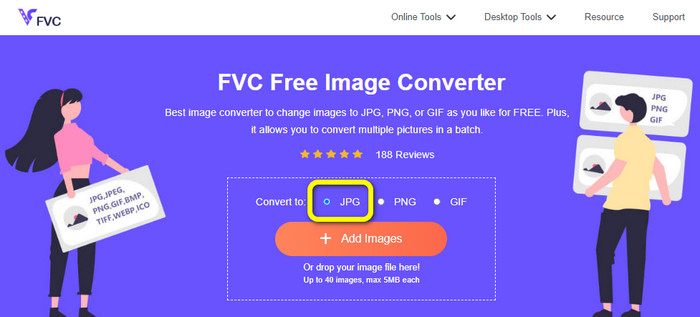
चरण 1: अपने ब्राउज़र से FVC Free Image Converter वेबसाइट पर जाएँ। फिर Convert to विकल्प में से JPG फ़ाइल फ़ॉर्मेट चुनें।.
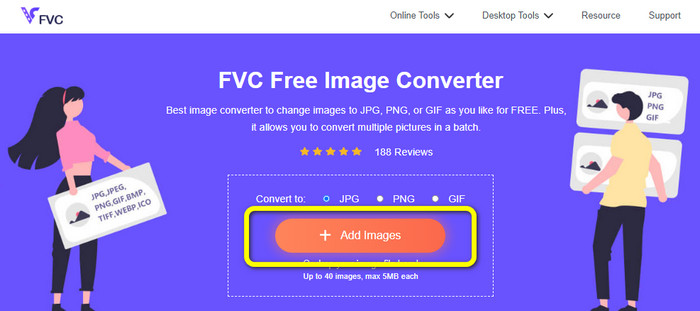
चरण 2: अगला क़दम है Add Images बटन पर क्लिक करना। क्लिक करने के बाद आपके कंप्यूटर स्क्रीन पर फ़ाइल फ़ोल्डर खुल जाएगा। इमेज फ़ाइल चुनें और Open पर क्लिक करें।.
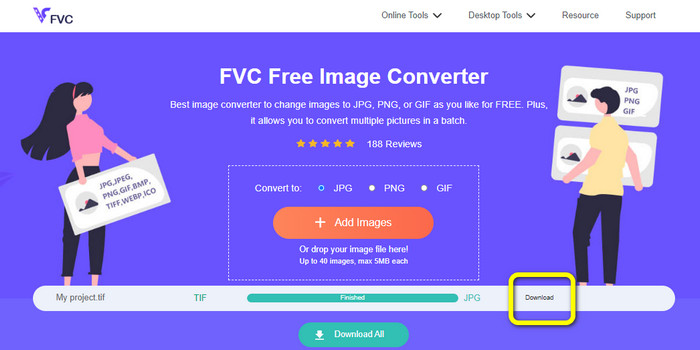
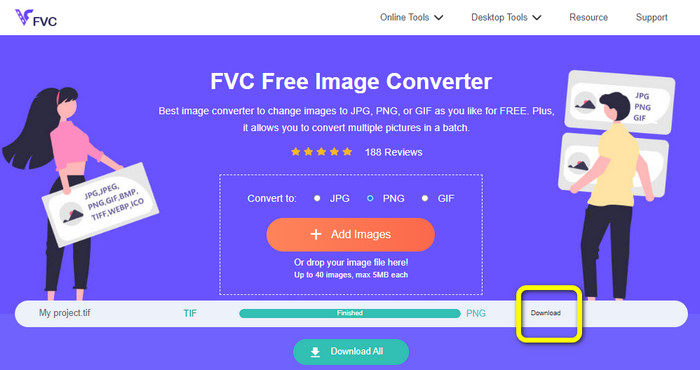
चरण 3: अपलोड होने के बाद इमेज कन्वर्टर आपकी इमेज अपने-आप कन्वर्ट कर देगा। कन्वर्ट की गई इमेज को अपने कंप्यूटर में सेव और डाउनलोड करने के लिए Download बटन पर क्लिक करें।.
टीआईएफएफ/टीआईएफ को पीएनजी में कनवर्ट करें
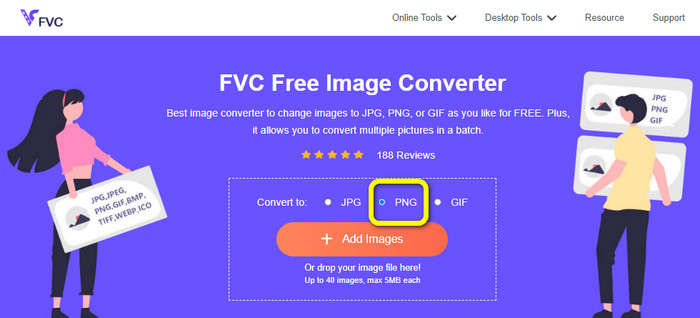
चरण 1: वेबपेज से फ़ॉर्मेट ऑप्शन में जाकर PNG फ़ाइल फ़ॉर्मेट चुनें।.
चरण 2: Add Images बटन पर क्लिक करें। जब फ़ाइल फ़ोल्डर स्क्रीन पर दिखाई दे, तो वह PNG फ़ाइल चुनें जिसे आप कन्वर्ट करना चाहते हैं। फिर उसे Open करें।.
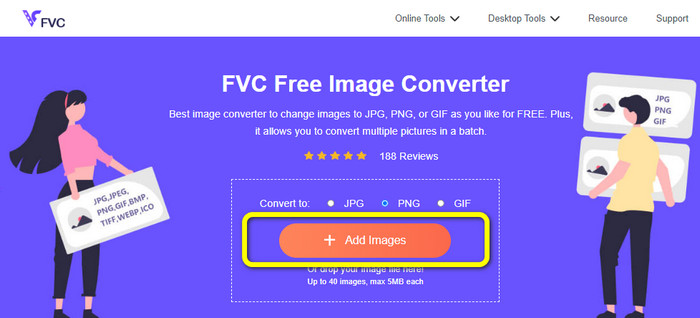
चरण 3: कन्वर्ज़न प्रक्रिया के बाद Download बटन पर क्लिक करें। सेव होने की प्रक्रिया पूरी होने दें और फिर अपने फ़ोल्डर से इमेज खोलें। यह जानने के लिए यहाँ क्लिक करें कि BMP को JPG या PNG में कैसे कन्वर्ट करें।.
भाग 3. TIF/TIFF को JPG/PNG ऑफ़लाइन में कनवर्ट करने के सर्वोत्तम तरीके
Video Converter Ultimate TIF फ़ाइल को JPG और PNG में कन्वर्ट करने के लिए सबसे बेहतर ऑफ़लाइन तरीक़ों में से एक है। आप इस प्रोग्राम को Mac और Windows दोनों ऑपरेटिंग सिस्टम पर डाउनलोड कर सकते हैं। यह ऑफ़लाइन इमेज कन्वर्टर आपको TIF फ़ाइल को JPG और PNG में बदलने की सुविधा देता है। साथ ही यह WEBP, BMP, GIF, TIFF, JPG, PNG और अन्य कई फ़ॉर्मेट्स को भी सपोर्ट करता है। कन्वर्टर का इंटरफ़ेस उपयोगकर्ता के लिए अनुकूल है, जिस वजह से यह प्रोफ़ेशनल और शुरुआती, दोनों के लिए उपयुक्त है। इसके अलावा, अगर आप एक साथ कई फ़ाइलें कन्वर्ट करना चाहते हैं, तो वह भी कर सकते हैं। इसकी उल्लेखनीय विशेषताओं में से एक बैच कन्वर्ज़न प्रक्रिया है। इस वजह से उन सभी उपयोगकर्ताओं के लिए यह सुविधाजनक है जो अक्सर इमेज फ़ाइलें कन्वर्ट करते हैं। साथ ही, इमेज कन्वर्ट करते समय आप और भी काम कर सकते हैं। सेटिंग्स आइकन पर आप इमेज को ज़ूम इन और ज़ूम आउट कर सकते हैं। आप अपनी पसंद के अनुसार इमेज की क्वालिटी भी बदल सकते हैं। इस तरह आप मनचाहा परिणाम प्राप्त कर सकते हैं। नीचे दिए गए मूल चरणों का पालन करके TIF को JPG और PNG फ़ॉर्मेट में कन्वर्ट करें।.
टीआईएफएफ को जेपीजी में कनवर्ट करें
चरण 1: अपने कंप्यूटर पर Video Converter Ultimate डाउनलोड करें। इसके बाद इंस्टॉलेशन प्रक्रिया पूरी होने पर एप्लिकेशन चलाएँ। नीचे दिए गए Download बटन को देखें और कन्वर्टर तक आसानी से पहुँचने के लिए उस पर क्लिक करें।.
फ्री डाउनलोडWindows 7 या बाद के संस्करण के लिएसुरक्षित डाउनलोड
फ्री डाउनलोडMacOS 10.7 या बाद के संस्करण के लिएसुरक्षित डाउनलोड
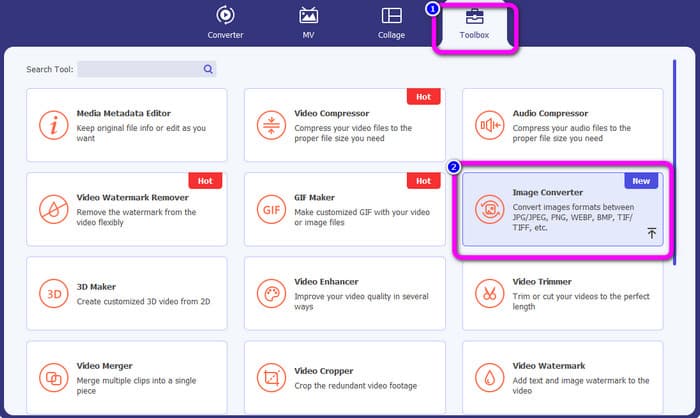
चरण 2: इंटरफ़ेस के ऊपरी भाग में Toolbox पैनल पर क्लिक करें। फिर Image Converter फ़ंक्शन चुनें।.
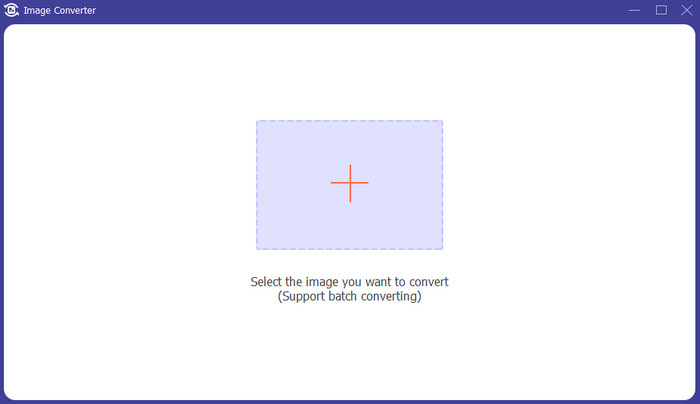
चरण 3: इसके बाद बीच में दिख रहे Plus साइन बटन पर क्लिक करें। अपने फ़ाइल फ़ोल्डर से TIFF इमेज फ़ाइल चुनें और उसे Open करें।.
चरण 4: यदि आप और इमेज जोड़ना चाहते हैं, तो Add Source file बटन पर क्लिक करें। फिर Convert All to विकल्प पर जाएँ और JPG फ़ाइल फ़ॉर्मेट चुनें।.
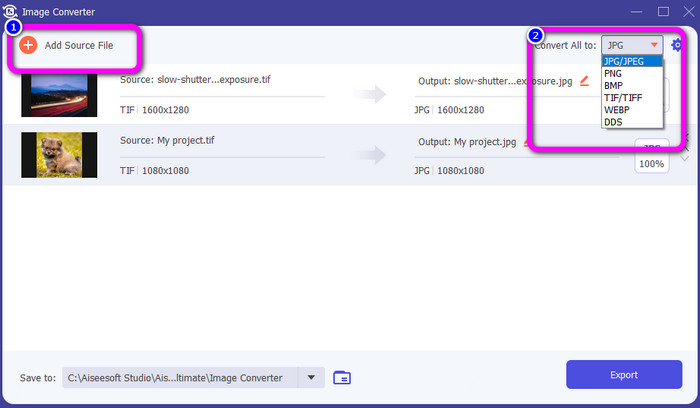
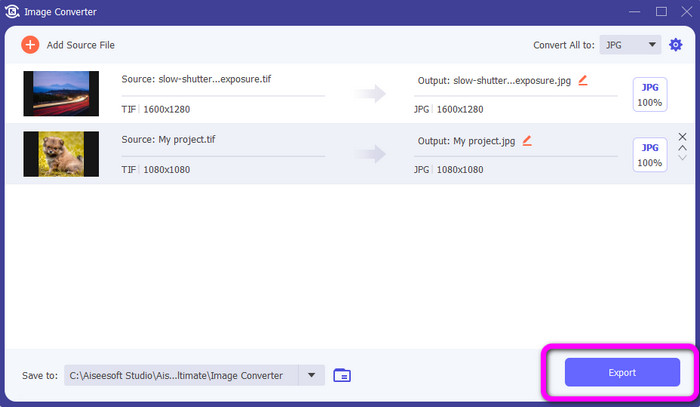
चरण 5: अंत में, JPG को आउटपुट फ़ॉर्मेट के रूप में चुनने के बाद Export बटन पर क्लिक करें। कन्वर्ज़न प्रक्रिया पूरी होने के बाद आप अपने फ़ोल्डर से कन्वर्ट की गई इमेज खोल सकते हैं।.
टीआईएफएफ को पीएनजी में कनवर्ट करें
चरण 1: आप ऊपर दी गई वही प्रक्रिया अपना सकते हैं। Toolbox पैनल में जाएँ और Image Converter फ़ंक्शन चुनें।.
चरण 2: जिस TIFF फ़ाइल को आप कन्वर्ट करना चाहते हैं, उसे जोड़ने के लिए Plus आइकन पर क्लिक करें।.
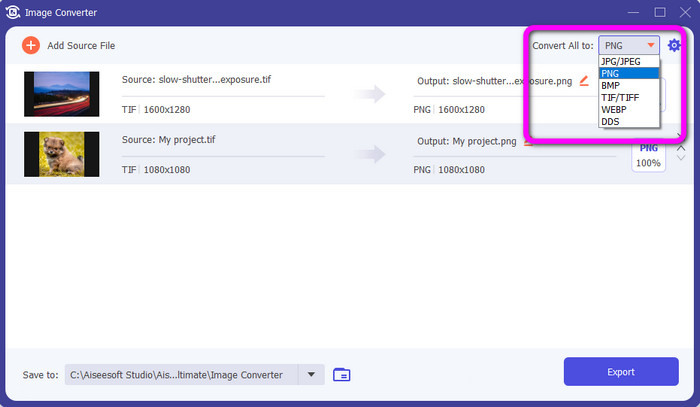
चरण 3: TIFF इमेज जोड़ने के बाद Convert All to विकल्प पर जाएँ। आउटपुट फ़ॉर्मेट के रूप में PNG फ़ाइल फ़ॉर्मेट चुनें।.
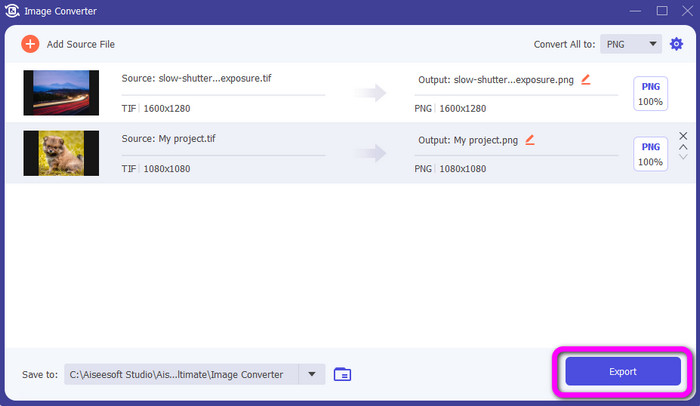
चरण 4: अंतिम चरण के रूप में, इंटरफ़ेस के निचले बाएँ कोने में मौजूद Export बटन पर क्लिक करें। आप इसी सॉफ़्टवेयर का उपयोग करके JPG को PNG में भी कन्वर्ट कर सकते हैं।.
भाग 4. TIF/TIFF को JPG/PNG में बदलने के बारे में अक्सर पूछे जाने वाले प्रश्न
1. मैक पर टीआईएफएफ को पीएनजी में कैसे बदलें?
Mac पर TIFF को PNG में कन्वर्ट करने के प्रभावी तरीक़ों में से एक है FVC Free Image Converter का उपयोग करना। अपने Mac पर Safari ब्राउज़र खोलें और इस ऑनलाइन इमेज कन्वर्टर पर जाएँ। मुख्य वेबपेज से फ़ॉर्मेट विकल्प में से PNG फ़ॉर्मेट चुनें। जिस TIFF फ़ाइल को आप कन्वर्ट करना चाहते हैं, उसे जोड़ने के लिए Add Images बटन पर क्लिक करें। अपलोड होते समय फ़ाइल अपने-आप कन्वर्ट हो जाएगी। इसके बाद, डाउनलोड बटन पर क्लिक करें और कन्वर्ट की गई इमेज को अपने Mac पर सेव करें।.
2. टीआईएफ को पीएनजी में बदलने के क्या फायदे हैं?
यदि आप अपनी फ़ाइल को छोटा बनाना चाहते हैं, तो अपनी TIF फ़ाइल को अन्य स्वरूपों में बदलना आवश्यक है। TIF को PNG फ़ाइल में बदलना सबसे अच्छा है क्योंकि PNG का फ़ाइल आकार छोटा है। यह आपको वेब ब्राउज़र और उपकरणों के लिए प्रबंधनीय फ़ाइल आकार देगा।
3. कौन सी फाइल भेजना आसान है, जेपीजी या टीआईएफएफ?
जेपीजी फ़ाइल प्रारूप में फ़ाइल का आकार छोटा होता है। इससे छवि को ऑनलाइन या ईमेल के माध्यम से भेजना आसान हो जाता है। TIFF का फ़ाइल आकार बड़ा होता है, जिससे छवि भेजना धीमा हो जाता है।
निष्कर्ष
अब आप जानते हैं कि TIFF इमेज फ़ाइल का आकार काफ़ी बड़ा होता है। इसलिए, अगर आप ऑनलाइन कोई इमेज तेज़ी से भेजना चाहते हैं, तो बेहतर होगा कि उसे छोटे फ़ाइल आकार वाले किसी दूसरे फ़ॉर्मेट में कन्वर्ट कर लें। इस प्रकार, इस लेख ने आपको TIFF को JPG और PNG में कन्वर्ट करने के बेहतरीन समाधान दिए हैं। यदि आप और भी आसान तरीक़े से इमेज फ़ाइलों को कन्वर्ट करना चाहते हैं, तो FVC Free Image Converter का उपयोग करें। यह एक समझने में आसान इंटरफ़ेस और इमेज फ़ाइलों को कन्वर्ट करने की सरल प्रक्रिया प्रदान करता है।.
-
 जेपीईजी को जेपीजी में कुशलता से परिवर्तित करें [पांच विधियां सूचीबद्ध हैं]
 आओ और जेपीईजी को जेपीजी छवि फ़ाइल प्रारूप में कनवर्ट करने पर सबसे सरल ट्यूटोरियल प्राप्त करें। इस गाइडपोस्ट पर क्लिक करें और अपने पसंदीदा तरीकों को सीखना शुरू करें
-
 पीएनजी को जेपीजी में तेजी से बदलने के लिए शीर्ष 5 प्रमुख ट्यूटोरियल
 अगर आपको अपनी पीएनजी फ़ाइल को जेपीजी प्रारूप में कनवर्ट करने की ज़रूरत है, तो आप यहां सबसे अच्छे तरीके सीख सकते हैं। आप पीएनजी और जेपीजी फ़ाइल स्वरूपों के बीच अंतर भी जानेंगे
-
 जेपीईजी बनाम जेपीजी बनाम पीएनजी के अंतर के बारे में पूरी जानकारी
 यह पोस्ट आपको जेपीईजी बनाम जेपीजी बनाम पीएनजी के अंतर के बारे में पर्याप्त जानकारी देगी। इसके अलावा, आप सीखेंगे कि छवियों को इन फ़ाइलों में कैसे परिवर्तित किया जाए
