


 वीडियो कनवर्टर अंतिम
 स्क्रीन अभिलेखी
 वीडियो मरम्मत
 सुरक्षित डाउनलोड
बिना किसी नुकसान के आसानी से छवियों को 50KB तक कैसे संपीड़ित करें [2024]
विस्तृत जानकारी और उच्च रिज़ॉल्यूशन के कारण छवि फ़ाइल का आकार अलग-अलग होता है, खासकर आज, आधुनिक कैमरों और उपकरणों के साथ। चूंकि 2024 में डिजिटल सामग्री एक चीज बनी रहेगी, इसलिए हम छवि फ़ाइल आकारों को प्रबंधित और अनुकूलित करने की आवश्यकता को समझते हैं। चाहे वेबसाइट के प्रदर्शन को बढ़ाने के लिए, भंडारण स्थान को संरक्षित करने के लिए, या निर्बाध साझाकरण की सुविधा के लिए, कुशल छवि संपीड़न आवश्यक है।
तो, अगर आप अपनी छवियों को छोटा करने के लिए किसी टूल की तलाश में हैं, तो आप सही दिशा में हैं। यह गाइड आपको बताएगा कि बिना गुणवत्ता खोए, कैसे आप अपनी छवियों को 50KB तक संपीड़ित कर सकते हैं, ताकि उच्च गुणवत्ता बनाए रखते हुए फाइल का आकार छोटा रखा जा सके। अधिक जानने के लिए आगे पढ़ें।

भाग 1. बिना किसी स्पष्ट गुणवत्ता हानि के छवि को 50KB तक संपीड़ित करें
इमेज कम्प्रेशन टूल का इस्तेमाल करने से आमतौर पर इमेज की क्वालिटी खराब हो जाती है, लेकिन ऐसा हमेशा नहीं होता। जब सही टूल का इस्तेमाल करके सही तरीके से किया जाता है, तो इमेज की क्वालिटी को बनाए रखा जा सकता है या फिर बिना किसी नुकसान के उसे कम्प्रेस किया जा सकता है।
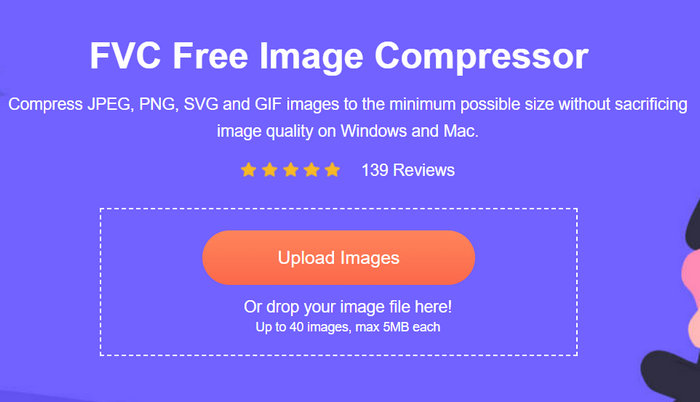
ऐसे बेहतरीन इमेज कम्प्रेशन टूल्स में से एक जो इमेज क्वालिटी को बरक़रार रखते हैं, FVC Free Image Compressor है। यह तेज़ और उपयोग में आसान टूल विशेष रूप से इस तरह डिज़ाइन किया गया है कि यह 50KB तक इमेज को कम्प्रेस कर सके, वह भी गुणवत्ता को ज़्यादा कम किए बिना। यह JPEG, PNG, SVG और GIF जैसी विभिन्न फोटो फॉर्मैट्स को कम्प्रेस करने में उत्कृष्ट है और अन्य सॉफ़्टवेयर विकल्पों की तुलना में बेहतर कम्प्रेशन प्रदान करता है। इसके अलावा, यह पूरी तरह मुफ़्त है और इसे विभिन्न डिवाइसों पर ऑनलाइन आसानी से एक्सेस किया जा सकता है। वहीं, अगर आप एक साथ कई इमेज कम्प्रेस कर रहे हैं, तो यह टूल आपके लिए बिल्कुल सही है, क्योंकि यह एक ही समय में कई इमेज कम्प्रेस करता है और उन्हें एक ज़िप फ़ाइल में सेव कर देता है, ताकि आप उन्हें आसानी से एक्सेस कर सकें।.
यहाँ बताया गया है कि आप FVC Free Image Compressor के साथ इमेज को 50KB तक कैसे कम्प्रेस कर सकते हैं
चरण 1. सबसे पहले, आपको उनकी आधिकारिक वेबसाइट पर जाना होगा।.
चरण 2. उसके बाद, जिन फ़ोटो को आप 50KB तक कम्प्रेस करना चाहते हैं उन्हें आयात करने के लिए Upload Images पर क्लिक करें।.
चरण 3. कम्प्रेशन के बाद, आप अपनी इमेज के नए कम्प्रेस्ड साइज़ का प्रीव्यू कर सकते हैं। अंत में, अपनी इमेज सेव करने के लिए Download पर क्लिक करें।.
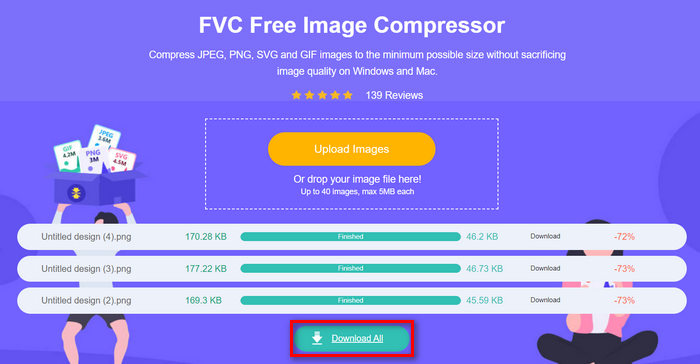
FVC Free Image Compressor की सबसे अच्छी बात यह है कि यह इमेज साइज रिड्यूसर एक सरल और बेहद सहज इंटरफेस के साथ आता है। उपयोगकर्ताओं को केवल दो प्रमुख चरणों की आवश्यकता होती है: अपलोड करना और एक्सपोर्ट करना, क्योंकि इमेज आयात होते ही कम्प्रेशन अपने आप हो जाता है।.
भाग 2. कस्टम गुणवत्ता के साथ ऑनलाइन छवि को 50KB तक संपीड़ित करें
यदि आप व्यक्तिगत गुणवत्ता विकल्पों के साथ एक ऑनलाइन इमेज कंप्रेसर टूल पसंद करते हैं, तो डुप्लीचेकर आपके लिए एक है। यह टूल दृश्य अखंडता को बनाए रखते हुए कस्टम इमेज फ़ाइल आकारों को संपीड़ित करने के लिए एक त्वरित, परेशानी मुक्त समाधान प्रदान करता है। एक सुव्यवस्थित इंटरफ़ेस के साथ, यह टूल उपयोगकर्ताओं को छवि फ़ाइलों को कम करने के लिए एक तेज़ समाधान प्रदान करता है। इसके अलावा, यह JPEG, PNG और GIF प्रारूपों का समर्थन करता है और उपयोगकर्ताओं को अपनी फ़ाइल बैलेंस आकार में कमी को अनुकूलित करने की अनुमति देता है। इसके अलावा, डुप्लीचेकर बैच प्रोसेसिंग का समर्थन करता है, जिससे कई छवियों को एक साथ 50KB तक संपीड़ित किया जा सकता है। अंत में, यह उपकरण उपयोग करने के लिए पूरी तरह से निःशुल्क है।
यहाँ बताया गया है कि आप Duplichecker का उपयोग करके इमेज को 50KB तक कैसे कम्प्रेस कर सकते हैं
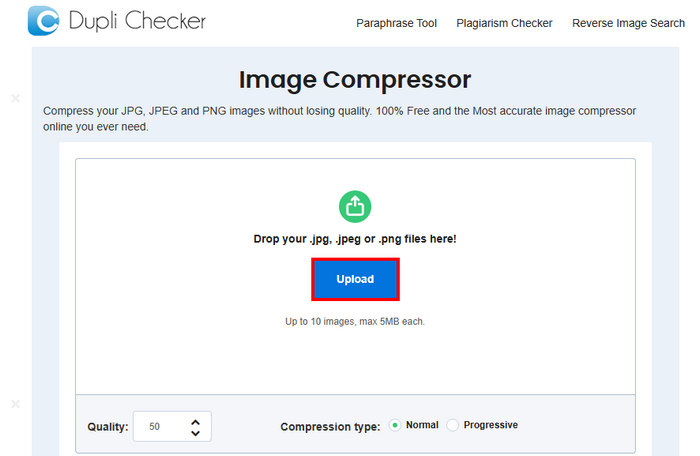
चरण 1. जिस इमेज को आप 50KB तक कम्प्रेस करना चाहते हैं उसे अपलोड करने के लिए Upload बटन पर क्लिक करें।.
चरण 2. इसके बाद, आपको बाएँ निचले कोने में Quality विकल्प दिखाई देगा। अपनी इच्छित कम्प्रेस्ड क्वालिटी चुनें या टाइप करें। यहाँ पर 50 टाइप करें।.
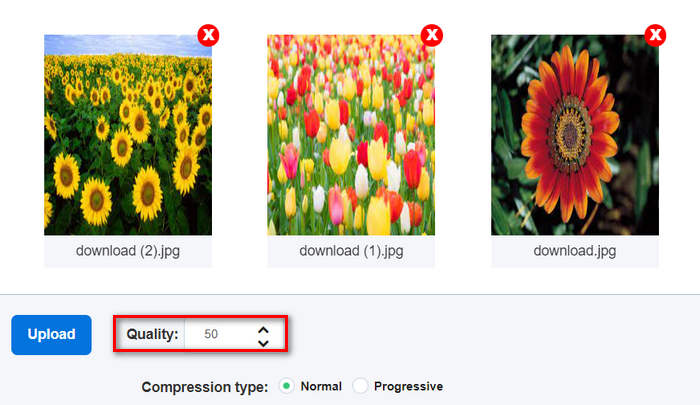
यह छवि गुणवत्ता KB या किलोबाइट में है।
चरण 3. क्वालिटी चुनने के बाद, अब आप अपनी पसंद का कम्प्रेशन प्रकार चुन सकते हैं।.

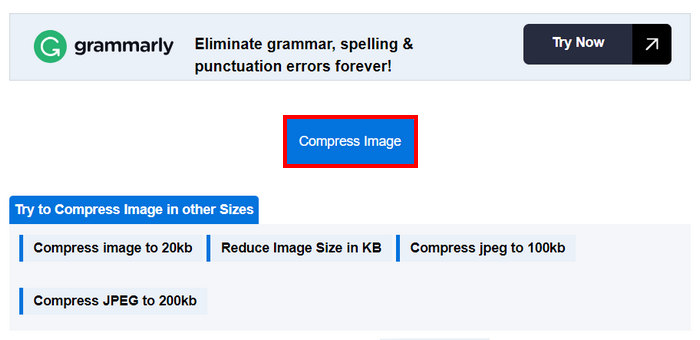
चरण 4. सेटिंग्स करने के बाद, नीचे थोड़ा स्क्रोल करें और इमेज को 50KB तक कम्प्रेस करने के लिए Compress बटन पर क्लिक करें।.
चरण 5. अंत में, अपनी कम्प्रेस्ड इमेज को सेव करने के लिए Download All बटन पर क्लिक करें ताकि आप सभी को एक साथ सेव कर सकें। ये फाइलें सीधे आपके डिवाइस पर सेव हो जाएँगी।.
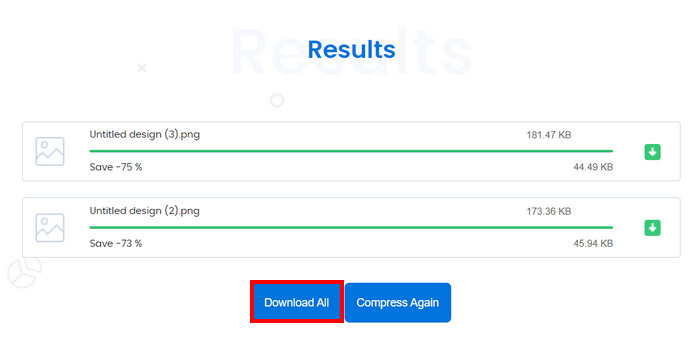
यदि आप अपनी छवि संपीड़न को 50KB तक अनुकूलित करना चाहते हैं तो यह उपकरण वास्तव में बहुत बढ़िया है। हालाँकि, कई छवियों के साथ रूपांतरण करने पर, सिस्टम बंद हो गया, लेकिन इसे पुनः लोड करने से समस्या ठीक हो गई।
भाग 3. बैचों में एक छवि को 50KN तक संपीड़ित करें
RedKetchup Bulk Image Resizer एक ऑनलाइन टूल है, जिसे उपयोगकर्ताओं को फ़ोटो का आकार बदलने और बैच में इमेज को 50KB तक कम्प्रेस करने के लिए डिज़ाइन किया गया है। यह टूल RedKetchup द्वारा प्रदान किए गए उपयोगी ऑनलाइन इमेज-प्रोसेसिंग टूल्स के सूट का हिस्सा है। अंत में, इसका उपयोगकर्ता-अनुकूल इंटरफेस और तेज़ प्रोसेसिंग क्षमता बैच में इमेज कम्प्रेस करना आसान और बिना झंझट के बना देती है।.
यहाँ बताया गया है कि आप RedKetchup Bulk Image Resizer का उपयोग करके बैच में इमेज को 50KB तक कैसे कम्प्रेस कर सकते हैं
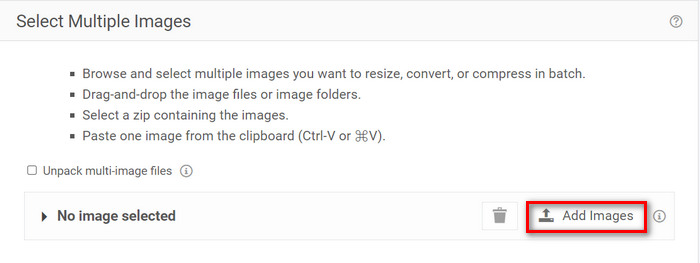
चरण 1. सबसे पहले, Add Files बटन पर क्लिक करके उन इमेज को आयात करें जिन्हें आप बैच में कम्प्रेस करना चाहते हैं।.
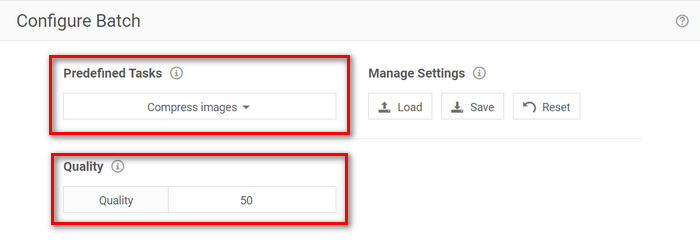
चरण 2. अब, Configure Batch सेक्शन में, Predefined Task मेनू में Compress Images चुनें और Quality मेनू में अपना इच्छित फ़ाइल आकार टाइप करें।.
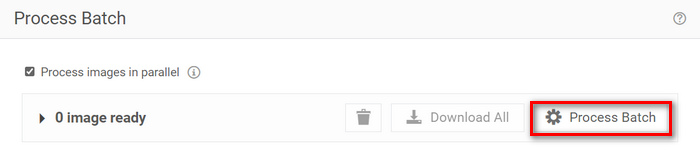
चरण 3. इसके बाद, इमेज को एक साथ कम्प्रेस करने के लिए Process Batch बटन पर क्लिक करें।.
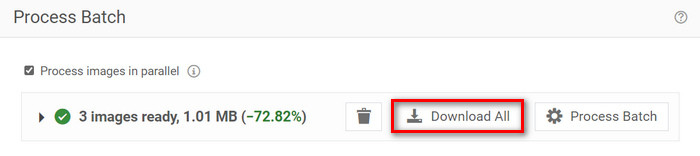
चरण 4. अंत में, अपनी कम्प्रेस्ड इमेज को सेव करने के लिए Download All बटन पर क्लिक करें।.
इसलिए, यदि आप एक ऐसे टूल की तलाश कर रहे हैं जो बैच कम्प्रेशन के लिए कई फ़ाइलों को पूरा कर सके, तो यह टूल निश्चित रूप से आपके लिए है। हालाँकि, आपको अपनी फ़ाइलें डाउनलोड करते समय विज्ञापनों से निपटना होगा।
भाग 4. 3 इमेज कंप्रेसर टूल की तुलना
आइए उन तीन उपकरणों पर एक नज़र डालें जो छवियों को 50KB तक संपीड़ित करने में आपकी मदद कर सकते हैं।
| छवि संपीडन उपकरण | समर्थित प्रारूप | गुणवत्ता | गति | बैच संपीड़न |
| FVC मुक्त छवि कंप्रेसर | जेपीईजी, पीएनजी, एसवीजी, और जीआईएफ | उच्च गुणवत्ता | तेज | एक साथ 40 छवियों को संपीड़ित कर सकता है। |
| डुप्लीचेकर | जेपीजी, जेपीईजी, जीआईएफ, और पीएनजी | उच्च गुणवत्ता | धीरे | एक साथ 10 छवियों को संपीड़ित कर सकते हैं। |
| रेडकेचप बल्क इमेज रिसाइजर | PNG, JPEG, WEBP, या HEIC | उच्च गुणवत्ता | तेज | यह एक साथ 1000 से अधिक छवियों को संपीड़ित कर सकता है। |
FVC फ्री इमेज कंप्रेसर तेज़ प्रोसेसिंग प्रदान करता है और एक बार में 40 इमेज तक संभाल सकता है, जो उच्च-गुणवत्ता वाली संपीड़ित छवियों को सुनिश्चित करते हुए कई प्रकार के प्रारूपों का समर्थन करता है। इस बीच, डुप्लीचेकर थोड़ा धीमा है, लेकिन फिर भी उच्च-गुणवत्ता वाले परिणाम देता है और 10 छवियों तक के बैच संपीड़न का समर्थन करता है। RedKetchup बल्क इमेज रिसाइज़र एक बार में 1000 छवियों तक संपीड़ित कर सकता है, जो तेज़ प्रोसेसिंग और व्यापक प्रारूप समर्थन प्रदान करता है। हालाँकि, इस टूल के साथ अपनी संपीड़ित छवियों को डाउनलोड करते समय विज्ञापनों से बचने के लिए, आपको इसे प्रीमियम खाते में अपग्रेड करना होगा।
भाग 5. छवि को 50KB तक संपीड़ित करने के बारे में अक्सर पूछे जाने वाले प्रश्न
50KB कितने पिक्सेल हैं?
50KB इमेज की पिक्सेल संख्या इसकी जटिलता, रंग और संपीड़न एल्गोरिदम के आधार पर व्यापक रूप से भिन्न हो सकती है। आम तौर पर, 50KB इमेज का आयाम लगभग 200 × 230 पिक्सल होता है, लेकिन यह इमेज की सामग्री और प्रारूप के आधार पर भिन्न हो सकता है।
मैं PNG फ़ाइल का आकार 50KB तक कैसे कम करूँ?
किसी PNG फ़ाइल का साइज 50KB तक कम करने के लिए, FVC Free Image Compressor, Duplichecker या RedKetchup Bulk Image Resizer जैसे ऑनलाइन इमेज कम्प्रेसर टूल का उपयोग करें। अपनी PNG फ़ाइल अपलोड करें, क्वालिटी सेटिंग्स को समायोजित करके लक्ष्य फ़ाइल आकार 50KB रखें और फिर इमेज को कम्प्रेस करें।.
एक सामान्य फोटो कितने KB का होता है?
एक सामान्य फोटो का आकार उसके रिज़ॉल्यूशन और फ़ॉर्मेट के आधार पर अलग-अलग होता है। आम तौर पर, आधुनिक स्मार्टफ़ोन द्वारा ली गई फ़ोटो का आकार 1MB से 5MB तक होता है।
निष्कर्ष
संक्षेप में, किसी इमेज को 50KB या किसी भी फ़ाइल आकार तक कम्प्रेस करना सीखना बड़े इमेज फ़ाइलों को संभालने के लिए बेहद ज़रूरी है। FVC Free Image Compressor, Duplichecker और RedKetchup Bulk Image Resizer जैसे टूल्स की मदद से आप बिना इमेज क्वालिटी से समझौता किए बेहतरीन कम्प्रेशन प्राप्त कर सकते हैं। चाहे आप अपनी वेबसाइट की लोडिंग स्पीड बेहतर कर रहे हों, अपने डिवाइस में स्टोरेज स्पेस बचा रहे हों, या विभिन्न प्लेटफॉर्म्स पर बिना रुकावट शेयरिंग सुनिश्चित कर रहे हों, ये तरीक़े निश्चित रूप से आपको व्यावहारिक समाधान प्रदान कर सकते हैं।.
-
 एक MP4 वीडियो को छोटे आकार में कैसे संपीड़ित करें
 MP4 वीडियो अपलोड करने के लिए बहुत बड़ा है? वीडियो का आकार कम करना चाहते हैं? यहां MP4 फ़ाइल को छोटे आकार में संकुचित करने के 3 कुशल तरीके हैं जिनकी कोई सीमा नहीं है।
-
 टॉप १० एचडी वीडियो कन्वर्टर सॉफ्टवेयर की समीक्षा
 10 सिफारिशों से सर्वश्रेष्ठ एचडी वीडियो कनवर्टर सॉफ़्टवेयर प्राप्त करने के लिए पढ़ें और तुलना करें। मल्टीप्लायर के लिए प्रत्येक एचडी वीडियो कनवर्टर की विस्तृत समीक्षा यहां दी गई है।
-
 MTS फ़ाइल क्या है और MTS को MP4/MOV/MKV/AVI में कैसे बदलें?
 एमटीएस फ़ाइल क्या है और मैं इसे कैसे खेल सकता हूं? यह पोस्ट आपको एमटीएस फ़ाइल का एक मूल निर्देश देती है। इसके अलावा, आप MTS फ़ाइल को MP4, MOV, AVI, MPEG, MTS, MKV या उच्च गुणवत्ता के साथ अन्य स्वरूपों में कनवर्ट करने के लिए 3 सरल तरीके प्राप्त कर सकते हैं।
