


 वीडियो कनवर्टर अंतिम
 स्क्रीन अभिलेखी
 वीडियो मरम्मत
कटआउट प्रो इमेज एन्हांसर समीक्षा: लुभाने वाली मुख्य विशेषताएं
डिजिटल इमेजरी के क्षेत्र में इमेज एन्हांसर्स एक महत्वपूर्ण साधन बन गए हैं, और आपकी फ़ोटो को साधारण से असाधारण बनाने के लिए सही टूल ढूँढना बेहद ज़रूरी है। आज कई ऐसे टूल उपलब्ध हैं जो आपकी इमेज को बेहतर बना सकते हैं, लेकिन कोई ऐसा टूल खोजना कठिन है जो भरोसेमंद, सुरक्षित और प्रभावी भी हो। सौभाग्य से, Cutout Pro Image Enhancer वही टूल साबित होता है जिसकी आप तलाश कर रहे हैं। मूल रूप से, Cutout Pro Image Enhancer आपकी फ़ोटो की छुपी हुई क्षमता को खोलने और उनमें जो कमी है उसे पूरा करने के लिए डिज़ाइन किया गया है। यह आपकी विज़ुअल ज़रूरतों के अनुसार बेहतरीन क्वालिटी के साथ सहज परिणाम प्रदान करता है। इसकी प्रमुख विशेषताओं पर नज़र डालते हुए, जो इस टूल को आपके लिए आदर्श बनाती हैं, यह लेख Cutout Pro Image Enhancer का विस्तृत अवलोकन देगा—आउटपुट क्वालिटी से लेकर सपोर्टेड इमेज फॉर्मैट तक। इस लेख को आगे पढ़ने से आपको Cutout Pro पर फ़ोटो को बेहतर बनाने के लिए ज़रूरी जानकारी मिलेगी। इसके साथ‑साथ, एक सुझाया गया विकल्प भी यहाँ पेश किया जाएगा जिस पर आप नज़र रख सकते हैं। केवल फ़ोटो शूट, एडिट और अपलोड ही न करें; आज से ही अपने हर कदम में इमेज एन्हांसमेंट को भी शामिल करें!

भाग 1. कटआउट प्रो इमेज एन्हांसर समीक्षा
कटआउट प्रो एक आसान टूल बनाता है जो उपयोगकर्ताओं को त्वरित छवि संपादन में सहायता करता है, इस मामले में छवि बढ़ाने वाला। कटआउट प्रो इमेज एन्हांसर का इंटरफ़ेस दोषरहित छवि गुणवत्ता परिणाम प्राप्त करने के लिए शुरुआती और पेशेवरों दोनों के लिए उपयोगकर्ता के अनुकूल है। यह छवि बढ़ाने वाला एआई का उपयोग उन बेहतरीन विवरणों को परिष्कृत करने के लिए करता है जिन्हें पेशेवर भी अनदेखा कर सकते हैं। एक पल में, आप एआई को अपनी छवि के हिस्सों को पहचानने और बढ़ाने का काम करने देकर समय बचाएंगे। यह एआई-संचालित टूल न केवल छवि को बेहतर बनाता है, बल्कि इसमें पृष्ठभूमि हटाने और छवि कनवर्टर जैसी सुविधाएं भी हैं, जो मल्टीटास्किंग के दौरान इसे एक लचीला उपकरण बनाती है। नीचे सूचीबद्ध कुछ मुख्य विशेषताएं हैं जिनकी आप अपेक्षा कर सकते हैं।
मुख्य विशेषताएं
◆ फ़ोटो एन्हांसमेंट। टूल में एकीकृत AI तकनीक उन्नत प्रोसेसिंग का उपयोग करके आपकी ज़रूरत के अनुसार इमेज को अपस्केल करती है, रंग सुधारती है, शार्प बनाती है और नॉइज़ कम करती है।.
◆ कई डिवाइस पर उपलब्धता। आपके किसी भी स्थानीय वेब ब्राउज़र से फोटो एन्हांसमेंट का उपयोग किया जा सकता है। यह पहुंच आपको अपने पसंदीदा डिवाइस पर आराम से इसकी सुविधाओं और टूल्स का उपयोग करने देती है।.
◆ बैच प्रोसेसिंग। Cutout Pro Image Enhancer मल्टी‑टास्किंग और समय बचत के विचार पर गर्व करता है, इसी कारण यह बैच प्रोसेसिंग को सपोर्ट करता है और आपको कई इमेज को एक साथ बिना अगली इमेज के इंतज़ार के, सहज रूप से प्रोसेस करने देता है।.
◆ AI कटआउट टूल्स। यह आपको अपनी इमेज से अवांछित ऑब्जेक्ट, लोग, अव्यवस्था और खामियाँ हटाने देता है, जो आपकी तस्वीरों की समग्र सुंदरता को खराब करती हैं। यही सुविधा अवांछित टेक्स्ट पर भी लागू होती है—इमेज से टेक्स्ट कैसे हटाएँ? इसके लिए how to remove text from image देखें।
◆ बैकग्राउंड रिमूवल। बैकग्राउंड हटाने में यह फीचर सबसे सटीक विकल्पों में से एक है। आपको ग्रीन‑स्क्रीन की ज़रूरत नहीं होती, क्योंकि इसका AI अपने‑आप मुख्य सब्जेक्ट की पहचान कर उसके चारों ओर बॉर्डर बनाकर बैकग्राउंड को अत्यंत सटीकता से हटा देता है।.
◆ फोटो कलराइज़र। यह आपके पुराने ब्लैक‑एंड‑व्हाइट फ़ोटो में रंग भरकर उन्हें जीवंत बना सकता है, ऐसे रंगों के साथ जिन्हें टूल तस्वीर का सबसे अधिक जीवंत प्रतिनिधित्व मानता है।.
आउटपुट गुणवत्ता
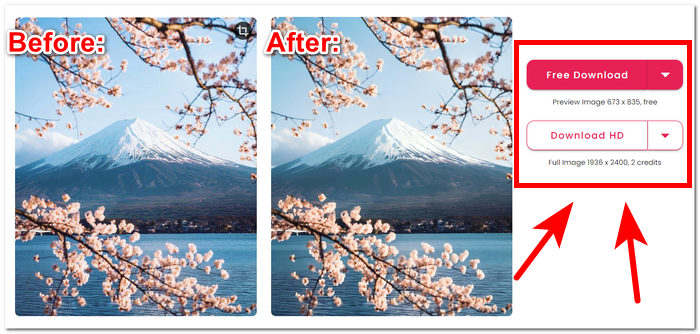
कटआउट प्रो इमेज एन्हांसर के लिए आउटपुट गुणवत्ता केवल 2 गुना तक सीमित है, इसका भुगतान क्रेडिट द्वारा किया जाता है। कटआउट प्रो इमेज एन्हांसर पर उपलब्ध आउटपुट गुणवत्ता नीचे सूचीबद्ध है।
फ्री डाउनलोड: PNG और JPG - 673 x 835 क्वालिटी
HD डाउनलोड: PNG और JPG - 1936 x 2400 क्वालिटी
समर्थित छवि प्रारूप
कटआउट प्रो इमेज एन्हांसर कई तरह के इमेज फॉर्मेट को सपोर्ट करता है, जिससे अलग-अलग फाइल टाइप को हैंडल करने में लचीलापन सुनिश्चित होता है। सपोर्टेड इमेज फॉर्मेट में PNG, JPG, JPEG, BMP और WEBP शामिल हैं। चाहे आप पारदर्शी इमेज, उच्च-गुणवत्ता वाली तस्वीरें या विभिन्न वेब-फ्रेंडली फॉर्मेट के साथ काम कर रहे हों, कटआउट प्रो उपयोगकर्ताओं को आम तौर पर इस्तेमाल किए जाने वाले फ़ाइल एक्सटेंशन की एक श्रृंखला में छवियों को सहजता से बढ़ाने और संपादित करने की अनुमति देता है।
कटआउट प्रो इमेज एन्हांसर की विशेषताएं निश्चित रूप से आपकी छवि गुणवत्ता बढ़ाने की चिंताओं को आसानी से संबोधित कर सकती हैं। हालाँकि, समर्थित छवि प्रारूपों, सुविधाओं और आउटपुट गुणवत्ता के बारे में सबसे सटीक और वर्तमान जानकारी के लिए कटआउट प्रो के विशिष्ट संस्करण और अपडेट की जाँच करना आवश्यक है।
भाग 2. फोटो को बेहतर बनाने के लिए कटआउट प्रो का विकल्प
क्या आप Cutout Pro के लिए ऐसा विकल्प ढूँढ रहे हैं जो कुशल, निःशुल्क और भरोसेमंद हो, खासकर उन स्थितियों में जब आप Cutout Pro तक पहुंच नहीं बना पा रहे हों? चिंता की कोई बात नहीं; FVC Free Image Upscaler आपके लिए मौजूद है। इसे इमेज एन्हांसर श्रेणी के सर्वश्रेष्ठ वेब‑आधारित टूल्स में से एक माना जाता है, जो वेब पर मौजूद अन्य टूल्स की तुलना में 8 गुना तक बेहतर मैग्निफिकेशन विकल्प प्रदान करता है, जिससे यह Cutout Pro Image Enhancer का उपयुक्त विकल्प बन जाता है। FVC उन्नत AI तकनीक का उपयोग करके बेदाग और लगभग परिपूर्ण परिणाम देता है, जबकि यह पूरी तरह निःशुल्क है। दूसरी ओर, Cutout Pro Image Enhancer में फ्री यूज़र्स के लिए आउटपुट क्वालिटी सीमित हो सकती है और यह इमेज एन्हांसमेंट के लिए अधिकतम 2 गुना मैग्निफिकेशन सेटिंग्स देता है। यह जानने के लिए कि FVC Free Image Upscaler को क्या खास बनाता है, नीचे इसकी कुछ प्रमुख विशेषताएँ दी गई हैं।.
◆ AI‑इंटीग्रेटेड इमेज अपस्केलर। AI का उपयोग करके यह धुँधले हिस्सों को पहचानता है और उन्हें अपने‑आप परिष्कृत कर देता है, जिससे बिना क्वालिटी खोए काम तेज़ और सरल हो जाता है। यह पिक्सल, शार्पनेस और रंगों को समायोजित करके आपकी फ़ोटो की ज़रूरत के अनुसार इमेज को बेहतर बनाता है।.
◆ आठ गुना मैग्निफिकेशन। FVC सामान्य सीमाओं से आगे जाता है। आमतौर पर इमेज एन्हांसर टूल्स केवल 2 गुना मैग्निफिकेशन तक सीमित होते हैं, और कुछ ज़्यादा विकल्प केवल पेड सब्सक्रिप्शन पर देते हैं। यह टूल उपयोगकर्ताओं को अपनी इमेज को 8 गुना तक बेहतर करने की सुविधा देता है।.
◆ आसान उपयोग। इसका इंटरफ़ेस उतना ही सरल है जितना इसका उद्देश्य—उपयोगकर्ताओं को बिना विज्ञापनों और छिपे हुए शुल्क के अपनी इमेज बेहतर करने में मदद करना।.
◆ प्रिंटिंग और वॉलपेपर। परिणामों को प्रिंटिंग के लिए या डेस्कटॉप और मोबाइल वॉलपेपर के रूप में बिना क्वालिटी खोए इस्तेमाल किया जा सकता है। उच्च‑गुणवत्ता वाले इमेज एन्हांसर्स की बदौलत आप अपनी धुंधली तस्वीरों को दोबारा इस्तेमाल कर सकते हैं, जैसे प्रिंटिंग या वॉलपेपर के रूप में।.
◆ वर्सटाइल फॉर्मैट कम्पैटिबिलिटी। अपनी इमेज को एक शानदार कृति में बदलें! फ़ॉर्मैट कोई भी हो—JPG, JPEG या BMP—आप इसे आसानी से हमारे प्लेटफ़ॉर्म पर अपलोड कर सकते हैं। हमें आपकी कल्पना को हक़ीक़त में बदलने में मदद करने दें!
◆ फ़्लैश‑स्पीड एन्हांसमेंट। प्रोसेसिंग स्पीड बहुत तेज़ है और यह भरोसेमंद परिणामों की गारंटी देती है, क्योंकि AI को करोड़ों इमेज को उच्च‑गुणवत्ता के साथ प्रोसेस करने के लिए प्रशिक्षित किया गया है, ताकि पिक्सल स्तर तक परफ़ेक्शन मिल सके।.
संक्षेप में कहें तो, दोनों ही उपकरण पेशेवर रूप से अपनी सर्वश्रेष्ठ गुणवत्ता में परिणाम देते हैं। धुंधली तस्वीरों और खामियों के लिए कोई जगह नहीं छोड़ते, जिससे FVC और कटआउट प्रो उपयोग करने के लिए एक विश्वसनीय उपकरण बन जाते हैं। सुविधाओं के मामले में, कटआउट प्रो कई डिवाइस और बैच प्रोसेसिंग पर उपलब्धता के मामले में आगे है। दूसरी ओर, FVC फ्री इमेज अपस्केलर ने गुणवत्तापूर्ण परिणाम, तेज़ प्रोसेसिंग और मुफ़्त में सुविधाओं की उपलब्धता के मामले में जीत हासिल की।
भाग 3. कटआउट प्रो इमेज एन्हांसर के बारे में अक्सर पूछे जाने वाले प्रश्न
क्या कटआउट प्रो तस्वीरें सहेजता है?
कटआउट प्रो उपयोगकर्ताओं को कई तरह के सेविंग विकल्प प्रदान करके अपनी बेहतर तस्वीरों को आसानी से सहेजने में सक्षम बनाता है। विभिन्न प्रारूपों और रिज़ॉल्यूशन में से चुनने की सुविधा के साथ, उपयोगकर्ता अपनी सहेजी गई छवियों को अपनी विशिष्ट प्राथमिकताओं और प्रोजेक्ट आवश्यकताओं के अनुसार समायोजित कर सकते हैं। यह सुविधा संपादित परिणामों को इष्टतम स्पष्टता और विवरण के साथ संरक्षित करने के लिए एक सहज और अनुकूलन योग्य अनुभव सुनिश्चित करती है।
क्या कटआउट प्रो ऑफलाइन ऐप्स प्रदान करता है?
कटआउट प्रो ऑफ़लाइन एप्लिकेशन प्रदान नहीं करता है, उपयोगकर्ताओं को निरंतर इंटरनेट कनेक्शन की आवश्यकता के बिना अपनी तस्वीरों को संपादित करने और बढ़ाने की क्षमता प्रदान नहीं करता है। कटआउट प्रो की छवि वृद्धि सुविधाओं का उपयोग करने के लिए, आपको इंटरनेट से कनेक्ट होना होगा क्योंकि यह एक वेब-आधारित उपकरण है।
क्या मैं कटआउट प्रो के साथ 2×2 फ़ोटो बना सकता हूँ?
कटआउट प्रो, उपयोगकर्ता इसके बहुमुखी संपादन टूल का उपयोग करके आसानी से 2×2 फोटो तैयार कर सकते हैं। सॉफ्टवेयर कस्टम आयामों का समर्थन करता है, विशिष्ट आवश्यकताओं के अनुसार छवियों को सटीक रूप से क्रॉप करने और आकार बदलने की सुविधा प्रदान करता है, जिससे यह अनुकूलित 2×2 फोटो लेआउट बनाने के लिए आदर्श बन जाता है। यह सुविधा उपयोगकर्ताओं को आसानी से अपनी छवियों के लिए वांछित संरचना और प्रारूप प्राप्त करने में सक्षम बनाती है।
कटआउट प्रो अच्छा है या बुरा?
कटआउट प्रो की प्रभावशीलता व्यक्तिगत प्राथमिकताओं और विशिष्ट आवश्यकताओं के आधार पर भिन्न होती है। जबकि इसे विविध विशेषताओं के साथ एक मजबूत छवि संवर्द्धक के रूप में व्यापक रूप से स्वीकार किया जाता है, इसकी उपयुक्तता उपयोगकर्ता के अनुकूल इंटरफेस, वांछित कार्यक्षमताओं और व्यक्तिगत संपादन प्राथमिकताओं जैसे कारकों पर निर्भर करती है। संभावित उपयोगकर्ताओं को सलाह दी जाती है कि वे अपनी अपेक्षाओं और वर्कफ़्लो के साथ इसकी संगतता का पता लगाने के लिए सॉफ़्टवेयर का पता लगाएँ।
क्या कटआउट प्रो मुफ़्त है?
कटआउट प्रो उपयोगकर्ताओं को मुफ़्त और प्रीमियम दोनों संस्करण प्रदान करता है। किसी विशेष संस्करण को चुनने से पहले, उससे जुड़े मूल्य निर्धारण विवरण और लाइसेंसिंग विकल्पों की पूरी तरह से जांच करना आवश्यक है। ध्यान रखें कि उन्नत सुविधाएँ या क्षमताएँ प्रीमियम संस्करणों के लिए विशिष्ट हो सकती हैं, जिससे आपके लिए पसंदीदा टूल चुनना कठिन हो जाएगा और संभावना कम हो जाएगी।
निष्कर्ष
अंत में, Cutout Pro Image Enhancer और FVC Free Image Upscaler दोनों ही पेशेवर रूप से विकसित टूल हैं, जो AI की शक्ति का उपयोग करके इमेज एन्हांसमेंट को अभूतपूर्व गुणवत्ता के स्तर तक पहुँचाते हैं। दृश्य उत्कृष्टता की सीमाओं को तोड़ने के प्रति उनका समर्पण उन्हें हर किसी के लिए मूल्यवान साधन बनाता है। अंततः इन दोनों उत्कृष्ट टूल्स के बीच चयन व्यक्तिगत सुविधा और व्यावहारिकता पर निर्भर करता है। चाहे आप Cutout Pro की उन्नत सुविधाओं को चुनें या FVC Free Image Upscaler के उपयोगकर्ता‑अनुकूल दृष्टिकोण को, उपयोगकर्ता निश्चिंत होकर अपनी ज़रूरत के अनुसार AI‑इंटीग्रेटेड तकनीक से इमेज बेहतर कर सकते हैं। इमेज एडिटिंग की दुनिया इन टूल्स से लगातार समृद्ध हो रही है, और विज़ुअल एन्हांसमेंट के लिए विविध विकल्प उपलब्ध करा रही है।.
-
 पिकविश फोटो एन्हांसर समीक्षा और आजमाने लायक वैकल्पिक उपकरण
 उस जादू की खोज करें जो पिकविश इमेज एनहांसर फोटो संपादन की दुनिया में लाता है। एक गहन समीक्षा और आपके प्रयास के लिए व्यवहार्य विकल्प तलाशना।
-
 बैकग्राउंड रिमूवर और फोटो एन्हांसर के लिए फ़ोटोर समीक्षा
 फ़ोटोर बैकग्राउंड रिमूवर और फ़ोटो एन्हांसर के बारे में आपको जो कुछ जानने की ज़रूरत है। इसकी कुछ विशेषताओं को देखें और सुझाए गए विकल्प को देखें जो आपकी आवश्यकताओं के अनुरूप हो।
-
 इमेज का आकार ऑनलाइन और ऑफलाइन कैसे बढ़ाएं
 गुणवत्ता खोए बिना छवि का आकार बढ़ाने का सबसे आसान तरीका खोजें। अपने चित्रों की इष्टतम गुणवत्ता सुनिश्चित करने के लिए हमारे आकार बदलने वाले टूल और सॉफ़्टवेयर देखें।
