


 वीडियो कनवर्टर अंतिम
 स्क्रीन अभिलेखी
 वीडियो मरम्मत
फ़ोटोर रिमूव बैकग्राउंड फीचर्स और एन्हांसमेंट रिव्यू
फ़ोटो एडिटिंग करते समय बैकग्राउंड हटाना और फ़ोटो एन्हांसर का इस्तेमाल करना इस क्षेत्र में सामान्य बात है; यह आपके आउटपुट की गुणवत्ता बढ़ाकर उसे अलग और बेहतर बना सकता है। इसी संदर्भ में Fotor जैसे टूल्स फ़ोटो एडिटिंग की दुनिया में आए, जिनका मुख्य ज़ोर बैकग्राउंड हटाने और फ़ोटो एन्हांसमेंट पर है। आम सवाल जैसे “क्या Fotor सुरक्षित है?” भी उठते हैं। इस समीक्षा में, हम Fotor की बहुआयामी विशेषताओं का बारीकी से विश्लेषण करते हैं और इसकी क्षमताओं को खोलकर देखते हैं। साथ‑साथ हम एक उल्लेखनीय विकल्प की भी तलाश करेंगे, जिसे आप आज़मा सकते हैं। Fotor की बैकग्राउंड रिमूवल और फ़ोटो एन्हांसमेंट क्षमताओं के बारे में जानने और यह तय करने के लिए कि क्या यह वास्तव में आपकी ज़रूरतों के लिए सही टूल है, आगे पढ़ें इस Fotor समीक्षा को।.

भाग 1. फ़ोटोर समीक्षा - बैकग्राउंड रिमूवर और फ़ोटो एन्हांसर
डिजिटल फोटोग्राफी और रचनात्मक डिजाइन की गतिशील दुनिया में बहुमुखी और शक्तिशाली संपादन टूल तक पहुंच महत्वपूर्ण है। Fotor, एक व्यापक फोटो संपादन कार्यक्रम, उपयोगकर्ताओं को इस निरंतर विकसित हो रहे क्षेत्र में नेविगेट करने के लिए आवश्यक उपकरण प्रदान करने में उत्कृष्टता प्राप्त करता है। आज अपनी रचनात्मक यात्रा को बढ़ाने के लिए इसकी क्षमताओं, विशेष रूप से बैकग्राउंड रिमूवर और फोटो एनहांसर जैसी असाधारण सुविधाओं का पता लगाएं!
फ़ोटोर
Fotor, एक बहुमुखी फ़ोटो एडिटिंग टूल, अपने उपयोगकर्ता‑अनुकूल इंटरफ़ेस और फ़ोटो एन्हांसिंग व बैकग्राउंड रिमूवल जैसी प्रभावशाली विशेषताओं के लिए जाना जाता है। इसका Background Remover उपयोगकर्ताओं को बैकग्राउंड हटाने और अपनी तस्वीरों को बहुत आसानी से बेहतर बनाने की सुविधा देता है। इसे उनके photo enhancer के साथ मिलाकर इस्तेमाल करने पर आपको वही उच्च‑गुणवत्ता वाला परिणाम मिलता है जिसकी आप तलाश कर रहे हैं। यह टूल न सिर्फ़ फ़ोटो एडिटिंग के लिए बनाया गया है, बल्कि इसमें बहुत सारे टेम्पलेट भी हैं, ताकि गैर‑पेशेवर लोग भी आसानी से अपने प्रोजेक्ट शुरू कर सकें या उन पर काम कर सकें। अगर आप ऐसा सॉफ़्टवेयर ढूंढ रहे हैं जिसमें लगभग सभी बुनियादी सुविधाएँ हों और साथ ही बैकग्राउंड रिमूवर व फ़ोटो एन्हांसमेंट के फ़ीचर भी मौजूद हों, तो आप Fotor को अपने विकल्पों में शामिल कर सकते हैं।.
के लिए सबसे अच्छा
Fotor उन व्यक्तियों और व्यवसायों के लिए आदर्श है जो अपनी तस्वीरों को बेहतर बनाने के लिए एक सहज मंच की तलाश में हैं, खासकर जब एक बेहतर अंतिम परिणाम के लिए सटीक पृष्ठभूमि हटाना आवश्यक हो। फ़ोटोर में वास्तव में क्या क्षमताएं हैं और इसका सबसे अच्छा उपयोग किसके लिए किया जाता है, इसके बारे में नीचे बताया गया है:
◆ व्यक्तियों और व्यवसायों के लिए। यह उपयोगकर्ता‑अनुकूल सॉफ़्टवेयर पेशेवरों और नए दोनों प्रकार के उपयोगकर्ताओं के लिए बनाया गया है, जिससे यह एक बेहतरीन समाधान बन जाता है, जो अपने सरल इंटरफ़ेस और फीचर्स के ज़रिए व्यक्तियों या व्यवसायों को आसानी से प्रोजेक्ट बनाने और उन्हें बेहतर करने में सक्षम बनाता है।.
◆ इमेज एन्हांसिंग टूल्स। Fotor में ढेरों टेम्पलेट और फ़िल्टर शामिल हैं, जो आपकी तस्वीरों को उनकी बेहतरीन संभव गुणवत्ता में दिखाने में मदद करते हैं। इसके अलावा, Fotor अपनी फ़ोटो‑एन्हांसिंग सुविधाओं का उपयोग करके तस्वीरों की खामियों और धुंधलेपन को कम करता है, जिससे यह फ़ोटो की गुणवत्ता संबंधी समस्याओं से निपटने के लिए एक आदर्श टूल बन जाता है।.
◆ बैकग्राउंड रिमूवर। बैकग्राउंड हटाने में Fotor की सटीकता निस्संदेह काबिले‑तारीफ़ है, क्योंकि यह आपको वेब पर उपलब्ध अन्य सॉफ़्टवेयर की तुलना में ज़्यादा सटीक परिणाम देता है।.
◆ फ़ोटो एडिटिंग। इसमें वे सभी टूल शामिल हैं जो फ़ोटो एडिटिंग आदि से संबंधित कामों में आवश्यक होते हैं। नतीजतन, जब फ़ोटो एडिटिंग में कई तरह के कार्यों से निपटना हो, तो Fotor उपयोग के लिए एक पसंदीदा सॉफ़्टवेयर बन जाता है।.
मूल्य निर्धारण
प्राइसिंग मॉडल: बेसिक और प्रो
Fotor Basic: मुफ़्त
Fotor Pro: $8.99/माह
◆ बैच छवि प्रसंस्करण।
◆ छवि संपादक और बढ़ानेवाला।
◆ एकाधिक उपकरणों पर उपलब्धता।
◆ पूर्व-निर्मित टेम्पलेट.
◆ बैकग्राउंड रिमूवर।
◆ फोटो कोलाज टूल।
◆ रॉ फ़ाइल कनवर्टर।
◆ अग्रिम फ़िल्टर और प्रभाव।
◆ डिज़ाइन निर्माता।
फ़ोटो फोटो एन्हांसर का उपयोग करने के चरण
स्टेप 1. Fotor Photo Enhancer वेबसाइट पर जाएँ और Enhance Photo Now फ़ील्ड में वह फ़ोटो अपलोड करें जिसे आप एन्हांस करना चाहते हैं।.
स्टेप 2. Fotor स्वतः ही आपकी इमेज को प्रोसेस करेगा। अब जो काम आपके लिए बचा है, वह है बाएँ से दाएँ एरो कर्सर खींचकर पहले और बाद के प्रीव्यू की तुलना करना।.
स्टेप 3. जब आप परिणाम से संतुष्ट हों, तो अपने फ़ोटो की प्रगति को सहेजने के लिए Apply पर क्लिक करें।.
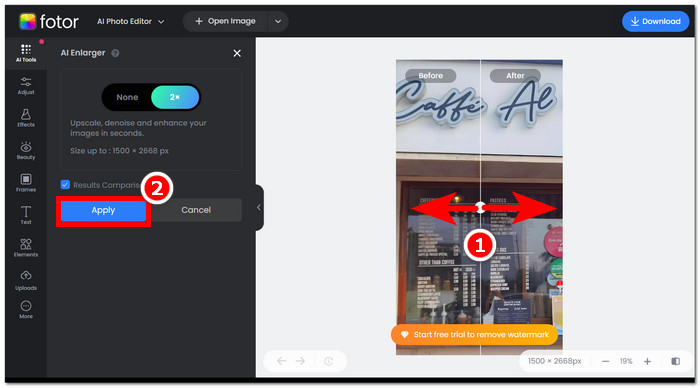
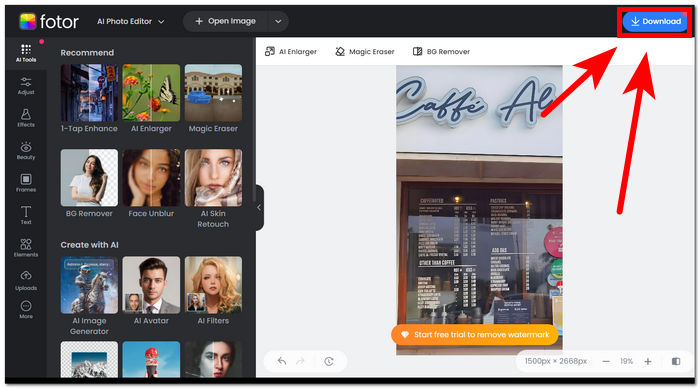
स्टेप 4. अपनी अब एन्हांस्ड इमेज को सेव करते समय, स्क्रीन के दाएँ‑ऊपरी कोने में स्थित Download पर क्लिक करें।,
फ़ोटोर बैकग्राउंड रिमूवर का उपयोग करने के चरण
स्टेप 1. Fotor Background Remover वेबसाइट पर जाएँ और Upload Image फ़ील्ड में वह फ़ोटो अपलोड करें जिसका बैकग्राउंड आप हटाना चाहते हैं।.
स्टेप 2. जैसे ही आपका फ़ोटो सॉफ़्टवेयर में लोड हो जाता है, यह स्वतः ही आपके अपलोड किए गए फ़ोटो का बैकग्राउंड हटा देगा।.
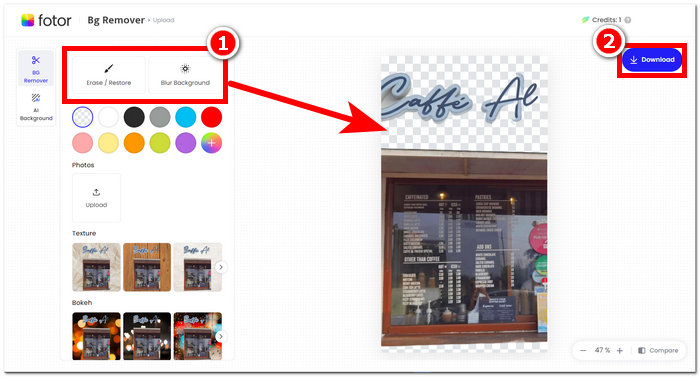
स्टेप 3. आप अपनी पसंद के अनुसार Erase/Restore टूल का प्रयोग कर बैकग्राउंड को मैन्युअली मिटा या वापस ला सकते हैं; यह आपके स्क्रीन के बाएँ‑ऊपरी नैविगेशन में स्थित होता है।.
स्टेप 4. जब आप परिणाम से संतुष्ट हों, तो इसे अपने डेस्कटॉप पर सेव करने के लिए स्क्रीन के दाएँ‑ऊपरी हिस्से में स्थित Download पर क्लिक करें।.
Fotor पर समीक्षा को सारांशित करने के लिए, फोटो संपादन के क्षेत्र में इसकी विशेषताएं काफी शानदार हैं। इसलिए, यह आपको आसानी से अद्भुत प्रोजेक्ट बनाने देगा। फोटो हेरफेर से निपटने के लिए सभी बुनियादी उपकरणों से बना होने के अलावा, फोटो एन्हांसमेंट और बैकग्राउंड रिमूवर पर जोर सहज है, क्योंकि इसके इंटरफ़ेस को नेविगेट करना सुविधाजनक है। हालाँकि, तालिका में लाई गई इसकी सभी सुविधाओं में से, आप फ़ोटर सुविधाओं और कार्यक्षमता का पूरी तरह से आनंद तभी ले सकते हैं जब आप इसकी मासिक योजना की सदस्यता लेते हैं।
भाग 2. बैकग्राउंड और अपस्केल तस्वीरें हटाने के लिए फ़ोटर विकल्प
FVC ने विज़ुअल एडिटिंग उद्योग में क्रिएटर्स की ज़रूरतों को पूरा करने के लिए टूल और सॉफ़्टवेयर विकसित करने की दिशा में विस्तार किया है। उन बनाए गए टूल्स में से दो हैं FVC Free Background Remover और FVC Free Image Upscaler; इन दोनों के अलग‑अलग वेब‑आधारित डोमेन हैं, ताकि उनके उद्देश्य को लेकर उपयोगकर्ता भ्रमित न हों। इसके विपरीत, सॉफ़्टवेयर‑आधारित टूल अलग‑अलग कार्यों के लिए हर टूल को एक ही सॉफ़्टवेयर में रख देते हैं, जिससे सॉफ़्टवेयर से परिचित होने में काफ़ी समय लग सकता है। इसके अतिरिक्त, ये FVC टूल क्रिएटर्स को उनकी सुविधाओं का निःशुल्क और बिना डाउनलोड‑इंस्टॉलेशन की झंझट के इस्तेमाल करने में मदद करते हैं। नीचे FVC बैकग्राउंड रिमूवर और इमेज अपस्केलर टूल्स के उपयोग के लिए चरण दिए गए हैं।.
FVC Free Background Remover का उपयोग करने के चरण:
स्टेप 1. FVC Free Background Remover वेबसाइट पर जाएँ और जिन फ़ोटो के बैकग्राउंड आप हटाना चाहते हैं उन्हें Upload करें।.
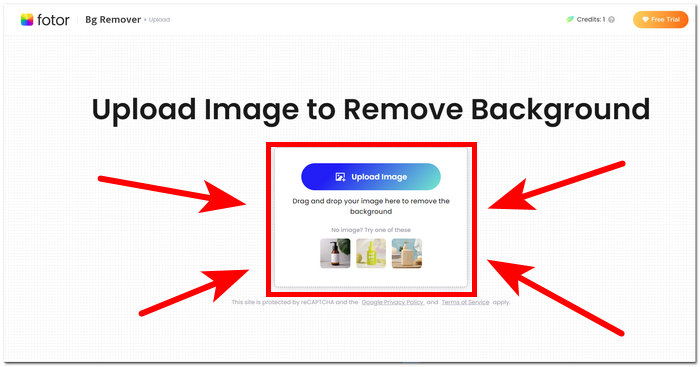
स्टेप 2. FVC AI स्वतः ही आपकी फ़ोटो से बैकग्राउंड को पहचान कर हटा देता है।.
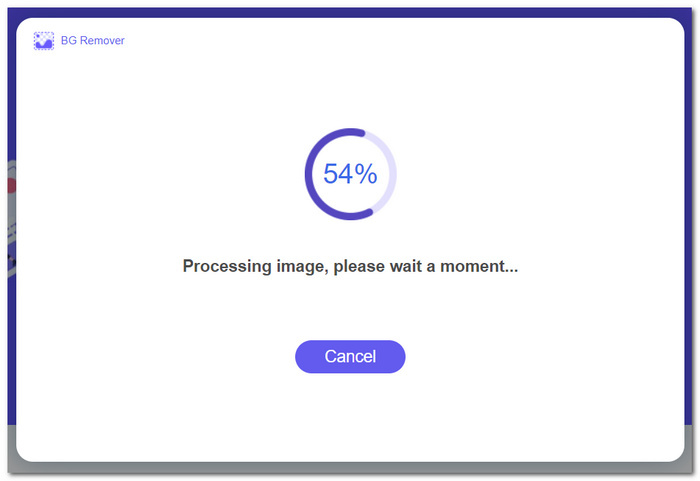
स्टेप 3. प्रक्रिया पूरी हो जाने के बाद, आप अपनी फ़ोटो को अब Download कर सकते हैं।.
FVC Free Image Upscaler के फ़ीचर्स उपयोग करने के चरण:
स्टेप 1. अपनी फ़ोटो को FVC Image Upscaler वेबसाइट पर अपलोड करें।.
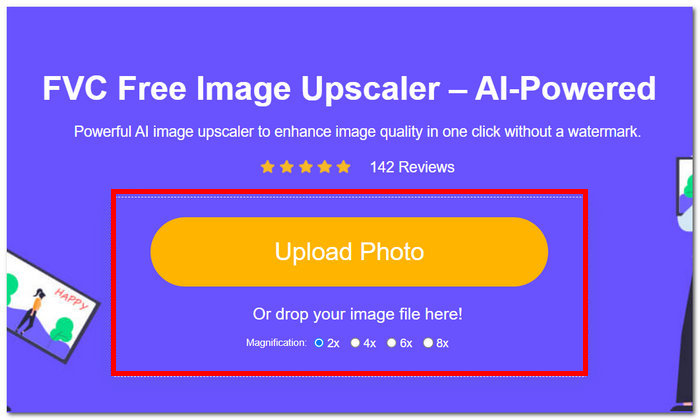
स्टेप 2. अपनी मनचाही Magnification चुनें और उस पर क्लिक करें।.
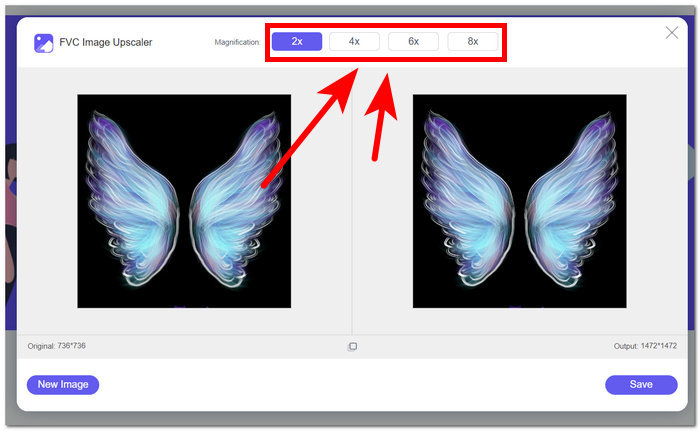
स्टेप 3. टूल स्वतः ही फ़ोटो को प्रोसेस करेगा, और आप चुनी गई मैग्निफिकेशन के आधार पर अंतर देख सकते हैं।.
स्टेप 4. अब आपकी अपस्केल की गई फ़ोटो सेव करने के लिए तैयार है। बस Download पर क्लिक करें।.
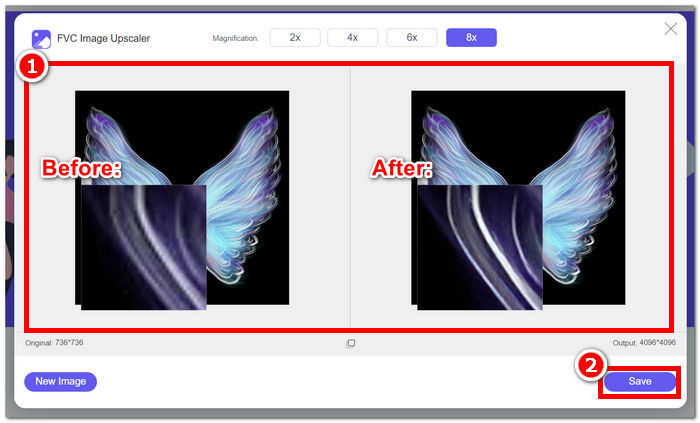
जब पृष्ठभूमि हटाने और छवि अपस्केल को संभालने की बात आती है तो Fotor और FVC उपकरण समान गुणवत्ता और सटीकता परिणाम दे सकते हैं। हालाँकि, जब FVC उपकरण किसी भी स्थानीय ब्राउज़र में उपयोग के लिए मुफ़्त होते हैं, तो उनकी उपलब्धता में अंतर होता है, जबकि Fotor में बुनियादी मुफ़्त सुविधाएँ हो सकती हैं, लेकिन वे सीमित हैं। पहले सुनिश्चित करें कि वे आपके लिए जो कार्यक्षमता और सुविधा लेकर आए हैं, उसकी जांच कर लें और खुद को ऐसे ऑनलाइन टूल का उपयोग करने दें जो तेज, कुशल और सुरक्षित हों। समय बचाने और अपनी लंबित परियोजनाओं को समय पर पूरा करने के लिए FVC आपका समर्थन करता है।
भाग 3. फ़ोटोर के बारे में अक्सर पूछे जाने वाले प्रश्न
क्या फ़ोटोर का उपयोग मुफ़्त है?
हां, Fotor अपने फोटो एडिटिंग प्लेटफॉर्म का एक मुफ्त संस्करण प्रदान करता है, जो उपयोगकर्ताओं को बिना किसी लागत के बुनियादी उपकरणों तक पहुंच प्रदान करता है। यह व्यक्तियों को बिना किसी शुल्क के आवश्यक सुविधाओं का उपयोग करने की अनुमति देता है।
फ़ोटोर की प्रति माह लागत कितनी है?
फ़ोटर विविध मूल्य निर्धारण योजनाएँ प्रदान करता है, जिसमें मासिक और वार्षिक दोनों सदस्यताएँ शामिल होती हैं, जिसमें सम्मिलित सुविधाओं के आधार पर लागत में भिन्नता होती है। नवीनतम और सटीक मूल्य निर्धारण जानकारी देखने के लिए, उपयोगकर्ताओं को उनकी वर्तमान पेशकशों के विवरण के लिए फ़ोटर की आधिकारिक वेबसाइट देखने के लिए प्रोत्साहित किया जाता है।
फ़ोटर का निःशुल्क परीक्षण कितने समय का है?
फ़ोटर अपनी प्रीमियम सुविधाओं के लिए निःशुल्क परीक्षण प्रदान कर सकता है, हालाँकि परीक्षण अवधि परिवर्तन के अधीन है। नि:शुल्क परीक्षण अवधि की नवीनतम जानकारी के लिए, Fotor की आधिकारिक वेबसाइट देखने की सलाह दी जाती है।
फ़ोटोर काम नहीं कर रहा?
यदि आप फ़ोटर के काम न करने की समस्या का सामना कर रहे हैं, तो अपने इंटरनेट कनेक्शन की जाँच करने, अपने ब्राउज़र कैश को साफ़ करने या यदि आप डेस्कटॉप संस्करण का उपयोग कर रहे हैं तो ऐप को अपडेट करने पर विचार करें। यदि समस्याएँ बनी रहती हैं, तो सहायता के लिए फ़ोटोर के ग्राहक सहायता से संपर्क करने की अनुशंसा की जाती है। वे तकनीकी समस्याओं को हल करने में आपका मार्गदर्शन कर सकते हैं या किसी संभावित सिस्टम अपडेट के बारे में जानकारी प्रदान कर सकते हैं।
क्या फ़ोटर एक अच्छा प्रोग्राम है?
हां, फ़ोटोर को फोटो संपादन के लिए एक अच्छा प्रोग्राम माना जाता है, जो शुरुआती और अधिक अनुभवी उपयोगकर्ताओं दोनों के लिए उपयुक्त उपयोगकर्ता-अनुकूल इंटरफ़ेस प्रदान करता है। बैकग्राउंड रिमूवर सहित इसकी विविध विशेषताएं इसे विभिन्न संपादन आवश्यकताओं के लिए बहुमुखी बनाती हैं। हालाँकि, Fotor की उपयुक्तता व्यक्तिगत प्राथमिकताओं और फोटो एन्हांसमेंट के लिए विशिष्ट आवश्यकताओं पर निर्भर करती है।
निष्कर्ष
Fotor एक उल्लेखनीय दावेदार के रूप में सामने आता है, ख़ास तौर पर इसके बैकग्राउंड‑रिमूवल और इमेज‑एन्हांसमेंट फीचर्स की वजह से। यह अपनी विविध विशेषताओं और ऐसे इंटरफ़ेस के कारण, जिसमें लगभग सभी बुनियादी आवश्यक टूल मौजूद हैं, फ़ोटो एडिटिंग के लिए मानक टूल्स में से एक बन चुका है। हालाँकि, उपयोगकर्ताओं की विविध आवश्यकताओं को ध्यान में रखते हुए FVC जैसे विकल्पों की जाँच करना एक व्यापक दृष्टिकोण प्रदान करता है। आप Fotor चुनें या उसके विकल्प, मुख्य बात यह है कि आप अपनी रचनात्मक यात्रा को ऐसे टूल्स से सशक्त बनाएँ जो आपकी सोच और विज़न से मेल खाते हों। अपने बैकग्राउंड रिमूवल और फ़ोटो एन्हांसिंग प्रोजेक्ट्स के लिए सबसे उपयुक्त टूल खोजने के लिए हर टूल को ज़रूर आज़माएँ और उसकी क्षमताओं का पूरा लाभ उठाएँ।.
-
 GIMP का उपयोग करके छवि से पृष्ठभूमि कैसे हटाएं
 GIMP और छवियों से पृष्ठभूमि हटाने की चरण-दर-चरण प्रक्रिया प्रारंभ करें। आज ही GIMP का उपयोग करके पारदर्शी छवियां बनाने के कुशल तरीके खोजें!
-
 इमेज का आकार ऑनलाइन और ऑफलाइन कैसे बढ़ाएं
 गुणवत्ता खोए बिना छवि का आकार बढ़ाने का सबसे आसान तरीका खोजें। अपने चित्रों की इष्टतम गुणवत्ता सुनिश्चित करने के लिए हमारे आकार बदलने वाले टूल और सॉफ़्टवेयर देखें।
-
 फ़ोटोशॉप में किसी छवि का आकार कैसे बदलें: अवश्य जानें मार्गदर्शिका
 फ़ोटोशॉप में किसी छवि का आकार बदलने की चरण-दर-चरण प्रक्रिया जानें। आसानी और गुणवत्ता के साथ अपनी छवियों का आकार कुशलतापूर्वक बदलने के लिए इस गाइड का पालन करें!
