


 वीडियो कनवर्टर अंतिम
 स्क्रीन अभिलेखी
 वीडियो मरम्मत
अपनी रचनात्मकता को उजागर करें: व्यापक ल्यूमिनार नियो समीक्षा
क्या आप इमेज एन्हांसमेंट और बैकग्राउंड हटाने के लिए ऑल‑इन‑वन समाधान की तलाश में हैं? तो आगे मत देखिए, Luminar Neo आपके लिए एक बेहतरीन टूल हो सकता है। इसके आसान‑से‑समझ आने वाले इंटरफ़ेस और शक्तिशाली AI‑आधारित फीचर्स के साथ, यह टूल हर तरह के यूज़र के लिए एक बहुमुखी फोटो एडिटिंग टूल के रूप में अलग नज़र आता है। चाहे आप अपने रंगों की चमक बढ़ाना चाह रहे हों, बैकग्राउंड को बिना किसी रुकावट के बदलना हो, या बस अपने शॉट्स की बारीकियों को और निखारना हो, यह टूल आपकी रचनात्मक ज़रूरतों को पूरा करने के लिए कुशल टूल्स और फीचर्स का एक विस्तृत सेट प्रदान करता है। इस Luminar Neo review में, हम देखेंगे कि यह शक्तिशाली टूल किस तरह आसानी से आपकी फ़ोटोग्राफ़ी को एक नए स्तर पर ले जा सकता है और आपको आपकी इमेजेज़ की पूरी क्षमता खोलने के लिए ज़रूरी जानकारी देता है। आइए साथ मिलकर उन फीचर्स और फ़ंक्शनालिटीज़ में गहराई से जाएँ जो Luminar Neo को इमेज एन्हांसमेंट की दुनिया में एक विशिष्ट विकल्प बनाते हैं।.
भाग 1. ल्यूमिनार नियो समीक्षा
Luminar Neo, Skylum द्वारा विकसित एक नवीन फोटो एडिटिंग सॉफ्टवेयर, उन फ़ोटोग्राफ़रों और विज़ुअल आर्टिस्ट्स के लिए गेम‑चेंजर है जो अपनी इमेजेज़ को बेहतर बनाने के लिए व्यापक टूल्स का सेट चाहते हैं। अपने मूल में, यह टूल जटिल एडिटिंग प्रक्रियाओं को सरल बनाने के लिए उन्नत AI तकनीक का उपयोग करता है, जिससे यह हर कौशल स्तर के यूज़र्स के लिए सुलभ हो जाता है। रचनात्मक एडिटिंग टूल्स और प्रीसेट्स की विस्तृत श्रृंखला प्रदान करने के साथ‑साथ, Luminar Neo को बाकियों से अलग बनाती हैं इसकी बेहतरीन इमेज अपस्केलिंग और बैकग्राउंड रिमूवल क्षमताएँ। इमेज अपस्केलर यह सुनिश्चित करता है कि आपकी फ़ोटोग्राफ़्स बड़े करने पर भी अपनी धार और बारीक विवरण बनाए रखें, जबकि बैकग्राउंड रिमूवर बैकग्राउंड को आसानी से बदलने और परिष्कृत करने के लिए एक सहज समाधान प्रदान करता है।.
मुख्य विशेषताएं
◆ सटीक संवर्द्धन के लिए उन्नत AI का उपयोग करें, जिसमें आकाश और त्वचा के लिए विशेष उपकरण शामिल हैं।
◆ आपकी तस्वीरों में अद्वितीय स्पर्श जोड़ने के लिए विविध उपकरण और प्रीसेट।
◆ सुचारू कार्यप्रवाह के लिए फ़ोटोशॉप जैसे लोकप्रिय संपादन सॉफ़्टवेयर के साथ एकीकरण।
◆ बड़ी फ़ाइलों और जटिल संपादनों को आसानी से संभालने के लिए तेज़ प्रसंस्करण।
◆ संपादन के साथ प्रयोग करते समय अपनी मूल छवि को सुरक्षित रखें।
◆ उपयोगकर्ता के अनुकूल इंटरफेस।
◆ बैकग्राउंड रिमूवर।
पेशेवरों
- अनुकूलनीय कार्यप्रवाह.
- मजबूत एआई क्षमताएं.
- किफायती मूल्य निर्धारण.
- शुरुआती लोगों के लिए आसान.
- स्काईलम उपयोगकर्ताओं के लिए छूट.
- 24/7 ग्राहक सहायता.
विपक्ष
- कुछ कार्यों में सुधार की आवश्यकता है।
- फोटो संपादन के लिए कोई मोबाइल ऐप नहीं।
भाग 2. ल्यूमिनार नियो बनाम ल्यूमिनार एआई
यहां ल्यूमिनार नियो और ल्यूमिनार एआई के बीच तुलना की एक तालिका दी गई है।
| विशेषता | ल्यूमिनार नियो | ल्यूमिनार एआई |
| AI-संचालित संपादन | हाँ | हाँ |
| इंटरफेस | उन्नत और अनुकूलन योग्य | उपयोगकर्ता के अनुकूल और सरलीकृत |
| संपादन उपकरण | उपकरणों और प्रीसेट की व्यापक रेंज | AI-संचालित टेम्पलेट और स्मार्ट टूल |
| एकीकरण | अन्य संपादन सॉफ्टवेयर के साथ सहज एकीकरण | कुशल प्रदर्शन, AI प्रसंस्करण के लिए अनुकूलित |
| लक्षित दर्शक | पेशेवर फोटोग्राफर और उन्नत उपयोगकर्ता | शुरुआती और आकस्मिक फोटोग्राफर |
यह याद रखना महत्वपूर्ण है कि Luminar Neo बनाम Luminar AI के बीच का चुनाव आपकी व्यक्तिगत प्राथमिकताओं और संपादन आवश्यकताओं पर निर्भर करता है। चाहे आप Luminar Neo की उन्नत और अनुकूलन योग्य सुविधाओं की ओर झुकते हैं या Luminar AI की उपयोगकर्ता-अनुकूल सादगी को पसंद करते हैं, दोनों उपकरण फोटो संपादन के क्षेत्र में शक्तिशाली समाधान के रूप में खड़े हैं।
भाग 3. ल्यूमिनार नियो का उपयोग कैसे करें?
यहां बताया गया है कि आप छवियों को बेहतर बनाने के लिए Luminar Neo का उपयोग कैसे कर सकते हैं:
स्टेप 1. Luminar Neo को एक स्टैंडअलोन प्रोग्राम के रूप में खोलें।.
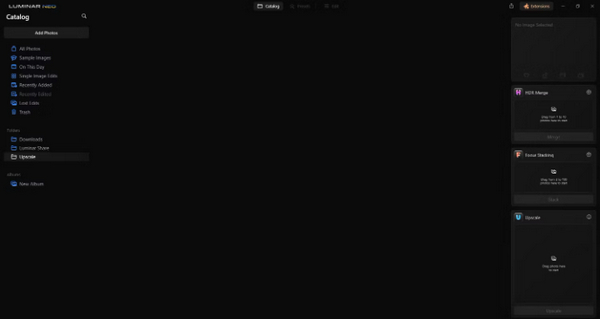
स्टेप 2. Add Photos पर क्लिक करें और फिर Add Image चुनें।.
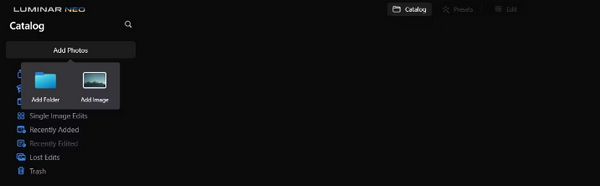
स्टेप 3. अपनी पसंद की फ़ाइल चुनें और Open पर क्लिक करें।.
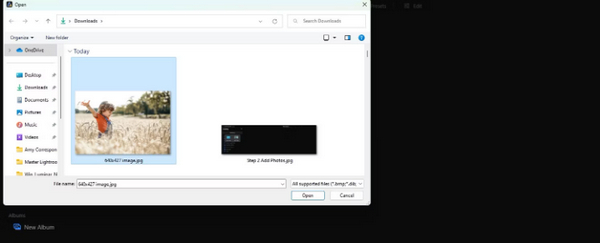
स्टेप 4. अब मेन्यू के शीर्ष पर Catalog पर क्लिक करें।.
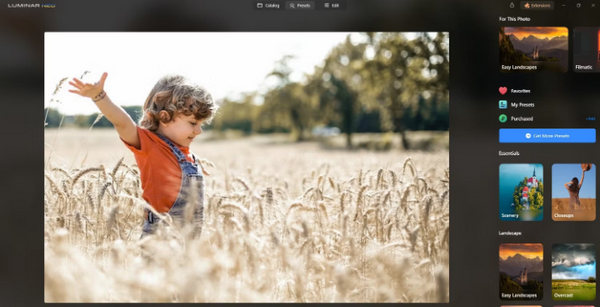
स्टेप 5. इमेज को नीचे की ओर खींचकर सबसे नीचे स्थित Upscale AI बॉक्स में छोड़ें, जिस पर लिखा है Drag photo here to start।.
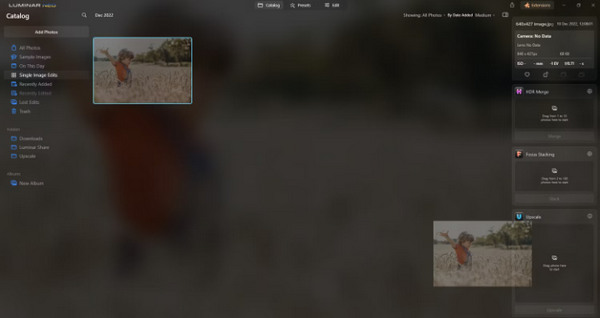
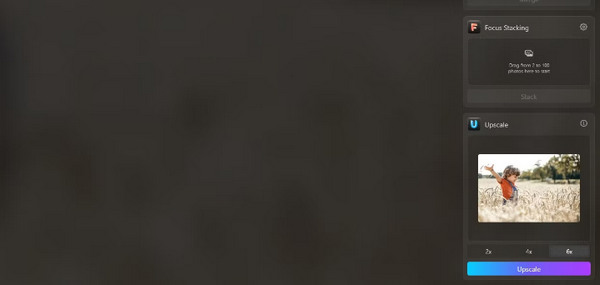
स्टेप 6. प्रक्रिया को पूरा करने के लिए अपने मनचाहे अपस्केलिंग स्तर का चयन करें; उदाहरण के लिए, इस डेमोंस्ट्रेशन में, हमने 6x इज़ाफ़ा चुना।.
स्टेप 7. अंत में, अपनी इमेज पर चुने गए अपस्केलिंग स्तर को लागू करने के लिए Upscale पर क्लिक करें।.
ल्यूमिनार शेयर का उपयोग करके अपनी ताज़ा अपस्केल की गई छवि को अपने कंप्यूटर से अपने फोन पर आसानी से स्थानांतरित करें।
आप Luminar Neo का उपयोग करके छवि की पृष्ठभूमि को इस प्रकार हटा सकते हैं:
स्टेप 1. सबसे पहले उस फोटो को इम्पोर्ट करें जिसे आप एडिट करना चाहते हैं। स्क्रीन के बाएँ ऊपरी कोने पर स्थित Add Photos बटन को खोजें और क्लिक करें। तस्वीर चुनने के बाद Open पर क्लिक करें।.
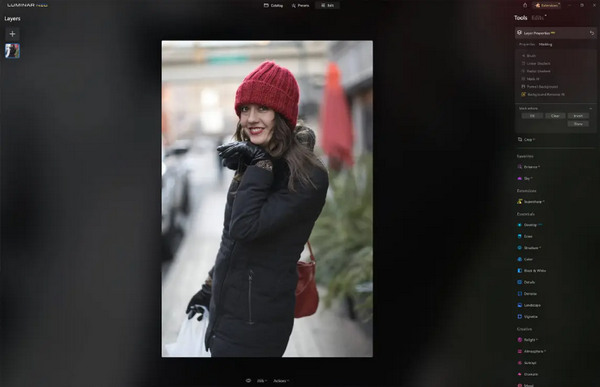
स्टेप 2. यह पहली बार उपयोग करने वाले यूज़र्स के लिए बेहद ज़रूरी है। आपको अपनी स्क्रीन के दाएँ ऊपरी हिस्से में स्थित एक्सटेंशन टैब से Background Removal AI एक्सटेंशन डाउनलोड करना होगा। डाउनलोड हो जाने के बाद, अपनी फोटो पर डबल‑क्लिक करें, Edit पर क्लिक करें और एडिटिंग शुरू करें।.
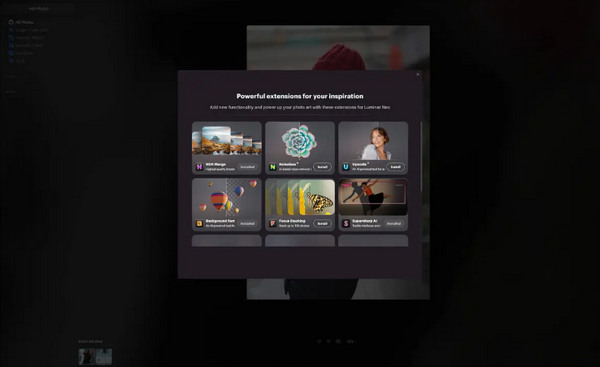
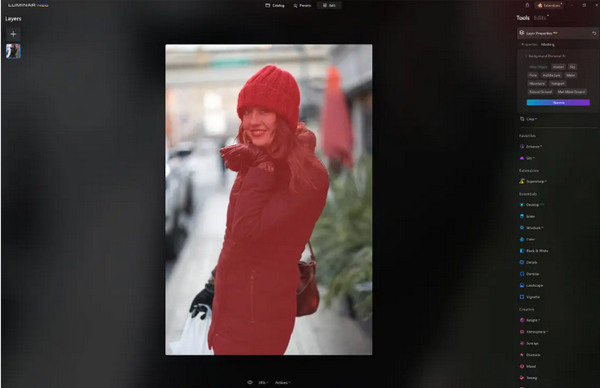
स्टेप 3. अपनी स्क्रीन के दाएँ हिस्से में एडिट बार के भीतर, Layer Properties में जाएँ, फिर Masking पर जाएँ, और Background Removal AI चुनें। इससे आप अपना सब्जेक्ट चुन सकते हैं। जब सब्जेक्ट लाल रंग में हाइलाइट हो जाए, तो बैकग्राउंड को जादुई तरीके से हटाने के लिए Remove दबाएँ। जिन हिस्सों को AI छोड़ सकता है, वहाँ की बारीकियों को सुधारने के लिए refinements brush का उपयोग करें।.
ल्यूमिनार नियो के बारे में एकमात्र बात यह है कि इसके मुफ़्त संस्करण में यह सुविधा नहीं है। फिर भी, यदि आप बजट पर हैं और अपनी तस्वीर को अगले स्तर तक बढ़ाना चाहते हैं, तो यह टूल आपके लिए है।
भाग 4. ल्यूमिनार नियो के 2 सर्वश्रेष्ठ मुफ़्त विकल्प
ल्यूमिनार नियो कुछ लोगों के लिए महंगा हो सकता है और इतना जटिल भी कि इसे आसानी से इस्तेमाल नहीं किया जा सकता, इसलिए यदि आप ल्यूमिनार नियो के लिए वैकल्पिक उपकरणों की तलाश कर रहे हैं, तो यहां कुछ सर्वोत्तम उपकरण दिए गए हैं, जिन्हें आप देख सकते हैं।
एफवीसी ऑनलाइन इमेज अपस्केलर
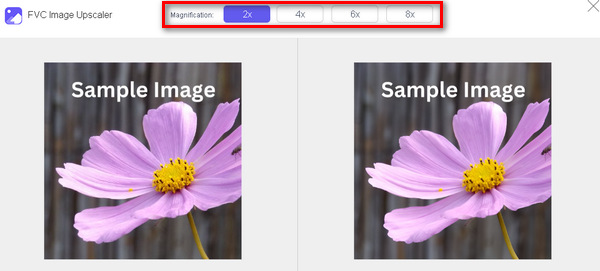
FVC Online Image Upscaler एक मुफ़्त ऑनलाइन इमेज अपस्केलर है। जी हाँ, आपने सही पढ़ा। यह मुफ़्त है, लेकिन इसके सामर्थ्य को कम मत आँकिए। यह टूल AI तकनीक से लैस है, जो एन्हांसमेंट की प्रक्रिया को अपने आप और बेहद सहज तरीके से करता है। साथ ही, आप इमेज को 8x तक बड़ा कर सकते हैं, वह भी बिना क्वालिटी से समझौता किए।.
इस उपकरण का उपयोग आप इस प्रकार कर सकते हैं
स्टेप 1. सबसे पहले उनकी आधिकारिक वेबसाइट पर जाएँ।.
स्टेप 2. Upload Photo पर क्लिक करें और वह इमेज चुनें जिसे आप अपस्केल करना चाहते हैं।.
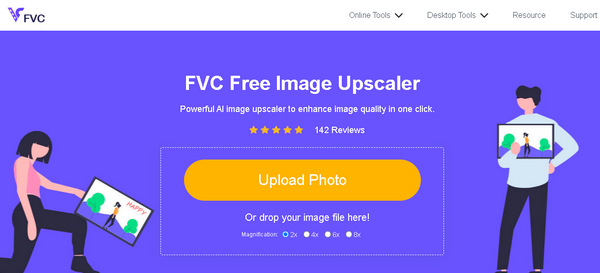
स्टेप 3. इसके बाद, यह टूल आपकी इमेज का प्रीव्यू दिखाएगा। आप इमेज की क्वालिटी जाँचने के लिए Magnifier विकल्प का उपयोग कर सकते हैं।.
स्टेप 4. अपनी इमेज डाउनलोड करने के लिए Save पर क्लिक करें।.
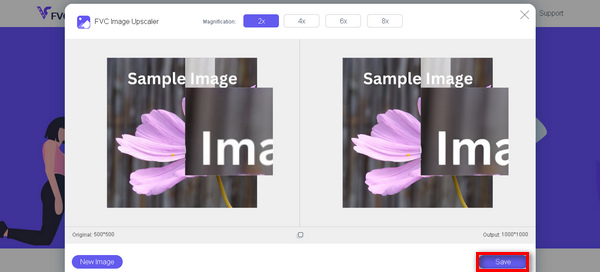
FVC फ्री इमेज अपस्केलर, इमेज को अपस्केल करने के मामले में Luminar Neo का सबसे अच्छा विकल्प है। इसके अलावा, इस टूल की मदद से, उपयोगकर्ता आसानी से अपनी इमेज को बेहतर बना सकते हैं। कोई जटिल इंटरफ़ेस नहीं, आपको अपनी तस्वीरों को बेहतरीन तरीके से बेहतर बनाने के लिए बस कुछ क्लिक की ज़रूरत है।
एफवीसी ऑनलाइन बैकग्राउंड रिमूवर
इसी बीच, आप बैकग्राउंड इमेज हटाने के लिए विकल्प के रूप में FVC Online Background Remover का उपयोग कर सकते हैं। यह टूल बहुउद्देशीय है और इमेज बैकग्राउंड हटाने की प्रक्रिया को ऑटोमेट करने के लिए बनाया गया है। यह PNG, JPG और JPEG जैसे कई लोकप्रिय इमेज फ़ॉर्मैट्स को सपोर्ट करता है। इसके अलावा, आप अपनी इमेज के नतीजे को कस्टमाइज़ भी कर सकते हैं—आप बैकग्राउंड को सॉलिड रंगों से बदल सकते हैं, सब्जेक्ट को फ्लिप कर सकते हैं, उसे इधर‑उधर मूव कर सकते हैं और क्रॉप भी कर सकते हैं।.
इस उपकरण का आसानी से उपयोग करने के चरण इस प्रकार हैं:
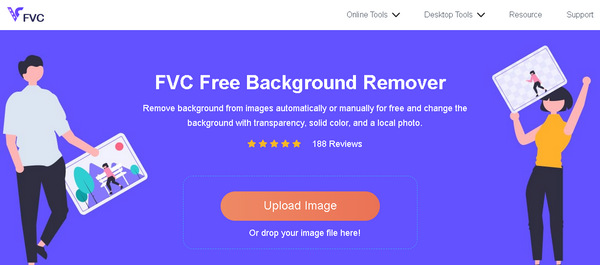
स्टेप 1. सबसे पहले उनकी आधिकारिक वेबसाइट पर जाएँ और Upload Image पर क्लिक करें।.
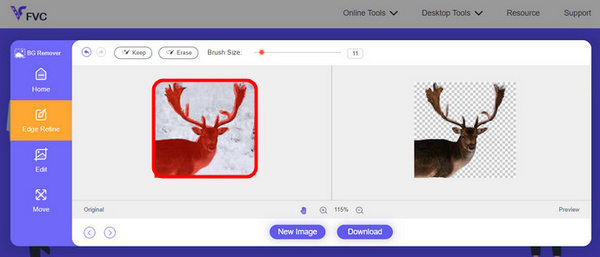
स्टेप 2. रिज़ल्ट आने के बाद, आप किनारों को परिष्कृत करके और सब्जेक्ट को मूव करके इमेज को एडिट कर सकते हैं।.
चरण 3. परिणाम को सेव करने के लिए Download बटन पर क्लिक करें।.
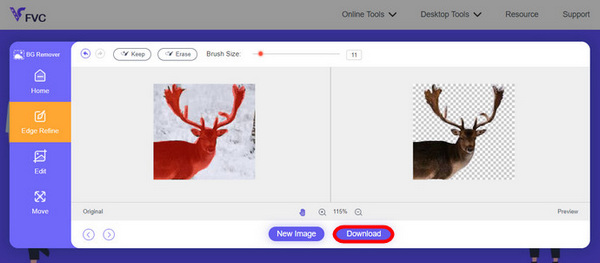
FVC इमेज बैकग्राउंड रिमूवर वास्तव में एक इमेज को काटने के लिए एक बेहतरीन टूल है और Luminar Neo के लिए सबसे अच्छा विकल्प है। और इसके मुफ़्त होने के अलावा, इस टूल को इस्तेमाल करना भी आसान है। कोई झंझट नहीं, बस बेहतरीन नतीजे।
भाग 5. लुमिनार नियो समीक्षा के बारे में अक्सर पूछे जाने वाले प्रश्न
क्या ल्यूमिनार नियो लाइटरूम से बेहतर है?
ल्यूमिनार नियो और लाइटरूम के बीच तुलना अक्सर व्यक्तिगत प्राथमिकताओं और विशिष्ट आवश्यकताओं पर निर्भर करती है। लाइटरूम एडोब के क्रिएटिव क्लाउड के साथ अपने सहज एकीकरण के लिए प्रसिद्ध है, जो इसे पेशेवर फ़ोटोग्राफ़रों के बीच पसंदीदा बनाता है। दूसरी ओर, ल्यूमिनार नियो उन्नत AI सुविधाएँ और एक लचीला वर्कफ़्लो प्रदान करता है। दोनों के बीच चुनाव अंततः उपयोगकर्ता की संपादन शैली और वर्कफ़्लो आवश्यकताओं पर निर्भर करता है।
क्या ल्यूमिनार नियो फोटोशॉप जितना अच्छा है?
ल्यूमिनार नियो और फोटोशॉप फोटो एडिटिंग के क्षेत्र में अलग-अलग उद्देश्यों की पूर्ति करते हैं। फोटोशॉप एक उद्योग मानक है, जो जटिल संपादन और ग्राफिक डिजाइन के लिए उन्नत उपकरणों का एक व्यापक सेट प्रदान करता है। ल्यूमिनार नियो, शक्तिशाली होने के साथ-साथ अपनी AI-संचालित विशेषताओं के साथ फोटोग्राफरों को अधिक लाभ पहुँचाता है। एक की दूसरे पर उपयुक्तता उपयोगकर्ता की विशिष्ट आवश्यकताओं पर निर्भर करती है।
क्या ल्यूमिनार नियो शुरुआती लोगों के लिए अच्छा है?
हां, ल्यूमिनार नियो को उपयोगकर्ता के अनुकूल बनाया गया है, जो इसे शुरुआती लोगों के लिए एक बेहतरीन विकल्प बनाता है। इसका सहज ज्ञान युक्त इंटरफ़ेस, उन्नत AI क्षमताओं के साथ मिलकर, उपयोगकर्ताओं को बिना किसी कठिन अध्ययन के प्रभावशाली परिणाम प्राप्त करने की अनुमति देता है। सॉफ़्टवेयर के प्रीसेट और क्रिएटिव टूल की व्यापक रेंज भी शुरुआती लोगों को आसानी से अपनी तस्वीरों को एक्सप्लोर करने और बेहतर बनाने में सक्षम बनाती है।
क्या ल्यूमिनार नियो एक बार की खरीद या सदस्यता मॉडल है?
ल्यूमिनार नियो एक बार की खरीद मॉडल का पालन करता है। उपयोगकर्ता सॉफ़्टवेयर खरीद सकते हैं और आवर्ती सदस्यता की आवश्यकता के बिना इसकी सुविधाओं तक पहुँच सकते हैं। यह मूल्य निर्धारण संरचना उन उपयोगकर्ताओं के लिए एक सीधा और लागत प्रभावी दृष्टिकोण प्रदान करती है जो अपनी फोटो संपादन आवश्यकताओं के लिए एकमुश्त भुगतान पसंद करते हैं।
निष्कर्ष
संक्षेप में, इस Luminar Neo review ने आपको इस शक्तिशाली लेकिन उपयोग में आसान फोटो एडिटिंग टूल के बारे में उपयोगी जानकारियाँ प्रदान की हैं। AI‑आधारित अपस्केलिंग और बैकग्राउंड रिमूवल जैसे उन्नत फीचर्स के साथ, यह पेशेवरों और शुरुआती दोनों के लिए उपयुक्त है। भले ही सुधार की कुछ गुंजाइश हो, इसकी बहुमुखी प्रतिभा, मज़बूत AI और किफ़ायती कीमत इसे आपकी फ़ोटोग्राफ़ी स्किल्स को निखारने के लिए एक आकर्षक विकल्प बनाती है। चाहे आप अधिक कस्टमाइज़ेशन चाहते हों या सादगी, Luminar Neo आपकी इमेजेज़ को रूपांतरित करने के लिए एक संपूर्ण समाधान प्रदान करता है।.
-
 IPhone, Android, कंप्यूटर, ऑनलाइन पर फोटो में पृष्ठभूमि जोड़ें
 क्या मैं फ़ोटो में सफ़ेद पृष्ठभूमि जोड़ सकता हूँ? ऐसा कैसे करें? कंप्यूटर, iPhone या Android पर ऑनलाइन फ़ोटो में पृष्ठभूमि जोड़ने के 3 तरीके जानें।
-
 कैनवा इमेज एन्हांसर: नया इमेज क्वालिटी बूस्टर? [समीक्षा]
 पता लगाएं कि कैसे कैनव इमेज एनहांसर आपकी तस्वीरों को अगले स्तर पर ले जा सकता है। हमारी विस्तृत समीक्षा देखें जिसमें इस टूल की सभी विशेषताओं, पेशेवरों और विपक्षों को शामिल किया गया है।
-
 वेंस एआई इमेज एन्हांसर: एक गहन समीक्षा [2024]
 एक शक्तिशाली और कुशल छवि बढ़ाने वाला उपकरण खोज रहे हैं? वेंस एआई इमेज एन्हांसर की हमारी गहन समीक्षा पढ़ें और देखें कि यह आपकी तस्वीरों को कैसे बदल सकता है।
