


 वीडियो कनवर्टर अंतिम
 स्क्रीन अभिलेखी
 वीडियो मरम्मत
सर्वश्रेष्ठ ऑनलाइन और ऑफलाइन MOV से 3GP कन्वर्टर कोशिश करने लायक है
3G मोबाइल डिवाइस मूल रूप से MOV फ़ाइलें नहीं चला सकते। इसलिए, यदि आप 3G मोबाइल डिवाइस पर MOV फ़ाइल चलाना चाहते हैं, तो आपको ऐसा टूल चाहिए जो MOV को 3GP में बदल सके। और यदि आप अपने MOV फ़ाइलों को 3GP में बदलने के लिए बेहतरीन कन्वर्टर ढूंढ रहे हैं, तो आप सही रास्ते पर हैं। सौभाग्य से, हमने बेहतरीन और निःशुल्क ऑनलाइन और ऑफ़लाइन MOV से 3GP कन्वर्टर ढूंढ लिए हैं, जिनसे आप आसानी से कन्वर्ट कर सकते हैं।.

भाग 1. 5 अद्भुत कन्वर्टर्स आसानी से MOV को 3GP में कनवर्ट करें।
अपनी MOV फ़ाइल को 3GP में बदलने के लिए सर्वश्रेष्ठ कन्वर्टर्स की तलाश करना आसान नहीं है। इसलिए, हमने सर्वश्रेष्ठ ऑफ़लाइन और ऑनलाइन कन्वर्टर्स की कोशिश की और हमारे द्वारा आजमाए गए कन्वर्टर्स में से पांच सर्वश्रेष्ठ कन्वर्टर्स को चुना। इसलिए जैसे ही हम शामिल होते हैं और MOV को 3GP फ़ाइलों में बदलने के लिए सबसे आसान उपयोग में आसान कन्वर्टर्स को जानते हैं।
FVC वीडियो कन्वर्टर अंतिम
यदि आप ऐसा टूल ढूंढ रहे हैं जो MOV को 3GP में निःशुल्क, ऑफ़लाइन और कई बेहतरीन सुविधाओं के साथ कन्वर्ट कर सके, तो यह टूल आपके लिए सबसे अच्छा हो सकता है। FVC Video Converter Ultimate एक ऑफ़लाइन टूल है जो MOV, 3GP, MP4, AVI, MPG, FLV, MOV, WMV और कई अन्य फ़ाइल फ़ॉर्मैट को कन्वर्ट कर सकता है। इसके अलावा, यह ऑफ़लाइन टूल आपकी फ़ाइल में इफ़ेक्ट जोड़ सकता है, उसे घुमा सकता है और प्रोफ़ेशनल तरीक़े से एन्हांस भी कर सकता है। आप कई MOV फ़ाइलों को एक में मर्ज भी कर सकते हैं, क्योंकि इसमें बैच कन्वर्ज़न की सुविधा मौजूद है। साथ ही, यह टूल Windows और Mac, दोनों पर उपलब्ध है।.
पेशेवरों
- आपको संपादित करने, बढ़ाने, और अपनी फ़ाइलों को संपीड़ित करें.
- यह आपकी फ़ाइलों को बिजली की बोल्ट गति से परिवर्तित कर सकता है।
- इसमें उपयोग में आसान सॉफ्टवेयर इंटरफेस है।
- यह MP4, AVI, MOV, 3GP, FLV, AVI, M4V, और 1000 + अधिक सहित विभिन्न फ़ाइल स्वरूपों का समर्थन करता है।
विपक्ष
- इसकी अनूठी विशेषताओं तक पहुंच के लिए आपको ऐप खरीदना होगा।
एचडी कन्वर्ट
HDConvert एक ऑनलाइन MOV से 3GP कन्वर्टर है, जो बिना किसी सीमा के फ़ाइलें कन्वर्ट कर सकता है। इस कन्वर्टर का उपयोग करके आप अपनी फ़ाइलों को हाई-डेफ़िनिशन गुणवत्ता के साथ कन्वर्ट कर सकते हैं। हालांकि, यह टूल कम गुणवत्ता वाले वीडियो को बेहतर नहीं बना सकता। इसके बावजूद, इस कन्वर्टर का इंटरफ़ेस बहुत सीधा-सादा है, जो शुरुआती उपयोगकर्ताओं के लिए अनुकूल है।.
पेशेवरों
- यह मैक और विंडोज जैसे कुछ सामान्य उपकरणों के साथ संगत है।
- इसमें उपयोग में आसान GUI है।
- इसकी कोई फ़ाइल आकार सीमा नहीं है।
विपक्ष
- यह निम्न-गुणवत्ता वाले वीडियो को नहीं बढ़ा सकता है।
- इसकी रूपांतरण गति आपके इंटरनेट पर निर्भर करती है।
ImToo वीडियो कन्वर्टर
एक और ऑनलाइन टूल जिसे आपको ज़रूर आज़माना चाहिए, वह है ImToo Video Converter। यह ऑनलाइन कन्वर्टर MOV को 3GP, AVI, MPEG, MP4, AVC आदि में बदल सकता है। इसके अलावा, यह स्वतः ही 2D और 3D वीडियो को कन्वर्ट कर सकता है। हालांकि, इस टूल का उपयोग करना पूरी तरह सुरक्षित नहीं माना जाता। फिर भी, यह याद रखें कि इस कन्वर्टर का इस्तेमाल करना या न करना आपका अपना निर्णय है।.
पेशेवरों
- हाई-डेफिनिशन वाली फाइलों को कन्वर्ट कर सकते हैं।
- यह आईपैड, ऐप्पल और ब्लैकबेरी जैसे मानक उपकरणों के साथ संगत है।
- इसमें एक उपयोग में आसान वीडियो एडिटर है।
विपक्ष
- पहुंचना सुरक्षित नहीं है।
3GP कनवर्टर
MOV को 3GP फ़ाइलों में ऑनलाइन बदलने के लिए एक और टूल है 3GP Converter। इस कन्वर्टर का इंटरफ़ेस शुरुआती उपयोगकर्ताओं के लिए अनुकूल है, क्योंकि इसका सॉफ़्टवेयर इंटरफ़ेस बहुत साधारण है। इसका मतलब है कि इस कन्वर्टर का उपयोग करने के लिए आपको तकनीकी कौशल की आवश्यकता नहीं है। फिर भी, यह ऑनलाइन कन्वर्टर केवल 3GP फ़ाइलों को AVI, MPEG, और MOV में ही कन्वर्ट कर सकता है।.
पेशेवरों
- इसका एक सरल यूजर इंटरफेस है।
- आप इसे फ्री में डाउनलोड भी कर सकते हैं।
- आप सीमाओं के बिना फ़ाइलों को परिवर्तित कर सकते हैं।
विपक्ष
- यह केवल कुछ फ़ाइल स्वरूपों को परिवर्तित कर सकता है।
- यदि आपका इंटरनेट कनेक्शन बाधित है तो आपकी फ़ाइल दूषित हो सकती है।
FVC फ्री वीडियो कन्वर्टर ऑनलाइन
सबसे प्रसिद्ध ऑनलाइन कन्वर्टरों में से एक है FVC Free Video Converter Online। यह ऑनलाइन टूल आपको MOV, 3GP, WMV, AVI, MP4, FLV, WebM, MKV और कई अन्य फ़ॉर्मैट सहित अनेक फ़ाइल फ़ॉर्मैट कन्वर्ट करने की सुविधा देता है। और यदि आप अपनी फ़ाइल के वीडियो और ऑडियो बिटरेट को बदलना चाहते हैं, तो इस ऑनलाइन कन्वर्टर में यह सुविधा भी मौजूद है। इसके अलावा, इसे उपयोग करना भी आसान है, इसलिए पहली बार उपयोग करते समय आपको कोई कठिनाई नहीं होगी। तो यदि आप किसी ऑनलाइन कन्वर्टर की तलाश में हैं, तो इस टूल का उपयोग करके देखें।.
पेशेवरों
- इसमें आपकी फ़ाइल की बिटरेट, रिज़ॉल्यूशन और फ़्रेम दर को बदलने की सुविधा है।
- यह कई फ़ाइल स्वरूपों का समर्थन करता है।
- फ़ाइलों को किसी भी अन्य ऑनलाइन टूल की तुलना में तेज़ी से परिवर्तित कर सकते हैं।
विपक्ष
- यह इंटरनेट के बिना फाइलों को परिवर्तित नहीं कर सकता।
भाग 2. मैक पर MOV को 3GP में कैसे बदलें
अब जब आपको पता चल गया है कि कौन‑सा ऑनलाइन या ऑफ़लाइन कन्वर्टर इस्तेमाल करना है, तो हम बताएंगे कि Mac पर FVC Video Converter Ultimate का उपयोग करके अपनी MOV फ़ाइल को 3GP में कैसे कन्वर्ट करें। MOV को 3GP में आसानी से बदलने के लिए नीचे दिए गए सरल चरणों का पालन करें।.
चरण 1. Mac के लिए नीचे दिए गए Download बटन पर क्लिक करके FVC Video Converter Ultimate डाउनलोड करें। इंस्टॉलेशन प्रक्रिया का पालन करें, फिर एप्लिकेशन खोलें।.
फ्री डाउनलोडWindows 7 या बाद के संस्करण के लिएसुरक्षित डाउनलोड
फ्री डाउनलोडMacOS 10.7 या बाद के संस्करण के लिएसुरक्षित डाउनलोड
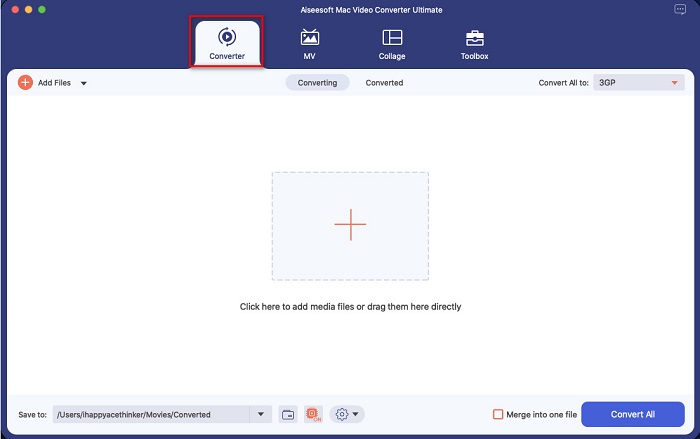
चरण 2. ऐप खोलने के बाद, Converter विकल्प पर क्लिक करें।.
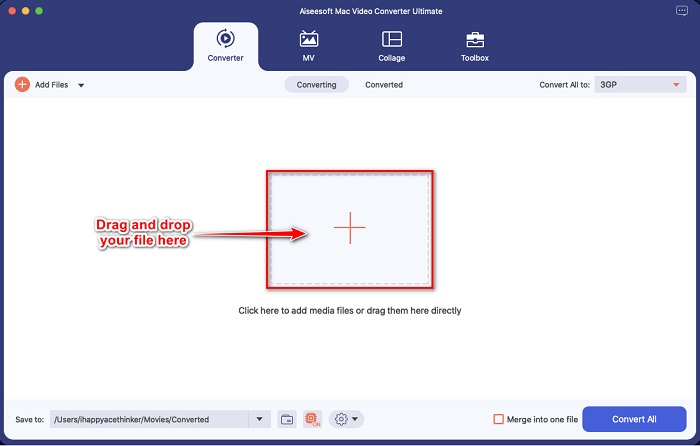
चरण 3. अपनी MOV फ़ाइल अपलोड करने के लिए + साइन बटन पर क्लिक करें या अपने डेस्कटॉप से फ़ाइलों को ड्रैग और ड्रॉप करें।.
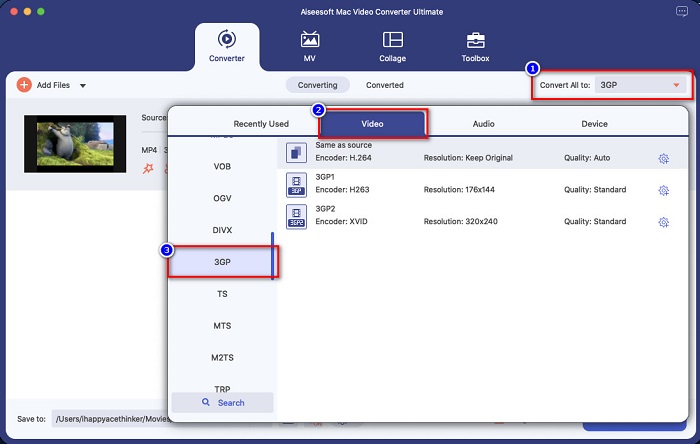
चरण 4. अगले चरण के लिए, वह आउटपुट फ़ाइल फ़ॉर्मैट चुनने के लिए Convert All to बटन पर क्लिक करें, जो आप चाहते हैं। आपके मामले में, 3GP फ़ॉर्मैट पर क्लिक करें।.
चरण 5. अंतिम चरण के लिए, अपनी MOV फ़ाइल को 3GP में कन्वर्ट करना शुरू करने के लिए Convert All बटन पर क्लिक करें।.
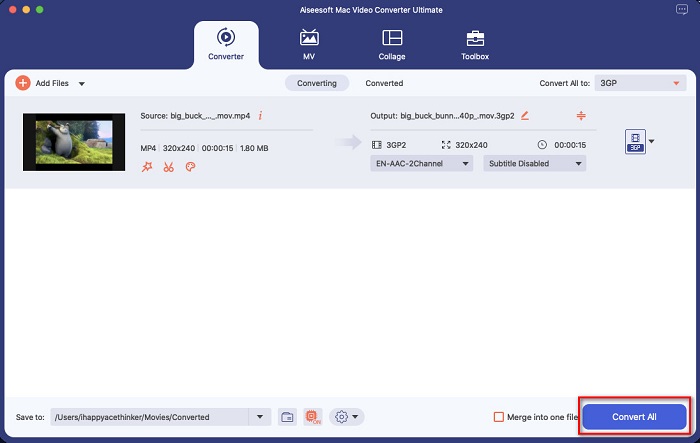
और बस! इन सरल चरणों का पालन करना 1-2-3 जितना आसान है, लेकिन एक अद्भुत आउटपुट उत्पन्न कर सकता है।
भाग 3. सर्वश्रेष्ठ कनवर्टर चुनने में 4 मानक
उपयोग करने के लिए उपयुक्त कनवर्टर चुनना एक महत्वपूर्ण निर्णय है। अपने लिए सबसे अच्छा कनवर्टर चुनने में आपको कुछ बातों पर विचार करना चाहिए। हालाँकि, लेख के इस भाग में, हम उन मानकों को सूचीबद्ध करते हैं जिन पर आपको उपयोग करने के लिए सर्वश्रेष्ठ MOV से 3GP कनवर्टर का चयन करने पर विचार करना चाहिए। आगे की हलचल के बिना, ये चार मानक हैं
उपयोग करने के लिए सुरक्षा
कनवर्टर की तलाश करते समय, सुनिश्चित करें कि आपके द्वारा उपयोग किया जाने वाला कनवर्टर उपयोग करने के लिए सुरक्षित है। यह जानने के लिए कि क्या कनवर्टर उपयोग करने के लिए सुरक्षित है, खोज बॉक्स के किनारे स्थित साइट की जानकारी देखें।
उपलब्धता
कनवर्टर का चयन करते समय सबसे महत्वपूर्ण बातों में से एक इसकी उपलब्धता है। सभी प्लेटफॉर्म पर सभी कन्वर्टर्स उपलब्ध नहीं हैं। इसलिए, एक कनवर्टर चुनें जो लगभग सभी क्रॉस-मीडिया प्लेटफॉर्म पर उपलब्ध हो।
रूपांतरण की गति
सर्वश्रेष्ठ कनवर्टर की सबसे अच्छी विशेषताओं में से एक यह है कि यह अंततः तेजी से परिवर्तित हो सकता है। हम में से कई लोग एक कुशल कनवर्टर चाहते हैं जो फाइलों को तुरंत परिवर्तित कर सके।
समर्थित फ़ाइलें
आपको हमेशा यह सुनिश्चित करना चाहिए कि आपके द्वारा उपयोग किया जाने वाला कनवर्टर उस फ़ाइल स्वरूप का समर्थन करता है जिसे आप कनवर्ट करना चाहते हैं। इसलिए, एक कनवर्टर चुनने में, कई फ़ाइल स्वरूपों का समर्थन करने पर विचार करें।
भाग 4. MOV को 3GP में बदलने के बारे में अक्सर पूछे जाने वाले प्रश्न
क्या MOV को 3GP में बदलने से फ़ाइल का आकार कम हो जाएगा?
हाँ। अपनी MOV फ़ाइल को 3GP फ़ाइल में बदलने से आपकी फ़ाइल का आकार कम होगा।
क्या 3GP एक मानक वीडियो प्रारूप है?
दुर्भाग्यवश नहीं। MP4 सबसे मानक वीडियो प्रारूप है जो आपको मिलेगा। कई मीडिया प्लेयर इस फ़ाइल स्वरूप का समर्थन करते हैं, और यह उच्च रिज़ॉल्यूशन वीडियो का समर्थन कर सकता है।
क्या आप 4G डिवाइस पर 3GP चला सकते हैं?
नहीं। 3GP फ़ाइलें केवल 3G डिवाइस के लिए बनाई गई हैं। लेकिन यदि आप 4G डिवाइस पर 3GP फ़ाइल चलाना चाहते हैं, तो आप अपनी 3GP फ़ाइल को FLV में कन्वर्ट कर सकते हैं, जिसे 4G डिवाइस चला सकते हैं। 3GP को FLV में कन्वर्ट करने के बारे में जानने के लिए इस लिंक पर क्लिक करें।.
निष्कर्ष
हमारी यात्रा को समाप्त करने के लिए, आपको सबसे अच्छा MOV से 3GP कन्वर्टर्स चुनना होगा जिनका आप उपयोग करेंगे। ऊपर प्रस्तुत सभी मानक और कन्वर्टर्स आपको अंतिम कनवर्टर चुनने में मदद करेंगे। हालाँकि, यदि आप एक ऐसे कनवर्टर की तलाश कर रहे हैं जिसमें उन्नत सुविधाएँ हों, तो FVC वीडियो कन्वर्टर अल्टीमेट आपके लिए उपकरण है। इसे अभी डाउनलोड करें, और अपनी फ़ाइलों को आसानी से परिवर्तित करने का आनंद लें।
-
 MOV से GIF - मैक, पीसी और ऑनलाइन फ्री पर MOV को एनिमेटेड GIF में कैसे बदलें
 जीआईएफ क्या है? वीडियो को जीआईएफ में कैसे बदलें? MOV को एनिमेटेड GIF में ऑनलाइन कैसे बदलें? यह पोस्ट मैक/पीसी पर MOV को ऑनलाइन GIF में बदलने के 3 तरीके बताती है।
-
 पीसी और मैक पर MOV को AVI में बदलने के 4 प्रभावी तरीके [2021]
 क्या आप जानना चाहते हैं कि वेब पर AVI कनवर्टर के लिए बेहतरीन MOV क्या है? और FVC अल्टीमेट वीडियो कन्वर्टर आपके लिए एक क्यों हो सकता है।
-
 इन अद्भुत कन्वर्टर्स का उपयोग करके आसानी से MOV को WMV में बदलें
 अपनी MOV फ़ाइल को WMV फ़ाइल में बदलना चाहते हैं? इन ऑनलाइन और ऑफलाइन कन्वर्टर्स का उपयोग करके MOV को WMV में आसानी से बदलने के सरल तरीके यहां दिए गए हैं जिनका हम उपयोग करने की सलाह देते हैं।
